ECO mode LINCOLN MKC 2019 Repair Manual
[x] Cancel search | Manufacturer: LINCOLN, Model Year: 2019, Model line: MKC, Model: LINCOLN MKC 2019Pages: 581, PDF Size: 5.41 MB
Page 370 of 581
CD and CD Player Information
Note:CD units play commercially pressed4.7 in (12 cm) audio compact discs only. Dueto technical incompatibility, certainrecordable and re-recordable compact discsmay not function correctly when used in thevehicle’s CD player.
Note: Do not insert CDs with homemadepaper (adhesive) labels into the CD playeras the label may peel and cause the CD tobecome jammed. You should use apermanent felt tip marker rather thanadhesive labels on your homemade CDs. Ballpoint pens may damage CDs. Ask anauthorized dealer for more information.
Note:Do not use any irregularly shapeddiscs or discs with a scratch protection filmattached.
Always handle discs by their edges only. Clean the disc with an approved CD cleaneronly. Wipe it from the center of the disctoward the edge. Do not clean in a circularmotion.
Do not expose discs to direct sunlight or heatsources for extended periods.
MP3 and WMA Track and FolderStructure
Audio systems capable of recognizing andplaying MP3 and WMA individual tracks andfolder structures work as follows:
•There are two different modes for MP3and WMA disc playback: MP3 and WMAtrack mode (system default) and MP3 andWMA folder mode.
•MP3 and WMA track mode ignores anyfolder structure on the MP3 and WMAdisc. The player numbers each MP3 andWMA track on the disc (noted by the MP3or WMA file extension) from T001 to amaximum of T255. The maximum numberof playable MP3 and WMA files may beless depending on the structure of theCD and exact model of radio present.
•MP3 and WMA folder mode representsa folder structure consisting of one levelof folders. The CD player numbers allMP3 and WMA tracks on the disc (notedby the MP3 or WMA file extension) andall folders containing MP3 and WMA files,from F001 (folder) T001 (track) to F253T255.
•Creating discs with only one level offolders helps with navigation through thedisc files.
If you are burning your own MP3 and WMAdiscs, it is important to understand how thesystem reads the structures you create. Whilevarious files may be present (files withextensions other than MP3 and WMA), onlyfiles with the MP3 and WMA extension areplayed; other files are ignored by the system.This enables you to use the same MP3 andWMA disc for a variety of tasks on your workcomputer, home computer and yourin-vehicle system.
367
MKC (TME) Canada/United States of America, enUSA, Edition date: 201802, Second-Printing
Audio System
Page 371 of 581
In track mode, the system displays and playsthe structure as if it were only one level deep(all MP3 and WMA files play, regardless ofbeing in a specific folder). In folder mode,the system only plays the MP3 and WMA filesin the current folder.
AUDIO UNIT
WARNING: Driving while distractedcan result in loss of vehicle control, crashand injury. We strongly recommend that youuse extreme caution when using any devicethat may take your focus off the road. Yourprimary responsibility is the safe operationof your vehicle. We recommend against the
use of any hand-held device while drivingand encourage the use of voice-operatedsystems when possible. Make sure you areaware of all applicable local laws that mayaffect the use of electronic devices whiledriving.
Note:The touchscreen system controls mostof the audio features.
Note:Some features, such as satellite radio,may not be available in your location. Checkwith an authorized dealer.
368
MKC (TME) Canada/United States of America, enUSA, Edition date: 201802, Second-Printing
Audio System
Page 373 of 581
Tune
In radio mode, turn to search through theradio frequency band. In satellite radio mode,turn to find the previous or next availablesatellite radio station.
Seek, Fast Forward and Reverse
In radio mode, select a frequency band andpress either button. The system stops at thefirst station it finds in that direction. In CDmode, press to select the next or previoustrack. Press and hold to move quicklyforward or backward through the currenttrack. In satellite radio mode, press to selectthe next or previous satellite radio station. Ifyou select a specific category (such as jazz,rock or news), press to find the next orprevious station in the category you select.
Volume and Power
Turn to adjust the volume. Press to switchthe system on and off.
DIGITAL RADIO (If Equipped)
Note:HD Radio broadcasts are not availablein all markets.
HD Radio technology is the digital evolutionof analog AM/FM radio. Your system has aspecial receiver that allows it to receivedigital broadcasts (where available) inaddition to the analog broadcasts, it alreadyreceives. Digital broadcasts provide a bettersound quality than analog broadcasts withfree, crystal-clear audio and no static ordistortion. For more information, and a guideto available stations and programming,please visit www.hdradio.com.
When HD Radio is on and you tune to astation broadcasting HD Radio technology,you may notice the HD Radio logo on yourscreen. When this logo is available, you mayalso see Title and Artist fields on-screen.
The multicast indicator appears in FM mode(only) if the current station is broadcastingmultiple digital broadcasts. The highlightednumbers signify available digital channelswhere new or different content is available.HD1 signifies the main programming statusand is available in analog and digitalbroadcasts. Other multicast stations (HD2through HD7) are only available digitally.
When HD Radio broadcasts are active, youcan access the following functions:
•Memory presets allow you to save anactive channel as a memory preset.Touch and hold a memory preset slotuntil the sound returns. There is a briefmute while the radio saves the station.Sound returns when finished. Whenswitching to an HD2 or HD3 memorypreset, the sound mutes before thedigital audio plays, because the systemhas to reacquire the digital signal.
Note:As with any saved radio station, youcannot access the saved station if yourvehicle is outside the station’s receptionarea.
370
MKC (TME) Canada/United States of America, enUSA, Edition date: 201802, Second-Printing
Audio System
Page 377 of 581
SiriusXM Satellite Radio Service
Note:SiriusXM reserves the unrestrictedright to change, rearrange, add or deleteprogramming including canceling, movingor adding particular channels, and its prices,at any time, with or without notice to you.Ford Motor Company shall not beresponsible for any such programmingchanges.
SiriusXM satellite radio is asubscription-based satellite radio service thatbroadcasts a variety of music, sports, news,weather, traffic and entertainmentprogramming. Your factory-installed SiriusXMsatellite radio system includes hardware anda limited subscription term, which begins onthe date of sale or lease of your vehicle. Seean authorized dealer for availability.
For more information on extendedsubscription terms (a service fee is required),the online media player and a complete listof SiriusXM satellite radio channels, andother features, please visit www.siriusxm.comin the United States, www.siriusxm.ca inCanada, or call SiriusXM at 1-888-539-7474.
Satellite Radio Electronic SerialNumber (ESN)
You need your ESN to activate, modify ortrack your satellite radio account. When insatellite radio mode, tune to channel 0.
374
MKC (TME) Canada/United States of America, enUSA, Edition date: 201802, Second-Printing
Audio SystemE208625
Page 387 of 581
Accessing and Adjusting ModesThrough Your Vehicle InformationDisplay (If Equipped)
Depending on your vehicle and selected
options you may be able to control some ofthe SYNC 3 features on your informationdisplay. The features are visible in the centerof the display (A).
384
MKC (TME) Canada/United States of America, enUSA, Edition date: 201802, Second-Printing
SYNC™ 3
Page 389 of 581
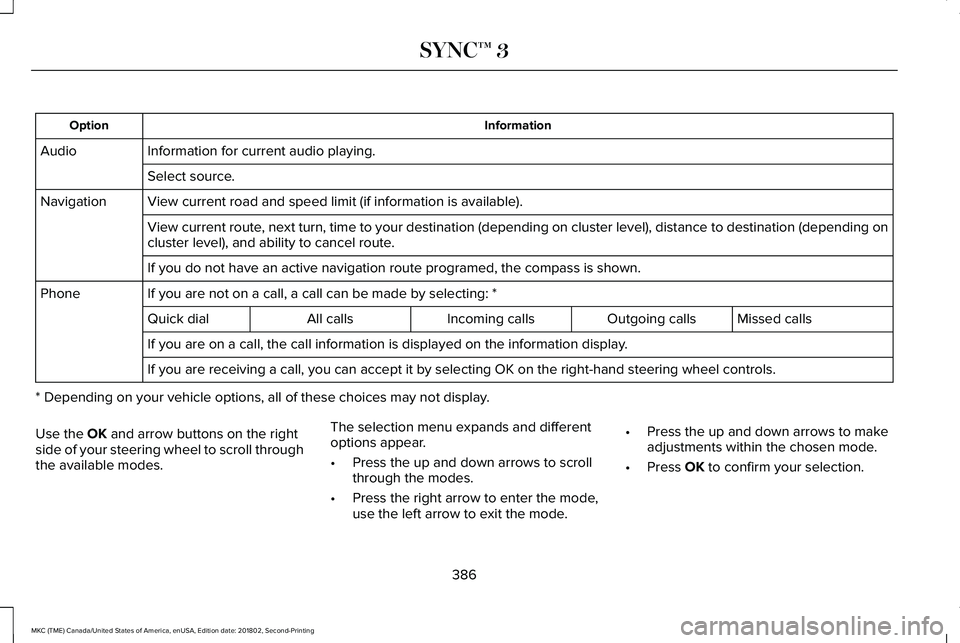
InformationOption
Information for current audio playing.Audio
Select source.
View current road and speed limit (if information is available).Navigation
View current route, next turn, time to your destination (depending on cluster level), distance to destination (depending oncluster level), and ability to cancel route.
If you do not have an active navigation route programed, the compass is shown.
If you are not on a call, a call can be made by selecting: *Phone
Missed callsOutgoing callsIncoming callsAll callsQuick dial
If you are on a call, the call information is displayed on the information display.
If you are receiving a call, you can accept it by selecting OK on the right-hand steering wheel controls.
* Depending on your vehicle options, all of these choices may not display.
Use the OK and arrow buttons on the rightside of your steering wheel to scroll throughthe available modes.
The selection menu expands and differentoptions appear.
•Press the up and down arrows to scrollthrough the modes.
•Press the right arrow to enter the mode,use the left arrow to exit the mode.
•Press the up and down arrows to makeadjustments within the chosen mode.
•Press OK to confirm your selection.
386
MKC (TME) Canada/United States of America, enUSA, Edition date: 201802, Second-Printing
SYNC™ 3
Page 390 of 581
Note:If your vehicle is not equipped withnavigation, compass appears in the displayinstead of navigation. If you press the rightarrow to go into the compass menu, you cansee the compass graphic. The compassdisplays the direction in which the vehicle istraveling, not true direction (for example, ifthe vehicle is traveling west, the middle ofthe compass graphic displays west; northdisplays to the left of west though its truedirection is to the right of west).
Using the Steering Wheel Controls
Depending on your vehicle and optionpackage, you can use different controls onyour steering wheel to interact with thetouchscreen system in different ways.
VOL: Control the volume of audio output.
Mute: Mute the audio output.
Voice: Press to start a voice session. Pressagain to stop the voice prompt andimmediately begin speaking. Press and holdto end a voice session.
SEEK NEXT:
•While in radio mode, press to seekbetween memory presets.
•While in USB, Bluetooth Audio or CDmode, press to seek between songs orpress and hold to fast seek.
SEEK PREVIOUS:
•While in radio mode, press to seekbetween memory presets.
•While in USB, Bluetooth Audio or CDmode, press to seek between songs orpress and hold to fast seek.
PHONE ACCEPT: Press to answer a call orswitch between calls.
PHONE REJECT: Press to end a call or rejectan incoming call.
Note:On some models, SEEK NEXT may becombined with PHONE REJECT and SEEKPREVIOUS may be combined with PHONEACCEPT.
M: Touch the control repeatedly to switchbetween media sources (modes).
See Steering Wheel (page 80).
Using Your Bezel Controls
Depending on your vehicle and optionpackage, you may also have these controlson your instrument panel:
•Power: Switch the audio system on andoff.
•VOL: Control the volume of playingaudio.
•Seek and Tune: Use as you normallywould in audio modes.
•Eject: Eject a CD from the audio system.
•SOURCE or MEDIA: Press repeatedly toadvance through available media modes.
•SOUND: Press to access the Soundmenu where you can adjust sound andother audio settings.
•1-6: Press and hold to store or press toselect an AM, FM or SIRIUS memorypreset. See Audio System (page 366).
387
MKC (TME) Canada/United States of America, enUSA, Edition date: 201802, Second-Printing
SYNC™ 3
Page 394 of 581
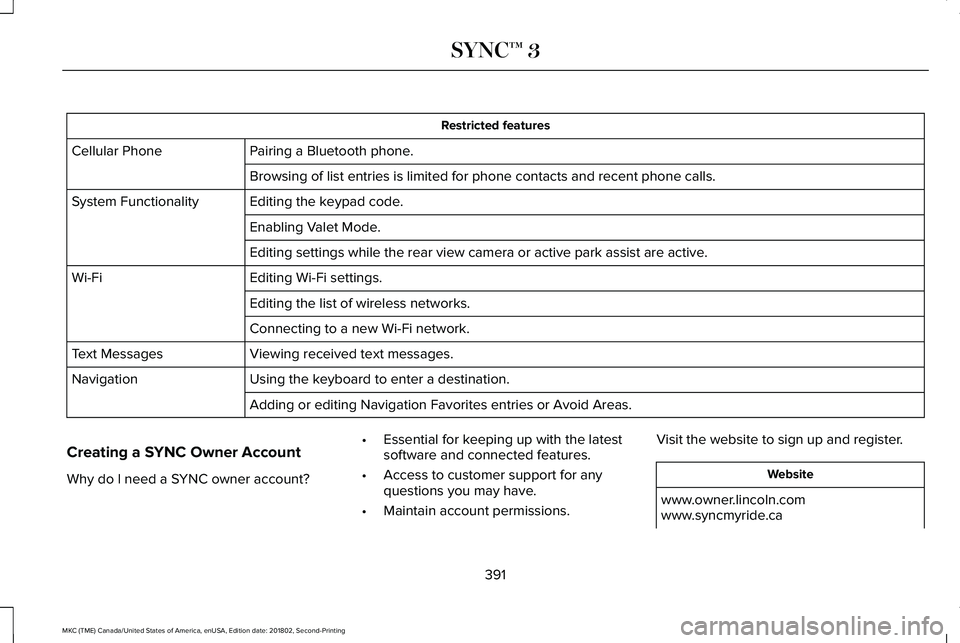
Restricted features
Pairing a Bluetooth phone.Cellular Phone
Browsing of list entries is limited for phone contacts and recent phone calls.
Editing the keypad code.System Functionality
Enabling Valet Mode.
Editing settings while the rear view camera or active park assist are active.
Editing Wi-Fi settings.Wi-Fi
Editing the list of wireless networks.
Connecting to a new Wi-Fi network.
Viewing received text messages.Text Messages
Using the keyboard to enter a destination.Navigation
Adding or editing Navigation Favorites entries or Avoid Areas.
Creating a SYNC Owner Account
Why do I need a SYNC owner account?
•Essential for keeping up with the latestsoftware and connected features.
•Access to customer support for anyquestions you may have.
•Maintain account permissions.
Visit the website to sign up and register.
Website
www.owner.lincoln.comwww.syncmyride.ca
391
MKC (TME) Canada/United States of America, enUSA, Edition date: 201802, Second-Printing
SYNC™ 3
Page 408 of 581
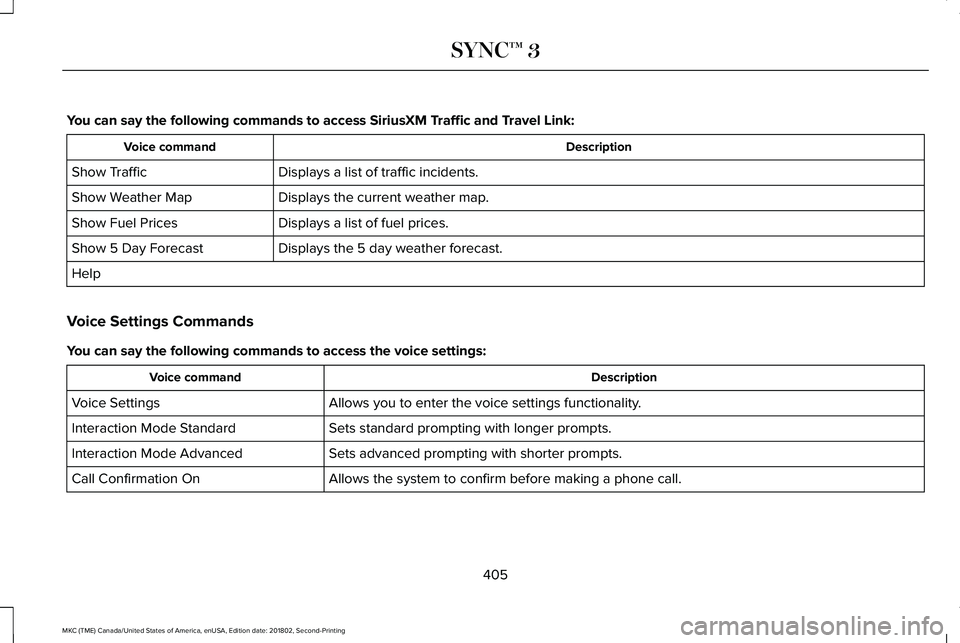
You can say the following commands to access SiriusXM Traffic and Travel Link:
DescriptionVoice command
Displays a list of traffic incidents.Show Traffic
Displays the current weather map.Show Weather Map
Displays a list of fuel prices.Show Fuel Prices
Displays the 5 day weather forecast.Show 5 Day Forecast
Help
Voice Settings Commands
You can say the following commands to access the voice settings:
DescriptionVoice command
Allows you to enter the voice settings functionality.Voice Settings
Sets standard prompting with longer prompts.Interaction Mode Standard
Sets advanced prompting with shorter prompts.Interaction Mode Advanced
Allows the system to confirm before making a phone call.Call Confirmation On
405
MKC (TME) Canada/United States of America, enUSA, Edition date: 201802, Second-Printing
SYNC™ 3
Page 414 of 581
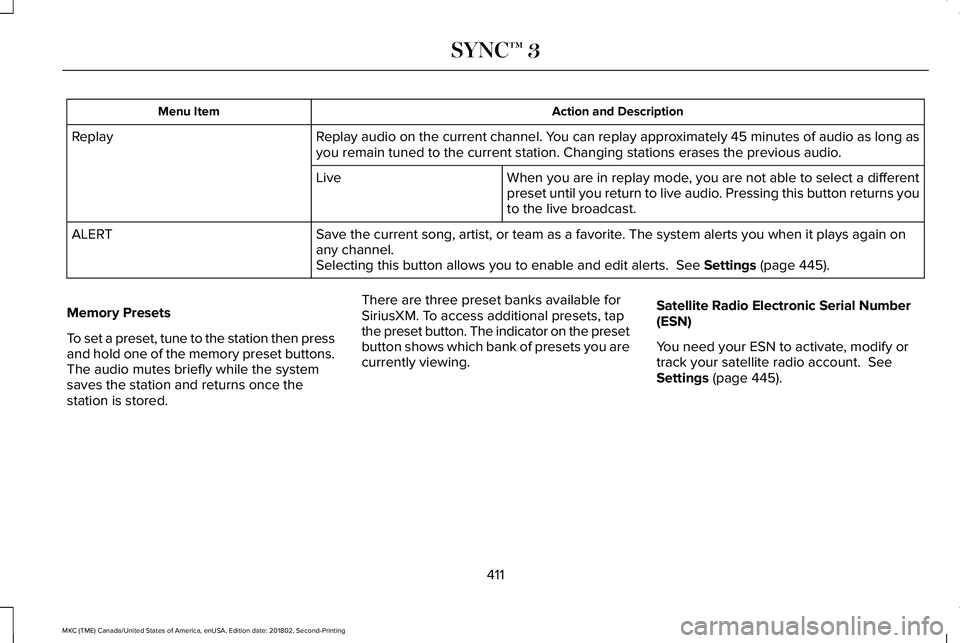
Action and DescriptionMenu Item
Replay audio on the current channel. You can replay approximately 45 minutes of audio as long asyou remain tuned to the current station. Changing stations erases the previous audio.Replay
When you are in replay mode, you are not able to select a differentpreset until you return to live audio. Pressing this button returns youto the live broadcast.
Live
Save the current song, artist, or team as a favorite. The system alerts you when it plays again onany channel.ALERT
Selecting this button allows you to enable and edit alerts. See Settings (page 445).
Memory Presets
To set a preset, tune to the station then pressand hold one of the memory preset buttons.The audio mutes briefly while the systemsaves the station and returns once thestation is stored.
There are three preset banks available forSiriusXM. To access additional presets, tapthe preset button. The indicator on the presetbutton shows which bank of presets you arecurrently viewing.
Satellite Radio Electronic Serial Number(ESN)
You need your ESN to activate, modify ortrack your satellite radio account. SeeSettings (page 445).
411
MKC (TME) Canada/United States of America, enUSA, Edition date: 201802, Second-Printing
SYNC™ 3