battery LINCOLN MKC 2019 User Guide
[x] Cancel search | Manufacturer: LINCOLN, Model Year: 2019, Model line: MKC, Model: LINCOLN MKC 2019Pages: 581, PDF Size: 5.41 MB
Page 76 of 581
POWER LIFTGATE
WARNING: It is extremely dangerousto ride in a cargo area, inside or outside ofa vehicle. In a crash, people riding in theseareas are more likely to be seriously injuredor killed. Do not allow people to ride in anyarea of your vehicle that is not equipped withseats and seatbelts. Make sure everyone inyour vehicle is in a seat and properly usinga seatbelt. Failure to follow this warningcould result in serious personal injury ordeath.
WARNING: Make sure that you fullyclose the liftgate to prevent exhaust fumesfrom entering your vehicle. If you are unableto fully close the liftgate, open the air ventsor the windows to allow fresh air to enteryour vehicle. Failure to follow this instructioncould result in personal injury or death.
WARNING: Keep keys out of reach ofchildren. Do not allow children to operate orplay near an open or moving power liftgate.You should supervise the operation of thepower liftgate at all times.
Note: Make sure that you close the liftgatebefore operating or moving your vehicle,especially in an enclosure, like a garage ora parking structure. This could damage theliftgate and its components.
Note: Do not hang anything, for example abike rack, from the glass or liftgate. Thiscould damage the liftgate and itscomponents.
The liftgate only operates with thetransmission in park (P).
Three warning tones sound as the liftgatebegins to power close. One short chimeindicates a problem with the open or closerequest, caused by:
•The ignition is on and the transmissionis not in park (P).
•The battery voltage is below theminimum operating voltage.
•The vehicle speed is at or above 3 mph(5 km/h).
If the liftgate starts to close after it has fullyopened, this indicates there may beexcessive weight on the liftgate or a possiblestrut failure. A repetitive chime sounds andthe liftgate closes under control. Remove anyexcessive weight from the liftgate. If theliftgate continues to close after opening,have the system checked by an authorizeddealer.
Opening and Closing the Liftgate
WARNING: Make sure all persons areclear of the power liftgate area before usingthe power liftgate control.
73
MKC (TME) Canada/United States of America, enUSA, Edition date: 201802, Second-Printing
Liftgate
Page 78 of 581
Note:Allow the power system to open theliftgate. Manually pushing or pulling theliftgate may activate the system’s obstacledetection feature and stop the poweroperation or reverse its direction. Manuallyinterfering with the liftgate motion may alsoreplicate a strut failure.
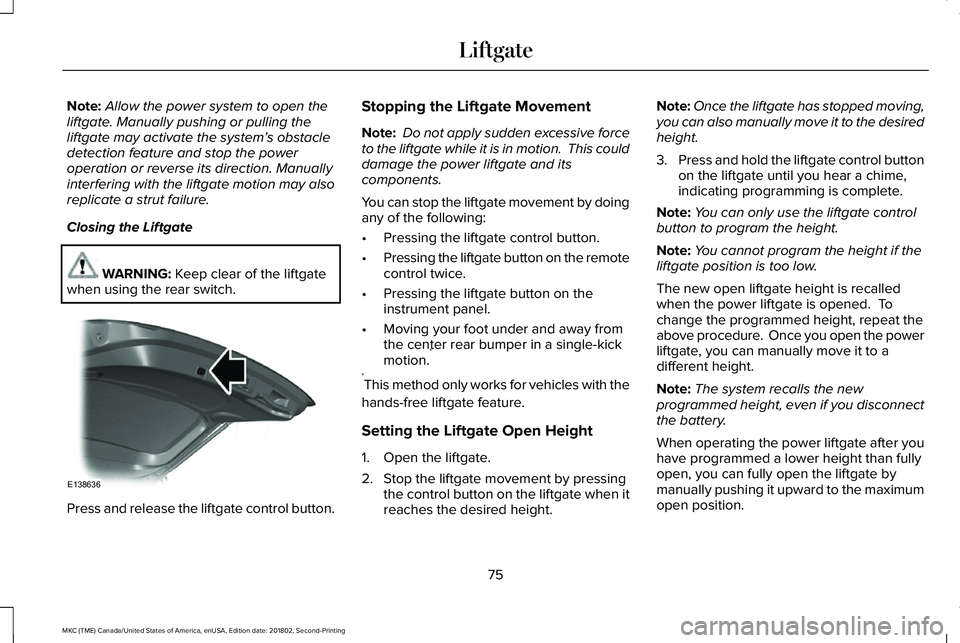
Closing the Liftgate
WARNING: Keep clear of the liftgatewhen using the rear switch.
Press and release the liftgate control button.
Stopping the Liftgate Movement
Note: Do not apply sudden excessive forceto the liftgate while it is in motion. This coulddamage the power liftgate and itscomponents.
You can stop the liftgate movement by doingany of the following:
•Pressing the liftgate control button.
•Pressing the liftgate button on the remotecontrol twice.
•Pressing the liftgate button on theinstrument panel.
•Moving your foot under and away fromthe center rear bumper in a single-kickmotion.*
*This method only works for vehicles with the
hands-free liftgate feature.
Setting the Liftgate Open Height
1. Open the liftgate.
2. Stop the liftgate movement by pressingthe control button on the liftgate when itreaches the desired height.
Note:Once the liftgate has stopped moving,you can also manually move it to the desiredheight.
3.Press and hold the liftgate control buttonon the liftgate until you hear a chime,indicating programming is complete.
Note:You can only use the liftgate controlbutton to program the height.
Note:You cannot program the height if theliftgate position is too low.
The new open liftgate height is recalledwhen the power liftgate is opened. Tochange the programmed height, repeat theabove procedure. Once you open the powerliftgate, you can manually move it to adifferent height.
Note:The system recalls the newprogrammed height, even if you disconnectthe battery.
When operating the power liftgate after youhave programmed a lower height than fullyopen, you can fully open the liftgate bymanually pushing it upward to the maximumopen position.
75
MKC (TME) Canada/United States of America, enUSA, Edition date: 201802, Second-Printing
LiftgateE138636
Page 93 of 581
Windshield Wiper Activated Headlamps
When you switch the autolamps on, theheadlamps turn on within 10 seconds ofswitching the wipers on. They turn offapproximately 60 seconds after you switchthe windshield wipers off.
The headlamps do not turn on with thewipers:
•During a single wipe.
•When using the windshield washers.
•If the wipers are in intermittent mode.
Note:If you switch the autolamps and theautowipers on, the headlamps turn on whenthe windshield wipers continuously operate.
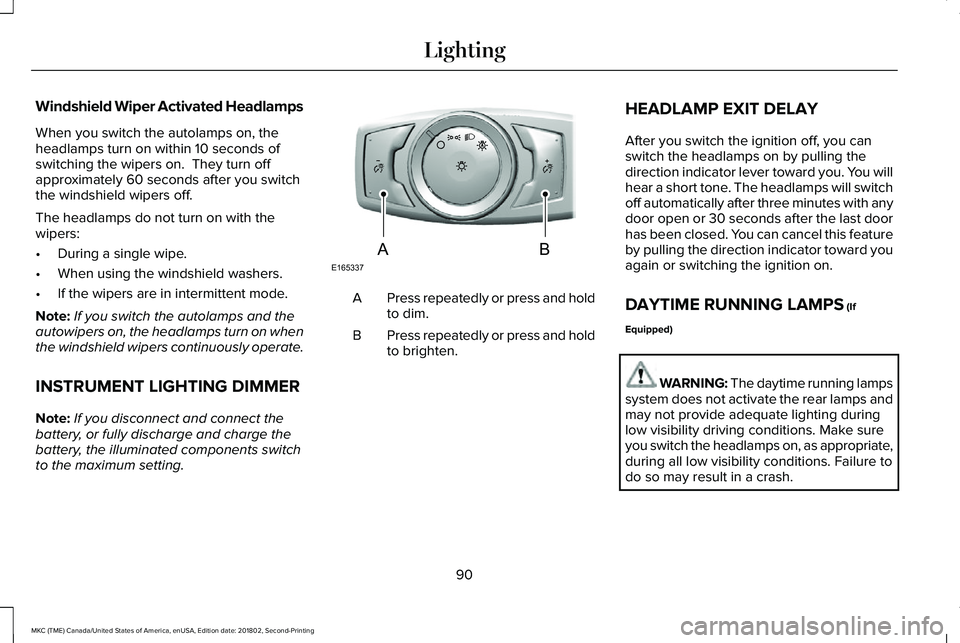
INSTRUMENT LIGHTING DIMMER
Note:If you disconnect and connect thebattery, or fully discharge and charge thebattery, the illuminated components switchto the maximum setting.
Press repeatedly or press and holdto dim.A
Press repeatedly or press and holdto brighten.B
HEADLAMP EXIT DELAY
After you switch the ignition off, you canswitch the headlamps on by pulling thedirection indicator lever toward you. You willhear a short tone. The headlamps will switchoff automatically after three minutes with anydoor open or 30 seconds after the last doorhas been closed. You can cancel this featureby pulling the direction indicator toward youagain or switching the ignition on.
DAYTIME RUNNING LAMPS (If
Equipped)
WARNING: The daytime running lampssystem does not activate the rear lamps andmay not provide adequate lighting duringlow visibility driving conditions. Make sureyou switch the headlamps on, as appropriate,during all low visibility conditions. Failure todo so may result in a crash.
90
MKC (TME) Canada/United States of America, enUSA, Edition date: 201802, Second-Printing
LightingE165337AB
Page 107 of 581
Note:Some warning indicators appear inthe information display and operate thesame as a warning lamp but do notilluminate when you start your vehicle.
Adaptive Cruise Control Indicator (If
Equipped)
It illuminates when you switch thesystem on.
It illuminates white when thesystem is in standby mode. It illuminatesgreen when you set the adaptive cruisespeed.
See Using Adaptive Cruise Control (page211).
Airbag Warning Lamp
If it does not illuminate when youswitch the ignition on, continuesto flash or remains on when theengine is running, this indicates amalfunction. Have your vehicle checked assoon as possible.
Anti-Lock Brake System Warning Lamp
If it illuminates when you aredriving, this indicates amalfunction. Your vehiclecontinues to have normal braking withoutthe anti-lock brake system function. Haveyour vehicle checked as soon as possible.
Auto Hold Active
It illuminates when the systemholds your vehicle stationary.
Auto Hold Unavailable
It illuminates when the system ison, but unavailable to hold yourvehicle stationary.
Automatic Headlamp High BeamIndicator (If Equipped)
It illuminates when the systemautomatically turns the headlamphigh beam on.
See Automatic High Beam Control (page91).
Auto-Start-Stop Indicator (If Equipped)
It will illuminate to inform you whenthe engine shuts down or inconjunction with a message.
Battery
If it illuminates while driving, itindicates a malfunction. Switch offall unnecessary electricalequipment and have the system checked byan authorized dealer immediately.
Blind Spot Information SystemIndicator (If Equipped)
It illuminates when you switch thesystem off.
See Blind Spot InformationSystem (page 226).
104
MKC (TME) Canada/United States of America, enUSA, Edition date: 201802, Second-Printing
Instrument ClusterE144524 E67017 E197933 E197934 E151262
Page 121 of 581
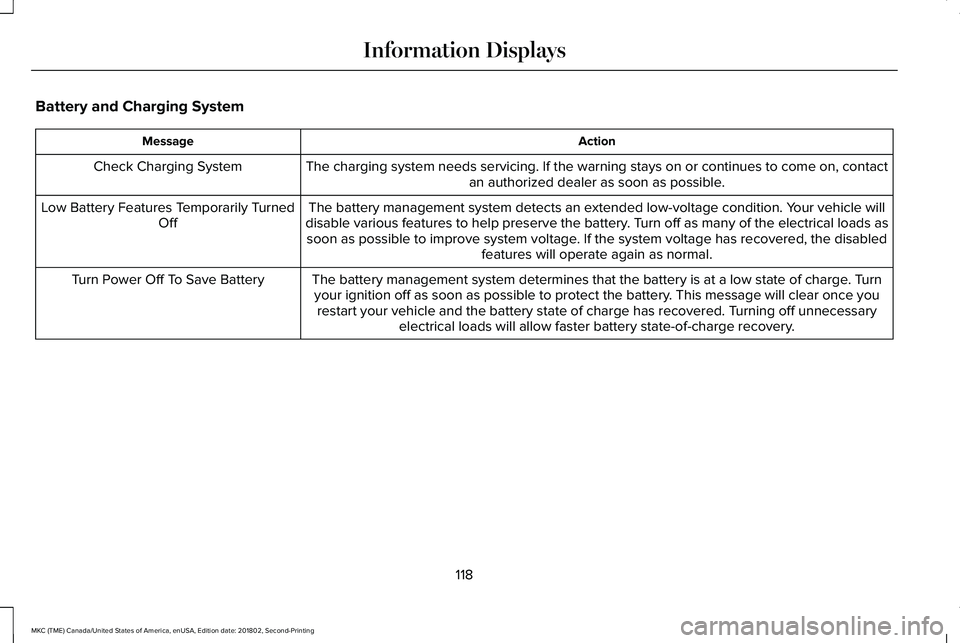
Battery and Charging System
ActionMessage
The charging system needs servicing. If the warning stays on or continues to come on, contactan authorized dealer as soon as possible.Check Charging System
The battery management system detects an extended low-voltage condition. Your vehicle willdisable various features to help preserve the battery. Turn off as many of the electrical loads assoon as possible to improve system voltage. If the system voltage has recovered, the disabledfeatures will operate again as normal.
Low Battery Features Temporarily TurnedOff
The battery management system determines that the battery is at a low state of charge. Turnyour ignition off as soon as possible to protect the battery. This message will clear once yourestart your vehicle and the battery state of charge has recovered. Turning off unnecessaryelectrical loads will allow faster battery state-of-charge recovery.
Turn Power Off To Save Battery
118
MKC (TME) Canada/United States of America, enUSA, Edition date: 201802, Second-Printing
Information Displays
Page 125 of 581
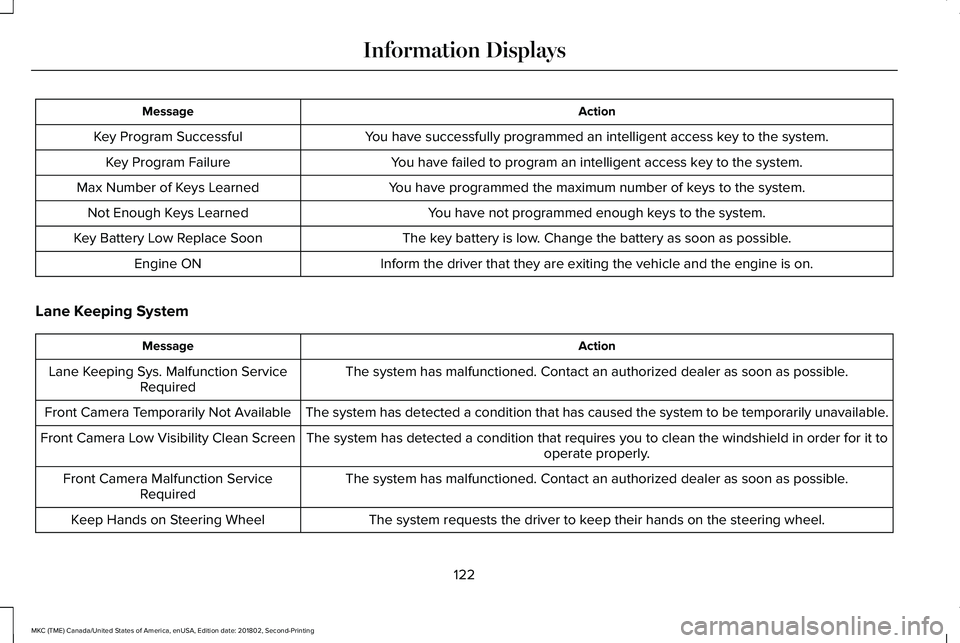
ActionMessage
You have successfully programmed an intelligent access key to the system.Key Program Successful
You have failed to program an intelligent access key to the system.Key Program Failure
You have programmed the maximum number of keys to the system.Max Number of Keys Learned
You have not programmed enough keys to the system.Not Enough Keys Learned
The key battery is low. Change the battery as soon as possible.Key Battery Low Replace Soon
Inform the driver that they are exiting the vehicle and the engine is on.Engine ON
Lane Keeping System
ActionMessage
The system has malfunctioned. Contact an authorized dealer as soon as possible.Lane Keeping Sys. Malfunction ServiceRequired
The system has detected a condition that has caused the system to be temporarily unavailable.Front Camera Temporarily Not Available
The system has detected a condition that requires you to clean the windshield in order for it tooperate properly.Front Camera Low Visibility Clean Screen
The system has malfunctioned. Contact an authorized dealer as soon as possible.Front Camera Malfunction ServiceRequired
The system requests the driver to keep their hands on the steering wheel.Keep Hands on Steering Wheel
122
MKC (TME) Canada/United States of America, enUSA, Edition date: 201802, Second-Printing
Information Displays
Page 132 of 581
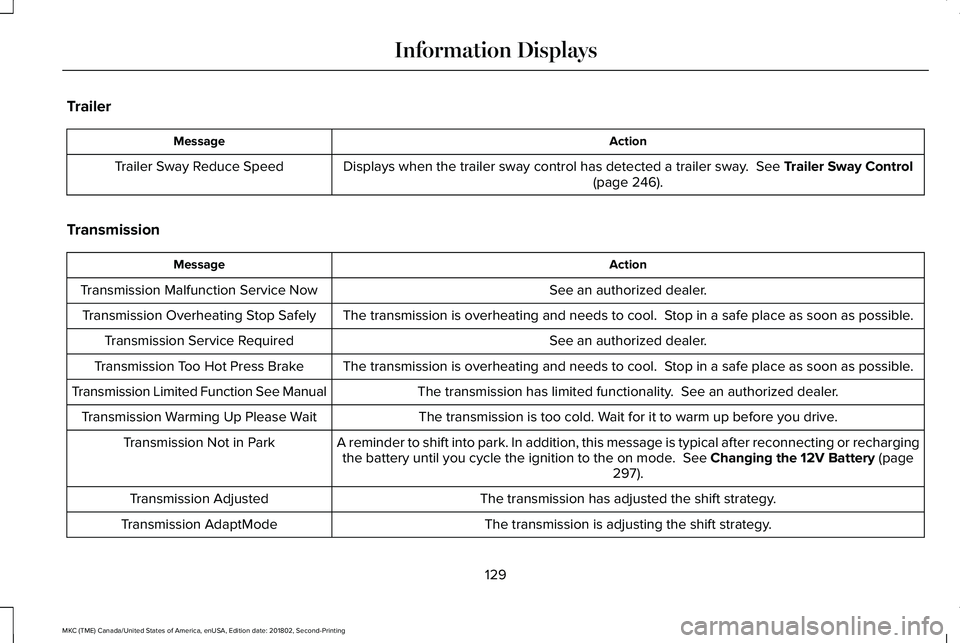
Trailer
ActionMessage
Displays when the trailer sway control has detected a trailer sway. See Trailer Sway Control(page 246).Trailer Sway Reduce Speed
Transmission
ActionMessage
See an authorized dealer.Transmission Malfunction Service Now
The transmission is overheating and needs to cool. Stop in a safe place as soon as possible.Transmission Overheating Stop Safely
See an authorized dealer.Transmission Service Required
The transmission is overheating and needs to cool. Stop in a safe place as soon as possible.Transmission Too Hot Press Brake
The transmission has limited functionality. See an authorized dealer.Transmission Limited Function See Manual
The transmission is too cold. Wait for it to warm up before you drive.Transmission Warming Up Please Wait
A reminder to shift into park. In addition, this message is typical after reconnecting or rechargingthe battery until you cycle the ignition to the on mode. See Changing the 12V Battery (page297).
Transmission Not in Park
The transmission has adjusted the shift strategy.Transmission Adjusted
The transmission is adjusting the shift strategy.Transmission AdaptMode
129
MKC (TME) Canada/United States of America, enUSA, Edition date: 201802, Second-Printing
Information Displays
Page 152 of 581
HomeLink Wireless Control System
WARNING: Do not use the system withany garage door opener that does not havethe safety stop and reverse feature asrequired by U.S. Federal Safety Standards(this includes any garage door openermanufactured before April 1, 1982). A garagedoor opener which cannot detect an object,signaling the door to stop and reverse, doesnot meet current federal safety standards.Using a garage door opener without thesefeatures increases the risk of serious injuryor death.
Note:Make sure that the garage door andsecurity device are free from obstructionwhen you are programming. Do not programthe system with the vehicle in the garage.
Note:Make sure you keep the originalremote control transmitter for use in othervehicles as well as for future systemprogramming.
Note:We recommend that upon the sale orlease termination of your vehicle, you erasethe programmed function buttons for securityreasons. See Erasing the Function ButtonCodes.
Note:You can program a maximum of threedevices. To change or replace any of thethree devices after it has been initiallyprogrammed, you must first erase the currentsettings. See Erasing the Function ButtonCodes.
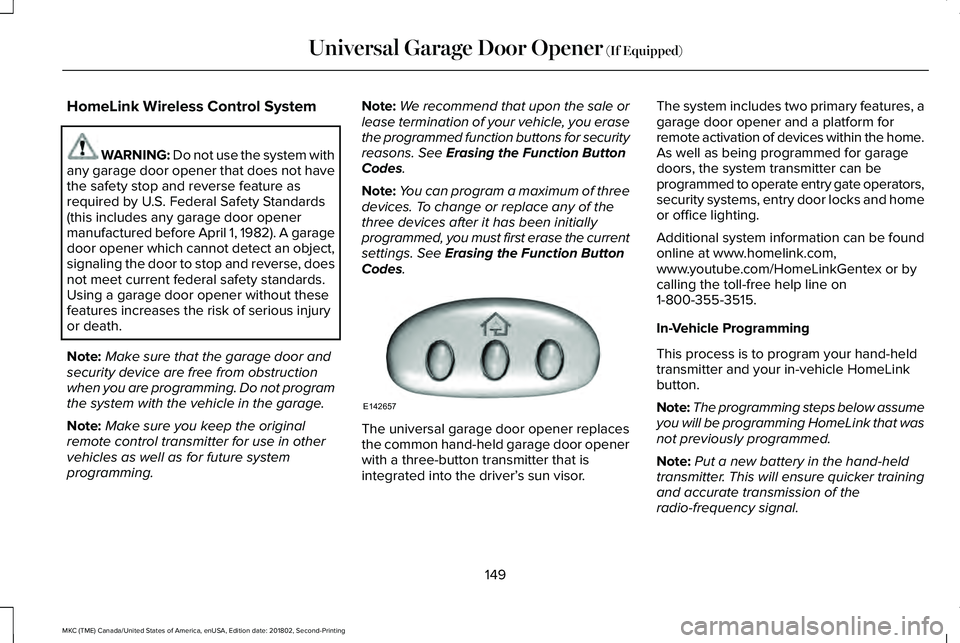
The universal garage door opener replacesthe common hand-held garage door openerwith a three-button transmitter that isintegrated into the driver’s sun visor.
The system includes two primary features, agarage door opener and a platform forremote activation of devices within the home.As well as being programmed for garagedoors, the system transmitter can beprogrammed to operate entry gate operators,security systems, entry door locks and homeor office lighting.
Additional system information can be foundonline at www.homelink.com,www.youtube.com/HomeLinkGentex or bycalling the toll-free help line on1-800-355-3515.
In-Vehicle Programming
This process is to program your hand-heldtransmitter and your in-vehicle HomeLinkbutton.
Note:The programming steps below assumeyou will be programming HomeLink that wasnot previously programmed.
Note:Put a new battery in the hand-heldtransmitter. This will ensure quicker trainingand accurate transmission of theradio-frequency signal.
149
MKC (TME) Canada/United States of America, enUSA, Edition date: 201802, Second-Printing
Universal Garage Door Opener (If Equipped)E142657
Page 157 of 581
12 Volt DC Power Point
WARNING: Do not plug optionalelectrical accessories into the cigar lightersocket. Incorrect use of the cigar lighter cancause damage not covered by the vehiclewarranty, and can result in fire or seriousinjury.
Note:When you switch the ignition on, youcan use the socket to power 12 voltappliances with a maximum current ratingof 15 amps.
If the power supply does not work after youswitch the ignition off, switch the ignition on.Note:Do not hang any accessory from theaccessory plug.
Note:Do not use the power point over thevehicle capacity of 12 volt DC 180 watts ora fuse may blow.
Note:Always keep the power point capsclosed when not in use.
Do not insert objects other than an accessoryplug into the power point. This damages thepower point and may blow the fuse.
Run the vehicle for full capacity use of thepower point.
To prevent the battery from running out ofcharge:
•Do not use the power point longer thannecessary when the engine is notrunning.
•Do not leave devices plugged inovernight or when you park your vehiclefor extended periods.
USB Port and Power Point Locations
USB Ports and Power Points may be in thefollowing locations:
•On the lower instrument panel.
•Inside the center console.
•On the front of the center console.
•On the rear of the center console.
•In the cargo area.
•On the passenger side floor panel.
•3rd row on the quarter trim panels.
Note:Some of the USB ports may not havedata transfer capabilities.
110 Volt AC Power Point (If Equipped)
WARNING: Do not keep electricaldevices plugged in the power pointwhenever the device is not in use. Do notuse any extension cord with the 110 volt ACpower point, since it will defeat the safetyprotection design. Doing so may cause thepower point to overload due to poweringmultiple devices that can reach beyond the150 watt load limit and could result in fire orserious injury.
Note:The power point turns off when youswitch off the ignition, when the vehicle isnot in accessory mode or when the batteryvoltage drops below 11 volts.
You can use the power point for electricdevices that require up to 150 watts. It is onthe rear of the center console.
154
MKC (TME) Canada/United States of America, enUSA, Edition date: 201802, Second-Printing
Auxiliary Power Points
Page 160 of 581
GENERAL INFORMATION
WARNING: Extended idling at highengine speeds can produce very hightemperatures in the engine and exhaustsystem, creating the risk of fire or otherdamage.
WARNING: Do not park, idle or driveyour vehicle on dry grass or other dry groundcover. The emission system heats up theengine compartment and exhaust system,creating the risk of fire.
WARNING: Do not start the engine ina closed garage or in other enclosed areas.Exhaust fumes can be toxic. Always openthe garage door before you start the engine.
WARNING: Exhaust leaks may resultin entry of harmful and potentially lethalfumes into the passenger compartment. Ifyou smell exhaust fumes inside your vehicle,have your vehicle inspected immediately. Donot drive if you smell exhaust fumes.
If you disconnect the battery, your vehiclemay exhibit some unusual drivingcharacteristics for approximately 5 mi (8 km)after you reconnect it. This is because theengine management system must realignitself with the engine. You can disregard anyunusual driving characteristics during thisperiod.
The powertrain control system meets allCanadian interference-causing equipmentstandard requirements regulating theimpulse electrical field or radio noise.
When you start the engine, avoid pressingthe accelerator pedal before and duringoperation. Only use the accelerator pedalwhen you have difficulty starting the engine.
KEYLESS STARTING
Note:The keyless starting system may notfunction if the key is close to metal objectsor electronic devices such as cellularphones.
Note:A valid key must be located insideyour vehicle to switch the ignition on andstart the engine.
Ignition Modes
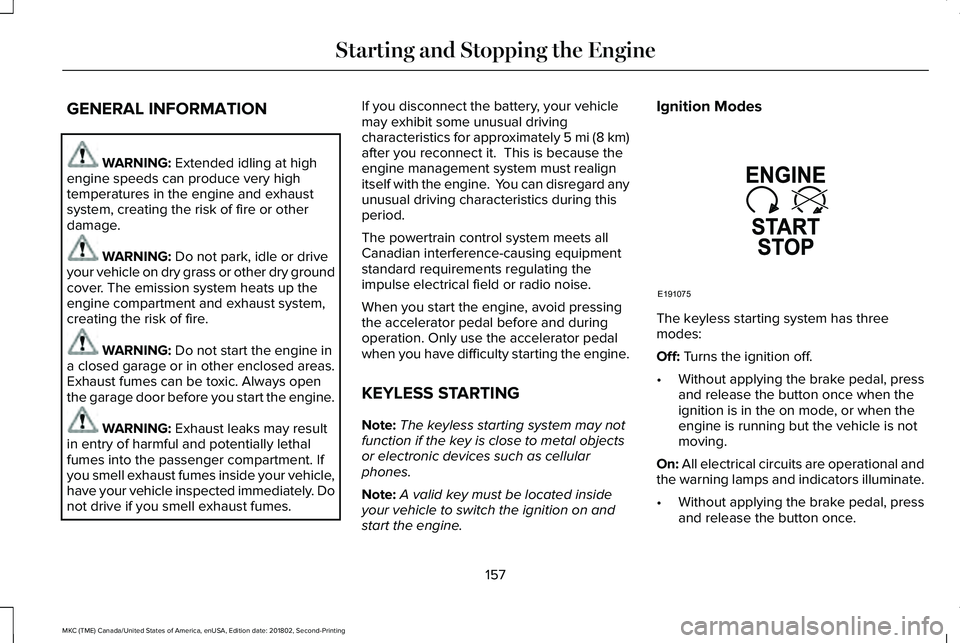
The keyless starting system has threemodes:
Off: Turns the ignition off.
•Without applying the brake pedal, pressand release the button once when theignition is in the on mode, or when theengine is running but the vehicle is notmoving.
On: All electrical circuits are operational andthe warning lamps and indicators illuminate.
•Without applying the brake pedal, pressand release the button once.
157
MKC (TME) Canada/United States of America, enUSA, Edition date: 201802, Second-Printing
Starting and Stopping the EngineE191075