lock LINCOLN MKC 2019 User Guide
[x] Cancel search | Manufacturer: LINCOLN, Model Year: 2019, Model line: MKC, Model: LINCOLN MKC 2019Pages: 581, PDF Size: 5.41 MB
Page 37 of 581
PRINCIPLE OF OPERATION
WARNING: Always drive and ride withyour seatback upright and the lap belt snugand low across the hips.
WARNING: To reduce the risk of injury,make sure children sit where they can beproperly restrained.
WARNING: Never let a passenger holda child on his or her lap while your vehicle ismoving. The passenger cannot protect thechild from injury in a crash.
WARNING: All occupants of yourvehicle, including the driver, should alwaysproperly wear their safety belts, even whenan airbag supplemental restraint system isprovided.
WARNING: It is extremely dangerousto ride in a cargo area, inside or outside ofa vehicle. In a crash, people riding in theseareas are more likely to be seriously injuredor killed. Do not allow people to ride in anyarea of your vehicle that is not equipped withseats and safety belts. Be sure everyone inyour vehicle is in a seat and using a safetybelt properly.
WARNING: In a rollover crash, anunbelted person is significantly more likelyto die than a person wearing a safety belt.
WARNING: Each seating position inyour vehicle has a specific safety beltassembly which is made up of one buckleand one tongue that are designed to be usedas a pair. 1) Use the shoulder belt on theoutside shoulder only. Never wear theshoulder belt under the arm. 2) Never swingthe safety belt around your neck over theinside shoulder. 3) Never use a single beltfor more than one person.
WARNING: When possible, all children12 years old and under should be properlyrestrained in a rear seating position.
WARNING: Safety belts and seats canbecome hot in a vehicle that has been closedup in sunny weather; they could burn a smallchild. Check seat covers and buckles beforeyou place a child anywhere near them.
WARNING: Front and rear seatoccupants, including pregnant women,should wear safety belts for optimumprotection in an accident.
All seating positions in this vehicle have lapand shoulder safety belts. All occupants ofthe vehicle should always properly wear theirsafety belts, even when an airbagsupplemental restraint system is provided.
The safety belt system consists of:
•lap and shoulder safety belts
•shoulder safety belt with automaticlocking mode, (except driver safety belt)
34
MKC (TME) Canada/United States of America, enUSA, Edition date: 201802, Second-Printing
Seatbelts
Page 39 of 581
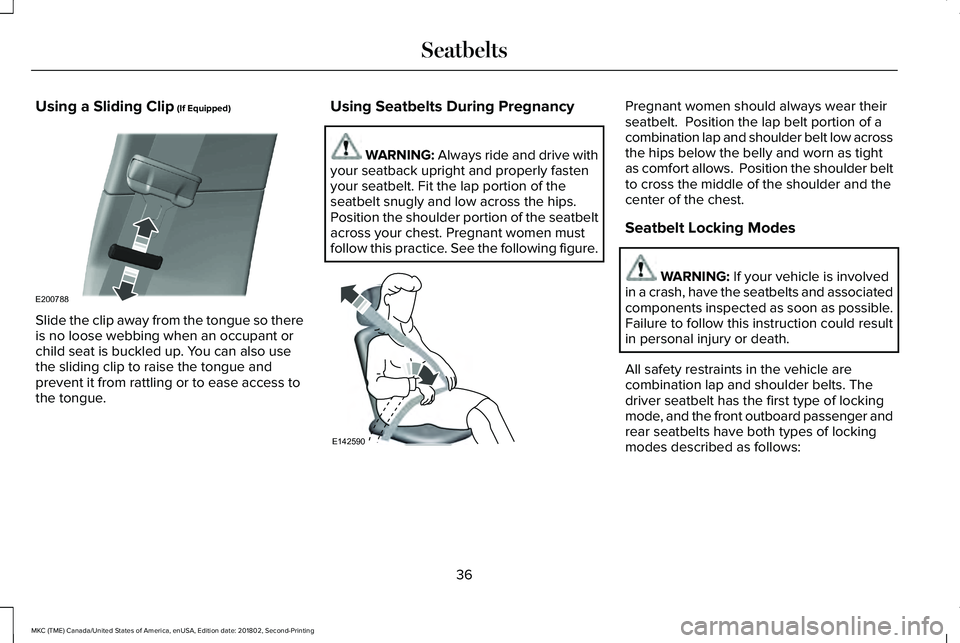
Using a Sliding Clip (If Equipped)
Slide the clip away from the tongue so thereis no loose webbing when an occupant orchild seat is buckled up. You can also usethe sliding clip to raise the tongue andprevent it from rattling or to ease access tothe tongue.
Using Seatbelts During Pregnancy
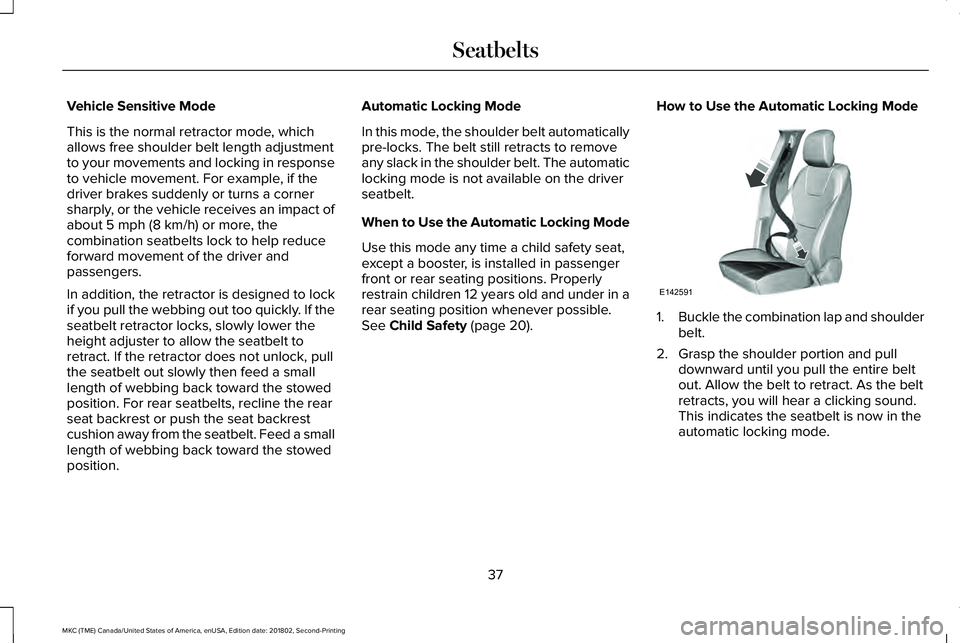
WARNING: Always ride and drive withyour seatback upright and properly fastenyour seatbelt. Fit the lap portion of theseatbelt snugly and low across the hips.Position the shoulder portion of the seatbeltacross your chest. Pregnant women mustfollow this practice. See the following figure.
Pregnant women should always wear theirseatbelt. Position the lap belt portion of acombination lap and shoulder belt low acrossthe hips below the belly and worn as tightas comfort allows. Position the shoulder beltto cross the middle of the shoulder and thecenter of the chest.
Seatbelt Locking Modes
WARNING: If your vehicle is involvedin a crash, have the seatbelts and associatedcomponents inspected as soon as possible.Failure to follow this instruction could resultin personal injury or death.
All safety restraints in the vehicle arecombination lap and shoulder belts. Thedriver seatbelt has the first type of lockingmode, and the front outboard passenger andrear seatbelts have both types of lockingmodes described as follows:
36
MKC (TME) Canada/United States of America, enUSA, Edition date: 201802, Second-Printing
SeatbeltsE200788 E142590
Page 40 of 581
Vehicle Sensitive Mode
This is the normal retractor mode, whichallows free shoulder belt length adjustmentto your movements and locking in responseto vehicle movement. For example, if thedriver brakes suddenly or turns a cornersharply, or the vehicle receives an impact ofabout 5 mph (8 km/h) or more, thecombination seatbelts lock to help reduceforward movement of the driver andpassengers.
In addition, the retractor is designed to lockif you pull the webbing out too quickly. If theseatbelt retractor locks, slowly lower theheight adjuster to allow the seatbelt toretract. If the retractor does not unlock, pullthe seatbelt out slowly then feed a smalllength of webbing back toward the stowedposition. For rear seatbelts, recline the rearseat backrest or push the seat backrestcushion away from the seatbelt. Feed a smalllength of webbing back toward the stowedposition.
Automatic Locking Mode
In this mode, the shoulder belt automaticallypre-locks. The belt still retracts to removeany slack in the shoulder belt. The automaticlocking mode is not available on the driverseatbelt.
When to Use the Automatic Locking Mode
Use this mode any time a child safety seat,except a booster, is installed in passengerfront or rear seating positions. Properlyrestrain children 12 years old and under in arear seating position whenever possible.See Child Safety (page 20).
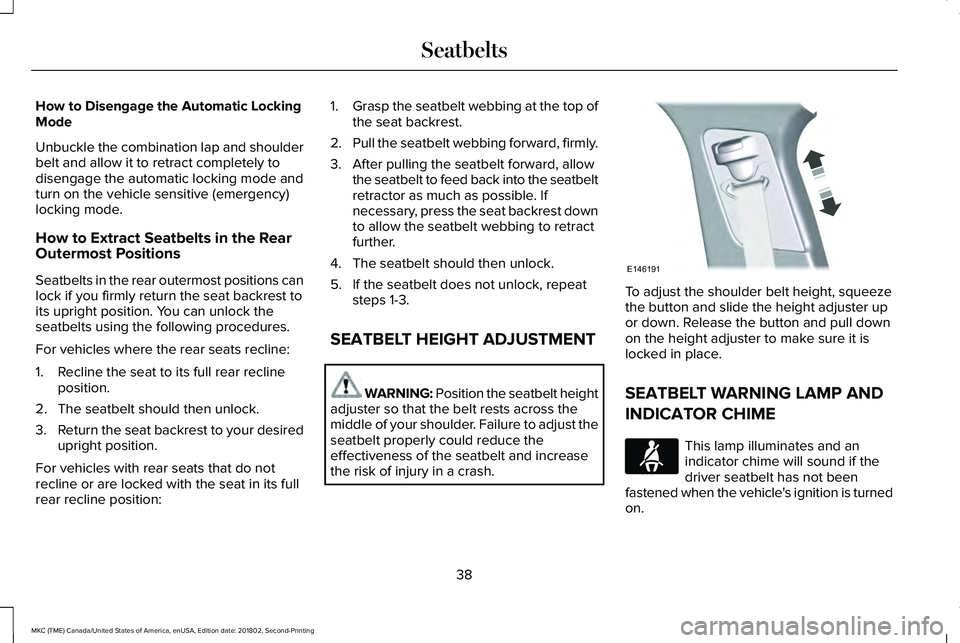
How to Use the Automatic Locking Mode
1.Buckle the combination lap and shoulderbelt.
2. Grasp the shoulder portion and pulldownward until you pull the entire beltout. Allow the belt to retract. As the beltretracts, you will hear a clicking sound.This indicates the seatbelt is now in theautomatic locking mode.
37
MKC (TME) Canada/United States of America, enUSA, Edition date: 201802, Second-Printing
SeatbeltsE142591
Page 41 of 581
How to Disengage the Automatic LockingMode
Unbuckle the combination lap and shoulderbelt and allow it to retract completely todisengage the automatic locking mode andturn on the vehicle sensitive (emergency)locking mode.
How to Extract Seatbelts in the RearOutermost Positions
Seatbelts in the rear outermost positions canlock if you firmly return the seat backrest toits upright position. You can unlock theseatbelts using the following procedures.
For vehicles where the rear seats recline:
1. Recline the seat to its full rear reclineposition.
2. The seatbelt should then unlock.
3.Return the seat backrest to your desiredupright position.
For vehicles with rear seats that do notrecline or are locked with the seat in its fullrear recline position:
1.Grasp the seatbelt webbing at the top ofthe seat backrest.
2.Pull the seatbelt webbing forward, firmly.
3. After pulling the seatbelt forward, allowthe seatbelt to feed back into the seatbeltretractor as much as possible. Ifnecessary, press the seat backrest downto allow the seatbelt webbing to retractfurther.
4. The seatbelt should then unlock.
5. If the seatbelt does not unlock, repeatsteps 1-3.
SEATBELT HEIGHT ADJUSTMENT
WARNING: Position the seatbelt heightadjuster so that the belt rests across themiddle of your shoulder. Failure to adjust theseatbelt properly could reduce theeffectiveness of the seatbelt and increasethe risk of injury in a crash.
To adjust the shoulder belt height, squeezethe button and slide the height adjuster upor down. Release the button and pull downon the height adjuster to make sure it islocked in place.
SEATBELT WARNING LAMP AND
INDICATOR CHIME
This lamp illuminates and anindicator chime will sound if thedriver seatbelt has not beenfastened when the vehicle's ignition is turnedon.
38
MKC (TME) Canada/United States of America, enUSA, Edition date: 201802, Second-Printing
SeatbeltsE146191 E71880
Page 58 of 581
GENERAL INFORMATION ON
RADIO FREQUENCIES
This device complies with Part 15 of the FCCRules and with Licence exempt RSSStandards of Industry Canada. Operation issubject to the following two conditions:
•This device may not cause harmfulinterference, and
•This device must accept any interferencereceived, including interference that maycause undesired operation.
WARNING: Changes or modificationsnot expressively approved by the partyresponsible for compliance could void theuser's authority to operate the equipment.The term "IC:" before the radio certificationnumber only signifies that Industry Canadatechnical specifications were met.
The typical operating range for yourtransmitter is approximately 33 ft (10 m).Vehicles with the remote start feature willhave a greater range. One of the followingcould cause a decrease in operating range:
•weather conditions
•nearby radio towers
•structures around the vehicle
•other vehicles parked next to yourvehicle
Other short-distance radio transmitters, suchas amateur radios, medical equipment,wireless headphones, remote controls andalarm systems may operate on the samefrequency as your remote control. If othertransmitters are operating on thosefrequencies, you may not be able to use yourremote control. Using your remote controlnear some types of electronic equipment,such as USB devices, computers or cellphones can interfere with remote operation.Operating your remote control near metal ormetallic-finished purses, bags or clothing caninterfere with remote operation. You can lockand unlock the doors with the key.
Note:Make sure to lock your vehicle beforeleaving it unattended.
Note:If you are in range, the remote controlwill operate if you press any buttonunintentionally.
Intelligent Access
The system uses a radio frequency signal tocommunicate with your vehicle and authorizeyour vehicle to unlock when one of thefollowing conditions are met:
•You touch the inside of any exterior doorhandle within 3 ft (1 m) proximity of anintelligent access key.
•You press the luggage compartmentbutton.
•You press a button on the transmitter.
If excessive radio frequency interference ispresent in the area or if the transmitterbattery is low, you may need to mechanicallyunlock your door. You can use themechanical key blade in your intelligentaccess key to open the driver door in thissituation. See Remote Control (page 56).
55
MKC (TME) Canada/United States of America, enUSA, Edition date: 201802, Second-Printing
Keys and Remote Controls
Page 59 of 581
REMOTE CONTROL
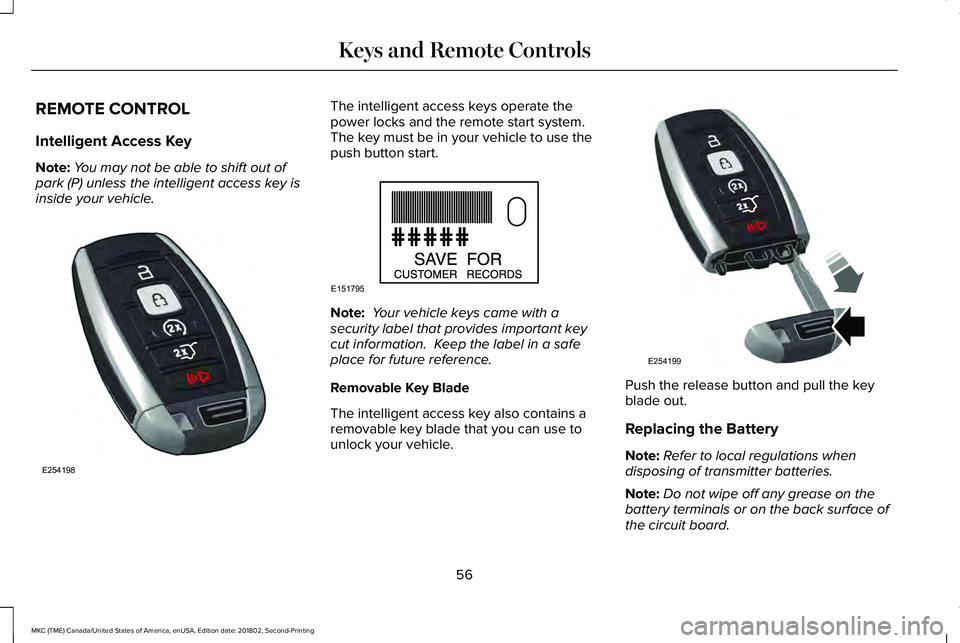
Intelligent Access Key
Note:You may not be able to shift out ofpark (P) unless the intelligent access key isinside your vehicle.
The intelligent access keys operate thepower locks and the remote start system. The key must be in your vehicle to use thepush button start.
Note: Your vehicle keys came with asecurity label that provides important keycut information. Keep the label in a safeplace for future reference.
Removable Key Blade
The intelligent access key also contains aremovable key blade that you can use tounlock your vehicle.
Push the release button and pull the keyblade out.
Replacing the Battery
Note:Refer to local regulations whendisposing of transmitter batteries.
Note:Do not wipe off any grease on thebattery terminals or on the back surface ofthe circuit board.
56
MKC (TME) Canada/United States of America, enUSA, Edition date: 201802, Second-Printing
Keys and Remote ControlsE254198 E151795 E254199
Page 62 of 581
Remote Starting Your Vehicle
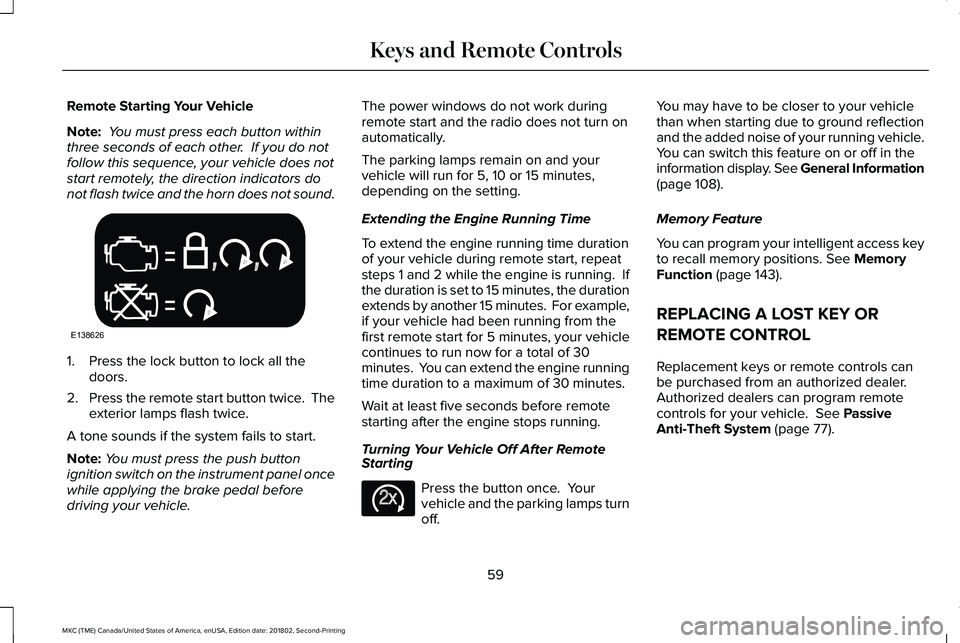
Note: You must press each button withinthree seconds of each other. If you do notfollow this sequence, your vehicle does notstart remotely, the direction indicators donot flash twice and the horn does not sound.
1. Press the lock button to lock all thedoors.
2.Press the remote start button twice. Theexterior lamps flash twice.
A tone sounds if the system fails to start.
Note:You must press the push buttonignition switch on the instrument panel oncewhile applying the brake pedal beforedriving your vehicle.
The power windows do not work duringremote start and the radio does not turn onautomatically.
The parking lamps remain on and yourvehicle will run for 5, 10 or 15 minutes,depending on the setting.
Extending the Engine Running Time
To extend the engine running time durationof your vehicle during remote start, repeatsteps 1 and 2 while the engine is running. Ifthe duration is set to 15 minutes, the durationextends by another 15 minutes. For example,if your vehicle had been running from thefirst remote start for 5 minutes, your vehiclecontinues to run now for a total of 30minutes. You can extend the engine runningtime duration to a maximum of 30 minutes.
Wait at least five seconds before remotestarting after the engine stops running.
Turning Your Vehicle Off After RemoteStarting
Press the button once. Yourvehicle and the parking lamps turnoff.
You may have to be closer to your vehiclethan when starting due to ground reflectionand the added noise of your running vehicle.You can switch this feature on or off in theinformation display. See General Information(page 108).
Memory Feature
You can program your intelligent access keyto recall memory positions. See MemoryFunction (page 143).
REPLACING A LOST KEY OR
REMOTE CONTROL
Replacement keys or remote controls canbe purchased from an authorized dealer.Authorized dealers can program remotecontrols for your vehicle. See PassiveAnti-Theft System (page 77).
59
MKC (TME) Canada/United States of America, enUSA, Edition date: 201802, Second-Printing
Keys and Remote ControlsE138626 E138625
Page 66 of 581
Number of MyKeys
Indicates the number of MyKeysprogrammed to your vehicle. Use this featureto detect how many MyKeys you have foryour vehicle and determine when all MyKeyshave been deleted.
Number of Admin Keys
Indicates how many admin keys areprogrammed to your vehicle. Use this featureto determine how many admin keys you havefor your vehicle, and detect if an additionalMyKey has been programmed.
USING MYKEY WITH REMOTE
START SYSTEMS
MyKey is not compatible with nonLincoln-approved, aftermarket remote startsystems. If you choose to install a remotestart system, see an authorized dealer for aLincoln-approved remote start system.
MYKEY TROUBLESHOOTING
Potential causesCondition
· The key or transmitter used to start the vehicle does not have adminprivileges.I cannot create a MyKey.
· Vehicles with keyless start: Make sure you place the transmitter intothe backup slot. See Passive Anti-Theft System (page 77).· The key or transmitter used to start the vehicle is the only admin key.There always has to be at least one admin key.· SecuriLock passive anti-theft system is disabled or in unlimited mode.
· The key or transmitter used to start the vehicle does not have adminprivileges.I cannot program the configurable settings.
63
MKC (TME) Canada/United States of America, enUSA, Edition date: 201802, Second-Printing
MyKey™
Page 68 of 581
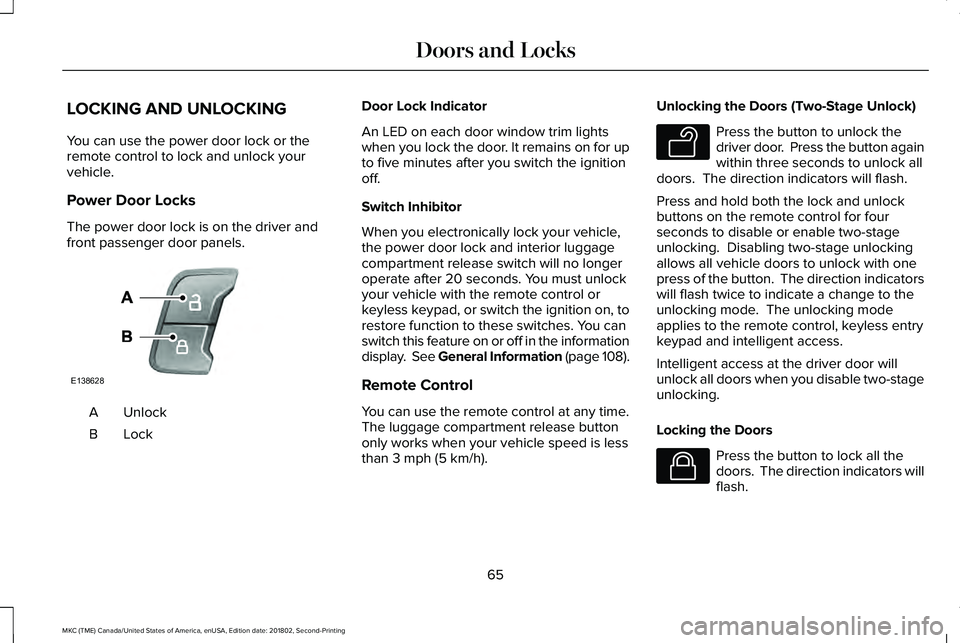
LOCKING AND UNLOCKING
You can use the power door lock or theremote control to lock and unlock yourvehicle.
Power Door Locks
The power door lock is on the driver andfront passenger door panels.
UnlockA
LockB
Door Lock Indicator
An LED on each door window trim lightswhen you lock the door. It remains on for upto five minutes after you switch the ignitionoff.
Switch Inhibitor
When you electronically lock your vehicle,the power door lock and interior luggagecompartment release switch will no longeroperate after 20 seconds. You must unlockyour vehicle with the remote control orkeyless keypad, or switch the ignition on, torestore function to these switches. You canswitch this feature on or off in the informationdisplay. See General Information (page 108).
Remote Control
You can use the remote control at any time.The luggage compartment release buttononly works when your vehicle speed is lessthan 3 mph (5 km/h).
Unlocking the Doors (Two-Stage Unlock)
Press the button to unlock thedriver door. Press the button againwithin three seconds to unlock alldoors. The direction indicators will flash.
Press and hold both the lock and unlockbuttons on the remote control for fourseconds to disable or enable two-stageunlocking. Disabling two-stage unlockingallows all vehicle doors to unlock with onepress of the button. The direction indicatorswill flash twice to indicate a change to theunlocking mode. The unlocking modeapplies to the remote control, keyless entrykeypad and intelligent access.
Intelligent access at the driver door willunlock all doors when you disable two-stageunlocking.
Locking the Doors
Press the button to lock all thedoors. The direction indicators willflash.
65
MKC (TME) Canada/United States of America, enUSA, Edition date: 201802, Second-Printing
Doors and LocksE138628 E138629 E138623
Page 69 of 581

Press the button again within three secondsto confirm that all the doors are closed. Thedoors lock again, a tone sounds and thedirection indicators flash if all the doors andthe luggage compartment are closed.
Mislock
If any door or the luggage compartment isopen, or if the hood is open on vehicles withan anti-theft alarm or remote start, a tonesounds and the direction indicators will notflash. You can switch this feature on or off inthe information display. See GeneralInformation (page 108).
Audible and Visual Locking Confirmation
If audible and visual locking confirmation isconfigurable, you can turn it on or off usingthe information display. See GeneralInformation (page 108).
Mechanical Key
The intelligent access key also contains aremovable key blade that you can use to lockand unlock your vehicle. See RemoteControl (page 56).
Turn the top of the key toward the front ofyour vehicle once to lock all doors.
Turn the top of the key toward the rear ofyour vehicle once to unlock the driver dooronly.
Locking the Doors Individually
If the power locks fail to operate, lock thedoors individually using the key in theposition shown.
Left-Hand Side
Turn clockwise to lock.
66
MKC (TME) Canada/United States of America, enUSA, Edition date: 201802, Second-Printing
Doors and LocksE180643