lock LINCOLN MKC 2019 Service Manual
[x] Cancel search | Manufacturer: LINCOLN, Model Year: 2019, Model line: MKC, Model: LINCOLN MKC 2019Pages: 581, PDF Size: 5.41 MB
Page 118 of 581
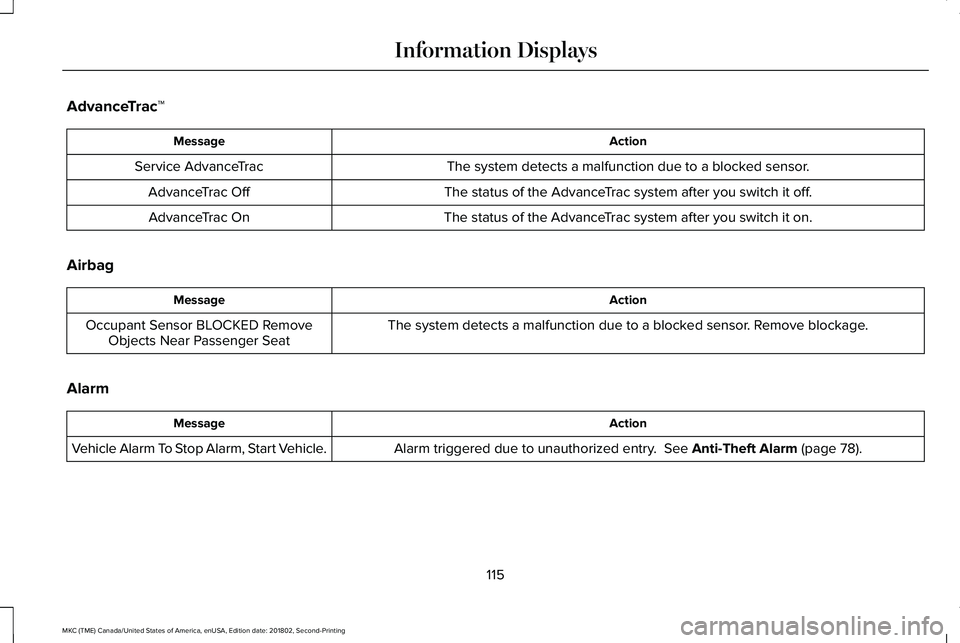
AdvanceTrac™
ActionMessage
The system detects a malfunction due to a blocked sensor.Service AdvanceTrac
The status of the AdvanceTrac system after you switch it off.AdvanceTrac Off
The status of the AdvanceTrac system after you switch it on.AdvanceTrac On
Airbag
ActionMessage
The system detects a malfunction due to a blocked sensor. Remove blockage.Occupant Sensor BLOCKED RemoveObjects Near Passenger Seat
Alarm
ActionMessage
Alarm triggered due to unauthorized entry. See Anti-Theft Alarm (page 78).Vehicle Alarm To Stop Alarm, Start Vehicle.
115
MKC (TME) Canada/United States of America, enUSA, Edition date: 201802, Second-Printing
Information Displays
Page 122 of 581
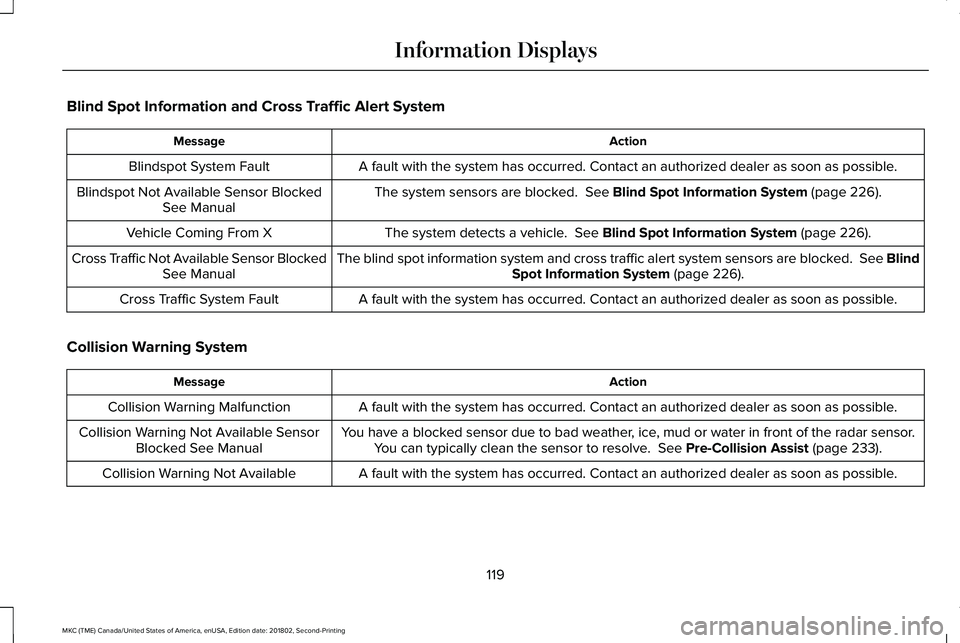
Blind Spot Information and Cross Traffic Alert System
ActionMessage
A fault with the system has occurred. Contact an authorized dealer as soon as possible.Blindspot System Fault
The system sensors are blocked. See Blind Spot Information System (page 226).Blindspot Not Available Sensor BlockedSee Manual
The system detects a vehicle. See Blind Spot Information System (page 226).Vehicle Coming From X
The blind spot information system and cross traffic alert system sensors are blocked. See BlindSpot Information System (page 226).Cross Traffic Not Available Sensor BlockedSee Manual
A fault with the system has occurred. Contact an authorized dealer as soon as possible.Cross Traffic System Fault
Collision Warning System
ActionMessage
A fault with the system has occurred. Contact an authorized dealer as soon as possible.Collision Warning Malfunction
You have a blocked sensor due to bad weather, ice, mud or water in front of the radar sensor.You can typically clean the sensor to resolve. See Pre-Collision Assist (page 233).Collision Warning Not Available SensorBlocked See Manual
A fault with the system has occurred. Contact an authorized dealer as soon as possible.Collision Warning Not Available
119
MKC (TME) Canada/United States of America, enUSA, Edition date: 201802, Second-Printing
Information Displays
Page 123 of 581
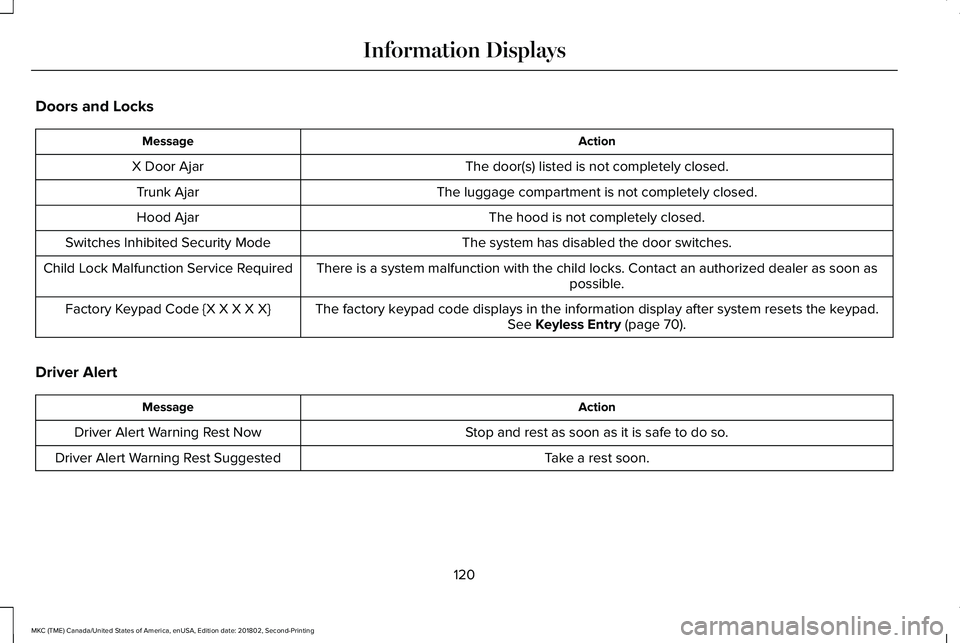
Doors and Locks
ActionMessage
The door(s) listed is not completely closed.X Door Ajar
The luggage compartment is not completely closed.Trunk Ajar
The hood is not completely closed.Hood Ajar
The system has disabled the door switches.Switches Inhibited Security Mode
There is a system malfunction with the child locks. Contact an authorized dealer as soon aspossible.Child Lock Malfunction Service Required
The factory keypad code displays in the information display after system resets the keypad.See Keyless Entry (page 70).Factory Keypad Code {X X X X X}
Driver Alert
ActionMessage
Stop and rest as soon as it is safe to do so.Driver Alert Warning Rest Now
Take a rest soon.Driver Alert Warning Rest Suggested
120
MKC (TME) Canada/United States of America, enUSA, Edition date: 201802, Second-Printing
Information Displays
Page 133 of 581
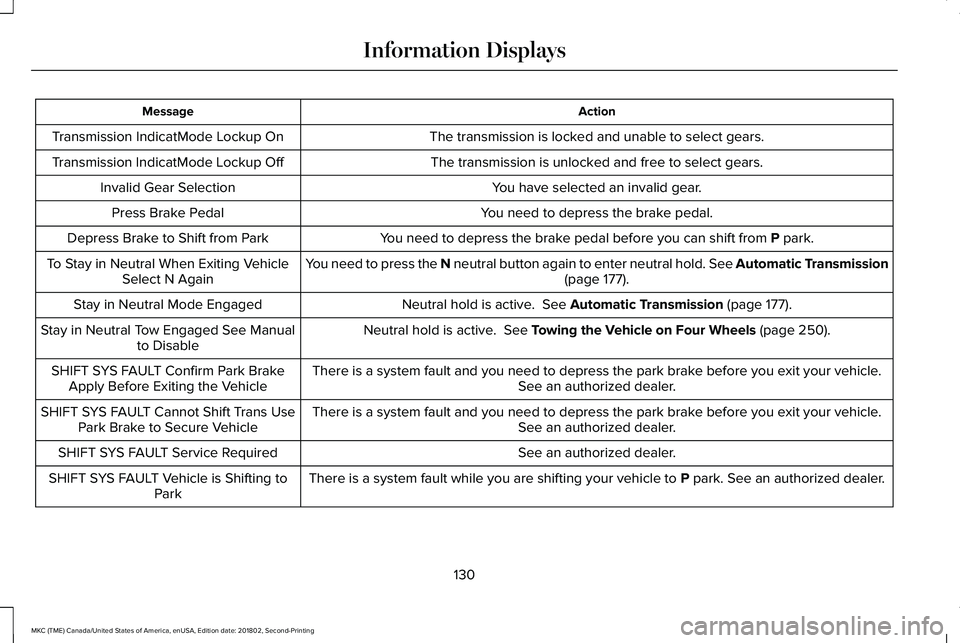
ActionMessage
The transmission is locked and unable to select gears.Transmission IndicatMode Lockup On
The transmission is unlocked and free to select gears.Transmission IndicatMode Lockup Off
You have selected an invalid gear.Invalid Gear Selection
You need to depress the brake pedal.Press Brake Pedal
You need to depress the brake pedal before you can shift from P park.Depress Brake to Shift from Park
You need to press the N neutral button again to enter neutral hold. See Automatic Transmission(page 177).To Stay in Neutral When Exiting VehicleSelect N Again
Neutral hold is active. See Automatic Transmission (page 177).Stay in Neutral Mode Engaged
Neutral hold is active. See Towing the Vehicle on Four Wheels (page 250).Stay in Neutral Tow Engaged See Manualto Disable
There is a system fault and you need to depress the park brake before you exit your vehicle.See an authorized dealer.SHIFT SYS FAULT Confirm Park BrakeApply Before Exiting the Vehicle
There is a system fault and you need to depress the park brake before you exit your vehicle.See an authorized dealer.SHIFT SYS FAULT Cannot Shift Trans UsePark Brake to Secure Vehicle
See an authorized dealer.SHIFT SYS FAULT Service Required
There is a system fault while you are shifting your vehicle to P park. See an authorized dealer.SHIFT SYS FAULT Vehicle is Shifting toPark
130
MKC (TME) Canada/United States of America, enUSA, Edition date: 201802, Second-Printing
Information Displays
Page 141 of 581
HEAD RESTRAINTS
WARNING: Fully adjust the headrestraint before you sit in or operate yourvehicle. This will help minimize the risk ofneck injury in the event of a crash. Do notadjust the head restraint when your vehicleis moving.
WARNING: The head restraint is asafety device. Whenever possible it shouldbe installed and properly adjusted when theseat is occupied. Failure to adjust the headrestraint properly could reduce itseffectiveness during certain impacts.
Note:Adjust the seat backrest (front seatsonly) to an upright driving position beforeadjusting the head restraint. Adjust the headrestraint so that the top of it is level with thetop of your head and as far forward aspossible. Make sure that you remaincomfortable. If you are extremely tall, adjustthe head restraint to its highest position.
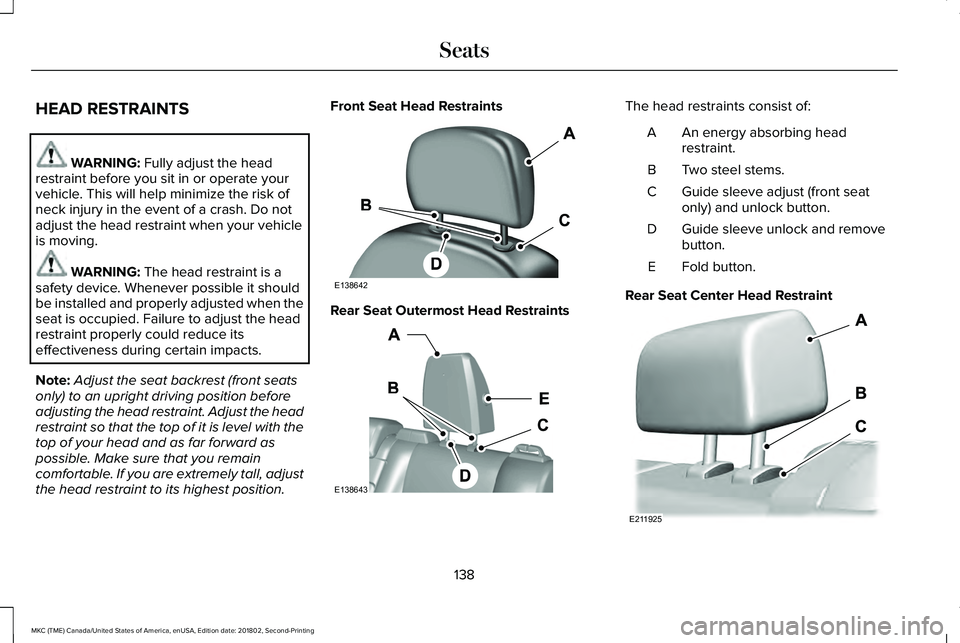
Front Seat Head Restraints
Rear Seat Outermost Head Restraints
The head restraints consist of:
An energy absorbing headrestraint.A
Two steel stems.B
Guide sleeve adjust (front seatonly) and unlock button.C
Guide sleeve unlock and removebutton.D
Fold button.E
Rear Seat Center Head Restraint
138
MKC (TME) Canada/United States of America, enUSA, Edition date: 201802, Second-Printing
SeatsE138642 E138643 E211925
Page 142 of 581
The rear center head restraint consists of:
An energy absorbing headrestraint.A
Two steel stems.B
Guide sleeve unlock and removebutton.C
Adjusting the Head Restraint
Raising the Front Seat Head Restraint
Pull the head restraint up.
Lowering the Front Seat Head Restraint
1. Press and hold button C.
2. Push the head restraint down.
Removing the Head Restraint
1.Pull the head restraint up until it reachesits highest position.
2. Press and hold buttons C and D.
3. Pull the head restraint up.
Installing the Head Restraint
Align the steel stems into the guide sleevesand push the head restraint down until itlocks.
Folding the Rear Seat Head Restraint
1. Press and hold button E.
2. Pull the head restraint back up to reset.
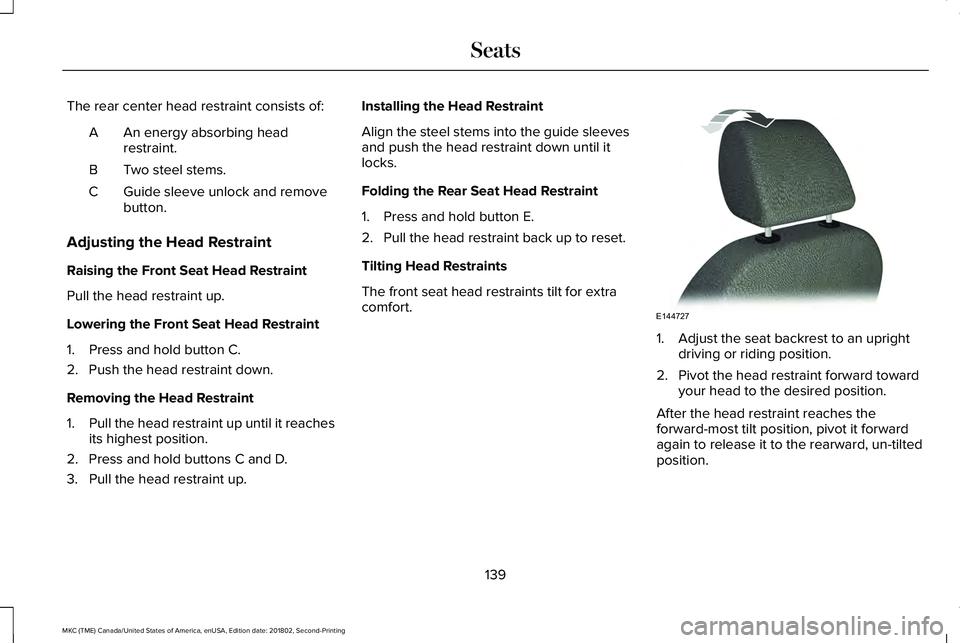
Tilting Head Restraints
The front seat head restraints tilt for extracomfort.
1. Adjust the seat backrest to an uprightdriving or riding position.
2. Pivot the head restraint forward towardyour head to the desired position.
After the head restraint reaches theforward-most tilt position, pivot it forwardagain to release it to the rearward, un-tiltedposition.
139
MKC (TME) Canada/United States of America, enUSA, Edition date: 201802, Second-Printing
SeatsE144727
Page 147 of 581
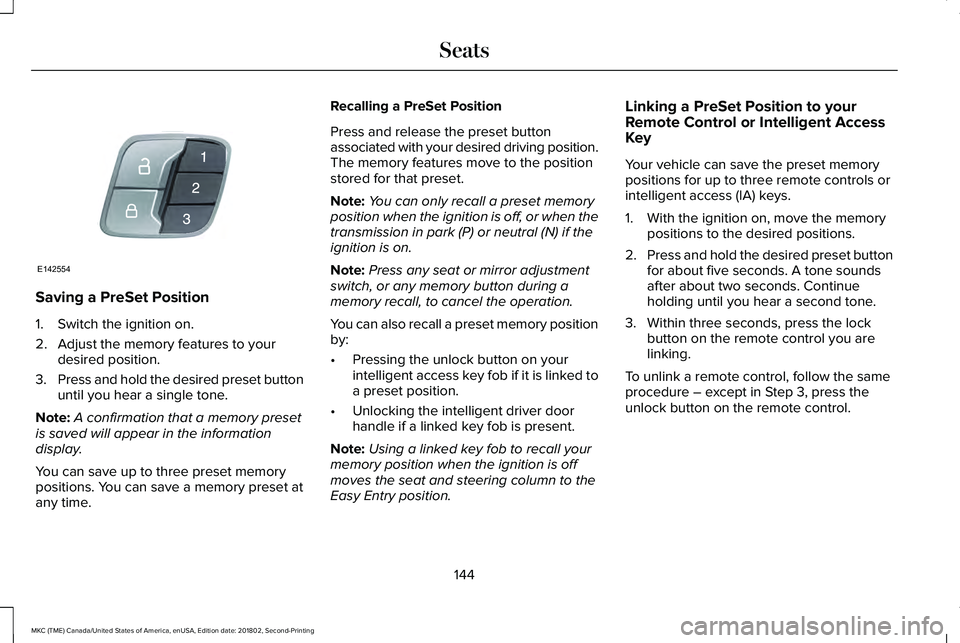
Saving a PreSet Position
1. Switch the ignition on.
2. Adjust the memory features to yourdesired position.
3.Press and hold the desired preset buttonuntil you hear a single tone.
Note:A confirmation that a memory presetis saved will appear in the informationdisplay.
You can save up to three preset memorypositions. You can save a memory preset atany time.
Recalling a PreSet Position
Press and release the preset buttonassociated with your desired driving position.The memory features move to the positionstored for that preset.
Note:You can only recall a preset memoryposition when the ignition is off, or when thetransmission in park (P) or neutral (N) if theignition is on.
Note:Press any seat or mirror adjustmentswitch, or any memory button during amemory recall, to cancel the operation.
You can also recall a preset memory positionby:
•Pressing the unlock button on yourintelligent access key fob if it is linked toa preset position.
•Unlocking the intelligent driver doorhandle if a linked key fob is present.
Note:Using a linked key fob to recall yourmemory position when the ignition is offmoves the seat and steering column to theEasy Entry position.
Linking a PreSet Position to yourRemote Control or Intelligent AccessKey
Your vehicle can save the preset memorypositions for up to three remote controls orintelligent access (IA) keys.
1. With the ignition on, move the memorypositions to the desired positions.
2.Press and hold the desired preset buttonfor about five seconds. A tone soundsafter about two seconds. Continueholding until you hear a second tone.
3. Within three seconds, press the lockbutton on the remote control you arelinking.
To unlink a remote control, follow the sameprocedure – except in Step 3, press theunlock button on the remote control.
144
MKC (TME) Canada/United States of America, enUSA, Edition date: 201802, Second-Printing
SeatsE142554
Page 150 of 581
Note:The heated seats will only functionwhen the engine is running.
The rear seat heat controls are located onthe rear of the center console.
Press the heated seat symbol to cyclethrough the various heat settings and off.More indicator lights indicate warmersettings.
CLIMATE CONTROLLED SEATS (If
Equipped)
Heated Seats
WARNING: People who are unable tofeel pain to their skin because of advancedage, chronic illness, diabetes, spinal cordinjury, medication, alcohol use, exhaustionor other physical conditions, must usecaution when using the heated seat. Theheated seat may cause burns even at lowtemperatures, especially if used for longperiods of time. Do not place anything onthe seat that may block the heat, such as ablanket or cushion. This can cause theheated seat to overheat. Do not puncturethe seat with pins, needles or other pointedobjects. This damages the heating elementand can cause the heated seat to overheat.An overheated seat may cause seriouspersonal injury.
Do not do the following:
•Place heavy objects on the seat.
•Operate the seat heater if water or anyother liquid spills on the seat. Allow theseat to dry thoroughly.
Note:The heated seats only function whenthe engine is running.
Press the heated seat symbol to cyclethrough the various heat settings and off.More indicator lights indicate warmersettings.
Note:After 90 minutes of operation, theheated seats switch off. Press the heatedseat symbol to switch the heated seats on.
Note:Depending on your remote startsettings, the heated seats may remain onafter you remote start your vehicle. Theheated seats may also turn on when youstart your vehicle if they were on when yourvehicle was turned off.
Cooled Seats
Note:The cooled seats only function whenthe engine is running.
147
MKC (TME) Canada/United States of America, enUSA, Edition date: 201802, Second-Printing
SeatsE146322 E146322
Page 152 of 581
HomeLink Wireless Control System
WARNING: Do not use the system withany garage door opener that does not havethe safety stop and reverse feature asrequired by U.S. Federal Safety Standards(this includes any garage door openermanufactured before April 1, 1982). A garagedoor opener which cannot detect an object,signaling the door to stop and reverse, doesnot meet current federal safety standards.Using a garage door opener without thesefeatures increases the risk of serious injuryor death.
Note:Make sure that the garage door andsecurity device are free from obstructionwhen you are programming. Do not programthe system with the vehicle in the garage.
Note:Make sure you keep the originalremote control transmitter for use in othervehicles as well as for future systemprogramming.
Note:We recommend that upon the sale orlease termination of your vehicle, you erasethe programmed function buttons for securityreasons. See Erasing the Function ButtonCodes.
Note:You can program a maximum of threedevices. To change or replace any of thethree devices after it has been initiallyprogrammed, you must first erase the currentsettings. See Erasing the Function ButtonCodes.
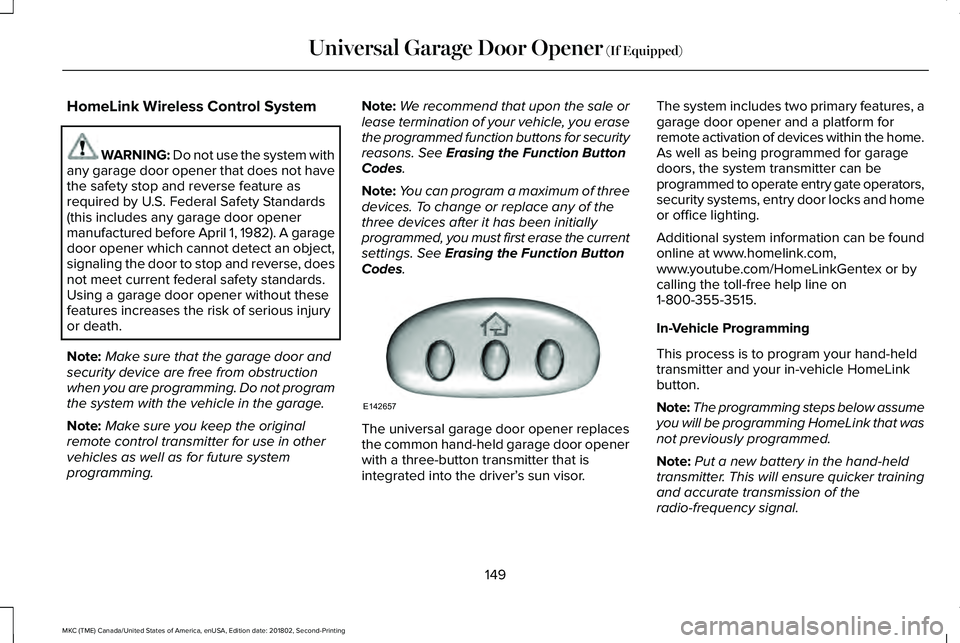
The universal garage door opener replacesthe common hand-held garage door openerwith a three-button transmitter that isintegrated into the driver’s sun visor.
The system includes two primary features, agarage door opener and a platform forremote activation of devices within the home.As well as being programmed for garagedoors, the system transmitter can beprogrammed to operate entry gate operators,security systems, entry door locks and homeor office lighting.
Additional system information can be foundonline at www.homelink.com,www.youtube.com/HomeLinkGentex or bycalling the toll-free help line on1-800-355-3515.
In-Vehicle Programming
This process is to program your hand-heldtransmitter and your in-vehicle HomeLinkbutton.
Note:The programming steps below assumeyou will be programming HomeLink that wasnot previously programmed.
Note:Put a new battery in the hand-heldtransmitter. This will ensure quicker trainingand accurate transmission of theradio-frequency signal.
149
MKC (TME) Canada/United States of America, enUSA, Edition date: 201802, Second-Printing
Universal Garage Door Opener (If Equipped)E142657
Page 163 of 581
•You can reset the timer by interactingwith your vehicle (such as pressing thebrake pedal or accelerator pedal).
•You can temporarily switch off theshutdown feature any time the ignition ison (for the current ignition cycle only).Use the information display to do so. SeeInformation Displays (page 108).
•During the countdown before engineshutdown, you are prompted to press OKor RESET (depending on your type ofinformation display) to temporarily switchthe feature off (for the current ignitioncycle only).
Stopping the Engine When YourVehicle is Stationary
1. Put the transmission in position P.
2. Press the button once.
3. Apply the parking brake.
Note:This switches off the ignition, allelectrical circuits, warning lamps andindicators.
Note:If the engine is idling for 30 minutes,the ignition and engine automatically shutdown.
Stopping the Engine When YourVehicle is Moving
WARNING: Switching off the enginewhen the vehicle is still moving will result ina loss of brake and steering assistance. Thesteering will not lock, but higher effort willbe required. When the ignition is switchedoff, some electrical circuits, including airbags, warning lamps and indicators may alsobe off. If the ignition was turned offaccidentally, you can shift into neutral (N) andre-start the engine.
1. Put the transmission in position N anduse the brakes to bring your vehicle to asafe stop.
2. When your vehicle has stopped, put thetransmission in position P.
3. Press and hold the button for onesecond, or press it three times within twoseconds.
4. Apply the parking brake.
Guarding Against Exhaust Fumes
WARNING: If you smell exhaust fumesinside your vehicle, have your vehiclechecked by your authorized dealerimmediately. Do not drive your vehicle if yousmell exhaust fumes. Carbon monoxide ispresent in exhaust fumes. Take precautionsto avoid its dangerous effects.
Important Ventilating Information
If you stop your vehicle and the leave theengine idling for long periods, werecommend that you do one of the following:
•Open the windows at least 1 in (2.5 cm).
•Set your climate control to outside air.
160
MKC (TME) Canada/United States of America, enUSA, Edition date: 201802, Second-Printing
Starting and Stopping the Engine