reset LINCOLN MKC 2019 User Guide
[x] Cancel search | Manufacturer: LINCOLN, Model Year: 2019, Model line: MKC, Model: LINCOLN MKC 2019Pages: 581, PDF Size: 5.41 MB
Page 98 of 581
POWER WINDOWS
WARNING: Do not leave childrenunattended in your vehicle and do not letthem play with the power windows. Failureto follow this instruction could result inpersonal injury.
WARNING: When closing the powerwindows, verify they are free of obstructionand make sure that children and pets are notin the proximity of the window openings.
Note:You may hear a pulsing noise whenjust one of the windows is open. Lower theopposite window slightly to reduce thisnoise.
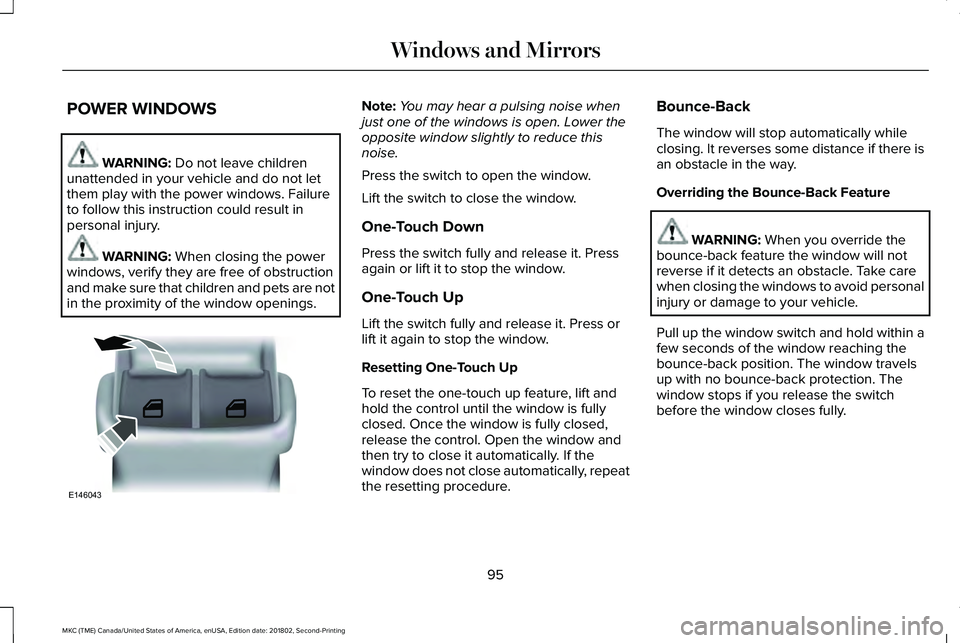
Press the switch to open the window.
Lift the switch to close the window.
One-Touch Down
Press the switch fully and release it. Pressagain or lift it to stop the window.
One-Touch Up
Lift the switch fully and release it. Press orlift it again to stop the window.
Resetting One-Touch Up
To reset the one-touch up feature, lift andhold the control until the window is fullyclosed. Once the window is fully closed,release the control. Open the window andthen try to close it automatically. If thewindow does not close automatically, repeatthe resetting procedure.
Bounce-Back
The window will stop automatically whileclosing. It reverses some distance if there isan obstacle in the way.
Overriding the Bounce-Back Feature
WARNING: When you override thebounce-back feature the window will notreverse if it detects an obstacle. Take carewhen closing the windows to avoid personalinjury or damage to your vehicle.
Pull up the window switch and hold within afew seconds of the window reaching thebounce-back position. The window travelsup with no bounce-back protection. Thewindow stops if you release the switchbefore the window closes fully.
95
MKC (TME) Canada/United States of America, enUSA, Edition date: 201802, Second-Printing
Windows and MirrorsE146043
Page 101 of 581
Loose Mirror
If your auto-folding mirrors are manuallyfolded or unfolded, they may not workproperly even after you re-position them.You need to reset them if:
•The mirrors vibrate when you drive.
•The mirrors feel loose.
•The mirrors do not stay in the folded orunfolded position.
•One of the mirrors is not in its normaldriving position.
To reset the auto-fold feature, use thepower-folding mirror control to fold andunfold the mirrors. You may hear a loud noiseas you reset the mirrors. This sound isnormal. Repeat this process as needed eachtime the mirrors are manually folded orunfolded.
Heated Exterior Mirrors
See Heated Exterior Mirrors (page 135).
Memory Mirrors (If Equipped)
You can save and recall the mirror positionsthrough the memory function. See MemoryFunction (page 143).
Signal Indicator Mirrors
The outer portion of the appropriate mirrorhousing will blink when you switch on theturn signal.
Auto-Dimming Feature (If Equipped)
The driver’s exterior mirror automaticallydims when the interior auto-dimming mirrorturns on.
Lincoln Welcome Mat
Projection lights, on the bottom of the mirrorhousings, project an image onto the grounda short distance from the vehicle. SeeLighting (page 88).
Integrated Blind Spot Mirrors (If Equipped)
WARNING: Objects in the mirror arecloser than they appear.
The blind spot mirror has a wide-angle mirrorinside the exterior mirror that can increasevisibility along the side of your vehicle.
Check the main mirror first before a lanechange, then check the blind spot mirror. Ifno vehicles are present in the blind spotmirror and the traffic in the adjacent lane isat a safe distance, signal that you intend tochange lanes. Glance over your shoulder toverify traffic is clear and carefully changelanes.
98
MKC (TME) Canada/United States of America, enUSA, Edition date: 201802, Second-Printing
Windows and Mirrors
Page 112 of 581
Trip 1 & 2
Normal or TowingDistance to E
Average fuel economy
Trip timer
Press and hold OK to reset the currently displayed trip information.
•Trip odometer — shows the accumulated trip distance.
•Trip Timer— when you switch your vehicle off the timer stops and then restarts when you restart your vehicle.
•Average fuel economy — shows the average fuel economy for a given trip.
Fuel Economy
Use the left or right arrow buttons to choosethe desired fuel economy display.
Fuel Economy
Instantaneous Fuel Economy
Auto StartStop
•Instantaneous Fuel Economy: This display shows a visual graph of your instantaneous fuel economy.
•Auto StartStop - Available Auto Start-Stop messaging will provide details about what is happening with your system. See InformationMessages (page 113).
109
MKC (TME) Canada/United States of America, enUSA, Edition date: 201802, Second-Printing
Information Displays
Page 123 of 581
Doors and Locks
ActionMessage
The door(s) listed is not completely closed.X Door Ajar
The luggage compartment is not completely closed.Trunk Ajar
The hood is not completely closed.Hood Ajar
The system has disabled the door switches.Switches Inhibited Security Mode
There is a system malfunction with the child locks. Contact an authorized dealer as soon aspossible.Child Lock Malfunction Service Required
The factory keypad code displays in the information display after system resets the keypad.See Keyless Entry (page 70).Factory Keypad Code {X X X X X}
Driver Alert
ActionMessage
Stop and rest as soon as it is safe to do so.Driver Alert Warning Rest Now
Take a rest soon.Driver Alert Warning Rest Suggested
120
MKC (TME) Canada/United States of America, enUSA, Edition date: 201802, Second-Printing
Information Displays
Page 142 of 581
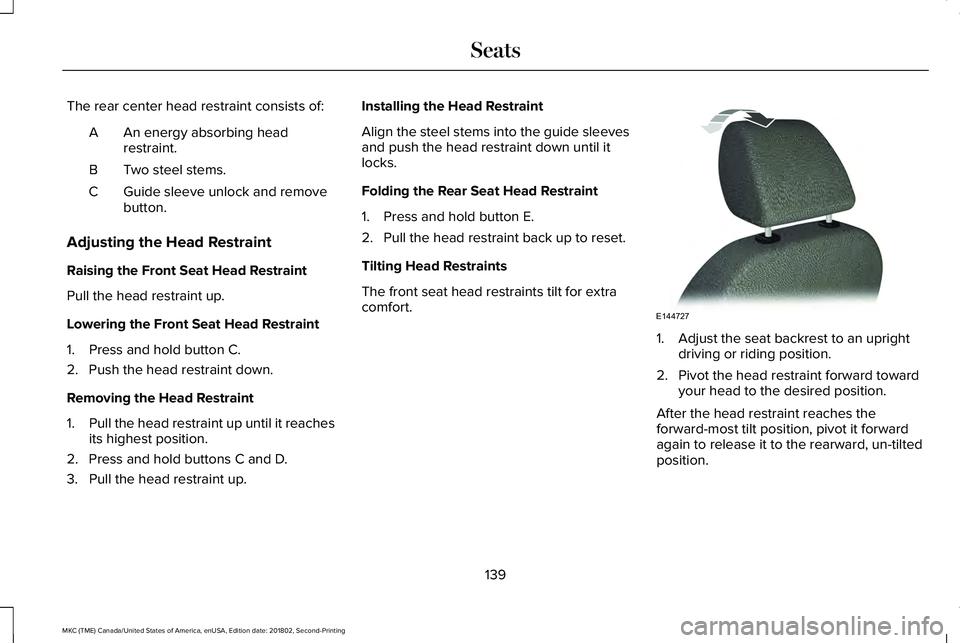
The rear center head restraint consists of:
An energy absorbing headrestraint.A
Two steel stems.B
Guide sleeve unlock and removebutton.C
Adjusting the Head Restraint
Raising the Front Seat Head Restraint
Pull the head restraint up.
Lowering the Front Seat Head Restraint
1. Press and hold button C.
2. Push the head restraint down.
Removing the Head Restraint
1.Pull the head restraint up until it reachesits highest position.
2. Press and hold buttons C and D.
3. Pull the head restraint up.
Installing the Head Restraint
Align the steel stems into the guide sleevesand push the head restraint down until itlocks.
Folding the Rear Seat Head Restraint
1. Press and hold button E.
2. Pull the head restraint back up to reset.
Tilting Head Restraints
The front seat head restraints tilt for extracomfort.
1. Adjust the seat backrest to an uprightdriving or riding position.
2. Pivot the head restraint forward towardyour head to the desired position.
After the head restraint reaches theforward-most tilt position, pivot it forwardagain to release it to the rearward, un-tiltedposition.
139
MKC (TME) Canada/United States of America, enUSA, Edition date: 201802, Second-Printing
SeatsE144727
Page 147 of 581
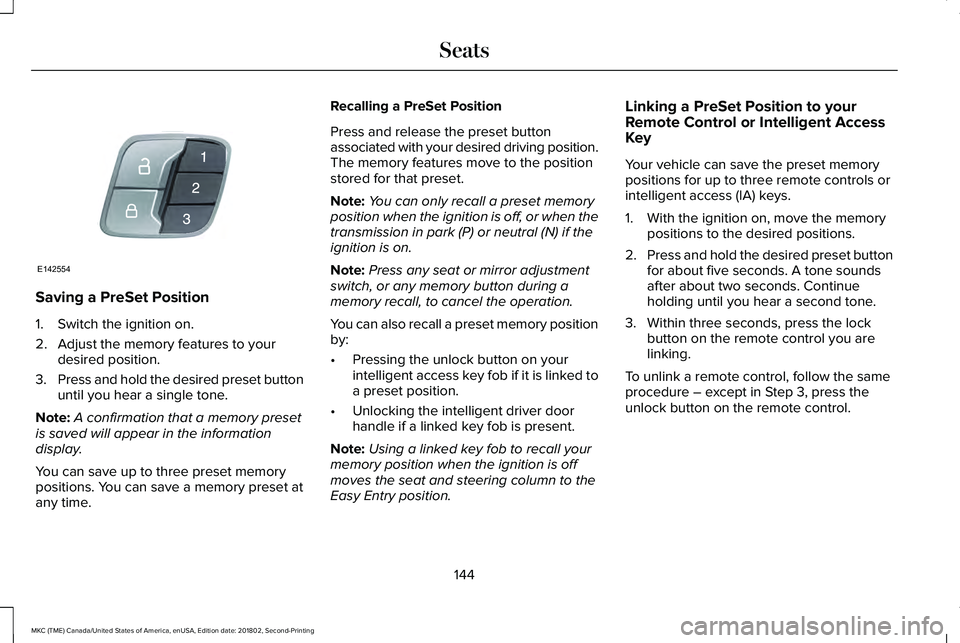
Saving a PreSet Position
1. Switch the ignition on.
2. Adjust the memory features to yourdesired position.
3.Press and hold the desired preset buttonuntil you hear a single tone.
Note:A confirmation that a memory presetis saved will appear in the informationdisplay.
You can save up to three preset memorypositions. You can save a memory preset atany time.
Recalling a PreSet Position
Press and release the preset buttonassociated with your desired driving position.The memory features move to the positionstored for that preset.
Note:You can only recall a preset memoryposition when the ignition is off, or when thetransmission in park (P) or neutral (N) if theignition is on.
Note:Press any seat or mirror adjustmentswitch, or any memory button during amemory recall, to cancel the operation.
You can also recall a preset memory positionby:
•Pressing the unlock button on yourintelligent access key fob if it is linked toa preset position.
•Unlocking the intelligent driver doorhandle if a linked key fob is present.
Note:Using a linked key fob to recall yourmemory position when the ignition is offmoves the seat and steering column to theEasy Entry position.
Linking a PreSet Position to yourRemote Control or Intelligent AccessKey
Your vehicle can save the preset memorypositions for up to three remote controls orintelligent access (IA) keys.
1. With the ignition on, move the memorypositions to the desired positions.
2.Press and hold the desired preset buttonfor about five seconds. A tone soundsafter about two seconds. Continueholding until you hear a second tone.
3. Within three seconds, press the lockbutton on the remote control you arelinking.
To unlink a remote control, follow the sameprocedure – except in Step 3, press theunlock button on the remote control.
144
MKC (TME) Canada/United States of America, enUSA, Edition date: 201802, Second-Printing
SeatsE142554
Page 158 of 581
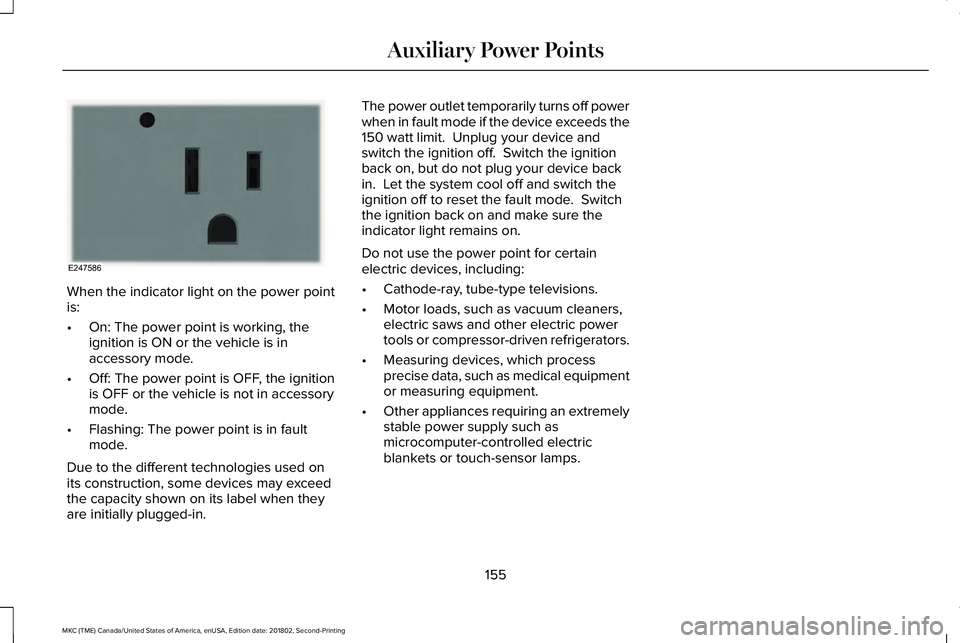
When the indicator light on the power pointis:
•On: The power point is working, theignition is ON or the vehicle is inaccessory mode.
•Off: The power point is OFF, the ignitionis OFF or the vehicle is not in accessorymode.
•Flashing: The power point is in faultmode.
Due to the different technologies used onits construction, some devices may exceedthe capacity shown on its label when theyare initially plugged-in.
The power outlet temporarily turns off powerwhen in fault mode if the device exceeds the150 watt limit. Unplug your device andswitch the ignition off. Switch the ignitionback on, but do not plug your device backin. Let the system cool off and switch theignition off to reset the fault mode. Switchthe ignition back on and make sure theindicator light remains on.
Do not use the power point for certainelectric devices, including:
•Cathode-ray, tube-type televisions.
•Motor loads, such as vacuum cleaners,electric saws and other electric powertools or compressor-driven refrigerators.
•Measuring devices, which processprecise data, such as medical equipmentor measuring equipment.
•Other appliances requiring an extremelystable power supply such asmicrocomputer-controlled electricblankets or touch-sensor lamps.
155
MKC (TME) Canada/United States of America, enUSA, Edition date: 201802, Second-Printing
Auxiliary Power PointsE247586
Page 162 of 581

Within 20 seconds of switching the engineoff, press the brake pedal and press thebutton. After 20 seconds have expired, youcan no longer restart the engine without thekey present inside your vehicle.
Once the engine has started, it remainsrunning until you press the button, even ifthe system does not detect a valid key. If youopen and close a door while the engine isrunning, the system searches for a valid key.You cannot restart the engine if the systemdoes not detect a valid key within 20seconds.
Failure to Start
If you cannot start the engine after threeattempts, wait 10 seconds and follow thisprocedure:
1. Fully press the brake pedal.
2. Fully press the accelerator pedal andhold it there.
3. Start the engine.
Note:You can crank the engine for a totalof 60 seconds (without the engine starting)before the starting system temporarilydisables. The 60 seconds does not have tobe all at once. For example, if you crank theengine three times for 20 seconds each time,without the engine starting, you reached the60-second time limit. A message appears inthe information display alerting you that youexceeded the cranking time. You cannotattempt to start the engine for at least 15minutes. After 15 minutes, you are limited toa 15-second engine cranking time. You needto wait 60 minutes before you can crank theengine for 60 seconds again.
Automatic Engine Shutdown
If your vehicle is equipped with a keylessignition, it has a feature that automaticallyshuts down the engine if it has been idlingfor an extended period. The ignition alsoturns off in order to save battery power.Before the engine shuts down, a messageappears in the information display showinga timer counting down from 30 seconds. If
you do not intervene within 30 seconds, theengine shuts down. Another messageappears in the information display to informyou that the engine has shut down in orderto save fuel. Start your vehicle as younormally do.
Automatic Engine Shutdown Override
Note:You cannot permanently switch off theautomatic engine shutdown feature. Whenyou switch it off temporarily, it turns on atthe next ignition cycle.
You can stop the engine shutdown, or resetthe timer, at any point before the 30-secondcountdown has expired by doing any of thefollowing:
159
MKC (TME) Canada/United States of America, enUSA, Edition date: 201802, Second-Printing
Starting and Stopping the Engine
Page 163 of 581
•You can reset the timer by interactingwith your vehicle (such as pressing thebrake pedal or accelerator pedal).
•You can temporarily switch off theshutdown feature any time the ignition ison (for the current ignition cycle only).Use the information display to do so. SeeInformation Displays (page 108).
•During the countdown before engineshutdown, you are prompted to press OKor RESET (depending on your type ofinformation display) to temporarily switchthe feature off (for the current ignitioncycle only).
Stopping the Engine When YourVehicle is Stationary
1. Put the transmission in position P.
2. Press the button once.
3. Apply the parking brake.
Note:This switches off the ignition, allelectrical circuits, warning lamps andindicators.
Note:If the engine is idling for 30 minutes,the ignition and engine automatically shutdown.
Stopping the Engine When YourVehicle is Moving
WARNING: Switching off the enginewhen the vehicle is still moving will result ina loss of brake and steering assistance. Thesteering will not lock, but higher effort willbe required. When the ignition is switchedoff, some electrical circuits, including airbags, warning lamps and indicators may alsobe off. If the ignition was turned offaccidentally, you can shift into neutral (N) andre-start the engine.
1. Put the transmission in position N anduse the brakes to bring your vehicle to asafe stop.
2. When your vehicle has stopped, put thetransmission in position P.
3. Press and hold the button for onesecond, or press it three times within twoseconds.
4. Apply the parking brake.
Guarding Against Exhaust Fumes
WARNING: If you smell exhaust fumesinside your vehicle, have your vehiclechecked by your authorized dealerimmediately. Do not drive your vehicle if yousmell exhaust fumes. Carbon monoxide ispresent in exhaust fumes. Take precautionsto avoid its dangerous effects.
Important Ventilating Information
If you stop your vehicle and the leave theengine idling for long periods, werecommend that you do one of the following:
•Open the windows at least 1 in (2.5 cm).
•Set your climate control to outside air.
160
MKC (TME) Canada/United States of America, enUSA, Edition date: 201802, Second-Printing
Starting and Stopping the Engine
Page 175 of 581
9. Fully close the fuel filler door.
Note:The message may not immediatelyreset. If the message continues to appearand a warning lamp illuminates, have yourvehicle checked as soon as possible.
FUEL CONSUMPTION
Advertised Capacity
The advertised capacity is the maximumamount of fuel that you can add to the fueltank after running out of fuel. Included in theadvertised capacity is an empty reserve. Theempty reserve is an unspecified amount offuel that remains in the fuel tank when thefuel gauge indicates empty.
Note:The amount of fuel in the emptyreserve varies and should not be relied uponto increase driving range.
Fuel Economy
Your vehicle calculates fuel economy figuresthrough the trip computer average fuelfunction. See General Information (page108).
The first 1,000 mi (1,500 km) of driving is thebreak-in period of the engine. A moreaccurate measurement is obtained after2,000 mi (3,000 km).
Impacting Fuel Economy
•Incorrect tire inflation pressures.
•Fully loading your vehicle.
•Carrying unnecessary weight.
•Adding certain accessories to yourvehicle such as bug deflectors, rollbarsor light bars, running boards and skiracks.
•Using fuel blended with alcohol. SeeFuel Quality (page 166).
•Fuel economy may decrease with lowertemperatures.
•Fuel economy may decrease whendriving short distances.
•You may get better fuel economy whendriving on flat terrain than when drivingon hilly terrain.
172
MKC (TME) Canada/United States of America, enUSA, Edition date: 201802, Second-Printing
Fuel and Refueling