steering LINCOLN MKC 2019 User Guide
[x] Cancel search | Manufacturer: LINCOLN, Model Year: 2019, Model line: MKC, Model: LINCOLN MKC 2019Pages: 581, PDF Size: 5.41 MB
Page 84 of 581
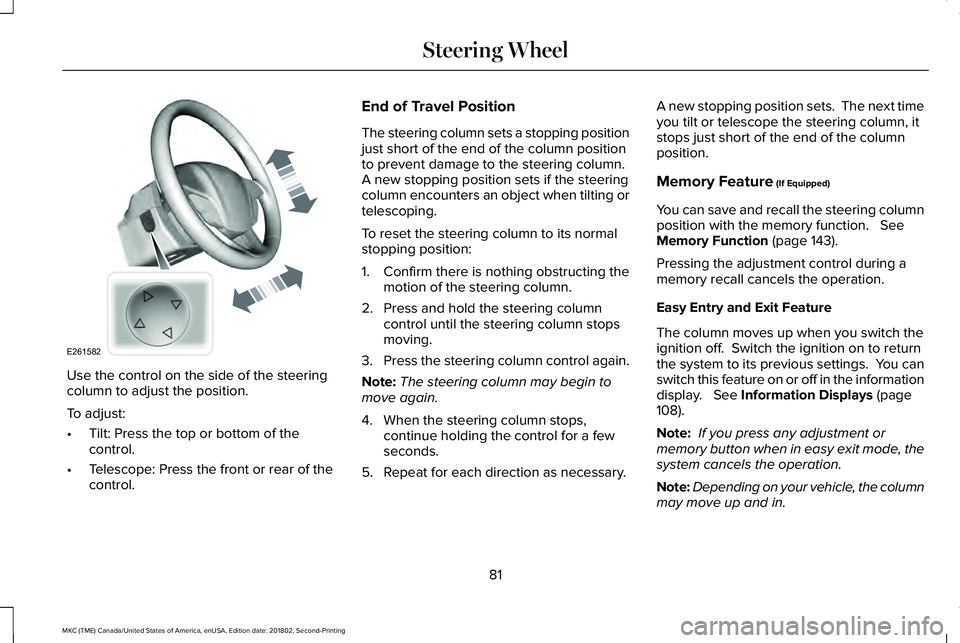
Use the control on the side of the steeringcolumn to adjust the position.
To adjust:
•Tilt: Press the top or bottom of thecontrol.
•Telescope: Press the front or rear of thecontrol.
End of Travel Position
The steering column sets a stopping positionjust short of the end of the column positionto prevent damage to the steering column. A new stopping position sets if the steeringcolumn encounters an object when tilting ortelescoping.
To reset the steering column to its normalstopping position:
1. Confirm there is nothing obstructing themotion of the steering column.
2. Press and hold the steering columncontrol until the steering column stopsmoving.
3.Press the steering column control again.
Note:The steering column may begin tomove again.
4. When the steering column stops,continue holding the control for a fewseconds.
5. Repeat for each direction as necessary.
A new stopping position sets. The next timeyou tilt or telescope the steering column, itstops just short of the end of the columnposition.
Memory Feature (If Equipped)
You can save and recall the steering columnposition with the memory function. SeeMemory Function (page 143).
Pressing the adjustment control during amemory recall cancels the operation.
Easy Entry and Exit Feature
The column moves up when you switch theignition off. Switch the ignition on to returnthe system to its previous settings. You canswitch this feature on or off in the informationdisplay. See Information Displays (page108).
Note: If you press any adjustment ormemory button when in easy exit mode, thesystem cancels the operation.
Note:Depending on your vehicle, the columnmay move up and in.
81
MKC (TME) Canada/United States of America, enUSA, Edition date: 201802, Second-Printing
Steering WheelE261582
Page 85 of 581
AUDIO CONTROL
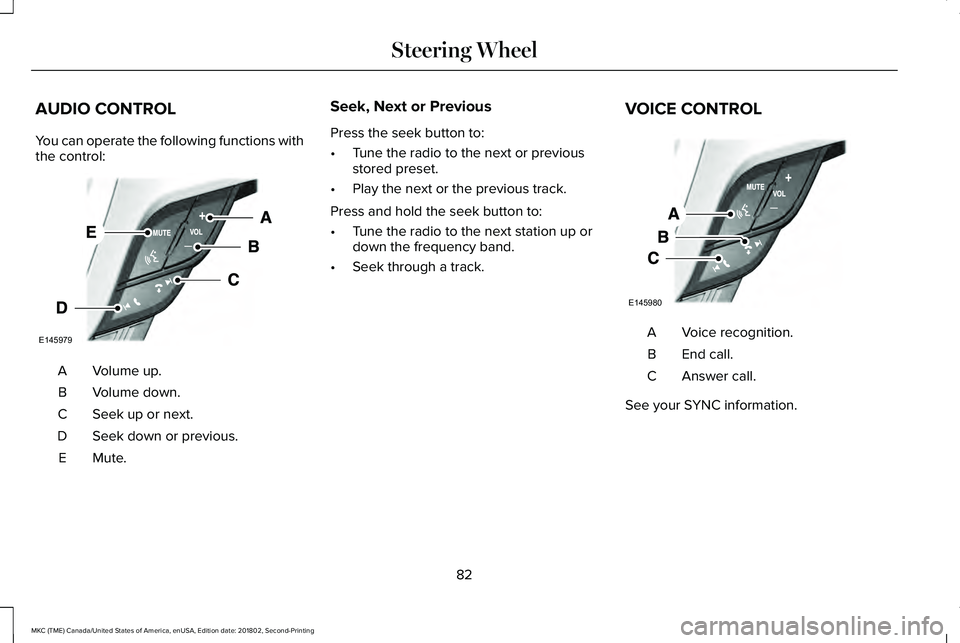
You can operate the following functions withthe control:
Volume up.A
Volume down.B
Seek up or next.C
Seek down or previous.D
Mute.E
Seek, Next or Previous
Press the seek button to:
•Tune the radio to the next or previousstored preset.
•Play the next or the previous track.
Press and hold the seek button to:
•Tune the radio to the next station up ordown the frequency band.
•Seek through a track.
VOICE CONTROL
Voice recognition.A
End call.B
Answer call.C
See your SYNC information.
82
MKC (TME) Canada/United States of America, enUSA, Edition date: 201802, Second-Printing
Steering WheelE145979 E145980
Page 86 of 581
CRUISE CONTROL
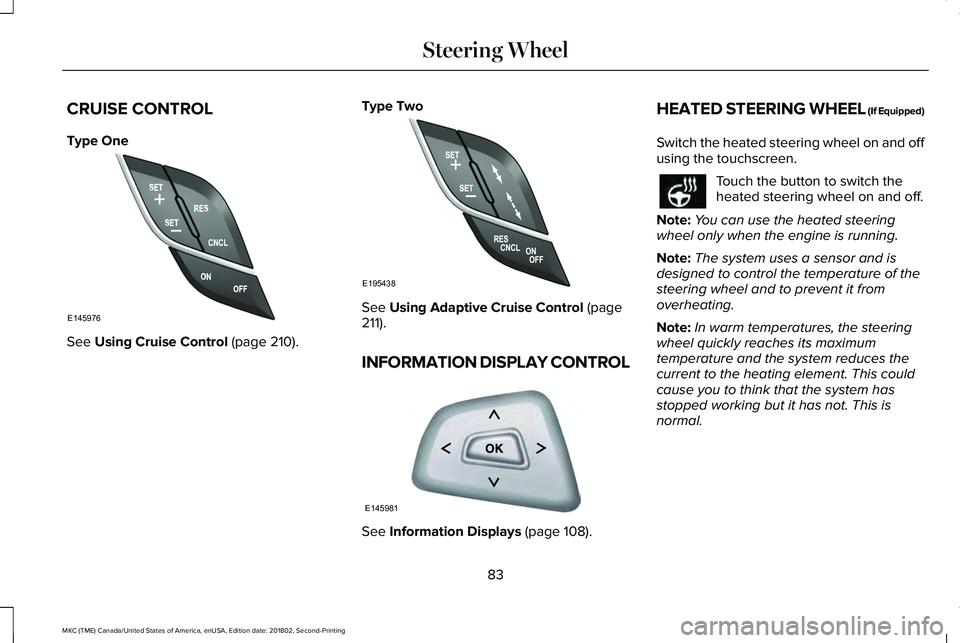
Type One
See Using Cruise Control (page 210).
Type Two
See Using Adaptive Cruise Control (page211).
INFORMATION DISPLAY CONTROL
See Information Displays (page 108).
HEATED STEERING WHEEL (If Equipped)
Switch the heated steering wheel on and offusing the touchscreen.
Touch the button to switch theheated steering wheel on and off.
Note:You can use the heated steeringwheel only when the engine is running.
Note:The system uses a sensor and isdesigned to control the temperature of thesteering wheel and to prevent it fromoverheating.
Note:In warm temperatures, the steeringwheel quickly reaches its maximumtemperature and the system reduces thecurrent to the heating element. This couldcause you to think that the system hasstopped working but it has not. This isnormal.
83
MKC (TME) Canada/United States of America, enUSA, Edition date: 201802, Second-Printing
Steering WheelE145976 E195438 E145981
Page 111 of 581
GENERAL INFORMATION
WARNING: Driving while distractedcan result in loss of vehicle control, crashand injury. We strongly recommend that youuse extreme caution when using any devicethat may take your focus off the road. Yourprimary responsibility is the safe operationof your vehicle. We recommend against theuse of any hand-held device while drivingand encourage the use of voice-operatedsystems when possible. Make sure you areaware of all applicable local laws that mayaffect the use of electronic devices whiledriving.
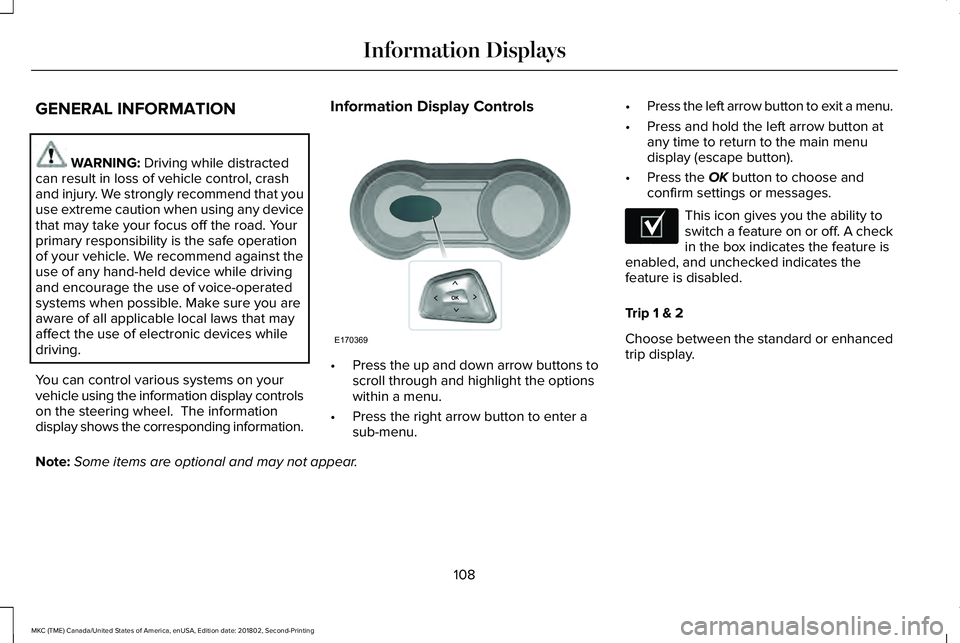
You can control various systems on yourvehicle using the information display controlson the steering wheel. The informationdisplay shows the corresponding information.
Information Display Controls
•Press the up and down arrow buttons toscroll through and highlight the optionswithin a menu.
•Press the right arrow button to enter asub-menu.
•Press the left arrow button to exit a menu.
•Press and hold the left arrow button atany time to return to the main menudisplay (escape button).
•Press the OK button to choose andconfirm settings or messages.
This icon gives you the ability toswitch a feature on or off. A checkin the box indicates the feature isenabled, and unchecked indicates thefeature is disabled.
Trip 1 & 2
Choose between the standard or enhancedtrip display.
Note:Some items are optional and may not appear.
108
MKC (TME) Canada/United States of America, enUSA, Edition date: 201802, Second-Printing
Information DisplaysE170369 E204495
Page 119 of 581
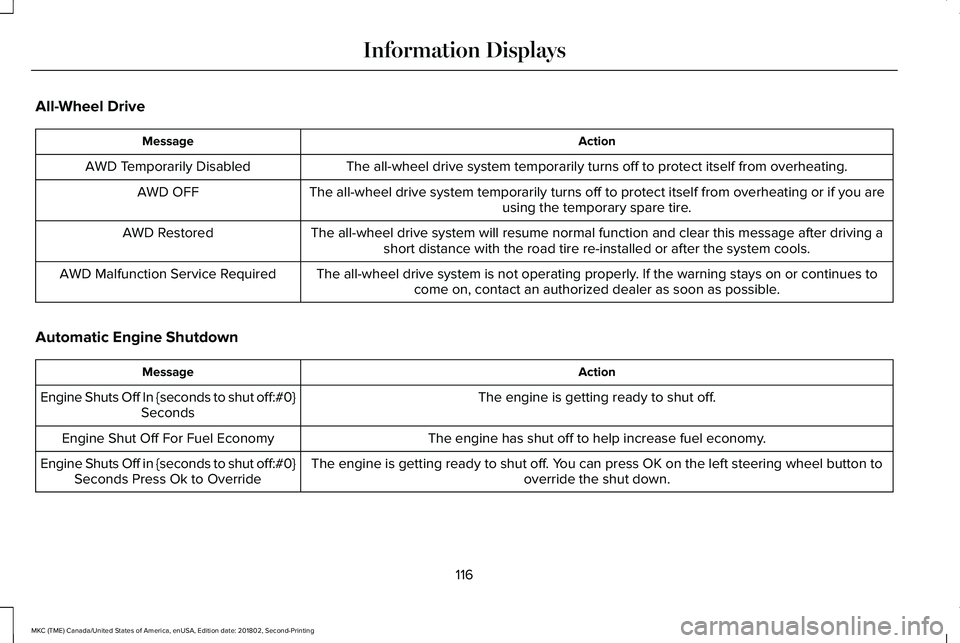
All-Wheel Drive
ActionMessage
The all-wheel drive system temporarily turns off to protect itself from overheating.AWD Temporarily Disabled
The all-wheel drive system temporarily turns off to protect itself from overheating or if you areusing the temporary spare tire.AWD OFF
The all-wheel drive system will resume normal function and clear this message after driving ashort distance with the road tire re-installed or after the system cools.AWD Restored
The all-wheel drive system is not operating properly. If the warning stays on or continues tocome on, contact an authorized dealer as soon as possible.AWD Malfunction Service Required
Automatic Engine Shutdown
ActionMessage
The engine is getting ready to shut off.Engine Shuts Off In {seconds to shut off:#0}Seconds
The engine has shut off to help increase fuel economy.Engine Shut Off For Fuel Economy
The engine is getting ready to shut off. You can press OK on the left steering wheel button tooverride the shut down.Engine Shuts Off in {seconds to shut off:#0}Seconds Press Ok to Override
116
MKC (TME) Canada/United States of America, enUSA, Edition date: 201802, Second-Printing
Information Displays
Page 125 of 581
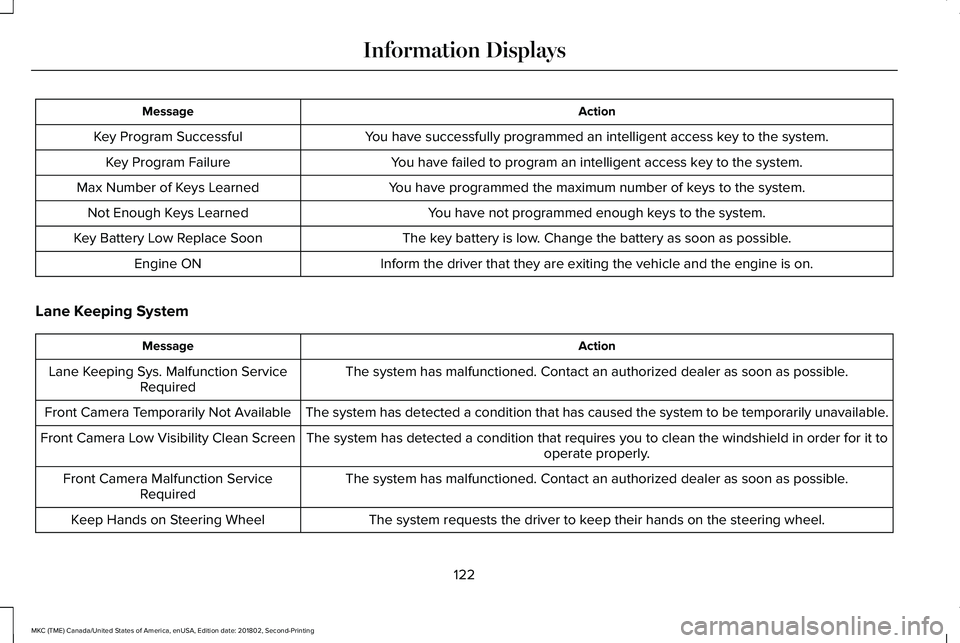
ActionMessage
You have successfully programmed an intelligent access key to the system.Key Program Successful
You have failed to program an intelligent access key to the system.Key Program Failure
You have programmed the maximum number of keys to the system.Max Number of Keys Learned
You have not programmed enough keys to the system.Not Enough Keys Learned
The key battery is low. Change the battery as soon as possible.Key Battery Low Replace Soon
Inform the driver that they are exiting the vehicle and the engine is on.Engine ON
Lane Keeping System
ActionMessage
The system has malfunctioned. Contact an authorized dealer as soon as possible.Lane Keeping Sys. Malfunction ServiceRequired
The system has detected a condition that has caused the system to be temporarily unavailable.Front Camera Temporarily Not Available
The system has detected a condition that requires you to clean the windshield in order for it tooperate properly.Front Camera Low Visibility Clean Screen
The system has malfunctioned. Contact an authorized dealer as soon as possible.Front Camera Malfunction ServiceRequired
The system requests the driver to keep their hands on the steering wheel.Keep Hands on Steering Wheel
122
MKC (TME) Canada/United States of America, enUSA, Edition date: 201802, Second-Printing
Information Displays
Page 129 of 581
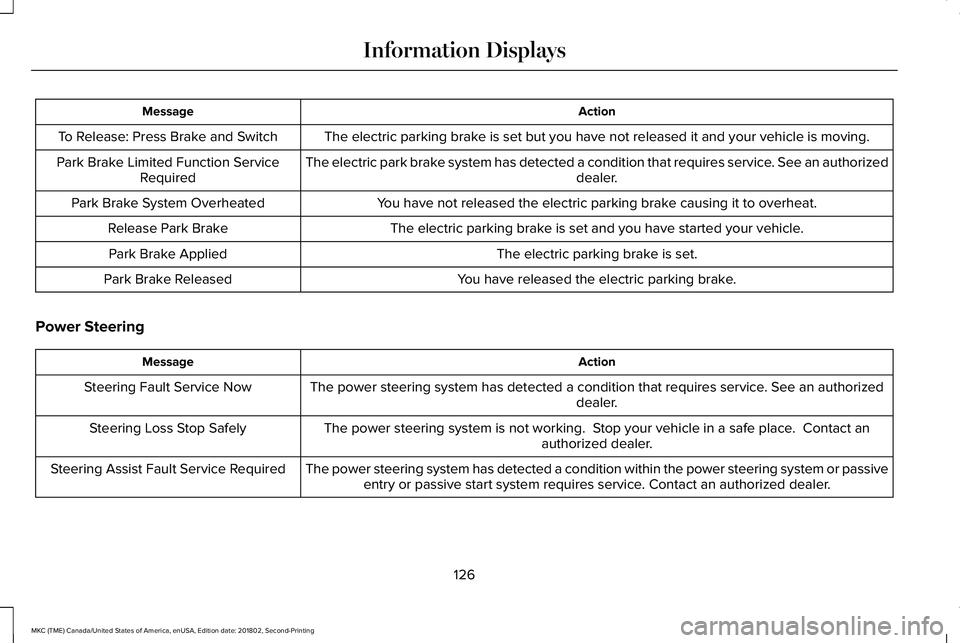
ActionMessage
The electric parking brake is set but you have not released it and your vehicle is moving.To Release: Press Brake and Switch
The electric park brake system has detected a condition that requires service. See an authorizeddealer.Park Brake Limited Function ServiceRequired
You have not released the electric parking brake causing it to overheat.Park Brake System Overheated
The electric parking brake is set and you have started your vehicle.Release Park Brake
The electric parking brake is set.Park Brake Applied
You have released the electric parking brake.Park Brake Released
Power Steering
ActionMessage
The power steering system has detected a condition that requires service. See an authorizeddealer.Steering Fault Service Now
The power steering system is not working. Stop your vehicle in a safe place. Contact anauthorized dealer.Steering Loss Stop Safely
The power steering system has detected a condition within the power steering system or passiveentry or passive start system requires service. Contact an authorized dealer.Steering Assist Fault Service Required
126
MKC (TME) Canada/United States of America, enUSA, Edition date: 201802, Second-Printing
Information Displays
Page 139 of 581
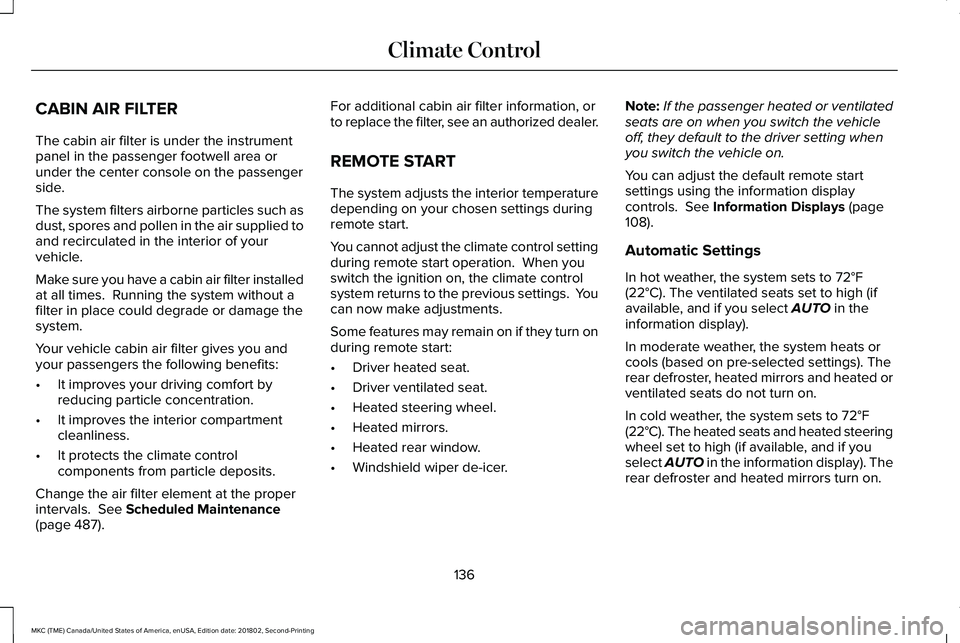
CABIN AIR FILTER
The cabin air filter is under the instrumentpanel in the passenger footwell area orunder the center console on the passengerside.
The system filters airborne particles such asdust, spores and pollen in the air supplied toand recirculated in the interior of yourvehicle.
Make sure you have a cabin air filter installedat all times. Running the system without afilter in place could degrade or damage thesystem.
Your vehicle cabin air filter gives you andyour passengers the following benefits:
•It improves your driving comfort byreducing particle concentration.
•It improves the interior compartmentcleanliness.
•It protects the climate controlcomponents from particle deposits.
Change the air filter element at the properintervals. See Scheduled Maintenance(page 487).
For additional cabin air filter information, orto replace the filter, see an authorized dealer.
REMOTE START
The system adjusts the interior temperaturedepending on your chosen settings duringremote start.
You cannot adjust the climate control settingduring remote start operation. When youswitch the ignition on, the climate controlsystem returns to the previous settings. Youcan now make adjustments.
Some features may remain on if they turn onduring remote start:
•Driver heated seat.
•Driver ventilated seat.
•Heated steering wheel.
•Heated mirrors.
•Heated rear window.
•Windshield wiper de-icer.
Note:If the passenger heated or ventilatedseats are on when you switch the vehicleoff, they default to the driver setting whenyou switch the vehicle on.
You can adjust the default remote startsettings using the information displaycontrols. See Information Displays (page108).
Automatic Settings
In hot weather, the system sets to 72°F(22°C). The ventilated seats set to high (ifavailable, and if you select AUTO in theinformation display).
In moderate weather, the system heats orcools (based on pre-selected settings). Therear defroster, heated mirrors and heated orventilated seats do not turn on.
In cold weather, the system sets to 72°F(22°C). The heated seats and heated steeringwheel set to high (if available, and if youselect AUTO in the information display). Therear defroster and heated mirrors turn on.
136
MKC (TME) Canada/United States of America, enUSA, Edition date: 201802, Second-Printing
Climate Control
Page 140 of 581
SITTING IN THE CORRECT
POSITION
WARNING: Sitting improperly, out ofposition or with the seatback reclined too farcan take weight off the seat cushion andaffect the decision of the passenger sensingsystem, resulting in serious injury or deathin the event of a crash. Always sit uprightagainst your seat back, with your feet on thefloor.
WARNING: Do not recline the seatbacktoo far as this can cause the occupant toslide under the seatbelt, resulting in seriousinjury in the event of a collision.
WARNING: Do not place objects higherthan the top of the seat backrest. Failure tofollow this instruction could result in personalinjury or death in the event of a sudden stopor crash.
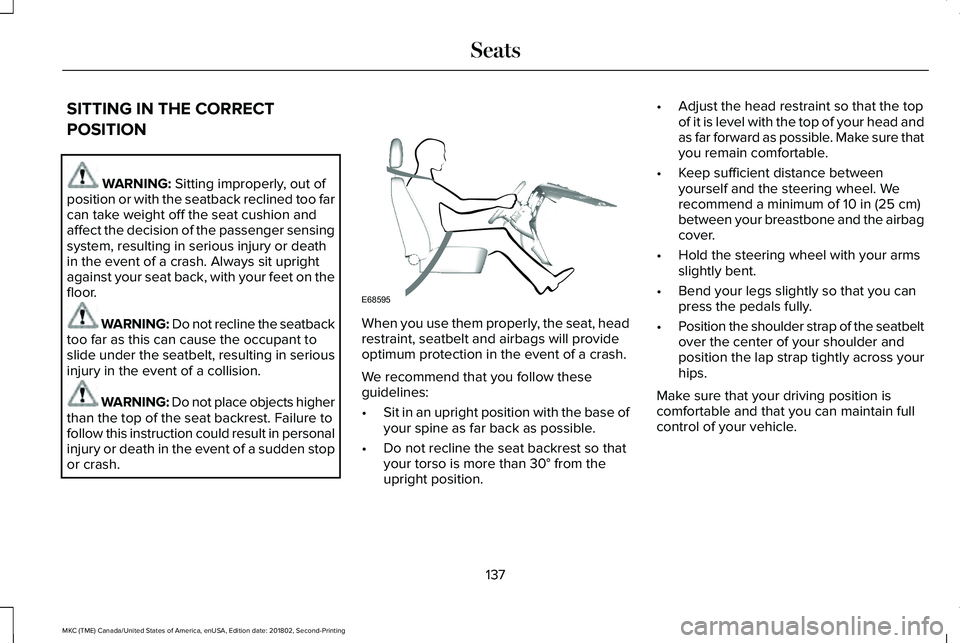
When you use them properly, the seat, headrestraint, seatbelt and airbags will provideoptimum protection in the event of a crash.
We recommend that you follow theseguidelines:
•Sit in an upright position with the base ofyour spine as far back as possible.
•Do not recline the seat backrest so thatyour torso is more than 30° from theupright position.
•Adjust the head restraint so that the topof it is level with the top of your head andas far forward as possible. Make sure thatyou remain comfortable.
•Keep sufficient distance betweenyourself and the steering wheel. Werecommend a minimum of 10 in (25 cm)between your breastbone and the airbagcover.
•Hold the steering wheel with your armsslightly bent.
•Bend your legs slightly so that you canpress the pedals fully.
•Position the shoulder strap of the seatbeltover the center of your shoulder andposition the lap strap tightly across yourhips.
Make sure that your driving position iscomfortable and that you can maintain fullcontrol of your vehicle.
137
MKC (TME) Canada/United States of America, enUSA, Edition date: 201802, Second-Printing
SeatsE68595
Page 146 of 581
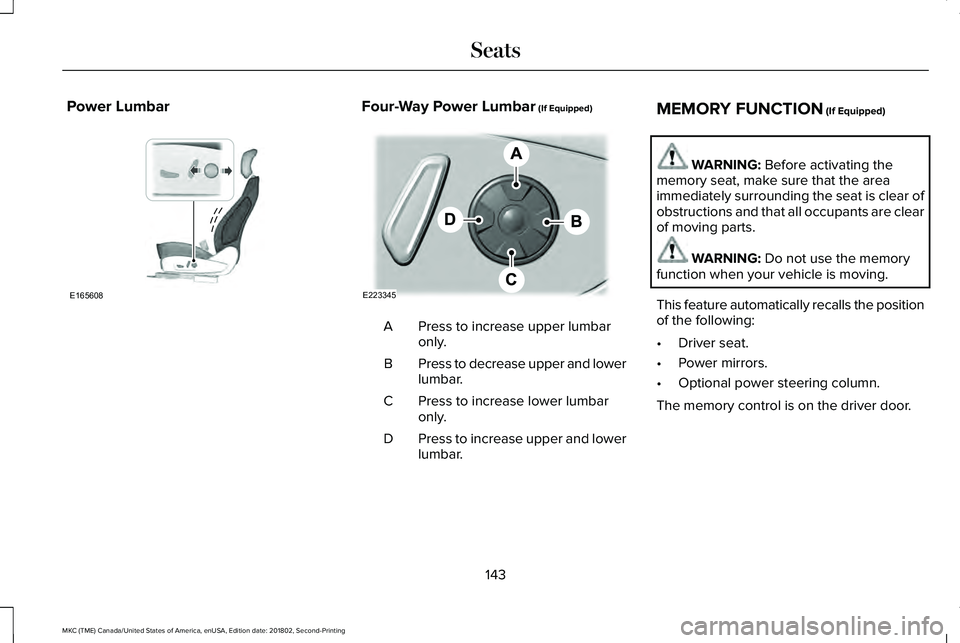
Power LumbarFour-Way Power Lumbar (If Equipped)
Press to increase upper lumbaronly.A
Press to decrease upper and lowerlumbar.B
Press to increase lower lumbaronly.C
Press to increase upper and lowerlumbar.D
MEMORY FUNCTION (If Equipped)
WARNING: Before activating thememory seat, make sure that the areaimmediately surrounding the seat is clear ofobstructions and that all occupants are clearof moving parts.
WARNING: Do not use the memoryfunction when your vehicle is moving.
This feature automatically recalls the positionof the following:
•Driver seat.
•Power mirrors.
•Optional power steering column.
The memory control is on the driver door.
143
MKC (TME) Canada/United States of America, enUSA, Edition date: 201802, Second-Printing
SeatsE165608 E223345