steering LINCOLN MKC 2019 Owner's Manual
[x] Cancel search | Manufacturer: LINCOLN, Model Year: 2019, Model line: MKC, Model: LINCOLN MKC 2019Pages: 581, PDF Size: 5.41 MB
Page 147 of 581
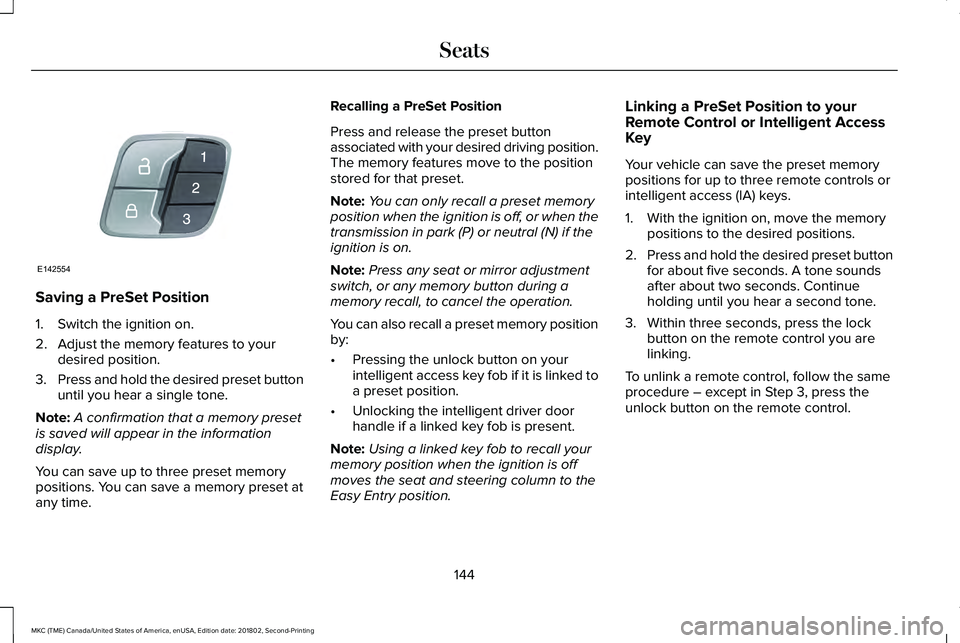
Saving a PreSet Position
1. Switch the ignition on.
2. Adjust the memory features to yourdesired position.
3.Press and hold the desired preset buttonuntil you hear a single tone.
Note:A confirmation that a memory presetis saved will appear in the informationdisplay.
You can save up to three preset memorypositions. You can save a memory preset atany time.
Recalling a PreSet Position
Press and release the preset buttonassociated with your desired driving position.The memory features move to the positionstored for that preset.
Note:You can only recall a preset memoryposition when the ignition is off, or when thetransmission in park (P) or neutral (N) if theignition is on.
Note:Press any seat or mirror adjustmentswitch, or any memory button during amemory recall, to cancel the operation.
You can also recall a preset memory positionby:
•Pressing the unlock button on yourintelligent access key fob if it is linked toa preset position.
•Unlocking the intelligent driver doorhandle if a linked key fob is present.
Note:Using a linked key fob to recall yourmemory position when the ignition is offmoves the seat and steering column to theEasy Entry position.
Linking a PreSet Position to yourRemote Control or Intelligent AccessKey
Your vehicle can save the preset memorypositions for up to three remote controls orintelligent access (IA) keys.
1. With the ignition on, move the memorypositions to the desired positions.
2.Press and hold the desired preset buttonfor about five seconds. A tone soundsafter about two seconds. Continueholding until you hear a second tone.
3. Within three seconds, press the lockbutton on the remote control you arelinking.
To unlink a remote control, follow the sameprocedure – except in Step 3, press theunlock button on the remote control.
144
MKC (TME) Canada/United States of America, enUSA, Edition date: 201802, Second-Printing
SeatsE142554
Page 163 of 581
•You can reset the timer by interactingwith your vehicle (such as pressing thebrake pedal or accelerator pedal).
•You can temporarily switch off theshutdown feature any time the ignition ison (for the current ignition cycle only).Use the information display to do so. SeeInformation Displays (page 108).
•During the countdown before engineshutdown, you are prompted to press OKor RESET (depending on your type ofinformation display) to temporarily switchthe feature off (for the current ignitioncycle only).
Stopping the Engine When YourVehicle is Stationary
1. Put the transmission in position P.
2. Press the button once.
3. Apply the parking brake.
Note:This switches off the ignition, allelectrical circuits, warning lamps andindicators.
Note:If the engine is idling for 30 minutes,the ignition and engine automatically shutdown.
Stopping the Engine When YourVehicle is Moving
WARNING: Switching off the enginewhen the vehicle is still moving will result ina loss of brake and steering assistance. Thesteering will not lock, but higher effort willbe required. When the ignition is switchedoff, some electrical circuits, including airbags, warning lamps and indicators may alsobe off. If the ignition was turned offaccidentally, you can shift into neutral (N) andre-start the engine.
1. Put the transmission in position N anduse the brakes to bring your vehicle to asafe stop.
2. When your vehicle has stopped, put thetransmission in position P.
3. Press and hold the button for onesecond, or press it three times within twoseconds.
4. Apply the parking brake.
Guarding Against Exhaust Fumes
WARNING: If you smell exhaust fumesinside your vehicle, have your vehiclechecked by your authorized dealerimmediately. Do not drive your vehicle if yousmell exhaust fumes. Carbon monoxide ispresent in exhaust fumes. Take precautionsto avoid its dangerous effects.
Important Ventilating Information
If you stop your vehicle and the leave theengine idling for long periods, werecommend that you do one of the following:
•Open the windows at least 1 in (2.5 cm).
•Set your climate control to outside air.
160
MKC (TME) Canada/United States of America, enUSA, Edition date: 201802, Second-Printing
Starting and Stopping the Engine
Page 166 of 581
AUTO-START-STOP (If Equipped)
WARNING: Always fully apply theparking brake. Make sure you shift into park(P) for vehicles with an automatictransmission. Switch the ignition off andremove the key whenever you leave yourvehicle.
WARNING: Before opening the hoodor performing any maintenance, fully applythe parking brake, shift into park (P) orneutral (N) and switch the ignition off.
WARNING: Always switch the ignitionoff before leaving the vehicle. If the ignitionis switched on an automatic restart mayoccur at any time.
WARNING: The system may requirethe engine to automatically restart when theauto-start-stop indicator illuminates green orflashes amber. Failure to follow thisinstruction could result in personal injury.
The system helps reduce fuel consumptionby automatically shutting off and restartingthe engine while your vehicle is stopped.The engine will restart automatically whenyou release the brake pedal. In somesituations, your vehicle may restartautomatically, for example:
•To maintain interior comfort
•To recharge the battery
Note:Power assist steering is turned offwhen the engine is off.
The Auto-Start-Stop system status isavailable at a glance within the informationdisplay. See Information Displays (page108).
Enabling Auto-Start-Stop
The system is automatically enabled everytime you start your vehicle if the followingconditions are met:
•The Auto-Start-Stop button is not pressed(not illuminated).
•Your vehicle exceeds an initial speed of3 mph (5 km/h) after the vehicle has beeninitially started.
•Your vehicle is stopped.
•Your foot is on the brake pedal.
•The transmission is in drive (D).
•The driver's door is closed.
•There is adequate brake vacuum.
•The interior compartment has beencooled or warmed to an acceptable level.
•The front windshield defroster is off.
•The steering wheel is not turned rapidlyor is not at a sharp angle.
•The vehicle is not on a steep road grade.
•The battery is within optimal operatingconditions (battery state of charge andtemperature in range).
•The engine coolant is at operatingtemperature.
•Elevation is below approximately10,000 ft (3,048 m).
•Ambient temperature is moderate.
The green Auto-Start-Stopindicator light on the instrumentcluster will illuminate to indicatewhen the automatic engine stop occurs.
163
MKC (TME) Canada/United States of America, enUSA, Edition date: 201802, Second-Printing
Unique Driving Characteristics
Page 182 of 581
Stay in Neutral mode
Stay in Neutral mode allows your vehicle tostay in neutral (N) when you exit the vehicle.Your vehicle must be stationary to enter thismode.
To enter Stay in Neutral mode:
1. Press the neutral (N) button on yourshifter assembly.
2. A message will appear in yourinformation display.
3. Press the neutral (N) button again toenter Stay in Neutral mode.
A message will appear in your informationdisplay screen when your vehicle hasentered Stay in Neutral mode.
Note:During this mode the N button willflash continuously and your instrumentcluster will display N as the selected gear.
Exiting Stay in Neutral mode
To disable Stay in Neutral mode selectanother gear. See the Putting the Vehiclein Gear for instructions on how to do this.
Entering a Carwash
Note:Always put your vehicle in Stay inNeutral mode when entering an automaticcar wash. Failure to do this could result invehicle damage not covered by warranty.
Drive (D)
The normal driving position for the best fueleconomy.
Sport (S)
Putting the vehicle in sport (S):
•Provides additional engine braking andextends lower gear operation to enhanceperformance for uphill climbs, hilly terrainor mountainous areas. This will increaseengine RPM during engine braking
•Provides additional lower gear operationthrough the automatic transmission shiftstrategy
•Provides gear selection more quickly andat higher engine speeds
SelectShift Automatic™ Transmission
Your SelectShift Automatic transmissiongives you the ability to change gearsmanually.
Paddle Shifters
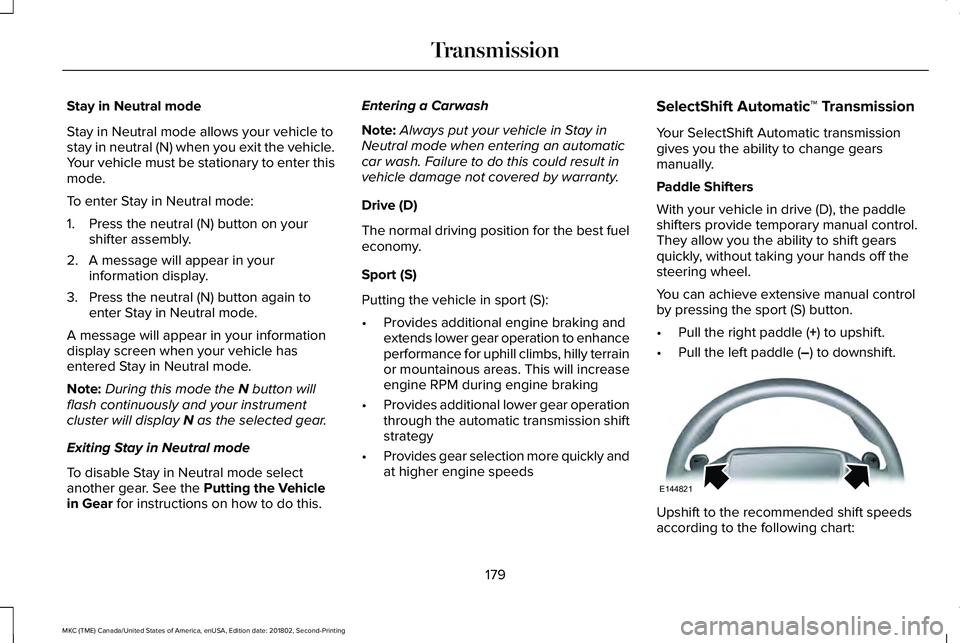
With your vehicle in drive (D), the paddleshifters provide temporary manual control.They allow you the ability to shift gearsquickly, without taking your hands off thesteering wheel.
You can achieve extensive manual controlby pressing the sport (S) button.
•Pull the right paddle (+) to upshift.
•Pull the left paddle (–) to downshift.
Upshift to the recommended shift speedsaccording to the following chart:
179
MKC (TME) Canada/United States of America, enUSA, Edition date: 201802, Second-Printing
TransmissionE144821
Page 187 of 581
When driving at slow speeds off road underhigh load conditions, use a low gear whenpossible. Low gear operation will maximizethe engine and transmission coolingcapability.
Under severe operating conditions, the airconditioning may cycle on and off to preventthe engine from overheating.
Basic Operating Principles
•Drive slower in strong crosswinds thatcan affect the normal steeringcharacteristics of your vehicle.
•When driving your vehicle on surfacesmade slippery by loose sand, water,gravel, snow or ice proceed with care.
If Your Vehicle leaves the Road
If your vehicle leaves the road, reduce yourvehicle speed and avoid severe braking.Once you have reduced your vehicle speed,ease your vehicle back onto the road. Donot turn the steering wheel sharply whilereturning your vehicle to the road.
It may be safer to stay on the shoulder of theroad and slow down gradually beforereturning to the road. You may lose controlif you do not slow down or if you turn thesteering wheel too sharply or abruptly.
It may be less risky to strike small objects,such as freeway reflectors, with minordamage to your vehicle rather than attemptan abrupt dangerous direction change.Remember, your primary concern should beyour safety and the safety of others.
Emergency Maneuvers
If you must make a sudden emergencydirection change, avoid over-driving yourvehicle. Turn the steering wheel only asrapidly and as far as you need to avoid theemergency. Apply smooth pressure to theaccelerator pedal or brake pedal as needed.Avoid abrupt steering, acceleration andbraking changes. Abrupt changes couldincrease the risk of vehicle roll over, loss ofvehicle control and personal injury. Use allavailable road surface to bring your vehicleto under control.
In the event of an emergency stop, avoidskidding and do not attempt any sharpsteering wheel movements.
Your vehicle responds differently to steering,accelerating and braking on different roadsurfaces when changing from one type ofsurface to another.
Sand
When driving over sand, avoid driving atexcessive speeds. This will cause yourvehicle momentum to work against you. Yourvehicle could become stuck that may requireassistance from another vehicle. Remember,if you proceed with caution you may be ableto back out the way you came.
Do not drive in deep sand for an extendedperiod. This will cause the all-wheel drivesystem to overheat. You will see a warningmessage in the information display. SeeInformation Messages (page 113).
184
MKC (TME) Canada/United States of America, enUSA, Edition date: 201802, Second-Printing
All-Wheel Drive (If Equipped)
Page 189 of 581
Start climbing a steep slope or hill in a lowgear rather than downshifting to a low gearfrom a high gear after you have started yourclimb. This reduces strain on the engine andthe possibility of stalling.
If your vehicle stalls, do not try to turnaround. Turning could cause the vehicle toroll over. Instead, reverse back to a safelocation.
Apply just enough power to the wheels toclimb the hill. Too much power will cause thetires to slip, spin or lose traction, and youcould lose control of your vehicle.
To avoid brake overheating, come down ahill in the same gear you used to go up thehill. Do not come down in neutral. Move thetransmission selector lever to a lower gear.When descending a steep hill, avoid suddenhard braking to keep the front wheels rollingand to maintain your vehicle's steering.
Your vehicle has anti-lock brakes. Apply thebrakes steadily. Do not pump the brakepedal.
Driving on Snow and Ice
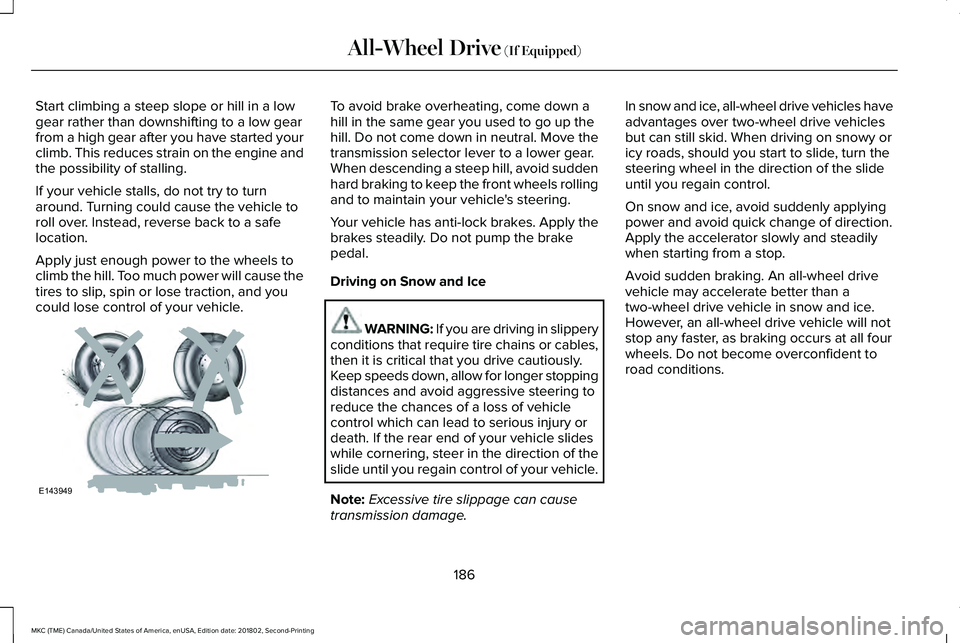
WARNING: If you are driving in slipperyconditions that require tire chains or cables,then it is critical that you drive cautiously.Keep speeds down, allow for longer stoppingdistances and avoid aggressive steering toreduce the chances of a loss of vehiclecontrol which can lead to serious injury ordeath. If the rear end of your vehicle slideswhile cornering, steer in the direction of theslide until you regain control of your vehicle.
Note:Excessive tire slippage can causetransmission damage.
In snow and ice, all-wheel drive vehicles haveadvantages over two-wheel drive vehiclesbut can still skid. When driving on snowy oricy roads, should you start to slide, turn thesteering wheel in the direction of the slideuntil you regain control.
On snow and ice, avoid suddenly applyingpower and avoid quick change of direction.Apply the accelerator slowly and steadilywhen starting from a stop.
Avoid sudden braking. An all-wheel drivevehicle may accelerate better than atwo-wheel drive vehicle in snow and ice.However, an all-wheel drive vehicle will notstop any faster, as braking occurs at all fourwheels. Do not become overconfident toroad conditions.
186
MKC (TME) Canada/United States of America, enUSA, Edition date: 201802, Second-Printing
All-Wheel Drive (If Equipped)E143949
Page 190 of 581
Make sure that you allow sufficient distancebetween your vehicle and other vehicles forstopping. On ice and snow, you should drivemore slowly than usual, and consider usingone of the lower gears. In emergencystopping situations, steadily apply the brake.Your vehicle has a four wheel anti-lock brakesystem, do not pump the brake pedal. SeeHints on Driving With Anti-Lock Brakes(page 189).
If Your Vehicle Gets Stuck In Mud or Snow
If your vehicle becomes stuck in mud orsnow, shift between forward and reversegears, and, in a steady pattern, stop betweenshifts. Press lightly on the accelerator witheach shift. Rocking your vehicle this way maydislodge your vehicle.
Note:Do not rock your vehicle if the engineis not at normal operating temperature,damage to the transmission may occur.
Note:Do not rock your vehicle for more thana minute, damage to the transmission andtires may occur or the engine may overheat.
Maintenance and Modifications
The suspension and steering systems onyour vehicle provides predictableperformance whether your vehicle is loadedor empty. For this reason, we recommendthat you do not make modifications to yourvehicle (lift kits or stabilizer bars) or usereplacement parts not equivalent to theoriginal factory equipment.
We recommend that you use caution whenyour vehicle has either a high load or device(ladder or luggage racks). Modifications toyour vehicle that raise the center of gravitymay cause your vehicle to tip if you shouldlose vehicle control.
Failure to maintain your vehicle correctly mayvoid the warranty, increase your repair cost,reduce vehicle performance and operationalcapabilities, and adversely affect you andyour passenger's safety. We recommend thatyou frequently inspect your vehicle's chassiscomponents if your vehicle is subject tooff-road use.
187
MKC (TME) Canada/United States of America, enUSA, Edition date: 201802, Second-Printing
All-Wheel Drive (If Equipped)
Page 191 of 581

GENERAL INFORMATION
Note: Occasional brake noise is normal. Ifa metal-to-metal, continuous grinding orcontinuous squeal sound is present, thebrake linings may be worn-out and anauthorized dealer should check them. If thevehicle has continuous vibration or shudderin the steering wheel while braking, anauthorized dealer should check your vehicle.
Note: Brake dust may accumulate on thewheels, even under normal drivingconditions. Some dust is inevitable as thebrakes wear and does not contribute tobrake noise. See Cleaning the Wheels(page 312).
Wet brakes result in reduced brakingefficiency. Gently press the brake pedal afew times when driving from a car wash orstanding water to dry the brakes.
Brake Over Accelerator
In the event the accelerator pedal becomesstuck or entrapped, apply steady and firmpressure to the brake pedal to slow thevehicle and reduce engine power. If youexperience this condition, apply the brakesand bring your vehicle to a safe stop. Switchthe engine off, move the transmission to park(P) and apply the parking brake. Inspect theaccelerator pedal and the area around it forany items or debris that may be obstructingits movement. If none are found and thecondition persists, have your vehicle towedto the nearest authorized dealer.
Emergency Brake Assist
Emergency brake assist detects when youbrake heavily by measuring the rate at whichyou press the brake pedal. It providesmaximum braking efficiency as long as youpress the pedal. Emergency brake assistcan reduce stopping distances in criticalsituations.
Anti-lock Brake System
This system helps you maintain steeringcontrol during emergency stops by keepingthe brakes from locking.
This lamp momentarily illuminateswhen you switch the ignition on. Ifthe light does not illuminate duringstart up, remains on or flashes, the anti-lockbraking system may be disabled. Have thesystem checked by an authorized dealer. Ifthe anti-lock brake system is disabled,normal braking is still effective.
See Warning Lamps and Indicators (page103).
Note:Indicators vary depending on region.
This lamp also illuminatesmomentarily when you switch theignition on to confirm the lamp isfunctional. If it does not illuminatewhen you switch the ignition on,or begins to flash at any time, havethe system checked by an authorized dealer.If the brake warning lamp illuminates withthe parking brake released, have the systemchecked immediately.
188
MKC (TME) Canada/United States of America, enUSA, Edition date: 201802, Second-Printing
Brakes E270480
Page 192 of 581
HINTS ON DRIVING WITH ANTI-
LOCK BRAKES
The anti-lock braking system does noteliminate the risks when:
•You drive too closely to the vehicle infront of you.
•Your vehicle is hydroplaning.
•You take corners too fast.
•The road surface is poor.
Note: If the system activates, the brakepedal may pulse and may travel further. Maintain pressure on the brake pedal. Youmay also hear a noise from the system. Thisis normal.
ELECTRIC PARKING BRAKE
The electric parking brake replaces theconventional handbrake. The operatingswitch is located on the instrument panel tothe left of the steering wheel.
WARNING: Always set the parkingbrake and leave your vehicle with thetransmission in position P.
Note:When you apply the electric parkingbrake in certain conditions, for example ona steep hill, the electric parking brake mayreapply the brakes within three to tenminutes.
Note:You may notice various noises whenyou apply and release the electric parkingbrake. This is normal and no cause forconcern.
Applying the electric parking brake
WARNING: The brake system warninglamp will flash during an electric brake apply.If the brake system warning lamp continuesto flash there could be a problem with yourelectric parking brake. Have the systemchecked by an authorized dealer as soon aspossible.
Note:The brake system warning lamp willilluminate for ten seconds if you have turnedthe ignition off after the electric parkingbrake has been applied, or the electricparking brake has been applied after theignition has been turned off.
Note:The electric parking brake will notautomatically apply. You must apply theelectric parking brake using the electricparking brake switch.
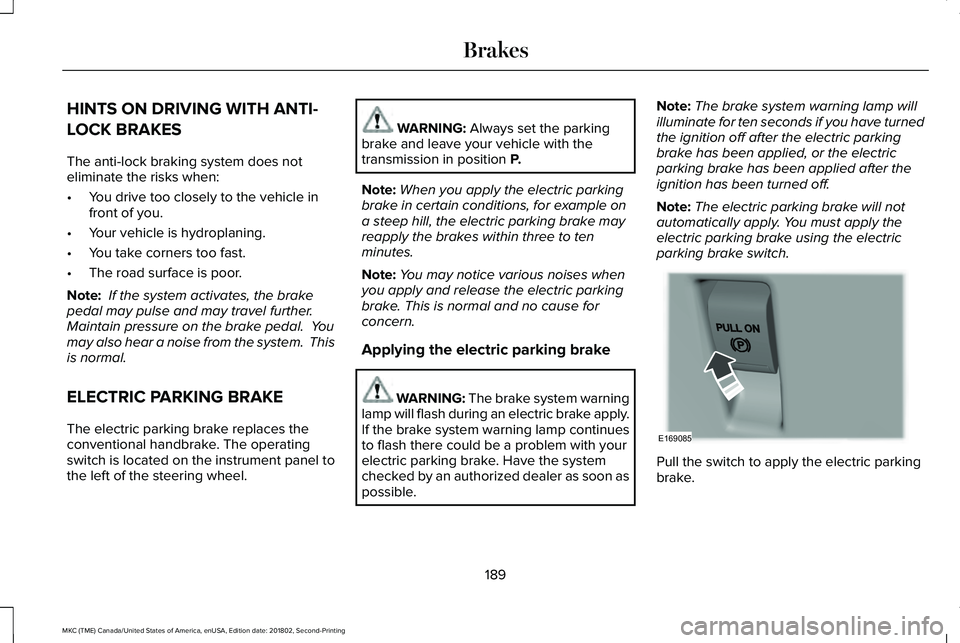
Pull the switch to apply the electric parkingbrake.
189
MKC (TME) Canada/United States of America, enUSA, Edition date: 201802, Second-Printing
BrakesE169085
Page 199 of 581
PRINCIPLE OF OPERATION
WARNING: Vehicle modificationsinvolving braking system, aftermarket roofracks, suspension, steering system, tireconstruction and wheel and tire size maychange the handling characteristics of yourvehicle and may adversely affect theperformance of the electronic stability controlsystem. In addition, installing any stereoloudspeakers may interfere with andadversely affect the electronic stabilitycontrol system. Install any aftermarket stereoloudspeaker as far as possible from the frontcenter console, the tunnel, and the frontseats in order to minimize the risk ofinterfering with the electronic stability controlsensors. Reducing the effectiveness of theelectronic stability control system could leadto an increased risk of loss of vehicle control,vehicle rollover, personal injury and death.
WARNING: Remember that evenadvanced technology cannot defy the lawsof physics. It’s always possible to lose controlof a vehicle due to inappropriate driver inputfor the conditions. Aggressive driving on anyroad condition can cause you to lose controlof your vehicle increasing the risk of personalinjury or property damage. Activation of theelectronic stability control system is anindication that at least some of the tires haveexceeded their ability to grip the road; thiscould reduce the operator’s ability to controlthe vehicle potentially resulting in a loss ofvehicle control, vehicle rollover, personalinjury and death. If your electronic stabilitycontrol system activates, SLOW DOWN.
The system automatically turns on each timeyou switch the ignition on.
If a fault occurs in either the stability controlor the traction control system, you mayexperience the following conditions:
•The stability and traction control lightilluminates steadily.
•The stability control and traction controlsystems do not enhance your vehicle'sability to maintain traction of the wheels.
If a driving condition activates either thestability control or the traction control systemyou may experience the following conditions:
•The stability and traction control lightflashes.
•Your vehicle slows down.
•Reduced engine power.
•A vibration in the brake pedal.
•The brake pedal is stiffer than usual.
•If the driving condition is severe and yourfoot is not on the brake, the brake pedalmay move as the system applies higherbrake force.
The stability control system has severalfeatures built into it to help you maintaincontrol of your vehicle:
196
MKC (TME) Canada/United States of America, enUSA, Edition date: 201802, Second-Printing
Stability Control