driver door LINCOLN MKC 2019 Owner's Manual
[x] Cancel search | Manufacturer: LINCOLN, Model Year: 2019, Model line: MKC, Model: LINCOLN MKC 2019Pages: 581, PDF Size: 5.41 MB
Page 167 of 581
If the instrument cluster isequipped with a greyAuto-Start-Stop indicator light, it isilluminated when automatic engine stop isnot available due to one of the above notedconditions not being met.
Automatic Engine Restart
Any of the following conditions will result inan automatic restart of the engine:
•Your foot is removed from the brakepedal.
•You press the accelerator pedal.
•You press the accelerator and the brakepedal at the same time.
•The driver safety belt becomesunfastened or the driver door is ajar.
•The transmission is moved from drive (D).
•Your vehicle is moving.
•The interior compartment does not meetcustomer comfort when air conditioningor heat is on.
•Fogging of the windows could occur andthe air conditioning is on.
•The battery is not within optimaloperating conditions.
•The maximum engine off time isexceeded.
•When you press the Auto-Start-Stopbutton while the engine is stoppedautomatically.
•The heated windshield is turned on.
Any of the following conditions may result inan automatic restart of the engine:
•The blower fan speed is increased or theclimate control temperature is changed.
•An electrical accessory is turned on orplugged in.
Disabling Auto-Start-Stop
Press the Auto-Start-Stop button located onthe center console to switch the system off.The button will illuminate. The system willonly be deactivated for the current ignitioncycle. Press the button again to restoreAuto-Start-Stop function.
164
MKC (TME) Canada/United States of America, enUSA, Edition date: 201802, Second-Printing
Unique Driving CharacteristicsE146361 E223639
Page 181 of 581
3. The gearshift button you select willilluminate and the selected gear willappear in the instrument cluster.
4. Release the brake pedal and yourtransmission will remain in the selectedgear.
Note:If you attempt to leave your vehiclewhile it is in gear, the vehicle willautomatically shift into park (P). Safety beltand door monitors determine your intent andmake the shift for you. During this time, amessage will appear in the informationdisplay screen prompting you to make theshift.
Note:To put your vehicle in gear with thedoor open, perform steps 1-4. See theAutomatic Return to Park section in thischapter for more information on this feature.
Park (P)
With the transmission in park (P), your vehiclelocks the transmission and prevents the frontwheels from turning. Always come to acomplete stop before putting your vehicleinto and out of park (P). An audible chimesounds once you select park (P).
When the ignition is turned off, the vehiclewill automatically shift into park (P). If theignition is turned off while the vehicle ismoving, it will first shift into neutral (N) untila slow enough speed is reached. The vehiclewill then shift into park (P) automatically.
Automatic Return to Park
Note:This feature will not operate when yourvehicle is in Stay in Neutral mode or neutraltow.
Your vehicle has a safety feature that willautomatically shift your vehicle into park (P)when any of the following conditions occur:
•You turn the ignition off
•You open the driver's door with yoursafety belt unlatched
•Your safety belt is unlatched while thedriver's door is open
If you turn the ignition off while your vehicleis moving, your vehicle will first shift intoneutral (N) until it slows down enough to shiftinto park (P) automatically.
Note:If you have waited an extended periodof time, (2-15 minutes) before starting yourvehicle, unlatching your safety belt will causethis feature to activate, even with the driver'sdoor closed.
Note:This feature may not work properly ifthe door ajar switch is malfunctioning. If yourdoor ajar indicator does not illuminate whenyou open the driver’s door or the indicatorilluminates with the driver’s door closed, seeyour authorized dealer.
Reverse (R)
With the transmission in reverse (R), yourvehicle will move backward. Always cometo a complete stop before shifting into andout of reverse (R).
Neutral (N)
With the transmission in neutral (N), you canstart your vehicle and it is free to roll. Holdthe brake pedal down while in this position.
178
MKC (TME) Canada/United States of America, enUSA, Edition date: 201802, Second-Printing
Transmission
Page 194 of 581
1.Pull the switch and hold it in this position.
2. Drive your vehicle, then release theswitch when you notice that the enginehas developed sufficient driving force.
Automatic release - drive away release
Your vehicle will automatically release theparking brake if all of the following conditionsexist:
•The driver door is closed.
•The vehicle is accelerated.
•There are no faults detected in theparking brake system.
Note:The driver door must be closed andthe driver safety belt must be fastenedbefore this feature will operate.
Note:If the electric parking brake warninglamp stays illuminated, the electric parkingbrake will not automatically release. Youmust release the electric parking brake usingthe electric parking brake switch.
Note:The engine must be running and theaccelerator pedal must be pressed beforethe drive away release feature will operate.
The brake system warning lamp will go offto confirm that the electric parking brake hasbeen released.
Note:The electric parking brake drive awayrelease makes starting on a hill easier. Thisfeature will release the parking brakeautomatically when the vehicle has sufficientdrive force to move up the hill. To assuredrive away release when starting uphill,press the accelerator pedal quickly.
Battery With No Charge
WARNING: You will not be able toapply or release the electric parking brakeif the battery is low or has no charge.
If the battery is low or has no charge, usejumper cables and a booster battery.
HILL START ASSIST
WARNING: The system does notreplace the parking brake. When you leaveyour vehicle, always apply the parking brakeand shift the transmission into park (P) forautomatic transmission or first gear formanual transmission.
WARNING: You must remain in yourvehicle when the system turns on. At alltimes, you are responsible for controllingyour vehicle, supervising the system andintervening, if required. Failure to take caremay result in the loss of control of yourvehicle, serious personal injury or death.
Note:If the engine is revved excessively, orif a malfunction is detected, the system willbe deactivated.
The system makes it easier to pull awaywhen your vehicle is on a slope without theneed to use the parking brake.
191
MKC (TME) Canada/United States of America, enUSA, Edition date: 201802, Second-Printing
Brakes
Page 210 of 581
REAR VIEW CAMERA
WARNING: The rear view camerasystem is a reverse aid supplement devicethat still requires the driver to use it inconjunction with the interior and exteriormirrors for maximum coverage.
WARNING: Objects that are close toeither corner of the bumper or under thebumper, might not be seen on the screendue to the limited coverage of the camerasystem.
WARNING: Reverse your vehicleslowly. Failure to follow this instruction couldresult in the loss of control of your vehicle,personal injury or death.
WARNING: Use caution when the rearcargo door is ajar. If the rear cargo door isajar, the camera will be out of position andthe video image may be incorrect. Allguidelines disappear when the rear cargodoor is ajar. Failure to follow this instructioncould result in personal injury.
WARNING: Use caution when turningcamera features on or off when thetransmission is not in park (P). Make sureyour vehicle is not moving.
The rear view camera system provides avideo image of the area behind your vehicle.
During operation, lines appear in the displaywhich represent your vehicle’s path andproximity to objects behind your vehicle.
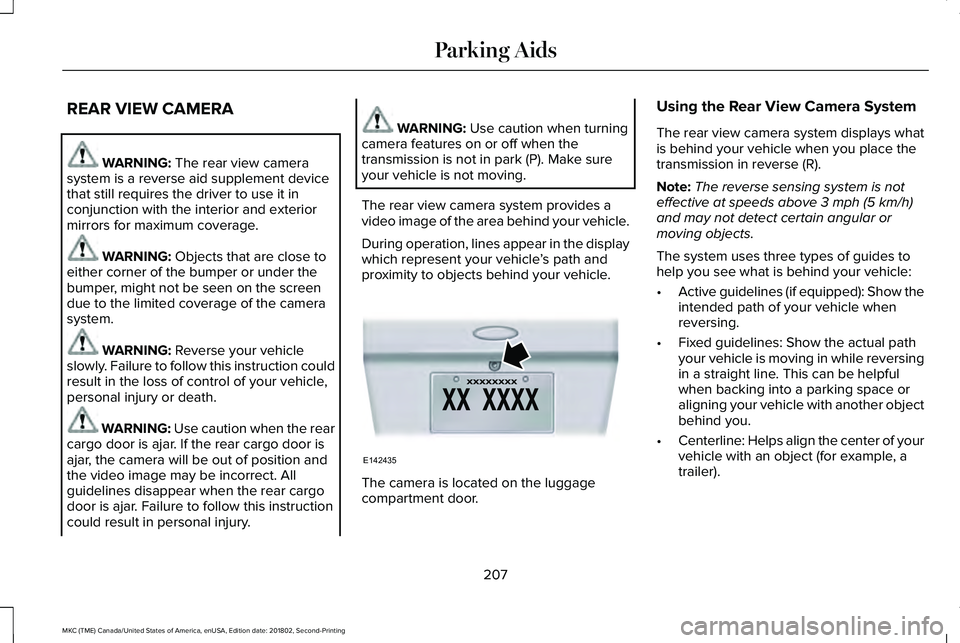
The camera is located on the luggagecompartment door.
Using the Rear View Camera System
The rear view camera system displays whatis behind your vehicle when you place thetransmission in reverse (R).
Note:The reverse sensing system is noteffective at speeds above 3 mph (5 km/h)and may not detect certain angular ormoving objects.
The system uses three types of guides tohelp you see what is behind your vehicle:
•Active guidelines (if equipped): Show theintended path of your vehicle whenreversing.
•Fixed guidelines: Show the actual pathyour vehicle is moving in while reversingin a straight line. This can be helpfulwhen backing into a parking space oraligning your vehicle with another objectbehind you.
•Centerline: Helps align the center of yourvehicle with an object (for example, atrailer).
207
MKC (TME) Canada/United States of America, enUSA, Edition date: 201802, Second-Printing
Parking AidsE142435
Page 224 of 581
•Switching the ignition off and on.
•Stopping the vehicle and then openingand closing the driver’s door.
LANE KEEPING SYSTEM (If Equipped)
WARNING: You are responsible forcontrolling your vehicle at all times. Thesystem is designed to be an aid and doesnot relieve you of your responsibility to drivewith due care and attention. Failure to followthis instruction could result in the loss ofcontrol of your vehicle, personal injury ordeath.
WARNING: Always drive with due careand attention when using and operating thecontrols and features on your vehicle.
WARNING: In cold and severe weatherconditions the system may not function. Rain,snow and spray can all limit sensorperformance.
WARNING: The system will not operateif the sensor cannot track the road lanemarkings.
WARNING: The sensor may incorrectlytrack lane markings as other structures orobjects. This can result in a false or missedwarning.
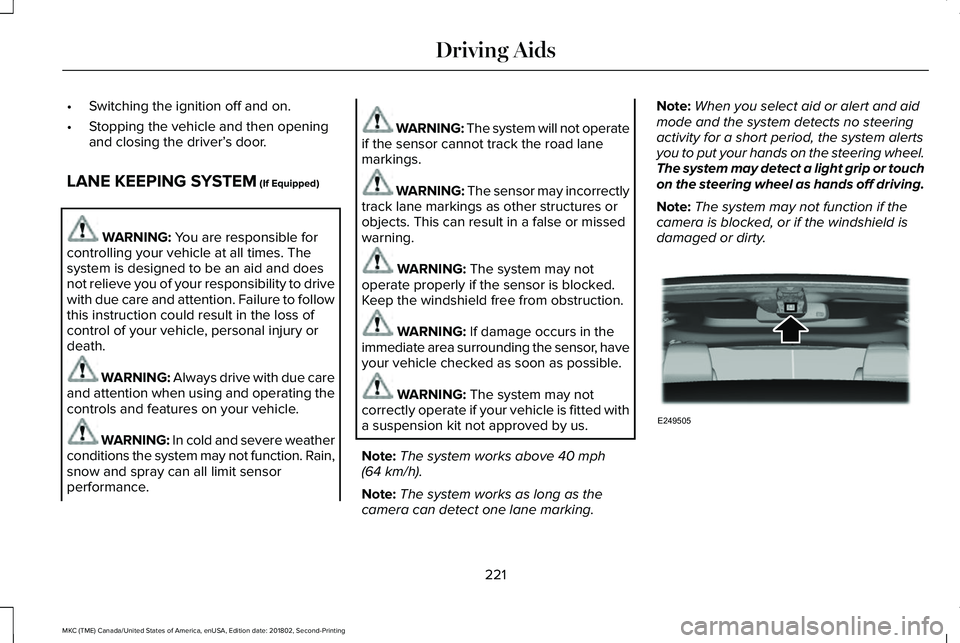
WARNING: The system may notoperate properly if the sensor is blocked.Keep the windshield free from obstruction.
WARNING: If damage occurs in theimmediate area surrounding the sensor, haveyour vehicle checked as soon as possible.
WARNING: The system may notcorrectly operate if your vehicle is fitted witha suspension kit not approved by us.
Note:The system works above 40 mph(64 km/h).
Note:The system works as long as thecamera can detect one lane marking.
Note:When you select aid or alert and aidmode and the system detects no steeringactivity for a short period, the system alertsyou to put your hands on the steering wheel.The system may detect a light grip or touchon the steering wheel as hands off driving.
Note:The system may not function if thecamera is blocked, or if the windshield isdamaged or dirty.
221
MKC (TME) Canada/United States of America, enUSA, Edition date: 201802, Second-Printing
Driving AidsE249505
Page 244 of 581
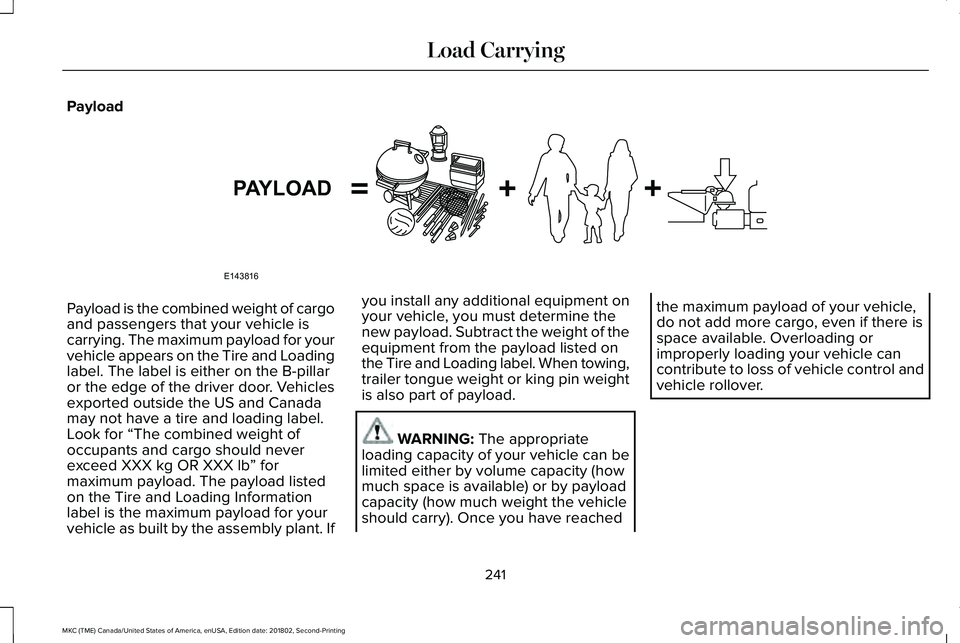
Payload
Payload is the combined weight of cargoand passengers that your vehicle iscarrying. The maximum payload for yourvehicle appears on the Tire and Loadinglabel. The label is either on the B-pillaror the edge of the driver door. Vehiclesexported outside the US and Canadamay not have a tire and loading label.Look for “The combined weight ofoccupants and cargo should neverexceed XXX kg OR XXX lb” formaximum payload. The payload listedon the Tire and Loading Informationlabel is the maximum payload for yourvehicle as built by the assembly plant. If
you install any additional equipment onyour vehicle, you must determine thenew payload. Subtract the weight of theequipment from the payload listed onthe Tire and Loading label. When towing,trailer tongue weight or king pin weightis also part of payload.
WARNING: The appropriateloading capacity of your vehicle can belimited either by volume capacity (howmuch space is available) or by payloadcapacity (how much weight the vehicleshould carry). Once you have reached
the maximum payload of your vehicle,do not add more cargo, even if there isspace available. Overloading orimproperly loading your vehicle cancontribute to loss of vehicle control andvehicle rollover.
241
MKC (TME) Canada/United States of America, enUSA, Edition date: 201802, Second-Printing
Load CarryingE143816PAYLOAD
Page 245 of 581
GAWR (Gross Axle Weight Rating)
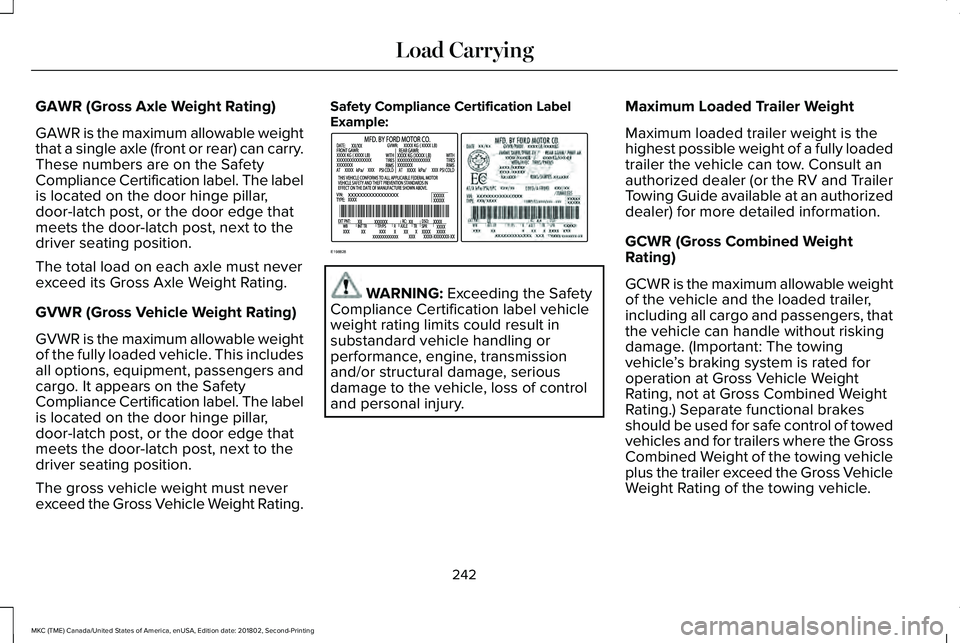
GAWR is the maximum allowable weightthat a single axle (front or rear) can carry.These numbers are on the SafetyCompliance Certification label. The labelis located on the door hinge pillar,door-latch post, or the door edge thatmeets the door-latch post, next to thedriver seating position.
The total load on each axle must neverexceed its Gross Axle Weight Rating.
GVWR (Gross Vehicle Weight Rating)
GVWR is the maximum allowable weightof the fully loaded vehicle. This includesall options, equipment, passengers andcargo. It appears on the Safety
Compliance Certification label. The labelis located on the door hinge pillar,door-latch post, or the door edge thatmeets the door-latch post, next to thedriver seating position.
The gross vehicle weight must neverexceed the Gross Vehicle Weight Rating.
Safety Compliance Certification LabelExample:
WARNING: Exceeding the SafetyCompliance Certification label vehicleweight rating limits could result insubstandard vehicle handling orperformance, engine, transmissionand/or structural damage, seriousdamage to the vehicle, loss of controland personal injury.
Maximum Loaded Trailer Weight
Maximum loaded trailer weight is thehighest possible weight of a fully loadedtrailer the vehicle can tow. Consult anauthorized dealer (or the RV and TrailerTowing Guide available at an authorizeddealer) for more detailed information.
GCWR (Gross Combined WeightRating)
GCWR is the maximum allowable weightof the vehicle and the loaded trailer,including all cargo and passengers, thatthe vehicle can handle without riskingdamage. (Important: The towingvehicle’s braking system is rated foroperation at Gross Vehicle WeightRating, not at Gross Combined Weight
Rating.) Separate functional brakesshould be used for safe control of towedvehicles and for trailers where the GrossCombined Weight of the towing vehicleplus the trailer exceed the Gross VehicleWeight Rating of the towing vehicle.
242
MKC (TME) Canada/United States of America, enUSA, Edition date: 201802, Second-Printing
Load CarryingE198828
Page 279 of 581
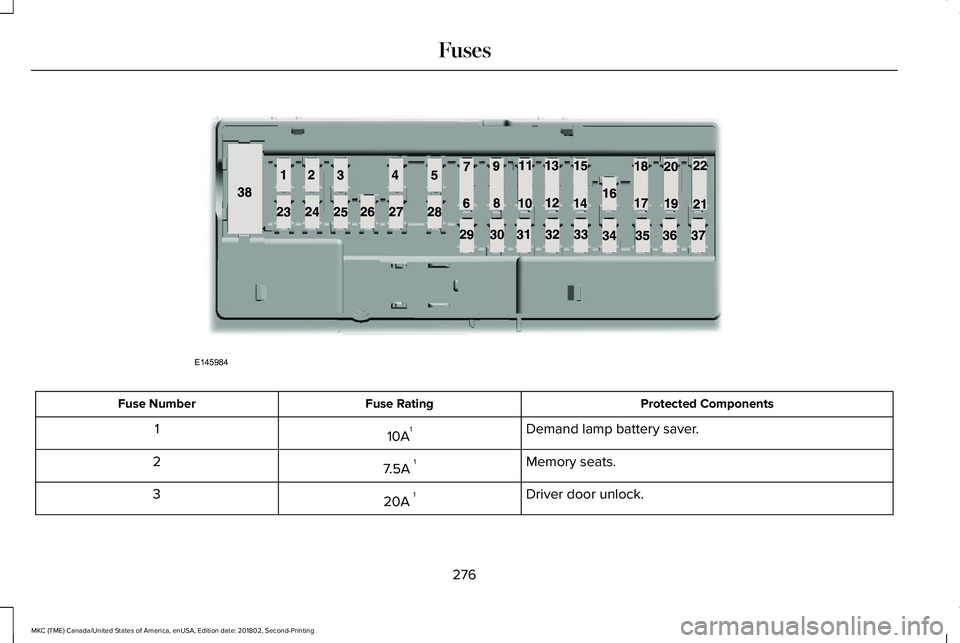
Protected ComponentsFuse RatingFuse Number
Demand lamp battery saver.10A11
Memory seats.7.5A 12
Driver door unlock.20A 13
276
MKC (TME) Canada/United States of America, enUSA, Edition date: 201802, Second-Printing
FusesE145984
Page 281 of 581
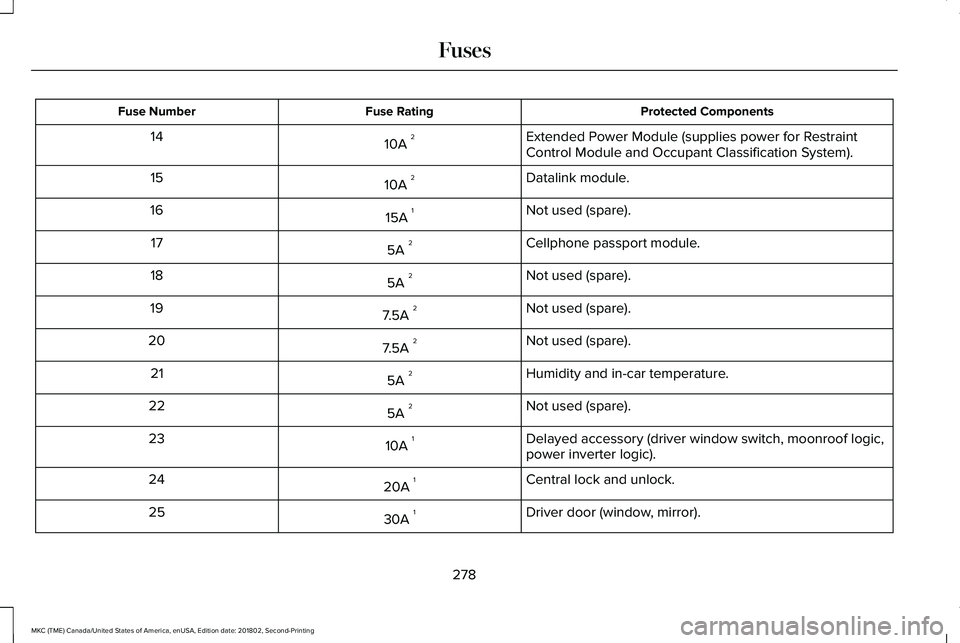
Protected ComponentsFuse RatingFuse Number
Extended Power Module (supplies power for RestraintControl Module and Occupant Classification System).10A 214
Datalink module.10A 215
Not used (spare).15A 116
Cellphone passport module.5A 217
Not used (spare).5A 218
Not used (spare).7.5A 219
Not used (spare).7.5A 220
Humidity and in-car temperature.5A 221
Not used (spare).5A 222
Delayed accessory (driver window switch, moonroof logic,power inverter logic).10A 123
Central lock and unlock.20A 124
Driver door (window, mirror).30A 125
278
MKC (TME) Canada/United States of America, enUSA, Edition date: 201802, Second-Printing
Fuses
Page 282 of 581
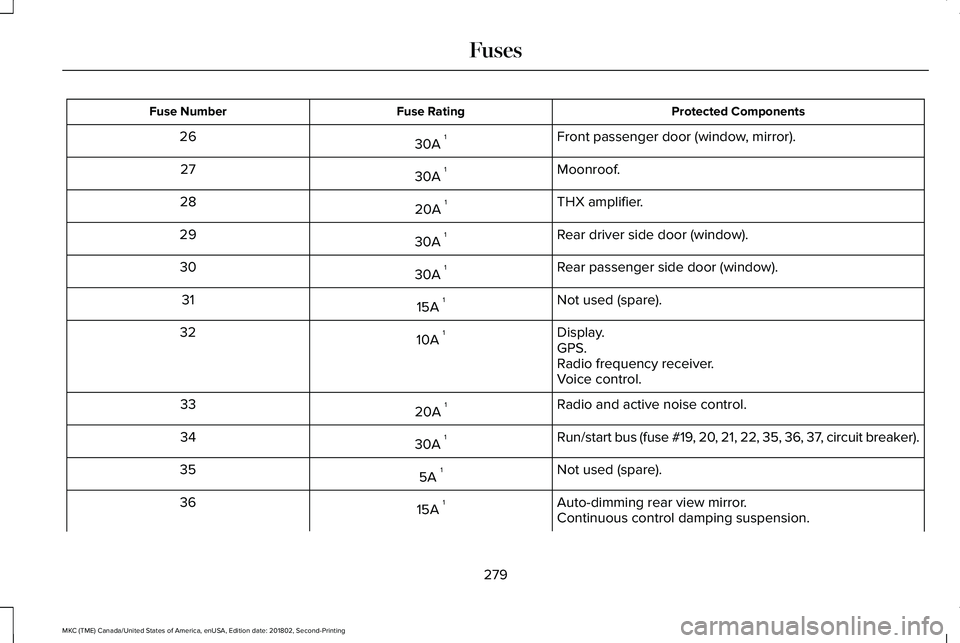
Protected ComponentsFuse RatingFuse Number
Front passenger door (window, mirror).30A 126
Moonroof.30A 127
THX amplifier.20A 128
Rear driver side door (window).30A 129
Rear passenger side door (window).30A 130
Not used (spare).15A 131
Display.10A 132GPS.Radio frequency receiver.Voice control.
Radio and active noise control.20A 133
Run/start bus (fuse #19, 20, 21, 22, 35, 36, 37, circuit breaker).30A 134
Not used (spare).5A 135
Auto-dimming rear view mirror.15A 136Continuous control damping suspension.
279
MKC (TME) Canada/United States of America, enUSA, Edition date: 201802, Second-Printing
Fuses