instrument cluster LINCOLN MKC 2019 Owner's Manual
[x] Cancel search | Manufacturer: LINCOLN, Model Year: 2019, Model line: MKC, Model: LINCOLN MKC 2019Pages: 581, PDF Size: 5.41 MB
Page 216 of 581
WARNING: Adaptive cruise controlonly warns of vehicles detected by the radarsensor. In some cases there may be nowarning or a delayed warning. You shouldalways apply the brakes when necessary.Failure to do so may result in a crash, seriousinjury or death.
Note:When you are following a vehicle andyou switch on a direction indicator, adaptivecruise control may provide a small temporaryacceleration to help you pass.
Note:The brakes may emit noise whenapplied by the system.
When a vehicle ahead of you enters thesame lane or a slower vehicle is ahead in thesame lane, the vehicle speed adjusts tomaintain a preset gap distance. A vehiclegraphic illuminates in the instrument cluster.
Your vehicle maintains a consistent gap fromthe vehicle ahead until:
•The vehicle in front of you accelerates toa speed above the set speed.
•The vehicle in front of you moves out ofthe lane you are in.
•Your vehicle speed falls below 12 mph(20 km/h).
•You set a new gap distance.
The system applies the brakes to slow yourvehicle to maintain a safe gap distance fromthe vehicle in front. The system only applieslimited braking. You can override the systemby applying the brakes.
If the system determines that its maximumbraking level is not sufficient, an audiblewarning sounds when the system continuesto brake. A red warning bar displays on thewindshield and you must take immediateaction.
Setting the Gap Distance
Note:The gap setting is time dependent andtherefore the distance adjusts with yourvehicle speed.
Note:It is your responsibility to select a gapappropriate to the driving conditions.
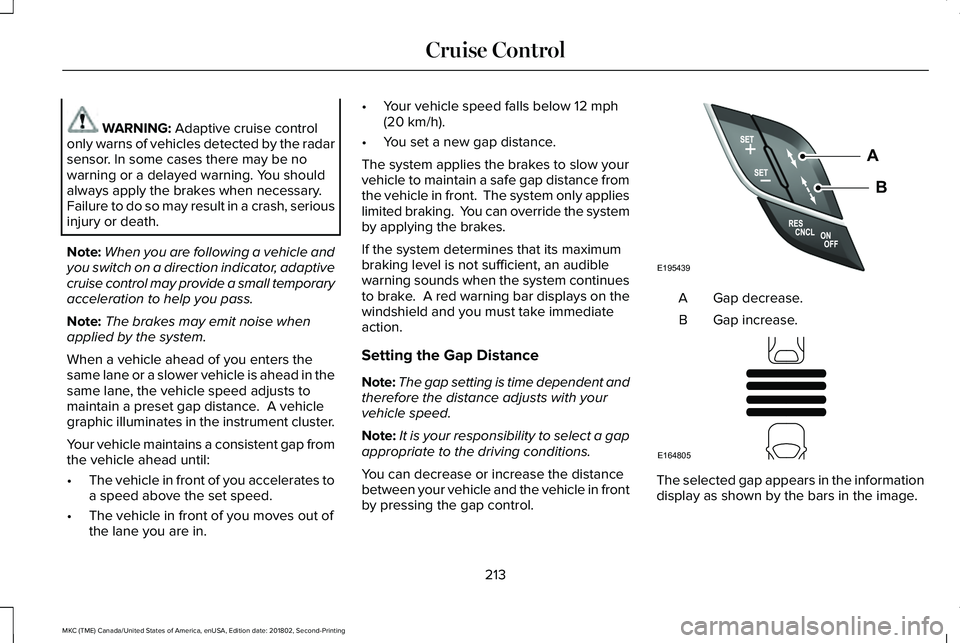
You can decrease or increase the distancebetween your vehicle and the vehicle in frontby pressing the gap control.
Gap decrease.A
Gap increase.B
The selected gap appears in the informationdisplay as shown by the bars in the image.
213
MKC (TME) Canada/United States of America, enUSA, Edition date: 201802, Second-Printing
Cruise ControlE195439
A
B E164805
Page 295 of 581
From the main menu scroll to:
Action and descriptionMessage
Press the right arrow button,then from this menu scroll tothe following message.
Settings
Press the right arrow button,then from this menu scroll tothe following message.
Vehicle
Press the right arrow button,then from this menu scroll tothe following message.
Oil Life
Press and hold the OK buttonuntil the instrument clusterdisplays the followingmessage.
Hold OK toReset
Reset Successful
When the oil change indicatorresets the instrument clusterdisplays 100%.
Remaining Life
{00}%
Action and descriptionMessage
If the instrument clusterdisplays one of the followingmessages, repeat theprocess.
Not Reset
Reset Cancelled
ENGINE COOLANT CHECK
Checking the Engine Coolant
WARNING: Do not add engine coolantwhen the engine is hot. Steam and scaldingliquids released from a hot cooling systemcan burn you badly. Also, you can be burnedif you spill coolant on hot engine parts.
WARNING: Do not put engine coolantin the windshield washer fluid container. Ifsprayed on the windshield, engine coolantcould make it difficult to see through thewindshield.
WARNING: To reduce the risk ofpersonal injury, make sure the engine is coolbefore unscrewing the coolant pressure reliefcap. The cooling system is under pressure;steam and hot liquid can come out forcefullywhen the cap is loosened slightly.
WARNING: Do not add coolant furtherthan the MAX mark.
Note:Automotive fluids are notinterchangeable. Do not use engine coolantor windshield washer fluid outside of itsspecified function and vehicle location.
Note:Do not use stop leak pellets, coolingsystem sealants, or additives as they cancause damage to the engine cooling orheating systems. This damage would not becovered under your vehicle’s warranty.
292
MKC (TME) Canada/United States of America, enUSA, Edition date: 201802, Second-Printing
Maintenance
Page 314 of 581
CLEANING THE INSTRUMENT
PANEL AND INSTRUMENT
CLUSTER LENS
WARNING: Do not use chemicalsolvents or strong detergents when cleaningthe steering wheel or instrument panel toavoid contamination of the airbag system.
Note:Follow the same procedure ascleaning leather seats for cleaning leatherinstrument panels and leather interior trimsurfaces. See Cleaning Leather Seats (page311).
Clean the instrument panel and cluster lenswith a clean, damp and soft cloth, then usea clean, dry and soft cloth to dry these areas.
•Avoid cleaners or polishes that increasethe gloss of the upper portion of theinstrument panel. The dull finish in thisarea helps protect you from undesirablewindshield reflection.
•Do not use any household cleaningproducts or glass cleaners as these maydamage the finish of the instrumentpanel, interior trim and cluster lens.
•Wash or wipe your hands clean if youhave been in contact with certainproducts such as insect repellent andsuntan lotion to avoid possible damageto the interior painted surfaces.
•Do not allow air fresheners and handsanitizers to spill onto interior surfaces.If a spill occurs, wipe off immediately.Your warranty may not cover thesedamages.
If a staining liquid like coffee or juice hasbeen spilled on the instrument panel or oninterior trim surfaces:
1.Wipe up spilled liquid using a clean, softcloth as quickly as possible.
2. Use Motorcraft Premium Leather andVinyl Cleaner or a commercially availableleather cleaning product for automotiveinteriors. Test any cleaner or stainremover on an inconspicuous area.
3. Alternatively, wipe the surface with aclean, soft cloth and a mild soap andwater solution. Dry the area with a clean,soft cloth.
4.If necessary, apply more soap and watersolution or cleaning product to a clean,soft cloth and press it onto the soiledarea. Allow this to set at roomtemperature for 30 minutes.
5. Remove the soaked cloth, then with aclean, damp cloth, use a rubbing motionfor 60 seconds on the soiled area.
6. Dry the area with a clean, soft cloth.
CLEANING LEATHER SEATS
Note:Follow the same procedure ascleaning leather seats for cleaning leatherinstrument panels and leather interior trimsurfaces.
311
MKC (TME) Canada/United States of America, enUSA, Edition date: 201802, Second-Printing
Vehicle Care
Page 483 of 581
General
Possible solutionPossible causeIssue
SYNC 3 only supports four languages in a single module for textdisplay, voice control and voice prompts. The country where youbought your vehicle dictates the four languages based on the mostpopular languages spoken. If the selected language is not available,SYNC 3 remains in the current active language.SYNC 3 does not support the currentlyselected language for the instrumentcluster and information and entertainmentdisplay.
The language selected forthe instrument cluster andinformation and entertain-ment display does notmatch the SYNC 3language (phone, USB,Bluetooth audio, voicecontrol and voice prompts).
SYNC 3 offers several new voice control features for a wide range oflanguages. Dialing a contact name directly from the phonebookwithout pre-recording (for example, “call John Smith”) or selecting atrack, artist, album, genre or playlist directly from your media player(for example, "play artist Madonna").
SYNC 3 System Reset
The system has a System Reset feature that can be performed if the function of a SYNC 3 feature is lost. This reset is intended to restorefunctionality and will not erase any information previously stored in the system (such as paired devices, phonebook, call history, textmessages, or user settings). To perform a System Reset, press and hold the Seek Up (>>|) button while pressing and holding the RadioPower button. After approximately 5 seconds the screen will go black. Allow 1-2 minutes for the system reset to complete. You may thenresume using the SYNC 3 system.
480
MKC (TME) Canada/United States of America, enUSA, Edition date: 201802, Second-Printing
SYNC™ 3
Page 570 of 581
Rear Window Wiper Blade...............................300
Checking MyKey System Status.................62MyKey Distance....................................................62Number of Admin Keys.......................................63Number of MyKeys...............................................63
Checking the Wiper Blades.......................299Child Restraint and SeatbeltMaintenance...................................................41Child Restraint Positioning............................31Child Safety......................................................20General Information.............................................20
Child Safety Locks..........................................32Left-Hand Side.......................................................33Right-Hand Side....................................................33
Cleaning Leather Seats................................311Cleaning Products.......................................305Materials...............................................................305
Cleaning the Engine....................................308Cleaning the Exterior..................................306Cleaning the Headlamps.................................306Exterior Chrome Parts.......................................307Exterior Plastic Parts..........................................307Stripes or Graphics.............................................307Underbody...........................................................307Under Hood.........................................................307
Cleaning the Instrument Panel andInstrument Cluster Lens.............................311
Cleaning the Interior...................................309Cleaning Black Label or PresidentialInterior..............................................................309
Cleaning the Wheels....................................312Cleaning the Windows and WiperBlades...........................................................308Clearing All MyKeys.......................................62Climate............................................................420Accessing Rear Climate Controls..................422Accessing the Climate Control Menu...........420Directing the Airflow..........................................420Rear Climate Control Lock Indicator.............423Setting the Blower Motor Speed.....................421Setting the Temperature....................................421Switching Auto Mode On and Off...................421Switching Dual Zone Mode On and Off........421Switching Maximum Air Conditioning On andOff......................................................................422Switching Maximum Defrost On andOff......................................................................422Switching Rear Auto Mode On and Off........423Switching Recirculated Air On and Off.........422Switching the Air Conditioning On andOff.......................................................................421Switching the Climate Controlled Seats Onand Off...............................................................421Switching the Climate Control On andOff.......................................................................421
Switching the Heated Exterior Mirrors On andOff......................................................................422Switching the Heated Rear Window On andOff......................................................................422Switching the Heated Seats On and Off......422Switching the Heated Steering Wheel On andOff......................................................................422Switching the Rear Climate Controlled SeatsOn and Off.......................................................423Switching the Rear Heated Seats On andOff......................................................................423Switching the Rear Ventilated Seats On andOff......................................................................423Switching the Ventilated Seats On andOff......................................................................422
Climate Control..............................................132Climate Controlled Seats.............................147Cooled Seats........................................................147
Coolant CheckSee: Engine Coolant Check............................292
Crash Sensors and Airbag Indicator..........53Creating a MyKey............................................61Programming or Changing ConfigurableSettings...............................................................62
Cross Traffic Alert.........................................228Blocked Sensors..................................................231Switching the System Off and On...................231System Errors.......................................................231
567
MKC (TME) Canada/United States of America, enUSA, Edition date: 201802, Second-Printing
Index
Page 574 of 581
Traction Control...................................................128Trailer......................................................................129Transmission.........................................................129
Installing Child Restraints.............................22Child Restraints.....................................................22Using Lap and Shoulder Belts...........................22Using Lower Anchors and Tethers forCHildren (LATCH).............................................25Using Tether Straps..............................................27
Instrument Cluster........................................102Instrument Lighting Dimmer........................90Instrument Panel Overview...........................18Interior Lamps..................................................93Front Interior Lamp...............................................93Rear Interior Lamp................................................94
Interior Mirror...................................................99Auto-Dimming Mirror...........................................99
Introduction.........................................................7
J
Jump Starting the Vehicle..........................256To Connect the Booster Cables.....................257To Start the Engine............................................258
K
Keyless Entry....................................................70SECURICODE™ KEYLESS ENTRYKEYPAD...............................................................70
Keyless Starting.............................................157Ignition Modes......................................................157
Keys and Remote Controls..........................55
L
Lane Keeping System..................................221Switching the System On and Off..................222
Liftgate...............................................................73Lighting Control...............................................88Flashing the Headlamp High Beam.................89Headlamp High Beam.........................................89
Lighting..............................................................88General Information.............................................88
Lincoln Automotive Financial Services......14Lincoln Protect..............................................484Lincoln Protect (CANADA ONLY)...................485Lincoln Protect Extended Service Plans (U.S.Only)..................................................................484
Load CarriersSee: Roof Racks and Load Carriers...............239
Load Carrying................................................239
Load Limit.......................................................240Special Loading Instructions for Owners ofPick-up Trucks and Utility-typeVehicles............................................................244Vehicle Loading - with and without aTrailer................................................................240
Locking and Unlocking.................................65Activating Intelligent Access..............................67Autolock..................................................................68Autounlock.............................................................68Battery Saver.........................................................69Illuminated Entry...................................................69Illuminated Exit......................................................69Mechanical Key.....................................................66Opening a Rear Door from Inside.....................67Power Door Locks................................................65Remote Control.....................................................65Smart Unlocks........................................................67Welcome Lighting.................................................69
Luggage Covers...........................................239Lug NutsSee: Changing a Road Wheel.........................336
M
Maintenance..................................................287General Information...........................................287
571
MKC (TME) Canada/United States of America, enUSA, Edition date: 201802, Second-Printing
Index