instrument cluster LINCOLN MKC 2019 Owners Manual
[x] Cancel search | Manufacturer: LINCOLN, Model Year: 2019, Model line: MKC, Model: LINCOLN MKC 2019Pages: 581, PDF Size: 5.41 MB
Page 5 of 581
Liftgate
Power Liftgate.................................................73
Security
Passive Anti-Theft System...........................77
Anti-Theft Alarm.............................................78
Steering Wheel
Adjusting the Steering Wheel - VehiclesWith: Manual Adjustable SteeringColumn.........................................................80
Adjusting the Steering Wheel - VehiclesWith: Power Adjustable Steering Column........................................................................80
Audio Control.................................................82
Voice Control..................................................82
Cruise Control.................................................83
Information Display Control........................83
Heated Steering Wheel...............................83
Wipers and Washers
Windshield Wipers........................................84
Autowipers......................................................85
Windshield Washers.....................................86
Rear Window Wiper and Washers............86
Lighting
General Information......................................88
Lighting Control.............................................88
Autolamps.......................................................89
Instrument Lighting Dimmer.......................90
Headlamp Exit Delay....................................90
Daytime Running Lamps.............................90
Automatic High Beam Control....................91
Direction Indicators.......................................92
Welcome Lighting..........................................93
Interior Lamps.................................................93
Ambient Lighting...........................................94
Windows and Mirrors
Power Windows.............................................95
Global Opening and Closing......................96
Exterior Mirrors...............................................96
Interior Mirror..................................................99
Sun Visors......................................................100
Moonroof.......................................................100
Instrument Cluster
Gauges...........................................................102
Warning Lamps and Indicators.................103
Audible Warnings and Indicators.............107
Information Displays
General Information....................................108
Information Messages..................................113
Climate Control
Automatic Climate Control........................132
Hints on Controlling the Interior Climate.......................................................................134
Heated Windshield......................................135
Heated Rear Window..................................135
Heated Exterior Mirrors..............................135
Cabin Air Filter..............................................136
Remote Start..................................................136
Seats
Sitting in the Correct Position...................137
Head Restraints............................................138
Power Seats..................................................140
2
MKC (TME) Canada/United States of America, enUSA, Edition date: 201802, Second-Printing
Table of Contents
Page 8 of 581
Changing the 12V Battery.........................297
Checking the Wiper Blades.....................299
Changing the Wiper Blades.....................299
Adjusting the Headlamps.........................300
Removing a Headlamp...............................301
Changing a Bulb...........................................301
Changing the Engine Air Filter................302
Vehicle Care
General Information...................................305
Cleaning Products......................................305
Cleaning the Exterior.................................306
Waxing............................................................307
Cleaning the Engine...................................308
Cleaning the Windows and Wiper Blades......................................................................308
Cleaning the Interior..................................309
Cleaning the Instrument Panel andInstrument Cluster Lens..........................311
Cleaning Leather Seats...............................311
Repairing Minor Paint Damage.................312
Cleaning the Wheels...................................312
Vehicle Storage............................................313
Body Styling Kits...........................................314
Wheels and Tires
General Information.....................................315
Tire Care.........................................................318
Using Snow Chains......................................331
Tire Pressure Monitoring System............332
Changing a Road Wheel...........................336
Technical Specifications.............................341
Capacities and Specifications
Engine Specifications - 2.0L.....................344
Engine Specifications - 2.3L.....................345
Motorcraft Parts - 2.0L...............................346
Motorcraft Parts - 2.3L................................347
Vehicle Identification Number.................348
Vehicle Certification Label........................348
Transmission Code Designation.............349
Capacities and Specifications - 2.0L......350
Capacities and Specifications - 2.3L......356
Bulb Specification Chart............................363
Audio System
General Information...................................366
Audio Unit.....................................................368
Digital Radio.................................................370
Satellite Radio...............................................373
USB Port........................................................376
SYNC™ 3
General Information....................................377
Home Screen...............................................394
Using Voice Recognition...........................396
Entertainment...............................................406
Climate...........................................................420
Phone.............................................................423
Navigation......................................................431
Apps................................................................442
Settings..........................................................445
SYNC™ 3 Troubleshooting........................465
Accessories
Accessories..................................................482
5
MKC (TME) Canada/United States of America, enUSA, Edition date: 201802, Second-Printing
Table of Contents
Page 22 of 581
Direction indicators. See DirectionIndicators (page 92). High beam.See Lighting Control (page 88).
A
Instrument cluster. See Gauges(page 102). See Warning Lampsand Indicators (page 103).
B
Wiper lever. See Wipers andWashers (page 84).C
Information and entertainmentdisplay. See SYNC™ 3 (page 377).D
Audio unit. See Audio Unit (page368).E
Hazard warning flasher switch.See Hazard Flashers (page 255).F
Parking aid switch. See ParkingAids (page 198).G
Heated rear window switch. SeeHeated Rear Window (page 135).H
Climate controls. See ClimateControl (page 132).I
Start button. See Keyless Starting(page 157).J
Entertainment, navigation andphone.K
Voice control. See Voice Control(page 82).L
Horn.M
Steering wheel adjustment. SeeAdjusting the Steering Wheel(page 80).
N
Cruise control switches. SeeUsing Cruise Control (page 210).O
Information display controls. SeeInformation Display Control (page83).
P
Parking brake. See ElectricParking Brake (page 189).Q
Lighting control. See LightingControl (page 88). InstrumentLighting Dimmer. See InstrumentLighting Dimmer (page 90).
R
19
MKC (TME) Canada/United States of America, enUSA, Edition date: 201802, Second-Printing
At a Glance
Page 56 of 581
CRASH SENSORS AND AIRBAG
INDICATOR
WARNING: Modifying or addingequipment to the front end of your vehicle(including hood, bumper system, frame, frontend body structure, tow hooks and hoodpins) may affect the performance of theairbag system, increasing the risk of injury.Do not modify or add equipment to the frontend of your vehicle.
Your vehicle has a collection of crash andoccupant sensors which provide informationto the restraints control module whichdeploys (activates) the front seatbeltpretensioners, driver airbag, passengerairbag, knee airbag(s), seat mounted sideairbags, and the Safety Canopy. Based onthe type of crash, the restraints controlmodule will deploy the appropriate safetydevices.
The restraints control module also monitorsthe readiness of the above safety devicesplus the crash and occupant sensors. Awarning indicator light in the instrumentcluster indicates the readiness of the safetysystem. If this warning indicator light is notfunctioning and there is another fault withinthe system, the message cluster coulddisplay an airbag failure warning. A tonesounds, a warning indicator light illuminates,or both, until the problem is repaired. Routinemaintenance of the airbag is not required.
A difficulty with the system is indicated byone or more of the following:
The indicator light will notilluminate immediately after youswitch the ignition on.
•The indicator light either flashes or staysilluminated.
•You could hear five tones thatperiodically repeat until the problem isrepaired.
•A message could appear in theinformation display.
If any of these things happen, evenintermittently, have the supplementalrestraint system serviced at an authorizeddealer immediately. Unless serviced, thesystem may not function properly in theevent of a crash.
The seatbelt pretensioners and the airbagsupplemental restraint system are designedto activate when your vehicle sustains frontalor sideways deceleration sufficient to causethe restraints control module to deploy asafety device or when a certain likelihood ofa rollover event is detected by the rolloversensor.
53
MKC (TME) Canada/United States of America, enUSA, Edition date: 201802, Second-Printing
Supplementary Restraints SystemE67017
Page 79 of 581
Obstacle Detection
When Closing
The system stops when it detects anobstacle. Three tones sound and the systemreverses to open. Once you remove theobstacle, you can power close the liftgate
Note:Entering your vehicle while the liftgateis closing can cause your vehicle to bounceand activate obstacle detection. To preventthis, let the power liftgate close completelybefore you enter your vehicle. Before drivingoff, check the instrument cluster for a liftgateor door ajar message or warning indicator.Failure to do this could result inunintentionally leaving the liftgate openwhile driving.
When Opening
The system stops when it detects anobstacle and three tones sound. Once youremove the obstacle, you can continue tooperate the liftgate.
Hands-Free Feature (If Equipped)
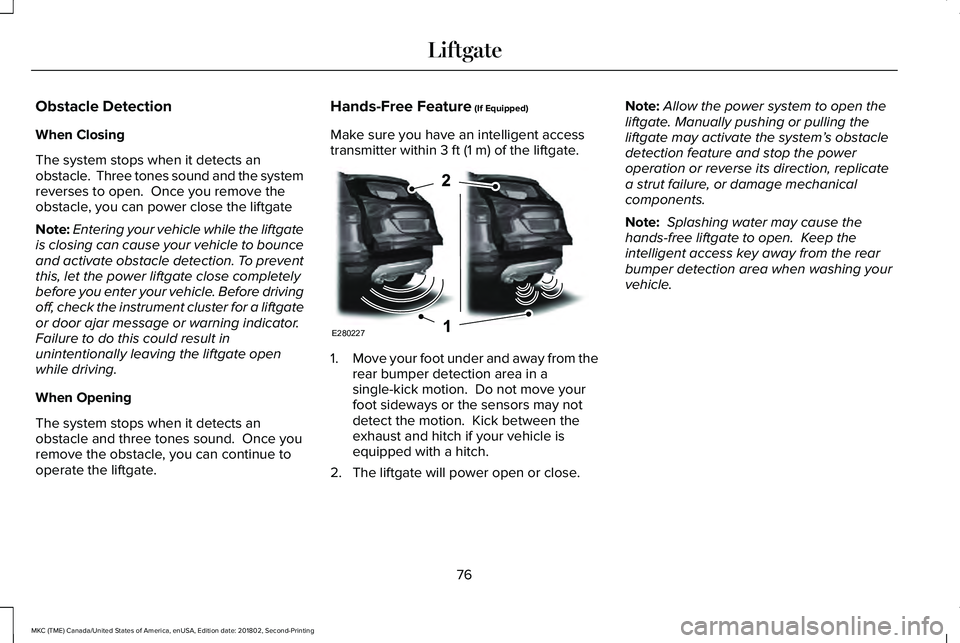
Make sure you have an intelligent accesstransmitter within 3 ft (1 m) of the liftgate.
1.Move your foot under and away from therear bumper detection area in asingle-kick motion. Do not move yourfoot sideways or the sensors may notdetect the motion. Kick between theexhaust and hitch if your vehicle isequipped with a hitch.
2. The liftgate will power open or close.
Note:Allow the power system to open theliftgate. Manually pushing or pulling theliftgate may activate the system’s obstacledetection feature and stop the poweroperation or reverse its direction, replicatea strut failure, or damage mechanicalcomponents.
Note: Splashing water may cause thehands-free liftgate to open. Keep theintelligent access key away from the rearbumper detection area when washing yourvehicle.
76
MKC (TME) Canada/United States of America, enUSA, Edition date: 201802, Second-Printing
LiftgateE280227
Page 105 of 581
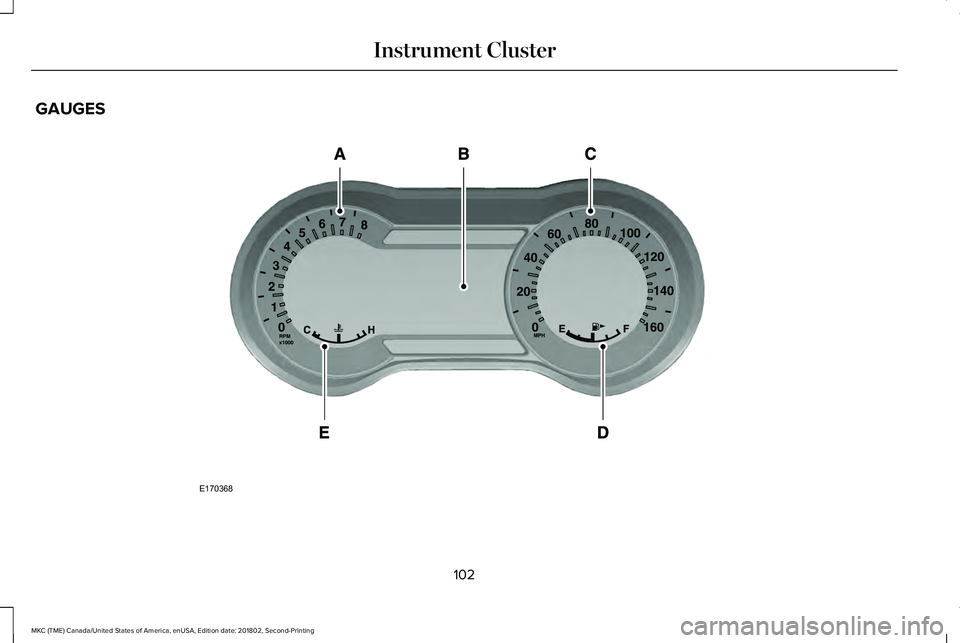
GAUGES
102
MKC (TME) Canada/United States of America, enUSA, Edition date: 201802, Second-Printing
Instrument ClusterE170368
Page 106 of 581
TachometerA
Information displayB
SpeedometerC
Fuel gaugeD
Engine coolant temperature gaugeE
Information Display
Vehicle Settings and Personalization
See General Information (page 108).
Fuel Gauge
Note:The fuel gauge may vary slightly whenyour vehicle is moving or on a gradient.
Switch the ignition on. The fuel gauge willindicate approximately how much fuel is leftin the fuel tank. The arrow adjacent to thefuel pump symbol indicates on which side ofyour vehicle the fuel filler door is located.
The needle should move toward F when yourefuel your vehicle. If the needle points to Eafter adding fuel, this indicates your vehicleneeds service soon.
After refueling some variability in needleposition is normal:
•It may take a short time for the needle toreach full after leaving the gas station.This is normal and depends upon theslope of pavement at the gas station.
•The fuel amount dispensed into the tankis a little less or more than the gaugeindicated. This is normal and dependsupon the slope of pavement at the gasstation.
•If the gas station nozzle shuts off beforethe tank is full, try a different gas pumpnozzle.
Low Fuel Level Reminder
A low fuel level reminder displays andsounds when the distance to empty reaches50 mi (80 km) to empty for MyKey, and at35 mi (60 km), 25 mi (40 km), 10 mi (20 km)and 0 mi (0 km) for all vehicle keys.
Engine Coolant Temperature Gauge
Indicates engine coolant temperature. Atnormal operating temperature, the levelindicator will be in the normal range. If theengine coolant temperature exceeds thenormal range, stop your vehicle as soon assafely possible, switch off the engine and letthe engine cool.
WARNING: Never remove the coolantreservoir cap when the engine is running orhot.
WARNING LAMPS AND
INDICATORS
The following warning lamps and indicatorsalert you to a vehicle condition that maybecome serious. Some lamps illuminatewhen you start your vehicle to make surethey work. If any lamps remain on afterstarting your vehicle, refer to the respectivesystem warning lamp for further information.
103
MKC (TME) Canada/United States of America, enUSA, Edition date: 201802, Second-Printing
Instrument Cluster
Page 107 of 581
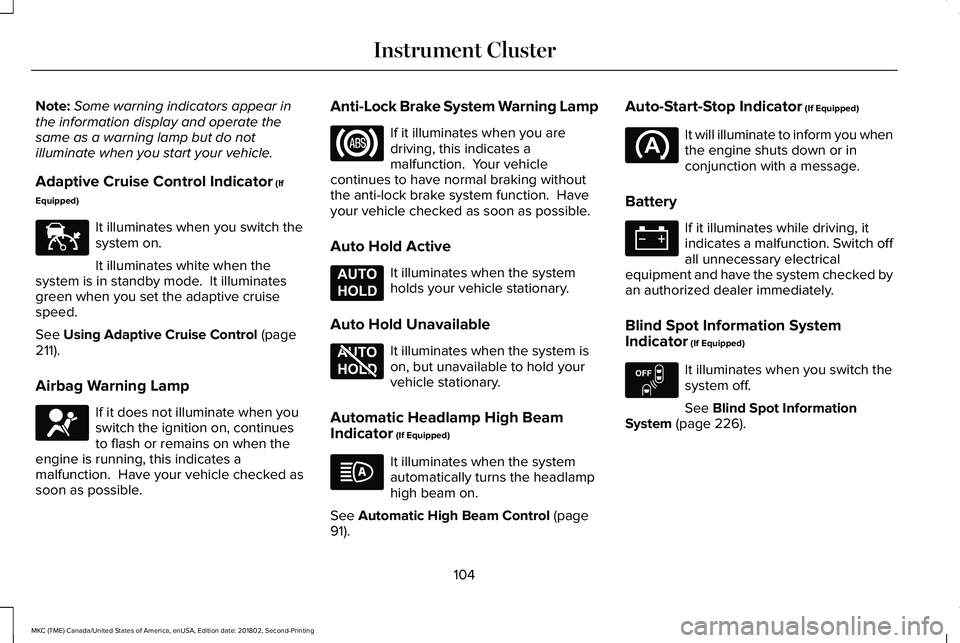
Note:Some warning indicators appear inthe information display and operate thesame as a warning lamp but do notilluminate when you start your vehicle.
Adaptive Cruise Control Indicator (If
Equipped)
It illuminates when you switch thesystem on.
It illuminates white when thesystem is in standby mode. It illuminatesgreen when you set the adaptive cruisespeed.
See Using Adaptive Cruise Control (page211).
Airbag Warning Lamp
If it does not illuminate when youswitch the ignition on, continuesto flash or remains on when theengine is running, this indicates amalfunction. Have your vehicle checked assoon as possible.
Anti-Lock Brake System Warning Lamp
If it illuminates when you aredriving, this indicates amalfunction. Your vehiclecontinues to have normal braking withoutthe anti-lock brake system function. Haveyour vehicle checked as soon as possible.
Auto Hold Active
It illuminates when the systemholds your vehicle stationary.
Auto Hold Unavailable
It illuminates when the system ison, but unavailable to hold yourvehicle stationary.
Automatic Headlamp High BeamIndicator (If Equipped)
It illuminates when the systemautomatically turns the headlamphigh beam on.
See Automatic High Beam Control (page91).
Auto-Start-Stop Indicator (If Equipped)
It will illuminate to inform you whenthe engine shuts down or inconjunction with a message.
Battery
If it illuminates while driving, itindicates a malfunction. Switch offall unnecessary electricalequipment and have the system checked byan authorized dealer immediately.
Blind Spot Information SystemIndicator (If Equipped)
It illuminates when you switch thesystem off.
See Blind Spot InformationSystem (page 226).
104
MKC (TME) Canada/United States of America, enUSA, Edition date: 201802, Second-Printing
Instrument ClusterE144524 E67017 E197933 E197934 E151262
Page 108 of 581
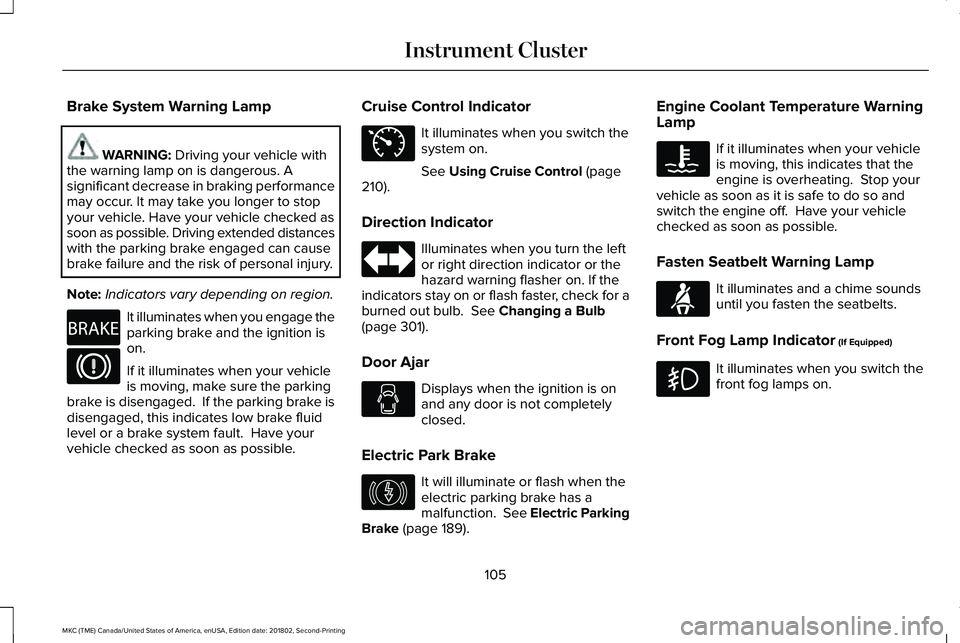
Brake System Warning Lamp
WARNING: Driving your vehicle withthe warning lamp on is dangerous. Asignificant decrease in braking performancemay occur. It may take you longer to stopyour vehicle. Have your vehicle checked assoon as possible. Driving extended distanceswith the parking brake engaged can causebrake failure and the risk of personal injury.
Note:Indicators vary depending on region.
It illuminates when you engage theparking brake and the ignition ison.
If it illuminates when your vehicleis moving, make sure the parkingbrake is disengaged. If the parking brake isdisengaged, this indicates low brake fluidlevel or a brake system fault. Have yourvehicle checked as soon as possible.
Cruise Control Indicator
It illuminates when you switch thesystem on.
See Using Cruise Control (page210).
Direction Indicator
Illuminates when you turn the leftor right direction indicator or thehazard warning flasher on. If theindicators stay on or flash faster, check for aburned out bulb. See Changing a Bulb(page 301).
Door Ajar
Displays when the ignition is onand any door is not completelyclosed.
Electric Park Brake
It will illuminate or flash when theelectric parking brake has amalfunction. See Electric ParkingBrake (page 189).
Engine Coolant Temperature WarningLamp
If it illuminates when your vehicleis moving, this indicates that theengine is overheating. Stop yourvehicle as soon as it is safe to do so andswitch the engine off. Have your vehiclechecked as soon as possible.
Fasten Seatbelt Warning Lamp
It illuminates and a chime soundsuntil you fasten the seatbelts.
Front Fog Lamp Indicator (If Equipped)
It illuminates when you switch thefront fog lamps on.
105
MKC (TME) Canada/United States of America, enUSA, Edition date: 201802, Second-Printing
Instrument ClusterE270480 E71340 E146190 E71880
Page 109 of 581
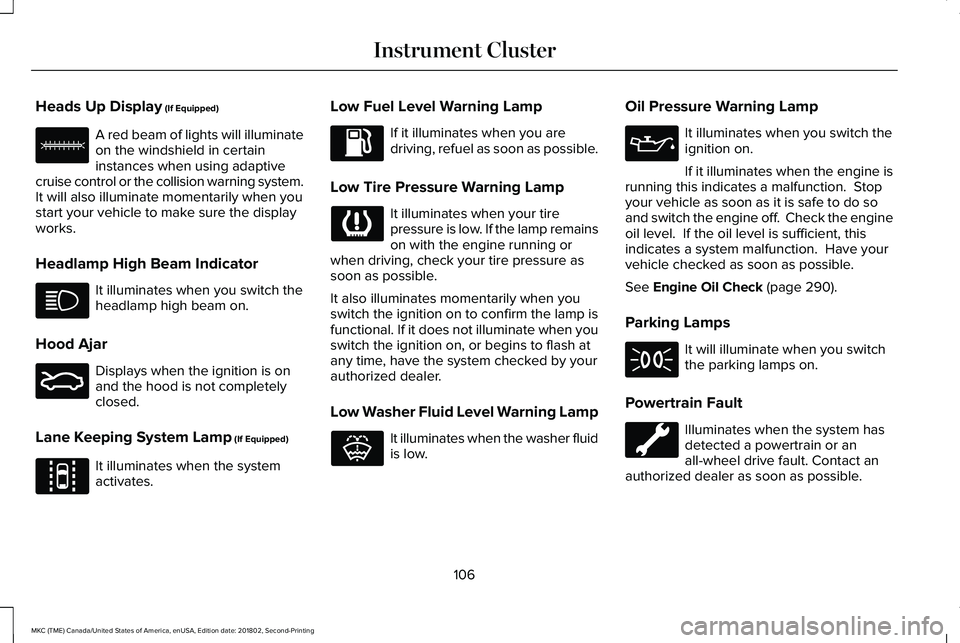
Heads Up Display (If Equipped)
A red beam of lights will illuminateon the windshield in certaininstances when using adaptivecruise control or the collision warning system.It will also illuminate momentarily when youstart your vehicle to make sure the displayworks.
Headlamp High Beam Indicator
It illuminates when you switch theheadlamp high beam on.
Hood Ajar
Displays when the ignition is onand the hood is not completelyclosed.
Lane Keeping System Lamp (If Equipped)
It illuminates when the systemactivates.
Low Fuel Level Warning Lamp
If it illuminates when you aredriving, refuel as soon as possible.
Low Tire Pressure Warning Lamp
It illuminates when your tirepressure is low. If the lamp remainson with the engine running orwhen driving, check your tire pressure assoon as possible.
It also illuminates momentarily when youswitch the ignition on to confirm the lamp isfunctional. If it does not illuminate when youswitch the ignition on, or begins to flash atany time, have the system checked by yourauthorized dealer.
Low Washer Fluid Level Warning Lamp
It illuminates when the washer fluidis low.
Oil Pressure Warning Lamp
It illuminates when you switch theignition on.
If it illuminates when the engine isrunning this indicates a malfunction. Stopyour vehicle as soon as it is safe to do soand switch the engine off. Check the engineoil level. If the oil level is sufficient, thisindicates a system malfunction. Have yourvehicle checked as soon as possible.
See Engine Oil Check (page 290).
Parking Lamps
It will illuminate when you switchthe parking lamps on.
Powertrain Fault
Illuminates when the system hasdetected a powertrain or anall-wheel drive fault. Contact anauthorized dealer as soon as possible.
106
MKC (TME) Canada/United States of America, enUSA, Edition date: 201802, Second-Printing
Instrument ClusterE156133 E159324 E144813 E132353