door lock LINCOLN MKC 2019 Owners Manual
[x] Cancel search | Manufacturer: LINCOLN, Model Year: 2019, Model line: MKC, Model: LINCOLN MKC 2019Pages: 581, PDF Size: 5.41 MB
Page 4 of 581
Introduction
About This Manual...........................................7
Symbols Glossary.............................................7
Data Recording...............................................10
Perchlorate.......................................................13
Lincoln Automotive Financial Services..........................................................................14
Replacement Parts Recommendation..........................................................................14
Special Notices...............................................15
Mobile Communications Equipment.........16
Export Unique Options..................................16
Environment
Protecting the Environment.........................17
At a Glance
Instrument Panel Overview..........................18
Child Safety
General Information......................................20
Installing Child Restraints............................22
Booster Seats.................................................28
Child Restraint Positioning...........................31
Child Safety Locks.........................................32
Seatbelts
Principle of Operation..................................34
Fastening the Seatbelts...............................35
Seatbelt Height Adjustment.......................38
Seatbelt Warning Lamp and IndicatorChime...........................................................38
Seatbelt Reminder.........................................39
Child Restraint and Seatbelt Maintenance..........................................................................41
Seatbelt Extension........................................42
Personal Safety System™
Personal Safety System™.............................43
Supplementary Restraints System
Principle of Operation..................................44
Driver and Passenger Airbags...................45
Front Passenger Sensing System..............47
Side Airbags...................................................50
Driver Knee Airbag.........................................51
Safety Canopy™...............................................51
Crash Sensors and Airbag Indicator.........53
Airbag Disposal..............................................54
Keys and Remote Controls
General Information on Radio Frequencies........................................................................55
Remote Control..............................................56
Replacing a Lost Key or Remote Control........................................................................59
MyKey™
Principle of Operation..................................60
Creating a MyKey...........................................61
Clearing All MyKeys......................................62
Checking MyKey System Status................62
Using MyKey With Remote Start Systems.........................................................................63
MyKey Troubleshooting...............................63
Doors and Locks
Locking and Unlocking................................65
Keyless Entry...................................................70
1
MKC (TME) Canada/United States of America, enUSA, Edition date: 201802, Second-Printing
Table of Contents
Page 6 of 581
Memory Function.........................................143
Rear Seats......................................................145
Heated Seats.................................................145
Climate Controlled Seats...........................147
Universal Garage Door Opener
Universal Garage Door Opener...............149
Auxiliary Power Points
Auxiliary Power Points................................154
Storage Compartments
Center Console............................................156
Overhead Console......................................156
Rear Seat Armrest........................................156
Starting and Stopping the Engine
General Information.....................................157
Keyless Starting............................................157
Starting a Gasoline Engine........................158
Engine Block Heater....................................161
Unique Driving Characteristics
Auto-Start-Stop.............................................163
Fuel and Refueling
Safety Precautions.......................................166
Fuel Quality...................................................166
Fuel Filler Funnel Location.........................167
Running Out of Fuel.....................................167
Refueling........................................................169
Fuel Consumption........................................172
Engine Emission Control
Emission Law.................................................173
Catalytic Converter......................................174
Transmission
Automatic Transmission..............................177
All-Wheel Drive
Using All-Wheel Drive.................................183
Brakes
General Information.....................................188
Hints on Driving With Anti-Lock Brakes.......................................................................189
Electric Parking Brake.................................189
Hill Start Assist...............................................191
Auto Hold.......................................................192
Traction Control
Principle of Operation.................................195
Using Traction Control................................195
Stability Control
Principle of Operation.................................196
Using Stability Control................................197
Parking Aids
Principle of Operation.................................198
Rear Parking Aid...........................................198
Front Parking Aid.........................................199
Active Park Assist.......................................200
Rear View Camera......................................207
Cruise Control
Principle of Operation.................................210
3
MKC (TME) Canada/United States of America, enUSA, Edition date: 201802, Second-Printing
Table of Contents
Page 11 of 581
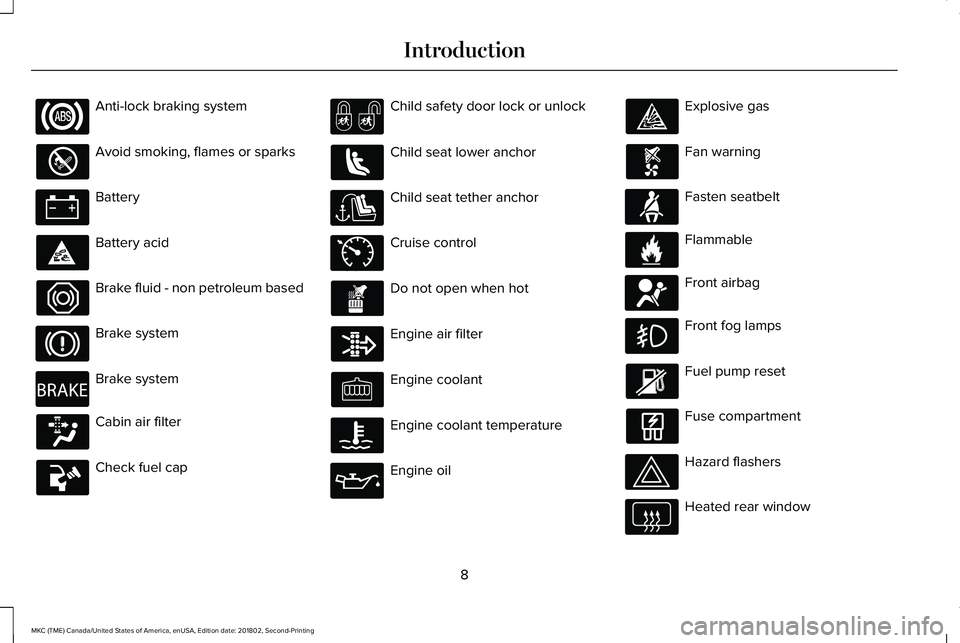
Anti-lock braking system
Avoid smoking, flames or sparks
Battery
Battery acid
Brake fluid - non petroleum based
Brake system
Brake system
Cabin air filter
Check fuel cap
Child safety door lock or unlock
Child seat lower anchor
Child seat tether anchor
Cruise control
Do not open when hot
Engine air filter
Engine coolant
Engine coolant temperature
Engine oil
Explosive gas
Fan warning
Fasten seatbelt
Flammable
Front airbag
Front fog lamps
Fuel pump reset
Fuse compartment
Hazard flashers
Heated rear window
8
MKC (TME) Canada/United States of America, enUSA, Edition date: 201802, Second-Printing
Introduction E270480 E71340 E71880 E231160 E67017
Page 35 of 581
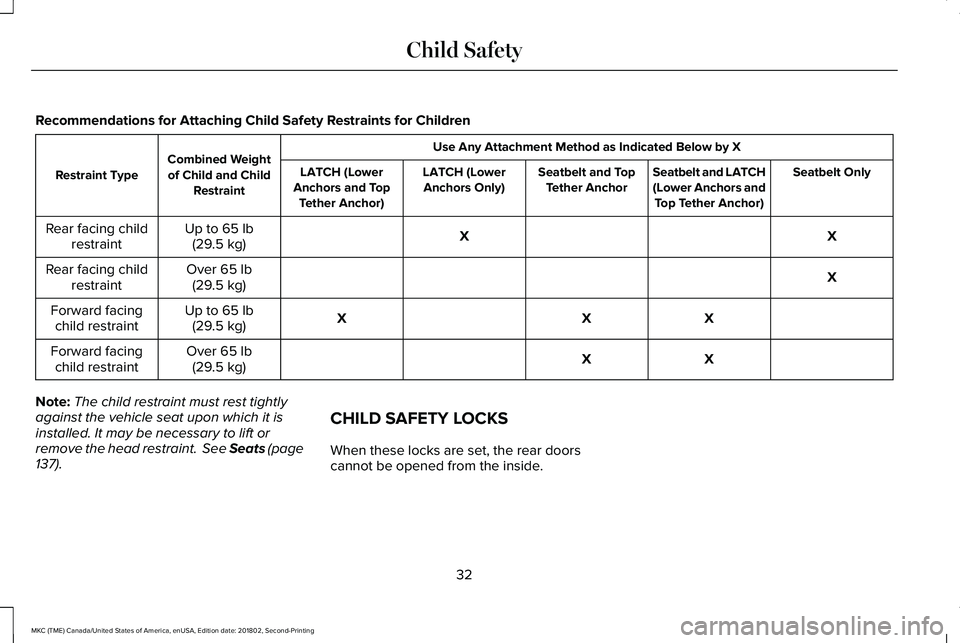
Recommendations for Attaching Child Safety Restraints for Children
Use Any Attachment Method as Indicated Below by XCombined Weightof Child and ChildRestraintRestraint TypeSeatbelt OnlySeatbelt and LATCH(Lower Anchors andTop Tether Anchor)
Seatbelt and TopTether AnchorLATCH (LowerAnchors Only)LATCH (LowerAnchors and TopTether Anchor)
XXUp to 65 lb(29.5 kg)Rear facing childrestraint
XOver 65 lb(29.5 kg)Rear facing childrestraint
XXXUp to 65 lb(29.5 kg)Forward facingchild restraint
XXOver 65 lb(29.5 kg)Forward facingchild restraint
Note:The child restraint must rest tightlyagainst the vehicle seat upon which it isinstalled. It may be necessary to lift orremove the head restraint. See Seats (page137).
CHILD SAFETY LOCKS
When these locks are set, the rear doorscannot be opened from the inside.
32
MKC (TME) Canada/United States of America, enUSA, Edition date: 201802, Second-Printing
Child Safety
Page 36 of 581
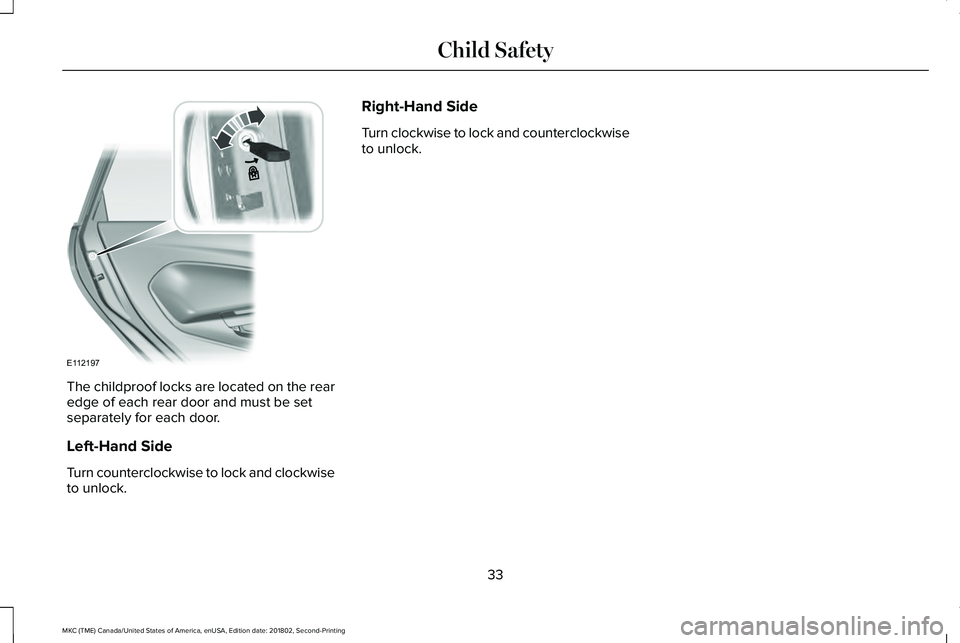
The childproof locks are located on the rearedge of each rear door and must be setseparately for each door.
Left-Hand Side
Turn counterclockwise to lock and clockwiseto unlock.
Right-Hand Side
Turn clockwise to lock and counterclockwiseto unlock.
33
MKC (TME) Canada/United States of America, enUSA, Edition date: 201802, Second-Printing
Child SafetyE112197
Page 58 of 581
GENERAL INFORMATION ON
RADIO FREQUENCIES
This device complies with Part 15 of the FCCRules and with Licence exempt RSSStandards of Industry Canada. Operation issubject to the following two conditions:
•This device may not cause harmfulinterference, and
•This device must accept any interferencereceived, including interference that maycause undesired operation.
WARNING: Changes or modificationsnot expressively approved by the partyresponsible for compliance could void theuser's authority to operate the equipment.The term "IC:" before the radio certificationnumber only signifies that Industry Canadatechnical specifications were met.
The typical operating range for yourtransmitter is approximately 33 ft (10 m).Vehicles with the remote start feature willhave a greater range. One of the followingcould cause a decrease in operating range:
•weather conditions
•nearby radio towers
•structures around the vehicle
•other vehicles parked next to yourvehicle
Other short-distance radio transmitters, suchas amateur radios, medical equipment,wireless headphones, remote controls andalarm systems may operate on the samefrequency as your remote control. If othertransmitters are operating on thosefrequencies, you may not be able to use yourremote control. Using your remote controlnear some types of electronic equipment,such as USB devices, computers or cellphones can interfere with remote operation.Operating your remote control near metal ormetallic-finished purses, bags or clothing caninterfere with remote operation. You can lockand unlock the doors with the key.
Note:Make sure to lock your vehicle beforeleaving it unattended.
Note:If you are in range, the remote controlwill operate if you press any buttonunintentionally.
Intelligent Access
The system uses a radio frequency signal tocommunicate with your vehicle and authorizeyour vehicle to unlock when one of thefollowing conditions are met:
•You touch the inside of any exterior doorhandle within 3 ft (1 m) proximity of anintelligent access key.
•You press the luggage compartmentbutton.
•You press a button on the transmitter.
If excessive radio frequency interference ispresent in the area or if the transmitterbattery is low, you may need to mechanicallyunlock your door. You can use themechanical key blade in your intelligentaccess key to open the driver door in thissituation. See Remote Control (page 56).
55
MKC (TME) Canada/United States of America, enUSA, Edition date: 201802, Second-Printing
Keys and Remote Controls
Page 62 of 581
Remote Starting Your Vehicle
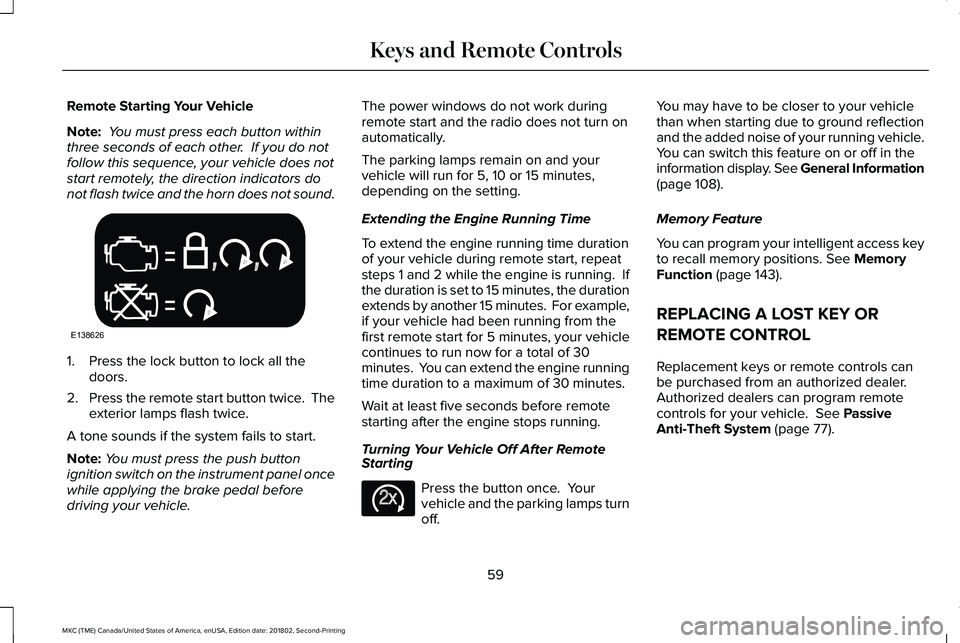
Note: You must press each button withinthree seconds of each other. If you do notfollow this sequence, your vehicle does notstart remotely, the direction indicators donot flash twice and the horn does not sound.
1. Press the lock button to lock all thedoors.
2.Press the remote start button twice. Theexterior lamps flash twice.
A tone sounds if the system fails to start.
Note:You must press the push buttonignition switch on the instrument panel oncewhile applying the brake pedal beforedriving your vehicle.
The power windows do not work duringremote start and the radio does not turn onautomatically.
The parking lamps remain on and yourvehicle will run for 5, 10 or 15 minutes,depending on the setting.
Extending the Engine Running Time
To extend the engine running time durationof your vehicle during remote start, repeatsteps 1 and 2 while the engine is running. Ifthe duration is set to 15 minutes, the durationextends by another 15 minutes. For example,if your vehicle had been running from thefirst remote start for 5 minutes, your vehiclecontinues to run now for a total of 30minutes. You can extend the engine runningtime duration to a maximum of 30 minutes.
Wait at least five seconds before remotestarting after the engine stops running.
Turning Your Vehicle Off After RemoteStarting
Press the button once. Yourvehicle and the parking lamps turnoff.
You may have to be closer to your vehiclethan when starting due to ground reflectionand the added noise of your running vehicle.You can switch this feature on or off in theinformation display. See General Information(page 108).
Memory Feature
You can program your intelligent access keyto recall memory positions. See MemoryFunction (page 143).
REPLACING A LOST KEY OR
REMOTE CONTROL
Replacement keys or remote controls canbe purchased from an authorized dealer.Authorized dealers can program remotecontrols for your vehicle. See PassiveAnti-Theft System (page 77).
59
MKC (TME) Canada/United States of America, enUSA, Edition date: 201802, Second-Printing
Keys and Remote ControlsE138626 E138625
Page 68 of 581
LOCKING AND UNLOCKING
You can use the power door lock or theremote control to lock and unlock yourvehicle.
Power Door Locks
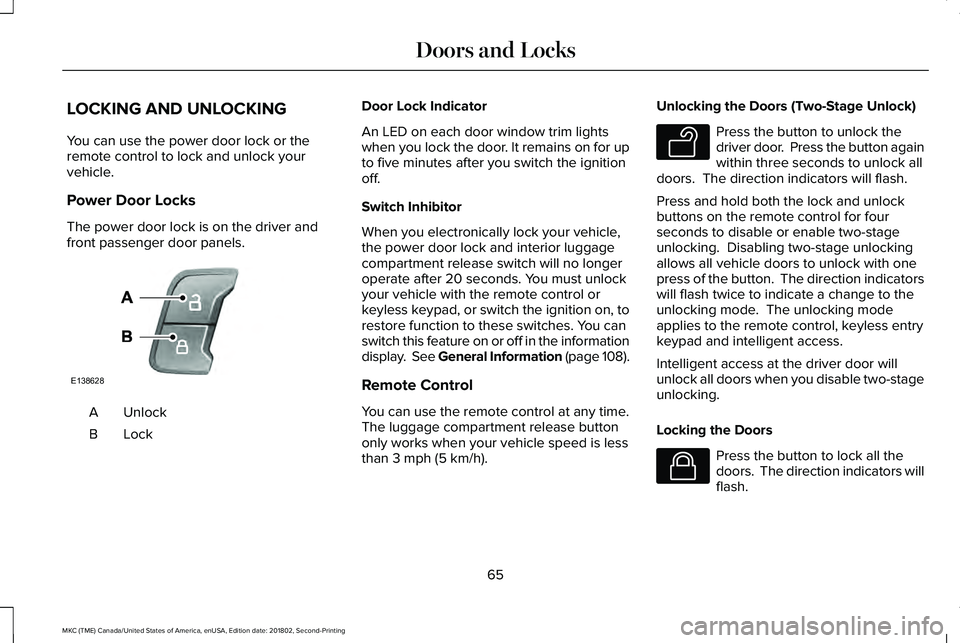
The power door lock is on the driver andfront passenger door panels.
UnlockA
LockB
Door Lock Indicator
An LED on each door window trim lightswhen you lock the door. It remains on for upto five minutes after you switch the ignitionoff.
Switch Inhibitor
When you electronically lock your vehicle,the power door lock and interior luggagecompartment release switch will no longeroperate after 20 seconds. You must unlockyour vehicle with the remote control orkeyless keypad, or switch the ignition on, torestore function to these switches. You canswitch this feature on or off in the informationdisplay. See General Information (page 108).
Remote Control
You can use the remote control at any time.The luggage compartment release buttononly works when your vehicle speed is lessthan 3 mph (5 km/h).
Unlocking the Doors (Two-Stage Unlock)
Press the button to unlock thedriver door. Press the button againwithin three seconds to unlock alldoors. The direction indicators will flash.
Press and hold both the lock and unlockbuttons on the remote control for fourseconds to disable or enable two-stageunlocking. Disabling two-stage unlockingallows all vehicle doors to unlock with onepress of the button. The direction indicatorswill flash twice to indicate a change to theunlocking mode. The unlocking modeapplies to the remote control, keyless entrykeypad and intelligent access.
Intelligent access at the driver door willunlock all doors when you disable two-stageunlocking.
Locking the Doors
Press the button to lock all thedoors. The direction indicators willflash.
65
MKC (TME) Canada/United States of America, enUSA, Edition date: 201802, Second-Printing
Doors and LocksE138628 E138629 E138623
Page 69 of 581

Press the button again within three secondsto confirm that all the doors are closed. Thedoors lock again, a tone sounds and thedirection indicators flash if all the doors andthe luggage compartment are closed.
Mislock
If any door or the luggage compartment isopen, or if the hood is open on vehicles withan anti-theft alarm or remote start, a tonesounds and the direction indicators will notflash. You can switch this feature on or off inthe information display. See GeneralInformation (page 108).
Audible and Visual Locking Confirmation
If audible and visual locking confirmation isconfigurable, you can turn it on or off usingthe information display. See GeneralInformation (page 108).
Mechanical Key
The intelligent access key also contains aremovable key blade that you can use to lockand unlock your vehicle. See RemoteControl (page 56).
Turn the top of the key toward the front ofyour vehicle once to lock all doors.
Turn the top of the key toward the rear ofyour vehicle once to unlock the driver dooronly.
Locking the Doors Individually
If the power locks fail to operate, lock thedoors individually using the key in theposition shown.
Left-Hand Side
Turn clockwise to lock.
66
MKC (TME) Canada/United States of America, enUSA, Edition date: 201802, Second-Printing
Doors and LocksE180643
Page 70 of 581
Right-Hand Side
Turn counterclockwise to lock.
Opening a Rear Door from Inside
Pull the interior door handle twice to unlockand open a rear door. The first pull unlocksthe door and the second pull will unlatch thedoor.
Activating Intelligent Access
General Information
You can unlock and lock the vehicle withouttaking the keys out of your pocket or pursewhen your intelligent access key is within3 ft (1 m) of your vehicle. Intelligent accessuses a sensor on the back of the door handlefor unlocking and a separate sensor on theface of each door handle for locking.
The system will not function if:
•Your vehicle battery has no charge.
•The key battery has no charge.
•The key frequencies are jammed.
Note:The system may not function if thepassive key is close to metal objects orelectronic devices, for example keys or acell phone.
Note:If the system does not function, usethe key blade to lock and unlock yourvehicle. See Remote Control (page 56).
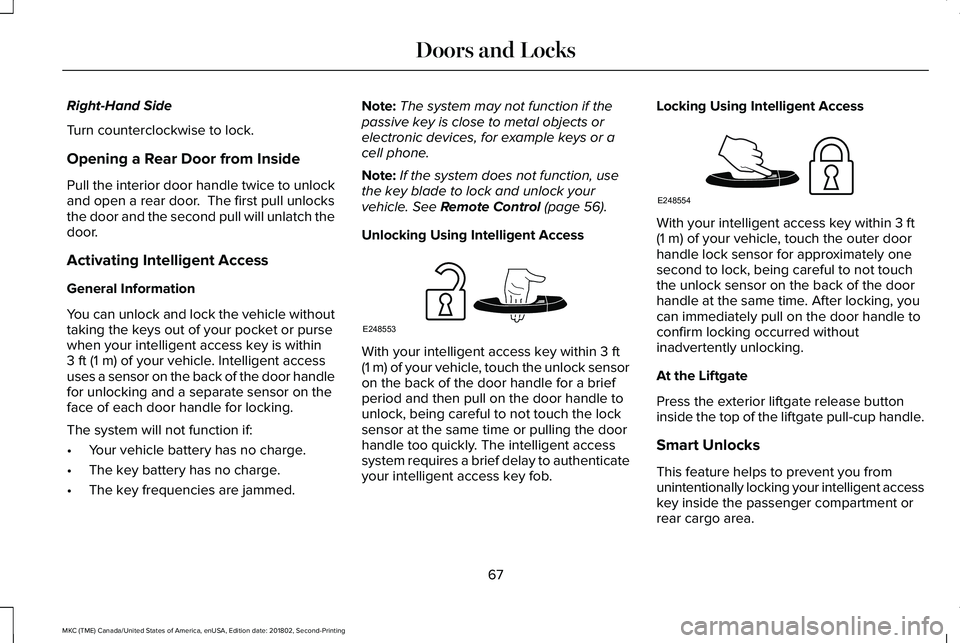
Unlocking Using Intelligent Access
With your intelligent access key within 3 ft(1 m) of your vehicle, touch the unlock sensoron the back of the door handle for a briefperiod and then pull on the door handle tounlock, being careful to not touch the locksensor at the same time or pulling the doorhandle too quickly. The intelligent accesssystem requires a brief delay to authenticateyour intelligent access key fob.
Locking Using Intelligent Access
With your intelligent access key within 3 ft(1 m) of your vehicle, touch the outer doorhandle lock sensor for approximately onesecond to lock, being careful to not touchthe unlock sensor on the back of the doorhandle at the same time. After locking, youcan immediately pull on the door handle toconfirm locking occurred withoutinadvertently unlocking.
At the Liftgate
Press the exterior liftgate release buttoninside the top of the liftgate pull-cup handle.
Smart Unlocks
This feature helps to prevent you fromunintentionally locking your intelligent accesskey inside the passenger compartment orrear cargo area.
67
MKC (TME) Canada/United States of America, enUSA, Edition date: 201802, Second-Printing
Doors and LocksE248553 E248554