key LINCOLN MKS 2014 Workshop Manual
[x] Cancel search | Manufacturer: LINCOLN, Model Year: 2014, Model line: MKS, Model: LINCOLN MKS 2014Pages: 461, PDF Size: 5.98 MB
Page 220 of 461
•Electronic Stability Control and Traction Control (ESC and TC)
maintain vehicle control in adverse conditions or high performance
driving.
•Electronic Throttle Control (ETC) which enhances the powertrain
response to your inputs.
These systems have a range of modes which you can choose from in
order to customize your ideal driving experience:
•
Comfort – Provides a more relaxed driving experience, maximizing
comfort. Steering effort is decreased and suspension movement is more
fluid. Comfort mode is ideal when enhanced traveling comfort is desired.
•Normal – Delivers a balanced combination of comfortable, controlled
ride and confident handling. This mode provides an engaging drive
experience and a direct connection to the road without sacrificing any
of the composure demanded from a luxury vehicle.
•Sport – Provides a sportier driving experience. Suspension stiffens,
with an emphasis on handling and control. The engine responds more
directly to your inputs and takes on a more powerful tone. Sport mode
is intended to be used during more spirited driving.
Using Lincoln Drive Control
You can configure which of the Drive Control modes are active when the
vehicle is in D (Drive) or in S (Sport). The configuration is retained until
modified using the information display.
To change the vehicle’s Drive Control settings, access the main menu on
the information display:
1. Choose Settings.
2. Choose Driver Assist.
3. Choose Drive Control.
4. Select the shift position you would like to configure, either D or S.
5. Choose from Comfort, Normal, or Sport modes as your preferred
setting in D.
6. Choose from Normal or Sport modes as your preferred setting in S.
Note:Lincoln Drive Control has diagnostic checks that continuously
monitor the system to ensure proper operation. Certain types of system
errors will gray out the mode selections within the information display,
preventing you from changing states when the gear position is changed.
Other types of errors will produce a temporary message that states Drive
Control Malfunction. If either condition persists for multiple key cycles,
take your vehicle to an authorized dealer to have it checked.
Driving Aids219
2014 MKS(mks)
Owners Guide gf, 1st Printing, April 2013
USA(fus)
Page 241 of 461
ROADSIDE ASSISTANCE
Vehicles Sold in the U.S.: Getting Roadside Assistance
To fully assist you should you have a vehicle concern, Ford Motor
Company offers a complimentary roadside assistance program. This
program is separate from the New Vehicle Limited Warranty. The service
is available:
•24 hours a day, seven days a week
•for the coverage period listed on the Roadside Assistance Card
included in your owner’s manual portfolio.
Roadside assistance will cover:
•a flat tire change with a good spare (except vehicles that have been
supplied with a tire inflation kit).
•battery jump start.
•lock-out assistance (key replacement cost is the customer’s
responsibility).
•fuel delivery – Independent Service Contractors, if not prohibited by
state, local or municipal law, shall deliver up to 2.0 gallons (7.5 liters)
of gasoline or 5.0 gallons (18.9 liters) of diesel fuel to a disabled
vehicle. Fuel delivery service is limited to two no-charge occurrences
within a 12-month period.
•winch out – available within 100 feet (30.5 meters) of a paved or
county maintained road, no recoveries.
•towing – Ford and Lincoln eligible vehicles towed to an authorized
dealer within 35 miles (56 kilometers) of the disablement location or
to the nearest authorized dealer. If a member requests to be towed to
an authorized dealer more than 35 miles (56 kilometers) from the
disablement location, the member shall be responsible for any mileage
costs in excess of 35 miles (56 kilometers).
Trailers shall be covered up to $200 if the disabled eligible vehicle
requires service at the nearest authorized dealer. If the trailer is disabled,
but the towing vehicle is operational, the trailer does not qualify for any
roadside services.
Vehicles sold in the U.S. : Using roadside assistance
Complete the roadside assistance identification card and place it in your
wallet for quick reference. This card is found in the owner’s manual
portfolio in the glove compartment.
240Roadside Emergencies
2014 MKS(mks)
Owners Guide gf, 1st Printing, April 2013
USA(fus)
Page 260 of 461
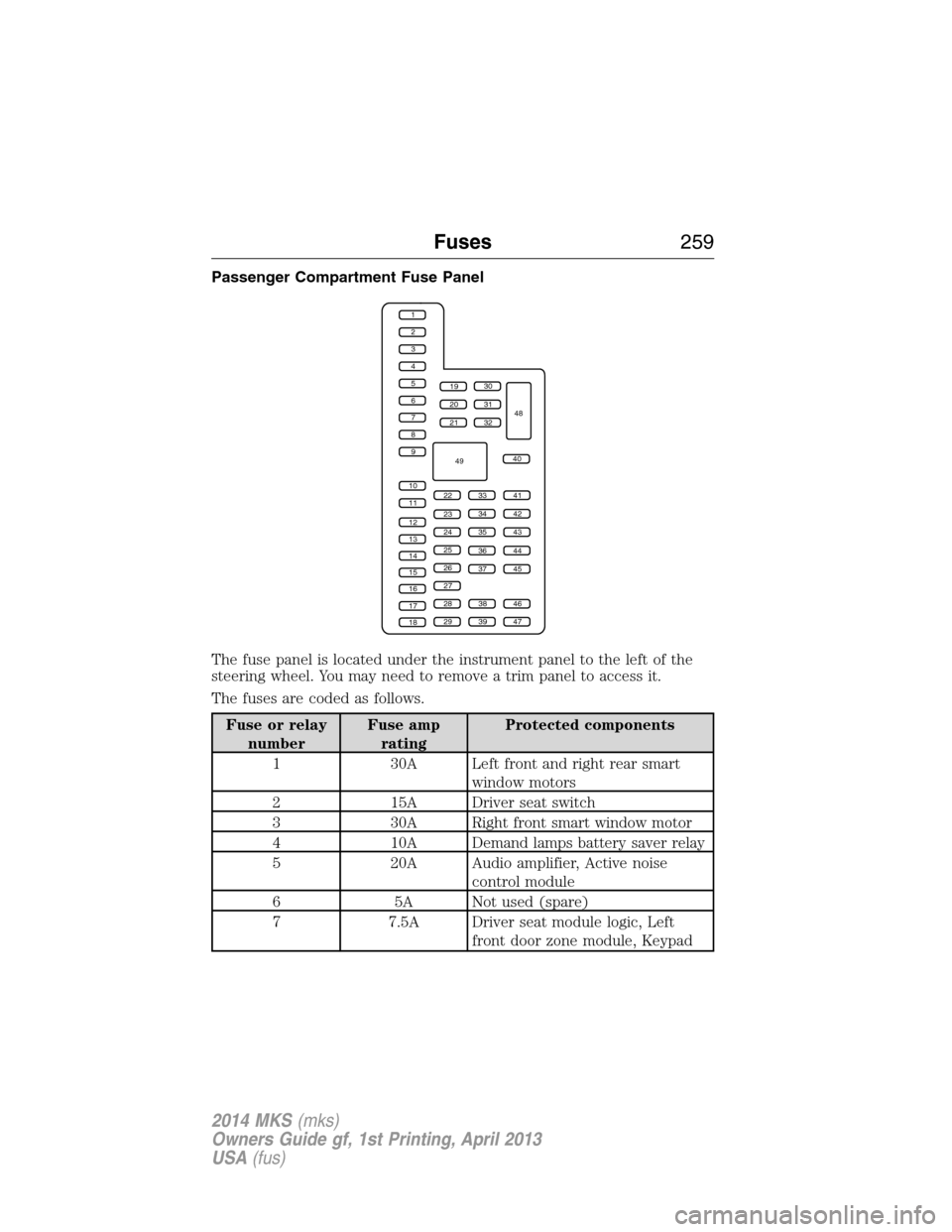
Passenger Compartment Fuse Panel
The fuse panel is located under the instrument panel to the left of the
steering wheel. You may need to remove a trim panel to access it.
The fuses are coded as follows.
Fuse or relay
numberFuse amp
ratingProtected components
1 30A Left front and right rear smart
window motors
2 15A Driver seat switch
3 30A Right front smart window motor
4 10A Demand lamps battery saver relay
5 20A Audio amplifier, Active noise
control module
6 5A Not used (spare)
7 7.5A Driver seat module logic, Left
front door zone module, Keypad
1
2
3
4
5
6
7
8
9
10
11
12
13
14
15
16
17
18
19
20
21
223341
42
43
44
45
34
35
36
37
23
24
25
26
27
283846
394729
32
40
31
30
48
49
Fuses259
2014 MKS(mks)
Owners Guide gf, 1st Printing, April 2013
USA(fus)
Page 261 of 461
Fuse or relay
numberFuse amp
ratingProtected components
8 10A Not used (spare)
9 10A SYNC module, Electronic finish
panel, Radio frequency
transceiver module
10 10A Run accessory relay, Wiper relay,
Rain-sense subfuse
11 10A Intelligent access module logic,
Heads-up display
12 15A Puddle lamp, Backlighting LED,
Interior lighting
13 15A Right turn signals
14 15A Left turn signals
15 15A Stop lamp, Backup lamp
16 10A Right front low beam
17 10A Left front low beam
18 10A Start button, Keypad illumination,
Brake shift interlock, Powertrain
control module wake-up,
Immobilizer transceiver module
19 20A Audio amplifiers
20 20A All lock motor relay and coil,
Driver lock motor relay and coil
21 10A Not used (spare)
22 20A Horn relay
23 15A Steering wheel control module
logic, Instrument cluster
24 15A Steering wheel control module,
Datalink
25 15A Decklid release
26 5A Push button start switch
27 20A Intelligent access module power
28 15A Not used (spare)
260Fuses
2014 MKS(mks)
Owners Guide gf, 1st Printing, April 2013
USA(fus)
Page 263 of 461
GENERAL INFORMATION
Have your vehicle serviced regularly to help maintain its roadworthiness
and resale value. There is a large network of Ford authorized dealers
who are there to help you with their professional servicing expertise. We
believe that their specially trained technicians are best qualified to
service your vehicle properly and expertly. They are supported by a wide
range of highly specialized tools developed specifically for servicing your
vehicle.
To help you service your vehicle, we provideScheduled Maintenance
Informationwhich makes tracking routine service easy.
If your vehicle requires professional service, your authorized dealer can
provide the necessary parts and service. Check your warranty
information to find out which parts and services are covered.
Use only recommended fuels, lubricants, fluids and service parts
conforming to specifications. Motorcraft® parts are designed and built to
provide the best performance in your vehicle.
Precautions
•Do not work on a hot engine.
•Make sure that nothing gets caught in moving parts.
•Do not work on a vehicle with the engine running in an enclosed
space, unless you are sure you have enough ventilation.
•Keep all open flames and other burning material (such as cigarettes)
away from the battery and all fuel related parts.
Working with the Engine Off
1. Set the parking brake and shift toP(Park).
2. Turn off the engine and remove the key (if equipped).
3. Block the wheels.
Working with the Engine On
WARNING:To reduce the risk of vehicle damage or personal
burn injuries, do not start your engine with the air cleaner
removed and do not remove it while the engine is running.
1. Set the parking brake and shift to positionP.
2. Block the wheels.
262Maintenance
2014 MKS(mks)
Owners Guide gf, 1st Printing, April 2013
USA(fus)
Page 345 of 461
Safety Information
WARNING:Driving while distracted can result in loss of vehicle
control, crash and injury. We strongly recommend that you use
extreme caution when using any device that may take your focus off
the road. Your primary responsibility is the safe operation of your
vehicle. We recommend against the use of any handheld device while
driving and encourage the use of voice-operated systems when possible.
Make sure you are aware of all applicable local laws that may affect the
use of electronic devices while driving.
When using SYNC:
•Do not operate playing devices if the power cords or cables are
broken, split or damaged. Place cords and cables out of the way, so
they do not interfere with the operation of pedals, seats,
compartments or safe driving abilities.
•Do not leave playing devices in your vehicle during extreme conditions
as it could cause them damage. See your device’s manual for further
information.
•Do not attempt to service or repair the system. See your authorized
dealer.
For your safety, some SYNC functions are speed-dependent. Their use is
limited to when your vehicle is traveling at speeds under 3 mph
(5 km/h).
Make sure that you review your device’s manual before using it with
SYNC.
Speed-restricted Features
Some features of this system may be too difficult to use while your
vehicle is moving so they are restricted from use unless your vehicle is
stationary.
•Screens that are too crowded with information, such as Point of
Interest reviews and ratings, Sirius Travel Link sports scores, movie
times and ski conditions.
•Any action that requires you to use a keyboard is restricted, such as
entering a navigation destination or editing information.
•All lists are limited so the user can view fewer entries (such as phone
contacts or recent phone call entries).
344MyLincoln Touch™
2014 MKS(mks)
Owners Guide gf, 1st Printing, April 2013
USA(fus)
Page 346 of 461
See the following chart for more specific examples:
Restricted Features
Cellular Phone Pairing a Bluetooth phone
Adding phonebook contacts or uploading
phonebook contacts (from a USB)
List entries are limited for phone contacts and
recent phone call entries
System Functionality Editing the keypad code
Enabling Valet Mode
Editing settings while the rear view camera or
Active Park Assist are active
Wi-Fi and Wireless Editing wireless settings
Editing the list of wireless networks
Videos, Photos and
GraphicsPlaying video
Editing the screen’s wallpaper or adding new
wallpaper
Text Messages Composing text messages
Viewing received text messages
Editing preset text messages
Navigation Using the keyboard to enter a destination
Demo navigation route
Adding or Editing Address Book entries or
Avoid Areas
Privacy Information
When a cellular phone is connected to SYNC, the system creates a
profile within your vehicle that is linked to that cellular phone. This
profile is created in order to offer you more cellular features and to
operate more efficiently. Among other things, this profile may contain
data about your cellular phone book, text messages (read and unread),
and call history, including history of calls when your cell phone was not
connected to the system. In addition, if you connect a media device, the
system creates and retains an index of supported media content. The
system also records a short development log of approximately
10 minutes of all recent system activity. The log profile and other system
data may be used to improve the system and help diagnose any problems
that may occur.
MyLincoln Touch™345
2014 MKS(mks)
Owners Guide gf, 1st Printing, April 2013
USA(fus)
Page 364 of 461
Satellite radio electronic serial number (ESN):You need your ESN
to activate, modify or track your satellite radio account. The ESN is on
the System Information Screen (SR ESN: XXXXXXXXXXXX). To access
your ESN, press the bottom left corner of the touchscreen, thenSIRIUS
>Options.
Potential satellite radio reception issues
Antenna
obstructionsFor optimal reception performance, keep the
antenna clear of snow and ice build-up and
keep luggage and other materials as far away
from the antenna as possible.
TerrainHills, mountains, tall buildings, bridges,
tunnels, freeway overpasses, parking garages,
dense tree foliage and thunderstorms can
interfere with your reception.
Station overloadWhen you pass a ground-based
broadcast-repeating tower, a stronger signal
may overtake a weaker one and the audio
system may mute.
Satellite radio signal
interferenceYour display may show ACQUIRING...to
indicate the interference and the audio
system may mute.
Sirius troubleshooting tips
Radio display Condition Possible action
Acquiring... Radio requires more
than two seconds to
produce audio for the
selected channel.No action required.
This message should
disappear shortly.
Sat Fault/SIRIUS
system failure.There is an internal
module or system
failure present.If this message does
not clear shortly, or
with an ignition key
cycle, your receiver
may have a fault. See
your authorized dealer
for service.
MyLincoln Touch™363
2014 MKS(mks)
Owners Guide gf, 1st Printing, April 2013
USA(fus)
Page 395 of 461
Your system allows you to upload and view up to 32 photos.
To access, press theSettings icon >Display>Edit Wallpaper,and then
follow the system prompts to upload your photographs.
Only the photograph(s), which meets the following conditions, display:
•Compatible file formats are as follows: .jpg, .gif, .png, .bmp.
•Each file must be 1.5 MB or less.
•Recommended dimensions: 800 x 384.
Sound
Press the Settings icon >Sound,then select from the
following:
Sound Settings
Bass DSP*
Midrange Occupancy Mode*
Treble Speed Compensated Volume
Set Balance and Fade
*If equipped.
Vehicle
Press the Settings icon >Vehicle,then select from the
following:
•Ambient Lighting
•Vehicle Health Report
•Door Keypad Code
•Rear View Camera
•Enable Valet Mode.
394MyLincoln Touch™
2014 MKS(mks)
Owners Guide gf, 1st Printing, April 2013
USA(fus)
Page 396 of 461
Ambient Lighting (If Equipped)
When activated, ambient lighting illuminates footwells and cupholders
with a choice of colors. To access and make adjustments:
1. Press the Settings icon >Vehicle>Ambient Lighting.
2. Touch the desired color.
3. Use the scroll bar to increase or decrease the intensity.
To turn the feature on or off, press the power button.
Vehicle Health Report
Turn Automatic Reminders on and off and set the mileage interval at
which you would like to receive the reports. Press?for more information
on these selections.
When done making your selections, pressRun Vehicle Health Report
Nowif you want your report.
Door Keypad Code
To change the keypad code for your keyless entry keypad system:
1. Press the Settings icon >Vehicle>Door Keypad Code.
2. Enter your current factory code, then, when prompted, enter your
new code.
Rear View Camera
This menu allows you to access settings for your rear view camera.
Press the Settings icon >Vehicle>Rear View Camera,then select
from the following settings:
•Rear Camera Delay
•Visual Park Aid Alert
•Guidelines.
Enable Valet Mode
Note:If the system locks, and you need to reset the PIN, enter 3681 and
the system unlocks.
Valet mode allows you to lock the system. No information is accessible
until the system is unlocked with the correct PIN.
1. Press the Settings icon >Vehicle>Enable Valet Mode.
2. When prompted, enter a four-digit PIN.
After you press Continue, the system locks until you enter the PIN again.
MyLincoln Touch™395
2014 MKS(mks)
Owners Guide gf, 1st Printing, April 2013
USA(fus)