phone LINCOLN MKS 2015 User Guide
[x] Cancel search | Manufacturer: LINCOLN, Model Year: 2015, Model line: MKS, Model: LINCOLN MKS 2015Pages: 424, PDF Size: 3.96 MB
Page 218 of 424
UTILIZING THE
MEDIATION/ARBITRATION
PROGRAM (CANADA ONLY)
For vehicles delivered to authorized Canadian
dealers. In those cases where you continue
to feel that the efforts by Ford of Canada and
the authorized dealer to resolve a
factory-related vehicle service concern have
been unsatisfactory, Ford of Canada
participates in an impartial third party
mediation/arbitration program administered
by the Canadian Motor Vehicle Arbitration
Plan (CAMVAP).
The CAMVAP program is a straight forward
and relatively speedy alternative to resolve
a disagreement when all other efforts to
produce a settlement have failed. This
procedure is without cost to you and is
designed to eliminate the need for lengthy
and expensive legal proceedings.
In the CAMVAP program, impartial third-party
arbitrators conduct hearings at mutually
convenient times and places in an informal
environment. These impartial arbitrators
review the positions of the parties, make
decisions and, when appropriate, render
awards to resolve disputes. CAMVAP
decisions are fast, fair, and final as the
arbitrator
’s award is binding on both you and
Ford of Canada.
CAMVAP services are available in all
Canadian territories and provinces. For more
information, without charge or obligation,
call your CAMVAP Provincial Administrator
directly at 1-800-207-0685 or visit
www.camvap.ca.
GETTING ASSISTANCE OUTSIDE
THE U.S. AND CANADA
Before exporting your vehicle to a foreign
country, contact the appropriate foreign
embassy or consulate. These officials can
inform you of local vehicle registration
regulations and where to find unleaded fuel.
If you cannot find unleaded fuel or can only
get fuel with an anti-knock index lower than
is recommended for your vehicle, contact our
Customer Relationship Center. The use of leaded fuel in your vehicle without
proper conversion may damage the
effectiveness of your emission control system
and may cause engine knocking or serious
engine damage. Ford Motor Company or Ford
of Canada is not responsible for any damage
caused by use of improper fuel. Using leaded
fuel may also result in difficulty importing
your vehicle back into the United States.
If your vehicle must be serviced while you are
traveling or living in Asia-Pacific Region,
Sub-Saharan Africa, U.S. Virgin Islands,
Central America, the Caribbean, and Israel,
contact the nearest authorized dealer. If the
authorized dealer cannot help you, contact:
FORD MOTOR COMPANY
Customer Relationship Center
1555 Fairlane Drive
Fairlane Business Park #3
Allen Park, Michigan 48101
U.S.A.
Telephone: (313) 594-4857
Fax: (313) 390-0804
Email: [email protected]
For customers in Guam, the Commonwealth
of the Northern Mariana Islands (CNMI),
America Samoa, and the U.S. Virgin Islands,
please feel free to call our Toll-Free Number:
(800) 841-FORD (3673).
215
MKS (), enUSA Customer Assistance
Page 219 of 424
If your vehicle must be serviced while you are
traveling or living in Puerto Rico, contact the
nearest authorized dealer. If the authorized
dealer cannot help you, contact:
FORD MOTOR COMPANY
Customer Relationship Center
1555 Fairlane Drive
Fairlane Business Park #3
Allen Park, Michigan 48101
U.S.A.
Telephone: (800) 841-FORD (3673)
FAX: (313) 390-0804
Email: [email protected]
www.ford.com.pr
If your vehicle must be serviced while you are
traveling or living in the Middle East, contact
the nearest authorized dealer. If the
authorized dealer cannot help you, contact:
FORD MOTOR COMPANY
Customer Relationship Center
1555 Fairlane Drive
Fairlane Business Park #3
Allen Park, Michigan 48101
U.S.A.
Telephone: +971 4 3326084
Toll-Free Number of the Kingdom of Saudi
Arabia: 800 8971409
Local Telephone Number of Kuwait:
24810575
FAX: +971 4 3327299
Email: [email protected]
www.me.ford.com
If you buy your vehicle in North America and
then relocate to any of the above locations,
register your vehicle identification number
(VIN) and new address with Ford Motor
Company Export Operations & Global Growth
Initiatives by emailing [email protected].
If you are in another foreign country, contact
the nearest authorized dealer. In the event
your inquiry is unresolved, communicate your
concern with the dealership
’s Sales Manager,
Service Manager or Customer Relations
Manager. If you require additional assistance
or clarification, please contact the respective
Customer Relationship Center as previously
listed. Customers in the U.S. should call
1-800-392-3673.
ORDERING ADDITIONAL
OWNER'S LITERATURE
To order the publications in this portfolio,
contact Helm, Incorporated at:
HELM, INCORPORATED
47911 Halyard Drive
Plymouth, Michigan 48170
Attention: Customer Service
Or to order a free publication catalog, call toll
free: 1-800-782-4356
Monday-Friday 8:00 a.m. - 6:00 p.m. EST
Helm, Incorporated can also be reached by
their website:
www.helminc.com
(Items in this catalog may be purchased by
credit card, check or money order.)
Obtaining a French Owner
’s Manual
French Owner ’s Manual can be obtained from
your authorized dealer or by contacting Helm,
Incorporated using the contact information
listed previously in this section.
216
MKS (), enUSA Customer Assistance
Page 220 of 424
REPORTING SAFETY DEFECTS
(U.S. ONLY)
If you believe that your vehicle has
a defect which could cause a crash
or could cause injury or death, you
should immediately inform the
National Highway Traffic Safety
Administration (NHTSA) in addition
to notifying Ford Motor Company.
If NHTSA receives similar
complaints, it may open an
investigation, and if it finds that a
safety defect exists in a group of
vehicles, it may order a recall and
remedy campaign. However, NHTSA
cannot become involved in
individual problems between you,
your dealer, or Ford Motor Company.
To contact NHTSA, you may call the
Vehicle Safety Hotline toll-free at
1-888-327-4236 (TTY:
1-800-424-9153); go to
http://www.safercar.gov; or write
to:
Administrator1200 New Jersey Avenue, Southeast
Washington, D.C. 20590
You can also obtain other
information about motor vehicle
safety from
http://www.safercar.gov.
REPORTING SAFETY DEFECTS
(CANADA ONLY)
If you believe that your vehicle has
a defect which could cause a crash
or could cause injury or death, you
should immediately inform
Transport Canada.
Transport Canada Contact Information
http://www.tc.gc.ca/eng/roadsafety/menu.htm
Website
1–800–333–0510
Phone
217
MKS (), enUSA Customer AssistanceE142557
Page 306 of 424
GENERAL INFORMATION WARNING
Driving while distracted can result in
loss of vehicle control, crash and injury.
We strongly recommend that you use
extreme caution when using any device that
may take your focus off the road. Your
primary responsibility is the safe operation
of your vehicle. We recommend against the
use of any hand-held device while driving and
encourage the use of voice-operated systems
when possible. Make sure you are aware of
all applicable local laws that may affect the
use of electronic devices while driving. Note:
You can also set up the certain
convenience features using MyLincoln Mobile
over the internet or smartphone application.
For more information on MyLincoln Mobile,
and to set up your MyLincoln Mobile account,
visit: Web Address
http://support.lincoln.com/owner-services/ mylincoln-mobile-app. 303
MKS (), enUSA MyLincoln Touch
™AB
GCDFE
E161891
Page 307 of 424
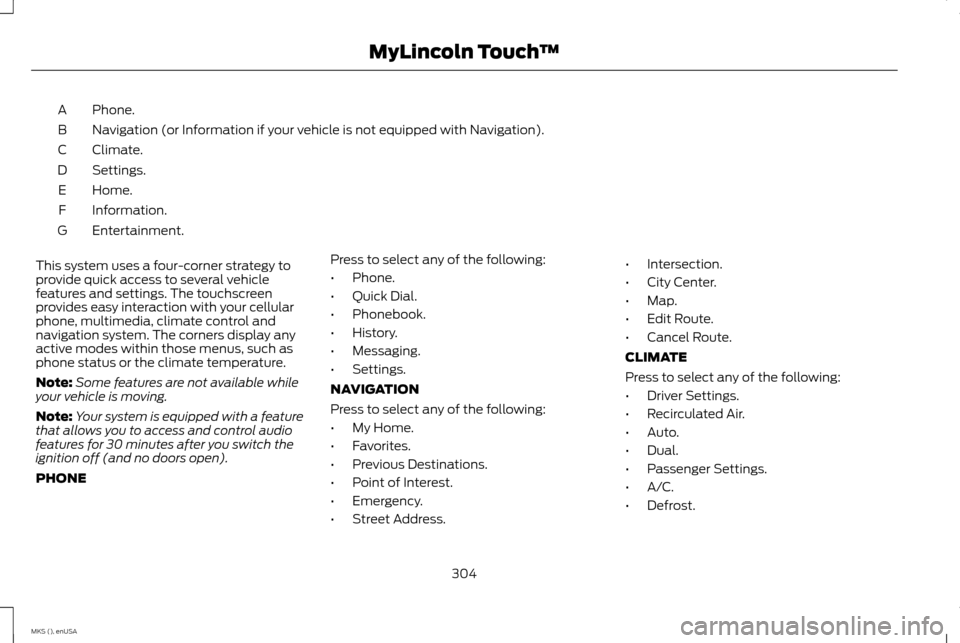
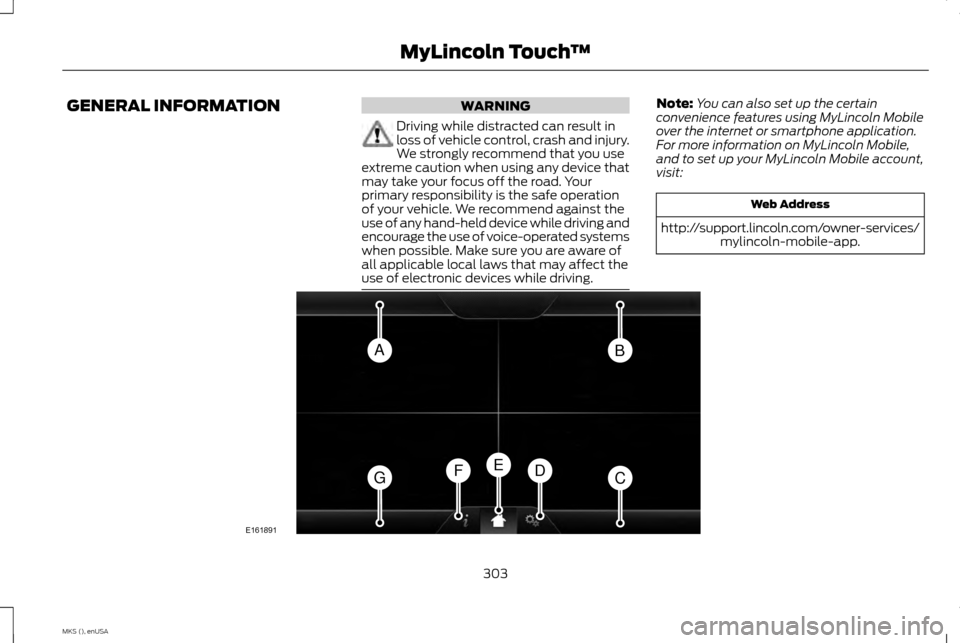
Phone.
A
Navigation (or Information if your vehicle is not equipped with Navigation).
B
Climate.
C
Settings.
D
Home.
E
Information.
F
Entertainment.
G
This system uses a four-corner strategy to
provide quick access to several vehicle
features and settings. The touchscreen
provides easy interaction with your cellular
phone, multimedia, climate control and
navigation system. The corners display any
active modes within those menus, such as
phone status or the climate temperature.
Note: Some features are not available while
your vehicle is moving.
Note: Your system is equipped with a feature
that allows you to access and control audio
features for 30 minutes after you switch the
ignition off (and no doors open).
PHONE Press to select any of the following:
•
Phone.
• Quick Dial.
• Phonebook.
• History.
• Messaging.
• Settings.
NAVIGATION
Press to select any of the following:
• My Home.
• Favorites.
• Previous Destinations.
• Point of Interest.
• Emergency.
• Street Address. •
Intersection.
• City Center.
• Map.
• Edit Route.
• Cancel Route.
CLIMATE
Press to select any of the following:
• Driver Settings.
• Recirculated Air.
• Auto.
• Dual.
• Passenger Settings.
• A/C.
• Defrost.
304
MKS (), enUSA MyLincoln Touch
™
Page 309 of 424
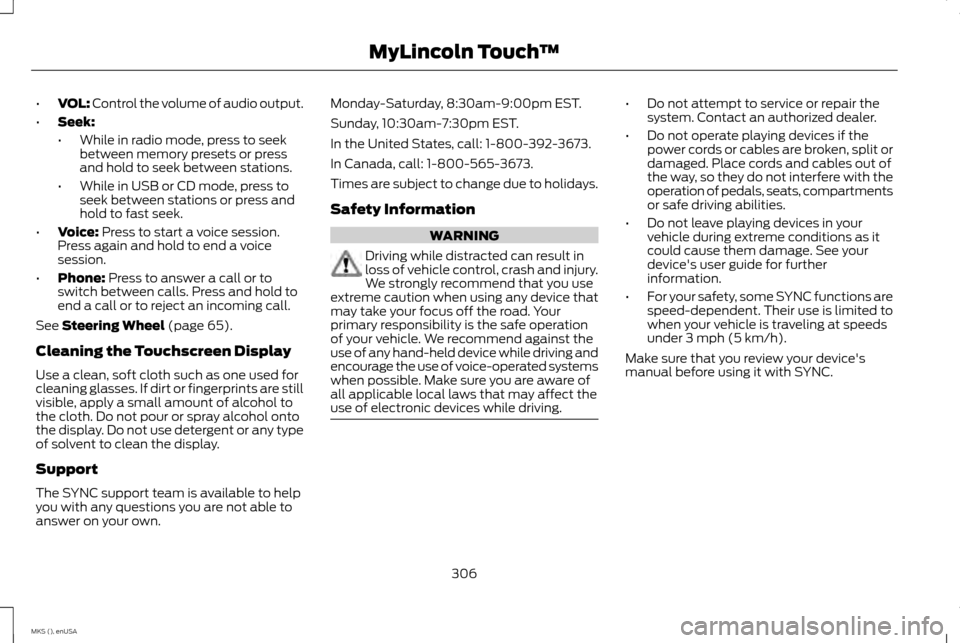
•
VOL: Control the volume of audio output.
• Seek:
•While in radio mode, press to seek
between memory presets or press
and hold to seek between stations.
• While in USB or CD mode, press to
seek between stations or press and
hold to fast seek.
• Voice: Press to start a voice session.
Press again and hold to end a voice
session.
• Phone:
Press to answer a call or to
switch between calls. Press and hold to
end a call or to reject an incoming call.
See
Steering Wheel (page 65).
Cleaning the Touchscreen Display
Use a clean, soft cloth such as one used for
cleaning glasses. If dirt or fingerprints are still
visible, apply a small amount of alcohol to
the cloth. Do not pour or spray alcohol onto
the display. Do not use detergent or any type
of solvent to clean the display.
Support
The SYNC support team is available to help
you with any questions you are not able to
answer on your own. Monday-Saturday, 8:30am-9:00pm EST.
Sunday, 10:30am-7:30pm EST.
In the United States, call: 1-800-392-3673.
In Canada, call: 1-800-565-3673.
Times are subject to change due to holidays.
Safety Information
WARNING
Driving while distracted can result in
loss of vehicle control, crash and injury.
We strongly recommend that you use
extreme caution when using any device that
may take your focus off the road. Your
primary responsibility is the safe operation
of your vehicle. We recommend against the
use of any hand-held device while driving and
encourage the use of voice-operated systems
when possible. Make sure you are aware of
all applicable local laws that may affect the
use of electronic devices while driving. •
Do not attempt to service or repair the
system. Contact an authorized dealer.
• Do not operate playing devices if the
power cords or cables are broken, split or
damaged. Place cords and cables out of
the way, so they do not interfere with the
operation of pedals, seats, compartments
or safe driving abilities.
• Do not leave playing devices in your
vehicle during extreme conditions as it
could cause them damage. See your
device's user guide for further
information.
• For your safety, some SYNC functions are
speed-dependent. Their use is limited to
when your vehicle is traveling at speeds
under 3 mph (5 km/h).
Make sure that you review your device's
manual before using it with SYNC.
306
MKS (), enUSA MyLincoln Touch
™
Page 310 of 424
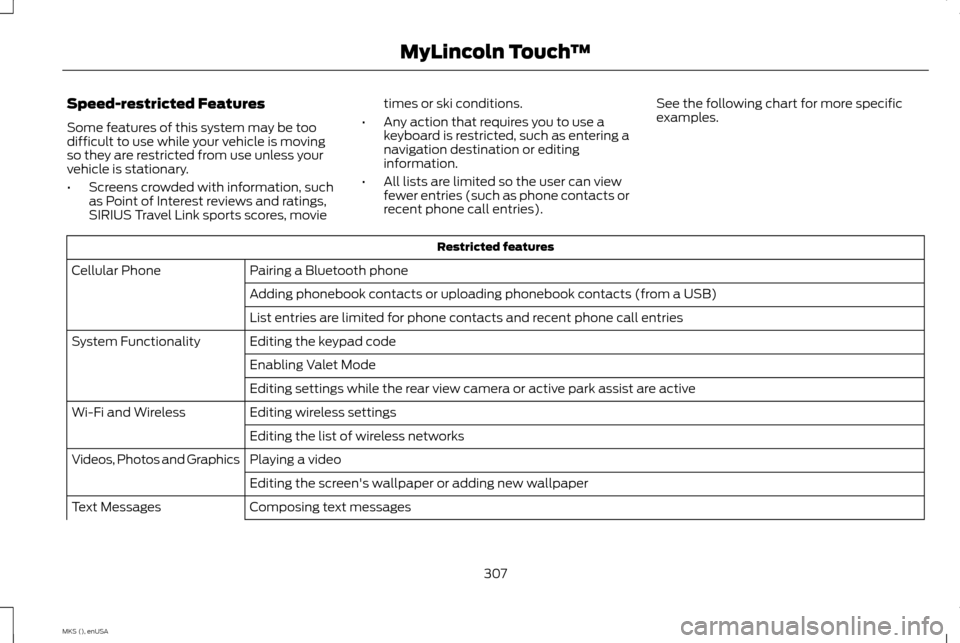
Speed-restricted Features
Some features of this system may be too
difficult to use while your vehicle is moving
so they are restricted from use unless your
vehicle is stationary.
•
Screens crowded with information, such
as Point of Interest reviews and ratings,
SIRIUS Travel Link sports scores, movie times or ski conditions.
• Any action that requires you to use a
keyboard is restricted, such as entering a
navigation destination or editing
information.
• All lists are limited so the user can view
fewer entries (such as phone contacts or
recent phone call entries). See the following chart for more specific
examples. Restricted features
Pairing a Bluetooth phone
Cellular Phone
Adding phonebook contacts or uploading phonebook contacts (from a USB)
List entries are limited for phone contacts and recent phone call entries
Editing the keypad code
System Functionality
Enabling Valet Mode
Editing settings while the rear view camera or active park assist are active
Editing wireless settings
Wi-Fi and Wireless
Editing the list of wireless networks
Playing a video
Videos, Photos and Graphics
Editing the screen's wallpaper or adding new wallpaper
Composing text messages
Text Messages
307
MKS (), enUSA MyLincoln Touch
™
Page 311 of 424
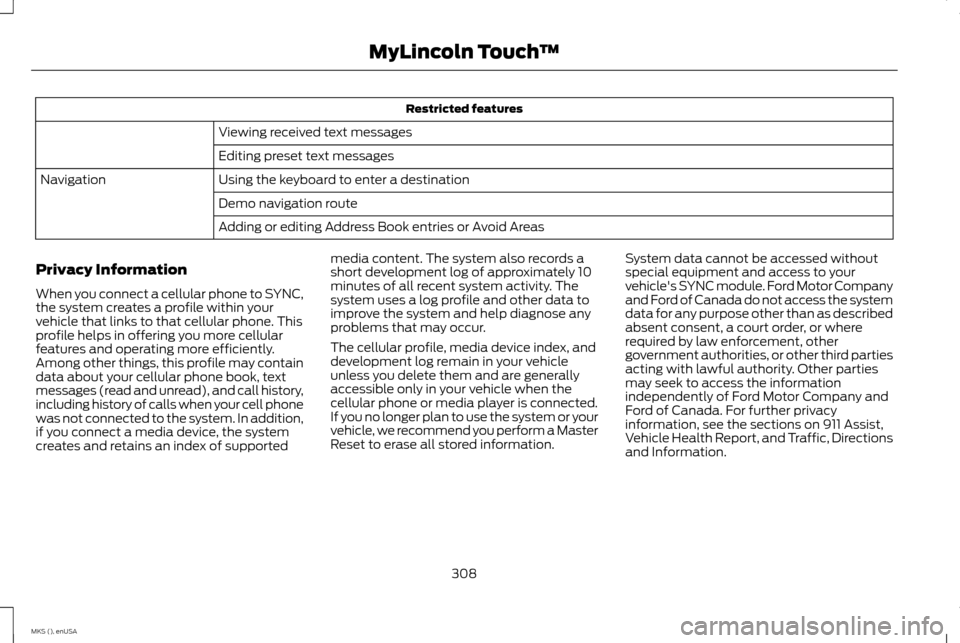
Restricted features
Viewing received text messages
Editing preset text messages
Using the keyboard to enter a destination
Navigation
Demo navigation route
Adding or editing Address Book entries or Avoid Areas
Privacy Information
When you connect a cellular phone to SYNC,
the system creates a profile within your
vehicle that links to that cellular phone. This
profile helps in offering you more cellular
features and operating more efficiently.
Among other things, this profile may contain
data about your cellular phone book, text
messages (read and unread), and call history,
including history of calls when your cell phone
was not connected to the system. In addition,
if you connect a media device, the system
creates and retains an index of supported media content. The system also records a
short development log of approximately 10
minutes of all recent system activity. The
system uses a log profile and other data to
improve the system and help diagnose any
problems that may occur.
The cellular profile, media device index, and
development log remain in your vehicle
unless you delete them and are generally
accessible only in your vehicle when the
cellular phone or media player is connected.
If you no longer plan to use the system or your
vehicle, we recommend you perform a Master
Reset to erase all stored information.
System data cannot be accessed without
special equipment and access to your
vehicle's SYNC module. Ford Motor Company
and Ford of Canada do not access the system
data for any purpose other than as described
absent consent, a court order, or where
required by law enforcement, other
government authorities, or other third parties
acting with lawful authority. Other parties
may seek to access the information
independently of Ford Motor Company and
Ford of Canada. For further privacy
information, see the sections on 911 Assist,
Vehicle Health Report, and Traffic, Directions
and Information.
308
MKS (), enUSA MyLincoln Touch
™
Page 312 of 424
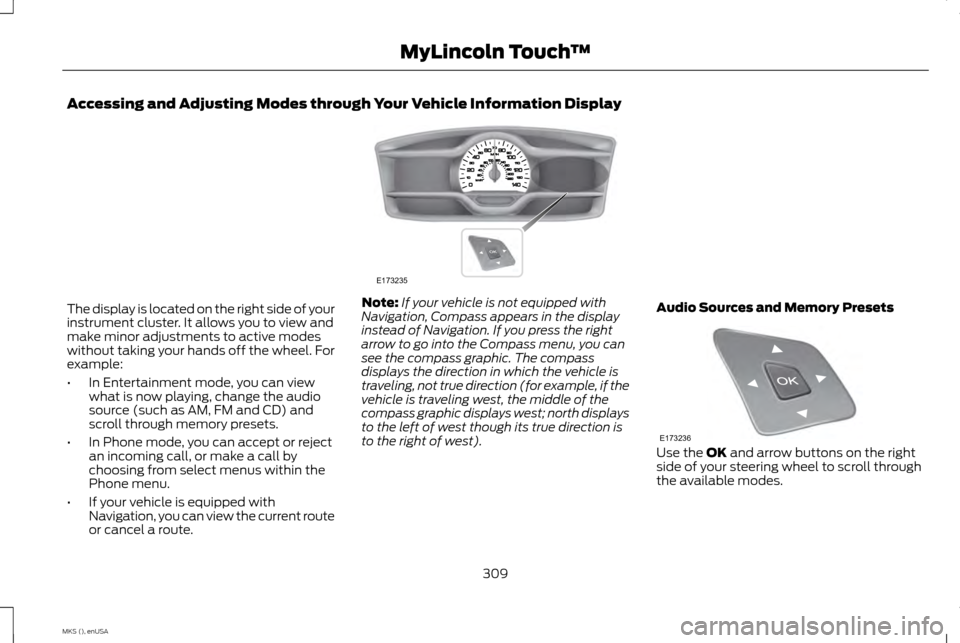
Accessing and Adjusting Modes through Your Vehicle Information Display
The display is located on the right side of your
instrument cluster. It allows you to view and
make minor adjustments to active modes
without taking your hands off the wheel. For
example:
•
In Entertainment mode, you can view
what is now playing, change the audio
source (such as AM, FM and CD) and
scroll through memory presets.
• In Phone mode, you can accept or reject
an incoming call, or make a call by
choosing from select menus within the
Phone menu.
• If your vehicle is equipped with
Navigation, you can view the current route
or cancel a route. Note:
If your vehicle is not equipped with
Navigation, Compass appears in the display
instead of Navigation. If you press the right
arrow to go into the Compass menu, you can
see the compass graphic. The compass
displays the direction in which the vehicle is
traveling, not true direction (for example, if the
vehicle is traveling west, the middle of the
compass graphic displays west; north displays
to the left of west though its true direction is
to the right of west). Audio Sources and Memory Presets Use the OK and arrow buttons on the right
side of your steering wheel to scroll through
the available modes.
309
MKS (), enUSA MyLincoln Touch
™E173235 E173236
Page 314 of 424
•
Speak naturally, without long pauses
between words.
• At any time, you can interrupt the system
while it is speaking by pressing the voice
icon.
Accessing a List of Available Commands
• If you use the touchscreen, press the
Settings icon > Help > Voice Command
List.
• If you use the steering wheel control,
press the voice icon. After the tone, speak
your command clearly. Available voice commands
"Audio list of commands"
"Bluetooth audio list of commands" "Browse list of commands""CD list of commands"
"Climate control list of commands" "List of commands"
"Navigation list of commands" *
"Phone list of commands" Available voice commands
"Radio list of commands"
"SD card list of commands"
"Sirius satellite list of commands" **
"Travel link list of commands" *
"USB list of commands"
"Voice instructions list of commands" "Voice settings list of commands" "Help"
* This command is only available when your
vehicle is equipped with the navigation
system, and the navigation system SD card
is in the card slot.
** This command is only available when you
have an active SIRIUS satellite radio
subscription. Voice Settings
Voice settings allow you to customize the
level of system interaction, help and
feedback. The system defaults to standard
interaction that uses candidate lists and
confirmation prompts as these provide the
highest level of guidance and feedback.
•
Interaction Mode:
Novice mode
provides detailed interaction and
guidance while the advanced mode has
less audible interaction and more tone
prompts.
• Confirmation Prompts:
The system
uses these short questions to confirm
your voice request. If switched off, the
system simply makes a best guess as to
what you requested. The system may still
occasionally ask you to confirm settings.
• Phone and Media Candidate Lists:
Candidate lists are lists of possible results
from your voice commands. The system
creates these lists when it has the same
confidence level of several options based
on your voice command.
To access these settings using the
touchscreen:
1. Press the Settings icon > Settings > then
Voice Control
.
2. Select from the following:
311
MKS (), enUSA MyLincoln Touch
™