ECU LINCOLN MKS 2015 Owner's Manual
[x] Cancel search | Manufacturer: LINCOLN, Model Year: 2015, Model line: MKS, Model: LINCOLN MKS 2015Pages: 424, PDF Size: 3.96 MB
Page 242 of 424
Engine oil dipstick. See Engine Oil Dipstick (page 239).
C.
Brake fluid reservoir. See
Brake Fluid Check (page 247).
D.
Battery. See
Changing the 12V Battery (page 248).
E.
Power distribution box. See
Fuses (page 218).
F.
Air filter assembly. See
Changing the Engine Air Filter (page 255).
G.
Automatic transmission dipstick (under air filter assembly). See
Automatic Transmission Fluid Check (page 244).
H.
Windshield washer fluid reservoir. See
Washer Fluid Check (page 248).
I.
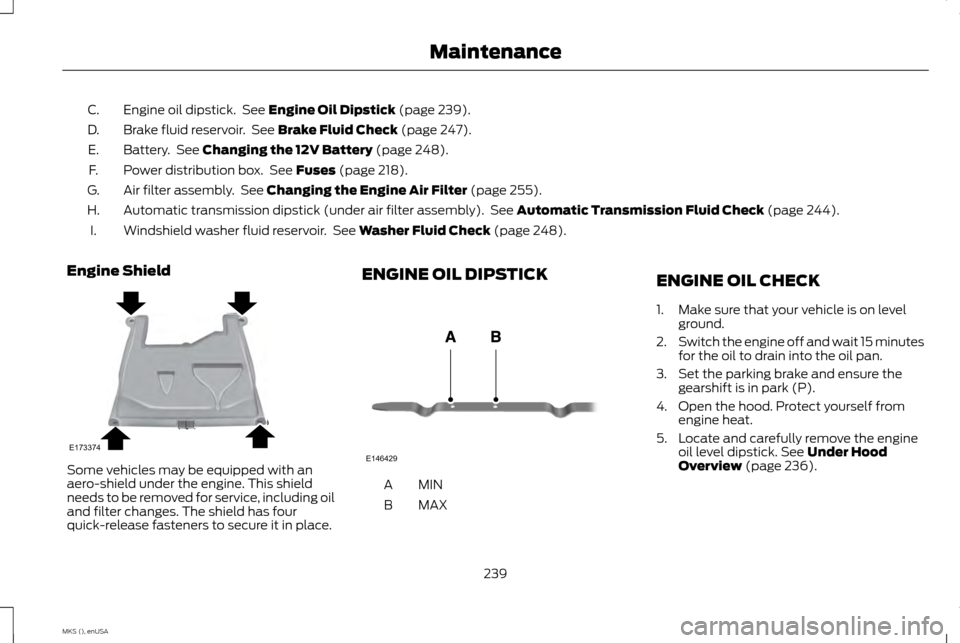
Engine Shield Some vehicles may be equipped with an
aero-shield under the engine. This shield
needs to be removed for service, including oil
and filter changes. The shield has four
quick-release fasteners to secure it in place. ENGINE OIL DIPSTICK
MINA
MAX
B ENGINE OIL CHECK
1. Make sure that your vehicle is on level
ground.
2. Switch the engine off and wait 15 minutes
for the oil to drain into the oil pan.
3. Set the parking brake and ensure the gearshift is in park (P).
4. Open the hood. Protect yourself from engine heat.
5. Locate and carefully remove the engine oil level dipstick.
See Under Hood
Overview (page 236).
239
MKS (), enUSA MaintenanceE173374 E146429
Page 258 of 424
CHANGING THE ENGINE AIR
FILTER
WARNING
To reduce the risk of vehicle damage
or personal burn injuries, do not start
your engine with the air cleaner
removed and do not remove it when the
engine is running. When changing the air filter element, use only
the air filter element listed. See Capacities
and Specifications (page 290).
For EcoBoost equipped vehicles, when
servicing the air cleaner, it is important that
no foreign material enter the air induction
system. The engine and turbocharger are
susceptible to damage from even small
particles.
Change the air filter element at the proper
interval. See
Scheduled Maintenance
(page 392).
Note: Failure to use the correct air filter
element may result in severe engine damage.
The customer warranty may be void for any
damage to the engine if the correct air filter
element is not used. 3.5L EcoBoost Engine 3.7L Engine
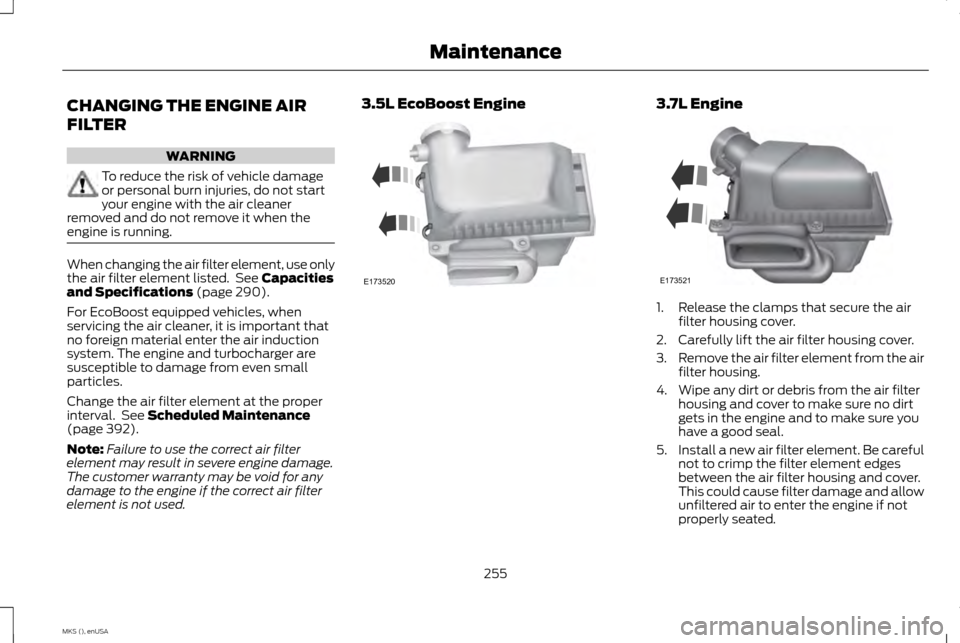
1. Release the clamps that secure the air
filter housing cover.
2. Carefully lift the air filter housing cover.
3. Remove the air filter element from the air
filter housing.
4. Wipe any dirt or debris from the air filter housing and cover to make sure no dirt
gets in the engine and to make sure you
have a good seal.
5. Install a new air filter element. Be careful
not to crimp the filter element edges
between the air filter housing and cover.
This could cause filter damage and allow
unfiltered air to enter the engine if not
properly seated.
255
MKS (), enUSA MaintenanceE173520 E173521
Page 259 of 424
6. Install the air filter housing cover.
7.
Engage the clamps to secure the air filter
housing cover to the air filter housing.
256
MKS (), enUSA Maintenance
Page 288 of 424
Tire Change Procedure
WARNINGS
When one of the front wheels is off the
ground, the transmission alone will not
prevent the vehicle from moving or
slipping off the jack, even if the transmission
is in park (P). To help prevent the vehicle from
moving when you change a tire, be sure
to place the transmission in park
(P),
set the parking brake and block (in both
directions) the wheel that is diagonally
opposite (other side and end of the vehicle)
to the tire being changed. Never get underneath a vehicle that is
supported only by a jack. If the vehicle
slips off the jack, you or someone else
could be seriously injured. Do not attempt to change a tire on the
side of the vehicle close to moving
traffic. Pull far enough off the road to
avoid the danger of being hit when operating
the jack or changing the wheel. WARNINGS
Always use the jack provided as original
equipment with your vehicle. If using a
jack other than the one provided as
original equipment with your vehicle, make
sure the jack capacity is adequate for the
vehicle weight, including any vehicle cargo
or modifications. 1. Park on a level surface, set the parking
brake and activate the hazard flashers.
2. Place the transmission in park
(P) and
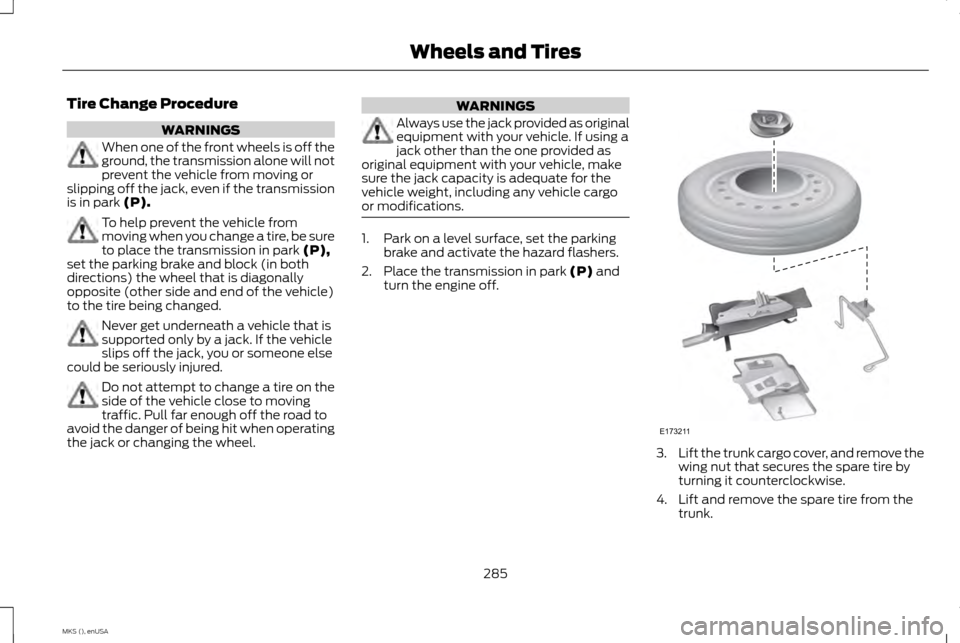
turn the engine off. 3.
Lift the trunk cargo cover, and remove the
wing nut that secures the spare tire by
turning it counterclockwise.
4. Lift and remove the spare tire from the trunk.
285
MKS (), enUSA Wheels and TiresE173211
Page 289 of 424
5.
Remove the second wing nut that secures
the jack retention bracket by turning it
counterclockwise. Then remove the jack
kit from your vehicle.
6. Remove the jack and the wrench from the felt bag. Fold down the wrench socket
used to loosen the lug nuts and to
operate the jack.
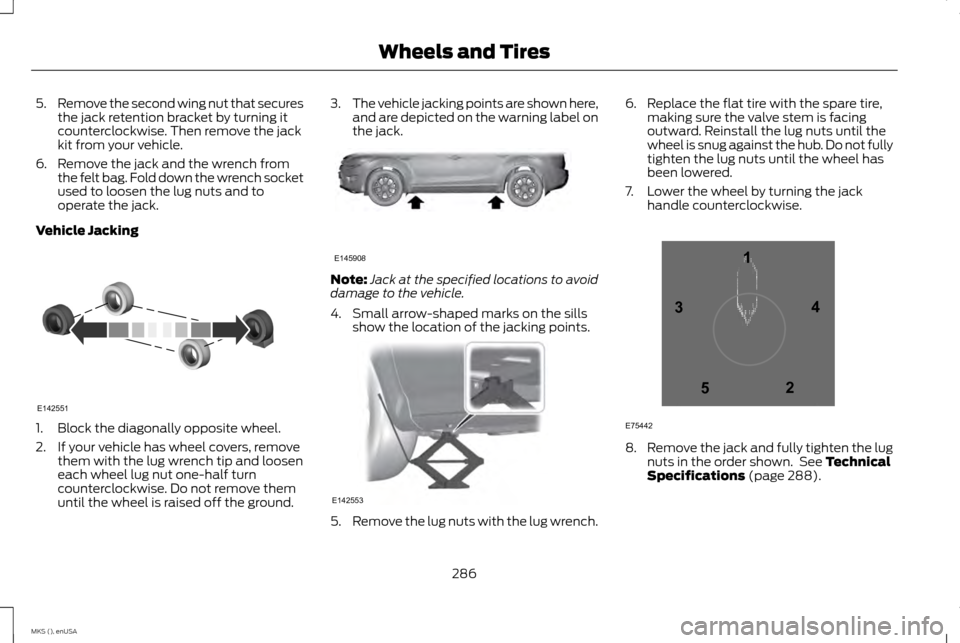
Vehicle Jacking 1. Block the diagonally opposite wheel.
2. If your vehicle has wheel covers, remove
them with the lug wrench tip and loosen
each wheel lug nut one-half turn
counterclockwise. Do not remove them
until the wheel is raised off the ground. 3.
The vehicle jacking points are shown here,
and are depicted on the warning label on
the jack. Note:
Jack at the specified locations to avoid
damage to the vehicle.
4. Small arrow-shaped marks on the sills show the location of the jacking points. 5.
Remove the lug nuts with the lug wrench. 6. Replace the flat tire with the spare tire,
making sure the valve stem is facing
outward. Reinstall the lug nuts until the
wheel is snug against the hub. Do not fully
tighten the lug nuts until the wheel has
been lowered.
7. Lower the wheel by turning the jack handle counterclockwise. 8.
Remove the jack and fully tighten the lug
nuts in the order shown. See Technical
Specifications (page 288).
286
MKS (), enUSA Wheels and TiresE142551 E145908 E142553 12
3
4
5
E75442
Page 290 of 424
9. Put the flat tire, jack and lug wrench
away. Make sure the jack is fastened so
it does not rattle when you drive. Unblock
the wheels.
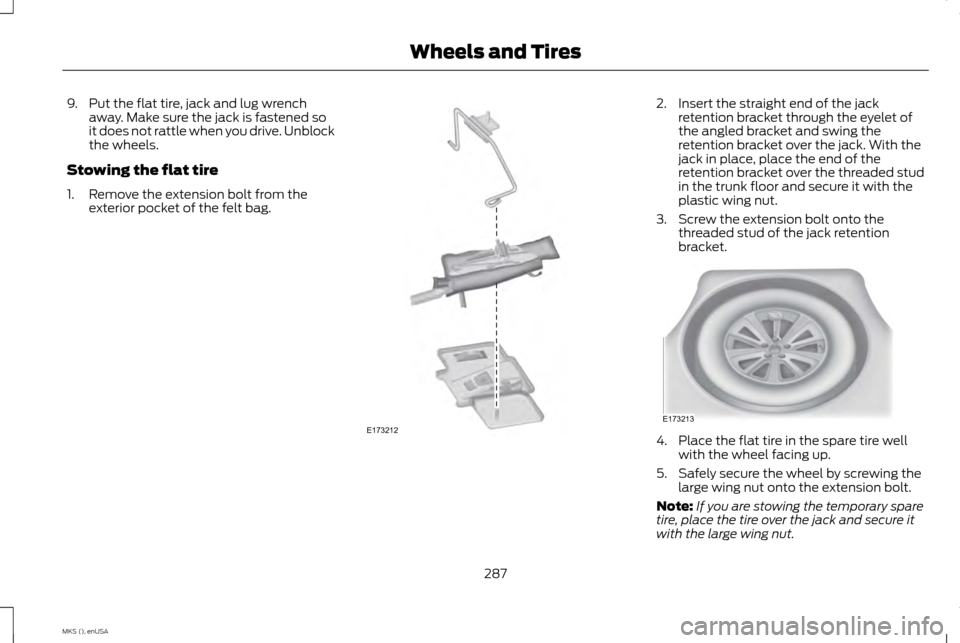
Stowing the flat tire
1. Remove the extension bolt from the exterior pocket of the felt bag. 2. Insert the straight end of the jack
retention bracket through the eyelet of
the angled bracket and swing the
retention bracket over the jack. With the
jack in place, place the end of the
retention bracket over the threaded stud
in the trunk floor and secure it with the
plastic wing nut.
3. Screw the extension bolt onto the threaded stud of the jack retention
bracket. 4. Place the flat tire in the spare tire well
with the wheel facing up.
5. Safely secure the wheel by screwing the large wing nut onto the extension bolt.
Note: If you are stowing the temporary spare
tire, place the tire over the jack and secure it
with the large wing nut.
287
MKS (), enUSA Wheels and TiresE173212 E173213
Page 291 of 424
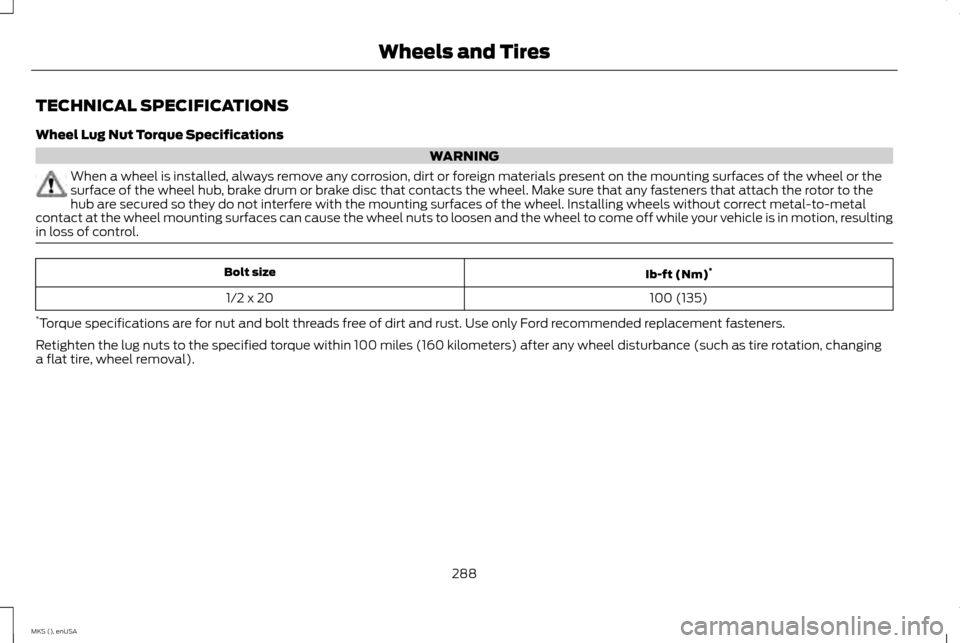
TECHNICAL SPECIFICATIONS
Wheel Lug Nut Torque Specifications
WARNING
When a wheel is installed, always remove any corrosion, dirt or foreign materials present on the mounting surfaces of the wheel or the
surface of the wheel hub, brake drum or brake disc that contacts the wheel. Make sure that any fasteners that attach the rotor to the
hub are secured so they do not interfere with the mounting surfaces of the wheel. Installing wheels without correct metal-to-metal
contact at the wheel mounting surfaces can cause the wheel nuts to loosen and the wheel to come off while your vehicle is in motion, resulting
in loss of control. Ib-ft (Nm)
*
Bolt size
100 (135)
1/2 x 20
* Torque specifications are for nut and bolt threads free of dirt and rust. Use only Ford recommended replacement fasteners.
Retighten the lug nuts to the specified torque within 100 miles (160 kilometers) after any wheel disturbance (such as tire rotation, changing
a flat tire, wheel removal).
288
MKS (), enUSA Wheels and Tires
Page 315 of 424
•
Interaction Mode
• Confirmation Prompts
• Media Candidate Lists
• Phone Candidate Lists
• Voice Control Volume.
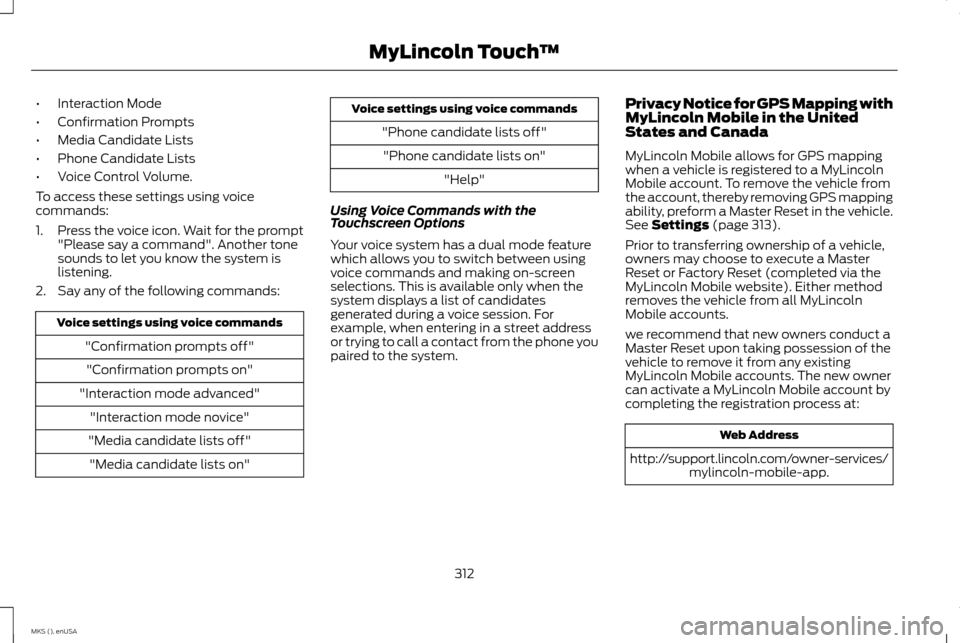
To access these settings using voice
commands:
1. Press the voice icon. Wait for the prompt
"Please say a command". Another tone
sounds to let you know the system is
listening.
2. Say any of the following commands: Voice settings using voice commands
"Confirmation prompts off""Confirmation prompts on"
"Interaction mode advanced" "Interaction mode novice"
"Media candidate lists off" "Media candidate lists on" Voice settings using voice commands
"Phone candidate lists off""Phone candidate lists on" "Help"
Using Voice Commands with the
Touchscreen Options
Your voice system has a dual mode feature
which allows you to switch between using
voice commands and making on-screen
selections. This is available only when the
system displays a list of candidates
generated during a voice session. For
example, when entering in a street address
or trying to call a contact from the phone you
paired to the system. Privacy Notice for GPS Mapping with
MyLincoln Mobile in the United
States and Canada
MyLincoln Mobile allows for GPS mapping
when a vehicle is registered to a MyLincoln
Mobile account. To remove the vehicle from
the account, thereby removing GPS mapping
ability, preform a Master Reset in the vehicle.
See Settings (page 313).
Prior to transferring ownership of a vehicle,
owners may choose to execute a Master
Reset or Factory Reset (completed via the
MyLincoln Mobile website). Either method
removes the vehicle from all MyLincoln
Mobile accounts.
we recommend that new owners conduct a
Master Reset upon taking possession of the
vehicle to remove it from any existing
MyLincoln Mobile accounts. The new owner
can activate a MyLincoln Mobile account by
completing the registration process at: Web Address
http://support.lincoln.com/owner-services/ mylincoln-mobile-app.
312
MKS (), enUSA MyLincoln Touch
™
Page 346 of 424
WARNINGS
Store the portable music player in a
secure location, such as the center
console or the glove box, when your
vehicle is moving. Hard objects may become
projectiles in a crash or sudden stop, which
may increase the risk of serious injury. The
audio extension cable must be long enough
to allow the portable music player to be
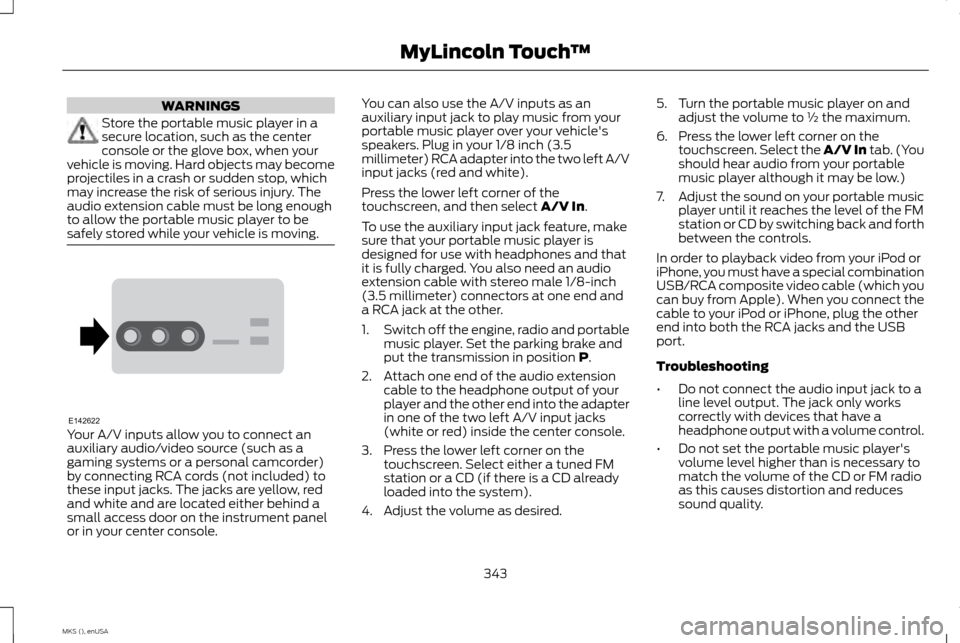
safely stored while your vehicle is moving. Your A/V inputs allow you to connect an
auxiliary audio/video source (such as a
gaming systems or a personal camcorder)
by connecting RCA cords (not included) to
these input jacks. The jacks are yellow, red
and white and are located either behind a
small access door on the instrument panel
or in your center console. You can also use the A/V inputs as an
auxiliary input jack to play music from your
portable music player over your vehicle's
speakers. Plug in your 1/8 inch (3.5
millimeter) RCA adapter into the two left A/V
input jacks (red and white).
Press the lower left corner of the
touchscreen, and then select A/V In.
To use the auxiliary input jack feature, make
sure that your portable music player is
designed for use with headphones and that
it is fully charged. You also need an audio
extension cable with stereo male 1/8-inch
(3.5 millimeter) connectors at one end and
a RCA jack at the other.
1. Switch off the engine, radio and portable
music player. Set the parking brake and
put the transmission in position
P.
2. Attach one end of the audio extension cable to the headphone output of your
player and the other end into the adapter
in one of the two left A/V input jacks
(white or red) inside the center console.
3. Press the lower left corner on the touchscreen. Select either a tuned FM
station or a CD (if there is a CD already
loaded into the system).
4. Adjust the volume as desired. 5. Turn the portable music player on and
adjust the volume to ½ the maximum.
6. Press the lower left corner on the touchscreen. Select the A/V In tab. (You
should hear audio from your portable
music player although it may be low.)
7. Adjust the sound on your portable music
player until it reaches the level of the FM
station or CD by switching back and forth
between the controls.
In order to playback video from your iPod or
iPhone, you must have a special combination
USB/RCA composite video cable (which you
can buy from Apple). When you connect the
cable to your iPod or iPhone, plug the other
end into both the RCA jacks and the USB
port.
Troubleshooting
• Do not connect the audio input jack to a
line level output. The jack only works
correctly with devices that have a
headphone output with a volume control.
• Do not set the portable music player's
volume level higher than is necessary to
match the volume of the CD or FM radio
as this causes distortion and reduces
sound quality.
343
MKS (), enUSA MyLincoln Touch
™E142622
Page 349 of 424
Note:
Put the transmission in park (P). Switch
on your vehicle ignition and the radio.
1. Touch Add Phone in the upper left
corner of the touchscreen. Find SYNC
appears on the screen, and instructs you
to begin the pairing process from your
device.
2. Make sure that Bluetooth is set to On and
that your cellular phone is in the proper
mode. See your device ’s manual if
necessary.
Note: Select
SYNC, and a six-digit PIN
appears on your device.
3. If prompted to enter a PIN on your device,
it does not support Secure Simple Pairing.
To pair, enter the PIN displayed on the
touchscreen. Skip the next step.
4. When prompted on your phone ’s display,
confirm that the PIN provided by SYNC
matches the PIN displayed on your
cellular phone.
5. The display indicates when the pairing is successful.
SYNC may prompt you with more phone
options. For more information on your
phone's capability, see your device's manual
and visit the website. Pairing Subsequent Phones
Note:
Put the transmission in park (P). Switch
on your vehicle ignition and the radio.
1. Press the
Phone corner of the
touchscreen > Settings > BT Devices >
Add Device
.
2. Make sure that Bluetooth is set to On and
that your cellular phone is in the proper
mode. See your device ’s manual if
necessary.
Note: Select
SYNC, and a six-digit PIN
appears on your device.
3. If prompted to enter a PIN on your device,
it does not support Secure Simple Pairing.
To pair, enter the PIN displayed on the
touchscreen. Skip the next step.
4. When prompted on your phone ’s display,
confirm that the PIN provided by SYNC
matches the PIN displayed on your
cellular phone.
5. The display indicates when the pairing is successful.
SYNC may prompt you with more phone
options. For more information on your
phone's capability, see your device's manual
and visit the website. Making Calls Press the voice button on your
steering wheel controls. When
prompted, say, "Call
say "Dial", then the desired number. To end the call or exit phone mode,
press and hold this phone button
on your steering wheel controls.
Receiving Calls
During an incoming call, an audible tone
sounds. Call information appears in the
display if it is available. Accept the call by pressing Accept
on the touchscreen or by pressing
this phone button on your steering
wheel controls. Reject the call by pressing
Reject
on the touchscreen or by pressing
and holding this phone button on
your steering wheel controls.
Ignore the call by doing nothing. SYNC logs
it as a missed call.
346
MKS (), enUSA MyLincoln Touch
™E142599 E142632 E142632