ESP LINCOLN MKS 2015 Service Manual
[x] Cancel search | Manufacturer: LINCOLN, Model Year: 2015, Model line: MKS, Model: LINCOLN MKS 2015Pages: 424, PDF Size: 3.96 MB
Page 303 of 424
MP3 Track and Folder Structure
Audio systems capable of recognizing and
playing MP3 individual tracks and folder
structures work as follows:
•
There are two different modes for MP3
disc playback: MP3 track mode (system
default) and MP3 folder mode.
• MP3 track mode ignores any folder
structure on the MP3 disc. The player
numbers each MP3 track on the disc
(noted by the .mp3 file extension) from
T001 to a maximum of T255. The
maximum number of playable MP3 files
may be less depending on the structure
of the CD and exact model of radio
present. •
MP3 folder mode represents a folder
structure consisting of one level of
folders. The CD player numbers all MP3
tracks on the disc (noted by the .mp3 file
extension) and all folders containing MP3
files, from F001 (folder) T001 (track) to
F253 T255.
• Creating discs with only one level of
folders helps with navigation through the
disc files.
If you are burning your own MP3 discs, it is
important to understand how the system
reads the structures you create. While various
files may be present, (files with extensions
other than mp3), only files with the .mp3
extension are played; other files are ignored
by the system. This enables you to use the
same MP3 disc for a variety of tasks on your
work computer, home computer and your
in-vehicle system.
In track mode, the system displays and plays
the structure as if it were only one level deep
(all .mp3 files play, regardless of being in a
specific folder). In folder mode, the system
only plays the .mp3 files in the current folder. AUDIO UNIT WARNING
Driving while distracted can result in
loss of vehicle control, crash and injury.
We strongly recommend that you use
extreme caution when using any device that
may take your focus off the road. Your
primary responsibility is the safe operation
of your vehicle. We recommend against the
use of any hand-held device while driving and
encourage the use of voice-operated systems
when possible. Make sure you are aware of
all applicable local laws that may affect the
use of electronic devices while driving. Note:
The MyLincoln Touch system controls
most of the audio features. See
Entertainment (page 325).
300
MKS (), enUSA Audio System
Page 306 of 424
GENERAL INFORMATION WARNING
Driving while distracted can result in
loss of vehicle control, crash and injury.
We strongly recommend that you use
extreme caution when using any device that
may take your focus off the road. Your
primary responsibility is the safe operation
of your vehicle. We recommend against the
use of any hand-held device while driving and
encourage the use of voice-operated systems
when possible. Make sure you are aware of
all applicable local laws that may affect the
use of electronic devices while driving. Note:
You can also set up the certain
convenience features using MyLincoln Mobile
over the internet or smartphone application.
For more information on MyLincoln Mobile,
and to set up your MyLincoln Mobile account,
visit: Web Address
http://support.lincoln.com/owner-services/ mylincoln-mobile-app. 303
MKS (), enUSA MyLincoln Touch
™AB
GCDFE
E161891
Page 309 of 424
•
VOL: Control the volume of audio output.
• Seek:
•While in radio mode, press to seek
between memory presets or press
and hold to seek between stations.
• While in USB or CD mode, press to
seek between stations or press and
hold to fast seek.
• Voice: Press to start a voice session.
Press again and hold to end a voice
session.
• Phone:
Press to answer a call or to
switch between calls. Press and hold to
end a call or to reject an incoming call.
See
Steering Wheel (page 65).
Cleaning the Touchscreen Display
Use a clean, soft cloth such as one used for
cleaning glasses. If dirt or fingerprints are still
visible, apply a small amount of alcohol to
the cloth. Do not pour or spray alcohol onto
the display. Do not use detergent or any type
of solvent to clean the display.
Support
The SYNC support team is available to help
you with any questions you are not able to
answer on your own. Monday-Saturday, 8:30am-9:00pm EST.
Sunday, 10:30am-7:30pm EST.
In the United States, call: 1-800-392-3673.
In Canada, call: 1-800-565-3673.
Times are subject to change due to holidays.
Safety Information
WARNING
Driving while distracted can result in
loss of vehicle control, crash and injury.
We strongly recommend that you use
extreme caution when using any device that
may take your focus off the road. Your
primary responsibility is the safe operation
of your vehicle. We recommend against the
use of any hand-held device while driving and
encourage the use of voice-operated systems
when possible. Make sure you are aware of
all applicable local laws that may affect the
use of electronic devices while driving. •
Do not attempt to service or repair the
system. Contact an authorized dealer.
• Do not operate playing devices if the
power cords or cables are broken, split or
damaged. Place cords and cables out of
the way, so they do not interfere with the
operation of pedals, seats, compartments
or safe driving abilities.
• Do not leave playing devices in your
vehicle during extreme conditions as it
could cause them damage. See your
device's user guide for further
information.
• For your safety, some SYNC functions are
speed-dependent. Their use is limited to
when your vehicle is traveling at speeds
under 3 mph (5 km/h).
Make sure that you review your device's
manual before using it with SYNC.
306
MKS (), enUSA MyLincoln Touch
™
Page 313 of 424
The selection menu expands and different
options appear.
•
Press the up and down arrows to scroll
through the modes.
• Press the right arrow to enter the mode.
• Press the left or right arrows to make
adjustments within the chosen mode.
• Press OK to confirm your selection.
Using Voice Recognition
This system helps you control many features
using voice commands. This allows you to
keep your hands on the wheel and focus on
what is in front of you. The system provides
feedback through audible tones, prompts,
questions and spoken confirmations
depending on the situation and the chosen
level of interaction (voice settings).
The system also asks short questions
(confirmation prompts) when it is not sure
of your request or when there are multiple
possible responses to your request.
When using voice commands, words and
icons may appear in the lower left status bar
indicating the status of the voice session
(such as Listening, Success, Failed, Paused
or Try Again). How to Use Voice Commands with Your
System Press the voice icon. After the tone,
speak your command clearly.
You can saythese commands at any time
during a voice session
"Cancel""Exit"
"Go back"
"List of commands" "Main menu""Next page"
"Previous page"
"What can I say?" "Help" What Can I Say?
To access the available voice commands for
the current session, do one of the following:
•
During a voice session, press the help icon
(
?) in the lower left status bar of the
screen.
• Say, "What can I say?" for an on-screen
listing of the possible voice commands
associated with your current voice
session.
• Press the voice icon. After the tone, say,
"Help" for an audible list of possible voice
commands.
Helpful Hints
• Make sure the interior of your vehicle is
as quiet as possible. Wind noise from
open windows and road vibrations may
prevent the system from correctly
recognizing spoken commands.
• After pressing the voice icon, wait until
after the tone sounds and Listening
appears before saying a command. Any
command spoken before this does not
register with the system.
310
MKS (), enUSA MyLincoln Touch
™E142599
Page 333 of 424
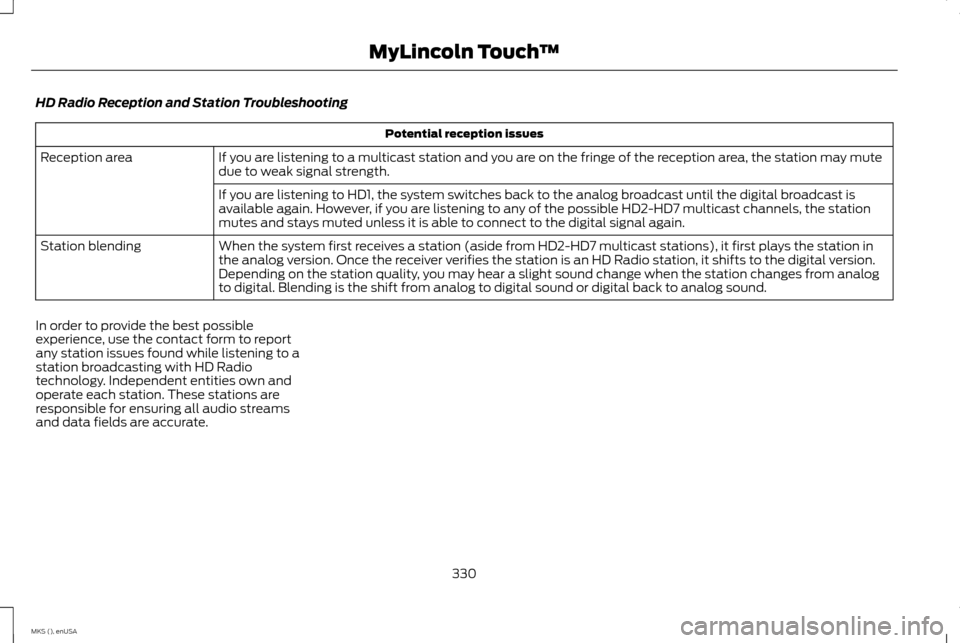
HD Radio Reception and Station Troubleshooting
Potential reception issues
If you are listening to a multicast station and you are on the fringe of the reception area, the station may mute
due to weak signal strength.
Reception area
If you are listening to HD1, the system switches back to the analog broadcast until the digital broadcast is
available again. However, if you are listening to any of the possible HD2-HD7 multicast channels, the station
mutes and stays muted unless it is able to connect to the digital signal again.
When the system first receives a station (aside from HD2-HD7 multicast stations), it first plays the station in
the analog version. Once the receiver verifies the station is an HD Radio station, it shifts to the digital version.
Depending on the station quality, you may hear a slight sound change when the station changes from analog
to digital. Blending is the shift from analog to digital sound or digital back to analog sound.
Station blending
In order to provide the best possible
experience, use the contact form to report
any station issues found while listening to a
station broadcasting with HD Radio
technology. Independent entities own and
operate each station. These stations are
responsible for ensuring all audio streams
and data fields are accurate.
330
MKS (), enUSA MyLincoln Touch
™
Page 335 of 424
HD Radio Technology manufactured under
license from iBiquity Digital Corp. U.S. and
foreign patents. HD Radio and the HD and
HD Radio logos are proprietary trademarks
of iBiquity Digital Corp. Ford Motor Company
and iBiquity Digital Corp. are not responsible
for the content sent using HD Radio
technology. Content may be changed, added
or deleted at any time at the station owner's
discretion.
Radio Voice Commands
If you are listening to the radio,
press the voice button on the
steering wheel controls. When
prompted, say any of the following
commands.
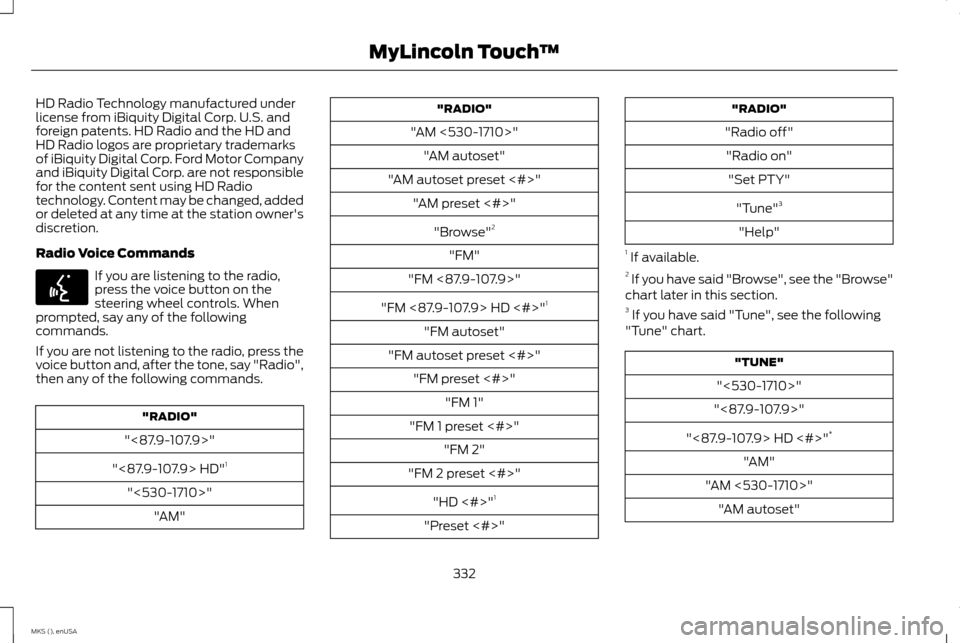
If you are not listening to the radio, press the
voice button and, after the tone, say "Radio",
then any of the following commands. "RADIO"
"<87.9-107.9>"
"<87.9-107.9> HD" 1
"<530-1710>" "AM" "RADIO"
"AM <530-1710>" "AM autoset"
"AM autoset preset <#>" "AM preset <#>"
"Browse" 2
"FM"
"FM <87.9-107.9>"
"FM <87.9-107.9> HD <#>" 1
"FM autoset"
"FM autoset preset <#>" "FM preset <#>" "FM 1"
"FM 1 preset <#>" "FM 2"
"FM 2 preset <#>"
"HD <#>" 1
"Preset <#>" "RADIO"
"Radio off" "Radio on" "Set PTY"
"Tune" 3
"Help"
1 If available.
2 If you have said "Browse", see the "Browse"
chart later in this section.
3 If you have said "Tune", see the following
"Tune" chart. "TUNE"
"<530-1710>"
"<87.9-107.9>"
"<87.9-107.9> HD <#>" *
"AM"
"AM <530-1710>" "AM autoset"
332
MKS (), enUSA MyLincoln Touch
™E142599
Page 337 of 424
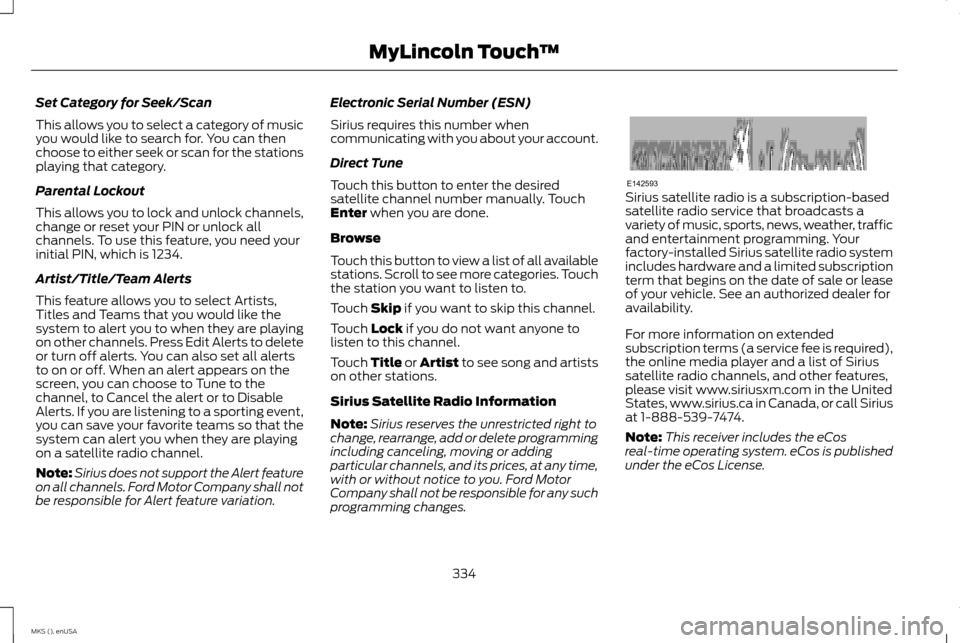
Set Category for Seek/Scan
This allows you to select a category of music
you would like to search for. You can then
choose to either seek or scan for the stations
playing that category.
Parental Lockout
This allows you to lock and unlock channels,
change or reset your PIN or unlock all
channels. To use this feature, you need your
initial PIN, which is 1234.
Artist/Title/Team Alerts
This feature allows you to select Artists,
Titles and Teams that you would like the
system to alert you to when they are playing
on other channels. Press Edit Alerts to delete
or turn off alerts. You can also set all alerts
to on or off. When an alert appears on the
screen, you can choose to Tune to the
channel, to Cancel the alert or to Disable
Alerts. If you are listening to a sporting event,
you can save your favorite teams so that the
system can alert you when they are playing
on a satellite radio channel.
Note:
Sirius does not support the Alert feature
on all channels. Ford Motor Company shall not
be responsible for Alert feature variation. Electronic Serial Number (ESN)
Sirius requires this number when
communicating with you about your account.
Direct Tune
Touch this button to enter the desired
satellite channel number manually. Touch
Enter when you are done.
Browse
Touch this button to view a list of all available
stations. Scroll to see more categories. Touch
the station you want to listen to.
Touch
Skip if you want to skip this channel.
Touch
Lock if you do not want anyone to
listen to this channel.
Touch
Title or Artist to see song and artists
on other stations.
Sirius Satellite Radio Information
Note: Sirius reserves the unrestricted right to
change, rearrange, add or delete programming
including canceling, moving or adding
particular channels, and its prices, at any time,
with or without notice to you. Ford Motor
Company shall not be responsible for any such
programming changes. Sirius satellite radio is a subscription-based
satellite radio service that broadcasts a
variety of music, sports, news, weather, traffic
and entertainment programming. Your
factory-installed Sirius satellite radio system
includes hardware and a limited subscription
term that begins on the date of sale or lease
of your vehicle. See an authorized dealer for
availability.
For more information on extended
subscription terms (a service fee is required),
the online media player and a list of Sirius
satellite radio channels, and other features,
please visit www.siriusxm.com in the United
States, www.sirius.ca in Canada, or call Sirius
at 1-888-539-7474.
Note:
This receiver includes the eCos
real-time operating system. eCos is published
under the eCos License.
334
MKS (), enUSA MyLincoln Touch
™E142593
Page 345 of 424
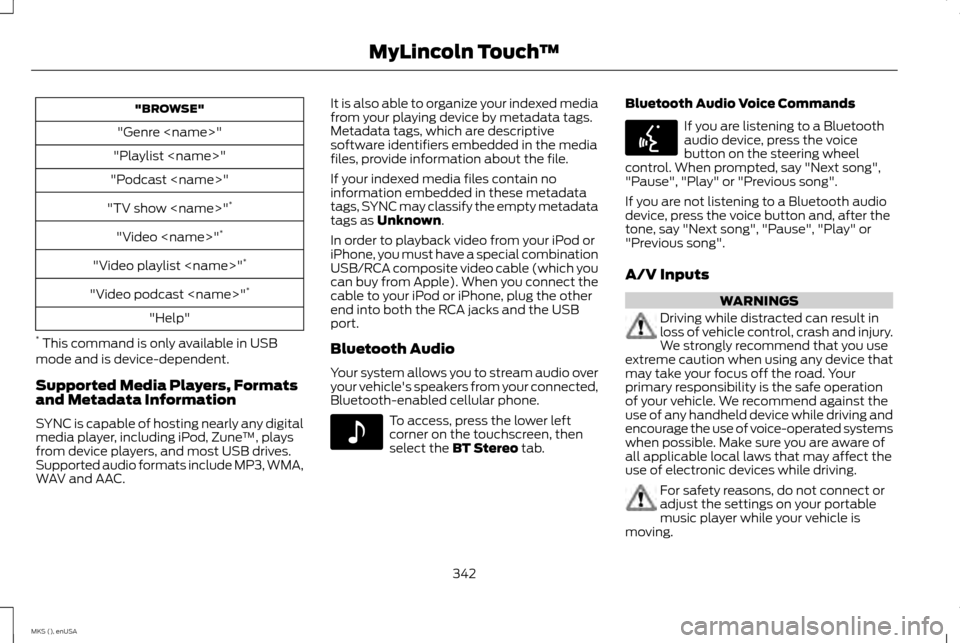
"BROWSE"
"Genre
"Playlist
"Podcast
"TV show
"Video
"Video playlist
"Video podcast
"Help"
* This command is only available in USB
mode and is device-dependent.
Supported Media Players, Formats
and Metadata Information
SYNC is capable of hosting nearly any digital
media player, including iPod, Zune ™, plays
from device players, and most USB drives.
Supported audio formats include MP3, WMA,
WAV and AAC. It is also able to organize your indexed media
from your playing device by metadata tags.
Metadata tags, which are descriptive
software identifiers embedded in the media
files, provide information about the file.
If your indexed media files contain no
information embedded in these metadata
tags, SYNC may classify the empty metadata
tags as Unknown.
In order to playback video from your iPod or
iPhone, you must have a special combination
USB/RCA composite video cable (which you
can buy from Apple). When you connect the
cable to your iPod or iPhone, plug the other
end into both the RCA jacks and the USB
port.
Bluetooth Audio
Your system allows you to stream audio over
your vehicle's speakers from your connected,
Bluetooth-enabled cellular phone. To access, press the lower left
corner on the touchscreen, then
select the
BT Stereo tab.Bluetooth Audio Voice Commands If you are listening to a Bluetooth
audio device, press the voice
button on the steering wheel
control. When prompted, say "Next song",
"Pause", "Play" or "Previous song".
If you are not listening to a Bluetooth audio
device, press the voice button and, after the
tone, say "Next song", "Pause", "Play" or
"Previous song".
A/V Inputs WARNINGS
Driving while distracted can result in
loss of vehicle control, crash and injury.
We strongly recommend that you use
extreme caution when using any device that
may take your focus off the road. Your
primary responsibility is the safe operation
of your vehicle. We recommend against the
use of any handheld device while driving and
encourage the use of voice-operated systems
when possible. Make sure you are aware of
all applicable local laws that may affect the
use of electronic devices while driving. For safety reasons, do not connect or
adjust the settings on your portable
music player while your vehicle is
moving.
342
MKS (), enUSA MyLincoln Touch
™E142611 E142599
Page 348 of 424
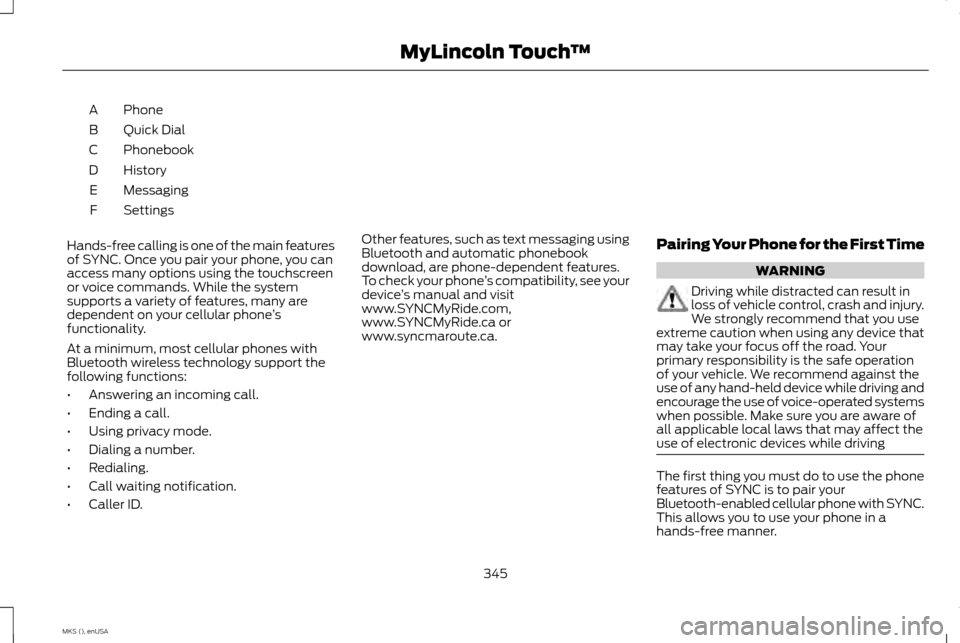
Phone
A
Quick Dial
B
Phonebook
C
History
D
Messaging
E
Settings
F
Hands-free calling is one of the main features
of SYNC. Once you pair your phone, you can
access many options using the touchscreen
or voice commands. While the system
supports a variety of features, many are
dependent on your cellular phone ’s
functionality.
At a minimum, most cellular phones with
Bluetooth wireless technology support the
following functions:
• Answering an incoming call.
• Ending a call.
• Using privacy mode.
• Dialing a number.
• Redialing.
• Call waiting notification.
• Caller ID. Other features, such as text messaging using
Bluetooth and automatic phonebook
download, are phone-dependent features.
To check your phone
’s compatibility, see your
device ’s manual and visit
www.SYNCMyRide.com,
www.SYNCMyRide.ca or
www.syncmaroute.ca. Pairing Your Phone for the First Time WARNING
Driving while distracted can result in
loss of vehicle control, crash and injury.
We strongly recommend that you use
extreme caution when using any device that
may take your focus off the road. Your
primary responsibility is the safe operation
of your vehicle. We recommend against the
use of any hand-held device while driving and
encourage the use of voice-operated systems
when possible. Make sure you are aware of
all applicable local laws that may affect the
use of electronic devices while driving The first thing you must do to use the phone
features of SYNC is to pair your
Bluetooth-enabled cellular phone with SYNC.
This allows you to use your phone in a
hands-free manner.
345
MKS (), enUSA MyLincoln Touch
™
Page 355 of 424
Under the Information menu, you can access
features such as:
•
SYNC Services
• Sirius Travel Link
• Alerts
• Calendar
• SYNC Applications If your vehicle is equipped with
Navigation, press the Information
button to access these features. If
your vehicle is not equipped with Navigation,
press the corner of the touchscreen with the
green tab.
SYNC Services (If Equipped, United
States Only)
Note: SYNC Services varies by trim level and
model year and may require a subscription.
Traffic alerts and turn-by-turn directions
available in select markets. Message and data
rates may apply. Ford Motor Company reserves
the right to change or discontinue this product
service at any time without prior notification
or incurring any future obligation. Note:
SYNC Services requires activation
before use. Visit www.SYNCMyRide.com to
register and check your eligibility for
complimentary services. Standard phone and
message rates may apply. Subscription may
be required. You must also have the active
SYNC Services Bluetooth-enabled cellular
phone paired and connected to the system in
order to connect to, and use, SYNC Services.
See Phone (page 344).
Note: This feature does not function properly
if you have enabled caller ID blocking on your
cellular phone. Make sure your cellular phone
is not blocking caller ID before using SYNC
Services.
Note: The driver is ultimately responsible for
the safe operation of the vehicle, and
therefore, must evaluate whether it is safe to
follow the suggested directions. Any
navigation features provided are only an aid.
Make your driving decisions based on your
observations of local conditions and existing
traffic regulations. Do not follow the route
suggestions if doing so would result in an
unsafe or illegal maneuver, if you would be
placed in an unsafe situation, or if you would
be directed into an area that you consider
unsafe. Maps used by this system may be
inaccurate because of errors, changes in roads,
traffic conditions or driving conditions. Note:
When you connect, the service uses
GPS technology and advanced vehicle sensors
to collect your vehicle's current location, travel
direction and speed to help provide you with
the directions, traffic reports, or business
searches you request. Further, to provide the
services you request, for continuous
improvement, the service may collect and
record call details and voice communications.
For more information, see SYNC Services
Terms and Conditions at
www.SYNCMyRide.com. If you do not want
Ford or its service providers to collect your
vehicle travel information or other information
identified in the Terms and Conditions, do not
subscribe or use the service.
SYNC Services uses advanced vehicle
sensors, integrated GPS technology and
comprehensive map and traffic data, to give
you personalized traffic reports, precise
turn-by-turn directions, business search,
news, sports, weather and more. For a
complete list of services, or to learn more,
please visit www.SYNCMyRide.com.
Connecting to SYNC Services Using Voice
Commands 352
MKS (), enUSA MyLincoln Touch
™E142608 E142599