wheel LINCOLN MKS 2015 Service Manual
[x] Cancel search | Manufacturer: LINCOLN, Model Year: 2015, Model line: MKS, Model: LINCOLN MKS 2015Pages: 424, PDF Size: 3.96 MB
Page 205 of 424
TRANSPORTING THE VEHICLE If you need to have your vehicle towed,
contact a professional towing service or, if
you are a member of a roadside assistance
program, your roadside assistance service
provider.
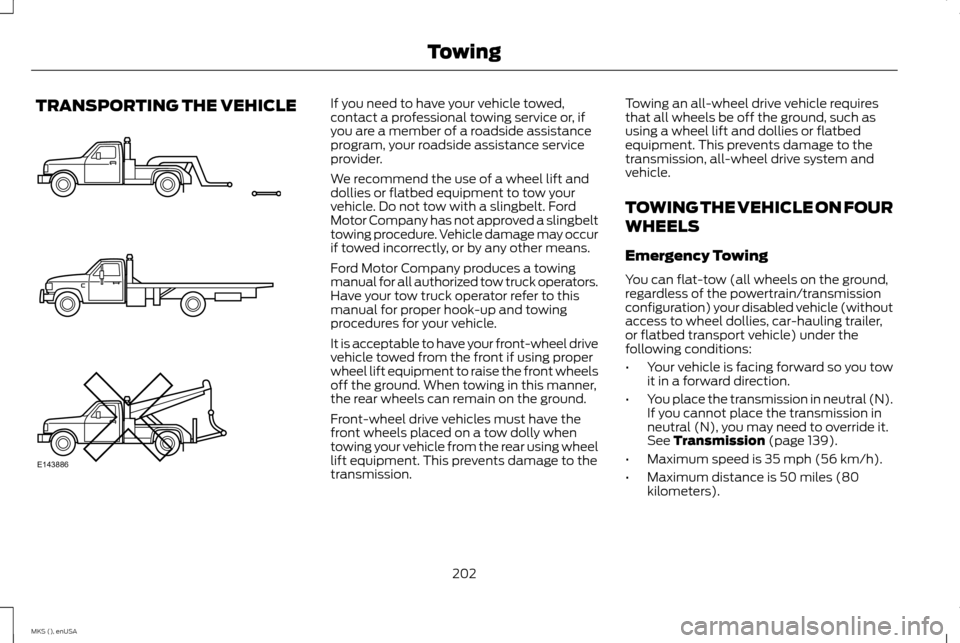
We recommend the use of a wheel lift and
dollies or flatbed equipment to tow your
vehicle. Do not tow with a slingbelt. Ford
Motor Company has not approved a slingbelt
towing procedure. Vehicle damage may occur
if towed incorrectly, or by any other means.
Ford Motor Company produces a towing
manual for all authorized tow truck operators.
Have your tow truck operator refer to this
manual for proper hook-up and towing
procedures for your vehicle.
It is acceptable to have your front-wheel drive
vehicle towed from the front if using proper
wheel lift equipment to raise the front wheels
off the ground. When towing in this manner,
the rear wheels can remain on the ground.
Front-wheel drive vehicles must have the
front wheels placed on a tow dolly when
towing your vehicle from the rear using wheel
lift equipment. This prevents damage to the
transmission.
Towing an all-wheel drive vehicle requires
that all wheels be off the ground, such as
using a wheel lift and dollies or flatbed
equipment. This prevents damage to the
transmission, all-wheel drive system and
vehicle.
TOWING THE VEHICLE ON FOUR
WHEELS
Emergency Towing
You can flat-tow (all wheels on the ground,
regardless of the powertrain/transmission
configuration) your disabled vehicle (without
access to wheel dollies, car-hauling trailer,
or flatbed transport vehicle) under the
following conditions:
•
Your vehicle is facing forward so you tow
it in a forward direction.
• You place the transmission in neutral (N).
If you cannot place the transmission in
neutral (N), you may need to override it.
See Transmission (page 139).
• Maximum speed is 35 mph (56 km/h).
• Maximum distance is 50 miles (80
kilometers).
202
MKS (), enUSA TowingE143886
Page 206 of 424
Recreational Towing
Note:
Put your climate control system in
recirculated air mode to prevent exhaust
fumes from entering the vehicle. See Climate
Control (page 105).
Follow these guidelines if you have a need
for recreational (RV) towing. An example of
recreational towing would be towing your
vehicle behind a motorhome or truck. These
guidelines are to make sure you do not
damage your vehicle after it is hooked-up to
the recreational vehicle or tow dolly.
You can tow your front-wheel drive vehicle
with all four wheels on the ground or with the
front wheels off the ground by using a tow
dolly. If you are using a tow dolly, follow the
instructions specified by the equipment
provider. If you are towing with all four wheels
on the ground, see the following instructions.
You can tow your all-wheel drive vehicle with
all four wheels on the ground or with all four
wheels off the ground using a vehicle
transport trailer. Do not tow your all-wheel
drive vehicle with the front wheels off the
ground (by using a tow dolly) and the rear wheels on the ground. This causes damage
to your all-wheel drive system. If you are
using a vehicle transport trailer, follow the
instruction specified by the equipment
provider. If you are towing with all four wheels
on the ground, see the following instructions.
If you tow your vehicle with all four wheels
on the ground:
•
Tow only in the forward direction.
• Release the parking brake.
• Place the transmission in neutral (N).
• Do not exceed 65 mph (105 km/h).
• Start the engine and allow it to run for
five minutes at the beginning of each day
and every six hours thereafter. With the
engine running and your foot on the brake,
shift into drive (D) and then into reverse
(R) before shifting back into neutral (N).
203
MKS (), enUSA Towing
Page 207 of 424
BREAKING-IN
You need to break in new tires for
approximately 300 miles (480 kilometers).
During this time, your vehicle may exhibit
some unusual driving characteristics.
Avoid driving too fast during the first 1000
miles (1600 kilometers). Vary your speed
frequently and change up through the gears
early. Do not labor the engine.
Do not tow during the first 1000 miles (1600
kilometers).
ECONOMICAL DRIVING
Fuel economy is affected by several things
such as how you drive, the conditions you
drive under and how you maintain your
vehicle.
There are some things to keep in mind that
may improve your fuel economy:
•
Accelerate and slow down in a smooth,
moderate fashion.
• Drive at steady speeds.
• Anticipate stops; slowing down may
eliminate the need to stop. •
Combine errands and minimize
stop-and-go driving.
•When running errands, go to the
furthest destination first and then
work your way back home.
• Close the windows for high-speed driving.
• Drive at reasonable speeds. (Traveling at
65 mph/105 kph uses about 15% less fuel
than traveling at 75 mph/121 kph).
• Keep the tires properly inflated and use
only the recommended size.
• Use the recommended engine oil.
• Perform all regularly scheduled
maintenance.
There are also some things you may want to
avoid doing because they reduce your fuel
economy:
• Avoid sudden or hard accelerations.
• Avoid revving the engine before turning
off the car.
• Avoid long idle periods.
• Do not warm up your vehicle on cold
mornings.
• Reduce the use of air conditioning and
heat.
• Avoid using speed control in hilly terrain. •
Do not rest your foot on the brake pedal
while driving.
• Avoid carrying unnecessary weight
(approximately 1 mpg [0.4
kilometers/liter] is lost for every 400 lbs
[180 kilograms] of weight carried).
• Avoid adding particular accessories to
your vehicle (e.g. bug deflectors,
rollbars/light bars, running boards, ski
racks).
• Avoid driving with the wheels out of
alignment.
DRIVING THROUGH WATER WARNING
Do not drive through flowing or deep
water as you may lose control of your
vehicle.
Note:
Driving through standing water can
cause vehicle damage.
Note: Engine damage can occur if water
enters the air filter.
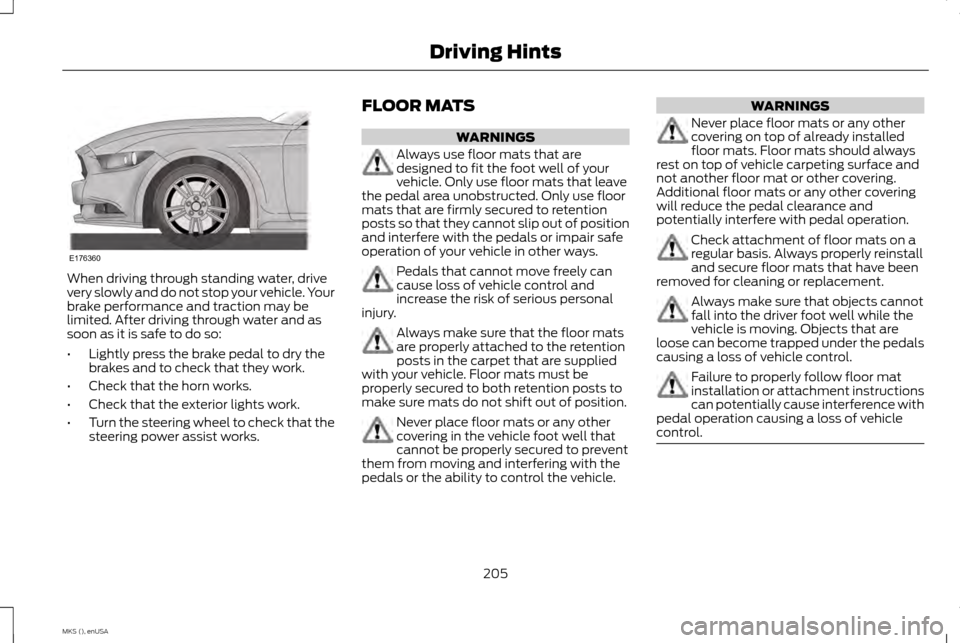
Before driving through standing water, check
the depth. Never drive through water that is
higher than the bottom of the front rocker
area of your vehicle.
204
MKS (), enUSA Driving Hints
Page 208 of 424
When driving through standing water, drive
very slowly and do not stop your vehicle. Your
brake performance and traction may be
limited. After driving through water and as
soon as it is safe to do so:
•
Lightly press the brake pedal to dry the
brakes and to check that they work.
• Check that the horn works.
• Check that the exterior lights work.
• Turn the steering wheel to check that the
steering power assist works. FLOOR MATS WARNINGS
Always use floor mats that are
designed to fit the foot well of your
vehicle. Only use floor mats that leave
the pedal area unobstructed. Only use floor
mats that are firmly secured to retention
posts so that they cannot slip out of position
and interfere with the pedals or impair safe
operation of your vehicle in other ways. Pedals that cannot move freely can
cause loss of vehicle control and
increase the risk of serious personal
injury. Always make sure that the floor mats
are properly attached to the retention
posts in the carpet that are supplied
with your vehicle. Floor mats must be
properly secured to both retention posts to
make sure mats do not shift out of position. Never place floor mats or any other
covering in the vehicle foot well that
cannot be properly secured to prevent
them from moving and interfering with the
pedals or the ability to control the vehicle. WARNINGS
Never place floor mats or any other
covering on top of already installed
floor mats. Floor mats should always
rest on top of vehicle carpeting surface and
not another floor mat or other covering.
Additional floor mats or any other covering
will reduce the pedal clearance and
potentially interfere with pedal operation. Check attachment of floor mats on a
regular basis. Always properly reinstall
and secure floor mats that have been
removed for cleaning or replacement. Always make sure that objects cannot
fall into the driver foot well while the
vehicle is moving. Objects that are
loose can become trapped under the pedals
causing a loss of vehicle control. Failure to properly follow floor mat
installation or attachment instructions
can potentially cause interference with
pedal operation causing a loss of vehicle
control. 205
MKS (), enUSA Driving HintsE176360
Page 227 of 424
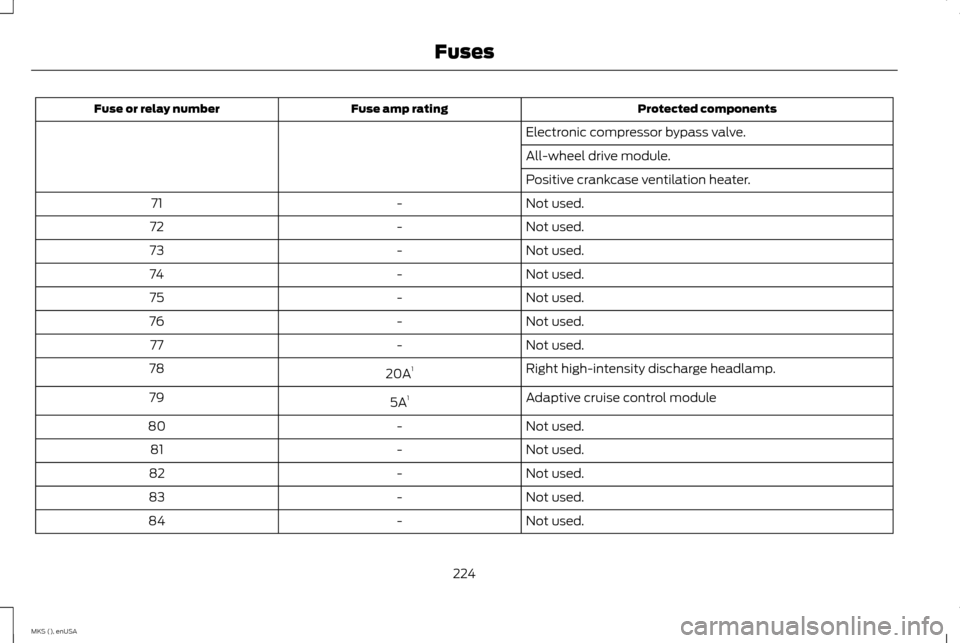
Protected components
Fuse amp rating
Fuse or relay number
Electronic compressor bypass valve.
All-wheel drive module.
Positive crankcase ventilation heater.
Not used.
-
71
Not used.
-
72
Not used.
-
73
Not used.
-
74
Not used.
-
75
Not used.
-
76
Not used.
-
77
Right high-intensity discharge headlamp.
20A 1
78
Adaptive cruise control module
5A 1
79
Not used.
-
80
Not used.
-
81
Not used.
-
82
Not used.
-
83
Not used.
-
84
224
MKS (), enUSA Fuses
Page 229 of 424
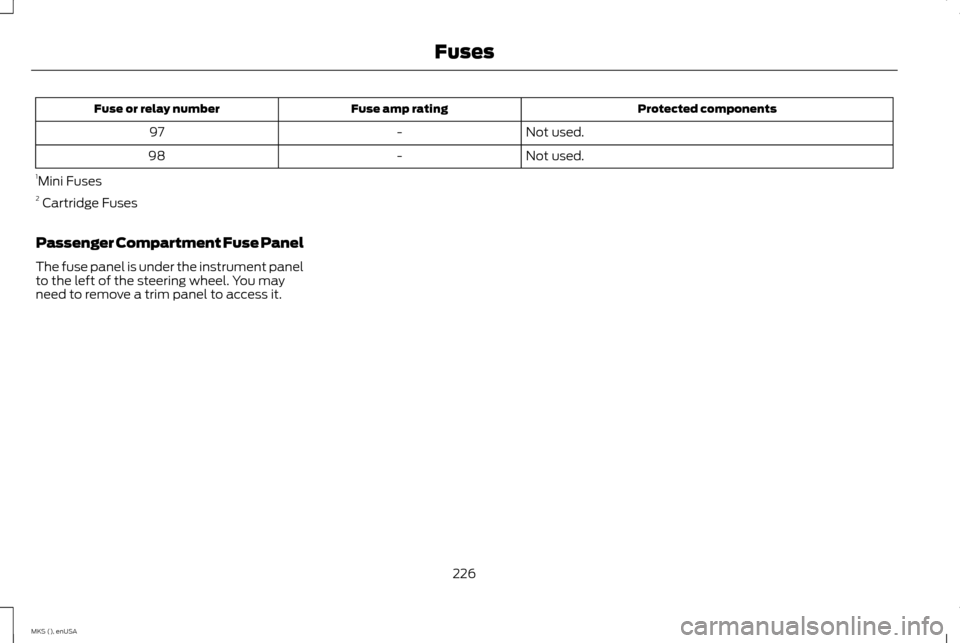
Protected components
Fuse amp rating
Fuse or relay number
Not used.
-
97
Not used.
-
98
1 Mini Fuses
2 Cartridge Fuses
Passenger Compartment Fuse Panel
The fuse panel is under the instrument panel
to the left of the steering wheel. You may
need to remove a trim panel to access it.
226
MKS (), enUSA Fuses
Page 232 of 424
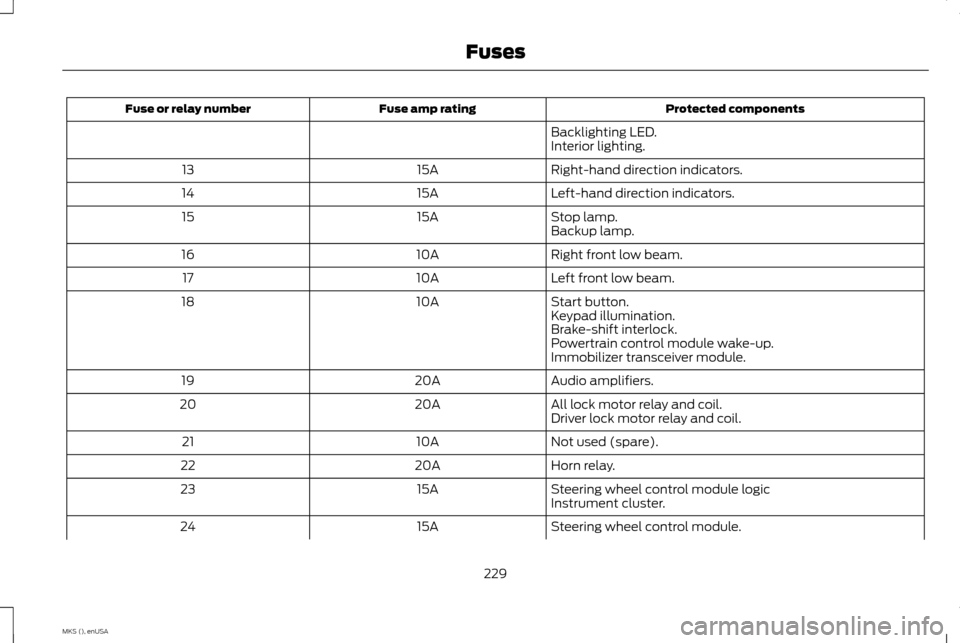
Protected components
Fuse amp rating
Fuse or relay number
Backlighting LED.
Interior lighting.
Right-hand direction indicators.
15A
13
Left-hand direction indicators.
15A
14
Stop lamp.
15A
15
Backup lamp.
Right front low beam.
10A
16
Left front low beam.
10A
17
Start button.
10A
18
Keypad illumination.
Brake-shift interlock.
Powertrain control module wake-up.
Immobilizer transceiver module.
Audio amplifiers.
20A
19
All lock motor relay and coil.
20A
20
Driver lock motor relay and coil.
Not used (spare).
10A
21
Horn relay.
20A
22
Steering wheel control module logic
15A
23
Instrument cluster.
Steering wheel control module.
15A
24
229
MKS (), enUSA Fuses
Page 234 of 424
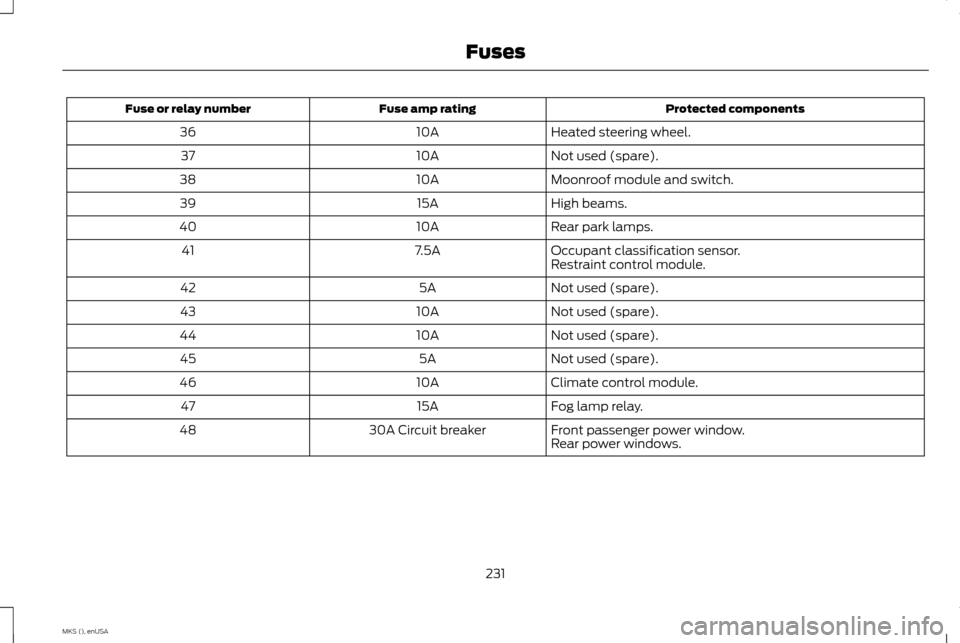
Protected components
Fuse amp rating
Fuse or relay number
Heated steering wheel.
10A
36
Not used (spare).
10A
37
Moonroof module and switch.
10A
38
High beams.
15A
39
Rear park lamps.
10A
40
Occupant classification sensor.
7.5A
41
Restraint control module.
Not used (spare).
5A
42
Not used (spare).
10A
43
Not used (spare).
10A
44
Not used (spare).
5A
45
Climate control module.
10A
46
Fog lamp relay.
15A
47
Front passenger power window.
30A Circuit breaker
48
Rear power windows.
231
MKS (), enUSA Fuses
Page 237 of 424
GENERAL INFORMATION
Have your vehicle serviced regularly to help
maintain its roadworthiness and resale value.
There is a large network of authorized dealers
that are there to help you with their
professional servicing expertise. We believe
that their specially trained technicians are
best qualified to service your vehicle properly
and expertly. They are supported by a wide
range of highly specialized tools developed
specifically for servicing your vehicle.
To help you service your vehicle, we provide
scheduled maintenance information which
makes tracking routine service easy. See
Scheduled Maintenance (page 392).
If your vehicle requires professional service,
an authorized dealer can provide the
necessary parts and service. Check your
warranty information to find out which parts
and services are covered.
Use only recommended fuels, lubricants,
fluids and service parts conforming to
specifications. Motorcraft® parts are
designed and built to provide the best
performance in your vehicle. Precautions
•
Do not work on a hot engine.
• Make sure that nothing gets caught in
moving parts.
• Do not work on a vehicle with the engine
running in an enclosed space, unless you
are sure you have enough ventilation.
• Keep all open flames and other burning
material (such as cigarettes) away from
the battery and all fuel related parts.
Working with the Engine Off
1. Set the parking brake and shift to park (P).
2. Switch off the engine.
3. Block the wheels.
Working with the Engine On WARNING
To reduce the risk of vehicle damage
and/or personal burn injuries, do not
start your engine with the air cleaner
removed and do not remove it while the
engine is running. 1. Set the parking brake and shift to park
(P). 2. Block the wheels
OPENING AND CLOSING THE
HOOD
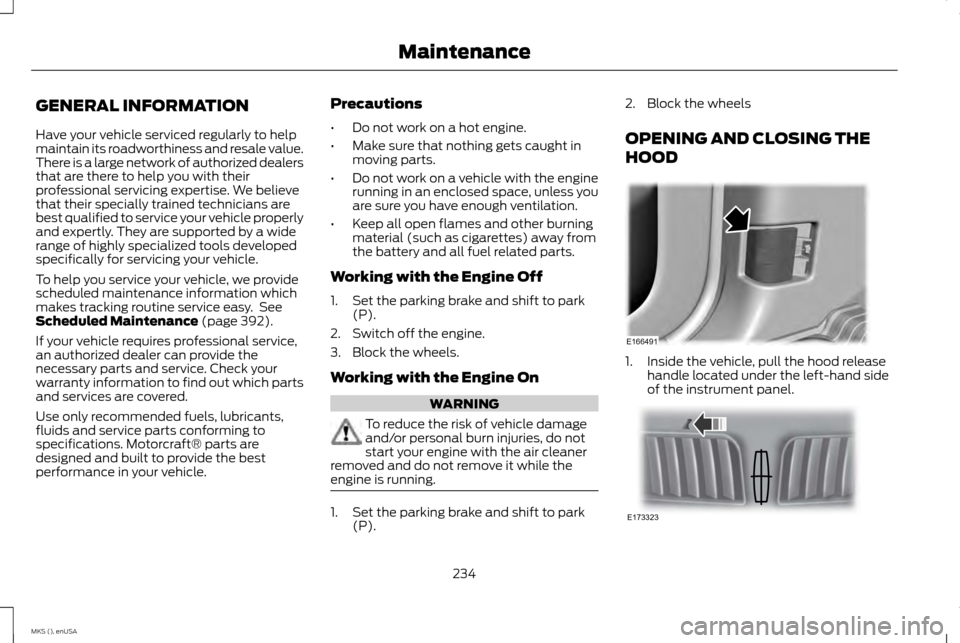
1. Inside the vehicle, pull the hood release
handle located under the left-hand side
of the instrument panel. 234
MKS (), enUSA MaintenanceE166491 E173323
Page 253 of 424
Always dispose of automotive batteries
in a responsible manner. Follow your
local authorized standards for disposal.
Call your local authorized recycling
center to find out more about recycling
automotive batteries.
Battery Management System (If
Equipped)
The battery management system (BMS)
monitors battery conditions and takes
actions to extend battery life. If excessive
battery drain is detected, the system may
temporarily disable certain electrical features
to protect the battery. Those electrical
accessories affected include the rear defrost,
heated/cooled seats, climate control fan,
heated steering wheel, audio and navigation
system. A message may be shown in the
information displays to alert the driver that
battery protection actions are active. These
messages are only for notification that an
action is taking place, and not intended to
indicate an electrical problem or that the
battery requires replacement.
Electrical accessory installation
To ensure proper operation of the Battery
Management System, any electrical devices
that are added to your vehicle should not
have their ground connection made directly
at the negative battery post. A connection at
the negative battery post can cause
inaccurate measurements of the battery
condition and potential incorrect system
operation.
Note:
Electrical or electronic accessories
added to your vehicle by the dealer or the
owner, may adversely affect battery
performance and durability, and may affect
the performance of other electrical systems
in your vehicle.
When a battery replacement is required, the
battery should only be replaced with a
Ford-recommended replacement battery
that matches the electrical requirements of
your vehicle. After battery replacement, or in
some cases after charging the battery with
the external charger, the Battery
Management System requires eight hours of
vehicle sleep time (key off with doors closed)
to relearn the new battery state of charge.
Prior to relearning the state of charge, the
Battery Management System may disable
electrical features (to protect the battery)
earlier than normal. CHECKING THE WIPER BLADES
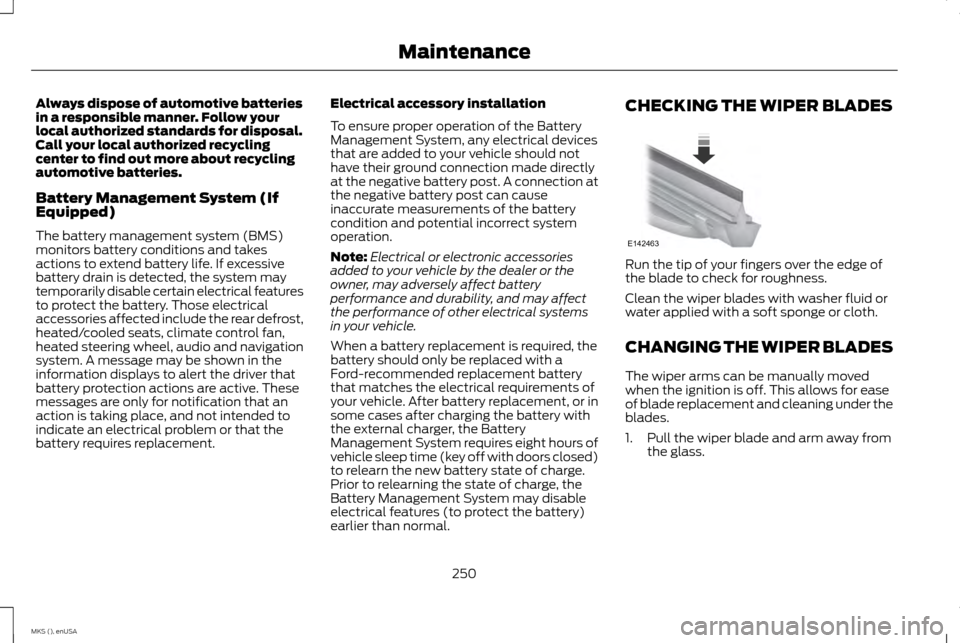
Run the tip of your fingers over the edge of
the blade to check for roughness.
Clean the wiper blades with washer fluid or
water applied with a soft sponge or cloth.
CHANGING THE WIPER BLADES
The wiper arms can be manually moved
when the ignition is off. This allows for ease
of blade replacement and cleaning under the
blades.
1. Pull the wiper blade and arm away from
the glass.
250
MKS (), enUSA MaintenanceE142463