door lock LINCOLN MKS 2016 User Guide
[x] Cancel search | Manufacturer: LINCOLN, Model Year: 2016, Model line: MKS, Model: LINCOLN MKS 2016Pages: 382, PDF Size: 3.81 MB
Page 63 of 382
To program additional personal entry codes,
repeat steps 1 through 3, then for step 4:
•
Press 3·4 to save personal code 2.
• Press
5·6 to save personal code 3.
• Press
7·8 to save personal code 4.
• Press
9·0 to save personal code 5.
You may also program a personal entry code
using the touchscreen.
Tips:
• Do not set a code that uses five of the
same number.
• Do not use five numbers in sequential
order.
• The factory-set five-digit code will work
even if you have set your own personal
code.
Recalling Memory Positions (If
Equipped)
The programmed entry codes recall driver
memory positions as follows:
• Entry code 1 recalls driver 1 memory
positions.
• Entry code 2 recalls driver 2 memory
positions.
• Entry code 3 recalls driver 3 memory
positions. Note:
Personal entry codes 4 and 5 will not
recall memory positions.
Note: The factory-set five-digit code cannot
be associated with a memory setting.
Erasing a Personal Code
1. Enter the factory-set five-digit code.
2. Press and release
1·2 on the keypad
within five seconds.
3. Press and hold
1·2 for two seconds. You
must do this within five seconds of
completing Step 2.
All personal codes are now erased and only
the factory-set five–digit code will work.
Anti-Scan Feature
The keypad will go into an anti-scan mode if
you enter the wrong code seven times (35
consecutive button presses). This mode
disables the keypad for one minute and the
keypad lamp will flash.
The anti-scan feature will turn off after:
• One minute of keypad inactivity.
• Pressing the unlock button on the remote
control. •
Switching the ignition on.
• Unlocking your vehicle using intelligent
access.
Unlocking and Locking the Doors
To Unlock the Driver Door
Enter the factory-set five-digit code or your
personal code. You must press each number
within five seconds of each other. The interior
lamps will illuminate.
Note: All doors will unlock if you disable the
two-stage unlocking feature. See
Locking
and Unlocking (page 56).
To Unlock All Doors
Enter the factory-set five-digit code or your
personal code, then press
3·4 within five
seconds.
To Lock All Doors
Press and hold 7·8 and 9·0 at the same time
(with the driver door closed). You do not
need to enter the keypad code first.
Displaying the Factory Set Code
Note: You will need to have two programmed
intelligent access keys for this procedure.
60
MKS (CLE) Canada/United States of America, enUSA, First Printing Locks
Page 64 of 382
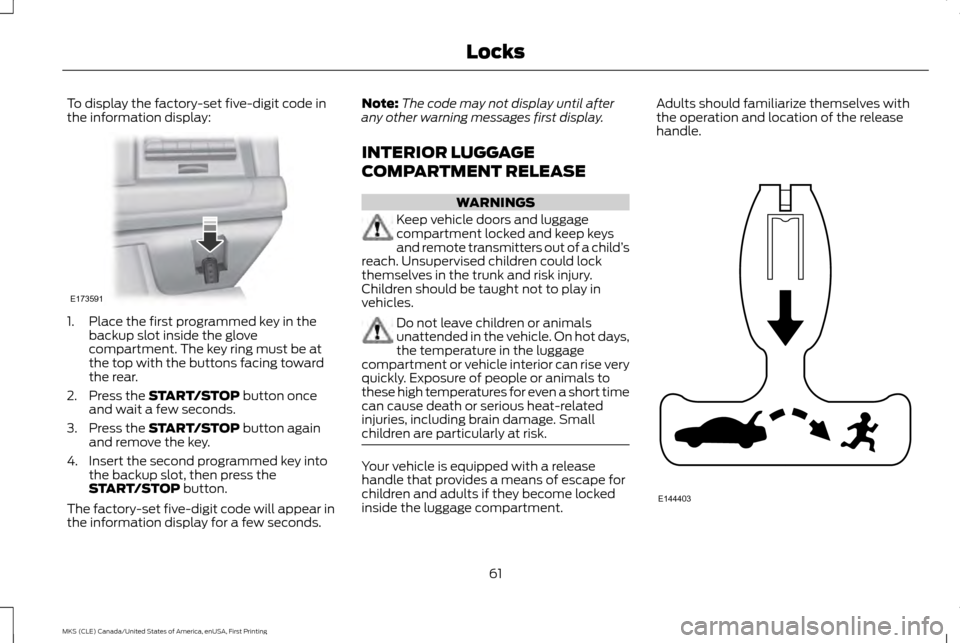
To display the factory-set five-digit code in
the information display:
1. Place the first programmed key in the
backup slot inside the glove
compartment. The key ring must be at
the top with the buttons facing toward
the rear.
2. Press the START/STOP button once
and wait a few seconds.
3. Press the
START/STOP button again
and remove the key.
4. Insert the second programmed key into the backup slot, then press the
START/STOP
button.
The factory-set five-digit code will appear in
the information display for a few seconds. Note:
The code may not display until after
any other warning messages first display.
INTERIOR LUGGAGE
COMPARTMENT RELEASE WARNINGS
Keep vehicle doors and luggage
compartment locked and keep keys
and remote transmitters out of a child
’s
reach. Unsupervised children could lock
themselves in the trunk and risk injury.
Children should be taught not to play in
vehicles. Do not leave children or animals
unattended in the vehicle. On hot days,
the temperature in the luggage
compartment or vehicle interior can rise very
quickly. Exposure of people or animals to
these high temperatures for even a short time
can cause death or serious heat-related
injuries, including brain damage. Small
children are particularly at risk. Your vehicle is equipped with a release
handle that provides a means of escape for
children and adults if they become locked
inside the luggage compartment.Adults should familiarize themselves with
the operation and location of the release
handle.
61
MKS (CLE) Canada/United States of America, enUSA, First Printing LocksE173591 E144403
Page 65 of 382
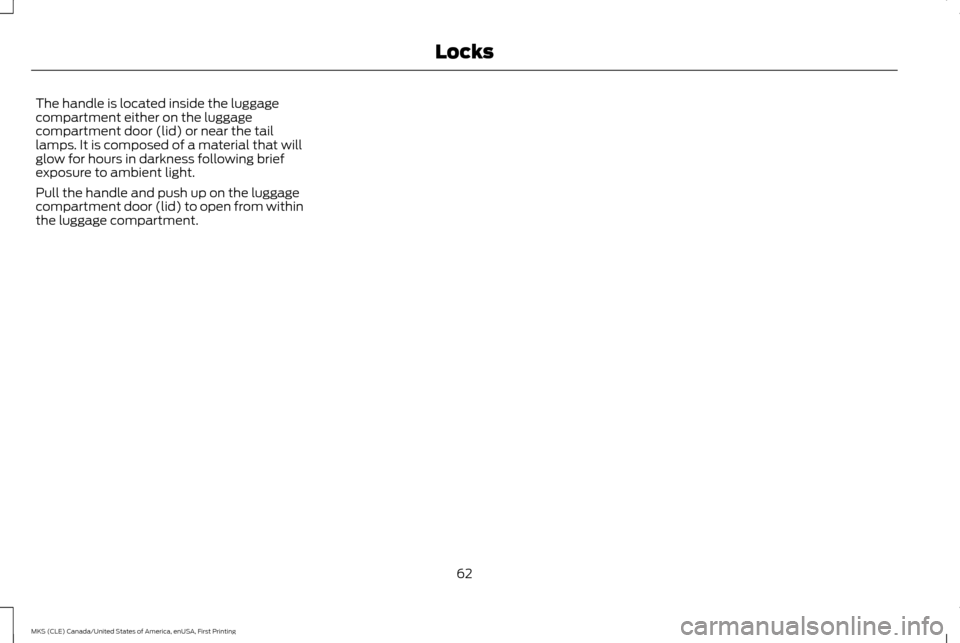
The handle is located inside the luggage
compartment either on the luggage
compartment door (lid) or near the tail
lamps. It is composed of a material that will
glow for hours in darkness following brief
exposure to ambient light.
Pull the handle and push up on the luggage
compartment door (lid) to open from within
the luggage compartment.
62
MKS (CLE) Canada/United States of America, enUSA, First Printing Locks
Page 66 of 382
PASSIVE ANTI-THEFT SYSTEM
Note:
The system is not compatible with
non-Ford aftermarket remote start systems.
Use of these systems may result in vehicle
starting problems and a loss of security
protection.
Note: Metallic objects, electronic devices or
a second coded key on the same key chain
may cause vehicle starting problems if they
are too close to the key when starting your
vehicle. Prevent these objects from touching
the coded key while starting your vehicle.
Switch the ignition off, move all objects on the
key chain away from the coded key and restart
your vehicle if a problem occurs.
Note: Do not leave a duplicate coded key in
your vehicle. Always take your keys and lock
all doors when leaving your vehicle. The
system is an engine immobilization system. It
will not start without a coded key programmed
to your vehicle. If you use the wrong key, a
message may appear in the information
display. SecuriLock
The system helps prevent your vehicle from
starting unless you use a coded key
programmed to your vehicle. Using the wrong
key may prevent your vehicle from starting.
A message may appear in the information
display.
If you are unable to start your vehicle with a
correctly coded key, it is not operating
properly. A message may appear in the
information display.
Automatic Arming
Your vehicle arms immediately after
switching the ignition off.
Automatic Disarming
Switching the ignition on with a coded key
disarms your vehicle.
Replacement Keys
Note:
Your vehicle comes equipped with two
intelligent access keys.
The intelligent access key functions as a
programmed key that operates the driver
door lock and activates the intelligent access
with push button start system, as well as a
remote control. If your programmed transmitters are lost or
stolen and you do not have an extra coded
key, you will need to have your vehicle towed
to an authorized dealer. You need to erase
the key codes from your vehicle and program
new coded keys.
Store an extra programmed key away from
your vehicle in a safe place to help prevent
any inconveniences. Contact your authorized
dealer to purchase additional spare or
replacement keys.
Programming a Spare Intelligent Access
Key
Note:
You can program a maximum of four
intelligent access keys to your vehicle.
You must have two previously programmed
intelligent access keys inside your vehicle and
the new unprogrammed intelligent access
keys readily accessible. Contact an
authorized dealer to have the spare key
programmed if two previously programmed
keys are not available.
63
MKS (CLE) Canada/United States of America, enUSA, First Printing Security
Page 67 of 382
Make sure that your vehicle is off before
beginning this procedure. Make sure that you
close all the doors before beginning and that
they remain closed throughout the procedure.
Perform all steps within 30 seconds of
starting the sequence. Stop and wait for at
least one minute before starting again if you
perform any steps out of sequence.
Read and understand the entire procedure
before you begin.
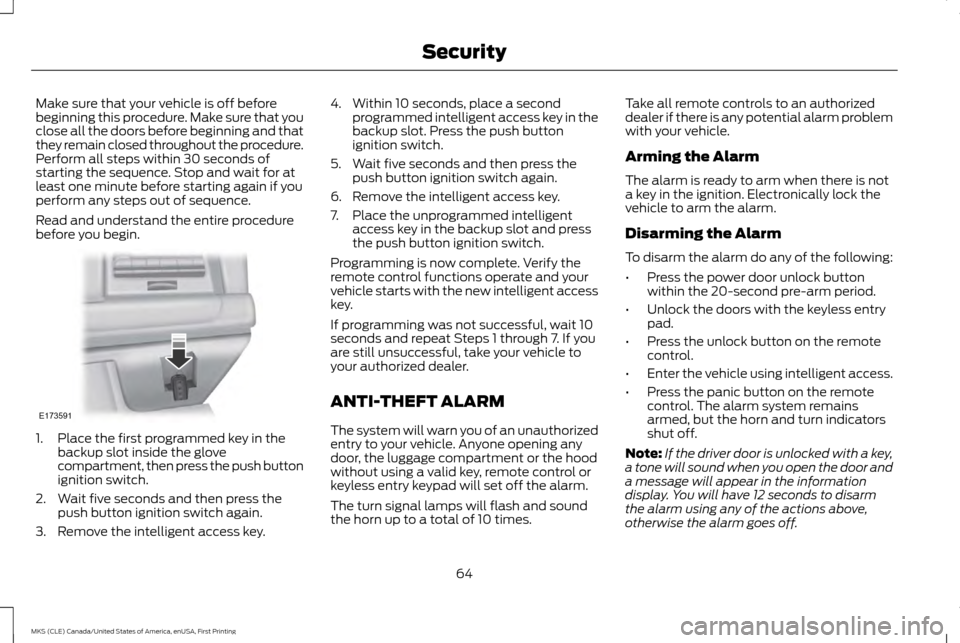
1. Place the first programmed key in the
backup slot inside the glove
compartment, then press the push button
ignition switch.
2. Wait five seconds and then press the push button ignition switch again.
3. Remove the intelligent access key. 4. Within 10 seconds, place a second
programmed intelligent access key in the
backup slot. Press the push button
ignition switch.
5. Wait five seconds and then press the push button ignition switch again.
6. Remove the intelligent access key.
7. Place the unprogrammed intelligent access key in the backup slot and press
the push button ignition switch.
Programming is now complete. Verify the
remote control functions operate and your
vehicle starts with the new intelligent access
key.
If programming was not successful, wait 10
seconds and repeat Steps 1 through 7. If you
are still unsuccessful, take your vehicle to
your authorized dealer.
ANTI-THEFT ALARM
The system will warn you of an unauthorized
entry to your vehicle. Anyone opening any
door, the luggage compartment or the hood
without using a valid key, remote control or
keyless entry keypad will set off the alarm.
The turn signal lamps will flash and sound
the horn up to a total of 10 times. Take all remote controls to an authorized
dealer if there is any potential alarm problem
with your vehicle.
Arming the Alarm
The alarm is ready to arm when there is not
a key in the ignition. Electronically lock the
vehicle to arm the alarm.
Disarming the Alarm
To disarm the alarm do any of the following:
•
Press the power door unlock button
within the 20-second pre-arm period.
• Unlock the doors with the keyless entry
pad.
• Press the unlock button on the remote
control.
• Enter the vehicle using intelligent access.
• Press the panic button on the remote
control. The alarm system remains
armed, but the horn and turn indicators
shut off.
Note: If the driver door is unlocked with a key,
a tone will sound when you open the door and
a message will appear in the information
display. You will have 12 seconds to disarm
the alarm using any of the actions above,
otherwise the alarm goes off.
64
MKS (CLE) Canada/United States of America, enUSA, First Printing SecurityE173591
Page 81 of 382
POWER WINDOWS
WARNINGS
Do not leave children unattended in
your vehicle and do not let them play
with the power windows. They may
seriously injure themselves. When closing the power windows, you
should verify they are free of
obstructions and make sure that
children and pets are not in the proximity of
the window openings. Note:
You may hear a pulsing noise when just
one of the windows is open. Lower the
opposite window slightly to reduce this noise. Press the switch to open the window.
Lift the switch to close the window.
One-Touch Down
Press the switch fully and release it. Press
again or lift it to stop the window.
One-Touch Up
Lift the switch fully and release it. Press or
lift it again to stop the window.
Bounce-Back
The window will stop automatically while
closing. It reverses some distance if there is
an obstacle in the way.
Overriding the Bounce-Back Feature
WARNING
When you override the bounce-back
feature the window will not reverse if
it detects an obstacle. Take care when
closing the windows to avoid personal injury
or damage to your vehicle. Pull up the window switch and hold within a
few seconds of the window reaching the
bounce-back position. The window travels
up with no bounce-back protection. The
window stops if you release the switch before
the window closes fully.
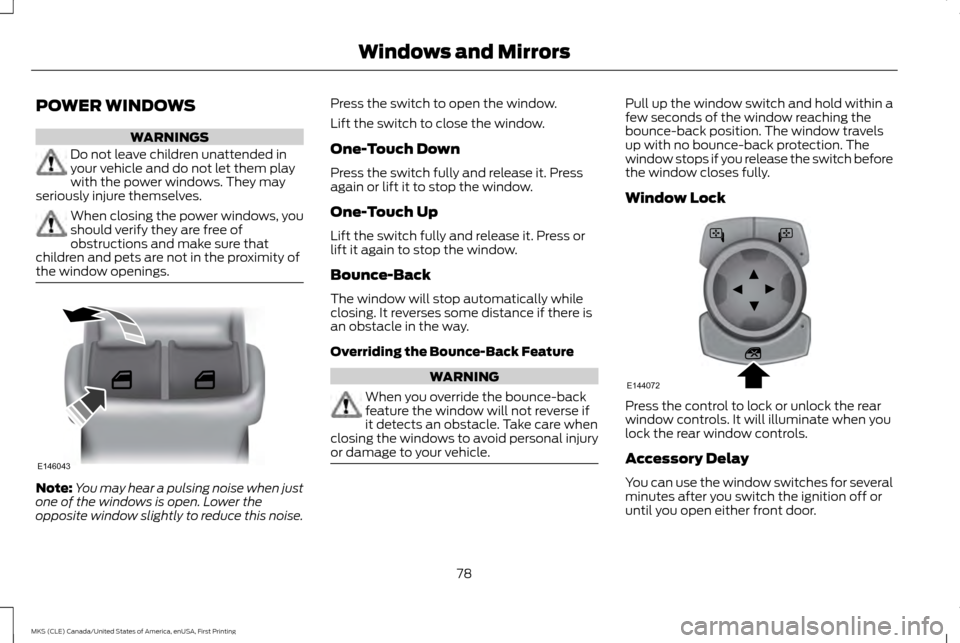
Window Lock
Press the control to lock or unlock the rear
window controls. It will illuminate when you
lock the rear window controls.
Accessory Delay
You can use the window switches for several
minutes after you switch the ignition off or
until you open either front door.
78
MKS (CLE) Canada/United States of America, enUSA, First Printing Windows and MirrorsE146043 E144072
Page 82 of 382
GLOBAL OPENING AND CLOSING
You can use the remote control to operate
the windows with the ignition off.
Note:
You can enable or disable this feature
in the information display or see an authorized
dealer. See General Information (page 89).
Note: To operate this feature, accessory delay
must not be active.
Opening the Windows
You can only open the windows for a short
time after you unlock your vehicle with the
remote control. After you unlock your vehicle,
press and hold the remote control unlock
button to open the windows and vent the
moonroof. Release the button once
movement starts. Press the lock or unlock
button to stop movement.
Closing the Windows WARNING
When closing the windows and
moonroof, you should verify they are
free of obstructions and make sure that
children and pets are not in the proximity of
the window openings. To close the windows and moonroof, press
and hold the remote control lock button.
Release the button once movement starts.
Press the lock or unlock button to stop
movement.
EXTERIOR MIRRORS
Power Exterior Mirrors
WARNING
Do not adjust the mirrors when your
vehicle is moving.
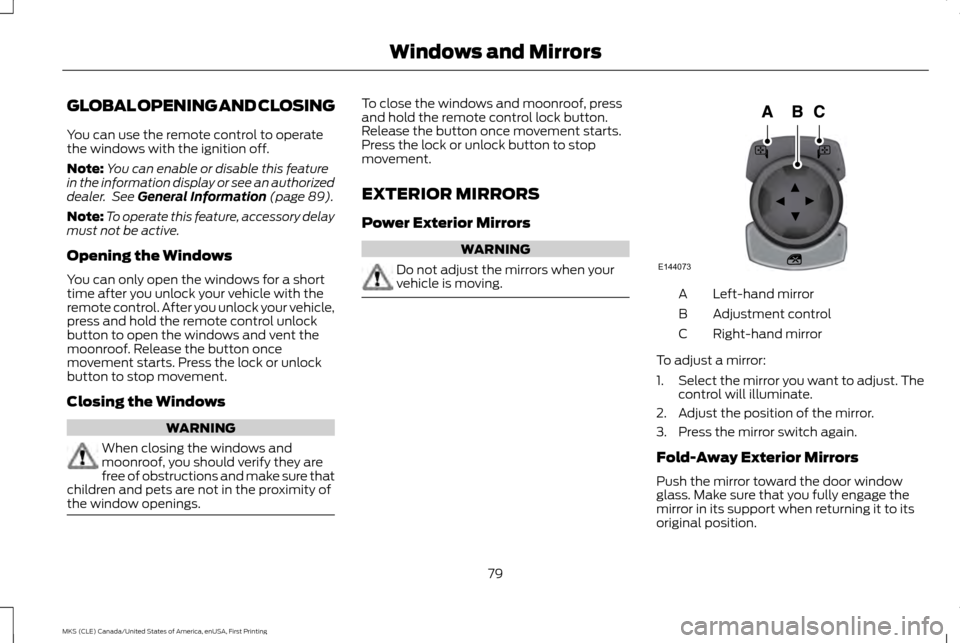
Left-hand mirror
A
Adjustment control
B
Right-hand mirror
C
To adjust a mirror:
1. Select the mirror you want to adjust. The
control will illuminate.
2. Adjust the position of the mirror.
3. Press the mirror switch again.
Fold-Away Exterior Mirrors
Push the mirror toward the door window
glass. Make sure that you fully engage the
mirror in its support when returning it to its
original position.
79
MKS (CLE) Canada/United States of America, enUSA, First Printing Windows and MirrorsE144073
Page 88 of 382
WARNING LAMPS AND
INDICATORS
The following warning lamps and indicators
will alert you to a vehicle condition that may
become serious. Some lamps will illuminate
when you start your vehicle to make sure they
work. If any lamps remain on after starting
your vehicle, refer to the respective system
warning lamp for further information.
Note:
Some warning indicators appear in the
information display and function the same as
a warning lamp, but do not display when you
start your vehicle.
Adaptive Cruise Control (If Equipped) The speed control system indicator
light changes color to indicate
what mode the system is in:
See
Using Adaptive Cruise Control (page 167).
On (white light): Illuminates when the
adaptive cruise control system is turned on.
Turns off when the speed control system is
turned off.
Engaged (green light): Illuminates when the
adaptive cruise control system is engaged.
Turns off when the speed control system is
disengaged. Anti-Lock Braking System If it illuminates when you are
driving, this indicates a
malfunction. You will continue to
have the normal braking system (without
ABS) unless the brake system warning lamp
is also illuminated. Have the system checked
by your authorized dealer.
Battery If it illuminates while driving, it
indicates a malfunction. Switch off
all unnecessary electrical
equipment and have the system checked by
your authorized dealer immediately.
Brake System It will illuminate when you engage
the parking brake with the ignition
on.
If it illuminates when you are driving, check
that the parking brake is not engaged. If the
parking brake is not engaged, this indicates
low brake fluid level or a brake system
malfunction. Have the system checked
immediately by your authorized dealer. WARNING
Driving your vehicle with the warning
lamp on is dangerous. A significant
decrease in braking performance may
occur. It will take you longer to stop your
vehicle. Have your vehicle checked by your
authorized dealer immediately. Driving
extended distances with the parking brake
engaged can cause brake failure and the risk
of personal injury. Cruise Control
(If Equipped)
It will illuminate when you switch
this feature on.
Direction Indicator Illuminates when the left or right
turn signal or the hazard warning
flasher is turned on. If the
indicators stay on or flash faster, check for a
burned out bulb. See
Changing a Bulb
(page 259).
Door Ajar Displays when the ignition is on and
any door is not completely closed.
85
MKS (CLE) Canada/United States of America, enUSA, First Printing Instrument ClusterE144524 E144522 E71340
Page 96 of 382
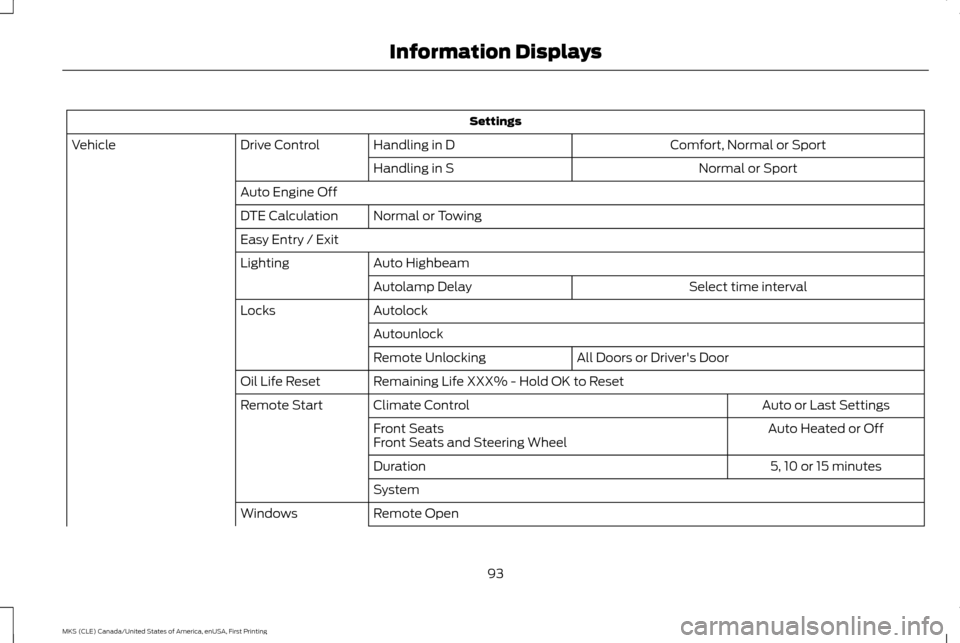
Settings
Comfort, Normal or Sport
Handling in D
Drive Control
Vehicle
Normal or Sport
Handling in S
Auto Engine Off Normal or Towing
DTE Calculation
Easy Entry / Exit
Auto Highbeam
Lighting
Select time interval
Autolamp Delay
Autolock
Locks
Autounlock All Doors or Driver's Door
Remote Unlocking
Remaining Life XXX% - Hold OK to Reset
Oil Life Reset
Auto or Last Settings
Climate Control
Remote Start
Auto Heated or Off
Front Seats
Front Seats and Steering Wheel
5, 10 or 15 minutes
Duration
System
Remote Open
Windows
93
MKS (CLE) Canada/United States of America, enUSA, First Printing Information Displays
Page 102 of 382
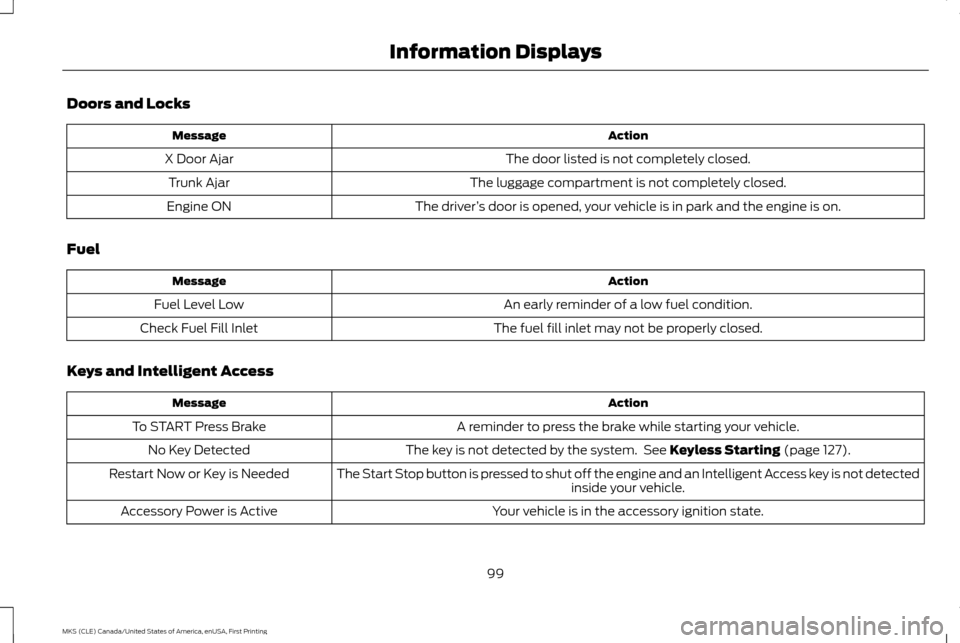
Doors and Locks
Action
Message
The door listed is not completely closed.
X Door Ajar
The luggage compartment is not completely closed.
Trunk Ajar
The driver’s door is opened, your vehicle is in park and the engine is on.
Engine ON
Fuel Action
Message
An early reminder of a low fuel condition.
Fuel Level Low
The fuel fill inlet may not be properly closed.
Check Fuel Fill Inlet
Keys and Intelligent Access Action
Message
A reminder to press the brake while starting your vehicle.
To START Press Brake
The key is not detected by the system. See Keyless Starting (page 127).
No Key Detected
The Start Stop button is pressed to shut off the engine and an Intelligent Access key is not detected inside your vehicle.
Restart Now or Key is Needed
Your vehicle is in the accessory ignition state.
Accessory Power is Active
99
MKS (CLE) Canada/United States of America, enUSA, First Printing Information Displays