light LINCOLN MKT 2011 Service Manual
[x] Cancel search | Manufacturer: LINCOLN, Model Year: 2011, Model line: MKT, Model: LINCOLN MKT 2011Pages: 454, PDF Size: 3.82 MB
Page 105 of 454
Press and release this control to
cycle through the intensity settings.
The lights come on whenever the ignition is in either on or in the
accessory position and the parking lamps or headlamps are on.
Note:The ambient lights will stay on until the ignition is placed in the
off position and either of the front doors are opened or the accessory
delay timer expires.
BULB REPLACEMENT
Lamp assembly condensation
Exterior lamps are vented to accommodate normal changes in pressure.
Condensation can be a natural by-product of this design. When moist air
enters the lamp assembly through the vents, there is a possibility that
condensation can occur when the temperature is cold. When normal
condensation occurs, a thin film of mist can form on the interior of the
lens. The thin mist eventually clears and exits through the vents during
normal operation. Clearing time may take as long as 48 hours under dry
weather conditions.
Examples of acceptable condensation are:
•Presence of thin mist (no streaks, drip marks or droplets)
•Fine mist covers less than 50% of the lens
Examples of unacceptable moisture (usually caused by a lamp water
leak) are:
•Water puddle inside the lamp
•Large water droplets, drip marks or streaks present on the interior of
the lens
Take your vehicle to a dealer for service if any of the above conditions of
unacceptable moisture are present.
Lights
105
2011 MKT(mkt)
Owners Guide, 1st Printing
USA(fus)
Page 106 of 454
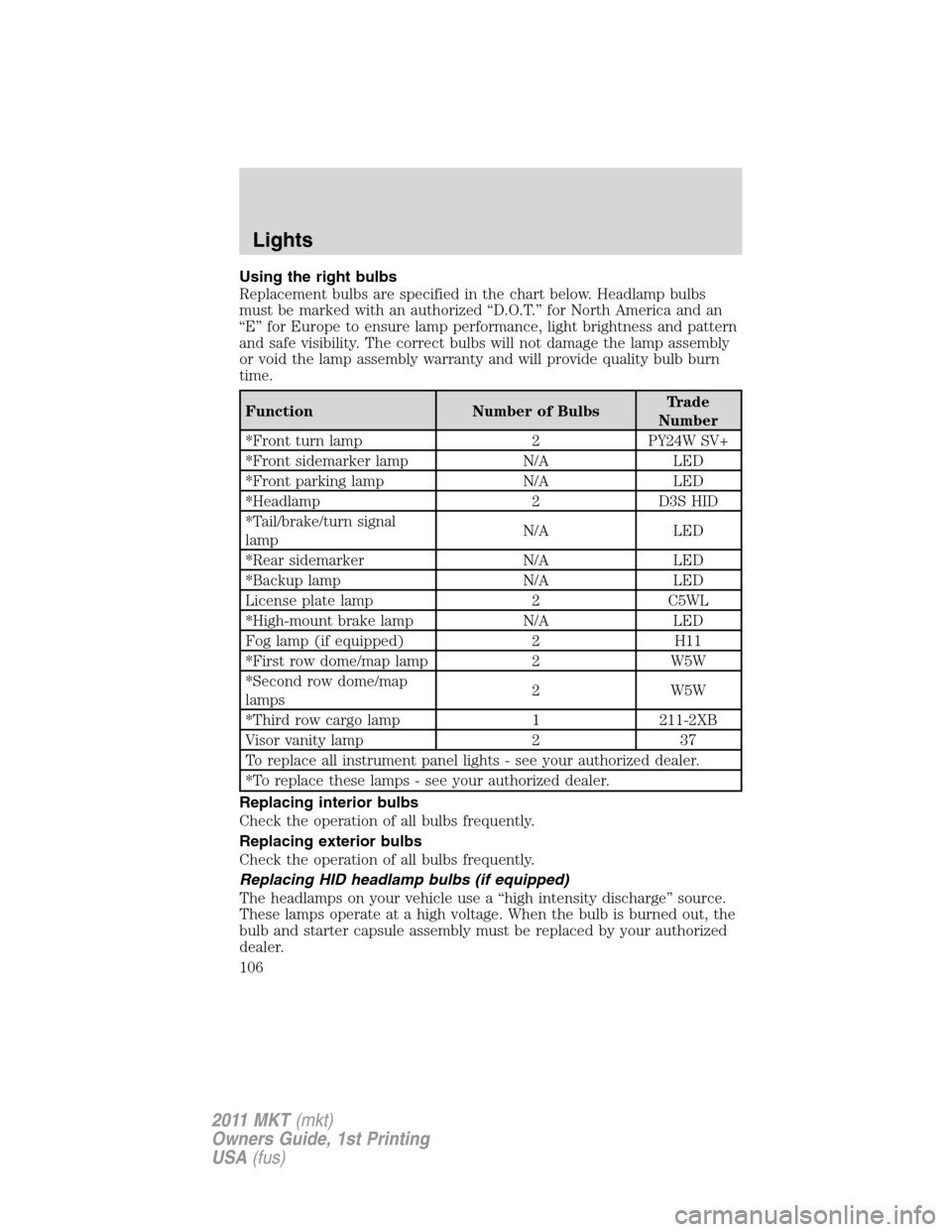
Using the right bulbs
Replacement bulbs are specified in the chart below. Headlamp bulbs
must be marked with an authorized “D.O.T.” for North America and an
“E” for Europe to ensure lamp performance, light brightness and pattern
and safe visibility. The correct bulbs will not damage the lamp assembly
or void the lamp assembly warranty and will provide quality bulb burn
time.
Function Number of BulbsTrade
Number
*Front turn lamp 2 PY24W SV+
*Front sidemarker lamp N/A LED
*Front parking lamp N/A LED
*Headlamp 2 D3S HID
*Tail/brake/turn signal
lampN/A LED
*Rear sidemarker N/A LED
*Backup lamp N/A LED
License plate lamp 2 C5WL
*High-mount brake lamp N/A LED
Fog lamp (if equipped) 2 H11
*First row dome/map lamp 2 W5W
*Second row dome/map
lamps2 W5W
*Third row cargo lamp 1 211-2XB
Visor vanity lamp 2 37
To replace all instrument panel lights - see your authorized dealer.
*To replace these lamps - see your authorized dealer.
Replacing interior bulbs
Check the operation of all bulbs frequently.
Replacing exterior bulbs
Check the operation of all bulbs frequently.
Replacing HID headlamp bulbs (if equipped)
The headlamps on your vehicle use a “high intensity discharge” source.
These lamps operate at a high voltage. When the bulb is burned out, the
bulb and starter capsule assembly must be replaced by your authorized
dealer.
Lights
106
2011 MKT(mkt)
Owners Guide, 1st Printing
USA(fus)
Page 107 of 454
Replacing front parking lamp/turn signal bulbs
For bulb replacement, see your authorized dealer.
Replacing rear stop/tail/turn/backup and side marker lamps
Your vehicle is equipped with stop/tail/turn/backup and side marker lamp
assemblies containing integral multiple light emitting diodes (LED). If
replacement is required, see your authorized dealer.
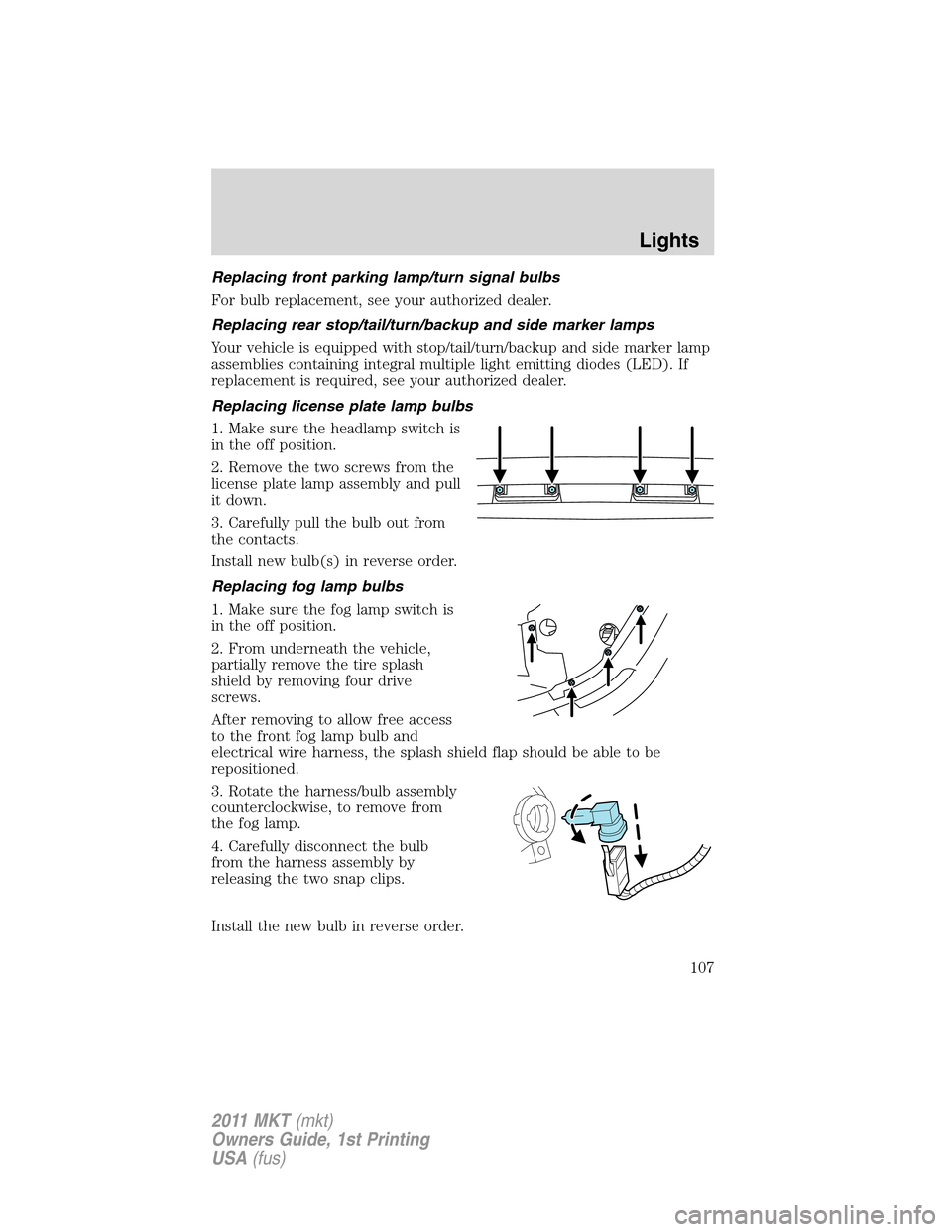
Replacing license plate lamp bulbs
1. Make sure the headlamp switch is
in the off position.
2. Remove the two screws from the
license plate lamp assembly and pull
it down.
3. Carefully pull the bulb out from
the contacts.
Install new bulb(s) in reverse order.
Replacing fog lamp bulbs
1. Make sure the fog lamp switch is
in the off position.
2. From underneath the vehicle,
partially remove the tire splash
shield by removing four drive
screws.
After removing to allow free access
to the front fog lamp bulb and
electrical wire harness, the splash shield flap should be able to be
repositioned.
3. Rotate the harness/bulb assembly
counterclockwise, to remove from
the fog lamp.
4. Carefully disconnect the bulb
from the harness assembly by
releasing the two snap clips.
Install the new bulb in reverse order.
Lights
107
2011 MKT(mkt)
Owners Guide, 1st Printing
USA(fus)
Page 108 of 454
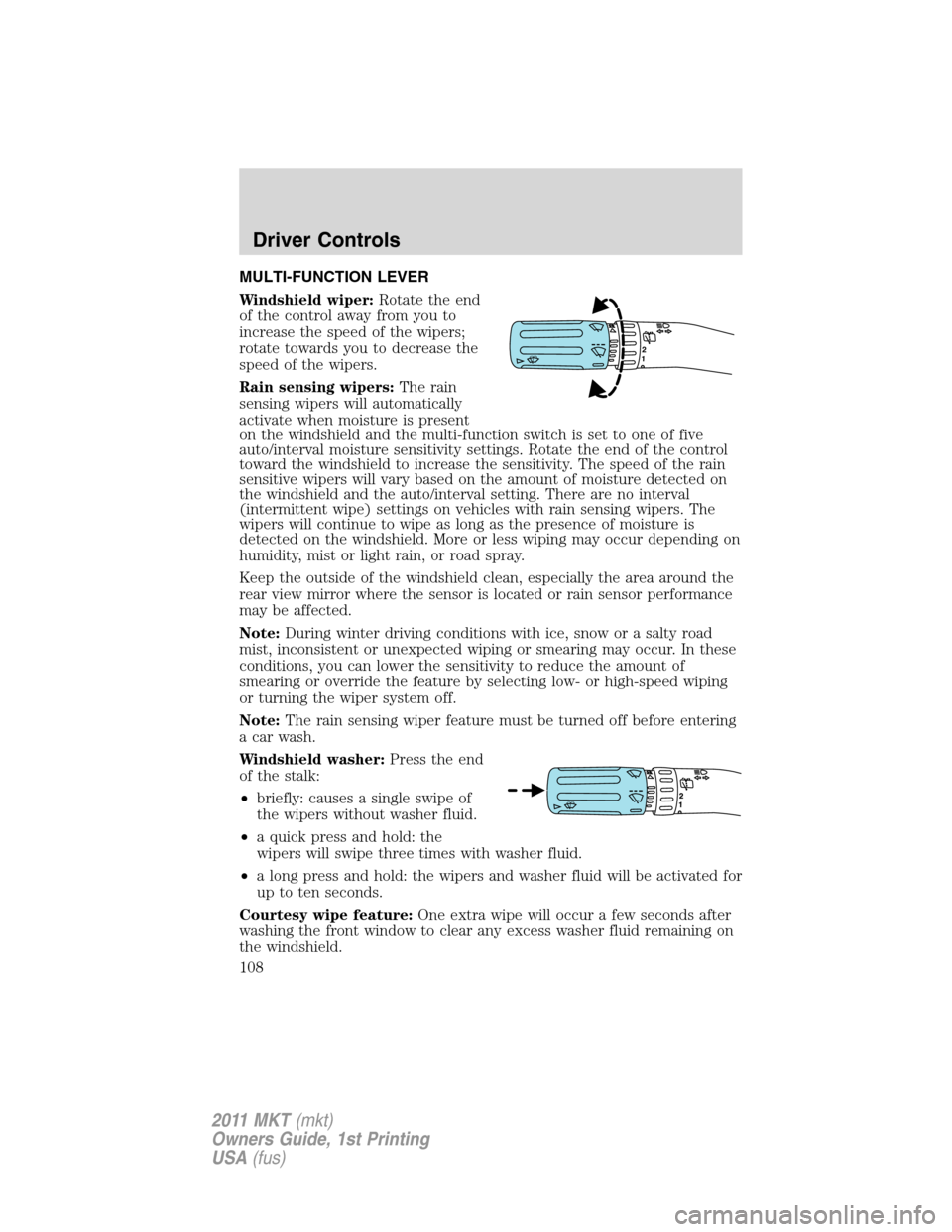
MULTI-FUNCTION LEVER
Windshield wiper:Rotate the end
of the control away from you to
increase the speed of the wipers;
rotate towards you to decrease the
speed of the wipers.
Rain sensing wipers:The rain
sensing wipers will automatically
activate when moisture is present
on the windshield and the multi-function switch is set to one of five
auto/interval moisture sensitivity settings. Rotate the end of the control
toward the windshield to increase the sensitivity. The speed of the rain
sensitive wipers will vary based on the amount of moisture detected on
the windshield and the auto/interval setting. There are no interval
(intermittent wipe) settings on vehicles with rain sensing wipers. The
wipers will continue to wipe as long as the presence of moisture is
detected on the windshield. More or less wiping may occur depending on
humidity, mist or light rain, or road spray.
Keep the outside of the windshield clean, especially the area around the
rear view mirror where the sensor is located or rain sensor performance
may be affected.
Note:During winter driving conditions with ice, snow or a salty road
mist, inconsistent or unexpected wiping or smearing may occur. In these
conditions, you can lower the sensitivity to reduce the amount of
smearing or override the feature by selecting low- or high-speed wiping
or turning the wiper system off.
Note:The rain sensing wiper feature must be turned off before entering
a car wash.
Windshield washer:Press the end
of the stalk:
•briefly: causes a single swipe of
the wipers without washer fluid.
•a quick press and hold: the
wipers will swipe three times with washer fluid.
•a long press and hold: the wipers and washer fluid will be activated for
up to ten seconds.
Courtesy wipe feature:One extra wipe will occur a few seconds after
washing the front window to clear any excess washer fluid remaining on
the windshield.
12
Driver Controls
108
2011 MKT(mkt)
Owners Guide, 1st Printing
USA(fus)
Page 109 of 454
Note:Do not operate the washer when the washer reservoir is empty.
This may cause the washer pump to overheat. Check the washer fluid
level frequently. Do not operate the wipers when the windshield is dry.
This may scratch the glass, damage the wiper blades and cause the wiper
motor to burn out. Before operating the wiper on a dry windshield,
always use the windshield washer. In freezing weather, be sure the wiper
blades are not frozen to the windshield before operating the wipers.
Windshield wiper rainlamp feature
When the windshield wipers are turned on during daylight, and the
headlamp control is in the autolamp position, the exterior lamps will turn
on after a brief delay and will remain on until the wipers are turned off.
Rear window wiper/washer controls
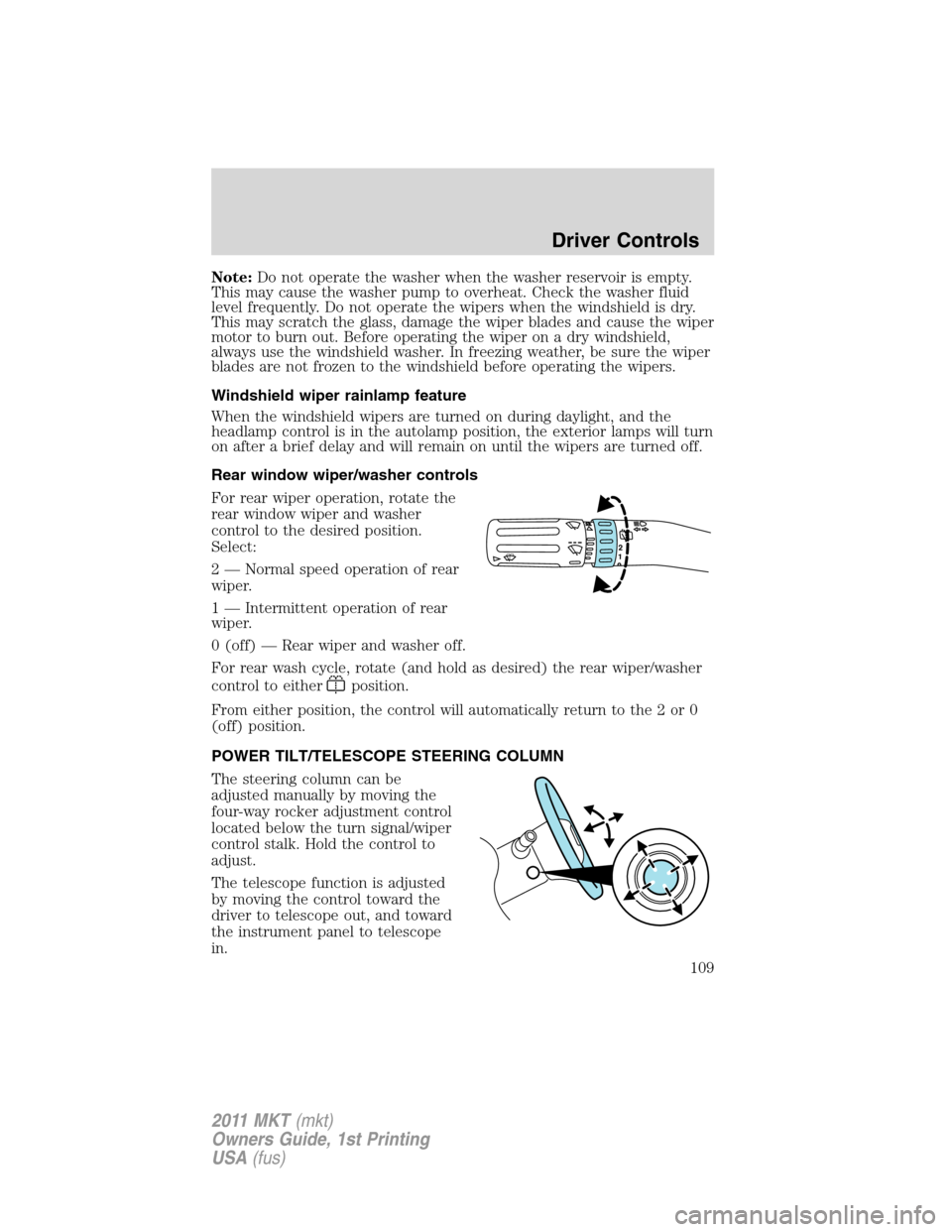
For rear wiper operation, rotate the
rear window wiper and washer
control to the desired position.
Select:
2 — Normal speed operation of rear
wiper.
1 — Intermittent operation of rear
wiper.
0 (off) — Rear wiper and washer off.
For rear wash cycle, rotate (and hold as desired) the rear wiper/washer
control to either
position.
From either position, the control will automatically return to the 2 or 0
(off) position.
POWER TILT/TELESCOPE STEERING COLUMN
The steering column can be
adjusted manually by moving the
four-way rocker adjustment control
located below the turn signal/wiper
control stalk. Hold the control to
adjust.
The telescope function is adjusted
by moving the control toward the
driver to telescope out, and toward
the instrument panel to telescope
in.
12
Driver Controls
109
2011 MKT(mkt)
Owners Guide, 1st Printing
USA(fus)
Page 110 of 454
The tilt function is adjusted by moving the control up or down.
During easy exit, when the ignition is switched off, the column will move
to the full in and up position. When the ignition is put in accessory
mode, the column will return to the previous setting.
WARNING:Never adjust the steering wheel when the vehicle is
moving.
ILLUMINATED VISOR MIRROR
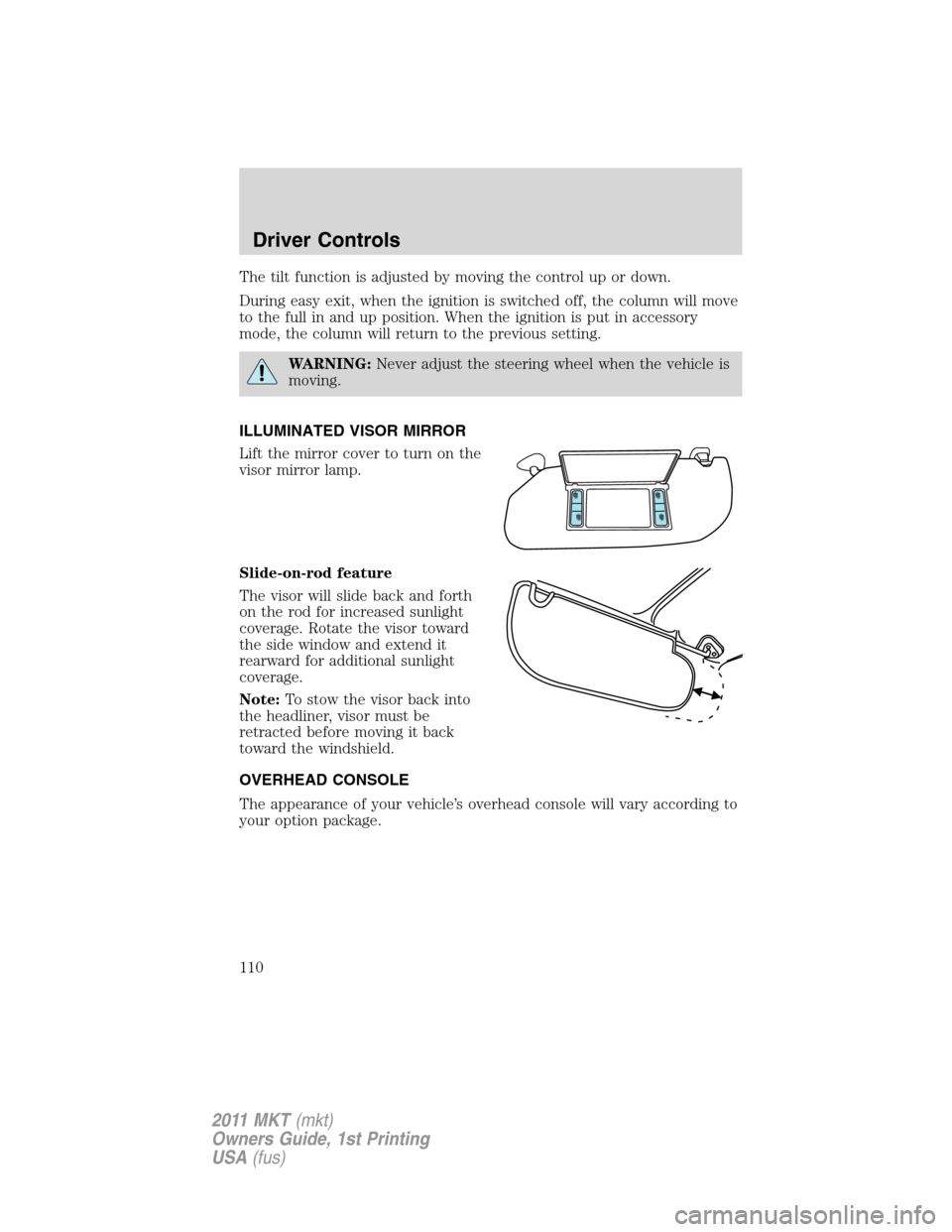
Lift the mirror cover to turn on the
visor mirror lamp.
Slide-on-rod feature
The visor will slide back and forth
on the rod for increased sunlight
coverage. Rotate the visor toward
the side window and extend it
rearward for additional sunlight
coverage.
Note:To stow the visor back into
the headliner, visor must be
retracted before moving it back
toward the windshield.
OVERHEAD CONSOLE
The appearance of your vehicle’s overhead console will vary according to
your option package.
Driver Controls
110
2011 MKT(mkt)
Owners Guide, 1st Printing
USA(fus)
Page 113 of 454
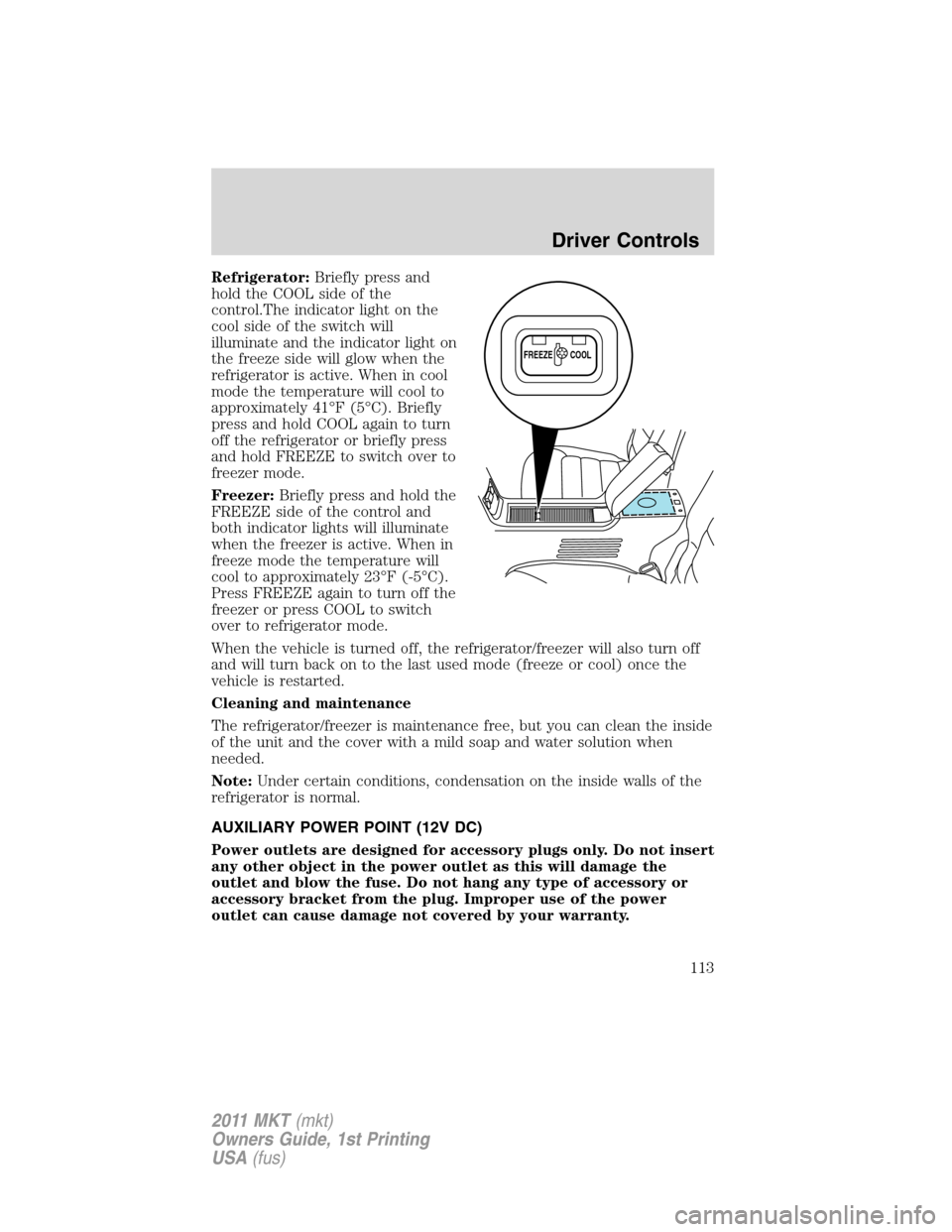
Refrigerator:Briefly press and
hold the COOL side of the
control.The indicator light on the
cool side of the switch will
illuminate and the indicator light on
the freeze side will glow when the
refrigerator is active. When in cool
mode the temperature will cool to
approximately 41°F (5°C). Briefly
press and hold COOL again to turn
off the refrigerator or briefly press
and hold FREEZE to switch over to
freezer mode.
Freezer:Briefly press and hold the
FREEZE side of the control and
both indicator lights will illuminate
when the freezer is active. When in
freeze mode the temperature will
cool to approximately 23°F (-5°C).
Press FREEZE again to turn off the
freezer or press COOL to switch
over to refrigerator mode.
When the vehicle is turned off, the refrigerator/freezer will also turn off
and will turn back on to the last used mode (freeze or cool) once the
vehicle is restarted.
Cleaning and maintenance
The refrigerator/freezer is maintenance free, but you can clean the inside
of the unit and the cover with a mild soap and water solution when
needed.
Note:Under certain conditions, condensation on the inside walls of the
refrigerator is normal.
AUXILIARY POWER POINT (12V DC)
Power outlets are designed for accessory plugs only. Do not insert
any other object in the power outlet as this will damage the
outlet and blow the fuse. Do not hang any type of accessory or
accessory bracket from the plug. Improper use of the power
outlet can cause damage not covered by your warranty.
FREEZE
COOL
Driver Controls
113
2011 MKT(mkt)
Owners Guide, 1st Printing
USA(fus)
Page 114 of 454
Auxiliary power points can be found in the following locations:
•Near the floor in the front console bin on the driver’s side
•In the center console utility compartment
•On the rear of the center console (inside the second row center
console on vehicles equipped with that feature)
•In the rear cargo area on the driver’s side trim panel
Do not use the power point for operating the cigarette lighter element (if
equipped).
To prevent the fuse from being blown, do not use the power point(s)
over the vehicle capacity of 12V DC/180W. If the power point or cigar
lighter socket is not working, a fuse may have blown. Refer toFuses and
relaysin theRoadside Emergencieschapter for information on
checking and replacing fuses.
To have full capacity usage of your power point, the engine is required to
be running to avoid unintentional discharge of the battery. To prevent
the battery from being discharged:
•do not use the power point longer than necessary when the engine is
not running,
•do not leave battery chargers, video game adapters, computers and
other devices plugged in overnight or when the vehicle is parked for
extended periods.
Always keep the power point caps closed when not being used.
Power point (110V AC) (if equipped)
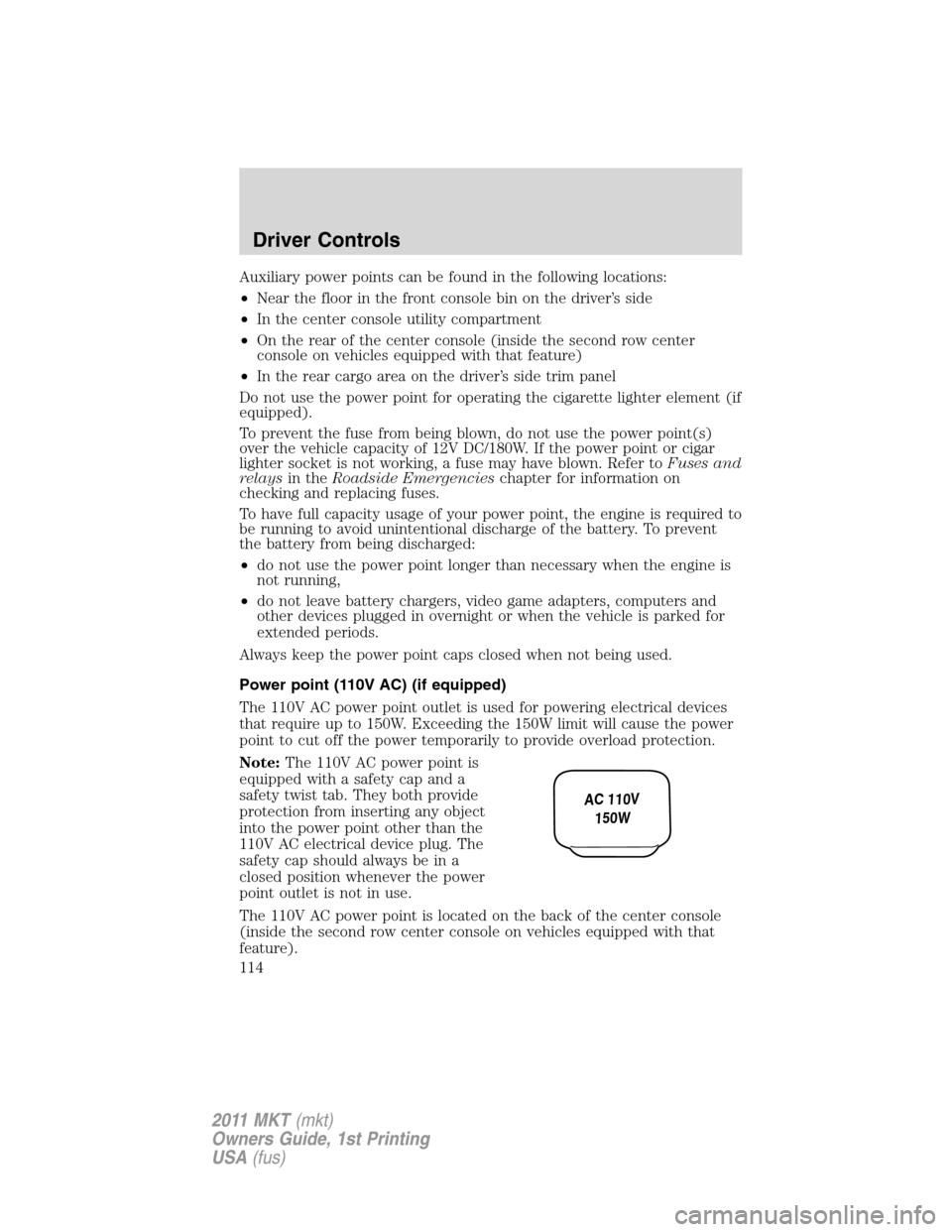
The 110V AC power point outlet is used for powering electrical devices
that require up to 150W. Exceeding the 150W limit will cause the power
point to cut off the power temporarily to provide overload protection.
Note:The 110V AC power point is
equipped with a safety cap and a
safety twist tab. They both provide
protection from inserting any object
into the power point other than the
110V AC electrical device plug. The
safety cap should always be in a
closed position whenever the power
point outlet is not in use.
The 110V AC power point is located on the back of the center console
(inside the second row center console on vehicles equipped with that
feature).
AC 110V
150W
Driver Controls
114
2011 MKT(mkt)
Owners Guide, 1st Printing
USA(fus)
Page 115 of 454
The power outlet is not designed for the following electric appliances;
they may not work properly:
•Cathode ray tube type televisions.
•Motor loads, such as vacuum cleaners, electric saws and other electric
power tools, compressor-driven refrigerators, etc.
•Measuring devices, which process precise data, such as medical
equipment, measuring equipment, etc.
•Other appliances requiring an extremely stable power supply:
microcomputer-controlled electric blankets, touch sensor lamps, etc.
WARNING:Do not keep electrical devices plugged in the power
point whenever the device is not in use. Do not use any
extension cord with the 110 VAC power point, since it will defeat the
safety protection design provided by the cap and twist tab. Doing so
my cause the power point to overload due to powering multiple
devices that can reach beyond the 150W load limit and could result in
fire or serious injury.
The power point can switch to a fault mode when it is overloaded,
overheated, or shorted. For overloading and shorting conditions, unplug
your device and turn the ignition key off then on. For an overheating
condition, let the system cool off, then turn the ignition key off then on.
The 110V AC power point can provide power whenever the vehicle
ignition is in the run position and the power point green indicator light
located in the top left corner is turned on. Refer to the indicator light
code below for the power point status.
Indicator light code
Green light is on — Power point is ready to supply power
Green light is off — Power point power supply is off. Ignition is not in
RUN position
Green light is blinking — Power point is in fault mode
POWER WINDOWS
WARNING:Do not leave children unattended in the vehicle and
do not let children play with the power windows. They may
seriously injure themselves.
Driver Controls
115
2011 MKT(mkt)
Owners Guide, 1st Printing
USA(fus)
Page 118 of 454
INTERIOR MIRROR
The interior rear view mirror has two pivot points on the support arm
which lets you adjust the mirror up or down and from side to side.
WARNING:Do not adjust the mirror while the vehicle is in
motion.
Automatic dimming interior rear view mirror
The interior rear view mirror and a driver’s side exterior mirror have an
auto-dimming function. The electronic day/night mirrors will change from
the normal (high reflective) state to the non-glare (darkened) state
when bright lights (glare) reach the interior mirror. When the interior
mirror detects bright light from behind the vehicle, the interior rear view
mirror and the driver’s side exterior mirror will automatically adjust
(darken) to minimize glare.
The mirrors will automatically return to the normal state whenever the
vehicle is placed in R (Reverse) to ensure a bright clear view when
backing up.
Do not block the sensors on the front and back of the interior
rear view mirror since this may impair proper mirror
performance.
Note:A rear center passenger and/or raised rear center headrest (if
equipped) may also block the light from reaching the sensor.
Do not clean the housing or glass of any mirror with harsh
abrasives, fuel or other petroleum-based cleaning products.
EXTERIOR MIRRORS
Power side view mirrors
WARNING:Do not adjust the mirror while the vehicle is in
motion.
Driver Controls
118
2011 MKT(mkt)
Owners Guide, 1st Printing
USA(fus)