ignition LINCOLN MKT 2013 Manual PDF
[x] Cancel search | Manufacturer: LINCOLN, Model Year: 2013, Model line: MKT, Model: LINCOLN MKT 2013Pages: 494, PDF Size: 5.97 MB
Page 419 of 494
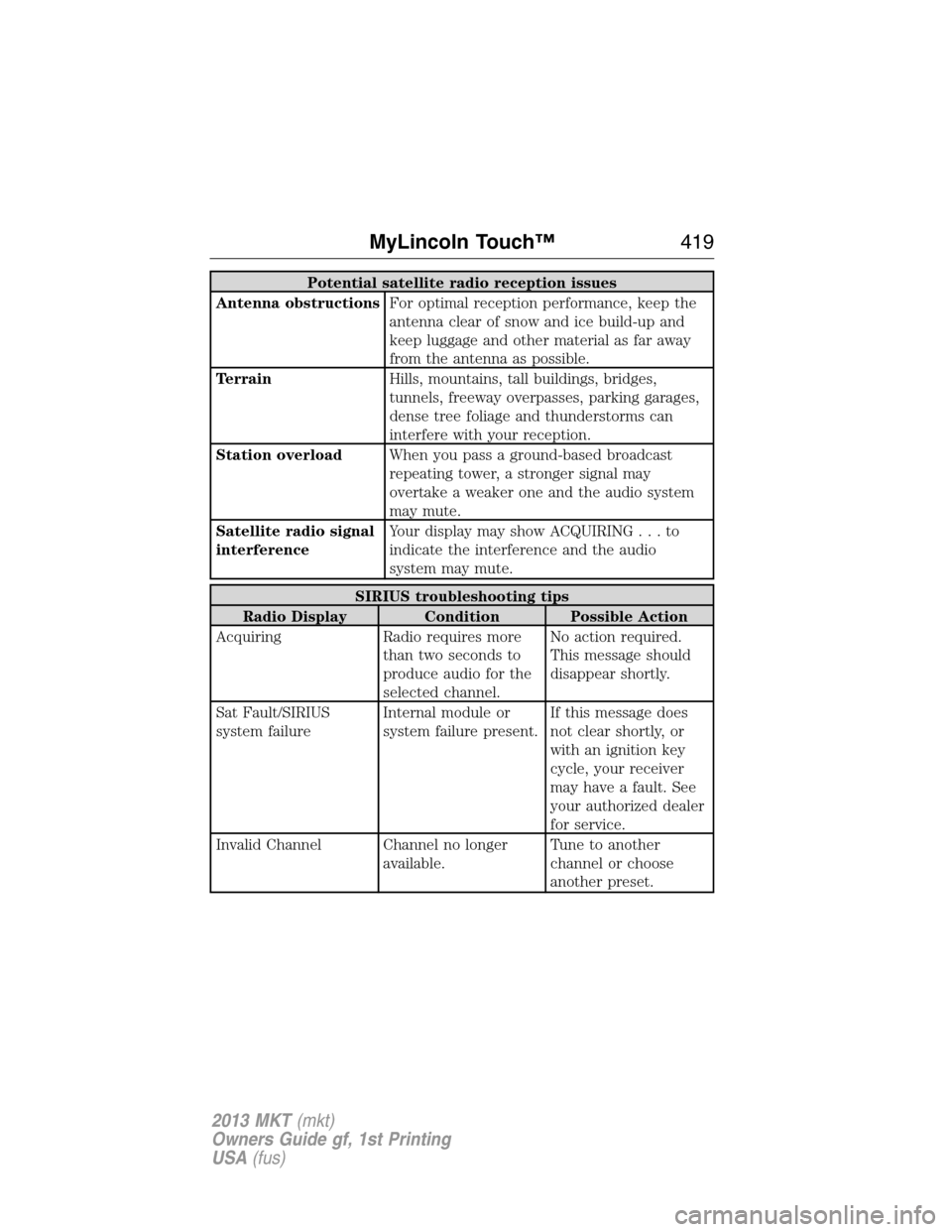
Potential satellite radio reception issues
Antenna obstructionsFor optimal reception performance, keep the
antenna clear of snow and ice build-up and
keep luggage and other material as far away
from the antenna as possible.
TerrainHills, mountains, tall buildings, bridges,
tunnels, freeway overpasses, parking garages,
dense tree foliage and thunderstorms can
interfere with your reception.
Station overloadWhen you pass a ground-based broadcast
repeating tower, a stronger signal may
overtake a weaker one and the audio system
may mute.
Satellite radio signal
interferenceYour display may show ACQUIRING...to
indicate the interference and the audio
system may mute.
SIRIUS troubleshooting tips
Radio Display Condition Possible Action
Acquiring Radio requires more
than two seconds to
produce audio for the
selected channel.No action required.
This message should
disappear shortly.
Sat Fault/SIRIUS
system failureInternal module or
system failure present.If this message does
not clear shortly, or
with an ignition key
cycle, your receiver
may have a fault. See
your authorized dealer
for service.
Invalid Channel Channel no longer
available.Tune to another
channel or choose
another preset.
MyLincoln Touch™419
2013 MKT(mkt)
Owners Guide gf, 1st Printing
USA(fus)
Page 424 of 494
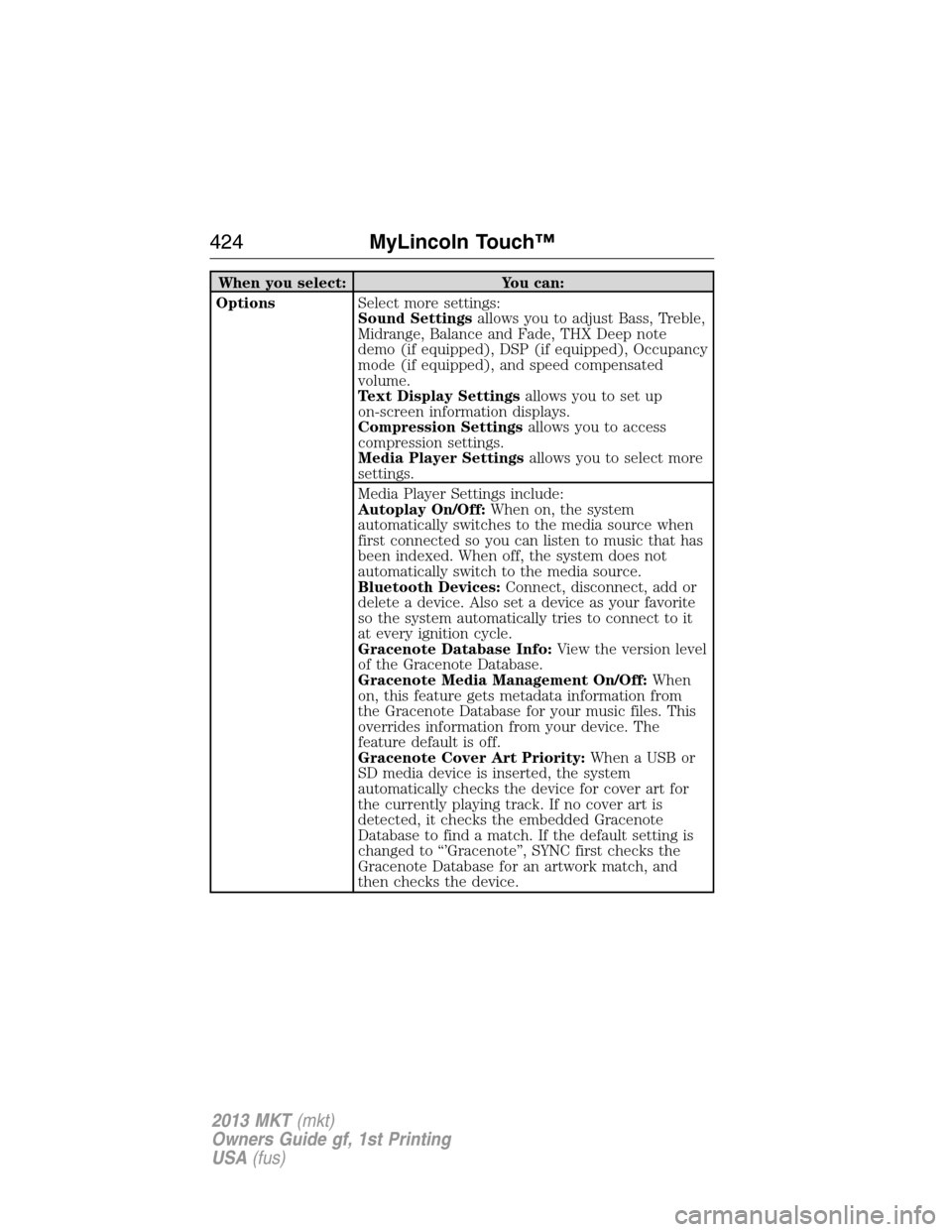
When you select: You can:
OptionsSelect more settings:
Sound Settingsallows you to adjust Bass, Treble,
Midrange, Balance and Fade, THX Deep note
demo (if equipped), DSP (if equipped), Occupancy
mode (if equipped), and speed compensated
volume.
Text Display Settingsallows you to set up
on-screen information displays.
Compression Settingsallows you to access
compression settings.
Media Player Settingsallows you to select more
settings.
Media Player Settings include:
Autoplay On/Off:When on, the system
automatically switches to the media source when
first connected so you can listen to music that has
been indexed. When off, the system does not
automatically switch to the media source.
Bluetooth Devices:Connect, disconnect, add or
delete a device. Also set a device as your favorite
so the system automatically tries to connect to it
at every ignition cycle.
Gracenote Database Info:View the version level
of the Gracenote Database.
Gracenote Media Management On/Off:When
on, this feature gets metadata information from
the Gracenote Database for your music files. This
overrides information from your device. The
feature default is off.
Gracenote Cover Art Priority:When a USB or
SD media device is inserted, the system
automatically checks the device for cover art for
the currently playing track. If no cover art is
detected, it checks the embedded Gracenote
Database to find a match. If the default setting is
changed to “’Gracenote”, SYNC first checks the
Gracenote Database for an artwork match, and
then checks the device.
424MyLincoln Touch™
2013 MKT(mkt)
Owners Guide gf, 1st Printing
USA(fus)
Page 430 of 494
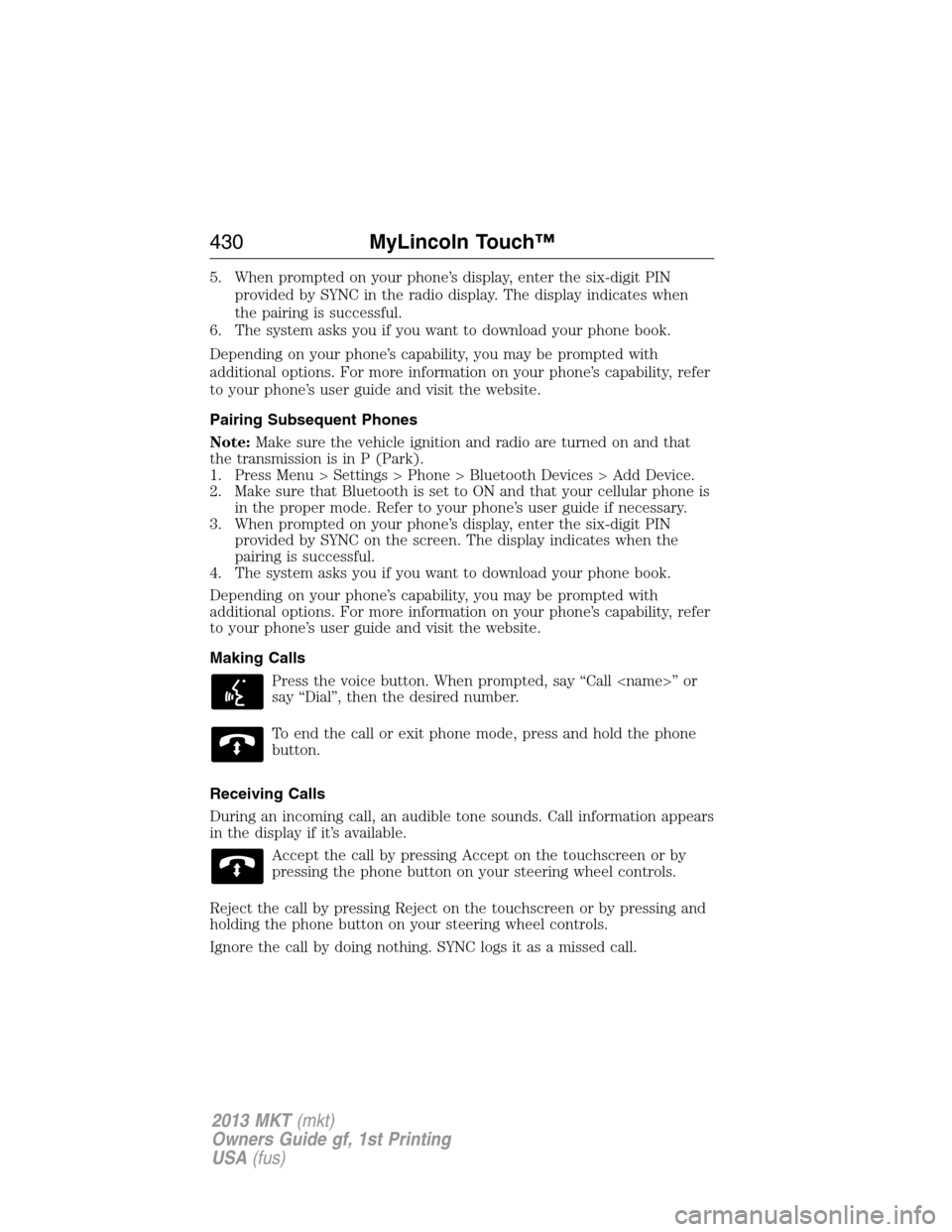
5. When prompted on your phone’s display, enter the six-digit PIN
provided by SYNC in the radio display. The display indicates when
the pairing is successful.
6. The system asks you if you want to download your phone book.
Depending on your phone’s capability, you may be prompted with
additional options. For more information on your phone’s capability, refer
to your phone’s user guide and visit the website.
Pairing Subsequent Phones
Note:Make sure the vehicle ignition and radio are turned on and that
the transmission is in P (Park).
1. Press Menu > Settings > Phone > Bluetooth Devices > Add Device.
2. Make sure that Bluetooth is set to ON and that your cellular phone is
in the proper mode. Refer to your phone’s user guide if necessary.
3. When prompted on your phone’s display, enter the six-digit PIN
provided by SYNC on the screen. The display indicates when the
pairing is successful.
4. The system asks you if you want to download your phone book.
Depending on your phone’s capability, you may be prompted with
additional options. For more information on your phone’s capability, refer
to your phone’s user guide and visit the website.
Making Calls
Press the voice button. When prompted, say “Call
say “Dial”, then the desired number.
To end the call or exit phone mode, press and hold the phone
button.
Receiving Calls
During an incoming call, an audible tone sounds. Call information appears
in the display if it’s available.
Accept the call by pressing Accept on the touchscreen or by
pressing the phone button on your steering wheel controls.
Reject the call by pressing Reject on the touchscreen or by pressing and
holding the phone button on your steering wheel controls.
Ignore the call by doing nothing. SYNC logs it as a missed call.
430MyLincoln Touch™
2013 MKT(mkt)
Owners Guide gf, 1st Printing
USA(fus)
Page 450 of 494
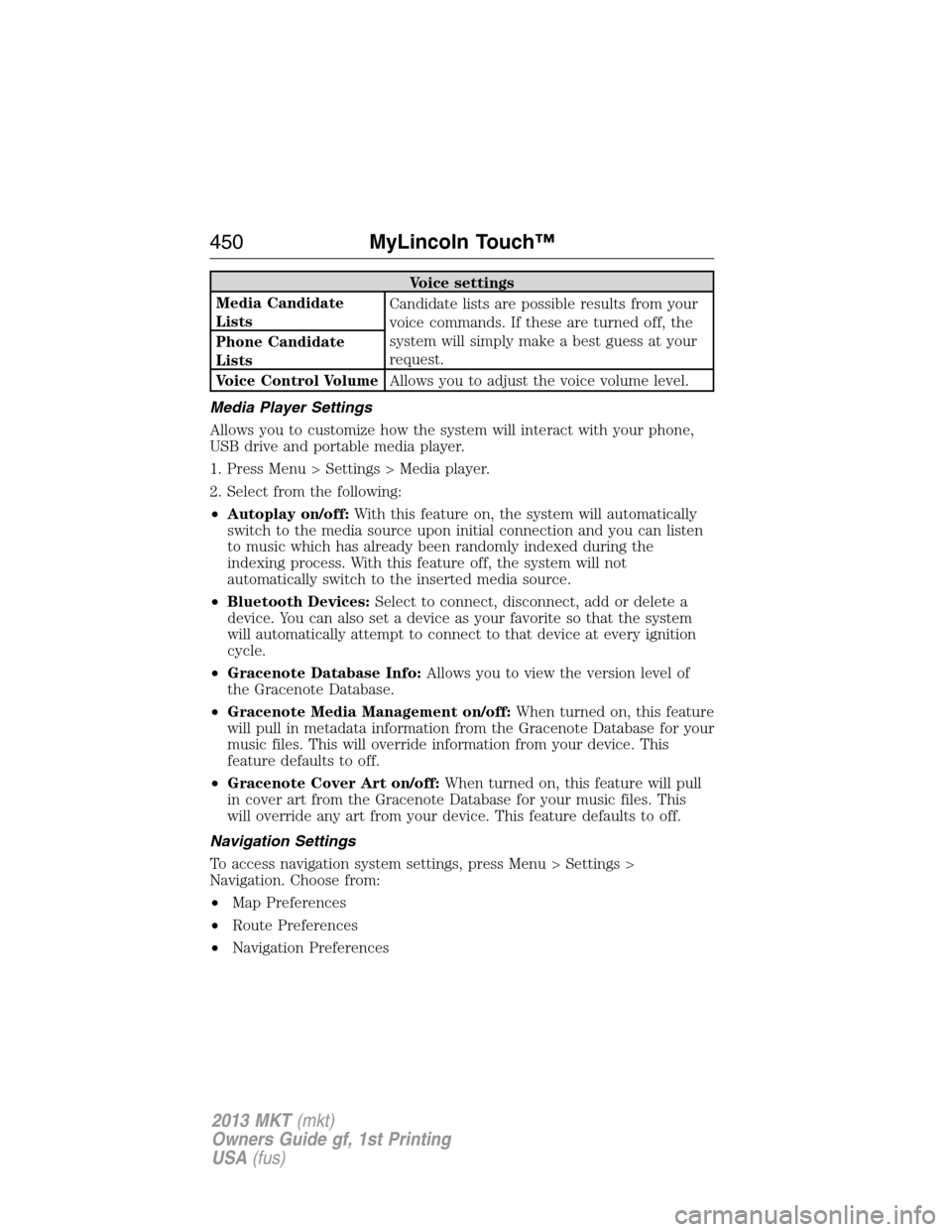
Voice settings
Media Candidate
ListsCandidate lists are possible results from your
voice commands. If these are turned off, the
system will simply make a best guess at your
request. Phone Candidate
Lists
Voice Control VolumeAllows you to adjust the voice volume level.
Media Player Settings
Allows you to customize how the system will interact with your phone,
USB drive and portable media player.
1. Press Menu > Settings > Media player.
2. Select from the following:
•Autoplay on/off:With this feature on, the system will automatically
switch to the media source upon initial connection and you can listen
to music which has already been randomly indexed during the
indexing process. With this feature off, the system will not
automatically switch to the inserted media source.
•Bluetooth Devices:Select to connect, disconnect, add or delete a
device. You can also set a device as your favorite so that the system
will automatically attempt to connect to that device at every ignition
cycle.
•Gracenote Database Info:Allows you to view the version level of
the Gracenote Database.
•Gracenote Media Management on/off:When turned on, this feature
will pull in metadata information from the Gracenote Database for your
music files. This will override information from your device. This
feature defaults to off.
•Gracenote Cover Art on/off:When turned on, this feature will pull
in cover art from the Gracenote Database for your music files. This
will override any art from your device. This feature defaults to off.
Navigation Settings
To access navigation system settings, press Menu > Settings >
Navigation. Choose from:
•Map Preferences
•Route Preferences
•Navigation Preferences
450MyLincoln Touch™
2013 MKT(mkt)
Owners Guide gf, 1st Printing
USA(fus)
Page 490 of 494
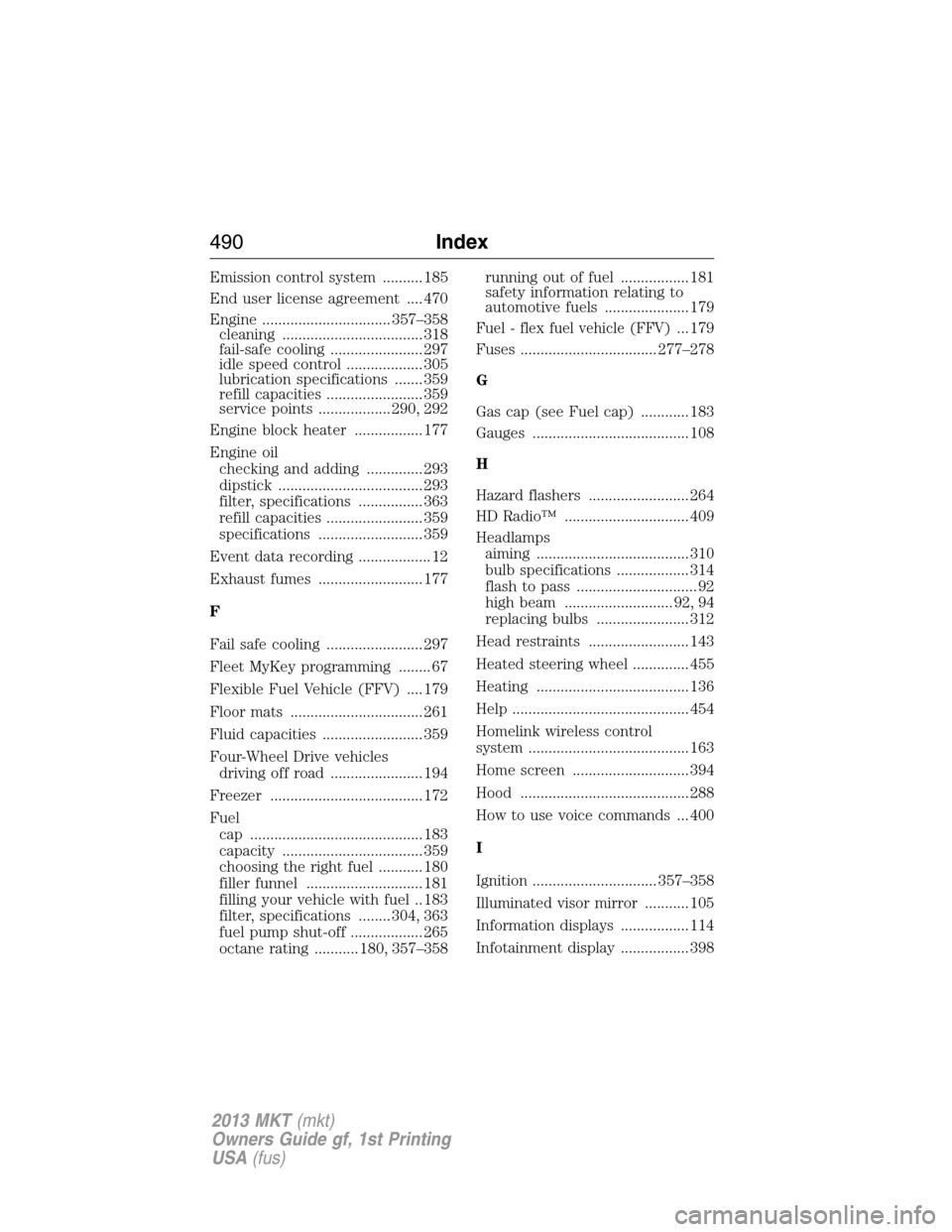
Emission control system .......... 185
End user license agreement .... 470
Engine ................................ 357–358
cleaning ................................... 318
fail-safe cooling ....................... 297
idle speed control ................... 305
lubrication specifications ....... 359
refill capacities ........................ 359
service points .................. 290, 292
Engine block heater ................. 177
Engine oil
checking and adding .............. 293
dipstick .................................... 293
filter, specifications ................ 363
refill capacities ........................ 359
specifications .......................... 359
Event data recording .................. 12
Exhaust fumes .......................... 177
F
Fail safe cooling ........................ 297
Fleet MyKey programming ........ 67
Flexible Fuel Vehicle (FFV) .... 179
Floor mats ................................. 261
Fluid capacities ......................... 359
Four-Wheel Drive vehicles
driving off road ....................... 194
Freezer ...................................... 172
Fuel
cap ........................................... 183
capacity ................................... 359
choosing the right fuel ........... 180
filler funnel ............................. 181
filling your vehicle with fuel .. 183
filter, specifications ........ 304, 363
fuel pump shut-off .................. 265
octane rating ........... 180, 357–358running out of fuel ................. 181
safety information relating to
automotive fuels ..................... 179
Fuel - flex fuel vehicle (FFV)... 179
Fuses .................................. 277–278
G
Gas cap (see Fuel cap) ............ 183
Gauges ....................................... 108
H
Hazard flashers ......................... 264
HD Radio™ ............................... 409
Headlamps
aiming ...................................... 310
bulb specifications .................. 314
flash to pass .............................. 92
high beam ........................... 92, 94
replacing bulbs ....................... 312
Head restraints ......................... 143
Heated steering wheel .............. 455
Heating ...................................... 136
Help ............................................ 454
Homelink wireless control
system ........................................ 163
Home screen ............................. 394
Hood .......................................... 288
How to use voice commands ... 400
I
Ignition ............................... 357–358
Illuminated visor mirror ........... 105
Information displays ................. 114
Infotainment display ................. 398
490Index
2013 MKT(mkt)
Owners Guide gf, 1st Printing
USA(fus)