wheel LINCOLN MKT 2014 Owners Manual
[x] Cancel search | Manufacturer: LINCOLN, Model Year: 2014, Model line: MKT, Model: LINCOLN MKT 2014Pages: 498, PDF Size: 7.3 MB
Page 431 of 498
You can also turn the outside air temperature display on and off. It
appears at the top center of the touchscreen, next to the time and date.
The system automatically saves any updates you make to the settings.
Display
You can adjust the touchscreen display through the touchscreen or by
pressing the voice button on your steering wheel controls and when
prompted, say, “Display settings”.
Press the Settings icon >Display,then select from the
following:
Brightnessallows you to make the screen display brighter or dimmer.
Modeallows you to set the screen to a certain brightness or have the
system automatically change based on the outside light level, or turn the
display off.
•If you selectAUTOorNIGHT,you have the options of turning the
display’s Auto Dim feature on or off and changing the Auto Dim
Manual Offset feature.
Edit Wallpaper
•You can have your touchscreen display the default photo or upload
your own.
Uploading Photos for Your Home Screen Wallpaper
Note:You cannot load photos directly from your camera. You must
access the photos either from your USB mass storage device or from an
SD card.
Note:
Photographs with extremely large dimensions (such as 2048 x 1536)
may not be compatible and appear as a blank (black) image on the display.
Your system allows you to upload and view up to 32 photos.
To access, press theSettings icon >Display>Edit Wallpaper,and then
follow the system prompts to upload your photographs.
Only the photograph(s), which meets the following conditions, display:
•Compatible file formats are as follows: .jpg, .gif, .png, .bmp.
•Each file must be 1.5 MB or less.
•Recommended dimensions: 800 x 384.
430MyLincoln Touch™
2014 MKT(mkt)
Owners Guide gf, 1st Printing, April 2013
USA(fus)
Page 443 of 498
K.Manual controls:Select any of the following airflow distribution
modes:
•Floor and Defrost:Distributes air through the windshield defroster
vents, demister vents, floor vents and rear seat floor vents, and
provides outside air to reduce window fogging.
•Panel:Distributes air through the instrument panel vents.
•Panel and Floor:Distributes air through the instrument panel vents,
demister vents, floor vents and rear seat floor vents.
•Floor:Distributes air through the demister vents, floor vents and
rear seat floor vents.
L.Driver settings:Depending on your vehicle and option package, you
may have the following features:
•Touch+or–to adjust the temperature.
•If your vehicle is equipped with heated seats, touch the heated seat
icon to control the heated seat. See theSeatschapter.
•If your vehicle is equipped with cooled seats, touch the cooled seat
icon to control the cooled seat. See theSeatschapter.
•Touch and holdMyTempto select a temperature you would like your
vehicle to remember and maintain for you.
•If your vehicle is equipped with a heated steering wheel, touch the
heated steering wheel icon to warm the steering wheel.
Note:If your vehicle is equipped with a wood-trimmed steering wheel, it
does not heat between the 10 o’clock and 2 o’clock positions.
Climate Control Voice Commands
The following voice commands are available at the main menu
level of a voice session. For example, press the voice button
and after the prompt, “Say a command”; say any of the
following commands:
Climate control voice commands
“Climate automatic”
“Climate my temperature”
“Climate off”
“Climate on”
“Climate temperature <15.5–29.5> degrees”
“Climate temperature <60–85> degrees”
“Help”
442MyLincoln Touch™
2014 MKT(mkt)
Owners Guide gf, 1st Printing, April 2013
USA(fus)
Page 454 of 498
Navigation Map Updates
Annual navigation map updates are available for purchase through your
dealership, by calling 1-800-NAVMAPS (in Mexico, call 01–800–557–5539) or
going to www.navigation.com/ford. You need to specify the make and model
of your vehicle to determine if there is an update available.
Navigation Voice Commands
When in navigation mode, press the voice button on the
steering wheel control. After the tone, say any of the following
commands:
Navigation system voice commands
“Cancel next waypoint”1“Navigation”3
“Cancel route”1“Navigation voice volume
decrease”1
“Destination”2“Navigation voice volume
increase”1
“Destination
“Destination
“Destination favorites” “Show heading up”
“Destination home” “Show map”
“Destination intersection” “Show north up”
“Destination nearest
1
“Destination nearest POI” “Show turn list”1
“Destination play nametags” “Voice guidance off”
“Destination POI” “Voice guidance on”
“Destination POI category” “Where am I?”
“Destination previous destination” “Zoom in”
“Destination street address” “Zoom out”
“Detour”
1“Help”
1This command is only available when a navigation route is active.
2If you have said the command, “Destination”, you may say any of the
above commands or commands in the following Destination chart.
3If you have said the command, “Navigation”, you may say any of the
above commands or commands in the following Navigation chart.
MyLincoln Touch™453
2014 MKT(mkt)
Owners Guide gf, 1st Printing, April 2013
USA(fus)
Page 462 of 498
WARNING:Operating certain parts of this system while driving
can distract your attention away from the road, and possibly
cause an accident or other serious consequences. Do not change
system settings or enter data non-verbally (using your hands) while
driving. Stop the vehicle in a safe and legal manner before attempting
these operations. This is important since while setting up or changing
some functions you might be required to distract your attention away
from the road and remove your hands from the wheel.
General operation
Voice Command Control
Functions within the Windows Automotive-based system may be
accomplished using only voice commands. Using voice commands while
driving allows you to operate the system without removing your hands
from the wheel.
Prolonged Views of Screen
Do not access any function requiring a prolonged view of the screen
while you are driving. Pull over in a safe and legal manner before
attempting to access a function of the system requiring prolonged
attention. Even occasional short scans to the screen may be hazardous if
your attention has been diverted away from your driving task at a critical
time.
Volume Setting
Do not raise the volume excessively. Keep the volume at a level where
you can still hear outside traffic and emergency signals while driving.
Driving while unable to hear these sounds could cause an accident.
Use of Speech Recognition Functions
Speech recognition software is inherently a statistical process which is
subject to errors. It is your responsibility to monitor any speech
recognition functions included in the system and address any errors.
Navigation Features
Any navigation features included in the system are intended to provide
turn by turn instructions to get you to a desired destination. Please
make certain all persons using this system carefully read and follow
instructions and safety information fully.
Appendices461
2014 MKT(mkt)
Owners Guide gf, 1st Printing, April 2013
USA(fus)
Page 481 of 498
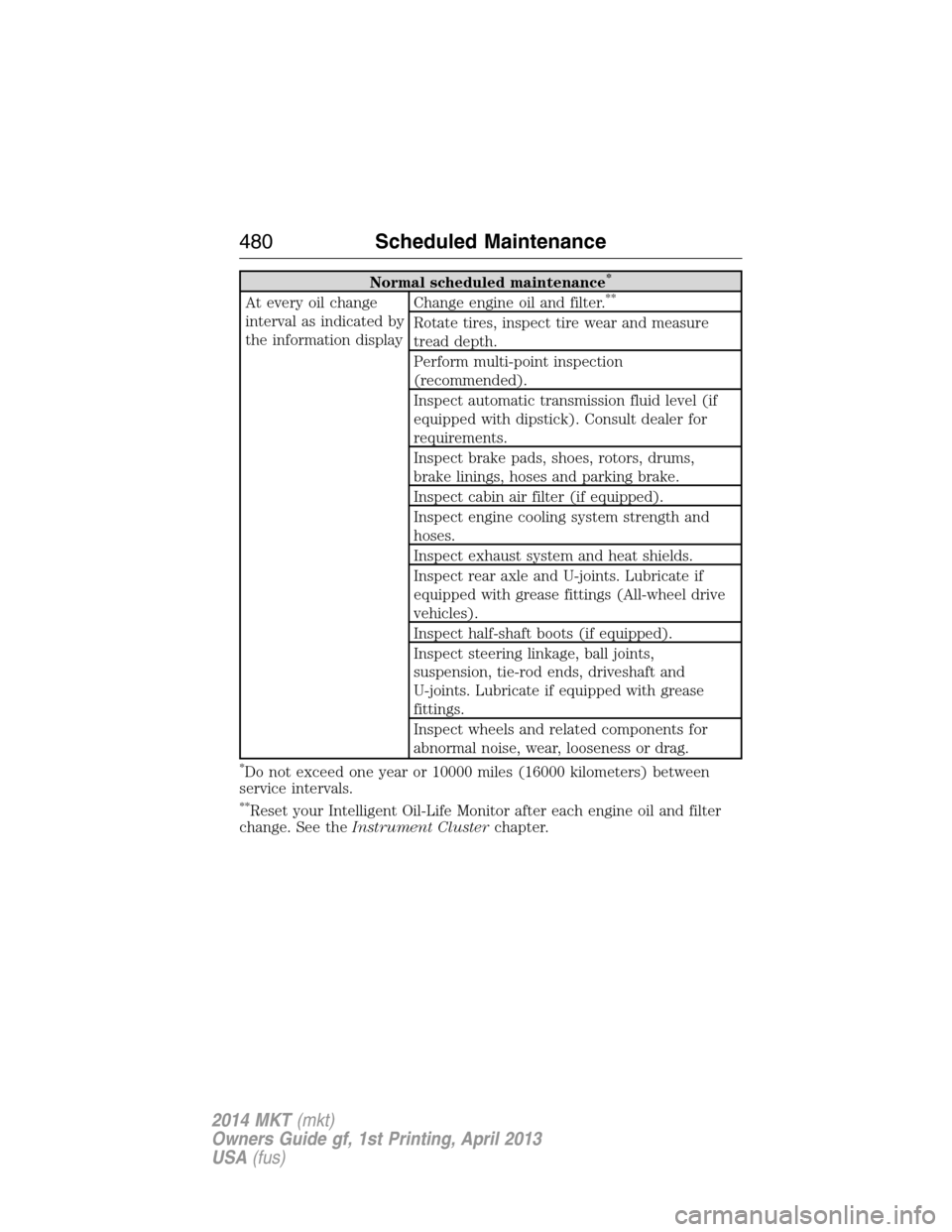
Normal scheduled maintenance*
At every oil change
interval as indicated by
the information displayChange engine oil and filter.**
Rotate tires, inspect tire wear and measure
tread depth.
Perform multi-point inspection
(recommended).
Inspect automatic transmission fluid level (if
equipped with dipstick). Consult dealer for
requirements.
Inspect brake pads, shoes, rotors, drums,
brake linings, hoses and parking brake.
Inspect cabin air filter (if equipped).
Inspect engine cooling system strength and
hoses.
Inspect exhaust system and heat shields.
Inspect rear axle and U-joints. Lubricate if
equipped with grease fittings (All-wheel drive
vehicles).
Inspect half-shaft boots (if equipped).
Inspect steering linkage, ball joints,
suspension, tie-rod ends, driveshaft and
U-joints. Lubricate if equipped with grease
fittings.
Inspect wheels and related components for
abnormal noise, wear, looseness or drag.
*Do not exceed one year or 10000 miles (16000 kilometers) between
service intervals.
**Reset your Intelligent Oil-Life Monitor after each engine oil and filter
change. See theInstrument Clusterchapter.
480Scheduled Maintenance
2014 MKT(mkt)
Owners Guide gf, 1st Printing, April 2013
USA(fus)
Page 487 of 498
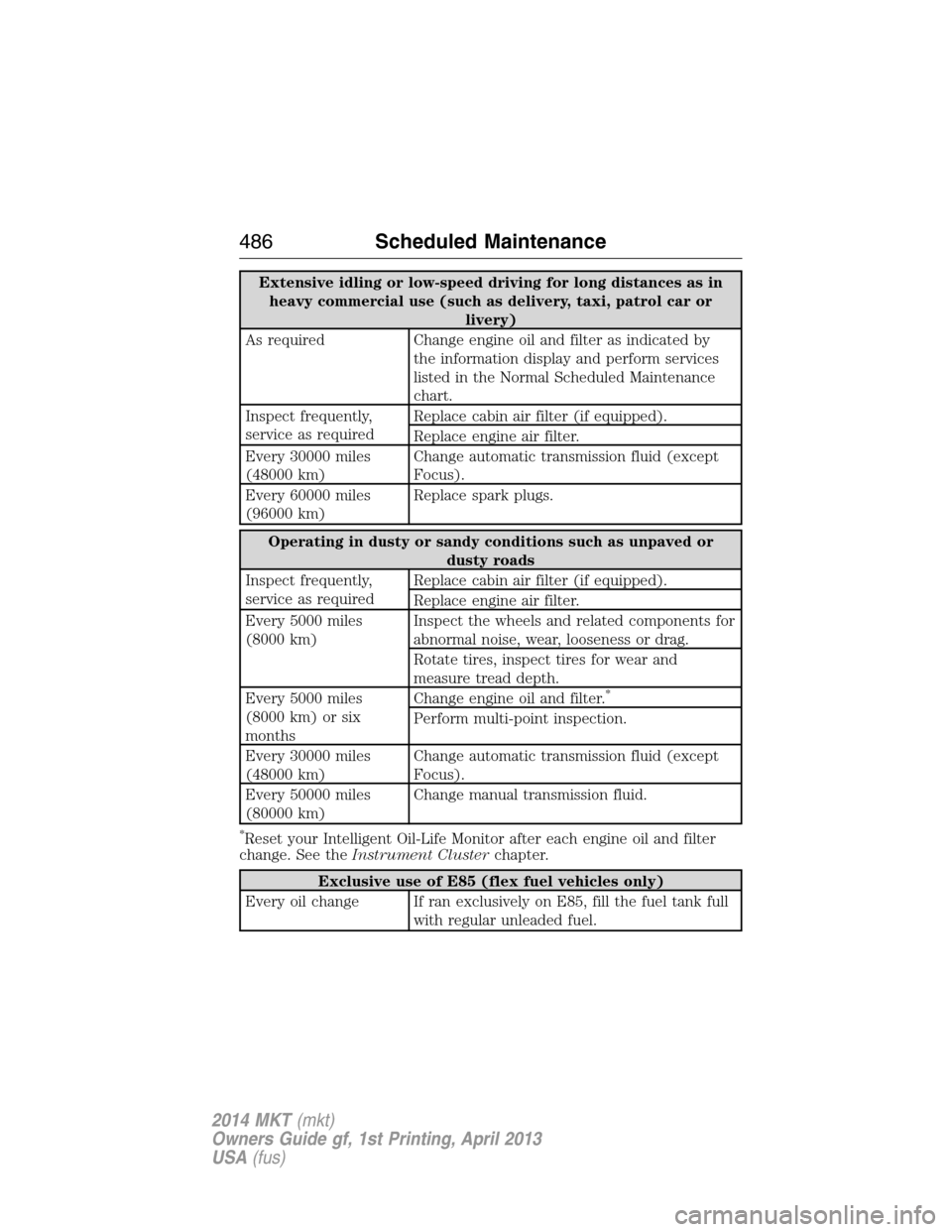
Extensive idling or low-speed driving for long distances as in
heavy commercial use (such as delivery, taxi, patrol car or
livery)
As required Change engine oil and filter as indicated by
the information display and perform services
listed in the Normal Scheduled Maintenance
chart.
Inspect frequently,
service as requiredReplace cabin air filter (if equipped).
Replace engine air filter.
Every 30000 miles
(48000 km)Change automatic transmission fluid (except
Focus).
Every 60000 miles
(96000 km)Replace spark plugs.
Operating in dusty or sandy conditions such as unpaved or
dusty roads
Inspect frequently,
service as requiredReplace cabin air filter (if equipped).
Replace engine air filter.
Every 5000 miles
(8000 km)Inspect the wheels and related components for
abnormal noise, wear, looseness or drag.
Rotate tires, inspect tires for wear and
measure tread depth.
Every 5000 miles
(8000 km) or six
monthsChange engine oil and filter.
*
Perform multi-point inspection.
Every 30000 miles
(48000 km)Change automatic transmission fluid (except
Focus).
Every 50000 miles
(80000 km)Change manual transmission fluid.
*Reset your Intelligent Oil-Life Monitor after each engine oil and filter
change. See theInstrument Clusterchapter.
Exclusive use of E85 (flex fuel vehicles only)
Every oil change If ran exclusively on E85, fill the fuel tank full
with regular unleaded fuel.
486Scheduled Maintenance
2014 MKT(mkt)
Owners Guide gf, 1st Printing, April 2013
USA(fus)
Page 491 of 498
Edge/MKX AWD only:Vehicles operating off-road in sand during high
ambient temperatures must replace the AWD PTU (All-wheel drive
Power Transfer Unit) lube every 20000 miles (32000 kilometers).
Engine air filter & cabin air filter replacement:Engine air filter and
cabin air filter life is dependent on exposure to dusty and dirty
conditions. Vehicles operated in these conditions will require frequent
inspection and replacement of the engine air filter and cabin air filter.
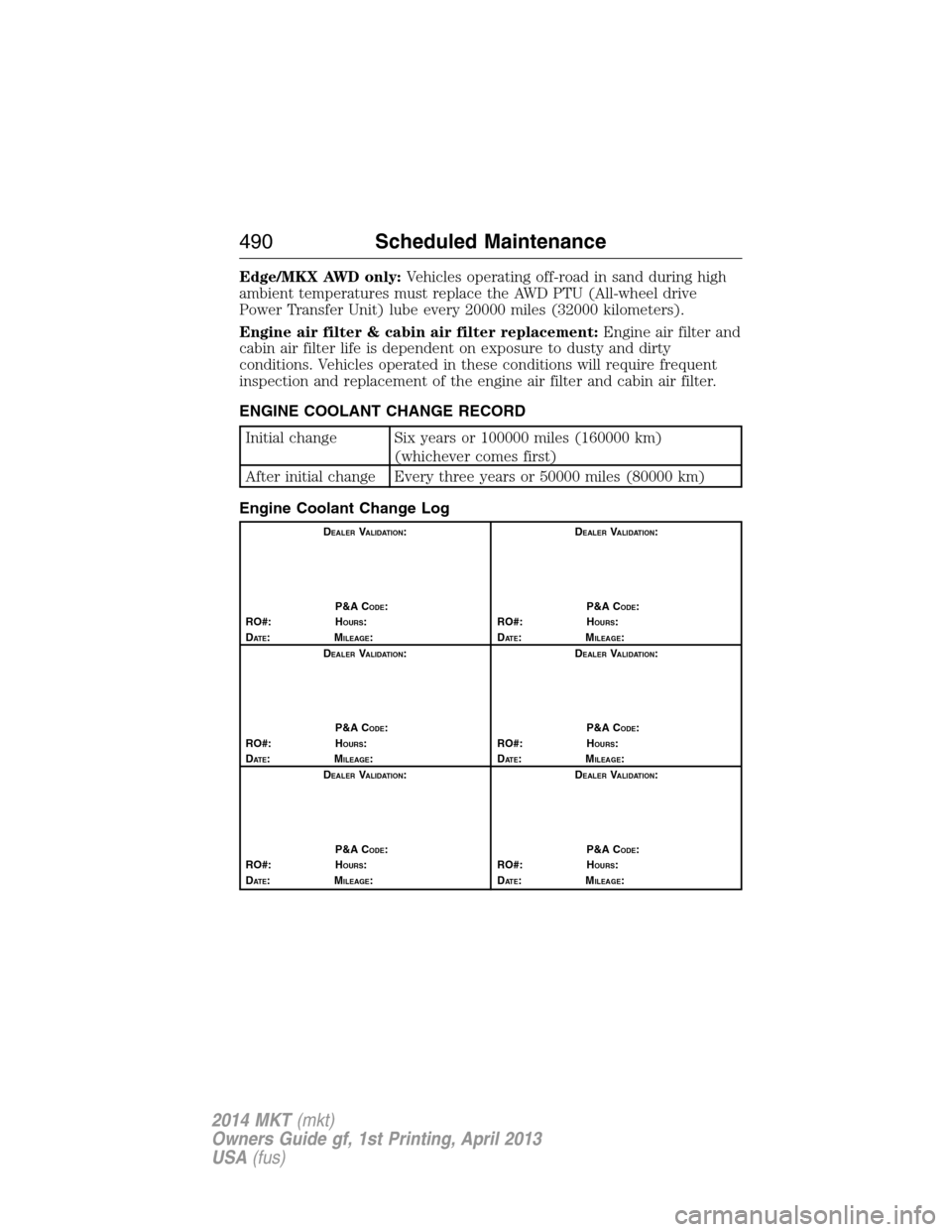
ENGINE COOLANT CHANGE RECORD
Initial change Six years or 100000 miles (160000 km)
(whichever comes first)
After initial change Every three years or 50000 miles (80000 km)
Engine Coolant Change Log
DEALERVALIDATION:
P&A C
ODE:
RO#: HOURS:
DAT E:MILEAGE:D
EALERVALIDATION:
P&A C
ODE:
RO#: HOURS:
DAT E:MILEAGE:
D
EALERVALIDATION:
P&A C
ODE:
RO#: HOURS:
DAT E:MILEAGE:D
EALERVALIDATION:
P&A C
ODE:
RO#: HOURS:
DAT E:MILEAGE:
D
EALERVALIDATION:
P&A C
ODE:
RO#: HOURS:
DAT E:MILEAGE:D
EALERVALIDATION:
P&A C
ODE:
RO#: HOURS:
DAT E:MILEAGE:
490Scheduled Maintenance
2014 MKT(mkt)
Owners Guide gf, 1st Printing, April 2013
USA(fus)
Page 492 of 498
911 Assist™ ..............................425
A
ABS (see Brakes) .....................201
Accessing and using your USB
port ............................................403
Accessing your calendar ..........424
Accessory delay ........................106
Active Park Assist .....................206
Adaptive Cruise Control ...........217
Adding (pairing) a phone ........411
Airbag supplemental restraint
system ..........................................54
and child safety seats ..............55
description ................................54
disposal ......................................64
driver airbag ..............................54
passenger airbag .......................54
side airbag ...........................54, 59
Air cleaner filter .......310–311, 364
Air filter, cabin ..........................139
All Wheel Drive (AWD),
driving off road .........................193
Ambient mood/lighting .............431
AM/FM .......................................391
Antifreeze (see Engine
coolant) .....................................296
Anti-lock brake system
(see Brakes) ..............................201
Anti-theft system ..................86, 88
arming the system ..............86, 88
disarming a triggered system ..88
Audio system
Single CD ................................374
Audio system (see Radio) .......374Automatic transmission
driving an automatic
overdrive .................................188
fluid, adding ............................301
fluid, checking ........................301
fluid, refill capacities ..............360
fluid, specification ..................360
Selectshift (SST) ....................189
Auxiliary Input Jack .................399
Auxiliary powerpoint ................167
A/V inputs ..........................376, 407
B
Battery .......................................307
acid, treating emergencies .....307
jumping a disabled battery ....268
maintenance-free ....................307
replacement, specifications ...364
servicing ..................................307
Blind Spot Information
System .......................................231
Booster seats ...............................22
Brakes ........................................200
anti-lock ...................................201
anti-lock brake system (ABS)
warning light ...........................201
brake warning light ................201
fluid, checking and adding ....306
fluid, refill capacities ..............360
fluid, specifications .................360
lubricant specifications ..........360
parking ....................................201
shift interlock ..........................191
trailer .......................................256
C
Capacities for refilling fluids ....360
Cargo area shade ......................243
Index491
2014 MKT(mkt)
Owners Guide gf, 1st Printing, April 2013
USA(fus)
Page 493 of 498
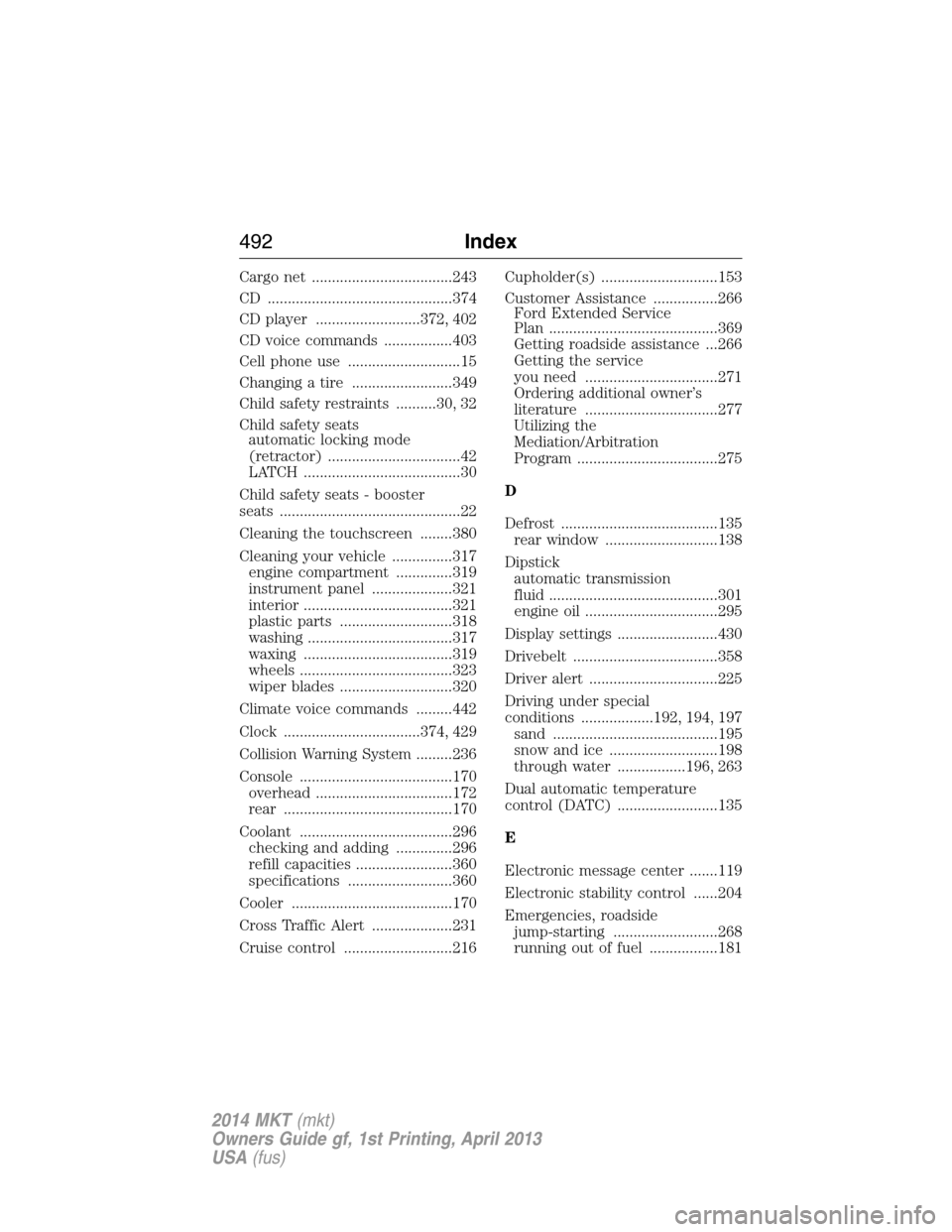
Cargo net ...................................243
CD ..............................................374
CD player ..........................372, 402
CD voice commands .................403
Cell phone use ............................15
Changing a tire .........................349
Child safety restraints ..........30, 32
Child safety seats
automatic locking mode
(retractor) .................................42
LATCH .......................................30
Child safety seats - booster
seats .............................................22
Cleaning the touchscreen ........380
Cleaning your vehicle ...............317
engine compartment ..............319
instrument panel ....................321
interior .....................................321
plastic parts ............................318
washing ....................................317
waxing .....................................319
wheels ......................................323
wiper blades ............................320
Climate voice commands .........442
Clock ..................................374, 429
Collision Warning System .........236
Console ......................................170
overhead ..................................172
rear ..........................................170
Coolant ......................................296
checking and adding ..............296
refill capacities ........................360
specifications ..........................360
Cooler ........................................170
Cross Traffic Alert ....................231
Cruise control ...........................216Cupholder(s) .............................153
Customer Assistance ................266
Ford Extended Service
Plan ..........................................369
Getting roadside assistance ...266
Getting the service
you need .................................271
Ordering additional owner’s
literature .................................277
Utilizing the
Mediation/Arbitration
Program ...................................275
D
Defrost .......................................135
rear window ............................138
Dipstick
automatic transmission
fluid ..........................................301
engine oil .................................295
Display settings .........................430
Drivebelt ....................................358
Driver alert ................................225
Driving under special
conditions ..................192, 194, 197
sand .........................................195
snow and ice ...........................198
through water .................196, 263
Dual automatic temperature
control (DATC) .........................135
E
Electronic message center .......119
Electronic stability control ......204
Emergencies, roadside
jump-starting ..........................268
running out of fuel .................181
492Index
2014 MKT(mkt)
Owners Guide gf, 1st Printing, April 2013
USA(fus)
Page 494 of 498
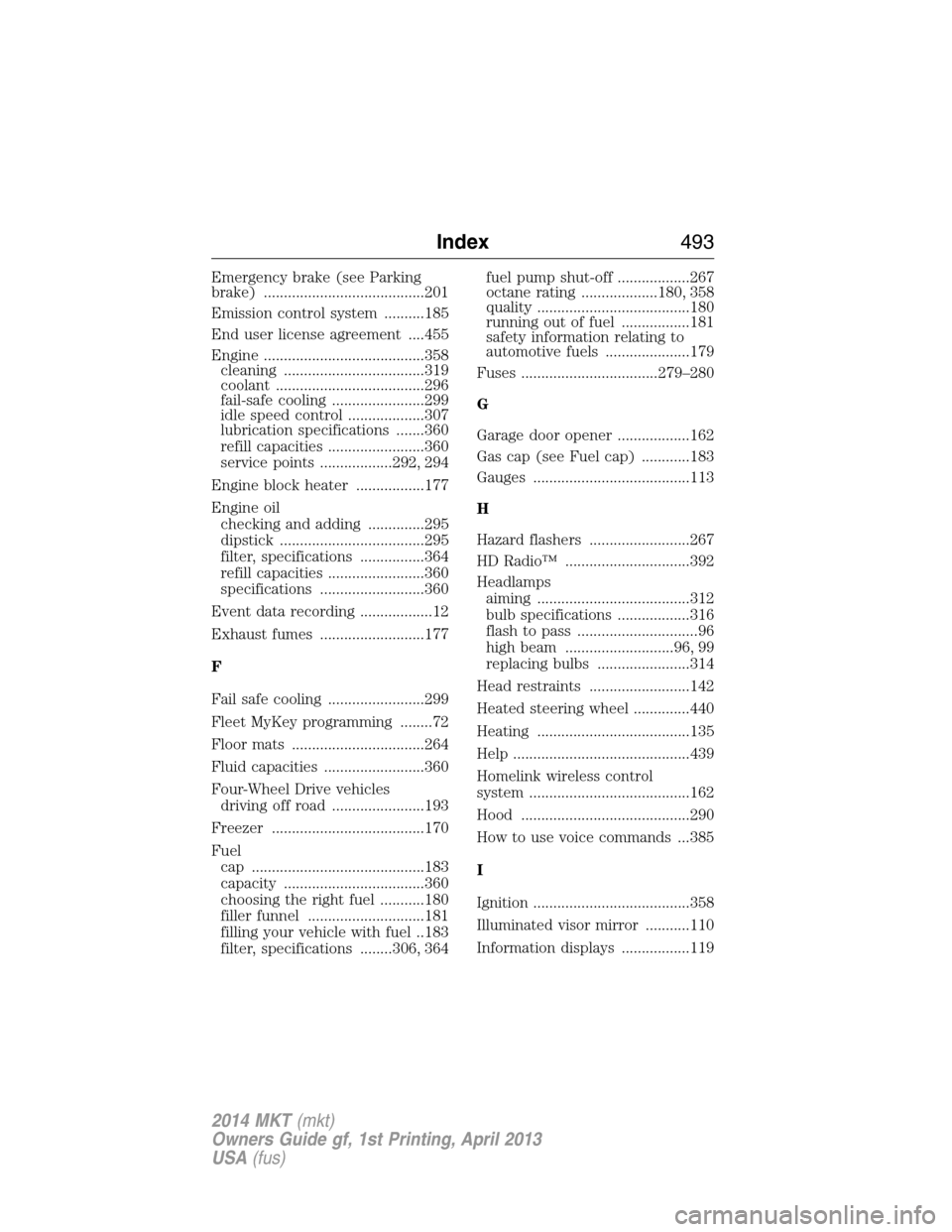
Emergency brake (see Parking
brake) ........................................201
Emission control system ..........185
End user license agreement ....455
Engine ........................................358
cleaning ...................................319
coolant .....................................296
fail-safe cooling .......................299
idle speed control ...................307
lubrication specifications .......360
refill capacities ........................360
service points ..................292, 294
Engine block heater .................177
Engine oil
checking and adding ..............295
dipstick ....................................295
filter, specifications ................364
refill capacities ........................360
specifications ..........................360
Event data recording ..................12
Exhaust fumes ..........................177
F
Fail safe cooling ........................299
Fleet MyKey programming ........72
Floor mats .................................264
Fluid capacities .........................360
Four-Wheel Drive vehicles
driving off road .......................193
Freezer ......................................170
Fuel
cap ...........................................183
capacity ...................................360
choosing the right fuel ...........180
filler funnel .............................181
filling your vehicle with fuel ..183
filter, specifications ........306, 364fuel pump shut-off ..................267
octane rating ...................180, 358
quality ......................................180
running out of fuel .................181
safety information relating to
automotive fuels .....................179
Fuses ..................................279–280
G
Garage door opener ..................162
Gas cap (see Fuel cap) ............183
Gauges .......................................113
H
Hazard flashers .........................267
HD Radio™ ...............................392
Headlamps
aiming ......................................312
bulb specifications ..................316
flash to pass ..............................96
high beam ...........................96, 99
replacing bulbs .......................314
Head restraints .........................142
Heated steering wheel ..............440
Heating ......................................135
Help ............................................439
Homelink wireless control
system ........................................162
Hood ..........................................290
How to use voice commands ...385
I
Ignition .......................................358
Illuminated visor mirror ...........110
Information displays .................119
Index493
2014 MKT(mkt)
Owners Guide gf, 1st Printing, April 2013
USA(fus)