audio LINCOLN MKT 2017 Owner's Guide
[x] Cancel search | Manufacturer: LINCOLN, Model Year: 2017, Model line: MKT, Model: LINCOLN MKT 2017Pages: 558, PDF Size: 4.59 MB
Page 417 of 558
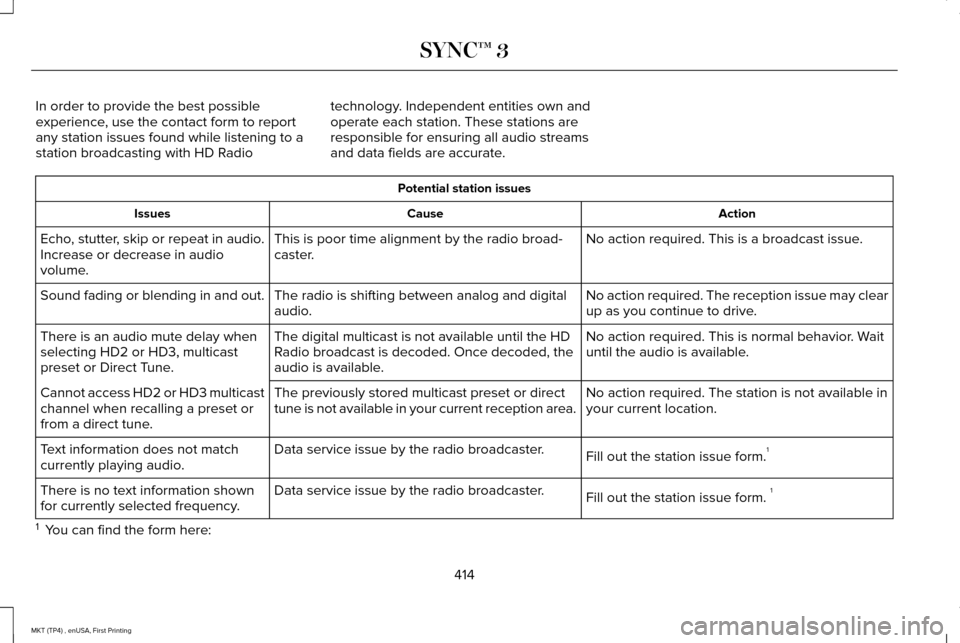
In order to provide the best possible
experience, use the contact form to report
any station issues found while listening to a
station broadcasting with HD Radio
technology. Independent entities own and
operate each station. These stations are
responsible for ensuring all audio streams
and data fields are accurate. Potential station issues
Action
Cause
Issues
No action required. This is a broadcast issue.
This is poor time alignment by the radio broad-
caster.
Echo, stutter, skip or repeat in audio.
Increase or decrease in audio
volume.
No action required. The reception issue may clear
up as you continue to drive.
The radio is shifting between analog and digital
audio.
Sound fading or blending in and out.
No action required. This is normal behavior. Wait
until the audio is available.
The digital multicast is not available until the HD
Radio broadcast is decoded. Once decoded, the
audio is available.
There is an audio mute delay when
selecting HD2 or HD3, multicast
preset or Direct Tune.
No action required. The station is not available in
your current location.
The previously stored multicast preset or direct
tune is not available in your current reception area.
Cannot access HD2 or HD3 multicast
channel when recalling a preset or
from a direct tune.
Fill out the station issue form.1
Data service issue by the radio broadcaster.
Text information does not match
currently playing audio.
Fill out the station issue form. 1
Data service issue by the radio broadcaster.
There is no text information shown
for currently selected frequency.
1 You can find the form here:
414
MKT (TP4) , enUSA, First Printing SYNC™ 3
Page 418 of 558
Website
http://www.ibiquity.com/automotive/report_radio_station_experiences
HD Radio Technology manufactured under
license from iBiquity Digital Corp. U.S. and
foreign patents. HD Radio and the HD and
HD Radio logos are proprietary trademarks
of iBiquity Digital Corp. Ford Motor Company
and iBiquity Digital Corp. are not responsible
for the content sent using HD Radio
technology. Content may be changed, added
or deleted at any time at the station owner's
discretion. CD (If equipped)
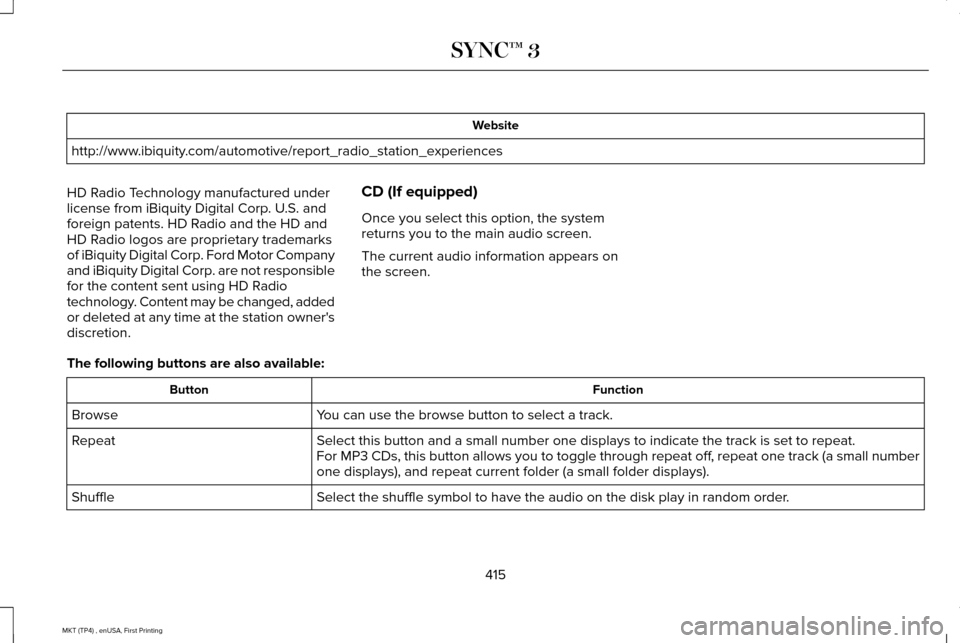
Once you select this option, the system
returns you to the main audio screen.
The current audio information appears on
the screen.
The following buttons are also available: Function
Button
You can use the browse button to select a track.
Browse
Select this button and a small number one displays to indicate the track\
is set to repeat.
Repeat
For MP3 CDs, this button allows you to toggle through repeat off, repeat one track (a small number
one displays), and repeat current folder (a small folder displays).
Select the shuffle symbol to have the audio on the disk play in random o\
rder.
Shuffle
415
MKT (TP4) , enUSA, First Printing SYNC™ 3
Page 419 of 558
You can use the forward, reverse, pause or
play buttons to control the audio playback.
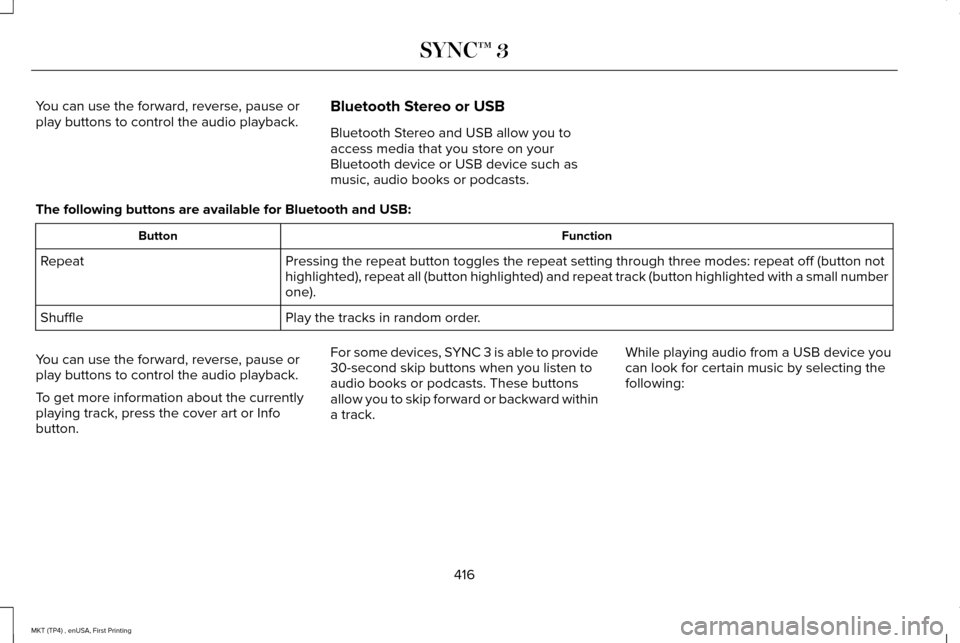
Bluetooth Stereo or USB
Bluetooth Stereo and USB allow you to
access media that you store on your
Bluetooth device or USB device such as
music, audio books or podcasts.
The following buttons are available for Bluetooth and USB: Function
Button
Pressing the repeat button toggles the repeat setting through three mode\
s: repeat off (button not
highlighted), repeat all (button highlighted) and repeat track (butt\
on highlighted with a small number
one).
Repeat
Play the tracks in random order.
Shuffle
You can use the forward, reverse, pause or
play buttons to control the audio playback.
To get more information about the currently
playing track, press the cover art or Info
button. For some devices, SYNC 3 is able to provide
30-second skip buttons when you listen to
audio books or podcasts. These buttons
allow you to skip forward or backward within
a track.
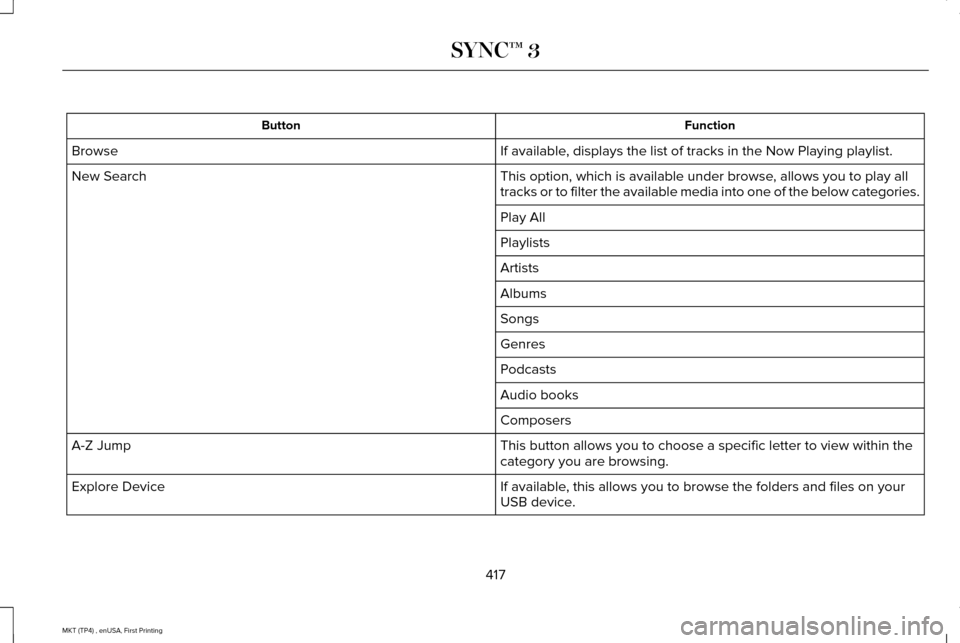
While playing audio from a USB device you
can look for certain music by selecting the
following:
416
MKT (TP4) , enUSA, First Printing SYNC™ 3
Page 420 of 558
Function
Button
If available, displays the list of tracks in the Now Playing playlist.
Browse
This option, which is available under browse, allows you to play all
tracks or to filter the available media into one of the below categories\
.
New Search
Play All
Playlists
Artists
Albums
Songs
Genres
Podcasts
Audio books
Composers
This button allows you to choose a specific letter to view within the
category you are browsing.
A-Z Jump
If available, this allows you to browse the folders and files on your
USB device.
Explore Device
417
MKT (TP4) , enUSA, First Printing SYNC™ 3
Page 421 of 558
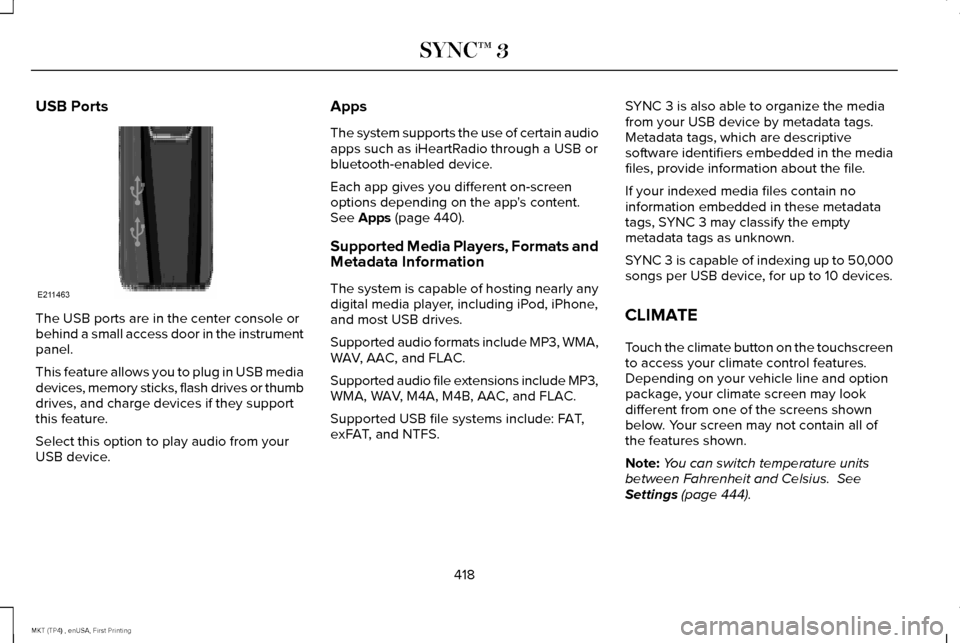
USB Ports
The USB ports are in the center console or
behind a small access door in the instrument
panel.
This feature allows you to plug in USB media
devices, memory sticks, flash drives or thumb
drives, and charge devices if they support
this feature.
Select this option to play audio from your
USB device. Apps
The system supports the use of certain audio
apps such as iHeartRadio through a USB or
bluetooth-enabled device.
Each app gives you different on-screen
options depending on the app's content.
See Apps (page 440).
Supported Media Players, Formats and
Metadata Information
The system is capable of hosting nearly any
digital media player, including iPod, iPhone,
and most USB drives.
Supported audio formats include MP3, WMA,
WAV, AAC, and FLAC.
Supported audio file extensions include MP3,
WMA, WAV, M4A, M4B, AAC, and FLAC.
Supported USB file systems include: FAT,
exFAT, and NTFS. SYNC 3 is also able to organize the media
from your USB device by metadata tags.
Metadata tags, which are descriptive
software identifiers embedded in the media
files, provide information about the file.
If your indexed media files contain no
information embedded in these metadata
tags, SYNC 3 may classify the empty
metadata tags as unknown.
SYNC 3 is capable of indexing up to 50,000
songs per USB device, for up to 10 devices.
CLIMATE
Touch the climate button on the touchscreen
to access your climate control features.
Depending on your vehicle line and option
package, your climate screen may look
different from one of the screens shown
below. Your screen may not contain all of
the features shown.
Note:
You can switch temperature units
between Fahrenheit and Celsius.
See
Settings (page 444).
418
MKT (TP4) , enUSA, First Printing SYNC™ 3E211463
Page 440 of 558

Button
Highway exit information displays on the right hand side of the screen d\
uring navigation.
Highway Exit Info
Points of interest icons display for restaurants, hotels, fuel stations a\
nd ATMs when they
are present at the exit. You can select the POI icons to receive a listing of specific locations.
You can select the POI location as a waypoint or destination if desired.
Only available during an active route. Displays all of the turns on the current route.
Turn List
You can choose to avoid any road on the turn list by selecting the road f\
rom the list. A
screen then appears and you can press:
Avoid
The system calculates a new route and displays a new turn list.
You can find the SiriusXM Traffic and Travel Link information by pressing this button. This information require\
s
an active subscription to SiriusXM Traffic and Travel Link.
Traffic List
When a route is not active, a list of nearby traffic incidents displays (if any are present).
When a route is active, you can choose to display a list of traffic nearby or on the route.
Press this button to adjust your preferences. See Settings (page 444).
Navigation Settings
Provides your current location city and the nearest road.
Where Am I?
The following are only available on the menu during an active navigation\
route:
The system asks for confirmation and then returns you to the map mode sc\
reen.
Cancel Route
Selecting this option switches off the audio navigation guidance. Press the button again to un-mute guidance.
Mute Guidance
Press this to see a map of the full route.
View Route
437
MKT (TP4) , enUSA, First Printing SYNC™ 3
Page 447 of 558
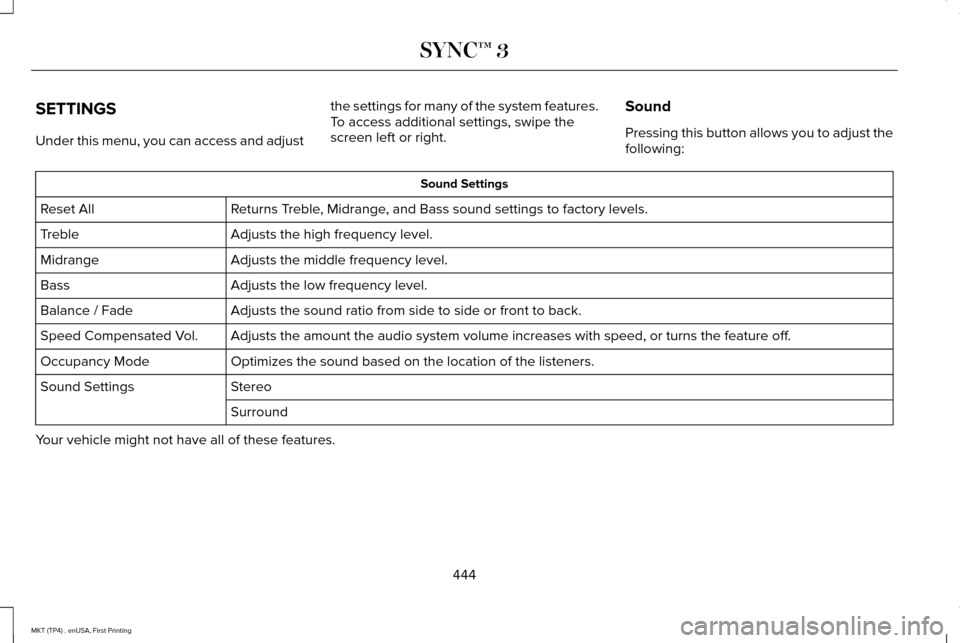
SETTINGS
Under this menu, you can access and adjust
the settings for many of the system features.
To access additional settings, swipe the
screen left or right.
Sound
Pressing this button allows you to adjust the
following: Sound Settings
Returns Treble, Midrange, and Bass sound settings to factory levels.
Reset All
Adjusts the high frequency level.
Treble
Adjusts the middle frequency level.
Midrange
Adjusts the low frequency level.
Bass
Adjusts the sound ratio from side to side or front to back.
Balance / Fade
Adjusts the amount the audio system volume increases with speed, or turn\
s the feature off.
Speed Compensated Vol.
Optimizes the sound based on the location of the listeners.
Occupancy Mode
Stereo
Sound Settings
Surround
Your vehicle might not have all of these features.
444
MKT (TP4) , enUSA, First Printing SYNC™ 3
Page 448 of 558
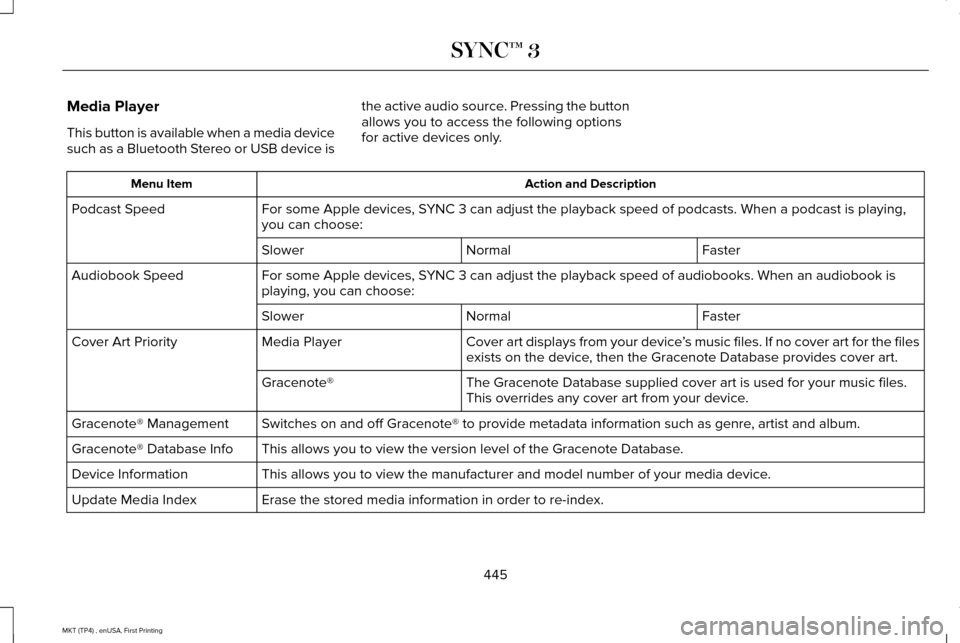
Media Player
This button is available when a media device
such as a Bluetooth Stereo or USB device is
the active audio source. Pressing the button
allows you to access the following options
for active devices only. Action and Description
Menu Item
For some Apple devices, SYNC 3 can adjust the playback speed of podcasts. When a podcast is playi\
ng,
you can choose:
Podcast Speed
Faster
Normal
Slower
For some Apple devices, SYNC 3 can adjust the playback speed of audiobooks. When an audiobook is
playing, you can choose:
Audiobook Speed
Faster
Normal
Slower
Cover art displays from your device ’s music files. If no cover art for the files
exists on the device, then the Gracenote Database provides cover art.
Media Player
Cover Art Priority
The Gracenote Database supplied cover art is used for your music files.
This overrides any cover art from your device.
Gracenote®
Switches on and off Gracenote® to provide metadata information such as genre, artist and album.
Gracenote® Management
This allows you to view the version level of the Gracenote Database.
Gracenote® Database Info
This allows you to view the manufacturer and model number of your media \
device.
Device Information
Erase the stored media information in order to re-index.
Update Media Index
445
MKT (TP4) , enUSA, First Printing SYNC™ 3
Page 453 of 558
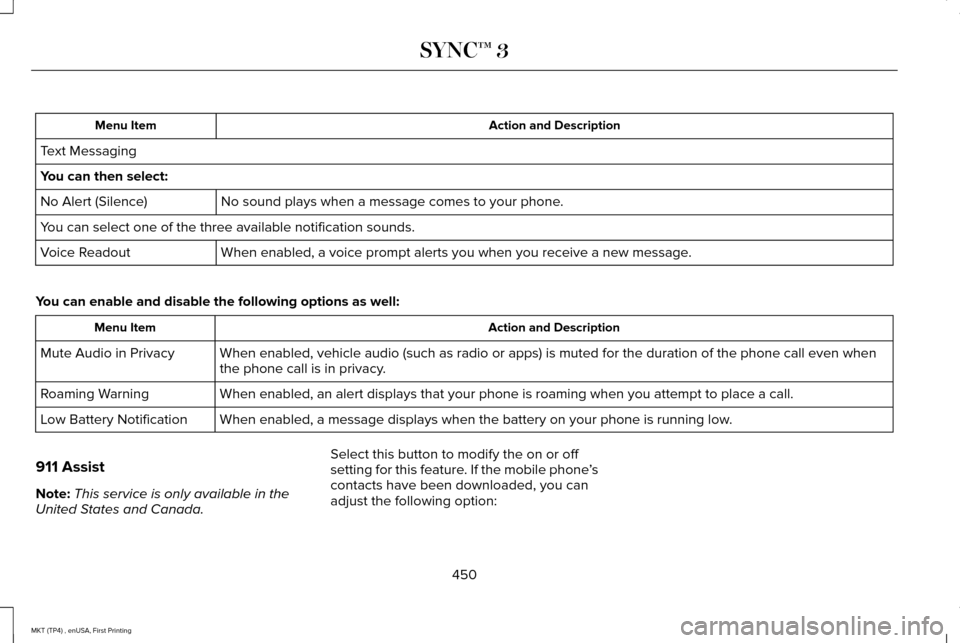
Action and Description
Menu Item
Text Messaging
You can then select: No sound plays when a message comes to your phone.
No Alert (Silence)
You can select one of the three available notification sounds.
When enabled, a voice prompt alerts you when you receive a new message.
Voice Readout
You can enable and disable the following options as well: Action and Description
Menu Item
When enabled, vehicle audio (such as radio or apps) is muted for the d\
uration of the phone call even when
the phone call is in privacy.
Mute Audio in Privacy
When enabled, an alert displays that your phone is roaming when you atte\
mpt to place a call.
Roaming Warning
When enabled, a message displays when the battery on your phone is runni\
ng low.
Low Battery Notification
911 Assist
Note: This service is only available in the
United States and Canada. Select this button to modify the on or off
setting for this feature. If the mobile phone
’s
contacts have been downloaded, you can
adjust the following option:
450
MKT (TP4) , enUSA, First Printing SYNC™ 3
Page 464 of 558
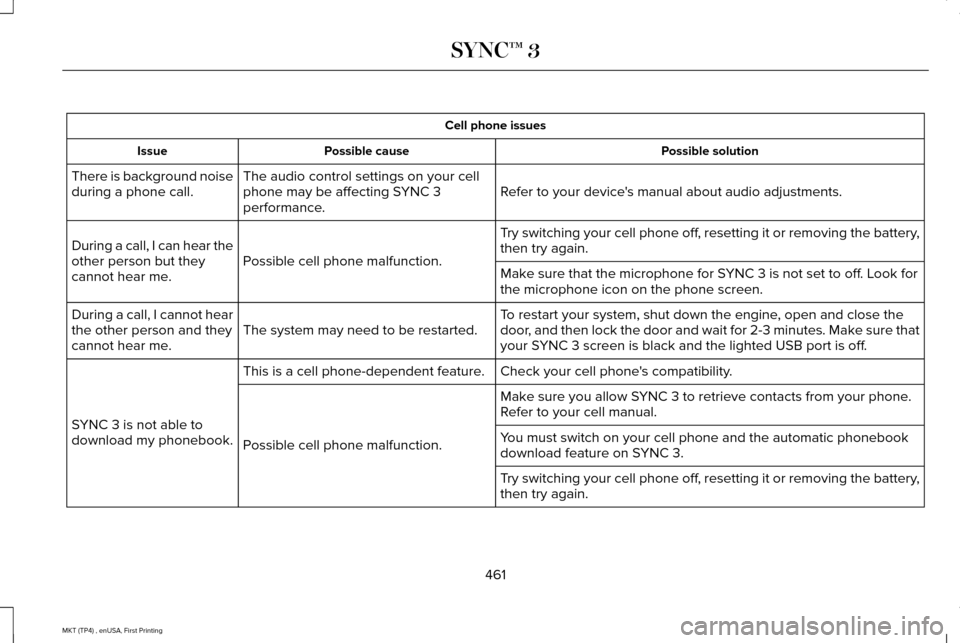
Cell phone issues
Possible solution
Possible cause
Issue
Refer to your device's manual about audio adjustments.
The audio control settings on your cell
phone may be affecting SYNC 3
performance.
There is background noise
during a phone call.
Try switching your cell phone off, resetting it or removing the battery,
then try again.
Possible cell phone malfunction.
During a call, I can hear the
other person but they
cannot hear me.
Make sure that the microphone for SYNC 3 is not set to off. Look for
the microphone icon on the phone screen.
To restart your system, shut down the engine, open and close the
door, and then lock the door and wait for 2-3 minutes. Make sure that
your SYNC 3 screen is black and the lighted USB port is off.
The system may need to be restarted.
During a call, I cannot hear
the other person and they
cannot hear me.
Check your cell phone's compatibility.
This is a cell phone-dependent feature.
SYNC 3 is not able to
download my phonebook. Make sure you allow SYNC 3 to retrieve contacts from your phone.
Refer to your cell manual.
Possible cell phone malfunction. You must switch on your cell phone and the automatic phonebook
download feature on SYNC 3.
Try switching your cell phone off, resetting it or removing the battery,
then try again.
461
MKT (TP4) , enUSA, First Printing SYNC™ 3