USB LINCOLN MKT 2018 Owner's Manual
[x] Cancel search | Manufacturer: LINCOLN, Model Year: 2018, Model line: MKT, Model: LINCOLN MKT 2018Pages: 564, PDF Size: 4.66 MB
Page 469 of 564
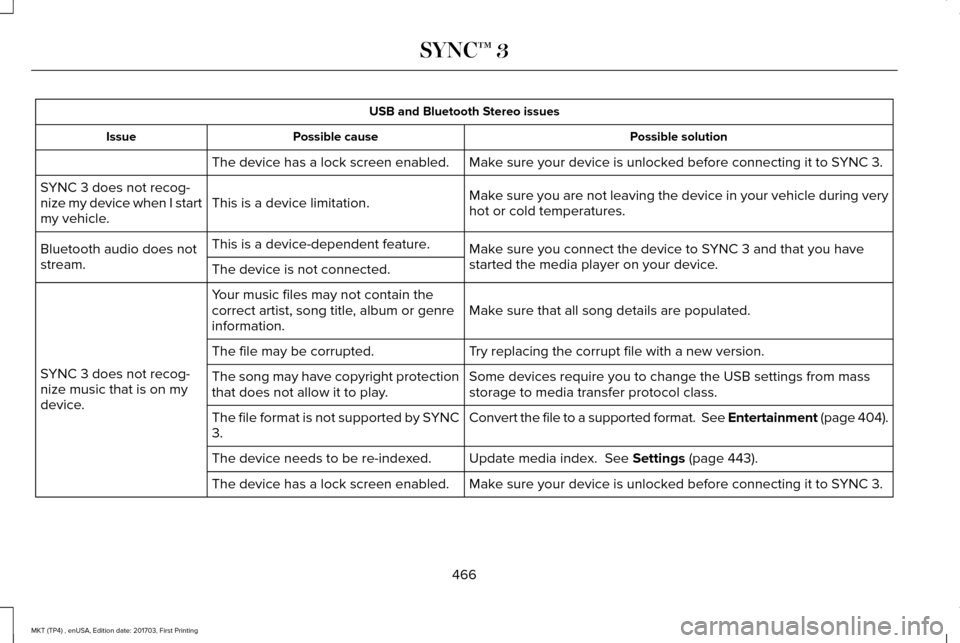
USB and Bluetooth Stereo issues
Possible solution
Possible cause
Issue
Make sure your device is unlocked before connecting it to SYNC 3.
The device has a lock screen enabled.
Make sure you are not leaving the device in your vehicle during very
hot or cold temperatures.
This is a device limitation.
SYNC 3 does not recog-
nize my device when I start
my vehicle.
Make sure you connect the device to SYNC 3 and that you have
started the media player on your device.
This is a device-dependent feature.
Bluetooth audio does not
stream. The device is not connected.
Make sure that all song details are populated.
Your music files may not contain the
correct artist, song title, album or genre
information.
SYNC 3 does not recog-
nize music that is on my
device. Try replacing the corrupt file with a new version.
The file may be corrupted.
Some devices require you to change the USB settings from mass
storage to media transfer protocol class.
The song may have copyright protection
that does not allow it to play.
Convert the file to a supported format. See Entertainment (page 404).
The file format is not supported by SYNC
3.
Update media index.
See Settings (page 443).
The device needs to be re-indexed.
Make sure your device is unlocked before connecting it to SYNC 3.
The device has a lock screen enabled.
466
MKT (TP4) , enUSA, Edition date: 201703, First Printing SYNC™ 3
Page 470 of 564
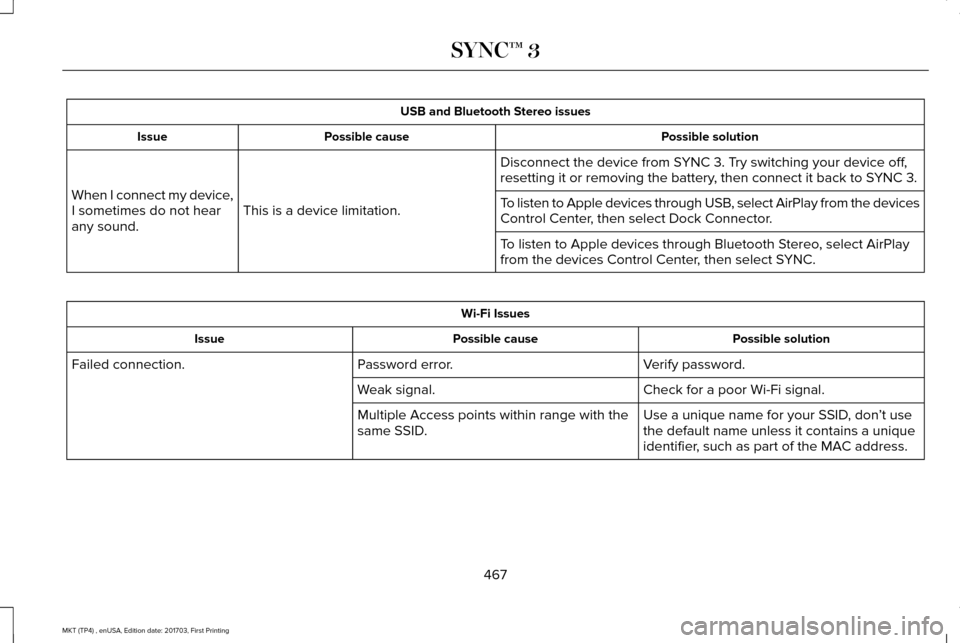
USB and Bluetooth Stereo issues
Possible solution
Possible cause
Issue
Disconnect the device from SYNC 3. Try switching your device off,
resetting it or removing the battery, then connect it back to SYNC 3.
This is a device limitation.
When I connect my device,
I sometimes do not hear
any sound. To listen to Apple devices through USB, select AirPlay from the devices
Control Center, then select Dock Connector.
To listen to Apple devices through Bluetooth Stereo, select AirPlay
from the devices Control Center, then select SYNC. Wi-Fi Issues
Possible solution
Possible cause
Issue
Verify password.
Password error.
Failed connection.
Check for a poor Wi-Fi signal.
Weak signal.
Use a unique name for your SSID, don’t use
the default name unless it contains a unique
identifier, such as part of the MAC address.
Multiple Access points within range with the
same SSID.
467
MKT (TP4) , enUSA, Edition date: 201703, First Printing SYNC™ 3
Page 473 of 564
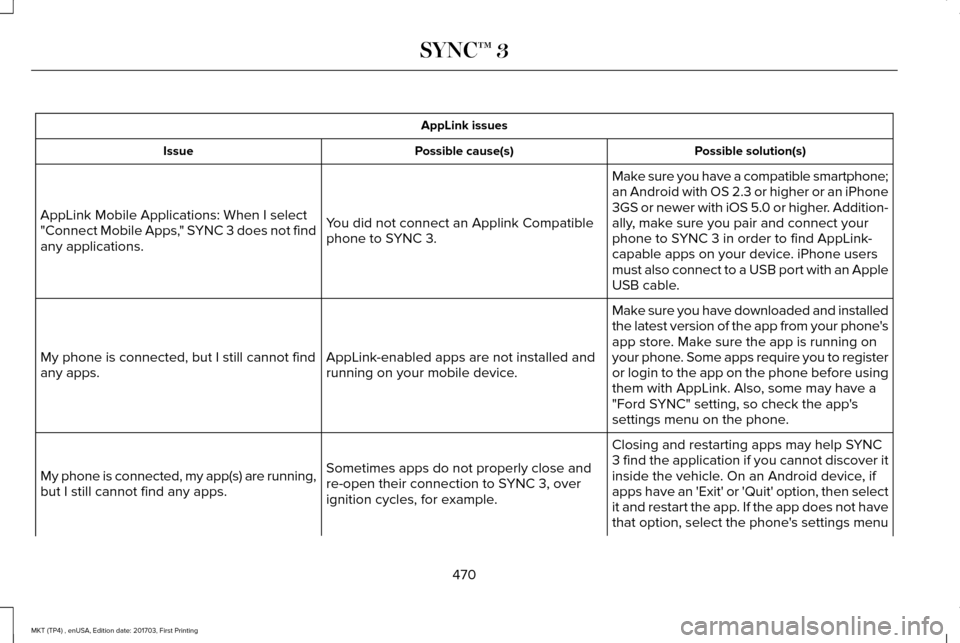
AppLink issues
Possible solution(s)
Possible cause(s)
Issue
Make sure you have a compatible smartphone;
an Android with OS 2.3 or higher or an iPhone
3GS or newer with iOS 5.0 or higher. Addition-
ally, make sure you pair and connect your
phone to SYNC 3 in order to find AppLink-
capable apps on your device. iPhone users
must also connect to a USB port with an Apple
USB cable.
You did not connect an Applink Compatible
phone to SYNC 3.
AppLink Mobile Applications: When I select
"Connect Mobile Apps," SYNC 3 does not find
any applications.
Make sure you have downloaded and installed
the latest version of the app from your phone's
app store. Make sure the app is running on
your phone. Some apps require you to register
or login to the app on the phone before using
them with AppLink. Also, some may have a
"Ford SYNC" setting, so check the app's
settings menu on the phone.
AppLink-enabled apps are not installed and
running on your mobile device.
My phone is connected, but I still cannot find
any apps.
Closing and restarting apps may help SYNC
3 find the application if you cannot discover it
inside the vehicle. On an Android device, if
apps have an 'Exit' or 'Quit' option, then select
it and restart the app. If the app does not have
that option, select the phone's settings menu
Sometimes apps do not properly close and
re-open their connection to SYNC 3, over
ignition cycles, for example.
My phone is connected, my app(s) are running,
but I still cannot find any apps.
470
MKT (TP4) , enUSA, Edition date: 201703, First Printing SYNC™ 3
Page 475 of 564
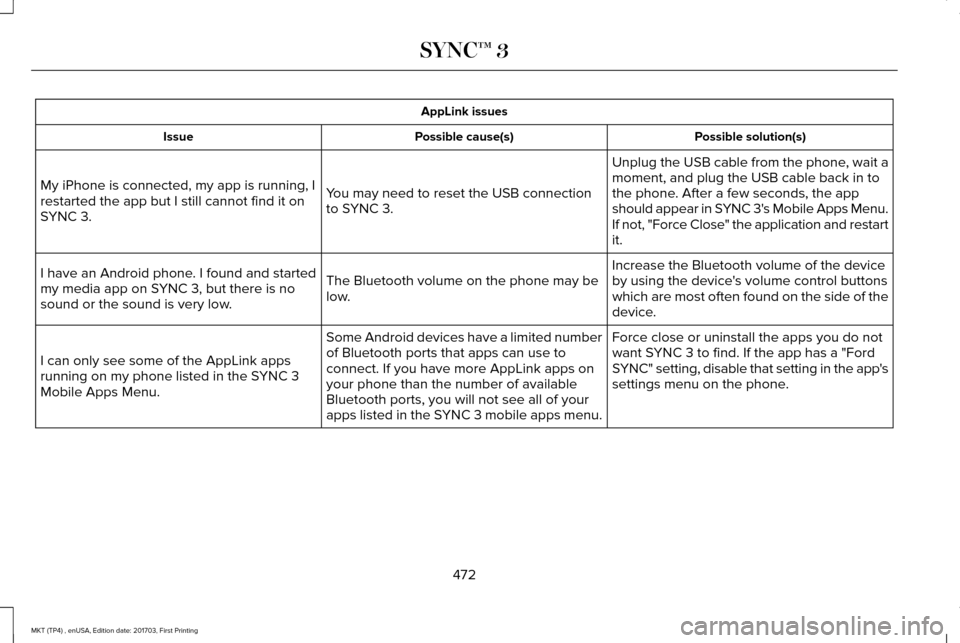
AppLink issues
Possible solution(s)
Possible cause(s)
Issue
Unplug the USB cable from the phone, wait a
moment, and plug the USB cable back in to
the phone. After a few seconds, the app
should appear in SYNC 3's Mobile Apps Menu.
If not, "Force Close" the application and restart
it.
You may need to reset the USB connection
to SYNC 3.
My iPhone is connected, my app is running, I
restarted the app but I still cannot find it on
SYNC 3.
Increase the Bluetooth volume of the device
by using the device's volume control buttons
which are most often found on the side of the
device.
The Bluetooth volume on the phone may be
low.
I have an Android phone. I found and started
my media app on SYNC 3, but there is no
sound or the sound is very low.
Force close or uninstall the apps you do not
want SYNC 3 to find. If the app has a "Ford
SYNC" setting, disable that setting in the app's
settings menu on the phone.
Some Android devices have a limited number
of Bluetooth ports that apps can use to
connect. If you have more AppLink apps on
your phone than the number of available
Bluetooth ports, you will not see all of your
apps listed in the SYNC 3 mobile apps menu.
I can only see some of the AppLink apps
running on my phone listed in the SYNC 3
Mobile Apps Menu.
472
MKT (TP4) , enUSA, Edition date: 201703, First Printing SYNC™ 3
Page 478 of 564
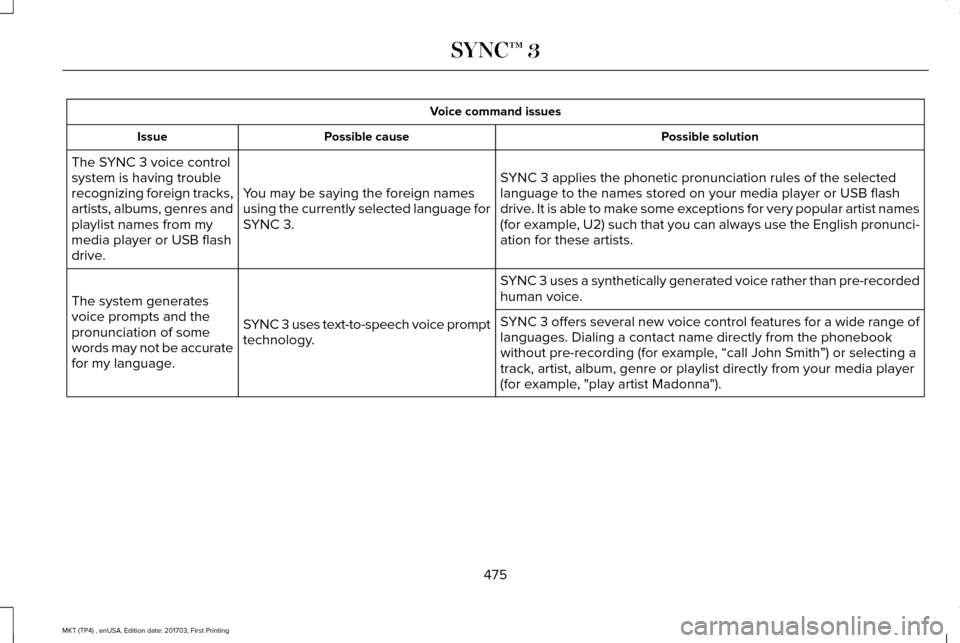
Voice command issues
Possible solution
Possible cause
Issue
SYNC 3 applies the phonetic pronunciation rules of the selected
language to the names stored on your media player or USB flash
drive. It is able to make some exceptions for very popular artist names
(for example, U2) such that you can always use the English pronunci-
ation for these artists.
You may be saying the foreign names
using the currently selected language for
SYNC 3.
The SYNC 3 voice control
system is having trouble
recognizing foreign tracks,
artists, albums, genres and
playlist names from my
media player or USB flash
drive.
SYNC 3 uses a synthetically generated voice rather than pre-recorded
human voice.
SYNC 3 uses text-to-speech voice prompt
technology.
The system generates
voice prompts and the
pronunciation of some
words may not be accurate
for my language. SYNC 3 offers several new voice control features for a wide range of
languages. Dialing a contact name directly from the phonebook
without pre-recording (for example, “call John Smith
”) or selecting a
track, artist, album, genre or playlist directly from your media player
(for example, "play artist Madonna").
475
MKT (TP4) , enUSA, Edition date: 201703, First Printing SYNC™ 3
Page 479 of 564
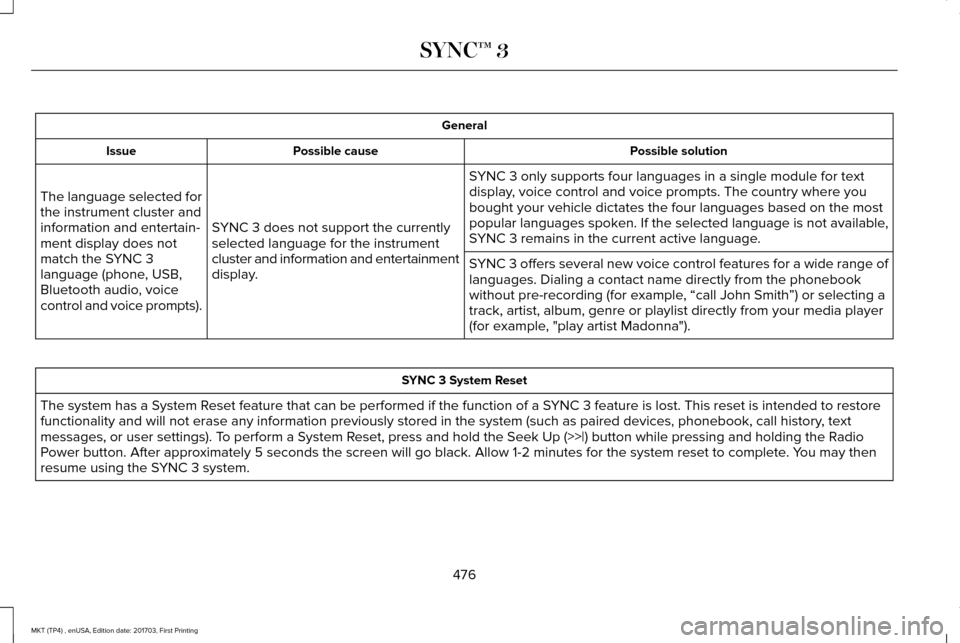
General
Possible solution
Possible cause
Issue
SYNC 3 only supports four languages in a single module for text
display, voice control and voice prompts. The country where you
bought your vehicle dictates the four languages based on the most
popular languages spoken. If the selected language is not available,
SYNC 3 remains in the current active language.
SYNC 3 does not support the currently
selected language for the instrument
cluster and information and entertainment
display.
The language selected for
the instrument cluster and
information and entertain-
ment display does not
match the SYNC 3
language (phone, USB,
Bluetooth audio, voice
control and voice prompts).
SYNC 3 offers several new voice control features for a wide range of
languages. Dialing a contact name directly from the phonebook
without pre-recording (for example, “call John Smith
”) or selecting a
track, artist, album, genre or playlist directly from your media player
(for example, "play artist Madonna"). SYNC 3 System Reset
The system has a System Reset feature that can be performed if the function of a SYNC 3 feature is lost. This reset is intended to restore
functionality and will not erase any information previously stored in th\
e system (such as paired devices, phonebook, call history , text
messages, or user settings). To perform a System Reset, press and hold the Seek Up (>>|) button while pressing and holdi\
ng the Radio
Power button. After approximately 5 seconds the screen will go black. Allow 1-2 minutes for the s\
ystem reset to complete. You may then
resume using the SYNC 3 system.
476
MKT (TP4) , enUSA, Edition date: 201703, First Printing SYNC™ 3
Page 557 of 564
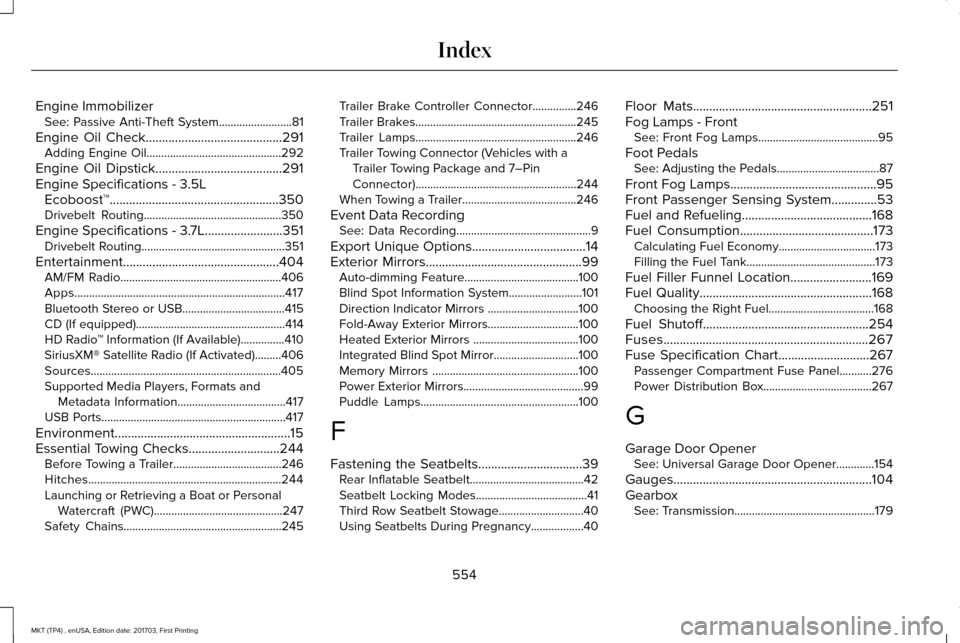
Engine Immobilizer
See: Passive Anti-Theft System.........................81
Engine Oil Check..........................................291 Adding Engine Oil..............................................292
Engine Oil Dipstick.......................................291
Engine Specifications - 3.5L Ecoboost™
....................................................350
Drivebelt Routing...............................................350
Engine Specifications - 3.7L........................351 Drivebelt Routing.................................................351
Entertainment................................................404 AM/FM Radio.......................................................406
Apps........................................................................\
417
Bluetooth Stereo or USB...................................415
CD (If equipped)...................................................414
HD Radio ™ Information (If Available)...............410
SiriusXM® Satellite Radio (If Activated).........406
Sources.................................................................405
Supported Media Players, Formats and Metadata Information.....................................417
USB Ports...............................................................417
Environment......................................................15
Essential Towing Checks............................244 Before Towing a Trailer.....................................246
Hitches..................................................................244
Launching or Retrieving a Boat or Personal
Watercraft (PWC)............................................247
Safety Chains......................................................245 Trailer Brake Controller Connector...............246
Trailer Brakes.......................................................245
Trailer Lamps.......................................................246
Trailer Towing Connector (Vehicles with a
Trailer Towing Package and 7–Pin
Connector).......................................................244
When Towing a Trailer.......................................246
Event Data Recording See: Data Recording..............................................9
Export Unique Options...................................14
Exterior Mirrors
................................................99
Auto-dimming Feature.......................................100
Blind Spot Information System.........................101
Direction Indicator Mirrors ...............................100
Fold-Away Exterior Mirrors...............................100
Heated Exterior Mirrors ....................................100
Integrated Blind Spot Mirror.............................100
Memory Mirrors ..................................................100
Power Exterior Mirrors.........................................99
Puddle Lamps......................................................100
F
Fastening the Seatbelts
................................39
Rear Inflatable Seatbelt.......................................42
Seatbelt Locking Modes......................................41
Third Row Seatbelt Stowage.............................40
Using Seatbelts During Pregnancy..................
40 Floor Mats
.......................................................251
Fog Lamps - Front See: Front Fog Lamps.........................................95
Foot Pedals See: Adjusting the Pedals...................................87
Front Fog Lamps.............................................95
Front Passenger Sensing System..............53
Fuel and Refueling
........................................168
Fuel Consumption.........................................173
Calculating Fuel Economy.................................173
Filling the Fuel Tank............................................173
Fuel Filler Funnel Location.........................169
Fuel Quality.....................................................168 Choosing the Right Fuel....................................168
Fuel Shutoff
...................................................254
Fuses...............................................................267
Fuse Specification Chart............................267 Passenger Compartment Fuse Panel...........276
Power Distribution Box.....................................267
G
Garage Door Opener See: Universal Garage Door Opener.............154
Gauges.............................................................104
Gearbox See: Transmission................................................179
554
MKT (TP4) , enUSA, Edition date: 201703, First Printing Index
Page 563 of 564
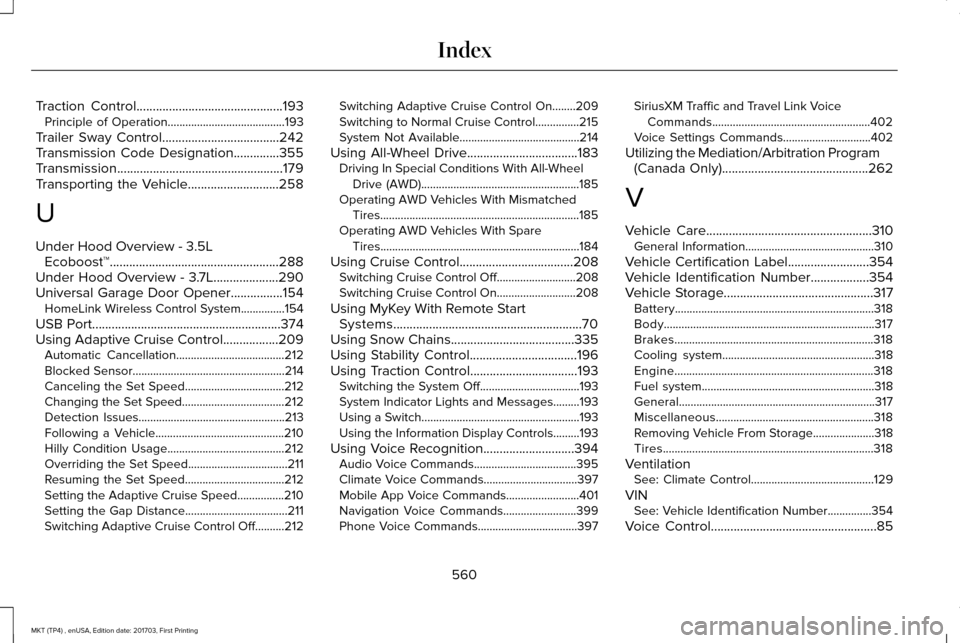
Traction Control.............................................193
Principle of Operation........................................193
Trailer Sway Control....................................242
Transmission Code Designation..............355
Transmission...................................................179
Transporting the Vehicle............................258
U
Under Hood Overview - 3.5L Ecoboost™....................................................288
Under Hood Overview - 3.7L....................290
Universal Garage Door Opener................154 HomeLink Wireless Control System...............154
USB Port
..........................................................374
Using Adaptive Cruise Control.................209 Automatic Cancellation.....................................212
Blocked Sensor....................................................214
Canceling the Set Speed..................................212
Changing the Set Speed...................................212
Detection Issues..................................................213
Following a Vehicle............................................210
Hilly Condition Usage........................................212
Overriding the Set Speed..................................211
Resuming the Set Speed..................................212
Setting the Adaptive Cruise Speed................210
Setting the Gap Distance...................................
211
Switching Adaptive Cruise Control Off..........212 Switching Adaptive Cruise Control On........209
Switching to Normal Cruise Control...............215
System Not Available.........................................214
Using All-Wheel Drive..................................183 Driving In Special Conditions With All-Wheel
Drive (AWD)......................................................185
Operating AWD Vehicles With Mismatched Tires....................................................................185
Operating AWD Vehicles With Spare Tires....................................................................184
Using Cruise Control...................................208 Switching Cruise Control Off...........................
208
Switching Cruise Control On...........................208
Using MyKey With Remote Start Systems..........................................................70
Using Snow Chains......................................335
Using Stability Control.................................196
Using Traction Control.................................193 Switching the System Off..................................193
System Indicator Lights and Messages.........193
Using a Switch......................................................193
Using the Information Display Controls.........193
Using Voice Recognition............................394 Audio Voice Commands...................................395
Climate Voice Commands................................397
Mobile App Voice Commands.........................
401
Navigation Voice Commands.........................399
Phone Voice Commands..................................397 SiriusXM Traffic and Travel Link Voice
Commands......................................................402
Voice Settings Commands..............................402
Utilizing the Mediation/Arbitration Program (Canada Only)
.............................................262
V
Vehicle Care...................................................310 General Information............................................310
Vehicle Certification Label
.........................354
Vehicle Identification Number..................354
Vehicle Storage..............................................317
Battery....................................................................318
Body........................................................................\
317
Brakes....................................................................318
Cooling system....................................................318
Engine....................................................................318
Fuel system...........................................................318
General...................................................................317
Miscellaneous......................................................318
Removing Vehicle From Storage.....................
318
Tires........................................................................\
318
Ventilation See: Climate Control..........................................129
VIN See: Vehicle Identification Number...............354
Voice Control
...................................................85
560
MKT (TP4) , enUSA, Edition date: 201703, First Printing Index