warning LINCOLN MKT 2019 Owners Manual
[x] Cancel search | Manufacturer: LINCOLN, Model Year: 2019, Model line: MKT, Model: LINCOLN MKT 2019Pages: 575, PDF Size: 4.66 MB
Page 215 of 575
DRIVER ALERT (If Equipped)
WARNING: The system is designedto aid the driver. It is not intended toreplace your attention and judgment. Youare still responsible to drive with due careand attention.
WARNING: At all times, you areresponsible for controlling your vehicle,supervising the system and intervening, ifrequired. Failure to take care may result inthe loss of control of your vehicle, seriouspersonal injury or death.
WARNING: The system may notfunction if the sensor is blocked.
WARNING: Take regular rest breaksif you feel tired. Do not wait for the systemto warn you.
WARNING: Certain driving styles mayresult in the system warning you even ifyou are not feeling tired.
WARNING: In cold and severeweather conditions the system may notfunction. Rain, snow and spray can all limitsensor performance.
WARNING: The system will notoperate if the sensor cannot track the roadlane markings.
WARNING: If damage occurs in theimmediate area surrounding the sensor,have your vehicle checked as soon aspossible.
WARNING: The system may notcorrectly operate if your vehicle is fittedwith a suspension kit not approved by us.
Note:Keep the windshield free fromobstructions. For example, bird droppings,insects and snow or ice.
Note:If the camera is blocked or if thewindshield is damaged, the system may notfunction.
Note:The system remembers the last settingwhen you start your vehicle, unless it detectsa MyKey™.
Note:If enabled in the menu, the systemactivates at speeds above 40 mph (64 km/h).When below the activation speed, theinformation display informs the driver thatthe system is unavailable.
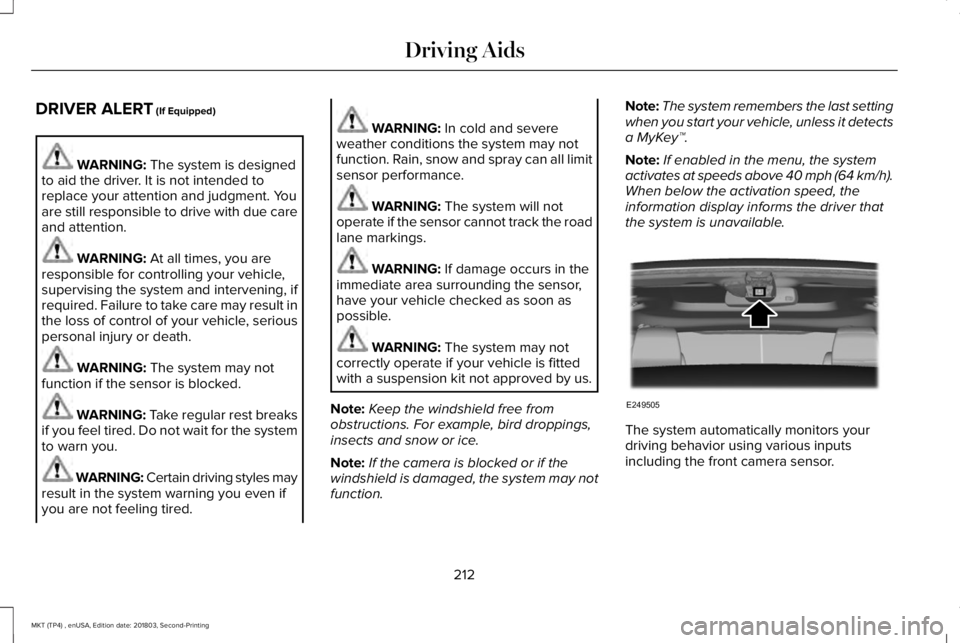
The system automatically monitors yourdriving behavior using various inputsincluding the front camera sensor.
212
MKT (TP4) , enUSA, Edition date: 201803, Second-Printing
Driving AidsE249505
Page 216 of 575
If the system detects that your drivingalertness is reduced below a certainthreshold, the system will alert you using achime and a message in the informationdisplay.
Using Driver Alert
Switching the system on and off
You may switch the system on or off throughthe information display. See GeneralInformation (page 105). When activated, thesystem will monitor your alertness levelbased upon your driving behavior in relationto the lane markings, and other factors.
System Warnings
Note:The system will not issue warningsbelow approximately 40 mph (64 km/h).
The warning system is in two stages. At firstthe system issues a temporary warning thatyou need to take a rest. This message willonly appear for a short time. If the systemdetects further reduction in driving alertness,another warning may be issued which willremain in the information display for a longertime. Press OK on the steering wheel controlto clear the warning.
System Display
When active the system will run automaticallyin the background and only issue a warningif required. You can view the status at anytime using the information display. SeeGeneral Information (page 105).
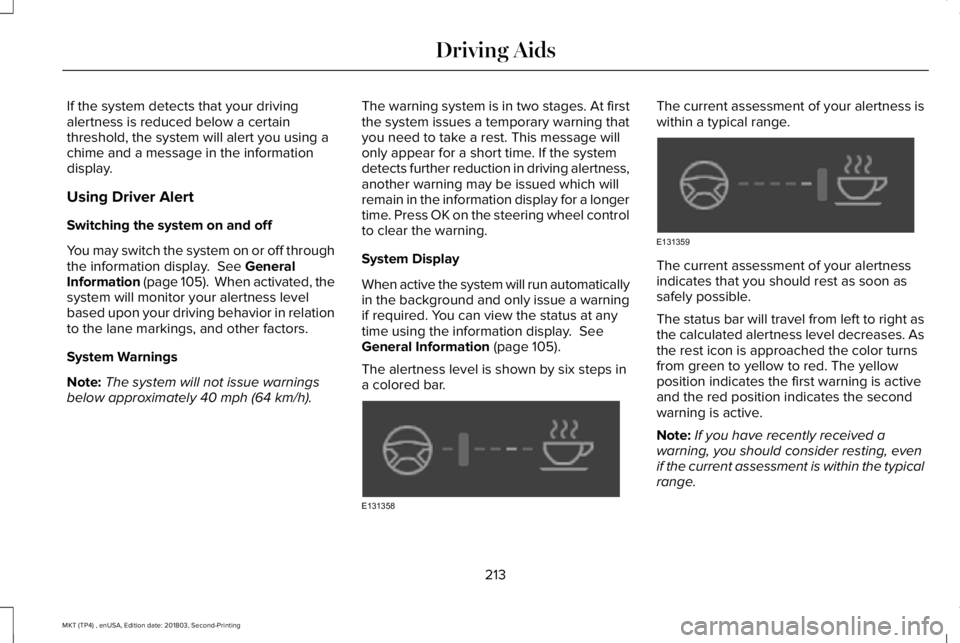
The alertness level is shown by six steps ina colored bar.
The current assessment of your alertness iswithin a typical range.
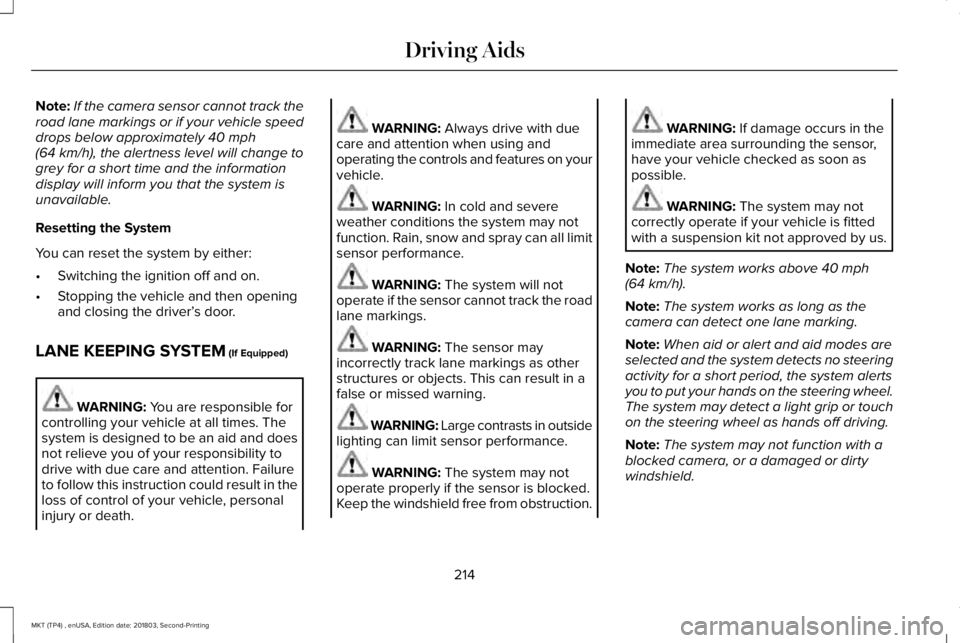
The current assessment of your alertnessindicates that you should rest as soon assafely possible.
The status bar will travel from left to right asthe calculated alertness level decreases. Asthe rest icon is approached the color turnsfrom green to yellow to red. The yellowposition indicates the first warning is activeand the red position indicates the secondwarning is active.
Note:If you have recently received awarning, you should consider resting, evenif the current assessment is within the typicalrange.
213
MKT (TP4) , enUSA, Edition date: 201803, Second-Printing
Driving AidsE131358 E131359
Page 217 of 575
Note:If the camera sensor cannot track theroad lane markings or if your vehicle speeddrops below approximately 40 mph(64 km/h), the alertness level will change togrey for a short time and the informationdisplay will inform you that the system isunavailable.
Resetting the System
You can reset the system by either:
•Switching the ignition off and on.
•Stopping the vehicle and then openingand closing the driver’s door.
LANE KEEPING SYSTEM (If Equipped)
WARNING: You are responsible forcontrolling your vehicle at all times. Thesystem is designed to be an aid and doesnot relieve you of your responsibility todrive with due care and attention. Failureto follow this instruction could result in theloss of control of your vehicle, personalinjury or death.
WARNING: Always drive with duecare and attention when using andoperating the controls and features on yourvehicle.
WARNING: In cold and severeweather conditions the system may notfunction. Rain, snow and spray can all limitsensor performance.
WARNING: The system will notoperate if the sensor cannot track the roadlane markings.
WARNING: The sensor mayincorrectly track lane markings as otherstructures or objects. This can result in afalse or missed warning.
WARNING: Large contrasts in outsidelighting can limit sensor performance.
WARNING: The system may notoperate properly if the sensor is blocked.Keep the windshield free from obstruction.
WARNING: If damage occurs in theimmediate area surrounding the sensor,have your vehicle checked as soon aspossible.
WARNING: The system may notcorrectly operate if your vehicle is fittedwith a suspension kit not approved by us.
Note:The system works above 40 mph(64 km/h).
Note:The system works as long as thecamera can detect one lane marking.
Note:When aid or alert and aid modes areselected and the system detects no steeringactivity for a short period, the system alertsyou to put your hands on the steering wheel.The system may detect a light grip or touchon the steering wheel as hands off driving.
Note:The system may not function with ablocked camera, or a damaged or dirtywindshield.
214
MKT (TP4) , enUSA, Edition date: 201803, Second-Printing
Driving Aids
Page 218 of 575
When you switch the system on and itdetects an unintentional drift out of your laneis likely to occur, it notifies or assists you tostay in your lane through the steering systemand information display. Depending on thefeature operation mode you select, thesystem provides a warning by vibrating thesteering wheel or a steering assistance bygently counter steering your vehicle backinto the lane.
Switching the System On and Off
Note:The system stores the on or off settinguntil you manually change it, unless itdetects a MyKey™. If the system detects aMyKey, it defaults to on and the mode is setto alert.
Note:If the system detects a MyKey™,pressing the button does not affect the onor off status of the system.
Press the button on the centerconsole to switch the system on oroff.
System Settings
The system has optional setting menusavailable. See General Information (page105). The system stores the last-knownselection for each of these settings. You donot need to readjust your settings each timeyou switch the system on.
Mode (if equipped): This setting allows youto select which of the system features youcan enable.
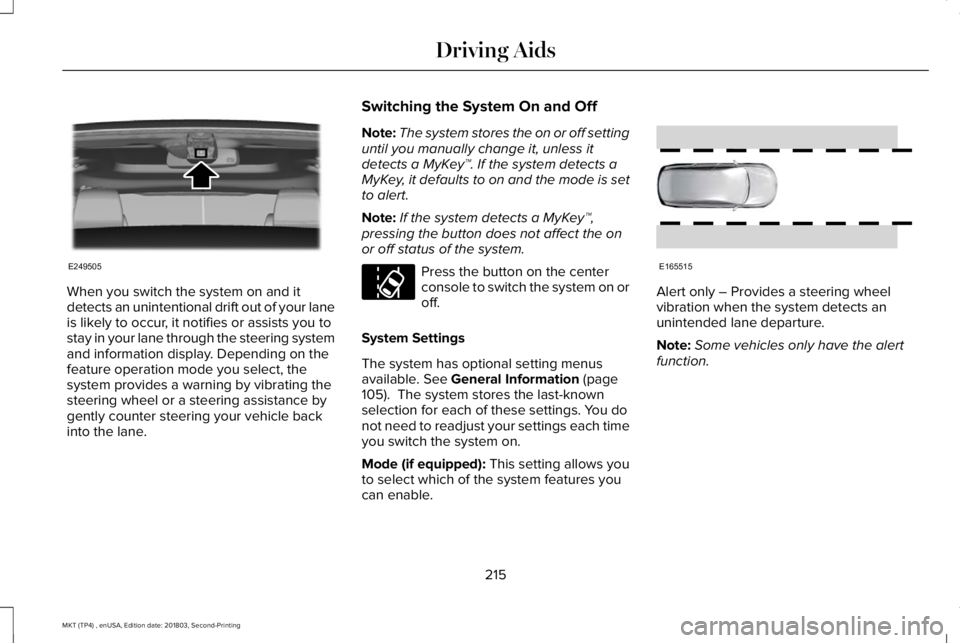
Alert only – Provides a steering wheelvibration when the system detects anunintended lane departure.
Note:Some vehicles only have the alertfunction.
215
MKT (TP4) , enUSA, Edition date: 201803, Second-Printing
Driving AidsE249505 E173233 E165515
Page 220 of 575
If you switch the system on in aid or alert andaid mode, a separate white icon alsoappears, or in some vehicles, arrows displaywith the lane markings.
When you switch the system off, the lanemarking graphics do not display.
When the system is on, the color of the lanemarkings change to indicate the systemstatus.
Gray: Indicates that the system is temporarilyunable to provide a warning or interventionon the indicated side. This may be because:
•Your vehicle is under the activationspeed.
•The direction indicator is active.
•Your vehicle is in a dynamic maneuver.
•The road has no or poor lane markingsin the camera field of view.
•The camera is obscured or unable todetect the lane markings due toenvironmental, traffic or vehicleconditions. For example, significant sunangles, shadows, snow, heavy rain or fog,following a large vehicle that is blockingor shadowing the lane or poor headlampillumination.
See Troubleshooting for additionalinformation.
Green: Indicates that the system is availableor ready to provide a warning or interventionon the indicated side.
Yellow: Indicates that the system is providingor has just provided a lane keeping aidintervention.
Red: Indicates that the system is providingor has just provided a lane keeping alertwarning.
The system can be temporarily suppressedat any time by the following:
•Quick braking.
•Fast acceleration.
•Using the turn signal indicator.
•Evasive steering maneuver.
•Driving too close to the lane marking.
Troubleshooting
Why is the feature not available (line markings are gray) when I can see the lane markings on the road?
Your vehicle speed is outside the operational range of the feature.
The sun is shining directly into the camera lens.
A quick intentional lane change has occurred.
217
MKT (TP4) , enUSA, Edition date: 201803, Second-Printing
Driving Aids
Page 221 of 575
Why is the feature not available (line markings are gray) when I can see the lane markings on the road?
Your vehicle stays too close to the lane markings.
Driving at high speeds in curves.
The last alert warning or aid intervention occurred a short time ago.
Ambiguous lane markings, for example in construction zones.
Rapid transition from light to dark, or from dark to light.
Sudden offset in lane markings.
ABS or AdvanceTrac™ is active.
There is a camera blockage due to dirt, grime, fog, frost or water on the windshield.
You are driving too close to the vehicle in front of you.
Transitioning between no lane markings to lane markings or vice versa.
There is standing water on the road.
Faint lane markings, for example partial yellow lane markings on concrete roads.
Lane width is too narrow or too wide.
The camera has not been calibrated after a windshield replacement.
Driving on tight roads or on uneven roads.
218
MKT (TP4) , enUSA, Edition date: 201803, Second-Printing
Driving Aids
Page 222 of 575
Why does the vehicle not come back toward the middle of the lane, as expected, in the Aid or Aid + Alert mode?
High cross winds are present.
There is a large road crown.
Rough roads, grooves or shoulder drop-offs.
Heavy uneven loading of the vehicle or improper tire inflation pressure.
The tires have been changed, or the suspension has been modified.
BLIND SPOT INFORMATION
SYSTEM (If Equipped)
WARNING: Never use the Blind SpotInformation System as a replacement forusing the interior and exterior mirrors orlooking over your shoulder beforechanging lanes. The Blind Spot InformationSystem is not a replacement for carefuldriving.
The Blind Spot Information System isdesigned to aid you in detecting vehiclesthat may have entered the blind spot zone(A). The detection area is on both sides ofyour vehicle, extending rearward from theexterior mirrors to approximately 10 ft (3 m)beyond the bumper. The system is designedto alert you if certain vehicles enter the blindspot zone while driving.
Note:The Blind Spot Information Systemdoes not prevent contact with other vehiclesor objects; nor detect parked vehicles,people, animals or infrastructure (fences,guardrails, trees). It’s only designed to alertyou to vehicles in the blind spot zones.
219
MKT (TP4) , enUSA, Edition date: 201803, Second-Printing
Driving AidsA
A
E124788
Page 224 of 575
If the system detects a degradedperformance condition, a message warningof a blocked sensor will appear in theinformation display. Also the system alertindicators will remain ON and the system willno longer provide any vehicle warnings. Youcan clear the information display warning butthe alert indicators will remain illuminated.
A "blocked" condition can be cleared in twoways:
•After the blockage in front of the sensorsis removed or the rainfall/snowfall ratedecreases or stops, drive for a fewminutes in traffic to allow the sensors todetect passing vehicles.
•By cycling the ignition from ON to OFFand then back ON.
Note:When towing a trailer, the sensors maydetect the trailer thus causing a false alert.It may be desirable to turn the Blind SpotInformation System off if the false alertsbecome annoying.
System Errors
If the system senses a problem with the leftor right sensor, the telltale will illuminate anda message will appear in the informationdisplay. See Information Messages (page112).
System Limitations
The system does have its limitations;situations such as severe weather conditionsor debris build-up on the sensor may limitvehicle detection.
The following are other situations that maylimit the system:
•Certain maneuvering of vehicles enteringand exiting the blind zone.
•Vehicles passing through the blind zoneat very fast rates.
•When several vehicles forming a convoypass through the blind zone.
Switching the System Off and On
You can temporarily switch the Blind SpotInformation System off in the informationdisplay. See General Information (page 105).When the Blind Spot Information Systemswitches off, you will not receive alerts andthe information display shows a system offmessage. The telltale in the cluster alsoilluminates. When you switch the Blind SpotInformation System on or off, the alertindicators flash twice.
Note:The system switches back on everytime you start your vehicle.
You can also have the Blind Spot InformationSystem switched off permanently at anauthorized dealer. Once switched offpermanently, the system can only beswitched back on at an authorized dealer.
221
MKT (TP4) , enUSA, Edition date: 201803, Second-Printing
Driving Aids
Page 225 of 575
CROSS TRAFFIC ALERT (If Equipped)
WARNING: Never use the CrossTraffic Alert system as a replacement forusing the interior and exterior mirrors andlooking over your shoulder before backingout of a parking space. Cross Traffic Alertis not a replacement for careful driving.
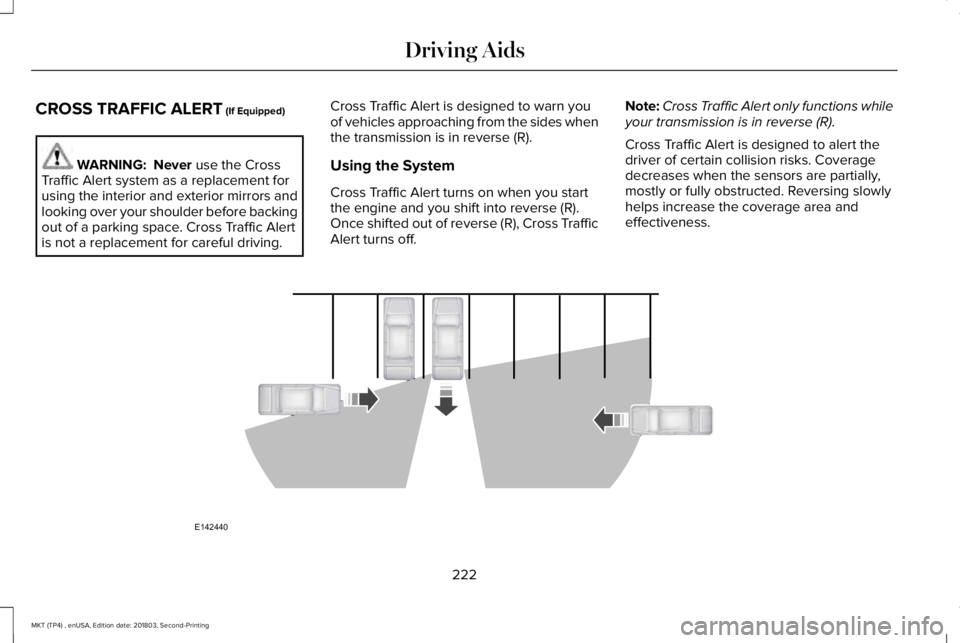
Cross Traffic Alert is designed to warn youof vehicles approaching from the sides whenthe transmission is in reverse (R).
Using the System
Cross Traffic Alert turns on when you startthe engine and you shift into reverse (R).Once shifted out of reverse (R), Cross TrafficAlert turns off.
Note:Cross Traffic Alert only functions whileyour transmission is in reverse (R).
Cross Traffic Alert is designed to alert thedriver of certain collision risks. Coveragedecreases when the sensors are partially,mostly or fully obstructed. Reversing slowlyhelps increase the coverage area andeffectiveness.
222
MKT (TP4) , enUSA, Edition date: 201803, Second-Printing
Driving AidsE142440
Page 228 of 575
If the rear end of the vehicle is hit ordamaged, the radar sensing zone may bealtered causing missed or false collisionwarnings. See your authorized dealer to haveyour collision warning radar checked forproper coverage and operation.
False Alerts
Note:When towing a trailer, the sensors maydetect the trailer thus causing a false alert.It may be desirable to turn the Blind SpotInformation System off if the false alertsbecome annoying.
There may be certain instances when thereis a false alert by the Cross Traffic Alertsystem that illuminates the alert indicatorwith no vehicle in the coverage zone. Someamount of false alerts are normal; they aretemporary and self-correct.
System Errors
If Cross Traffic Alert senses a problem withthe left or right sensor a message will appearin the information display. See InformationMessages (page 112).
Switching the System Off and On
You can temporarily switch Cross Traffic Alertoff in the information display. SeeInformation Messages (page 112). When youswitch Cross Traffic Alert off, you will notreceive alerts and the information displaywill display a system off message.
Note:The Cross Traffic Alert switches onwhenever the ignition is switched on andready to provide appropriate alerts whenthe transmission is in reverse (R). CrossTraffic Alert will not remember the lastselected on or off setting.
You can also have Cross Traffic Alertswitched off permanently at an authorizeddealer. Once switched off permanently, thesystem can only be switched back on at anauthorized dealer.
STEERING
Electric Power Steering
WARNING: The electric powersteering system has diagnostic checks thatcontinuously monitor the system. If a faultis detected, a message displays in theinformation display. Stop your vehicle assoon as it is safe to do so. Switch theignition off. After at least 10 seconds,switch the ignition on and watch theinformation display for a steering systemwarning message. If a steering systemwarning message returns, have the systemchecked by an authorized dealer.
WARNING: If the system detects anerror, you may not feel a difference in thesteering, however a serious condition mayexist. Obtain immediate service from anauthorized dealer, failure to do so mayresult in loss of steering control.
Your vehicle has an electric power steeringsystem. There is no fluid reservoir. Nomaintenance is required.
225
MKT (TP4) , enUSA, Edition date: 201803, Second-Printing
Driving Aids