service indicator LINCOLN MKT 2019 User Guide
[x] Cancel search | Manufacturer: LINCOLN, Model Year: 2019, Model line: MKT, Model: LINCOLN MKT 2019Pages: 575, PDF Size: 4.66 MB
Page 183 of 575
All-Wheel Drive Messages
Action / DescriptionAWD Messages
Displays if the AWD system disables to protect itself. This may occurif you operate the vehicle after installing the compact spare tire, if thesystem is overheating or if there is an issue with another vehiclesystem that prevents the AWD system from operating. The AWDsystem resumes normal operation and clears this message after youinstall the road tire and you switch the ignition on and off, or after youallow the system to cool. If this message remains on, have a qualifiedtechnician service your vehicle to repair other vehicle systems.
AWD OFF
Displayed in conjunction with the powertrain malfunction/reducedpower light when the system is not operating properly. If the warningstays on or continues to come on, contact your authorized dealer assoon as possible.
Check AWD
Operating AWD Vehicles With SpareTires
A spare tire of a different size other than thetire provided should never be used. TheAWD system may disable automatically andenter front-wheel drive only mode to protectdriveline components if a non-full sized tireis installed. This condition may display an
AWD OFF message in the informationdisplay. If there is an AWD OFF message inthe information display from using a non-fullsized spare tire, this indicator should turn offafter reinstalling the repaired or replacednormal road tire and cycling the ignition offand on. It is recommended to reinstall therepaired or replaced road tire as soon aspossible. Major dissimilar tire sizes between
the front and rear axles (for example, 17 inchlow profile tires on the front axle and 22 inchhigh profile tires on the rear axle) couldcause the AWD system to stop functioningand default to front-wheel drive or damagethe AWD system.
180
MKT (TP4) , enUSA, Edition date: 201803, Second-Printing
All-Wheel Drive (If Equipped)
Page 192 of 575
PRINCIPLE OF OPERATION
The traction control system helps avoid drivewheel spin and loss of traction.
If your vehicle begins to slide, the systemapplies the brakes to individual wheels and,when needed, reduces engine power at thesame time. If the wheels spin whenaccelerating on slippery or loose surfaces,the system reduces engine power in orderto increase traction.
USING TRACTION CONTROL
WARNING: The stability and tractioncontrol light illuminates steadily if thesystem detects a failure. Make sure youdid not manually disable the tractioncontrol system using the informationdisplay controls or the switch. If the stabilitycontrol and traction control light is still
illuminating steadily, have the systemserviced by an authorized dealerimmediately. Operating your vehicle withthe traction control disabled could lead toan increased risk of loss of vehicle control,vehicle rollover, personal injury and death.
The system automatically turns on each timeyou switch the ignition on.
If your vehicle is stuck in mud or snow,switching traction control off may bebeneficial as this allows the wheels to spin.
Note:When you switch traction control off,stability control remains fully active.
Switching the System Off
When you switch the system off or on, amessage appears in the information displayshowing system status.
You can switch the system off by either usingthe information display controls or the switch.
Using the Information Display Controls
You can switch this feature off or on in theinformation display. See General Information(page 105).
Using a Switch (If Equipped)
Use the traction control switch on theinstrument panel to switch the system off oron.
System Indicator Lights and Messages
The stability and traction controllight:
•Temporarily illuminates on enginestart-up.
•Flashes when a driving conditionactivates either of the systems.
•Illuminates if a problem occurs in eitherof the systems.
The stability and traction controloff light temporarily illuminates onengine start-up and stays on whenyou switch the traction control system off.
189
MKT (TP4) , enUSA, Edition date: 201803, Second-Printing
Traction ControlE138639 E130458
Page 228 of 575
If the rear end of the vehicle is hit ordamaged, the radar sensing zone may bealtered causing missed or false collisionwarnings. See your authorized dealer to haveyour collision warning radar checked forproper coverage and operation.
False Alerts
Note:When towing a trailer, the sensors maydetect the trailer thus causing a false alert.It may be desirable to turn the Blind SpotInformation System off if the false alertsbecome annoying.
There may be certain instances when thereis a false alert by the Cross Traffic Alertsystem that illuminates the alert indicatorwith no vehicle in the coverage zone. Someamount of false alerts are normal; they aretemporary and self-correct.
System Errors
If Cross Traffic Alert senses a problem withthe left or right sensor a message will appearin the information display. See InformationMessages (page 112).
Switching the System Off and On
You can temporarily switch Cross Traffic Alertoff in the information display. SeeInformation Messages (page 112). When youswitch Cross Traffic Alert off, you will notreceive alerts and the information displaywill display a system off message.
Note:The Cross Traffic Alert switches onwhenever the ignition is switched on andready to provide appropriate alerts whenthe transmission is in reverse (R). CrossTraffic Alert will not remember the lastselected on or off setting.
You can also have Cross Traffic Alertswitched off permanently at an authorizeddealer. Once switched off permanently, thesystem can only be switched back on at anauthorized dealer.
STEERING
Electric Power Steering
WARNING: The electric powersteering system has diagnostic checks thatcontinuously monitor the system. If a faultis detected, a message displays in theinformation display. Stop your vehicle assoon as it is safe to do so. Switch theignition off. After at least 10 seconds,switch the ignition on and watch theinformation display for a steering systemwarning message. If a steering systemwarning message returns, have the systemchecked by an authorized dealer.
WARNING: If the system detects anerror, you may not feel a difference in thesteering, however a serious condition mayexist. Obtain immediate service from anauthorized dealer, failure to do so mayresult in loss of steering control.
Your vehicle has an electric power steeringsystem. There is no fluid reservoir. Nomaintenance is required.
225
MKT (TP4) , enUSA, Edition date: 201803, Second-Printing
Driving Aids
Page 252 of 575
If you need to arrange roadside assistancefor yourself, Lincoln Motor Companyreimburses a reasonable amount for towingto the nearest Lincoln dealership within100 mi (160 km). To obtain reimbursementinformation, United States clients, call1-800-521-4140. Clients need to submit theiroriginal receipts.
Vehicles Sold in Canada: GettingRoadside Assistance
To fully assist you should you have a vehicleconcern, Lincoln Motor Company of Canada,Limited offers a complimentary roadsideassistance program. This program is eligiblewithin Canada or the continental UnitedStates.
The service is available 24 hours a day,seven days a week.
This program is separate from the NewVehicle Limited Warranty, but the coverageis concurrent with the powertrain coverageperiod of your vehicle. Canadian roadsidecoverage and benefits may differ from theU.S. coverage.
If you require more information, please callus in Canada at 1-800-387-9333, or visit ourwebsite at www.lincolncanada.com.
HAZARD FLASHERS
Note:The hazard flashers operate when theignition is in any position, or if the key is notin the ignition. If used when the vehicle is notrunning, the battery loses charge. As a result,there may be insufficient power to restartyour vehicle.
The flasher control is on theinstrument panel. Use your hazardflashers when your vehicle iscreating a safety hazard for other motorists.
•Press the flasher control and all front andrear direction indicators flash.
•Press the button again to switch them off.
FUEL SHUTOFF
WARNING: If your vehicle has beeninvolved in a crash, have the fuel systemchecked. Failure to follow this instructioncould result in fire, personal injury or death.
Note: When you try to restart your vehicleafter a fuel shutoff, the vehicle makes surethat various systems are safe to restart. Once the vehicle determines the systemsare safe, then the vehicle allows you torestart.
Note: In the event that your vehicle doesnot restart after your third attempt, contacta qualified technician.
The fuel pump shutoff stops the flow of fuelto the engine in the event of a moderate tosevere crash. Not every impact causes ashutoff.
Should your vehicle shut off after a crash,you may restart your vehicle.
249
MKT (TP4) , enUSA, Edition date: 201803, Second-Printing
Roadside Emergencies
Page 304 of 575
Front Direction Indicator Lamp
If a front direction indicator lamp fails, seean authorized dealer.
LED Lamps
LED lamps are not serviceable items. Seean authorized dealer if they fail.
The following lamps are LED:
•Side direction indicators.
•Approach lamp.
•Brake and rear lamps.
•Rear direction indicators.
•Rear side marker lamps.
•Reversing lamps.
•Central high mounted brake lamp.
•Front side marker lamps.
•Front parking lamps.
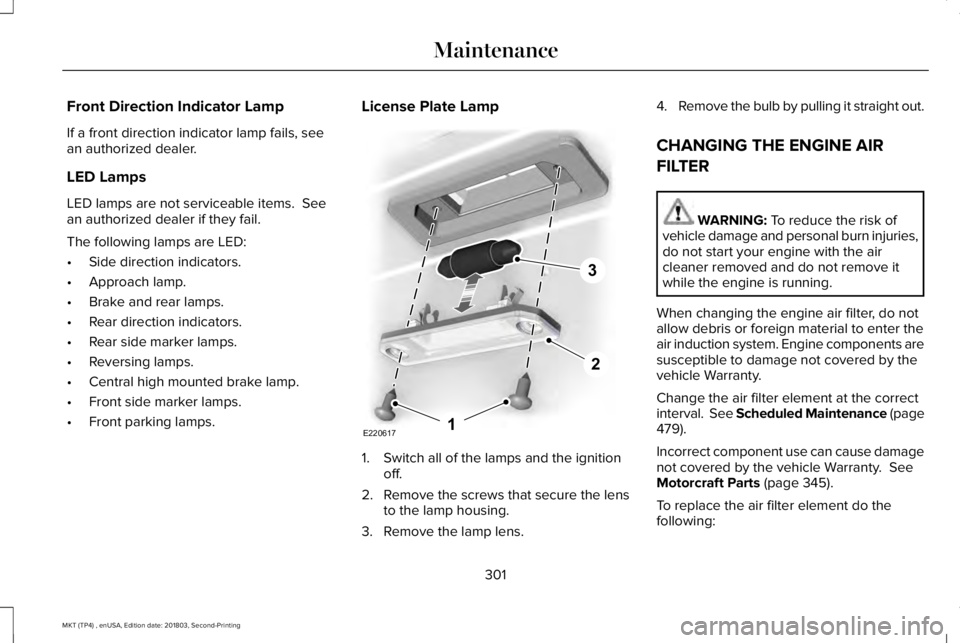
License Plate Lamp
1. Switch all of the lamps and the ignitionoff.
2.Remove the screws that secure the lensto the lamp housing.
3. Remove the lamp lens.
4.Remove the bulb by pulling it straight out.
CHANGING THE ENGINE AIR
FILTER
WARNING: To reduce the risk ofvehicle damage and personal burn injuries,do not start your engine with the aircleaner removed and do not remove itwhile the engine is running.
When changing the engine air filter, do notallow debris or foreign material to enter theair induction system. Engine components aresusceptible to damage not covered by thevehicle Warranty.
Change the air filter element at the correctinterval. See Scheduled Maintenance (page479).
Incorrect component use can cause damagenot covered by the vehicle Warranty. SeeMotorcraft Parts (page 345).
To replace the air filter element do thefollowing:
301
MKT (TP4) , enUSA, Edition date: 201803, Second-Printing
MaintenanceE2206171
2
3
Page 366 of 575
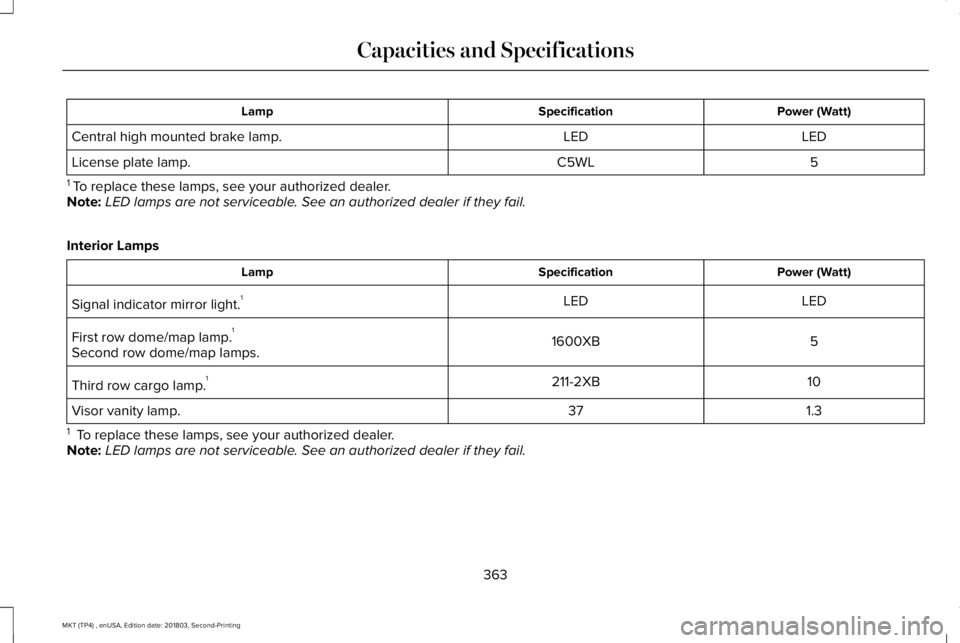
Power (Watt)SpecificationLamp
LEDLEDCentral high mounted brake lamp.
5C5WLLicense plate lamp.
1 To replace these lamps, see your authorized dealer.Note:LED lamps are not serviceable. See an authorized dealer if they fail.
Interior Lamps
Power (Watt)SpecificationLamp
LEDLEDSignal indicator mirror light.1
51600XBFirst row dome/map lamp.1
Second row dome/map lamps.
10211-2XBThird row cargo lamp.1
1.337Visor vanity lamp.
1 To replace these lamps, see your authorized dealer.Note:LED lamps are not serviceable. See an authorized dealer if they fail.
363
MKT (TP4) , enUSA, Edition date: 201803, Second-Printing
Capacities and Specifications
Page 483 of 575
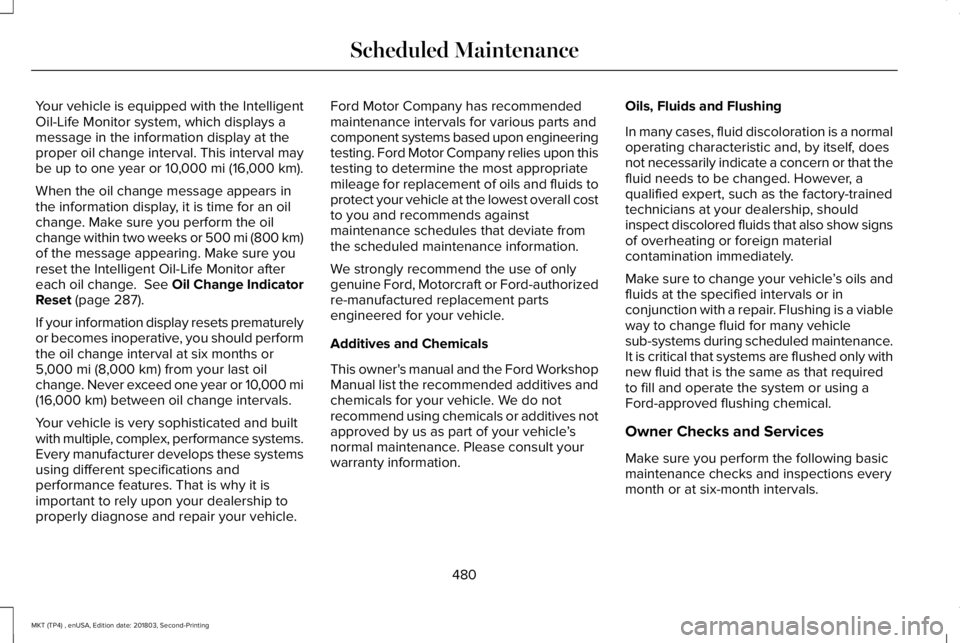
Your vehicle is equipped with the IntelligentOil-Life Monitor system, which displays amessage in the information display at theproper oil change interval. This interval maybe up to one year or 10,000 mi (16,000 km).
When the oil change message appears inthe information display, it is time for an oilchange. Make sure you perform the oilchange within two weeks or 500 mi (800 km)of the message appearing. Make sure youreset the Intelligent Oil-Life Monitor aftereach oil change. See Oil Change IndicatorReset (page 287).
If your information display resets prematurelyor becomes inoperative, you should performthe oil change interval at six months or5,000 mi (8,000 km) from your last oilchange. Never exceed one year or 10,000 mi(16,000 km) between oil change intervals.
Your vehicle is very sophisticated and builtwith multiple, complex, performance systems.Every manufacturer develops these systemsusing different specifications andperformance features. That is why it isimportant to rely upon your dealership toproperly diagnose and repair your vehicle.
Ford Motor Company has recommendedmaintenance intervals for various parts andcomponent systems based upon engineeringtesting. Ford Motor Company relies upon thistesting to determine the most appropriatemileage for replacement of oils and fluids toprotect your vehicle at the lowest overall costto you and recommends againstmaintenance schedules that deviate fromthe scheduled maintenance information.
We strongly recommend the use of onlygenuine Ford, Motorcraft or Ford-authorizedre-manufactured replacement partsengineered for your vehicle.
Additives and Chemicals
This owner's manual and the Ford WorkshopManual list the recommended additives andchemicals for your vehicle. We do notrecommend using chemicals or additives notapproved by us as part of your vehicle’snormal maintenance. Please consult yourwarranty information.
Oils, Fluids and Flushing
In many cases, fluid discoloration is a normaloperating characteristic and, by itself, doesnot necessarily indicate a concern or that thefluid needs to be changed. However, aqualified expert, such as the factory-trainedtechnicians at your dealership, shouldinspect discolored fluids that also show signsof overheating or foreign materialcontamination immediately.
Make sure to change your vehicle’s oils andfluids at the specified intervals or inconjunction with a repair. Flushing is a viableway to change fluid for many vehiclesub-systems during scheduled maintenance.It is critical that systems are flushed only withnew fluid that is the same as that requiredto fill and operate the system or using aFord-approved flushing chemical.
Owner Checks and Services
Make sure you perform the following basicmaintenance checks and inspections everymonth or at six-month intervals.
480
MKT (TP4) , enUSA, Edition date: 201803, Second-Printing
Scheduled Maintenance
Page 488 of 575
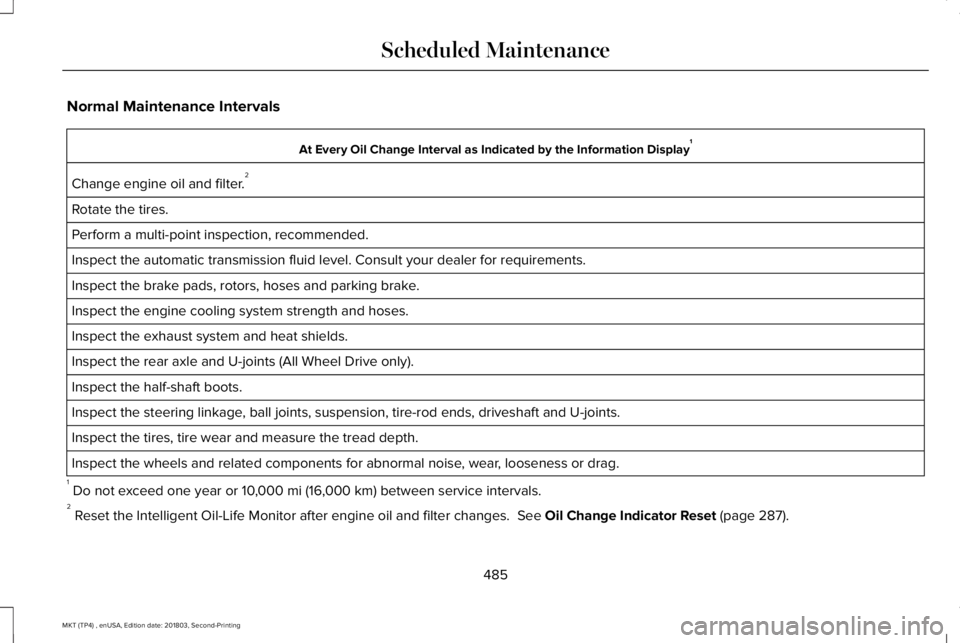
Normal Maintenance Intervals
At Every Oil Change Interval as Indicated by the Information Display1
Change engine oil and filter.2
Rotate the tires.
Perform a multi-point inspection, recommended.
Inspect the automatic transmission fluid level. Consult your dealer for requirements.
Inspect the brake pads, rotors, hoses and parking brake.
Inspect the engine cooling system strength and hoses.
Inspect the exhaust system and heat shields.
Inspect the rear axle and U-joints (All Wheel Drive only).
Inspect the half-shaft boots.
Inspect the steering linkage, ball joints, suspension, tire-rod ends, driveshaft and U-joints.
Inspect the tires, tire wear and measure the tread depth.
Inspect the wheels and related components for abnormal noise, wear, looseness or drag.
1 Do not exceed one year or 10,000 mi (16,000 km) between service intervals.2 Reset the Intelligent Oil-Life Monitor after engine oil and filter changes. See Oil Change Indicator Reset (page 287).
485
MKT (TP4) , enUSA, Edition date: 201803, Second-Printing
Scheduled Maintenance
Page 492 of 575
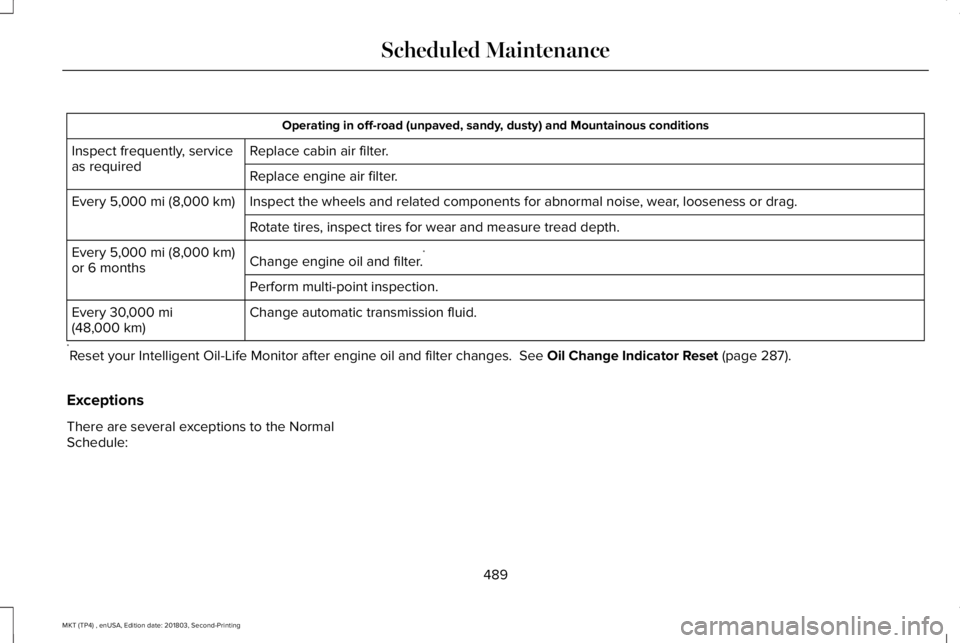
Operating in off-road (unpaved, sandy, dusty) and Mountainous conditions
Replace cabin air filter.Inspect frequently, serviceas requiredReplace engine air filter.
Inspect the wheels and related components for abnormal noise, wear, looseness or drag.Every 5,000 mi (8,000 km)
Rotate tires, inspect tires for wear and measure tread depth.
Change engine oil and filter.*Every 5,000 mi (8,000 km)or 6 months
Perform multi-point inspection.
Change automatic transmission fluid.Every 30,000 mi(48,000 km)
*Reset your Intelligent Oil-Life Monitor after engine oil and filter changes. See Oil Change Indicator Reset (page 287).
Exceptions
There are several exceptions to the NormalSchedule:
489
MKT (TP4) , enUSA, Edition date: 201803, Second-Printing
Scheduled Maintenance
Page 566 of 575
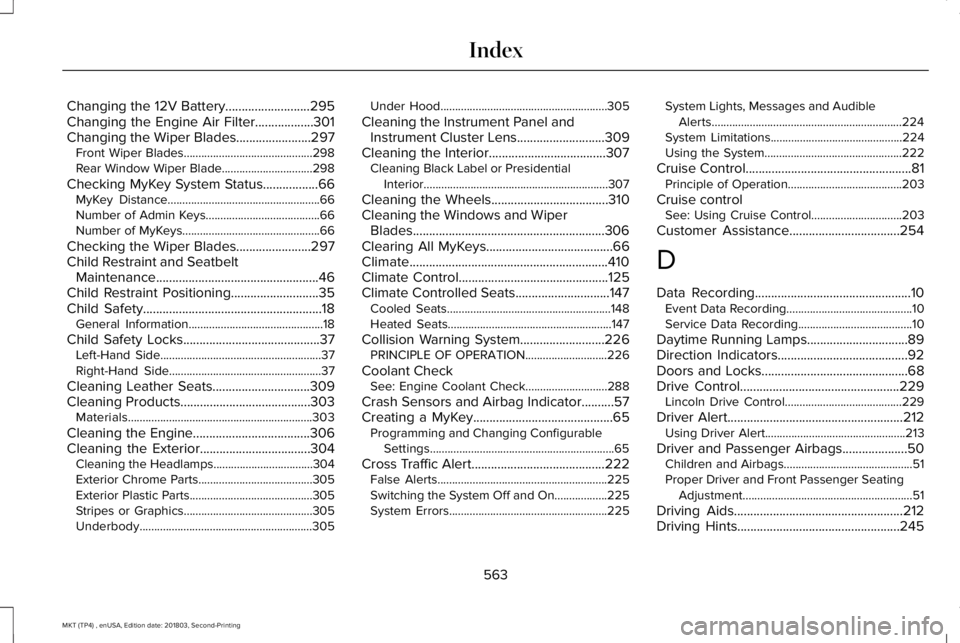
Changing the 12V Battery..........................295Changing the Engine Air Filter..................301Changing the Wiper Blades.......................297Front Wiper Blades............................................298Rear Window Wiper Blade...............................298
Checking MyKey System Status.................66MyKey Distance....................................................66Number of Admin Keys.......................................66Number of MyKeys...............................................66
Checking the Wiper Blades.......................297Child Restraint and SeatbeltMaintenance..................................................46Child Restraint Positioning...........................35Child Safety.......................................................18General Information..............................................18
Child Safety Locks..........................................37Left-Hand Side.......................................................37Right-Hand Side....................................................37
Cleaning Leather Seats..............................309Cleaning Products........................................303Materials...............................................................303
Cleaning the Engine....................................306Cleaning the Exterior..................................304Cleaning the Headlamps..................................304Exterior Chrome Parts.......................................305Exterior Plastic Parts..........................................305Stripes or Graphics............................................305Underbody...........................................................305
Under Hood.........................................................305
Cleaning the Instrument Panel andInstrument Cluster Lens...........................309Cleaning the Interior....................................307Cleaning Black Label or PresidentialInterior...............................................................307
Cleaning the Wheels....................................310Cleaning the Windows and WiperBlades...........................................................306Clearing All MyKeys.......................................66Climate.............................................................410Climate Control..............................................125Climate Controlled Seats.............................147Cooled Seats........................................................148Heated Seats........................................................147
Collision Warning System..........................226PRINCIPLE OF OPERATION............................226
Coolant CheckSee: Engine Coolant Check............................288
Crash Sensors and Airbag Indicator..........57Creating a MyKey...........................................65Programming and Changing ConfigurableSettings...............................................................65
Cross Traffic Alert.........................................222False Alerts..........................................................225Switching the System Off and On..................225System Errors......................................................225
System Lights, Messages and AudibleAlerts.................................................................224System Limitations.............................................224Using the System...............................................222
Cruise Control...................................................81Principle of Operation.......................................203
Cruise controlSee: Using Cruise Control...............................203
Customer Assistance..................................254
D
Data Recording................................................10Event Data Recording...........................................10Service Data Recording.......................................10
Daytime Running Lamps...............................89Direction Indicators........................................92Doors and Locks.............................................68Drive Control.................................................229Lincoln Drive Control........................................229
Driver Alert......................................................212Using Driver Alert................................................213
Driver and Passenger Airbags....................50Children and Airbags............................................51Proper Driver and Front Passenger SeatingAdjustment..........................................................51
Driving Aids....................................................212Driving Hints..................................................245
563
MKT (TP4) , enUSA, Edition date: 201803, Second-Printing
Index