wheel LINCOLN MKT 2019 User Guide
[x] Cancel search | Manufacturer: LINCOLN, Model Year: 2019, Model line: MKT, Model: LINCOLN MKT 2019Pages: 575, PDF Size: 4.66 MB
Page 85 of 575
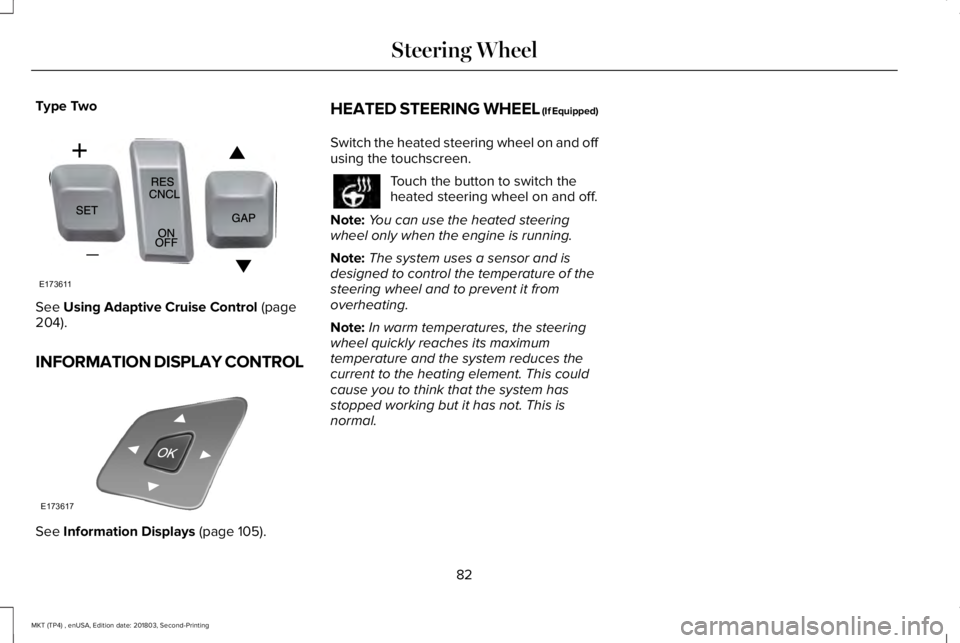
Type Two
See Using Adaptive Cruise Control (page204).
INFORMATION DISPLAY CONTROL
See Information Displays (page 105).
HEATED STEERING WHEEL (If Equipped)
Switch the heated steering wheel on and offusing the touchscreen.
Touch the button to switch theheated steering wheel on and off.
Note:You can use the heated steeringwheel only when the engine is running.
Note:The system uses a sensor and isdesigned to control the temperature of thesteering wheel and to prevent it fromoverheating.
Note:In warm temperatures, the steeringwheel quickly reaches its maximumtemperature and the system reduces thecurrent to the heating element. This couldcause you to think that the system hasstopped working but it has not. This isnormal.
82
MKT (TP4) , enUSA, Edition date: 201803, Second-Printing
Steering WheelE173611 E173617
Page 94 of 575
FRONT FOG LAMPS
Pull the lighting control toward you to switchthe fog lamps on.
You can switch the fog lamps on when thelighting control is in any position except off.
ADAPTIVE HEADLAMPS (If Equipped)
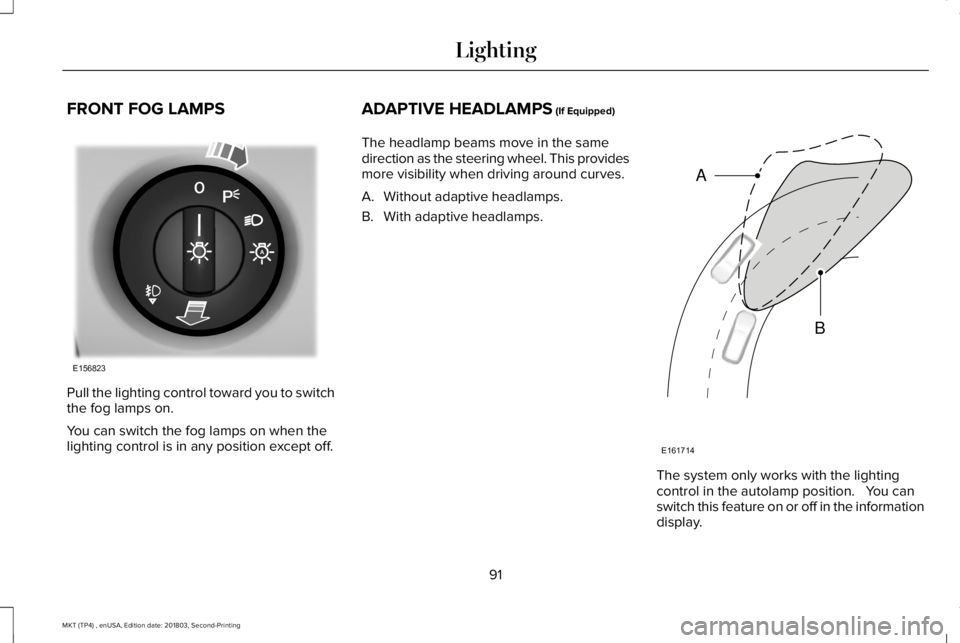
The headlamp beams move in the samedirection as the steering wheel. This providesmore visibility when driving around curves.
A. Without adaptive headlamps.
B. With adaptive headlamps.
The system only works with the lightingcontrol in the autolamp position. You canswitch this feature on or off in the informationdisplay.
91
MKT (TP4) , enUSA, Edition date: 201803, Second-Printing
LightingE156823 E161714
B
A
Page 108 of 575
GENERAL INFORMATION
WARNING: Driving while distractedcan result in loss of vehicle control, crashand injury. We strongly recommend thatyou use extreme caution when using anydevice that may take your focus off theroad. Your primary responsibility is the safeoperation of your vehicle. We recommendagainst the use of any hand-held devicewhile driving and encourage the use ofvoice-operated systems when possible.Make sure you are aware of all applicablelocal laws that may affect the use ofelectronic devices while driving.
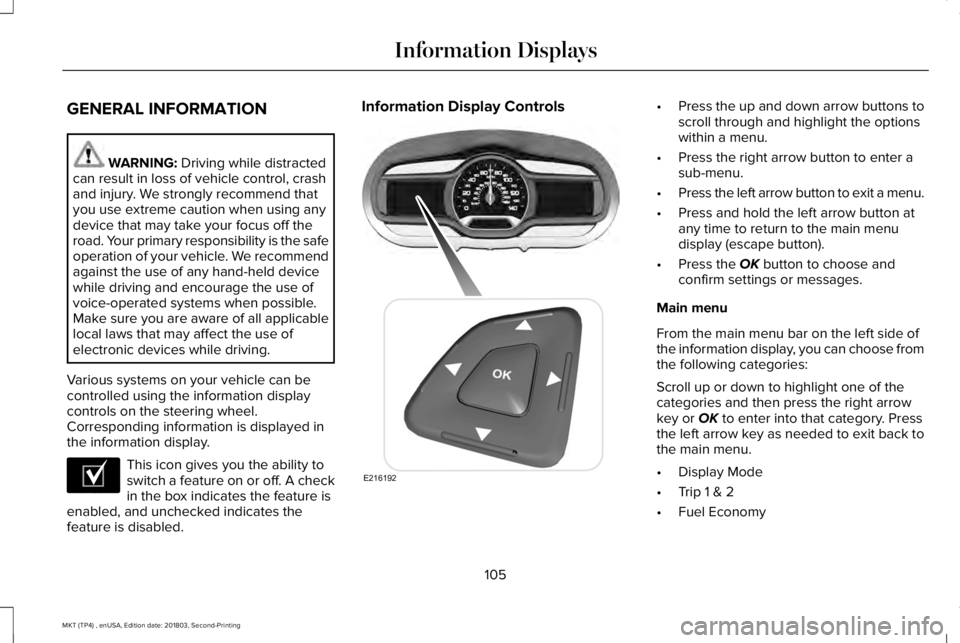
Various systems on your vehicle can becontrolled using the information displaycontrols on the steering wheel.Corresponding information is displayed inthe information display.
This icon gives you the ability toswitch a feature on or off. A checkin the box indicates the feature isenabled, and unchecked indicates thefeature is disabled.
Information Display Controls•Press the up and down arrow buttons toscroll through and highlight the optionswithin a menu.
•Press the right arrow button to enter asub-menu.
•Press the left arrow button to exit a menu.
•Press and hold the left arrow button atany time to return to the main menudisplay (escape button).
•Press the OK button to choose andconfirm settings or messages.
Main menu
From the main menu bar on the left side ofthe information display, you can choose fromthe following categories:
Scroll up or down to highlight one of thecategories and then press the right arrowkey or OK to enter into that category. Pressthe left arrow key as needed to exit back tothe main menu.
•Display Mode
•Trip 1 & 2
•Fuel Economy
105
MKT (TP4) , enUSA, Edition date: 201803, Second-Printing
Information DisplaysE204495 E216192
Page 113 of 575
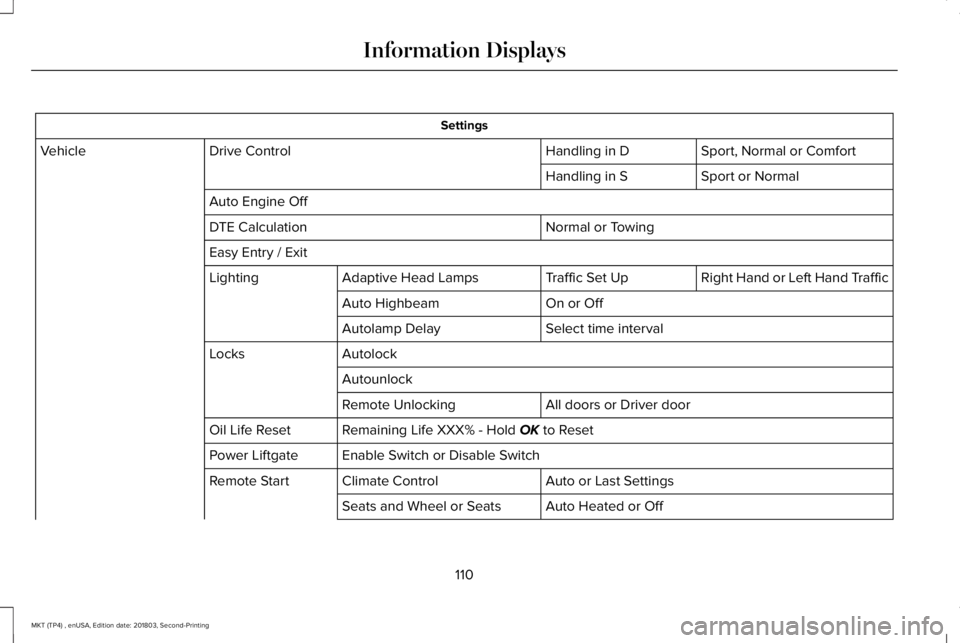
Settings
Sport, Normal or ComfortHandling in DDrive ControlVehicle
Sport or NormalHandling in S
Auto Engine Off
Normal or TowingDTE Calculation
Easy Entry / Exit
Right Hand or Left Hand TrafficTraffic Set UpAdaptive Head LampsLighting
On or OffAuto Highbeam
Select time intervalAutolamp Delay
AutolockLocks
Autounlock
All doors or Driver doorRemote Unlocking
Remaining Life XXX% - Hold OK to ResetOil Life Reset
Enable Switch or Disable SwitchPower Liftgate
Auto or Last SettingsClimate ControlRemote Start
Auto Heated or OffSeats and Wheel or Seats
110
MKT (TP4) , enUSA, Edition date: 201803, Second-Printing
Information Displays
Page 117 of 575
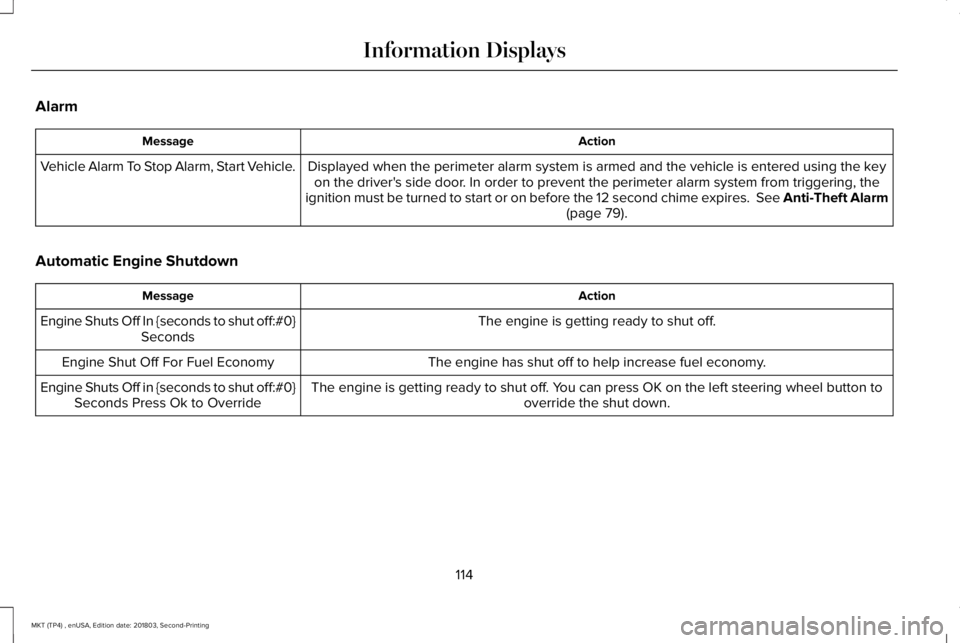
Alarm
ActionMessage
Displayed when the perimeter alarm system is armed and the vehicle is entered using the keyon the driver's side door. In order to prevent the perimeter alarm system from triggering, theignition must be turned to start or on before the 12 second chime expires. See Anti-Theft Alarm(page 79).
Vehicle Alarm To Stop Alarm, Start Vehicle.
Automatic Engine Shutdown
ActionMessage
The engine is getting ready to shut off.Engine Shuts Off In {seconds to shut off:#0}Seconds
The engine has shut off to help increase fuel economy.Engine Shut Off For Fuel Economy
The engine is getting ready to shut off. You can press OK on the left steering wheel button tooverride the shut down.Engine Shuts Off in {seconds to shut off:#0}Seconds Press Ok to Override
114
MKT (TP4) , enUSA, Edition date: 201803, Second-Printing
Information Displays
Page 123 of 575
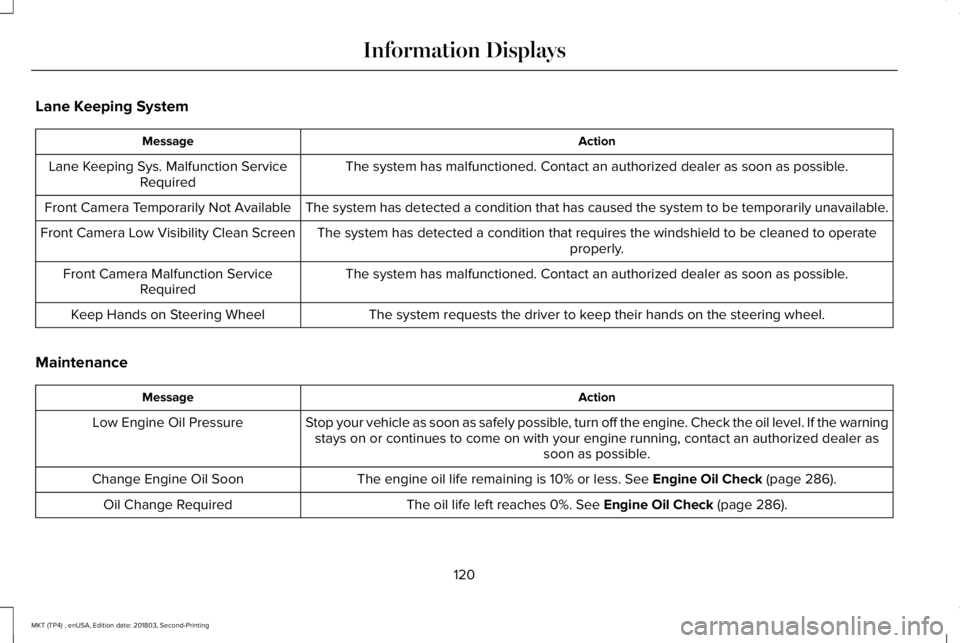
Lane Keeping System
ActionMessage
The system has malfunctioned. Contact an authorized dealer as soon as possible.Lane Keeping Sys. Malfunction ServiceRequired
The system has detected a condition that has caused the system to be temporarily unavailable.Front Camera Temporarily Not Available
The system has detected a condition that requires the windshield to be cleaned to operateproperly.Front Camera Low Visibility Clean Screen
The system has malfunctioned. Contact an authorized dealer as soon as possible.Front Camera Malfunction ServiceRequired
The system requests the driver to keep their hands on the steering wheel.Keep Hands on Steering Wheel
Maintenance
ActionMessage
Stop your vehicle as soon as safely possible, turn off the engine. Check the oil level. If the warningstays on or continues to come on with your engine running, contact an authorized dealer assoon as possible.
Low Engine Oil Pressure
The engine oil life remaining is 10% or less. See Engine Oil Check (page 286).Change Engine Oil Soon
The oil life left reaches 0%. See Engine Oil Check (page 286).Oil Change Required
120
MKT (TP4) , enUSA, Edition date: 201803, Second-Printing
Information Displays
Page 132 of 575
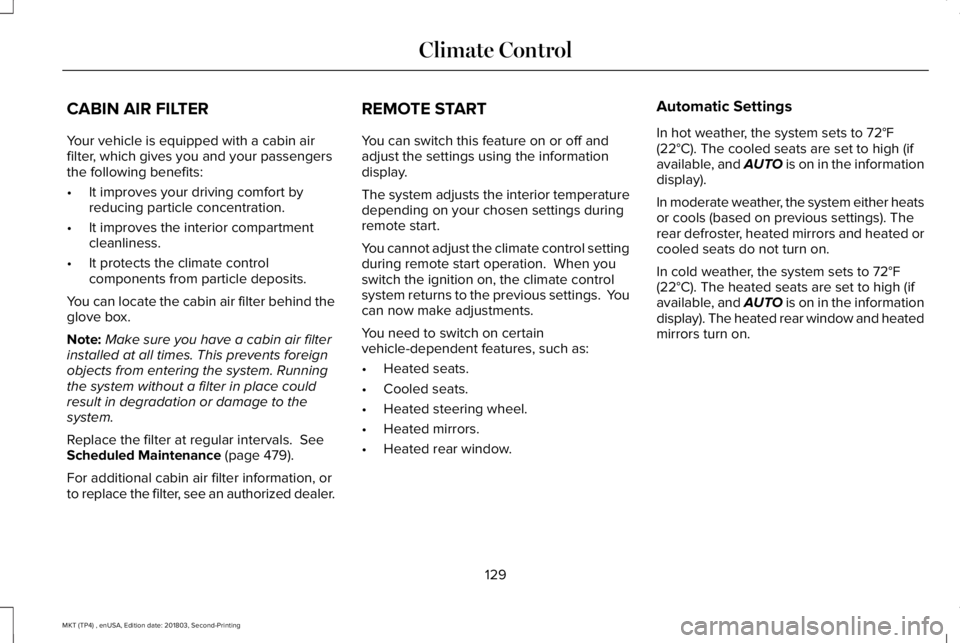
CABIN AIR FILTER
Your vehicle is equipped with a cabin airfilter, which gives you and your passengersthe following benefits:
•It improves your driving comfort byreducing particle concentration.
•It improves the interior compartmentcleanliness.
•It protects the climate controlcomponents from particle deposits.
You can locate the cabin air filter behind theglove box.
Note:Make sure you have a cabin air filterinstalled at all times. This prevents foreignobjects from entering the system. Runningthe system without a filter in place couldresult in degradation or damage to thesystem.
Replace the filter at regular intervals. SeeScheduled Maintenance (page 479).
For additional cabin air filter information, orto replace the filter, see an authorized dealer.
REMOTE START
You can switch this feature on or off andadjust the settings using the informationdisplay.
The system adjusts the interior temperaturedepending on your chosen settings duringremote start.
You cannot adjust the climate control settingduring remote start operation. When youswitch the ignition on, the climate controlsystem returns to the previous settings. Youcan now make adjustments.
You need to switch on certainvehicle-dependent features, such as:
•Heated seats.
•Cooled seats.
•Heated steering wheel.
•Heated mirrors.
•Heated rear window.
Automatic Settings
In hot weather, the system sets to 72°F(22°C). The cooled seats are set to high (ifavailable, and AUTO is on in the informationdisplay).
In moderate weather, the system either heatsor cools (based on previous settings). Therear defroster, heated mirrors and heated orcooled seats do not turn on.
In cold weather, the system sets to 72°F(22°C). The heated seats are set to high (ifavailable, and AUTO is on in the informationdisplay). The heated rear window and heatedmirrors turn on.
129
MKT (TP4) , enUSA, Edition date: 201803, Second-Printing
Climate Control
Page 133 of 575
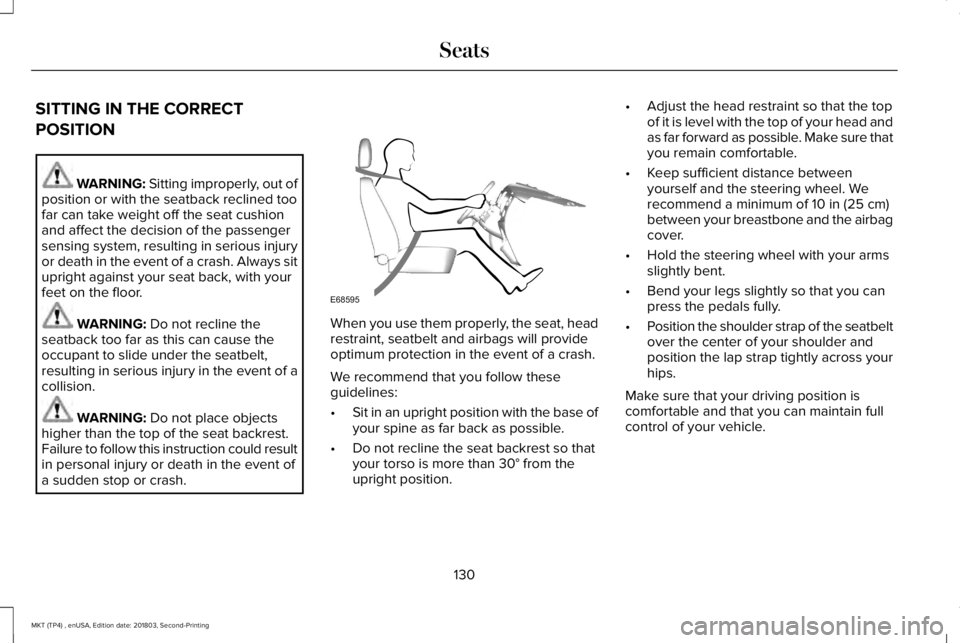
SITTING IN THE CORRECT
POSITION
WARNING: Sitting improperly, out ofposition or with the seatback reclined toofar can take weight off the seat cushionand affect the decision of the passengersensing system, resulting in serious injuryor death in the event of a crash. Always situpright against your seat back, with yourfeet on the floor.
WARNING: Do not recline theseatback too far as this can cause theoccupant to slide under the seatbelt,resulting in serious injury in the event of acollision.
WARNING: Do not place objectshigher than the top of the seat backrest.Failure to follow this instruction could resultin personal injury or death in the event ofa sudden stop or crash.
When you use them properly, the seat, headrestraint, seatbelt and airbags will provideoptimum protection in the event of a crash.
We recommend that you follow theseguidelines:
•Sit in an upright position with the base ofyour spine as far back as possible.
•Do not recline the seat backrest so thatyour torso is more than 30° from theupright position.
•Adjust the head restraint so that the topof it is level with the top of your head andas far forward as possible. Make sure thatyou remain comfortable.
•Keep sufficient distance betweenyourself and the steering wheel. Werecommend a minimum of 10 in (25 cm)between your breastbone and the airbagcover.
•Hold the steering wheel with your armsslightly bent.
•Bend your legs slightly so that you canpress the pedals fully.
•Position the shoulder strap of the seatbeltover the center of your shoulder andposition the lap strap tightly across yourhips.
Make sure that your driving position iscomfortable and that you can maintain fullcontrol of your vehicle.
130
MKT (TP4) , enUSA, Edition date: 201803, Second-Printing
SeatsE68595
Page 139 of 575
Saving a PreSet Position
1. Switch the ignition on.
2. Adjust the memory features to yourdesired position.
3.Press and hold the desired preset buttonuntil you hear a single tone.
You can save up to three preset memorypositions. You can save a memory preset atany time.
Recalling a PreSet Position
Press and release the preset buttonassociated with your desired driving position.The memory features move to the positionstored for that preset.
You can recall a programmed memoryposition:
•Only in park (P) or neutral (N) if theignition is on.
•In any gearshift position if the ignition isnot on.
You can also recall a programmed memoryposition by:
•Pressing your remote control transmitterunlock button (if the remote control isprogrammed to a memory position).
•Unlocking your vehicle with an intelligentaccess key (if it is programmed to amemory position).
Note:Using a linked keyfob to recall yourmemory position when the ignition is offmoves the seat to the Easy Entry position.
Note:Adjusting any active memory featureor pressing a memory switch during amemory recall cancels the operation.
Linking a PreSet Position to yourRemote Control or Intelligent AccessKey Fob
Your vehicle can save the preset memorypositions for up to two remote controls.
1. With the ignition on, move the memoryfeatures to the desired positions.
2.Press and hold the desired preset buttonfor about five seconds. A tone soundsafter about two seconds. Continueholding until you hear a second tone.
3. Within three seconds, press the lockbutton on the remote control you arelinking.
To unlink a remote control, follow the sameprocedure – except in step 3, press theunlock button on the remote control.
Note:If more than one linked remote controlor intelligent access key is in range, thememory function moves to the settings ofthe first key to initiate a memory recall.
Easy Entry and Exit Feature
This feature adjusts the position of the seatand steering column to allow easier exit andentry to the vehicle.
The driver seat automatically moves 2 in(5 cm) rearward when the transmission is inpark (P) and you switch the ignition off.
The driver seat and steering wheel return totheir previous positions when you switch theignition on.
136
MKT (TP4) , enUSA, Edition date: 201803, Second-Printing
Seats
Page 168 of 575

FUEL QUALITY
Choosing the Right Fuel
Your vehicle is designed to operate onregular unleaded gasoline with a minimumpump (R+M)/2 octane rating of 87.
Some fuel stations, particularly those in highaltitude areas, offer fuels posted as regularunleaded gasoline with an octane ratingbelow 87. The use of these fuels could resultin engine damage that will not be coveredby the vehicle warranty.
For best overall vehicle and engineperformance, premium fuel with an octanerating of 91 or higher is recommended. Theperformance gained by using premium fuelis most noticeable in hot weather as well asother conditions, for example when towinga trailer. See Towing (page 237).
Do not be concerned if the enginesometimes knocks lightly. However, if theengine knocks heavily while using fuel withthe recommended octane rating, contact anauthorized dealer to prevent any enginedamage.
We recommend Top Tier detergentgasolines, where available to help minimizeengine deposits and maintain optimal vehicleand engine performance. For additionalinformation, refer to www.toptiergas.com.
Note:Use of any fuel for which the vehiclewas not designed can impair the emissioncontrol system, cause loss of vehicleperformance, and cause damage to theengine which may not be covered by thevehicle Warranty.
Do not use:
•Diesel fuel.
•Fuels containing kerosene or paraffin.
•Fuel containing more than 15% ethanolor E85 fuel.
•Fuels containing methanol.
•Fuels containing metallic-based additives,including manganese-based compounds.
•Fuels containing the octane boosteradditive, methylcyclopentadienylmanganese tricarbonyl (MMT).
•Leaded fuel, using leaded fuel isprohibited by law.
The use of fuels with metallic compoundssuch as methylcyclopentadienyl manganesetricarbonyl (commonly known as MMT), whichis a manganese-based fuel additive, willimpair engine performance and affect theemission control system.
FUEL FILLER FUNNEL LOCATION
The fuel filler funnel is in the spare wheelstorage tray.
165
MKT (TP4) , enUSA, Edition date: 201803, Second-Printing
Fuel and RefuelingE161513