warning LINCOLN MKT 2019 Owner's Guide
[x] Cancel search | Manufacturer: LINCOLN, Model Year: 2019, Model line: MKT, Model: LINCOLN MKT 2019Pages: 575, PDF Size: 4.66 MB
Page 57 of 575
Note:When the passenger airbag statusindicator off light is illuminated, thepassenger (seat mounted) side airbag maybe disabled to avoid the risk of airbagdeployment injuries.
After all occupants have adjusted their seatsand put on seatbelts, it is very important thatthey continue to sit properly. A properlyseated occupant sits upright, leaning againstthe seatback, and centered on the seatcushion, with their feet comfortably extendedon the floor. Sitting improperly can increasethe chance of injury in a crash event. Forexample, if an occupant slouches, lies down,turns sideways, sits forward, leans forwardor sideways, or puts one or both feet up, thechance of injury during a crash greatlyincreases.
Make sure the front passengersensing system is operatingproperly. See Crash Sensors andAirbag Indicator (page 57).
Do not attempt to repair or service thesystem. Take your vehicle immediately to anauthorized dealer.
If it is necessary to modify an advanced frontairbag system to accommodate a personwith disabilities, contact the Ford CustomerRelationship Center. See Getting theServices You Need (page 254).
SIDE AIRBAGS
WARNING: Do not place objects ormount equipment on or near the airbagcover, on the side of the seatbacks (of thefront seats), or in front seat areas that maycome into contact with a deploying airbag.Failure to follow these instructions mayincrease the risk of personal injury in theevent of a crash.
WARNING: Do not use accessoryseat covers. The use of accessory seatcovers may prevent the deployment of theside airbags and increase the risk of injuryin an accident.
WARNING: Do not lean your headon the door. The side airbag could injureyou as it deploys from the side of theseatback.
WARNING: Do not attempt to service,repair, or modify the airbag, its fuses or theseat cover on a seat containing an airbagas you could be seriously injured or killed.Contact your authorized dealer as soon aspossible.
WARNING: If the side airbag hasdeployed, the airbag will not functionagain. The side airbag system (includingthe seat) must be inspected and servicedby an authorized dealer. If the airbag is notreplaced, the unrepaired area will increasethe risk of injury in a crash.
54
MKT (TP4) , enUSA, Edition date: 201803, Second-Printing
Supplementary Restraints SystemE67017
Page 58 of 575
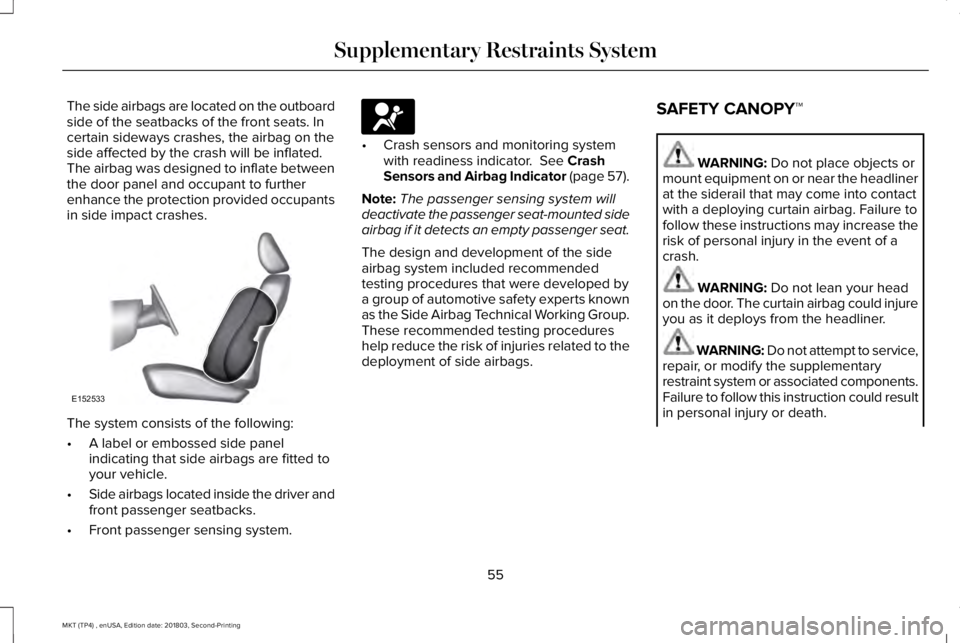
The side airbags are located on the outboardside of the seatbacks of the front seats. Incertain sideways crashes, the airbag on theside affected by the crash will be inflated.The airbag was designed to inflate betweenthe door panel and occupant to furtherenhance the protection provided occupantsin side impact crashes.
The system consists of the following:
•A label or embossed side panelindicating that side airbags are fitted toyour vehicle.
•Side airbags located inside the driver andfront passenger seatbacks.
•Front passenger sensing system.
•Crash sensors and monitoring systemwith readiness indicator. See CrashSensors and Airbag Indicator (page 57).
Note:The passenger sensing system willdeactivate the passenger seat-mounted sideairbag if it detects an empty passenger seat.
The design and development of the sideairbag system included recommendedtesting procedures that were developed bya group of automotive safety experts knownas the Side Airbag Technical Working Group.These recommended testing procedureshelp reduce the risk of injuries related to thedeployment of side airbags.
SAFETY CANOPY™
WARNING: Do not place objects ormount equipment on or near the headlinerat the siderail that may come into contactwith a deploying curtain airbag. Failure tofollow these instructions may increase therisk of personal injury in the event of acrash.
WARNING: Do not lean your headon the door. The curtain airbag could injureyou as it deploys from the headliner.
WARNING: Do not attempt to service,repair, or modify the supplementaryrestraint system or associated components.Failure to follow this instruction could resultin personal injury or death.
55
MKT (TP4) , enUSA, Edition date: 201803, Second-Printing
Supplementary Restraints SystemE152533 E67017
Page 59 of 575
WARNING: All occupants of yourvehicle, including the driver, should alwaysproperly wear their seatbelts, even whenan airbag supplemental restraint system isprovided. Failure to properly wear yourseatbelt could seriously increase the riskof injury or death.
WARNING: To reduce risk of injury,do not obstruct or place objects in thedeployment path of the airbag.
WARNING: If a supplementaryrestraint system component has deployed,it will not function again. Have the systemand associated components inspected assoon as possible. Failure to follow thisinstruction could result in personal injuryor death.
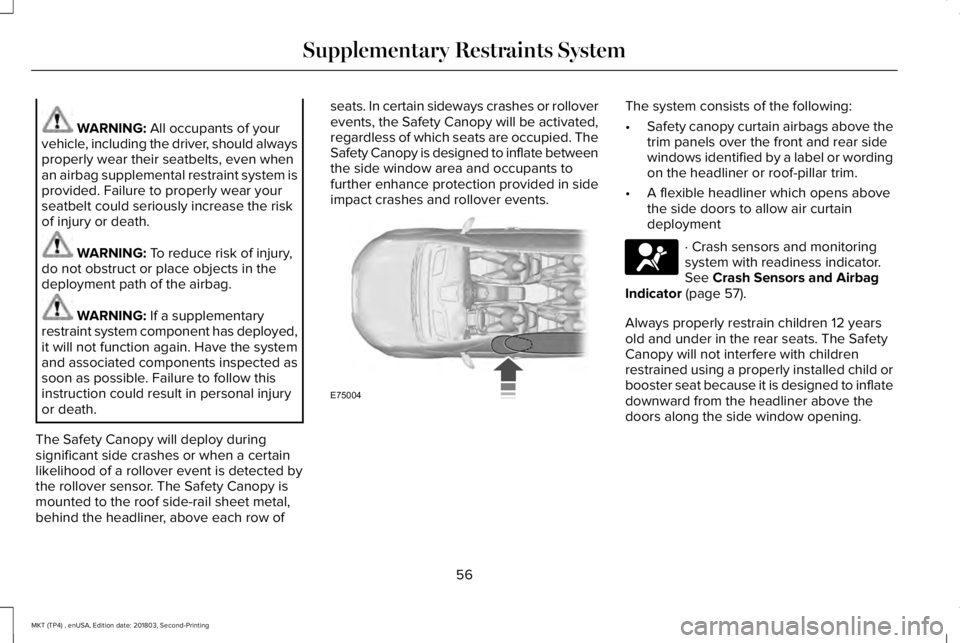
The Safety Canopy will deploy duringsignificant side crashes or when a certainlikelihood of a rollover event is detected bythe rollover sensor. The Safety Canopy ismounted to the roof side-rail sheet metal,behind the headliner, above each row of
seats. In certain sideways crashes or rolloverevents, the Safety Canopy will be activated,regardless of which seats are occupied. TheSafety Canopy is designed to inflate betweenthe side window area and occupants tofurther enhance protection provided in sideimpact crashes and rollover events.
The system consists of the following:
•Safety canopy curtain airbags above thetrim panels over the front and rear sidewindows identified by a label or wordingon the headliner or roof-pillar trim.
•A flexible headliner which opens abovethe side doors to allow air curtaindeployment
· Crash sensors and monitoringsystem with readiness indicator.See Crash Sensors and AirbagIndicator (page 57).
Always properly restrain children 12 yearsold and under in the rear seats. The SafetyCanopy will not interfere with childrenrestrained using a properly installed child orbooster seat because it is designed to inflatedownward from the headliner above thedoors along the side window opening.
56
MKT (TP4) , enUSA, Edition date: 201803, Second-Printing
Supplementary Restraints SystemE75004 E67017
Page 60 of 575
The design and development of the SafetyCanopy included recommended testingprocedures that were developed by a groupof automotive safety experts known as theSide Airbag Technical Working Group. Theserecommended testing procedures helpreduce the risk of injuries related to thedeployment of side airbags (including theSafety Canopy).
CRASH SENSORS AND AIRBAG
INDICATOR
WARNING: Modifying or addingequipment to the front end of the vehicle(including frame, bumper, front end bodystructure and tow hooks) may affect theperformance of the airbag system,increasing the risk of injury. Do not modifythe front end of the vehicle.
Your vehicle has a collection of crash andoccupant sensors which provide informationto the restraints control module. Therestraints control module deploys (activates)the front safety belt pretensioners, driverairbag, passenger airbag, seat mounted sideairbags, the Safety Canopy and rearinflatable safety belts. Based on the type ofcrash, the restraints control module willdeploy the appropriate safety devices.
The restraints control module also monitorsthe readiness of the above safety devicesplus the crash and occupant sensors. Thereadiness of the safety system is indicatedby a warning indicator light in the instrumentcluster or by a backup tone if the warninglight is not working. Routine maintenance ofthe airbag is not required.
A difficulty with the system is indicated byone or more of the following:
The readiness light will notilluminate immediately after theignition is turned on.
•The readiness light will either flash orstay lit.
•A series of five beeps will be heard. Thetone pattern will repeat periodically untilthe problem, the light or both arerepaired.
If any of these things happen, evenintermittently, have the supplementalrestraint system serviced at an authorizeddealer immediately. Unless serviced, thesystem may not function properly in theevent of a crash.
57
MKT (TP4) , enUSA, Edition date: 201803, Second-Printing
Supplementary Restraints SystemE67017
Page 62 of 575
GENERAL INFORMATION ON
RADIO FREQUENCIES
This device complies with Part 15 of the FCCRules and with Licence exempt RSSStandards of Industry Canada. Operation issubject to the following two conditions:
•This device may not cause harmfulinterference, and
•This device must accept any interferencereceived, including interference that maycause undesired operation.
WARNING: Changes or modificationsnot expressively approved by the partyresponsible for compliance could void theuser's authority to operate the equipment.The term "IC:" before the radio certificationnumber only signifies that Industry Canadatechnical specifications were met.
The typical operating range for yourtransmitter is approximately 33 ft (10 m).Vehicles with the remote start feature willhave a greater range. One of the followingcould cause a decrease in operating range:
•weather conditions
•nearby radio towers
•structures around the vehicle
•other vehicles parked next to yourvehicle
Other short-distance radio transmitters, suchas amateur radios, medical equipment,wireless headphones, remote controls andalarm systems may operate on the samefrequency as your remote control. If othertransmitters are operating on thosefrequencies, you may not be able to use yourremote control. Using your remote controlnear some types of electronic equipment,such as USB devices, computers or cellphones can interfere with remote operation.Operating your remote control near metal ormetallic-finished purses, bags or clothing caninterfere with remote operation. You can lockand unlock the doors with the key.
Note:Make sure to lock your vehicle beforeleaving it unattended.
Note:If you are in range, the remote controlwill operate if you press any buttonunintentionally.
Intelligent Access
The system uses a radio frequency signal tocommunicate with your vehicle and authorizeyour vehicle to unlock when one of thefollowing conditions are met:
•You touch the inside of any exterior doorhandle within 3 ft (1 m) proximity of anintelligent access key.
•You press the luggage compartmentbutton.
•You press a button on the transmitter.
If excessive radio frequency interference ispresent in the area or if the transmitterbattery is low, you may need to mechanicallyunlock your door. You can use themechanical key blade in your intelligentaccess key to open the driver door in thissituation. See Remote Control (page 60).
59
MKT (TP4) , enUSA, Edition date: 201803, Second-Printing
Keys and Remote Controls
Page 64 of 575
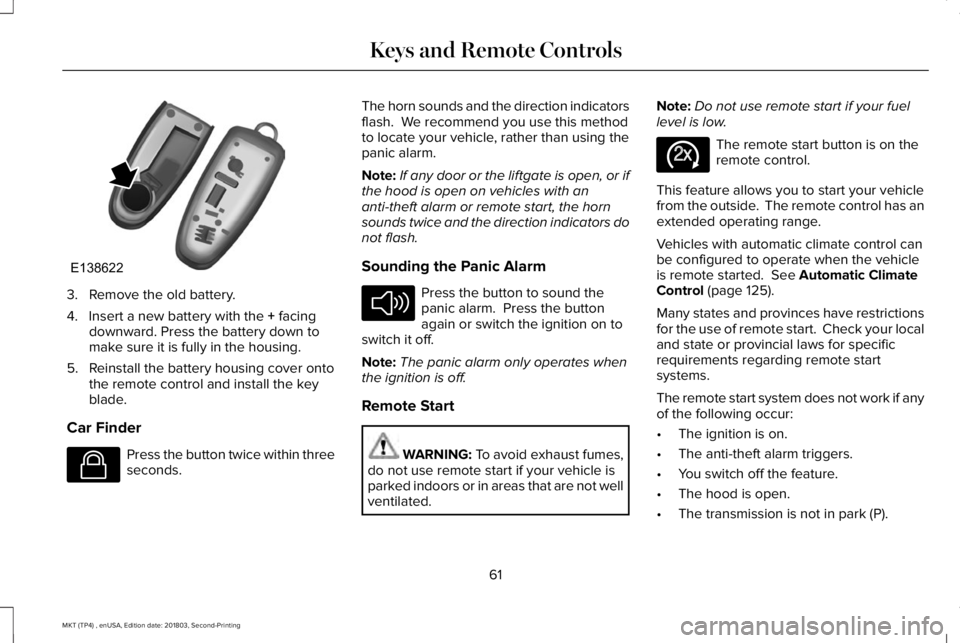
3. Remove the old battery.
4. Insert a new battery with the + facingdownward. Press the battery down tomake sure it is fully in the housing.
5. Reinstall the battery housing cover ontothe remote control and install the keyblade.
Car Finder
Press the button twice within threeseconds.
The horn sounds and the direction indicatorsflash. We recommend you use this methodto locate your vehicle, rather than using thepanic alarm.
Note:If any door or the liftgate is open, or ifthe hood is open on vehicles with ananti-theft alarm or remote start, the hornsounds twice and the direction indicators donot flash.
Sounding the Panic Alarm
Press the button to sound thepanic alarm. Press the buttonagain or switch the ignition on toswitch it off.
Note:The panic alarm only operates whenthe ignition is off.
Remote Start
WARNING: To avoid exhaust fumes,do not use remote start if your vehicle isparked indoors or in areas that are not wellventilated.
Note:Do not use remote start if your fuellevel is low.
The remote start button is on theremote control.
This feature allows you to start your vehiclefrom the outside. The remote control has anextended operating range.
Vehicles with automatic climate control canbe configured to operate when the vehicleis remote started. See Automatic ClimateControl (page 125).
Many states and provinces have restrictionsfor the use of remote start. Check your localand state or provincial laws for specificrequirements regarding remote startsystems.
The remote start system does not work if anyof the following occur:
•The ignition is on.
•The anti-theft alarm triggers.
•You switch off the feature.
•The hood is open.
•The transmission is not in park (P).
61
MKT (TP4) , enUSA, Edition date: 201803, Second-Printing
Keys and Remote ControlsE138622 E138623 E138624 E138625
Page 67 of 575
PRINCIPLE OF OPERATION
MyKey allows you to program keys withrestricted driving modes to promote gooddriving habits. All but one of the keysprogrammed to the vehicle can be activatedwith these restricted modes.
Any keys that have not been programmedare referred to as administrator keys oradmin keys. They can be used to:
•Create a MyKey.
•Program configurable MyKey settings.
•Clear all MyKey features.
When you have programmed a MyKey, youcan access the following information usingthe information display:
•How many admin keys and MyKeys areprogrammed to your vehicle.
•The total distance your vehicle hastraveled using a MyKey.
Note:All MyKeys are programmed to thesame settings. You cannot program themindividually.
Note:For vehicles equipped with apush-button start switch: When both a MyKeyand an admin key are present when youstart your vehicle, the system recognizes theadmin key only.
Non-configurable Settings
The following settings cannot be changedby an admin key user:
•Belt-Minder or safety belt reminder. Youcannot disable this feature. The audiosystem will mute when the front seatoccupants’ safety belts are not fastened.
•Early low fuel. The low fuel warning isactivated earlier, giving the MyKey usermore time to refuel.
•Driver assist features, if equipped on yourvehicle, are forced on: parking aid, blindspot information system (BLIS), crosstraffic alert, lane departure warning andforward collision warning system.
•Satellite radio adult content restrictions(available only in some markets).
Configurable Settings
With an admin key, you can configure certainMyKey settings when you first create aMyKey and before you recycle the key orrestart the vehicle. You can also change thesettings afterward with an admin key:
•A vehicle speed limit can be set.Warnings will be shown in the display,followed by an audible tone when yourvehicle reaches the set speed. Youcannot override the set speed by fullydepressing the accelerator pedal or bysetting cruise control.
WARNING: Do not set MyKeymaximum speed limit to a limit that willprevent the driver from maintaining a safespeed considering posted speed limits andprevailing road conditions. The driver isalways responsible to drive in accordancewith local laws and prevailing conditions.Failure to do so could result in accident orinjury.
64
MKT (TP4) , enUSA, Edition date: 201803, Second-Printing
MyKey™
Page 68 of 575
•Various vehicle speed reminders so youknow when your vehicle approaches thelimits. Warnings appear in the informationdisplay and an audible warning soundswhen you exceed the limit.
•Audio system maximum volume of 45%.A message will be shown in the displaywhen you attempt to exceed the limitedvolume. Also, the speed-sensitive orcompensated automatic volume controlwill be disabled.
•Always on setting. When this is selected,you will not be able to turn off AdvanceTrac or traction control, 911 Assist orEmergency Assistance, or Do Not Disturb(if your vehicle is equipped with thesefeatures).
CREATING A MYKEY
Use the information display to create aMyKey:
1. Insert the key you want to program intothe ignition. See Starting a GasolineEngine (page 159). If your vehicle isequipped with a push-button start, placethe remote control into the backup slot.See Passive Anti-Theft System (page77).
2. Switch the ignition on.
3.Access the main menu in the informationdisplay and then scroll through themenus to change the settings of yourMyKey. From the MyKey menu select theoption Create MyKey. See InformationDisplays (page 105).
4.When prompted, hold the OK button untilyou see a message informing you to labelthis key as a MyKey. The programmedrestrictions apply when you key off, openand close the driver door and restart yourvehicle with the programmed key ortransmitter.
MyKey is successfully created. Make sureyou label it so you can distinguish it from theadmin keys.
You can also program configurable settingsfor the key(s). See Programming andChanging Configurable Settings.
Programming and ChangingConfigurable Settings
Use the information display to access yourconfigurable MyKey settings.
1.Switch the ignition on using an admin keyor transmitter you want to program.
2.Access the main menu in the informationdisplay and then scroll through themenus to change the settings of yourMyKey. See Information Displays (page105).
3. Follow the instructions in the display.
Note:You can clear or change your MyKeysettings at any time during the same keycycle as you created the MyKey. Once youhave switched the vehicle off, however, youwill need an admin key to change or clearyour MyKey settings.
65
MKT (TP4) , enUSA, Edition date: 201803, Second-Printing
MyKey™
Page 77 of 575
POWER LIFTGATE
WARNING: It is extremely dangerousto ride in a cargo area, inside or outside ofa vehicle. In a crash, people riding in theseareas are more likely to be seriouslyinjured or killed. Do not allow people toride in any area of your vehicle that is notequipped with seats and seatbelts. Makesure everyone in your vehicle is in a seatand properly using a seatbelt. Failure tofollow this warning could result in seriouspersonal injury or death.
WARNING: Make sure to close andlatch the liftgate to prevent drawingexhaust fumes into your vehicle. This willalso prevent passengers and cargo fromfalling out. If you must drive with the liftgateopen, keep the vents or windows open sooutside air comes into your vehicle. Failureto follow this warning could result inserious personal injury.
WARNING: Keep keys out of reachof children. Do not allow children tooperate or play near an open or movingpower liftgate. You should supervise theoperation of the power liftgate at all times.
Note: Make sure that you close the liftgatebefore operating or moving your vehicle,especially in an enclosure, like a garage ora parking structure. This could damage theliftgate and its components.
Note: Do not hang anything, for example abike rack, from the glass or liftgate. Thiscould damage the liftgate and itscomponents.
The liftgate only operates with thetransmission in park (P).
Three warning tones sound as the liftgatebegins to power close. If there is a problemwith the open or close request, one of thefollowing may occur:
•One tone sounds if the ignition is on andthe transmission is not in park (P).
•Three tones sound if the battery voltageis below the minimum operating voltage.
•One tone sounds if the vehicle speed isat or above 3.1 mph (5 km/h)
If the liftgate starts to close after it has fullyopened, this indicates there may beexcessive weight on the liftgate or a possiblegas strut failure. A repetitive tone soundsand the liftgate closes under control. Removeany excessive weight from the liftgate. If theliftgate continues to close after opening,have the system checked by an authorizeddealer
Opening and Closing the Liftgate
WARNING: Make sure all personsare clear of the power liftgate area beforeusing the power liftgate control.
74
MKT (TP4) , enUSA, Edition date: 201803, Second-Printing
Liftgate
Page 79 of 575
Note: Entering your vehicle when the liftgateis closing can activate obstacle detection. To prevent this, allow the power liftgate tofully close before you enter your vehicle. Before driving off, check the instrumentcluster for a liftgate or door ajar message orwarning indicator. Failure to do this couldresult in unintentionally leaving the liftgateopen while driving.
Opening
The system stops when it detects anobstacle and two short tones sound. Whenyou remove the obstacle, you can continueto operate the liftgate.
76
MKT (TP4) , enUSA, Edition date: 201803, Second-Printing
Liftgate