ESP LINCOLN MKT 2019 Repair Manual
[x] Cancel search | Manufacturer: LINCOLN, Model Year: 2019, Model line: MKT, Model: LINCOLN MKT 2019Pages: 575, PDF Size: 4.66 MB
Page 409 of 575
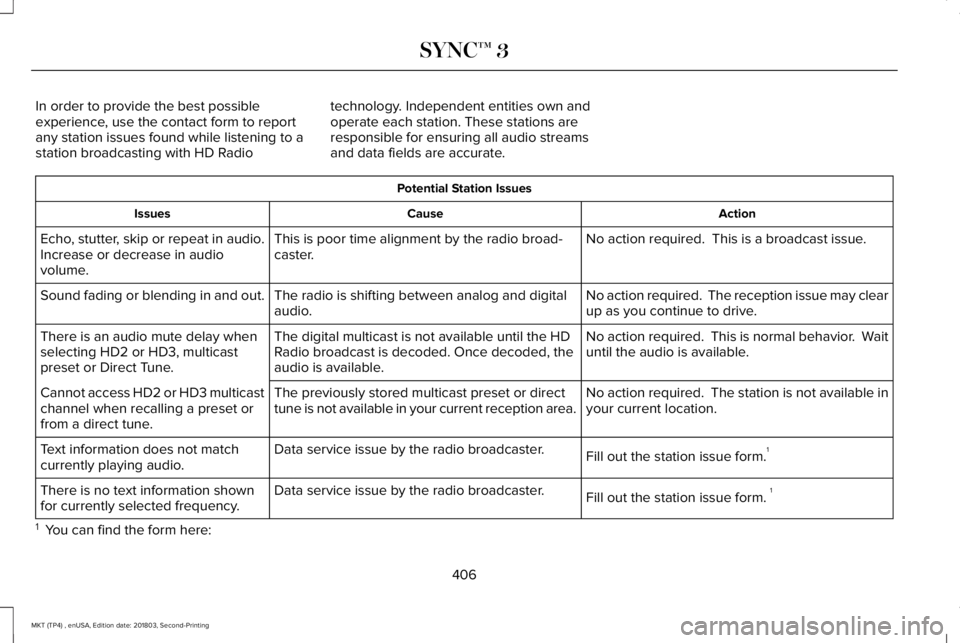
In order to provide the best possibleexperience, use the contact form to reportany station issues found while listening to astation broadcasting with HD Radio
technology. Independent entities own andoperate each station. These stations areresponsible for ensuring all audio streamsand data fields are accurate.
Potential Station Issues
ActionCauseIssues
No action required. This is a broadcast issue.This is poor time alignment by the radio broad-caster.Echo, stutter, skip or repeat in audio.Increase or decrease in audiovolume.
No action required. The reception issue may clearup as you continue to drive.The radio is shifting between analog and digitalaudio.Sound fading or blending in and out.
No action required. This is normal behavior. Waituntil the audio is available.The digital multicast is not available until the HDRadio broadcast is decoded. Once decoded, theaudio is available.
There is an audio mute delay whenselecting HD2 or HD3, multicastpreset or Direct Tune.
No action required. The station is not available inyour current location.The previously stored multicast preset or directtune is not available in your current reception area.Cannot access HD2 or HD3 multicastchannel when recalling a preset orfrom a direct tune.
Fill out the station issue form.1Data service issue by the radio broadcaster.Text information does not matchcurrently playing audio.
Fill out the station issue form. 1Data service issue by the radio broadcaster.There is no text information shownfor currently selected frequency.
1 You can find the form here:
406
MKT (TP4) , enUSA, Edition date: 201803, Second-Printing
SYNC™ 3
Page 410 of 575
Website
http://hdradio.com/stations/feedback
HD Radio Technology manufactured underlicense from iBiquity Digital Corporation andforeign patents. HD Radio and the HD andHD Radio logos are proprietary trademarksof DTS. The vehicle manufacturer and DTSare not responsible for the content sent usingHD Radio technology. Content may bechanged, added or deleted at any time atthe station owner's discretion.
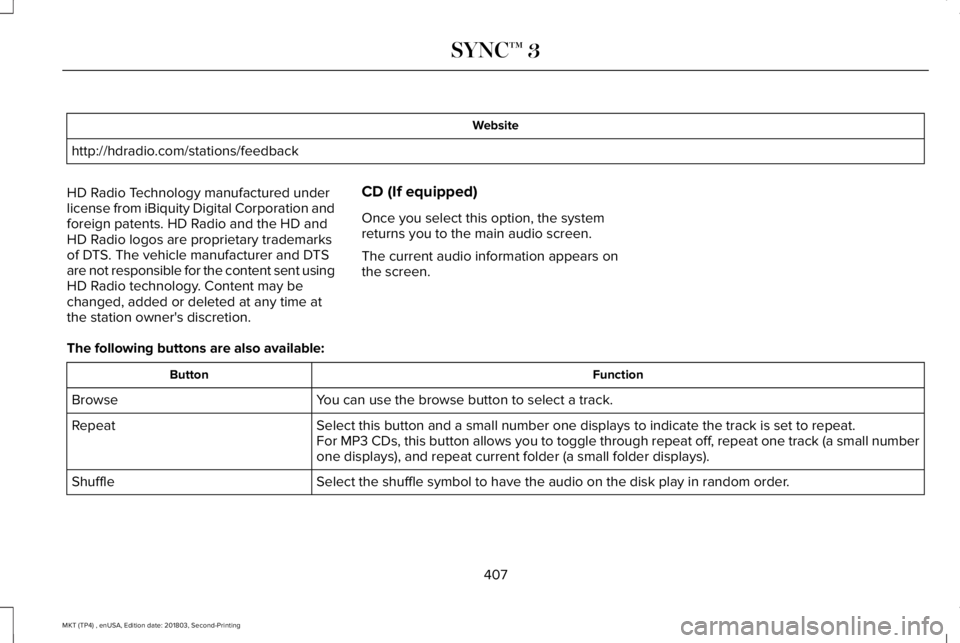
CD (If equipped)
Once you select this option, the systemreturns you to the main audio screen.
The current audio information appears onthe screen.
The following buttons are also available:
FunctionButton
You can use the browse button to select a track.Browse
Select this button and a small number one displays to indicate the track is set to repeat.RepeatFor MP3 CDs, this button allows you to toggle through repeat off, repeat one track (a small numberone displays), and repeat current folder (a small folder displays).
Select the shuffle symbol to have the audio on the disk play in random order.Shuffle
407
MKT (TP4) , enUSA, Edition date: 201803, Second-Printing
SYNC™ 3
Page 417 of 575
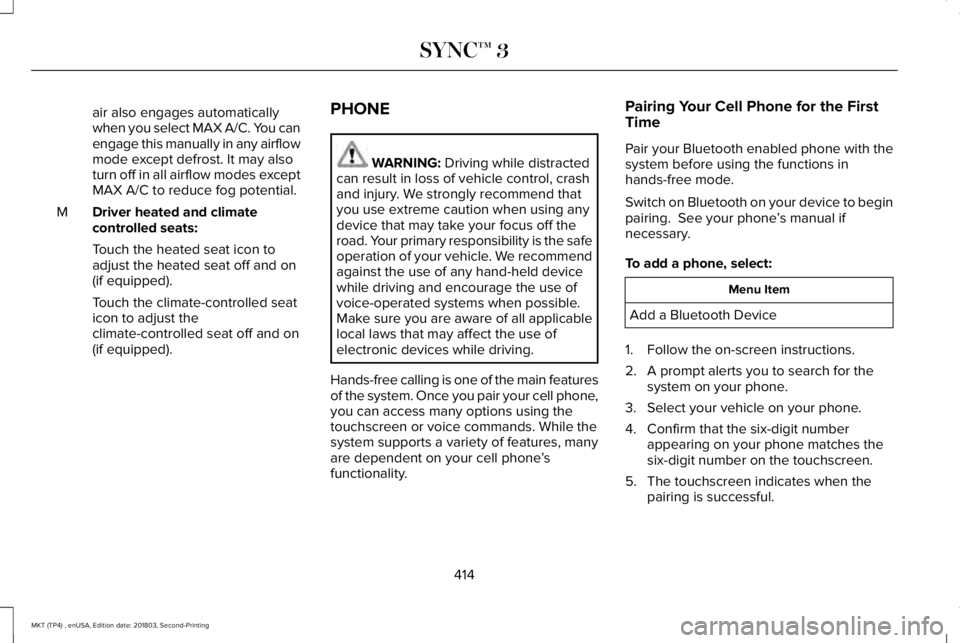
air also engages automaticallywhen you select MAX A/C. You canengage this manually in any airflowmode except defrost. It may alsoturn off in all airflow modes exceptMAX A/C to reduce fog potential.
Driver heated and climatecontrolled seats:M
Touch the heated seat icon toadjust the heated seat off and on(if equipped).
Touch the climate-controlled seaticon to adjust theclimate-controlled seat off and on(if equipped).
PHONE
WARNING: Driving while distractedcan result in loss of vehicle control, crashand injury. We strongly recommend thatyou use extreme caution when using anydevice that may take your focus off theroad. Your primary responsibility is the safeoperation of your vehicle. We recommendagainst the use of any hand-held devicewhile driving and encourage the use ofvoice-operated systems when possible.Make sure you are aware of all applicablelocal laws that may affect the use ofelectronic devices while driving.
Hands-free calling is one of the main featuresof the system. Once you pair your cell phone,you can access many options using thetouchscreen or voice commands. While thesystem supports a variety of features, manyare dependent on your cell phone’sfunctionality.
Pairing Your Cell Phone for the FirstTime
Pair your Bluetooth enabled phone with thesystem before using the functions inhands-free mode.
Switch on Bluetooth on your device to beginpairing. See your phone’s manual ifnecessary.
To add a phone, select:
Menu Item
Add a Bluetooth Device
1. Follow the on-screen instructions.
2. A prompt alerts you to search for thesystem on your phone.
3. Select your vehicle on your phone.
4. Confirm that the six-digit numberappearing on your phone matches thesix-digit number on the touchscreen.
5. The touchscreen indicates when thepairing is successful.
414
MKT (TP4) , enUSA, Edition date: 201803, Second-Printing
SYNC™ 3
Page 423 of 575
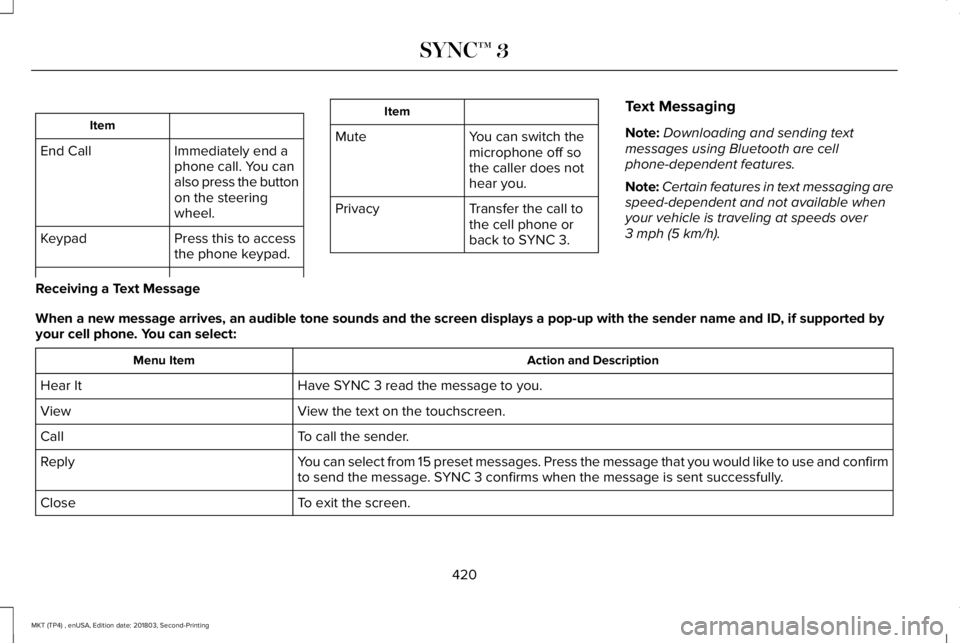
Item
Immediately end aphone call. You canalso press the buttonon the steeringwheel.
End Call
Press this to accessthe phone keypad.Keypad
Item
MuteYou can switch themicrophone off sothe caller does nothear you.
Transfer the call tothe cell phone orback to SYNC 3.
Privacy
Text Messaging
Note:Downloading and sending textmessages using Bluetooth are cellphone-dependent features.
Note:Certain features in text messaging arespeed-dependent and not available whenyour vehicle is traveling at speeds over3 mph (5 km/h).
Receiving a Text Message
When a new message arrives, an audible tone sounds and the screen displays a pop-up with the sender name and ID, if supported byyour cell phone. You can select:
Action and DescriptionMenu Item
Have SYNC 3 read the message to you.Hear It
View the text on the touchscreen.View
To call the sender.Call
You can select from 15 preset messages. Press the message that you would like to use and confirmto send the message. SYNC 3 confirms when the message is sent successfully.Reply
To exit the screen.Close
420
MKT (TP4) , enUSA, Edition date: 201803, Second-Printing
SYNC™ 3
Page 436 of 575
HERE is the digital map provider for thenavigation application. If you find map dataerrors, you may report them directly to HEREby going to www.here.com/mapcreator.HERE evaluates all reported map errors andresponds with the result of their investigationby e-mail.
Map coverage includes the USA (includingPuerto Rico and the US Virgin Islands),Canada and Mexico.
APPS
The system enables voice, steering wheel,and touch screen control of SYNC 3 AppLinkenabled smartphone apps. When an app isrunning through AppLink, you can controlmain features of the app through voicecommands and steering wheel controls.
Note:Available AppLink enabled apps willvary by market.
Note:You must pair and connect yoursmartphone via Bluetooth to SYNC 3 toaccess AppLink.
Note:iPhone users need to connect thephone to the USB port.
Note:For information on available apps,supported smartphone devices andtroubleshooting tips please visit:
Websites
owner.lincoln.comwww.syncmyride.cawww.syncmaroute.ca
Note:Make sure you have an active accountfor the app that you have downloaded. Someapps will work with no setup. Other apps willwant you to configure your personal settingsand personalize your experience by creatingstations or favorites. We recommend you dothis at home or outside of your vehicle.
Note:We encourage you to review thesmartphone app’s terms of service andprivacy policies because Lincoln is notresponsible for your app or its use of data.
Note:AppLink is a native SYNC systemfeature. Accessing mobile apps throughAppLink is only possible when Android Autoor Apple CarPlay are disabled. Some appsmay only be accessible in the car throughAppLink and others only through AndroidAuto or Apple CarPlay. Please refer to theSmartphone Connectivity information todisable Android Auto or Apple CarPlay.
Note:In order to use an app with SYNC 3,the app needs to be running in thebackground of your phone. If you shut downthe app on your phone, it shuts down theapp on SYNC 3 as well.
Note:If a SYNC 3 AppLink compatible appis not shown in the Apps Domain, make surethe required app is running on the mobiledevice.
433
MKT (TP4) , enUSA, Edition date: 201803, Second-Printing
SYNC™ 3
Page 437 of 575
Action and Descrip-tionMenu Item
SYNC 3 will searchand connect tocompatible app(s)running on yourmobile device.
Find Mobile Apps
Enabling SYNC 3 Mobile Apps
In order to enable mobile apps, SYNC 3requires user consent to send and receiveapp authorization information and updatesusing the data plan associated with theconnected device.
The connected device sends data to Lincolnin the United States. The information isencrypted and includes your VIN, SYNC 3module number, odometer, usage statisticsand debugging information. We retain thisdata for only as long as necessary to providethis service, troubleshoot, and improveproducts and services and to offer youproducts and services that may interest youwhere allowed by law.
Note:You must enable mobile apps for eachconnected device the first time you select amobile app using the system.
Note:Lincoln reserves the right to limitfunctionality or deactivate mobile apps atany time.
Note: Standard data rates apply. Lincoln isnot responsible for any additional chargesyou may receive from your service provider,when your vehicle sends or receives datathrough the connected device. This includesany additional charges incurred due todriving in areas when roaming out of a homenetwork.
You can enable and disable apps throughsettings. See Settings (page 436).
App Permissions
The system organizes the app permissionsinto groups. You can individually grant thesegroup permissions.You can change apermission group status any time when notdriving, by using the settings menu. Whilein the settings menu, you can also see thedata included in each group.
When you launch an app using SYNC 3, thesystem may ask you to grant certainpermissions, for example Vehicle information,Driving characteristics, GPS and Speed,and/or Push notifications. You can enable allgroups or none of them during the initial apppermissions prompts. The settings menuoffers individual group permission control.
Note:You are only prompted to grantpermissions the first time you use an appwith SYNC 3.
Note:If you disable group permissions, appswill still be enabled to work with SYNC 3unless you deactivate All Apps in the settingsmenu.
SiriusXM Traffic and Travel Link (If
Equipped)
WARNING: Driving while distractedcan result in loss of vehicle control, crashand injury. We strongly recommend thatyou use extreme caution when using anydevice that may take your focus off theroad. Your primary responsibility is the safe
434
MKT (TP4) , enUSA, Edition date: 201803, Second-Printing
SYNC™ 3
Page 438 of 575
operation of your vehicle. We recommendagainst the use of any hand-held devicewhile driving and encourage the use ofvoice-operated systems when possible.Make sure you are aware of all applicablelocal laws that may affect the use ofelectronic devices while driving.
Note:SiriusXM Traffic and Travel Link maynot be available in all markets.
Note:In order to use SiriusXM Traffic andTravel Link, your vehicle must havenavigation.
Note:A paid subscription is required toaccess and use these features. Go towww.siriusxm.com/travellink for moreinformation.
Note:Visit www.siriusxm.com/traffic and clickon Coverage map and details for a completelisting of all traffic areas covered by SiriusXMTraffic and Travel Link.
Note:Neither Sirius nor Lincoln isresponsible for any errors or inaccuracies inthe SiriusXM Traffic and Travel Link servicesor its use in vehicles.
When you subscribe to SiriusXM Traffic andTravel Link, it can help you locate the bestgas prices, find movie listings, get currenttraffic alerts, view the current weather map,get accurate ski conditions and see scoresto current sports games.
Action and DescriptionMenu Item
Touch these buttons to identify traffic incidents on your route, near your vehicle’s current locationor near any of your favorite places, if programmed.Traffic on Route
Traffic Nearby
Touch this button to view fuel prices at stations close to your vehicle’s location or on an activenavigation route.Fuel Prices
Touch this button to view nearby movie theaters and their show times, if available.Movie Listings
Touch this button to view the nearby weather, current weather, or the five-day forecast for thechosen area.Weather
Select to see the weather map, which can show storms,radar information, charts and winds.Map
435
MKT (TP4) , enUSA, Edition date: 201803, Second-Printing
SYNC™ 3
Page 452 of 575
Navigation Source Selection
The screen lists available alternativenavigation sources using Applink.
Mobile Apps
You can enable the control of compatiblemobile apps running on your Bluetooth orUSB device on SYNC 3. In order to enablemobile apps, SYNC 3 requires user consentto send and receive app authorizationinformation and updates using the data planassociated with the connected device.
The connected devices send data to us inthe United States. The encrypted informationincludes your VIN, SYNC 3 module number,anonymous usage statistics and debugginginformation. Updates may take place.
Note:Not all Mobile Apps are compatiblewith the system.
Note:Standard data rates apply. We are notresponsible for any additional charges youmay receive from your service provider,when your vehicle sends or receives datathrough the connected device.
Action and DescriptionMenu Item
Enable or disable the use of mobile apps onSYNC 3.OnMobile Apps
OffDisabling mobile apps in the settings menudisables automatic updates and the use ofmobile apps on SYNC 3.
You can view the status of mobile app permissions in the settings menu.
Once Mobile Apps is enabled, you have the following options:
This provides information on the current state of available app updates.Update Mobile Apps
There are three possible statuses:
449
MKT (TP4) , enUSA, Edition date: 201803, Second-Printing
SYNC™ 3
Page 453 of 575
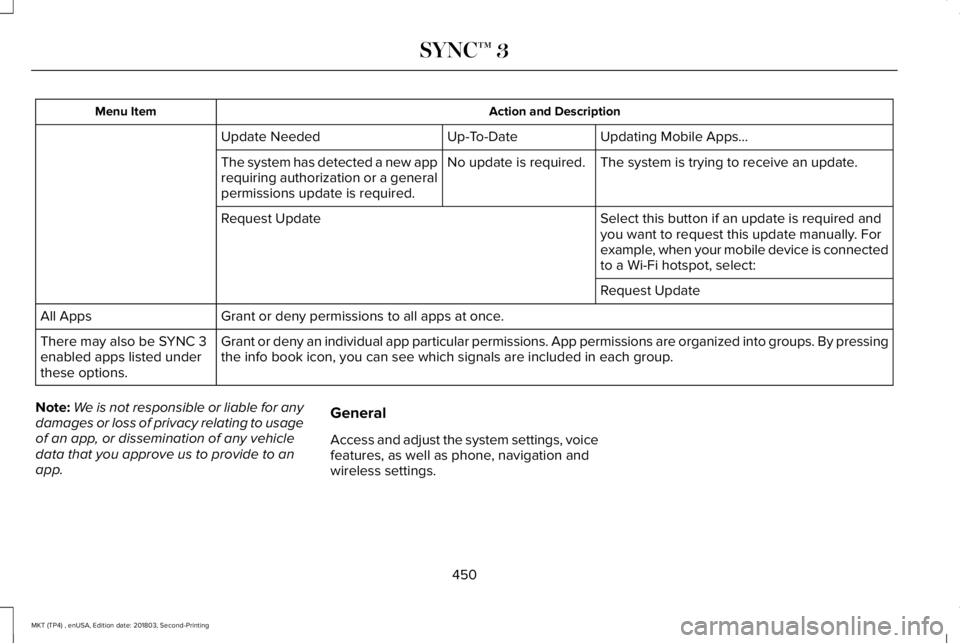
Action and DescriptionMenu Item
Updating Mobile Apps…Up-To-DateUpdate Needed
The system is trying to receive an update.No update is required.The system has detected a new apprequiring authorization or a generalpermissions update is required.
Select this button if an update is required andyou want to request this update manually. Forexample, when your mobile device is connectedto a Wi-Fi hotspot, select:
Request Update
Request Update
Grant or deny permissions to all apps at once.All Apps
Grant or deny an individual app particular permissions. App permissions are organized into groups. By pressingthe info book icon, you can see which signals are included in each group.There may also be SYNC 3enabled apps listed underthese options.
Note:We is not responsible or liable for anydamages or loss of privacy relating to usageof an app, or dissemination of any vehicledata that you approve us to provide to anapp.
General
Access and adjust the system settings, voicefeatures, as well as phone, navigation andwireless settings.
450
MKT (TP4) , enUSA, Edition date: 201803, Second-Printing
SYNC™ 3
Page 456 of 575
Note:The Vehicle Wi-Fi Hotspot (VehicleHotspot) may be operational while ignitionis On and may remain operational while theignition is Off.
Note:Vehicle Hotspot services are providedby the vehicle network carrier, subject toyour vehicle network carrier agreement,coverage and availability.
Note:It is the account owner’s responsibilityto remove the vehicle from the vehiclenetwork carrier account when ownership ofthe vehicle is transferred. If the owner wouldlike to remove the vehicle from the accountfor any reason, please contact your vehiclenetwork carrier for more information.
Note:Data, such as the Vehicle IdentificationNumber (VIN), SIM Card ID, and data planusage, is shared between us and the vehiclenetwork carrier to provide the VehicleHotspot service in accordance with yourvehicle network carrier agreement, coverageand availability, and may be used to enablea seamless transition from an old to newembedded modem and to confirm anyupdates are successfully delivered.
Note:For your convenience data usage maybe available for monitoring under Settingsbut may not reflect actual or current usage.The vehicle network carrier is responsiblefor providing information about your account.Please contact the vehicle network carrierfor more information.
Note:We may need to update operatingsystem software on your vehicle, includingsecurity updates and bug fixes, to keepconnected services current, like VehicleHotspot, without prior notice to you.
Ambient Lighting (If Equipped)
Tap a color once to active ambient lighting.This sets the color to the highest intensity.
You can drag the colors up and down toincrease or decrease the intensity.
To switch ambient lighting off, press theactive color once or drag the active color allthe way down to zero intensity.
Vehicle
Note:Your vehicle may not have all of thesefeatures.
You can select the following features toupdate their settings.
Door Keypad Code
Select this button to add or erase a personaldoor keypad code. To add or erase apersonal code, you first need to enter thefive-digit factory set code. You can find thiscode on the owner's wallet card in the glovebox or from your authorized dealer.
453
MKT (TP4) , enUSA, Edition date: 201803, Second-Printing
SYNC™ 3