fuel LINCOLN MKT 2019 Repair Manual
[x] Cancel search | Manufacturer: LINCOLN, Model Year: 2019, Model line: MKT, Model: LINCOLN MKT 2019Pages: 575, PDF Size: 4.66 MB
Page 430 of 575
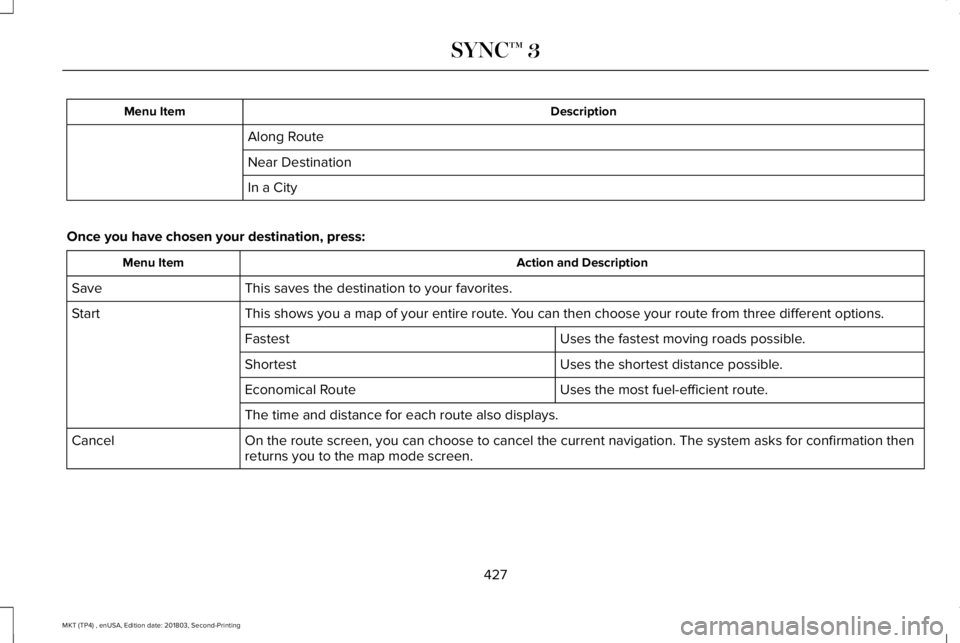
DescriptionMenu Item
Along Route
Near Destination
In a City
Once you have chosen your destination, press:
Action and DescriptionMenu Item
This saves the destination to your favorites.Save
This shows you a map of your entire route. You can then choose your route from three different options.Start
Uses the fastest moving roads possible.Fastest
Uses the shortest distance possible.Shortest
Uses the most fuel-efficient route.Economical Route
The time and distance for each route also displays.
On the route screen, you can choose to cancel the current navigation. The system asks for confirmation thenreturns you to the map mode screen.Cancel
427
MKT (TP4) , enUSA, Edition date: 201803, Second-Printing
SYNC™ 3
Page 432 of 575
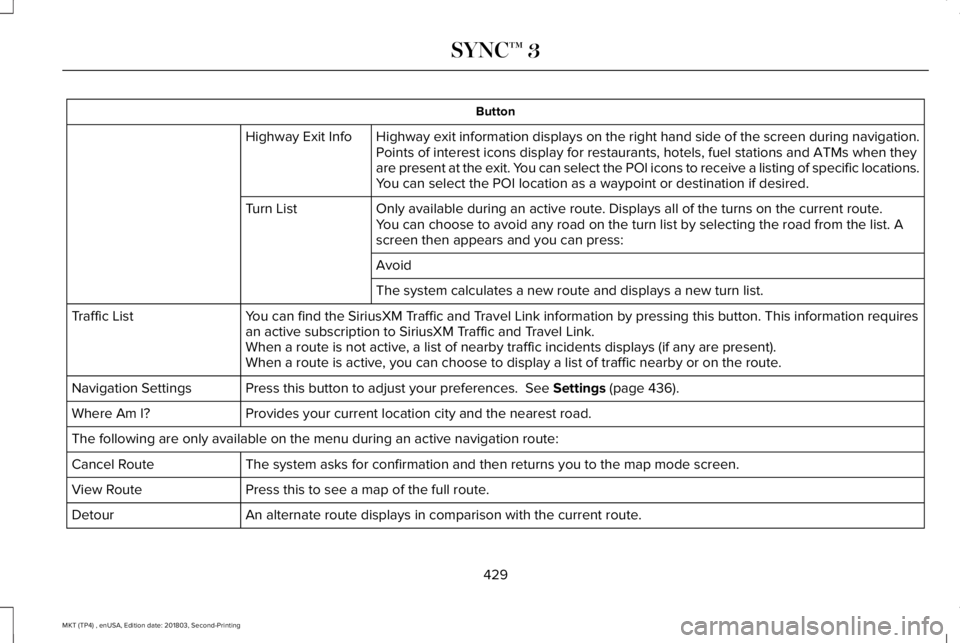
Button
Highway exit information displays on the right hand side of the screen during navigation.Highway Exit InfoPoints of interest icons display for restaurants, hotels, fuel stations and ATMs when theyare present at the exit. You can select the POI icons to receive a listing of specific locations.You can select the POI location as a waypoint or destination if desired.
Only available during an active route. Displays all of the turns on the current route.Turn ListYou can choose to avoid any road on the turn list by selecting the road from the list. Ascreen then appears and you can press:
Avoid
The system calculates a new route and displays a new turn list.
You can find the SiriusXM Traffic and Travel Link information by pressing this button. This information requiresan active subscription to SiriusXM Traffic and Travel Link.Traffic List
When a route is not active, a list of nearby traffic incidents displays (if any are present).When a route is active, you can choose to display a list of traffic nearby or on the route.
Press this button to adjust your preferences. See Settings (page 436).Navigation Settings
Provides your current location city and the nearest road.Where Am I?
The following are only available on the menu during an active navigation route:
The system asks for confirmation and then returns you to the map mode screen.Cancel Route
Press this to see a map of the full route.View Route
An alternate route displays in comparison with the current route.Detour
429
MKT (TP4) , enUSA, Edition date: 201803, Second-Printing
SYNC™ 3
Page 438 of 575
operation of your vehicle. We recommendagainst the use of any hand-held devicewhile driving and encourage the use ofvoice-operated systems when possible.Make sure you are aware of all applicablelocal laws that may affect the use ofelectronic devices while driving.
Note:SiriusXM Traffic and Travel Link maynot be available in all markets.
Note:In order to use SiriusXM Traffic andTravel Link, your vehicle must havenavigation.
Note:A paid subscription is required toaccess and use these features. Go towww.siriusxm.com/travellink for moreinformation.
Note:Visit www.siriusxm.com/traffic and clickon Coverage map and details for a completelisting of all traffic areas covered by SiriusXMTraffic and Travel Link.
Note:Neither Sirius nor Lincoln isresponsible for any errors or inaccuracies inthe SiriusXM Traffic and Travel Link servicesor its use in vehicles.
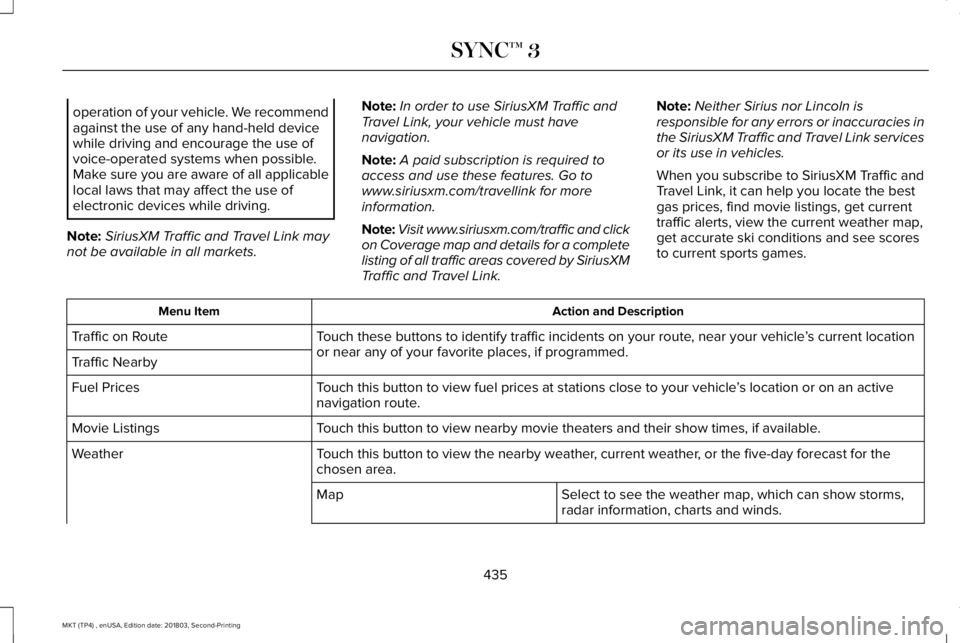
When you subscribe to SiriusXM Traffic andTravel Link, it can help you locate the bestgas prices, find movie listings, get currenttraffic alerts, view the current weather map,get accurate ski conditions and see scoresto current sports games.
Action and DescriptionMenu Item
Touch these buttons to identify traffic incidents on your route, near your vehicle’s current locationor near any of your favorite places, if programmed.Traffic on Route
Traffic Nearby
Touch this button to view fuel prices at stations close to your vehicle’s location or on an activenavigation route.Fuel Prices
Touch this button to view nearby movie theaters and their show times, if available.Movie Listings
Touch this button to view the nearby weather, current weather, or the five-day forecast for thechosen area.Weather
Select to see the weather map, which can show storms,radar information, charts and winds.Map
435
MKT (TP4) , enUSA, Edition date: 201803, Second-Printing
SYNC™ 3
Page 477 of 575
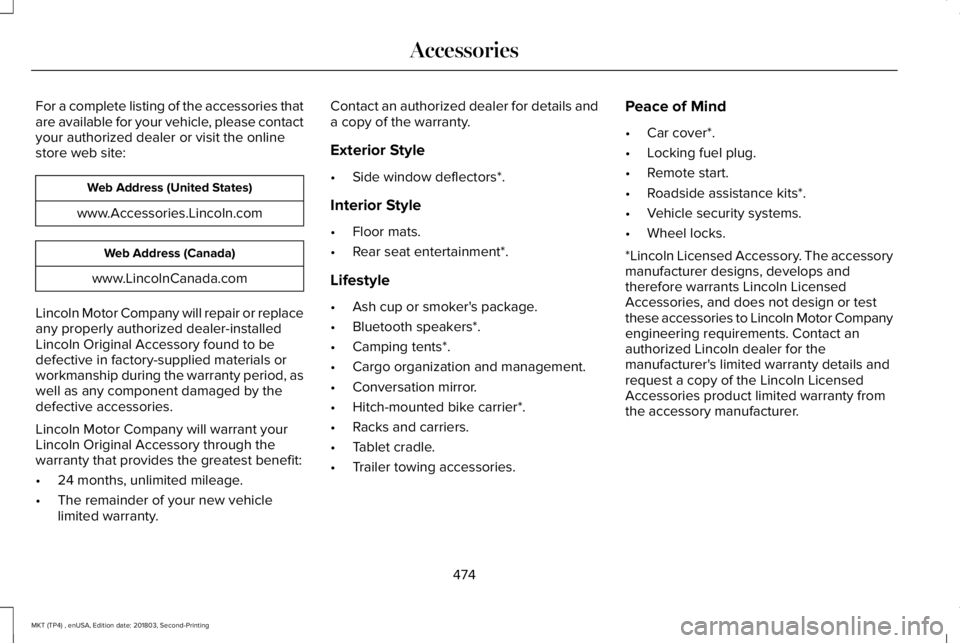
For a complete listing of the accessories thatare available for your vehicle, please contactyour authorized dealer or visit the onlinestore web site:
Web Address (United States)
www.Accessories.Lincoln.com
Web Address (Canada)
www.LincolnCanada.com
Lincoln Motor Company will repair or replaceany properly authorized dealer-installedLincoln Original Accessory found to bedefective in factory-supplied materials orworkmanship during the warranty period, aswell as any component damaged by thedefective accessories.
Lincoln Motor Company will warrant yourLincoln Original Accessory through thewarranty that provides the greatest benefit:
•24 months, unlimited mileage.
•The remainder of your new vehiclelimited warranty.
Contact an authorized dealer for details anda copy of the warranty.
Exterior Style
•Side window deflectors*.
Interior Style
•Floor mats.
•Rear seat entertainment*.
Lifestyle
•Ash cup or smoker's package.
•Bluetooth speakers*.
•Camping tents*.
•Cargo organization and management.
•Conversation mirror.
•Hitch-mounted bike carrier*.
•Racks and carriers.
•Tablet cradle.
•Trailer towing accessories.
Peace of Mind
•Car cover*.
•Locking fuel plug.
•Remote start.
•Roadside assistance kits*.
•Vehicle security systems.
•Wheel locks.
*Lincoln Licensed Accessory. The accessorymanufacturer designs, develops andtherefore warrants Lincoln LicensedAccessories, and does not design or testthese accessories to Lincoln Motor Companyengineering requirements. Contact anauthorized Lincoln dealer for themanufacturer's limited warranty details andrequest a copy of the Lincoln LicensedAccessories product limited warranty fromthe accessory manufacturer.
474
MKT (TP4) , enUSA, Edition date: 201803, Second-Printing
Accessories
Page 479 of 575
PROTECT YOURSELF FROM THE RISINGCOST OF VEHICLE REPAIRS WITHLINCOLN PROTECT EXTENDED SERVICEPLAN.
Lincoln Protect Extended Service Plans(U.S. Only)
Lincoln Protect means peace of mind. It’s theextended service plan backed by the LincolnMotor Company, and provides moreprotection beyond the New Vehicle LimitedWarranty coverage. When you visit yourLincoln Dealer, insist on genuine LincolnProtect extended service plans!
Lincoln Protect Extended Service Plan CanQuickly Pay for Itself
One trip to the Service Center could easilyexceed the price of your Lincoln Protectextended service plan. With Lincoln Protectyou minimize your risk for unexpected repairbills and rising repair costs.
Up to 1000+ Covered Vehicle Components
There are four mechanical Lincoln Protectextended service plans with different levelsof coverage. Ask your authorized dealer fordetails.
1.PremiumCARE - Our most comprehensivecoverage. With over 1,000 coveredcomponents, this plan is so complete it’sprobably easier to list what’s not covered.
2.ExtraCARE - Covers 113 components, andincludes many high-tech items.
3. BaseCARE - Covers 84 components.
4. PowertrainCARE - Covers 29 criticalcomponents.
Lincoln Protect extended service plans arehonored by all authorized Lincoln dealers inthe U.S., Canada and Mexico.
That means you get:
•Reliable, quality service at any Lincoln orFord dealership.
•Repairs performed by factory trainedtechnicians, using genuine parts.
Rental Car Reimbursement
1st day Rental Benefit
If you bring your car into your dealer forservice, we’ll give you a loaner to use for theday.
Extended Rental Benefits
If your vehicle is kept overnight for coveredrepairs, you are eligible for rental carcoverage, including bumper to bumperwarranty repairs, and Field Service Actions.
Roadside Assistance
Exclusive 24/7 roadside assistance, including:
•Towing, flat-tire change and battery jumpstarts.
•Out of fuel and lock-out assistance.
•Travel expense reimbursement forlodging, meals and rental car.
•Assistance for taxi, shuttle, rental carcoverage and other transportation.
476
MKT (TP4) , enUSA, Edition date: 201803, Second-Printing
Lincoln Protect
Page 484 of 575
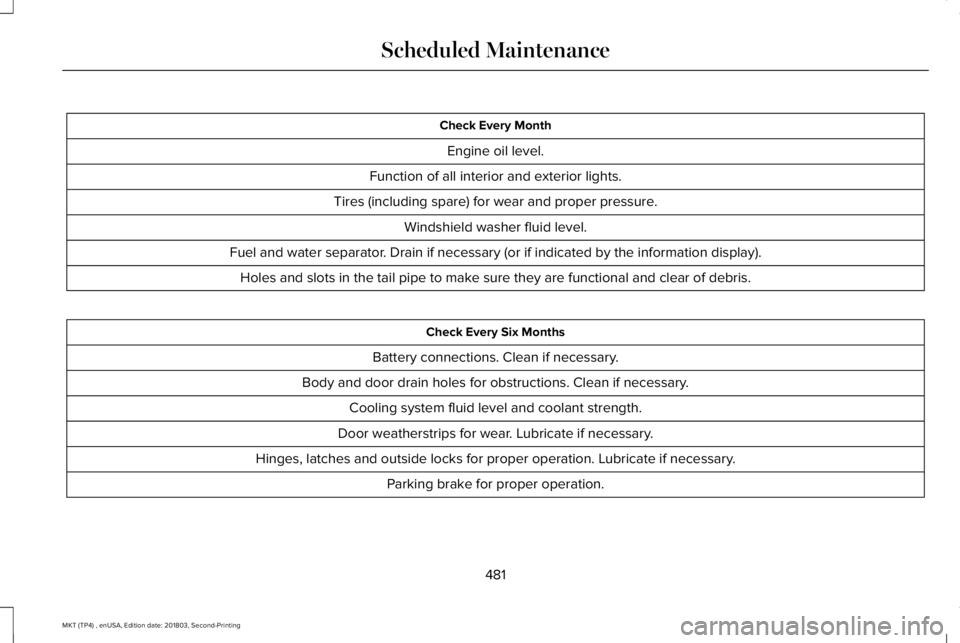
Check Every Month
Engine oil level.
Function of all interior and exterior lights.
Tires (including spare) for wear and proper pressure.
Windshield washer fluid level.
Fuel and water separator. Drain if necessary (or if indicated by the information display).
Holes and slots in the tail pipe to make sure they are functional and clear of debris.
Check Every Six Months
Battery connections. Clean if necessary.
Body and door drain holes for obstructions. Clean if necessary.
Cooling system fluid level and coolant strength.
Door weatherstrips for wear. Lubricate if necessary.
Hinges, latches and outside locks for proper operation. Lubricate if necessary.
Parking brake for proper operation.
481
MKT (TP4) , enUSA, Edition date: 201803, Second-Printing
Scheduled Maintenance
Page 493 of 575
Axle and PTU maintenance: The PowerTransfer Unit (PTU) and rear axle (AWD only)in your vehicle does not require any normalscheduled maintenance. The PTU lubricantwill be more likely to require a fluid changeif the vehicle has extended periods ofextreme or severe duty cycle driving.Changing or checking the PTU lubricant isnot necessary unless the unit has beensubmerged in water, shows sign of leakage.Contact your authorized dealer for service.
California fuel filter replacement: If youregister your vehicle in California, theCalifornia Air Resources Board hasdetermined that the failure to perform thismaintenance item does not nullify theemission warranty or limit recall liability
before the completion of your vehicle'suseful life. Ford Motor Company, however,urges you to have all recommendedmaintenance services performed at thespecified intervals and to record all vehicleservice.
Hot climate oil change intervals: Vehiclesoperating in the Middle East, North Africa,Sub-Saharan Africa or locations with similarclimates using an American PetroleumInstitute (API) Certified for Gasoline Engines(Certification mark) oil of SM or SN quality,the normal oil change interval is 5,000 mi(8,000 km).
If the available API SM or SN oils are notavailable, then the oil change interval is3,000 mi (4,800 km).
Engine air filter and cabin air filterreplacement: The life of the engine air filterand cabin air filter is dependent on exposureto dusty and dirty conditions. Vehiclesoperated in these conditions require frequentinspection and replacement of the engineair filter and cabin air filter.
SCHEDULED MAINTENANCE
RECORD
490
MKT (TP4) , enUSA, Edition date: 201803, Second-Printing
Scheduled Maintenance
Page 514 of 575
ELECTROMAGNETIC
COMPATIBILITY
WARNING: Do not place objects ormount equipment on or near the airbagcover, on the side of the seatbacks (of thefront seats), or in front seat areas that maycome into contact with a deploying airbag.Failure to follow these instructions mayincrease the risk of personal injury in theevent of a crash.
WARNING: Do not fasten antennacables to original vehicle wiring, fuel pipesand brake pipes.
WARNING: Keep antenna and powercables at least 4 in (10 cm) from anyelectronic modules and airbags.
Note:We test and certify your vehicle tomeet electromagnetic compatibilitylegislation (UNECE Regulation 10 or otherapplicable local requirements). It is yourresponsibility to make sure that anyequipment an authorized dealer installs onyour vehicle complies with applicable locallegislation and other requirements.
Note:Any radio frequency transmitterequipment in your vehicle (such as cellulartelephones and amateur radio transmitters)must keep to the parameters in the followingtable. We do not provide special provisionsor conditions for installations or use.
511
MKT (TP4) , enUSA, Edition date: 201803, Second-Printing
Appendices
Page 568 of 575
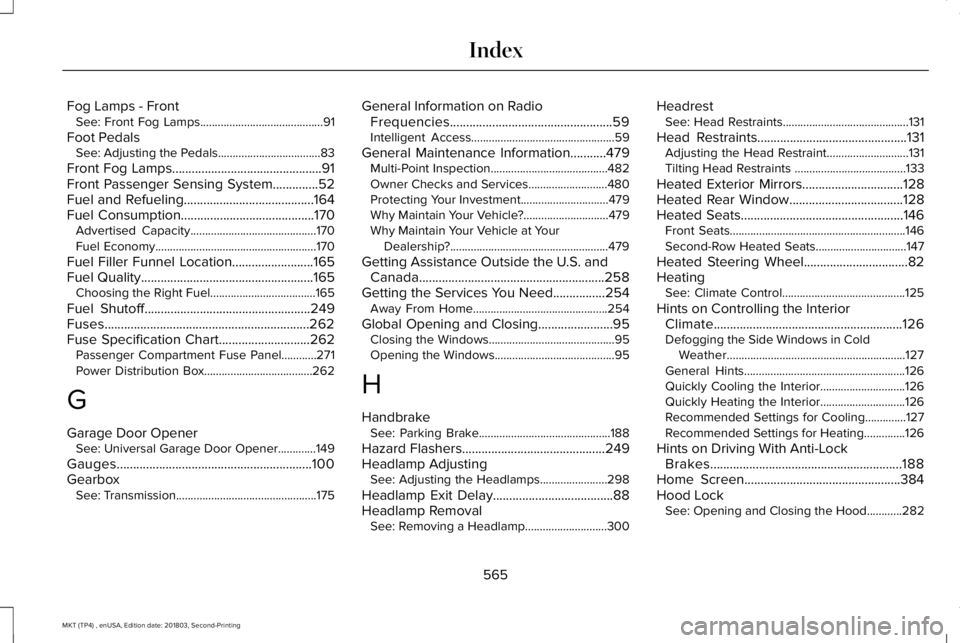
Fog Lamps - FrontSee: Front Fog Lamps..........................................91
Foot PedalsSee: Adjusting the Pedals...................................83
Front Fog Lamps..............................................91Front Passenger Sensing System..............52Fuel and Refueling........................................164Fuel Consumption.........................................170Advertised Capacity...........................................170Fuel Economy.......................................................170
Fuel Filler Funnel Location.........................165Fuel Quality.....................................................165Choosing the Right Fuel....................................165
Fuel Shutoff...................................................249Fuses...............................................................262Fuse Specification Chart............................262Passenger Compartment Fuse Panel............271Power Distribution Box.....................................262
G
Garage Door OpenerSee: Universal Garage Door Opener.............149
Gauges............................................................100GearboxSee: Transmission................................................175
General Information on RadioFrequencies..................................................59Intelligent Access.................................................59
General Maintenance Information...........479Multi-Point Inspection........................................482Owner Checks and Services...........................480Protecting Your Investment..............................479Why Maintain Your Vehicle?.............................479Why Maintain Your Vehicle at YourDealership?......................................................479
Getting Assistance Outside the U.S. andCanada.........................................................258Getting the Services You Need................254Away From Home..............................................254
Global Opening and Closing.......................95Closing the Windows...........................................95Opening the Windows.........................................95
H
HandbrakeSee: Parking Brake.............................................188
Hazard Flashers............................................249Headlamp AdjustingSee: Adjusting the Headlamps.......................298
Headlamp Exit Delay.....................................88Headlamp RemovalSee: Removing a Headlamp............................300
HeadrestSee: Head Restraints...........................................131
Head Restraints..............................................131Adjusting the Head Restraint............................131Tilting Head Restraints ......................................133
Heated Exterior Mirrors...............................128Heated Rear Window...................................128Heated Seats..................................................146Front Seats............................................................146Second-Row Heated Seats...............................147
Heated Steering Wheel................................82HeatingSee: Climate Control..........................................125
Hints on Controlling the InteriorClimate..........................................................126Defogging the Side Windows in ColdWeather.............................................................127General Hints.......................................................126Quickly Cooling the Interior.............................126Quickly Heating the Interior.............................126Recommended Settings for Cooling..............127Recommended Settings for Heating..............126
Hints on Driving With Anti-LockBrakes...........................................................188Home Screen................................................384Hood LockSee: Opening and Closing the Hood............282
565
MKT (TP4) , enUSA, Edition date: 201803, Second-Printing
Index
Page 569 of 575
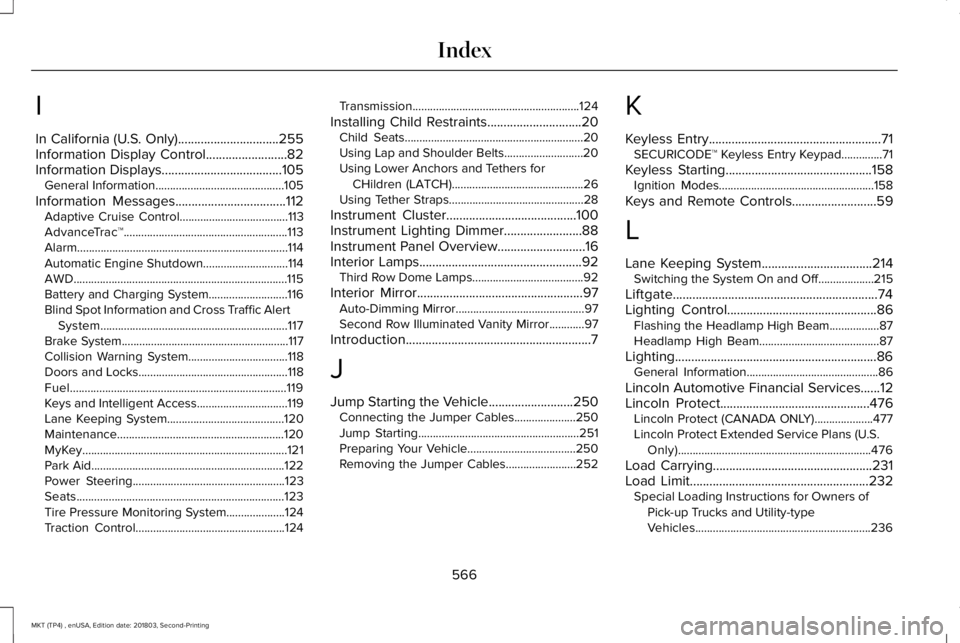
I
In California (U.S. Only)...............................255Information Display Control.........................82Information Displays.....................................105General Information............................................105
Information Messages..................................112Adaptive Cruise Control.....................................113AdvanceTrac™........................................................113Alarm........................................................................114Automatic Engine Shutdown.............................114AWD.........................................................................115Battery and Charging System...........................116Blind Spot Information and Cross Traffic AlertSystem................................................................117Brake System.........................................................117Collision Warning System..................................118Doors and Locks...................................................118Fuel..........................................................................119Keys and Intelligent Access...............................119Lane Keeping System........................................120Maintenance.........................................................120MyKey......................................................................121Park Aid..................................................................122Power Steering....................................................123Seats.......................................................................123Tire Pressure Monitoring System....................124Traction Control...................................................124
Transmission.........................................................124
Installing Child Restraints.............................20Child Seats.............................................................20Using Lap and Shoulder Belts...........................20Using Lower Anchors and Tethers forCHildren (LATCH).............................................26Using Tether Straps..............................................28
Instrument Cluster........................................100Instrument Lighting Dimmer........................88Instrument Panel Overview...........................16Interior Lamps..................................................92Third Row Dome Lamps......................................92
Interior Mirror...................................................97Auto-Dimming Mirror............................................97Second Row Illuminated Vanity Mirror............97
Introduction.........................................................7
J
Jump Starting the Vehicle..........................250Connecting the Jumper Cables.....................250Jump Starting.......................................................251Preparing Your Vehicle.....................................250Removing the Jumper Cables........................252
K
Keyless Entry.....................................................71SECURICODE™ Keyless Entry Keypad..............71
Keyless Starting.............................................158Ignition Modes.....................................................158
Keys and Remote Controls..........................59
L
Lane Keeping System..................................214Switching the System On and Off...................215
Liftgate...............................................................74Lighting Control..............................................86Flashing the Headlamp High Beam.................87Headlamp High Beam.........................................87
Lighting..............................................................86General Information.............................................86
Lincoln Automotive Financial Services......12Lincoln Protect..............................................476Lincoln Protect (CANADA ONLY)....................477Lincoln Protect Extended Service Plans (U.S.Only)..................................................................476
Load Carrying.................................................231Load Limit.......................................................232Special Loading Instructions for Owners ofPick-up Trucks and Utility-typeVehicles............................................................236
566
MKT (TP4) , enUSA, Edition date: 201803, Second-Printing
Index