change LINCOLN MKT 2019 Owners Manual
[x] Cancel search | Manufacturer: LINCOLN, Model Year: 2019, Model line: MKT, Model: LINCOLN MKT 2019Pages: 575, PDF Size: 4.66 MB
Page 2 of 575

The information contained in this publication was correct at the time of going to print. In the interest of continuous development, we reserve the right to change specifications,design or equipment at any time without notice or obligation. No part of this publication may be reproduced, transmitted, stored in a retrieval system or translated into any languagein any form by any means without our written permission. Errors and omissions excepted.
© Ford Motor Company 2018
All rights reserved.
Part Number: 201803 20180618114656
California Proposition 65
WARNING: Operating, servicing and maintaining a passenger vehicle or off-highway motor
vehicle can expose you to chemicals including engine exhaust, carbon monoxide, phthalates,
and lead, which are known to the State of California to cause cancer and birth defects or other
reproductive harm. To minimize exposure, avoid breathing exhaust, do not idle the engine except
as necessary, service your vehicle in a well-ventilated area and wear gloves or wash your hands
frequently when servicing your vehicle. For more information go to
www.P65Warnings.ca.gov/passenger-vehicle.
WARNING: Battery posts, terminals and related accessories contain lead and lead compounds,
chemicals known to the State of California to cause cancer and reproductive harm. Wash your
hands after handling.
Page 7 of 575
Cross Traffic Alert........................................222
Steering.........................................................225
Collision Warning System.........................226
Drive Control................................................229
Load Carrying
Rear Under Floor Storage..........................231
Cargo Nets.....................................................231
Luggage Covers...........................................231
Load Limit......................................................232
Towing
Towing a Trailer............................................237
Trailer Sway Control...................................238
Recommended Towing Weights.............238
Essential Towing Checks..........................240
Towing the Vehicle on Four Wheels......243
Driving Hints
Breaking-In...................................................245
Economical Driving.....................................245
Driving Through Water..............................245
Floor Mats.....................................................246
Roadside Emergencies
Roadside Assistance..................................248
Hazard Flashers..........................................249
Fuel Shutoff..................................................249
Jump Starting the Vehicle........................250
Post-Crash Alert System...........................252
Transporting the Vehicle...........................253
Customer Assistance
Getting the Services You Need...............254
In California (U.S. Only)..............................255
The Better Business Bureau (BBB) AutoLine Program (U.S. Only).......................256
Utilizing the Mediation/Arbitration Program(Canada Only)..........................................257
Getting Assistance Outside the U.S. andCanada......................................................258
Ordering Additional Owner's Literature......................................................................260
Reporting Safety Defects (U.S. Only)......260
Reporting Safety Defects (Canada Only).......................................................................261
Fuses
Fuse Specification Chart...........................262
Changing a Fuse.........................................278
Maintenance
General Information....................................281
Opening and Closing the Hood..............282
Under Hood Overview - 3.5L...................283
Under Hood Overview - 3.7L...................284
Engine Oil Dipstick.....................................286
Engine Oil Check........................................286
Oil Change Indicator Reset.......................287
Engine Coolant Check...............................288
Automatic Transmission Fluid Check.....292
Brake Fluid Check......................................294
Power Steering Fluid Check....................295
Washer Fluid Check...................................295
Changing the 12V Battery.........................295
Checking the Wiper Blades......................297
Changing the Wiper Blades.....................297
Adjusting the Headlamps.........................298
Removing a Headlamp..............................300
Changing a Bulb..........................................300
4
MKT (TP4) , enUSA, Edition date: 201803, Second-Printing
Table of Contents
Page 50 of 575
We recommend that all seatbelt assembliesin use in vehicles involved in a crash bereplaced. However, if the crash was minorand an authorized dealer finds that the beltsdo not show damage and continue tooperate properly, they do not need to bereplaced. Seatbelt assemblies not in useduring a crash should also be inspected andreplaced if either damage or improperoperation is noted.
Properly care for seatbelts. See VehicleCare (page 303).
SEATBELT EXTENSION
WARNING: Persons who fit into thevehicle's seatbelt should not use anextension. Unnecessary use could resultin serious personal injury in the event of acrash.
WARNING: Only use extensionsprovided free of charge by Lincoln MotorCompany dealers. The dealer will providean extension designed specifically for thisvehicle, model year and seating position.The use of an extension intended foranother vehicle, model year or seatingposition may not offer you the fullprotection of your vehicle’s seatbeltrestraint system.
WARNING: Never use seatbeltextensions to install child restraints.
WARNING: Do not use a seatbeltextension with an inflatable seatbelt.
WARNING: Do not use extensionsto change the fit of the belt across thetorso, over the lap or to make the seatbeltbuckle easier to reach.
If, because of body size or driving position,it is not possible to properly fasten theseatbelt over your lap and shoulder, anextension that is compatible with theseatbelts is available free of charge fromLincoln Motor Company dealers. Only Lincolnseatbelt extensions made by the samecompany which made the original equipmentseatbelts, should be used with Lincolnseatbelts. Ask your authorized dealer if yourextension is compatible with your Lincolnvehicle restraint system.
47
MKT (TP4) , enUSA, Edition date: 201803, Second-Printing
Seatbelts
Page 62 of 575
GENERAL INFORMATION ON
RADIO FREQUENCIES
This device complies with Part 15 of the FCCRules and with Licence exempt RSSStandards of Industry Canada. Operation issubject to the following two conditions:
•This device may not cause harmfulinterference, and
•This device must accept any interferencereceived, including interference that maycause undesired operation.
WARNING: Changes or modificationsnot expressively approved by the partyresponsible for compliance could void theuser's authority to operate the equipment.The term "IC:" before the radio certificationnumber only signifies that Industry Canadatechnical specifications were met.
The typical operating range for yourtransmitter is approximately 33 ft (10 m).Vehicles with the remote start feature willhave a greater range. One of the followingcould cause a decrease in operating range:
•weather conditions
•nearby radio towers
•structures around the vehicle
•other vehicles parked next to yourvehicle
Other short-distance radio transmitters, suchas amateur radios, medical equipment,wireless headphones, remote controls andalarm systems may operate on the samefrequency as your remote control. If othertransmitters are operating on thosefrequencies, you may not be able to use yourremote control. Using your remote controlnear some types of electronic equipment,such as USB devices, computers or cellphones can interfere with remote operation.Operating your remote control near metal ormetallic-finished purses, bags or clothing caninterfere with remote operation. You can lockand unlock the doors with the key.
Note:Make sure to lock your vehicle beforeleaving it unattended.
Note:If you are in range, the remote controlwill operate if you press any buttonunintentionally.
Intelligent Access
The system uses a radio frequency signal tocommunicate with your vehicle and authorizeyour vehicle to unlock when one of thefollowing conditions are met:
•You touch the inside of any exterior doorhandle within 3 ft (1 m) proximity of anintelligent access key.
•You press the luggage compartmentbutton.
•You press a button on the transmitter.
If excessive radio frequency interference ispresent in the area or if the transmitterbattery is low, you may need to mechanicallyunlock your door. You can use themechanical key blade in your intelligentaccess key to open the driver door in thissituation. See Remote Control (page 60).
59
MKT (TP4) , enUSA, Edition date: 201803, Second-Printing
Keys and Remote Controls
Page 67 of 575
PRINCIPLE OF OPERATION
MyKey allows you to program keys withrestricted driving modes to promote gooddriving habits. All but one of the keysprogrammed to the vehicle can be activatedwith these restricted modes.
Any keys that have not been programmedare referred to as administrator keys oradmin keys. They can be used to:
•Create a MyKey.
•Program configurable MyKey settings.
•Clear all MyKey features.
When you have programmed a MyKey, youcan access the following information usingthe information display:
•How many admin keys and MyKeys areprogrammed to your vehicle.
•The total distance your vehicle hastraveled using a MyKey.
Note:All MyKeys are programmed to thesame settings. You cannot program themindividually.
Note:For vehicles equipped with apush-button start switch: When both a MyKeyand an admin key are present when youstart your vehicle, the system recognizes theadmin key only.
Non-configurable Settings
The following settings cannot be changedby an admin key user:
•Belt-Minder or safety belt reminder. Youcannot disable this feature. The audiosystem will mute when the front seatoccupants’ safety belts are not fastened.
•Early low fuel. The low fuel warning isactivated earlier, giving the MyKey usermore time to refuel.
•Driver assist features, if equipped on yourvehicle, are forced on: parking aid, blindspot information system (BLIS), crosstraffic alert, lane departure warning andforward collision warning system.
•Satellite radio adult content restrictions(available only in some markets).
Configurable Settings
With an admin key, you can configure certainMyKey settings when you first create aMyKey and before you recycle the key orrestart the vehicle. You can also change thesettings afterward with an admin key:
•A vehicle speed limit can be set.Warnings will be shown in the display,followed by an audible tone when yourvehicle reaches the set speed. Youcannot override the set speed by fullydepressing the accelerator pedal or bysetting cruise control.
WARNING: Do not set MyKeymaximum speed limit to a limit that willprevent the driver from maintaining a safespeed considering posted speed limits andprevailing road conditions. The driver isalways responsible to drive in accordancewith local laws and prevailing conditions.Failure to do so could result in accident orinjury.
64
MKT (TP4) , enUSA, Edition date: 201803, Second-Printing
MyKey™
Page 68 of 575
•Various vehicle speed reminders so youknow when your vehicle approaches thelimits. Warnings appear in the informationdisplay and an audible warning soundswhen you exceed the limit.
•Audio system maximum volume of 45%.A message will be shown in the displaywhen you attempt to exceed the limitedvolume. Also, the speed-sensitive orcompensated automatic volume controlwill be disabled.
•Always on setting. When this is selected,you will not be able to turn off AdvanceTrac or traction control, 911 Assist orEmergency Assistance, or Do Not Disturb(if your vehicle is equipped with thesefeatures).
CREATING A MYKEY
Use the information display to create aMyKey:
1. Insert the key you want to program intothe ignition. See Starting a GasolineEngine (page 159). If your vehicle isequipped with a push-button start, placethe remote control into the backup slot.See Passive Anti-Theft System (page77).
2. Switch the ignition on.
3.Access the main menu in the informationdisplay and then scroll through themenus to change the settings of yourMyKey. From the MyKey menu select theoption Create MyKey. See InformationDisplays (page 105).
4.When prompted, hold the OK button untilyou see a message informing you to labelthis key as a MyKey. The programmedrestrictions apply when you key off, openand close the driver door and restart yourvehicle with the programmed key ortransmitter.
MyKey is successfully created. Make sureyou label it so you can distinguish it from theadmin keys.
You can also program configurable settingsfor the key(s). See Programming andChanging Configurable Settings.
Programming and ChangingConfigurable Settings
Use the information display to access yourconfigurable MyKey settings.
1.Switch the ignition on using an admin keyor transmitter you want to program.
2.Access the main menu in the informationdisplay and then scroll through themenus to change the settings of yourMyKey. See Information Displays (page105).
3. Follow the instructions in the display.
Note:You can clear or change your MyKeysettings at any time during the same keycycle as you created the MyKey. Once youhave switched the vehicle off, however, youwill need an admin key to change or clearyour MyKey settings.
65
MKT (TP4) , enUSA, Edition date: 201803, Second-Printing
MyKey™
Page 71 of 575
LOCKING AND UNLOCKING
You can use the power door lock control orthe remote control to lock and unlock yourvehicle.
Power Door Locks
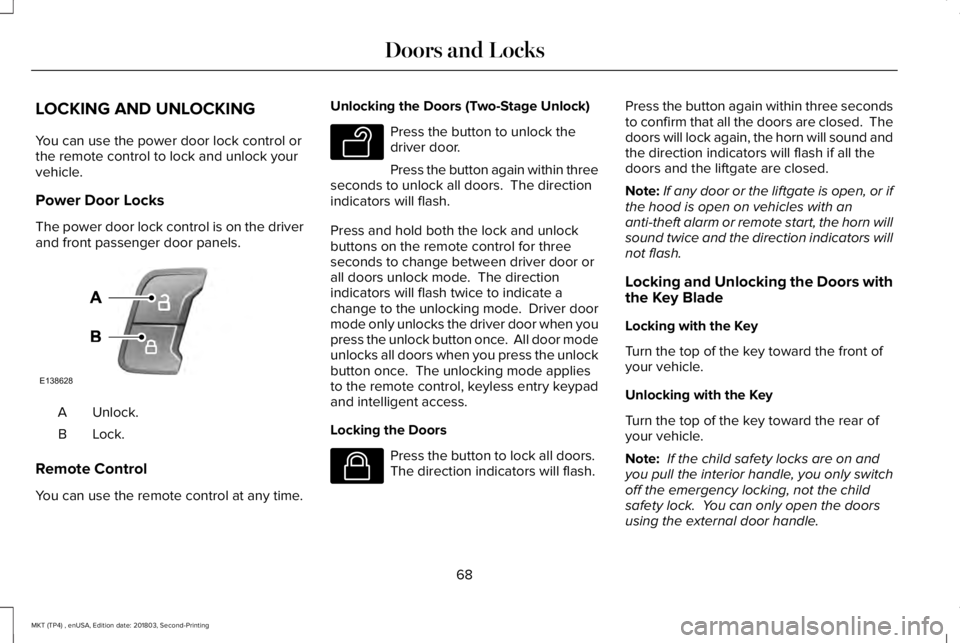
The power door lock control is on the driverand front passenger door panels.
Unlock.A
Lock.B
Remote Control
You can use the remote control at any time.
Unlocking the Doors (Two-Stage Unlock)
Press the button to unlock thedriver door.
Press the button again within threeseconds to unlock all doors. The directionindicators will flash.
Press and hold both the lock and unlockbuttons on the remote control for threeseconds to change between driver door orall doors unlock mode. The directionindicators will flash twice to indicate achange to the unlocking mode. Driver doormode only unlocks the driver door when youpress the unlock button once. All door modeunlocks all doors when you press the unlockbutton once. The unlocking mode appliesto the remote control, keyless entry keypadand intelligent access.
Locking the Doors
Press the button to lock all doors. The direction indicators will flash.
Press the button again within three secondsto confirm that all the doors are closed. Thedoors will lock again, the horn will sound andthe direction indicators will flash if all thedoors and the liftgate are closed.
Note:If any door or the liftgate is open, or ifthe hood is open on vehicles with ananti-theft alarm or remote start, the horn willsound twice and the direction indicators willnot flash.
Locking and Unlocking the Doors withthe Key Blade
Locking with the Key
Turn the top of the key toward the front ofyour vehicle.
Unlocking with the Key
Turn the top of the key toward the rear ofyour vehicle.
Note: If the child safety locks are on andyou pull the interior handle, you only switchoff the emergency locking, not the childsafety lock. You can only open the doorsusing the external door handle.
68
MKT (TP4) , enUSA, Edition date: 201803, Second-Printing
Doors and LocksE138628 E138629 E138623
Page 89 of 575
GENERAL INFORMATION
Condensation in the Exterior FrontLamps and Rear Lamps
Exterior front lamps and rear lamps havevents to accommodate normal changes inair pressure.
Condensation can be a natural by-productof this design. When moist air enters thelamp assembly through the vents, there is apossibility that condensation can occur whenthe temperature is cold. When normalcondensation occurs, a fine mist can form onthe interior of the lens. The fine misteventually clears and exits through the ventsduring normal operation.
Clearing time may take as long as 48 hoursunder dry weather conditions.
Examples of acceptable condensation are:
•The presence of a fine mist (no streaks,drip marks or large droplets).
•A fine mist covers less than 50% of thelens.
Examples of unacceptable condensation are:
•A water puddle inside the lamp.
•Streaks, drip marks or large dropletspresent on the interior of the lens.
If you see any unacceptable condensation,have your vehicle checked by an authorizeddealer.
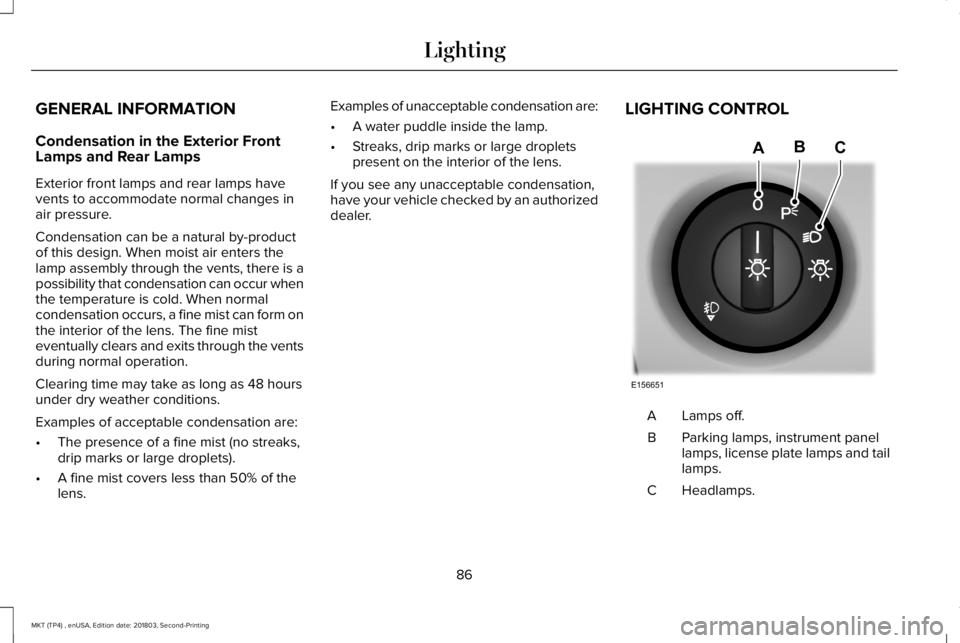
LIGHTING CONTROL
Lamps off.A
Parking lamps, instrument panellamps, license plate lamps and taillamps.
B
Headlamps.C
86
MKT (TP4) , enUSA, Edition date: 201803, Second-Printing
LightingE156651
ABC
Page 91 of 575
Windshield Wiper Activated Headlamps
When you switch the autolamps on, theheadlamps turn on within 10 seconds ofswitching the wipers on. They turn offapproximately 60 seconds after you switchthe windshield wipers off.
The headlamps do not turn on with thewipers:
•During a single wipe.
•When you use the windshield washer.
Note:If you switch the autolamps and theautowipers on, the headlamps turn on whenthe windshield wipers continuously operate.
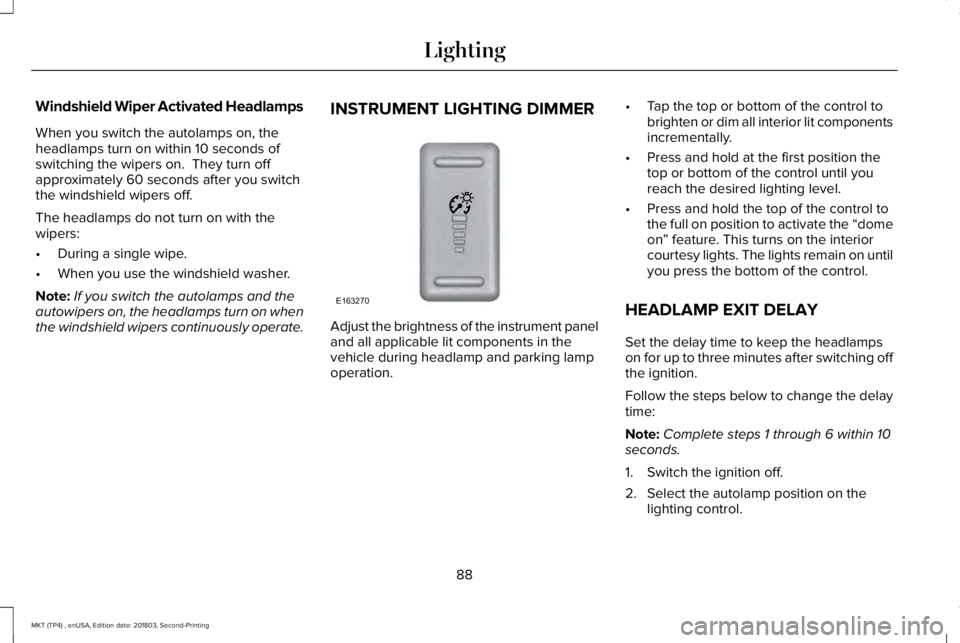
INSTRUMENT LIGHTING DIMMER
Adjust the brightness of the instrument paneland all applicable lit components in thevehicle during headlamp and parking lampoperation.
•Tap the top or bottom of the control tobrighten or dim all interior lit componentsincrementally.
•Press and hold at the first position thetop or bottom of the control until youreach the desired lighting level.
•Press and hold the top of the control tothe full on position to activate the “domeon” feature. This turns on the interiorcourtesy lights. The lights remain on untilyou press the bottom of the control.
HEADLAMP EXIT DELAY
Set the delay time to keep the headlampson for up to three minutes after switching offthe ignition.
Follow the steps below to change the delaytime:
Note:Complete steps 1 through 6 within 10seconds.
1. Switch the ignition off.
2. Select the autolamp position on thelighting control.
88
MKT (TP4) , enUSA, Edition date: 201803, Second-Printing
LightingE163270
Page 99 of 575
Fold-Away Exterior Mirrors
Push the mirror toward the door windowglass. Make sure that you fully engage themirror in its support when returning it to itsoriginal position.
Heated Exterior Mirrors
See Heated Exterior Mirrors (page 128).
Memory Mirrors
You can save and recall the mirror positionsthrough the memory function. See MemoryFunction (page 135).
Auto-dimming Feature
The driver exterior mirror automatically dimswith the auto-dimming interior mirror.
Direction Indicator Mirrors
While the vehicle is running, theforward-facing portion of the appropriatemirror housing blinks when you switch onthe direction indicator.
Puddle Lamps
The lamps on the bottom part of the mirrorhousing light when you use your transmitterto unlock the doors or when you open adoor.
Integrated Blind Spot Mirror (If Equipped)
WARNING: Objects in the blind spotmirror are closer than they appear.
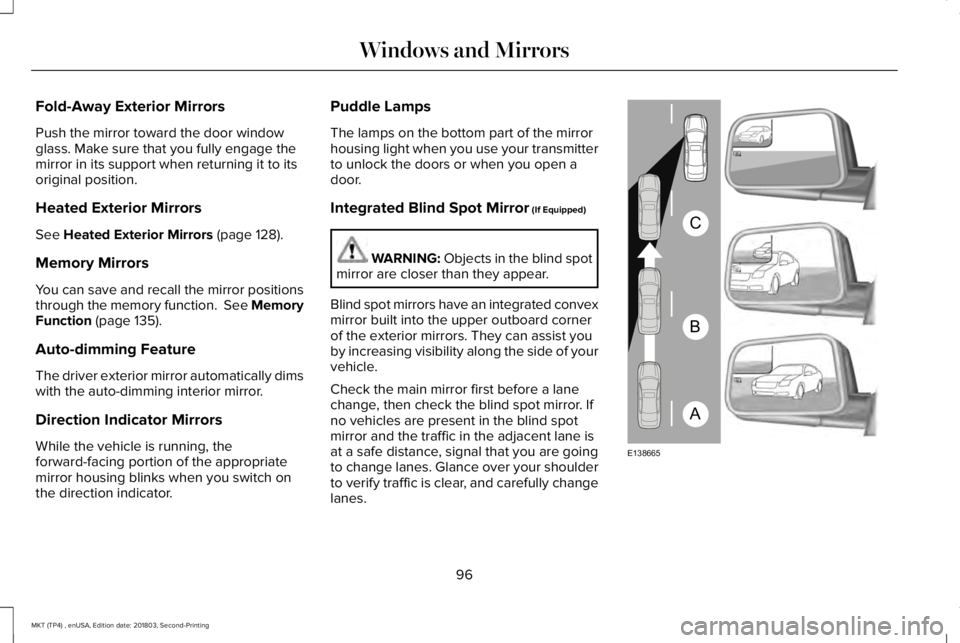
Blind spot mirrors have an integrated convexmirror built into the upper outboard cornerof the exterior mirrors. They can assist youby increasing visibility along the side of yourvehicle.
Check the main mirror first before a lanechange, then check the blind spot mirror. Ifno vehicles are present in the blind spotmirror and the traffic in the adjacent lane isat a safe distance, signal that you are goingto change lanes. Glance over your shoulderto verify traffic is clear, and carefully changelanes.
96
MKT (TP4) , enUSA, Edition date: 201803, Second-Printing
Windows and MirrorsA
B
C
E138665