change time LINCOLN MKX 2014 Owner's Manual
[x] Cancel search | Manufacturer: LINCOLN, Model Year: 2014, Model line: MKX, Model: LINCOLN MKX 2014Pages: 455, PDF Size: 6.1 MB
Page 293 of 455
D.R:Indicates a radial type tire.
E.15:Indicates the wheel or rim diameter in inches. If you change your
wheel size, you will have to purchase new tires to match the new wheel
diameter.
F.95:Indicates the tire’s load index. It is an index that relates to how
much weight a tire can carry. You may find this information in your
owner’s manual. If not, contact a local tire dealer.
Note:You may not find this information on all tires because it is not
required by federal law.
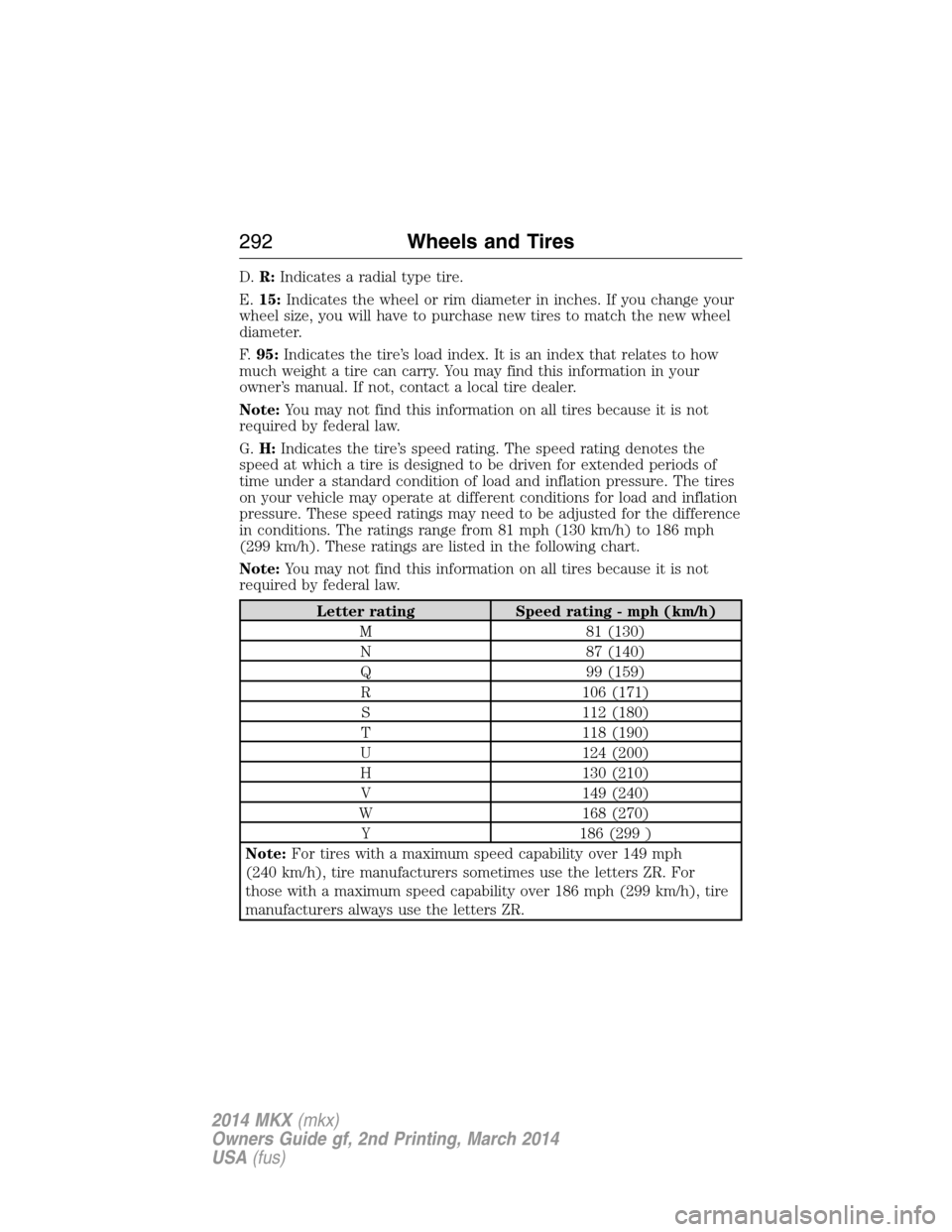
G.H:Indicates the tire’s speed rating. The speed rating denotes the
speed at which a tire is designed to be driven for extended periods of
time under a standard condition of load and inflation pressure. The tires
on your vehicle may operate at different conditions for load and inflation
pressure. These speed ratings may need to be adjusted for the difference
in conditions. The ratings range from 81 mph (130 km/h) to 186 mph
(299 km/h). These ratings are listed in the following chart.
Note:You may not find this information on all tires because it is not
required by federal law.
Letter rating Speed rating - mph (km/h)
M 81 (130)
N 87 (140)
Q 99 (159)
R 106 (171)
S 112 (180)
T 118 (190)
U 124 (200)
H 130 (210)
V 149 (240)
W 168 (270)
Y 186 (299 )
Note:For tires with a maximum speed capability over 149 mph
(240 km/h), tire manufacturers sometimes use the letters ZR. For
those with a maximum speed capability over 186 mph (299 km/h), tire
manufacturers always use the letters ZR.
292Wheels and Tires
2014 MKX(mkx)
Owners Guide gf, 2nd Printing, March 2014
USA(fus)
Page 327 of 455
Roadside Assistance
Exclusive 24/7 roadside assistance, including:
•Towing, flat-tire change and battery jump starts.
•Out of fuel and lock-out assistance.
•Travel expense reimbursement for lodging, meals and rental car.
•Destination assistance for taxi, shuttle, rental car coverage and
emergency transportation.
Transferable Coverage
If you sell your vehicle before your Lincoln Extended Service Plan
coverage expires, you can transfer any remaining coverage to the new
owner. Whenever you sell your vehicle, prospective buyers may have a
higher degree of confidence that vehicle was properly maintained with
Lincoln ESP, thereby improving resale value.
Avoid the Rising Cost of Properly Maintaining Your Vehicle!
Lincoln Extended Service Plan also offers a Premium Maintenance Plan
that covers all scheduled maintenance, and select items that routinely
wear out. The coverage is prepaid, so you never have to worry about
affording your vehicle maintenance. It covers regular checkups, routine
inspections, preventive care and replacement of select items that require
periodic attention for normal wear:
•Windshield wiper blades.
•Spark plugs (except in California).
•The clutch disc.
•Brake pads and linings.
•Shock absorbers.
•Belts and hoses.
•Diesel exhaust fluid replenishment.
Interest Free Finance Options Available
Take advantage of our interest free installment payment plan. Just a 10%
down payment will provide you with an affordable, no interest, no fee
payment program allowing you all the security and benefits Lincoln ESP
has to offer while paying over time. You are pre-approved with no credit
checks, no hassles! To learn more, call our Lincoln ESP specialists at
800-367-3377.
Lincoln ESP
P.O. Box 8072
Royal Oak, MI 48068-0039
326Extended Service Plan
2014 MKX(mkx)
Owners Guide gf, 2nd Printing, March 2014
USA(fus)
Page 328 of 455
SERVICE PLANS (CANADA ONLY)
You can get more protection for your vehicle by purchasing a Lincoln
Extended Service Plan. Lincoln Extended Service Plan is the only service
contract backed by Lincoln Motor Company of Canada, Limited.
Depending on the plan you purchase, Lincoln Extended Service Plan
provides benefits such as:
•Rental reimbursement.
•Coverage for certain maintenance and wear items.
•Protection against repair costs after your New Vehicle Limited
Warranty Coverage expires.
•Roadside Assistance benefits.
There are several Lincoln Extended Service Plans available in various
time, distance and deductible combinations. Each plan is tailored to fit
your own driving needs, including reimbursement for towing and rental.
When you purchase Lincoln Extended Service Plan, you receive added
peace-of-mind protection throughout Canada and the United States,
provided by a network of participating authorized Lincoln Motor
Company dealers.
Note:Repairs performed outside of Canada and the United States
are not eligible for Lincoln Extended Service Plan coverage.
This information is subject to change. For more information, visit your
local Lincoln of Canada dealer or www. Lincoln.ca to find the Lincoln
Extended Service Plan that is right for you.
Extended Service Plan327
2014 MKX(mkx)
Owners Guide gf, 2nd Printing, March 2014
USA(fus)
Page 337 of 455
Support
The SYNC support team is available to help you with any questions you
cannot answer on your own.
Monday-Saturday, 8:30am-9:00pm EST.
Sunday, 10:30am-7:30pm EST.
In the United States, call: 1–800–392–3673.
In Canada, call: 1–800–565–3673.
Times are subject to change due to holidays.
Safety Information
WARNING:Driving while distracted can result in loss of vehicle
control, crash and injury. We strongly recommend that you use
extreme caution when using any device that may take your focus off
the road. Your primary responsibility is the safe operation of your
vehicle. We recommend against the use of any handheld device while
driving and encourage the use of voice-operated systems when possible.
Make sure you are aware of all applicable local laws that may affect the
use of electronic devices while driving.
When using SYNC:
•Do not operate playing devices if the power cords or cables are
broken, split or damaged. Place cords and cables out of the way, so
they do not interfere with the operation of pedals, seats,
compartments or safe driving abilities.
•Do not leave playing devices in your vehicle during extreme conditions
as it could cause them damage. See your device’s manual for further
information.
•Do not attempt to service or repair the system. See your authorized
dealer.
For your safety, some SYNC functions are speed-dependent. Their use is
limited to when your vehicle is traveling at speeds under 3 mph
(5 km/h).
Make sure that you review your device’s manual before using it with
SYNC.
336MyLincoln Touch™
2014 MKX(mkx)
Owners Guide gf, 2nd Printing, March 2014
USA(fus)
Page 350 of 455
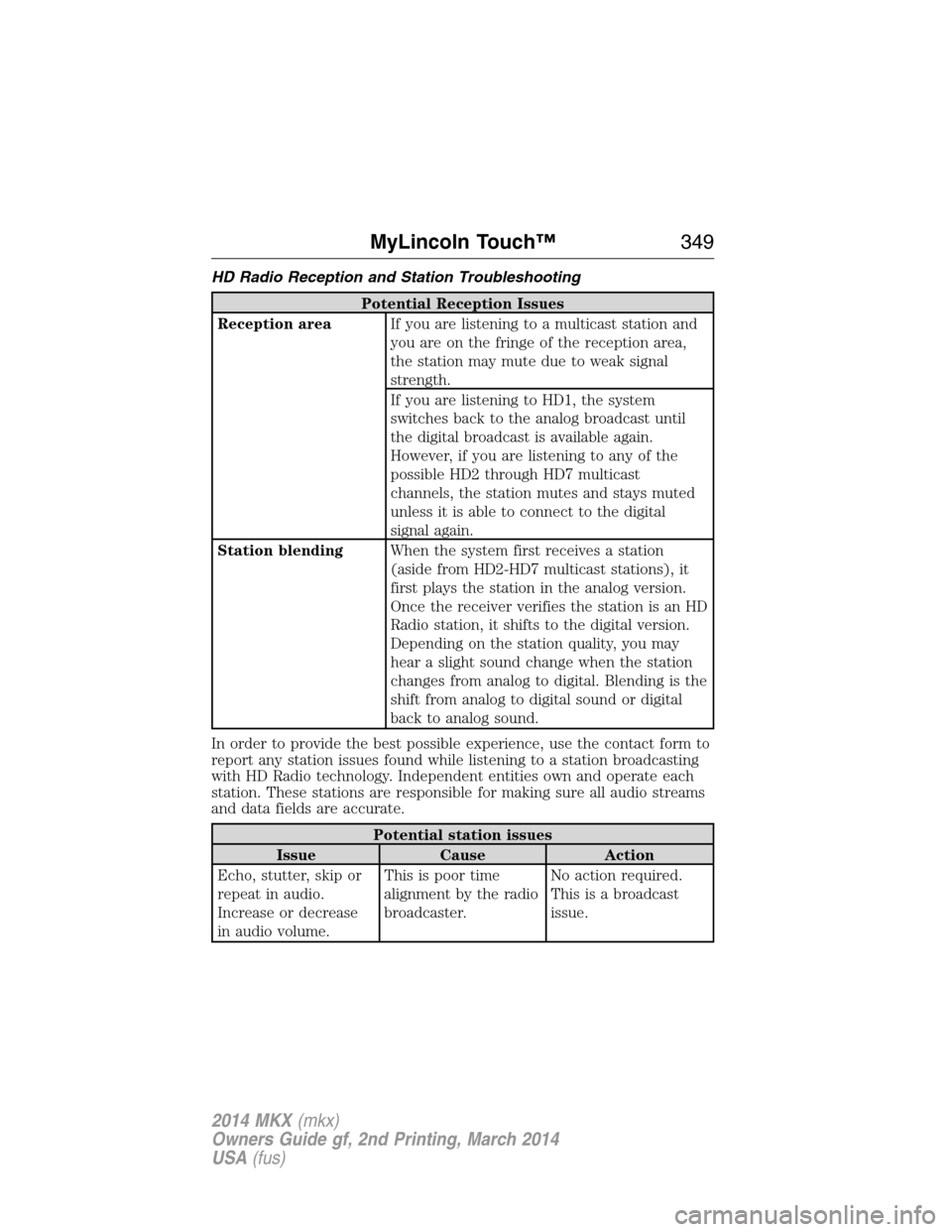
HD Radio Reception and Station Troubleshooting
Potential Reception Issues
Reception areaIf you are listening to a multicast station and
you are on the fringe of the reception area,
the station may mute due to weak signal
strength.
If you are listening to HD1, the system
switches back to the analog broadcast until
the digital broadcast is available again.
However, if you are listening to any of the
possible HD2 through HD7 multicast
channels, the station mutes and stays muted
unless it is able to connect to the digital
signal again.
Station blendingWhen the system first receives a station
(aside from HD2-HD7 multicast stations), it
first plays the station in the analog version.
Once the receiver verifies the station is an HD
Radio station, it shifts to the digital version.
Depending on the station quality, you may
hear a slight sound change when the station
changes from analog to digital. Blending is the
shift from analog to digital sound or digital
back to analog sound.
In order to provide the best possible experience, use the contact form to
report any station issues found while listening to a station broadcasting
with HD Radio technology. Independent entities own and operate each
station. These stations are responsible for making sure all audio streams
and data fields are accurate.
Potential station issues
Issue Cause Action
Echo, stutter, skip or
repeat in audio.
Increase or decrease
in audio volume.This is poor time
alignment by the radio
broadcaster.No action required.
This is a broadcast
issue.
MyLincoln Touch™349
2014 MKX(mkx)
Owners Guide gf, 2nd Printing, March 2014
USA(fus)
Page 351 of 455
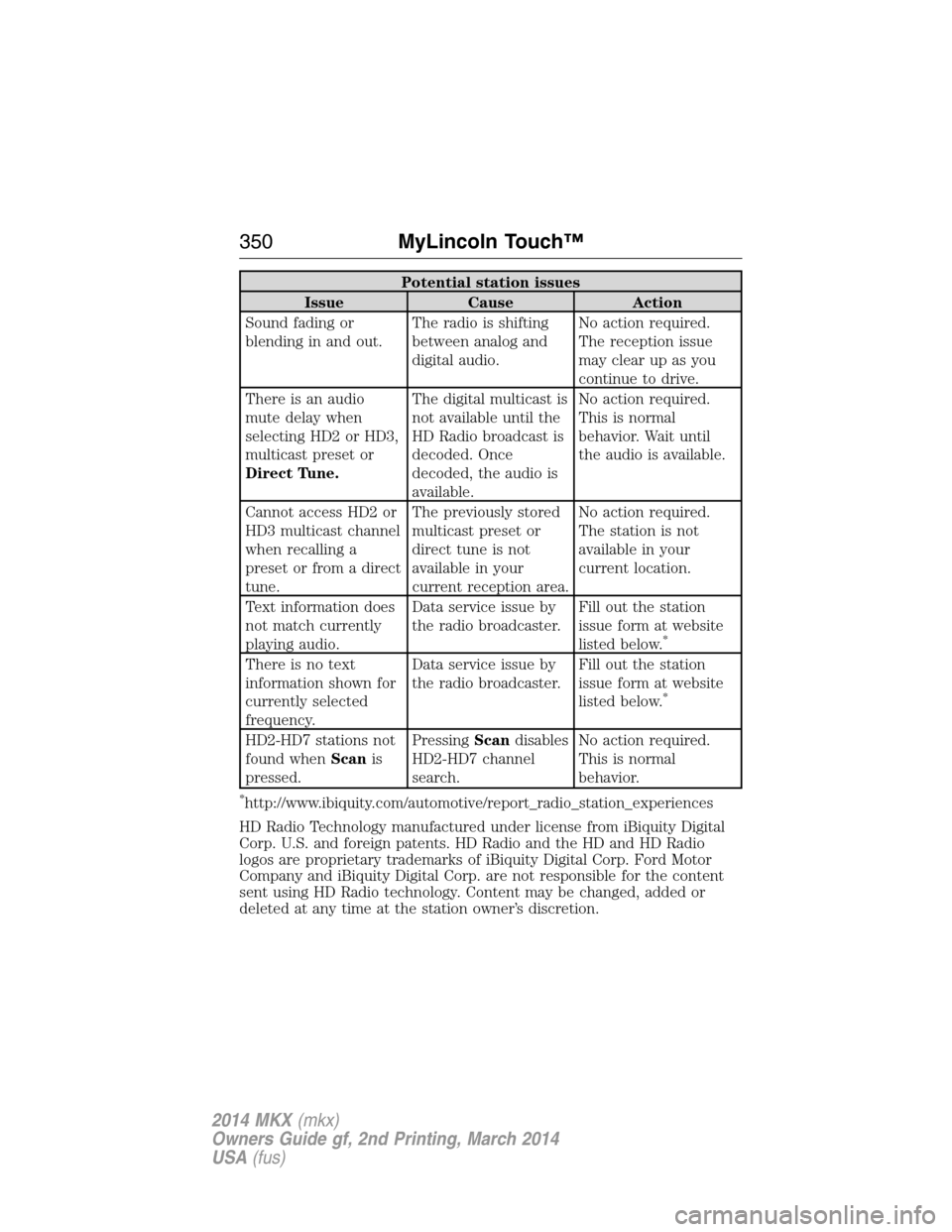
Potential station issues
Issue Cause Action
Sound fading or
blending in and out.The radio is shifting
between analog and
digital audio.No action required.
The reception issue
may clear up as you
continue to drive.
There is an audio
mute delay when
selecting HD2 or HD3,
multicast preset or
Direct Tune.The digital multicast is
not available until the
HD Radio broadcast is
decoded. Once
decoded, the audio is
available.No action required.
This is normal
behavior. Wait until
the audio is available.
Cannot access HD2 or
HD3 multicast channel
when recalling a
preset or from a direct
tune.The previously stored
multicast preset or
direct tune is not
available in your
current reception area.No action required.
The station is not
available in your
current location.
Text information does
not match currently
playing audio.Data service issue by
the radio broadcaster.Fill out the station
issue form at website
listed below.
*
There is no text
information shown for
currently selected
frequency.Data service issue by
the radio broadcaster.Fill out the station
issue form at website
listed below.
*
HD2-HD7 stations not
found whenScanis
pressed.PressingScandisables
HD2-HD7 channel
search.No action required.
This is normal
behavior.
*http://www.ibiquity.com/automotive/report_radio_station_experiences
HD Radio Technology manufactured under license from iBiquity Digital
Corp. U.S. and foreign patents. HD Radio and the HD and HD Radio
logos are proprietary trademarks of iBiquity Digital Corp. Ford Motor
Company and iBiquity Digital Corp. are not responsible for the content
sent using HD Radio technology. Content may be changed, added or
deleted at any time at the station owner’s discretion.
350MyLincoln Touch™
2014 MKX(mkx)
Owners Guide gf, 2nd Printing, March 2014
USA(fus)
Page 356 of 455
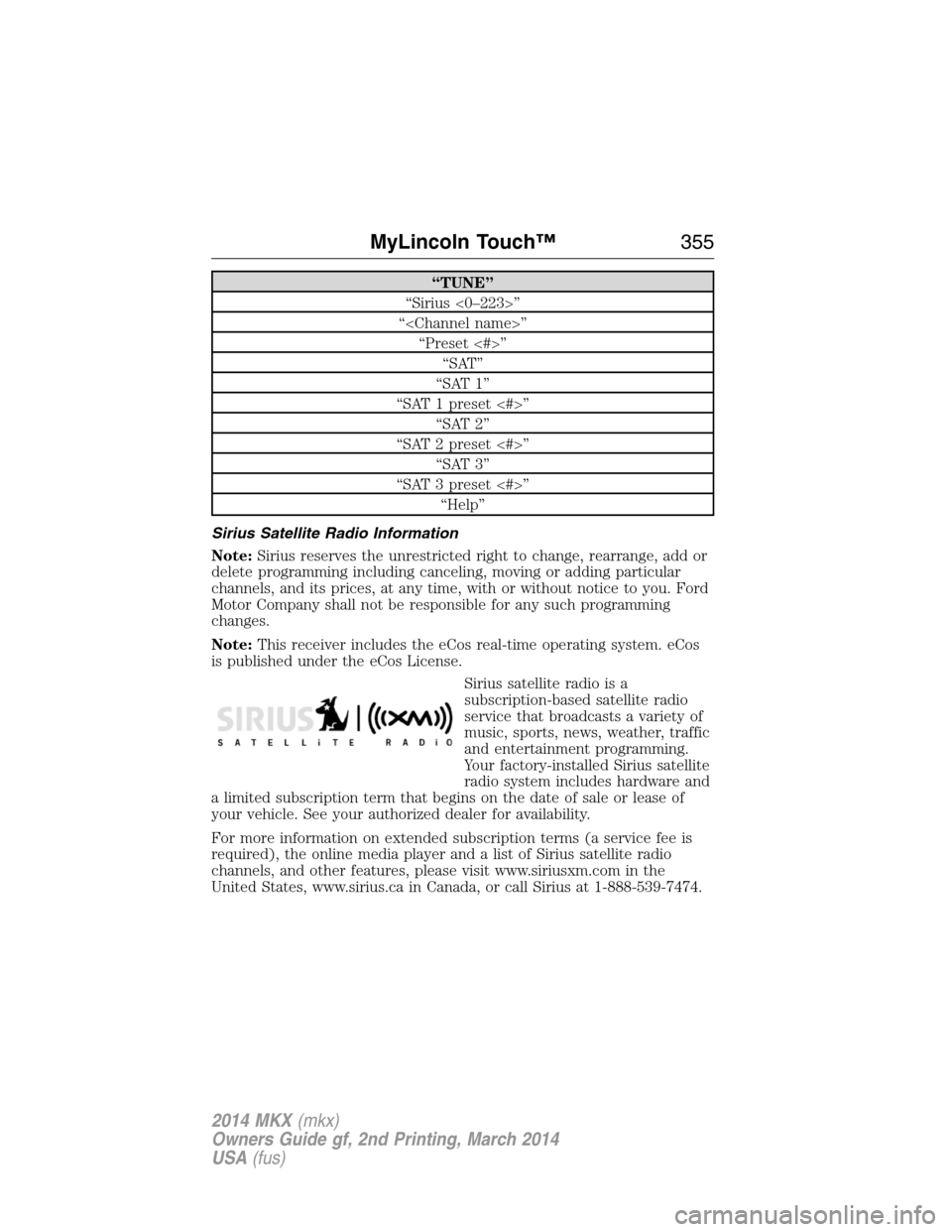
“TUNE”
“Sirius <0–223>”
“
“Preset <#>”
“SAT”
“SAT 1”
“SAT 1 preset <#>”
“SAT 2”
“SAT 2 preset <#>”
“SAT 3”
“SAT 3 preset <#>”
“Help”
Sirius Satellite Radio Information
Note:Sirius reserves the unrestricted right to change, rearrange, add or
delete programming including canceling, moving or adding particular
channels, and its prices, at any time, with or without notice to you. Ford
Motor Company shall not be responsible for any such programming
changes.
Note:This receiver includes the eCos real-time operating system. eCos
is published under the eCos License.
Sirius satellite radio is a
subscription-based satellite radio
service that broadcasts a variety of
music, sports, news, weather, traffic
and entertainment programming.
Your factory-installed Sirius satellite
radio system includes hardware and
a limited subscription term that begins on the date of sale or lease of
your vehicle. See your authorized dealer for availability.
For more information on extended subscription terms (a service fee is
required), the online media player and a list of Sirius satellite radio
channels, and other features, please visit www.siriusxm.com in the
United States, www.sirius.ca in Canada, or call Sirius at 1-888-539-7474.
MyLincoln Touch™355
2014 MKX(mkx)
Owners Guide gf, 2nd Printing, March 2014
USA(fus)
Page 374 of 455
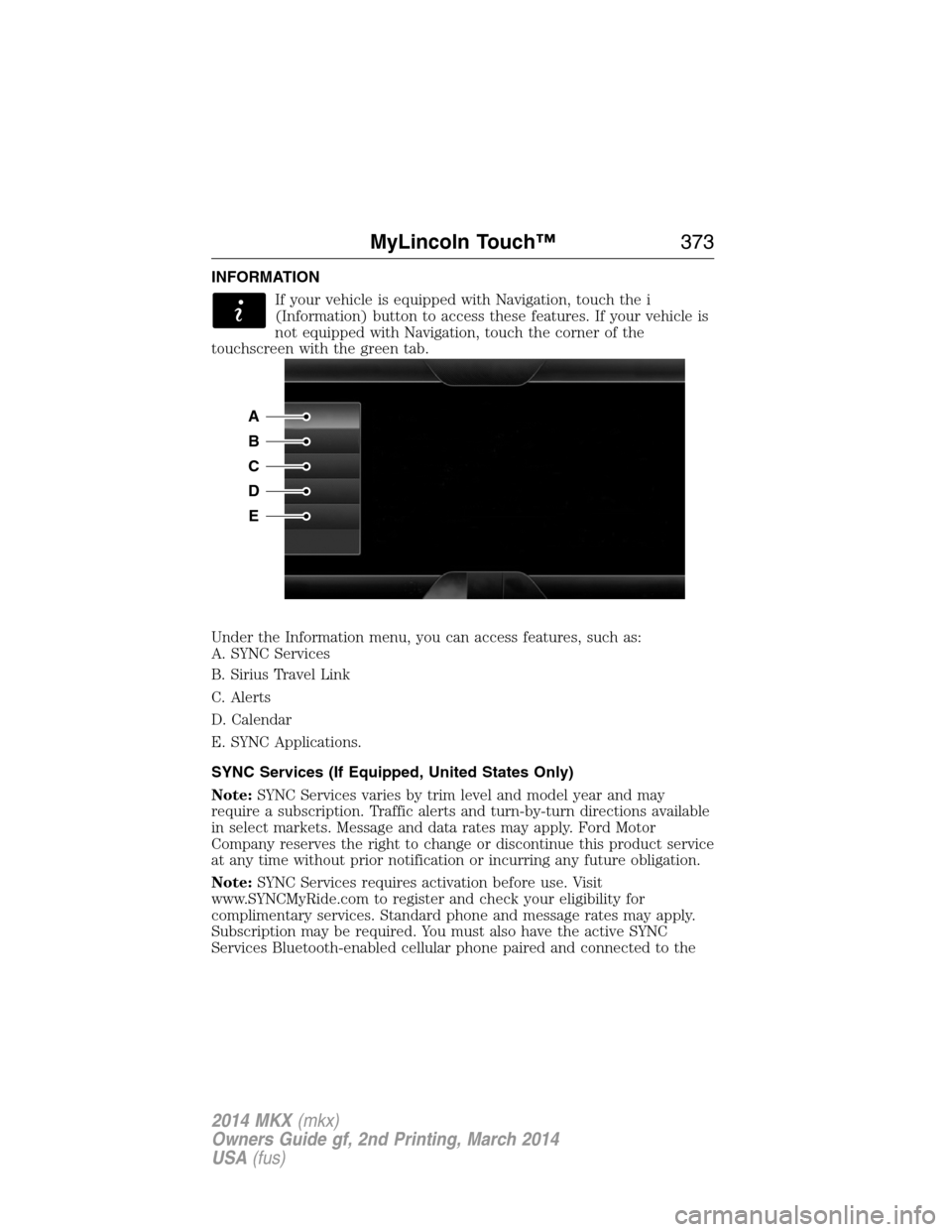
INFORMATION
If your vehicle is equipped with Navigation, touch the i
(Information) button to access these features. If your vehicle is
not equipped with Navigation, touch the corner of the
touchscreen with the green tab.
Under the Information menu, you can access features, such as:
A. SYNC Services
B. Sirius Travel Link
C. Alerts
D. Calendar
E. SYNC Applications.
SYNC Services (If Equipped, United States Only)
Note:SYNC Services varies by trim level and model year and may
require a subscription. Traffic alerts and turn-by-turn directions available
in select markets. Message and data rates may apply. Ford Motor
Company reserves the right to change or discontinue this product service
at any time without prior notification or incurring any future obligation.
Note:SYNC Services requires activation before use. Visit
www.SYNCMyRide.com to register and check your eligibility for
complimentary services. Standard phone and message rates may apply.
Subscription may be required. You must also have the active SYNC
Services Bluetooth-enabled cellular phone paired and connected to the
A
B
C
D
E
MyLincoln Touch™373
2014 MKX(mkx)
Owners Guide gf, 2nd Printing, March 2014
USA(fus)
Page 387 of 455
You can also turn the outside air temperature display on and off. It
appears at the top center of the touchscreen, next to the time and date.
The system automatically saves any updates you make to the settings.
Display
You can adjust the touchscreen display through the touchscreen or by
pressing the voice button on your steering wheel controls and when
prompted, say, “Display settings”.
Press the Settings icon >Display,to access and make
adjustments using the touchscreen.
•Brightnessallows you to make the screen display brighter or
dimmer.
•Auto DIM, when set toOn,lets you use the Auto Dim Manual Offset
feature. When set toOff,screen brightness does not change.
•Modeallows you to set the screen to a certain brightness or have the
system automatically change based on the outside light level, or turn
the display off.
•If you selectAUTOorNIGHT,you have the options of turning
the display’s Auto Dim feature on or off and changing the Auto
Dim Manual Offset feature.
•Auto Dim Manual Offsetallows you to adjust screen dimming as
the outside lighting conditions change from day to night. This feature
also allows you to adjust screen brightness using the instrument panel
dimming control.
Edit Wallpaper
•You can have your touchscreen display the default photo or upload
your own.
Uploading Photos for Your Home Screen Wallpaper
Note:You cannot load photos directly from your camera. You must
access the photos either from your USB mass storage device or from an
SD card.
Note:Photographs with extremely large dimensions (such as 2048 x
1536) may not be compatible and appear as a blank (black) image on the
display.
Your system allows you to upload and view up to 32 photos.
To access, press the Settings icon >Display>Edit Wallpaper,and
then follow the system prompts to upload your photographs.
386MyLincoln Touch™
2014 MKX(mkx)
Owners Guide gf, 2nd Printing, March 2014
USA(fus)
Page 409 of 455
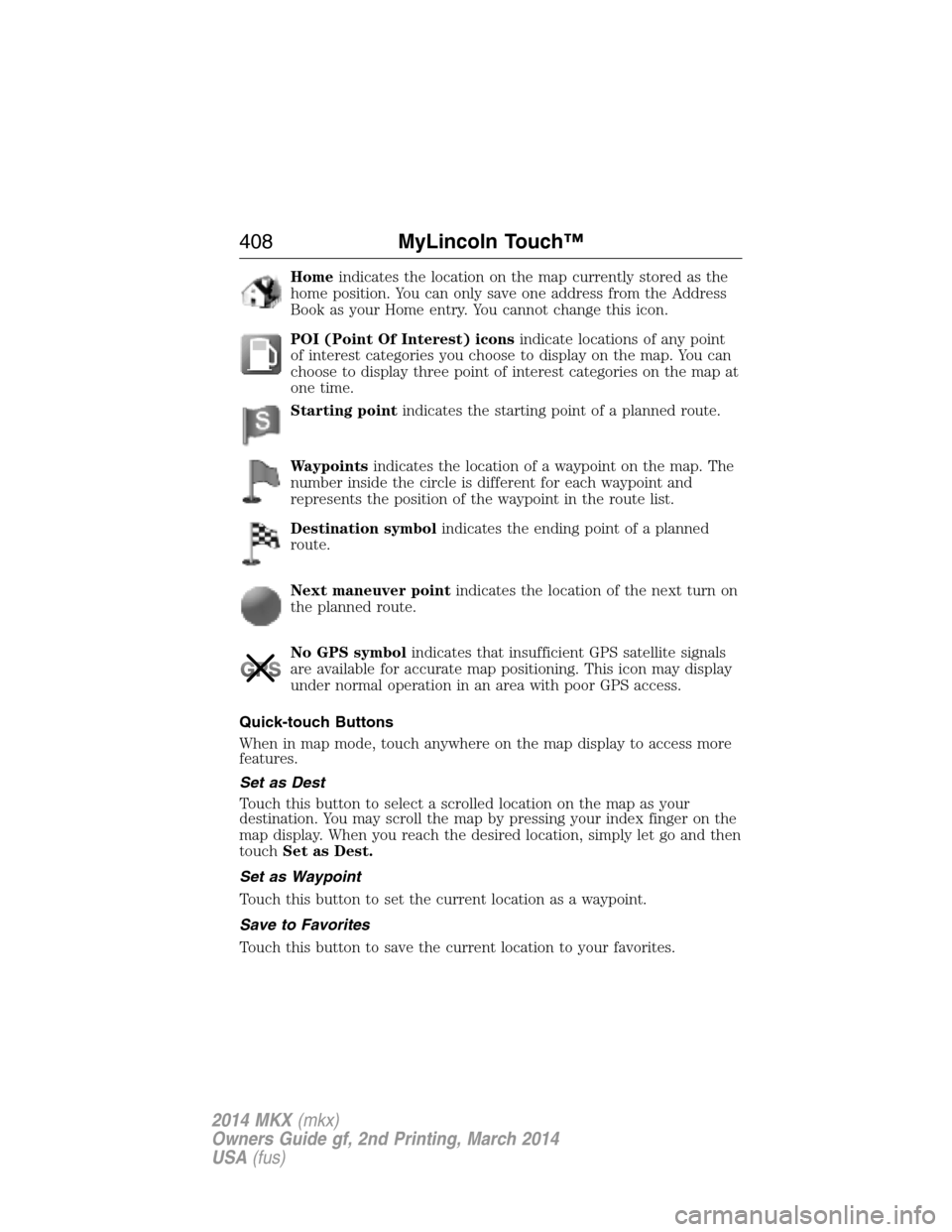
Homeindicates the location on the map currently stored as the
home position. You can only save one address from the Address
Book as your Home entry. You cannot change this icon.
POI (Point Of Interest) iconsindicate locations of any point
of interest categories you choose to display on the map. You can
choose to display three point of interest categories on the map at
one time.
Starting pointindicates the starting point of a planned route.
Waypointsindicates the location of a waypoint on the map. The
number inside the circle is different for each waypoint and
represents the position of the waypoint in the route list.
Destination symbolindicates the ending point of a planned
route.
Next maneuver pointindicates the location of the next turn on
the planned route.
No GPS symbolindicates that insufficient GPS satellite signals
are available for accurate map positioning. This icon may display
under normal operation in an area with poor GPS access.
Quick-touch Buttons
When in map mode, touch anywhere on the map display to access more
features.
Set as Dest
Touch this button to select a scrolled location on the map as your
destination. You may scroll the map by pressing your index finger on the
map display. When you reach the desired location, simply let go and then
touchSet as Dest.
Set as Waypoint
Touch this button to set the current location as a waypoint.
Save to Favorites
Touch this button to save the current location to your favorites.
408MyLincoln Touch™
2014 MKX(mkx)
Owners Guide gf, 2nd Printing, March 2014
USA(fus)