page 91 LINCOLN MKX 2017 User Guide
[x] Cancel search | Manufacturer: LINCOLN, Model Year: 2017, Model line: MKX, Model: LINCOLN MKX 2017Pages: 587, PDF Size: 5.4 MB
Page 54 of 587
SIDE AIRBAGS
WARNINGS
Do not place objects or mount
equipment on or near the airbag cover,
on the side of the seatbacks (of the front
seats), or in front seat areas that may come
into contact with a deploying airbag. Failure
to follow these instructions may increase the
risk of personal injury in the event of a crash. Do not use accessory seat covers. The
use of accessory seat covers may
prevent the deployment of the side airbags
and increase the risk of injury in an accident. Do not lean your head on the door. The
side airbag could injure you as it
deploys from the side of the seatback. Do not attempt to service, repair, or
modify the seat airbag supplemental
restraint systems, its fuses or the seat cover
on a vehicle containing seat airbags as you
could be seriously injured or killed. Contact
your authorized dealer as soon as possible. WARNINGS
If the side airbag has deployed, the
airbag will not function again. The side
airbag system (including the seat) must be
inspected as soon as possible. If the airbag
is not replaced, the unrepaired area will
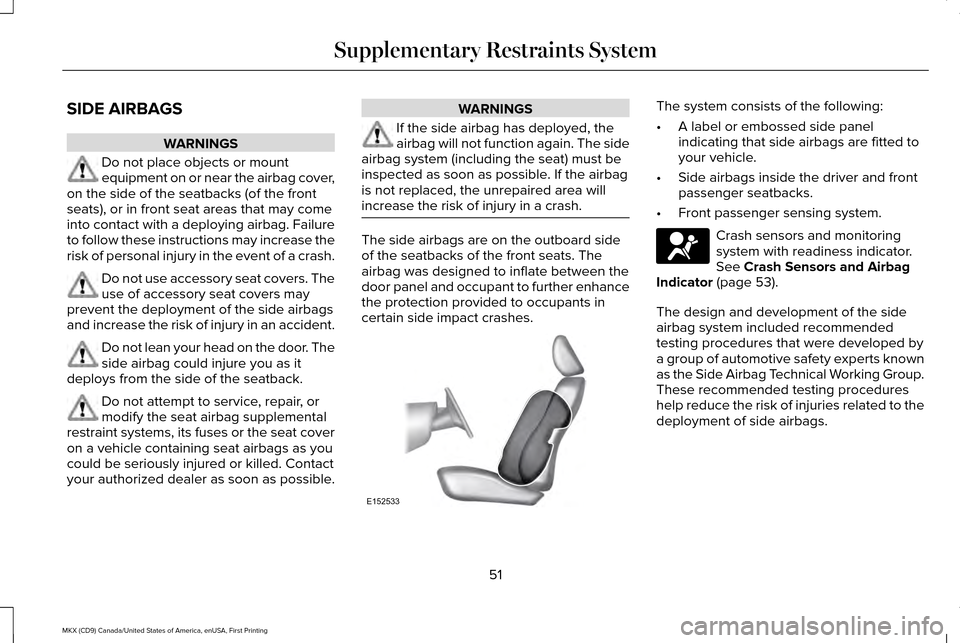
increase the risk of injury in a crash. The side airbags are on the outboard side
of the seatbacks of the front seats. The
airbag was designed to inflate between the
door panel and occupant to further enhance
the protection provided to occupants in
certain side impact crashes. The system consists of the following:
•
A label or embossed side panel
indicating that side airbags are fitted to
your vehicle.
• Side airbags inside the driver and front
passenger seatbacks.
• Front passenger sensing system. Crash sensors and monitoring
system with readiness indicator.
See Crash Sensors and Airbag
Indicator (page 53).
The design and development of the side
airbag system included recommended
testing procedures that were developed by
a group of automotive safety experts known
as the Side Airbag Technical Working Group.
These recommended testing procedures
help reduce the risk of injuries related to the
deployment of side airbags.
51
MKX (CD9) Canada/United States of America, enUSA, First Printing Supplementary Restraints SystemE152533 E67017
Page 55 of 587
DRIVER AND PASSENGER KNEE
AIRBAGS
WARNINGS
Keep the glove box door closed while
driving for optimal performance of the
passenger knee airbag during a crash. To reduce risk of injury, do not obstruct
or place objects in the deployment
path of the knee airbag. A driver knee airbag is located under or
within the instrument panel. A passenger
knee airbag is located within the glove box
door. During a crash, the restraints control
module may activate the driver and
passenger knee airbags based on crash
severity and occupant conditions. Under
certain crash and occupant conditions, the
driver and passenger knee airbag may
deploy but the driver front airbag may not
activate. As with front and side airbags, it is
important to be properly seated and
restrained to reduce the risk of death or
serious injury. Make sure the knee airbags are
operating properly. See Crash
Sensors and Airbag Indicator
(page
53).
SAFETY CANOPY™ WARNINGS
Do not place objects or mount
equipment on or near the headliner at
the siderail that may come into contact with
a deploying curtain airbag. Failure to follow
these instructions may increase the risk of
personal injury in the event of a crash. Do not lean your head on the door. The
curtain airbag could injure you as it
deploys from the headliner. Do not attempt to service, repair, or
modify the curtain airbags, its fuses,
the A, B, C or D pillar trim, or the headliner
on a vehicle containing curtain airbags as
you could be seriously injured or killed.
Contact your authorized dealer as soon as
possible. WARNINGS
All occupants of your vehicle including
the driver should always wear their
safety belts even when an airbag
supplemental restraint system and curtain
airbag is provided. Failure to properly wear
your safety belt could seriously increase the
risk of injury or death. To reduce risk of injury, do not obstruct
or place objects in the deployment
path of the curtain airbag. If the curtain airbags have deployed,
the curtain airbags will not function
again. The curtain airbags (including the A,
B, C and D pillar trim and headliner) must be
inspected and serviced by an authorized
dealer. If the curtain airbag is not replaced,
the unrepaired area will increase the risk of
injury in a crash. The Safety Canopy will deploy during
significant side crashes or when a certain
likelihood of a rollover event is detected by
the rollover sensor. The Safety Canopy is
mounted to the roof side-rail sheet metal,
behind the headliner, above each row of
52
MKX (CD9) Canada/United States of America, enUSA, First Printing Supplementary Restraints SystemE67017
Page 56 of 587
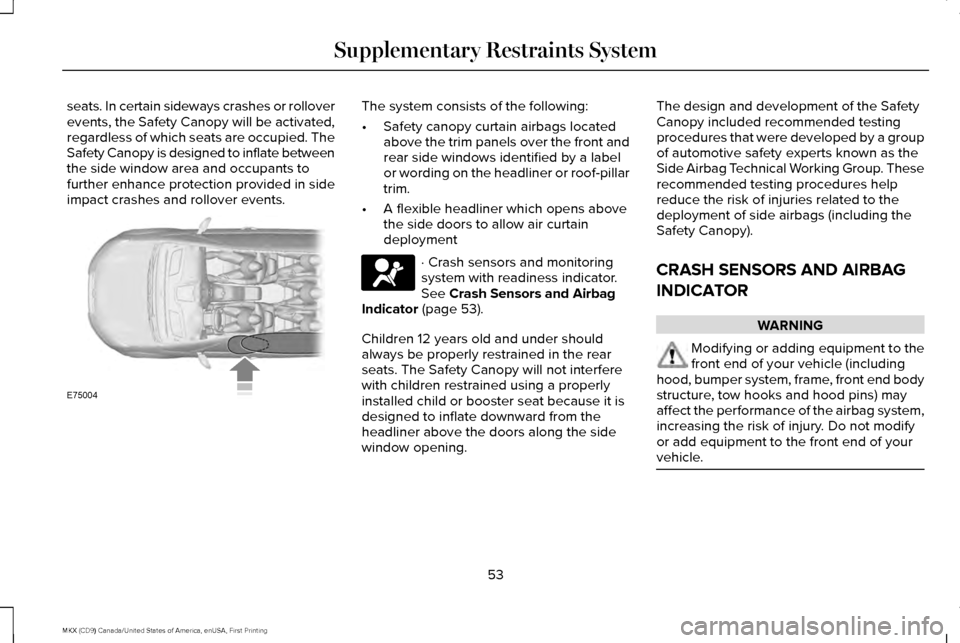
seats. In certain sideways crashes or rollover
events, the Safety Canopy will be activated,
regardless of which seats are occupied. The
Safety Canopy is designed to inflate between
the side window area and occupants to
further enhance protection provided in side
impact crashes and rollover events. The system consists of the following:
•
Safety canopy curtain airbags located
above the trim panels over the front and
rear side windows identified by a label
or wording on the headliner or roof-pillar
trim.
• A flexible headliner which opens above
the side doors to allow air curtain
deployment · Crash sensors and monitoring
system with readiness indicator.
See Crash Sensors and Airbag
Indicator (page 53).
Children 12 years old and under should
always be properly restrained in the rear
seats. The Safety Canopy will not interfere
with children restrained using a properly
installed child or booster seat because it is
designed to inflate downward from the
headliner above the doors along the side
window opening. The design and development of the Safety
Canopy included recommended testing
procedures that were developed by a group
of automotive safety experts known as the
Side Airbag Technical Working Group. These
recommended testing procedures help
reduce the risk of injuries related to the
deployment of side airbags (including the
Safety Canopy).
CRASH SENSORS AND AIRBAG
INDICATOR
WARNING
Modifying or adding equipment to the
front end of your vehicle (including
hood, bumper system, frame, front end body
structure, tow hooks and hood pins) may
affect the performance of the airbag system,
increasing the risk of injury. Do not modify
or add equipment to the front end of your
vehicle. 53
MKX (CD9) Canada/United States of America, enUSA, First Printing Supplementary Restraints SystemE75004 E67017
Page 59 of 587
GENERAL INFORMATION ON
RADIO FREQUENCIES
This device complies with Part 15 of the FCC
Rules and with Industry Canada
license-exempt RSS standard(s). Operation
is subject to the following two conditions: (1)
This device may not cause harmful
interference, and (2) This device must accept
any interference received, including
interference that may cause undesired
operation.
Note:
Changes or modifications not
expressively approved by the party
responsible for compliance could void the
user's authority to operate the equipment.
The term IC before the radio certification
number only signifies that Industry Canada
technical specifications were met.
The typical operating range for your
transmitter is approximately
33 ft (10 m).
Vehicles with the remote start feature will
have a greater range. One of the following could cause a decrease
in operating range:
•
Weather conditions.
• Nearby radio towers.
• Structures around the vehicle.
• Other vehicles parked next to your
vehicle.
The radio frequency used by your remote
control can also be used by other radio
transmitters, for example amateur radios,
medical equipment, wireless headphones,
wireless remote controls, cell phones, battery
chargers and alarm systems. If the
frequencies are jammed, you will not be able
to use your remote control. You can lock and
unlock the doors with the key.
Note: Make sure to lock your vehicle before
leaving it unattended.
Note: If you are in range, the remote control
will operate if you press any button
unintentionally.
Note: The remote control contains sensitive
electrical components. Exposure to moisture
or impact may cause permanent damage. Intelligent Access
The system uses a radio frequency signal to
communicate with your vehicle and authorize
your vehicle to unlock when one of the
following conditions are met:
•
You activate the front exterior door
handle switch.
• You press the luggage compartment
button.
• You press a button on the transmitter.
If excessive radio frequency interference is
present in the area or if the transmitter
battery is low, you may need to mechanically
unlock your door. You can use the
mechanical key blade in your intelligent
access key to open the driver door in this
situation.
See Remote Control (page 57).
56
MKX (CD9) Canada/United States of America, enUSA, First Printing Keys and Remote Controls
Page 60 of 587
REMOTE CONTROL
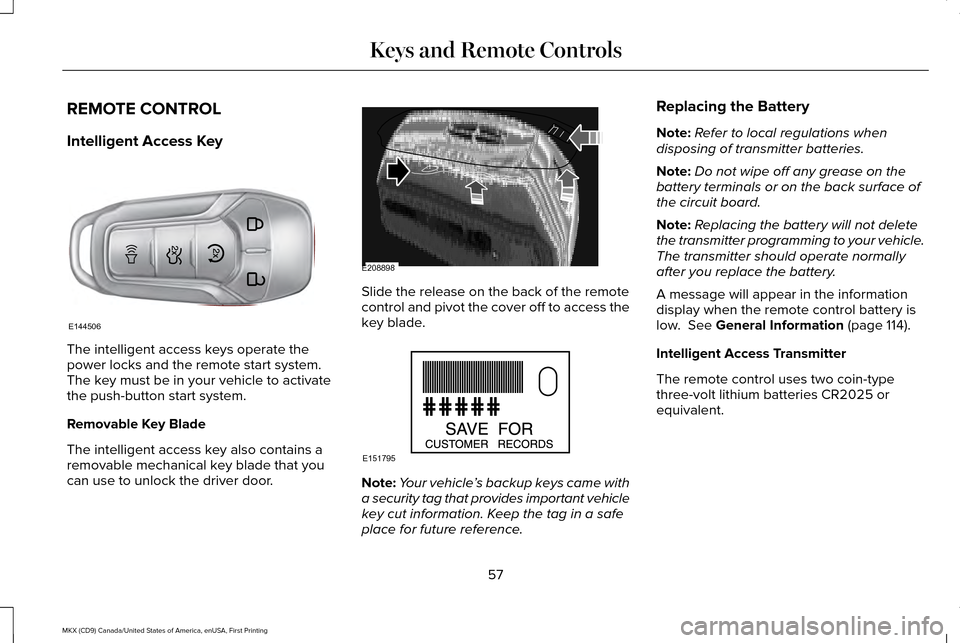
Intelligent Access Key
The intelligent access keys operate the
power locks and the remote start system.
The key must be in your vehicle to activate
the push-button start system.
Removable Key Blade
The intelligent access key also contains a
removable mechanical key blade that you
can use to unlock the driver door. Slide the release on the back of the remote
control and pivot the cover off to access the
key blade.
Note:
Your vehicle ’s backup keys came with
a security tag that provides important vehicle
key cut information. Keep the tag in a safe
place for future reference. Replacing the Battery
Note:
Refer to local regulations when
disposing of transmitter batteries.
Note: Do not wipe off any grease on the
battery terminals or on the back surface of
the circuit board.
Note: Replacing the battery will not delete
the transmitter programming to your vehicle.
The transmitter should operate normally
after you replace the battery.
A message will appear in the information
display when the remote control battery is
low. See General Information (page 114).
Intelligent Access Transmitter
The remote control uses two coin-type
three-volt lithium batteries CR2025 or
equivalent.
57
MKX (CD9) Canada/United States of America, enUSA, First Printing Keys and Remote ControlsE144506 E208898 E151795
Page 62 of 587
Vehicles with automatic climate control can
be configured to operate when the vehicle
is remote started. See Automatic Climate
Control (page 141).
Many states and provinces have restrictions
for the use of remote start. Check your local
and state or provincial laws for specific
requirements regarding remote start
systems.
The remote start system will not work if:
• The ignition is on.
• The alarm system is triggered.
• You switch off the feature in the
information display.
See General
Information (page 114).
• The hood is open.
• The transmission is not in
P.
• The vehicle battery voltage is too low.
• The service engine soon light is on. Remote Starting the Vehicle
Note:
You must press each button within
three seconds of each other. Your vehicle
will not remote start if you do not follow this
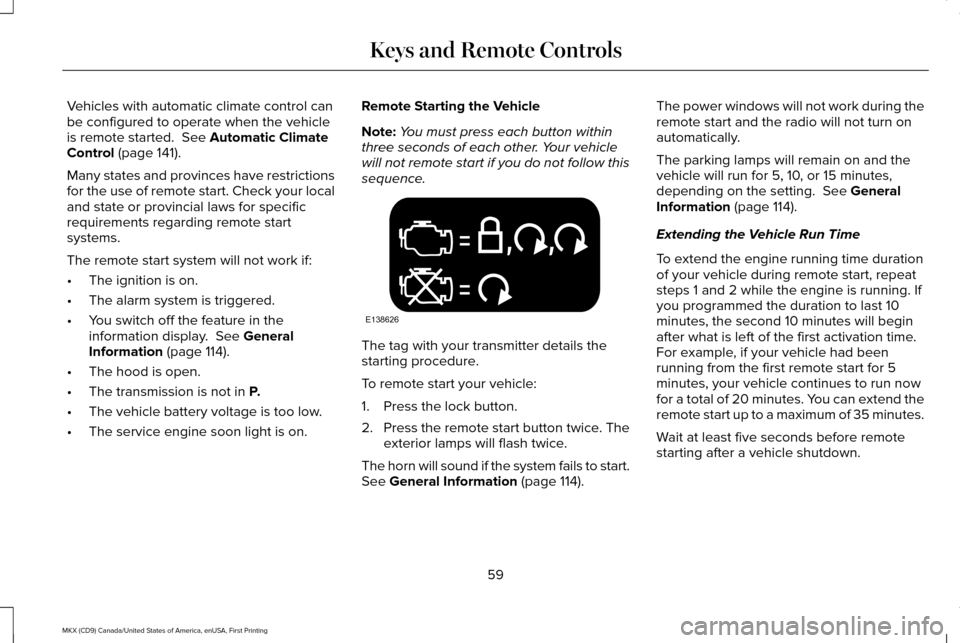
sequence. The tag with your transmitter details the
starting procedure.
To remote start your vehicle:
1. Press the lock button.
2.
Press the remote start button twice. The
exterior lamps will flash twice.
The horn will sound if the system fails to start.
See
General Information (page 114). The power windows will not work during the
remote start and the radio will not turn on
automatically.
The parking lamps will remain on and the
vehicle will run for 5, 10, or 15 minutes,
depending on the setting.
See General
Information (page 114).
Extending the Vehicle Run Time
To extend the engine running time duration
of your vehicle during remote start, repeat
steps 1 and 2 while the engine is running. If
you programmed the duration to last 10
minutes, the second 10 minutes will begin
after what is left of the first activation time.
For example, if your vehicle had been
running from the first remote start for 5
minutes, your vehicle continues to run now
for a total of 20 minutes. You can extend the
remote start up to a maximum of 35 minutes.
Wait at least five seconds before remote
starting after a vehicle shutdown.
59
MKX (CD9) Canada/United States of America, enUSA, First Printing Keys and Remote ControlsE138626
Page 63 of 587
Turning the Vehicle Off After Remote
Starting
Press the button once. The parking
lamps will turn off.
You may have to be closer to your
vehicle to remotely switch off your vehicle
after remote starting. This is due to the
added noise of your running vehicle.
You can disable or enable the remote start
system through the information display. See
General Information (page 114).
Remote Control Feedback
An LED on the remote control provides status
feedback of remote start or stop commands. Status
LED
Remote start or
extension successful
Solid green
Remote stop
successful; engine off
Solid red
Remote start or stopfailed
Blinking red
Waiting for status
update from vehicle
Blinking green
Memory Feature
You can program your intelligent access key
to recall memory positions.
See Memory
Function (page 152). REPLACING A LOST KEY OR
REMOTE CONTROL
Replacement keys or remote controls can
be purchased from an authorized dealer.
Authorized dealers can program remote
controls for your vehicle.
See Passive
Anti-Theft System (page 81).
60
MKX (CD9) Canada/United States of America, enUSA, First Printing Keys and Remote ControlsE138625
Page 65 of 587
•
Various vehicle speed minders can be
set. Once you select a speed, it will be
shown in the display, followed by an
audible tone when the preselected
vehicle speed is exceeded.
• Audio system maximum volume of 45%.
A message will be shown in the display
when you attempt to exceed the limited
volume. Also, the speed-sensitive or
compensated automatic volume control
will be disabled. •
Always on setting. When this is selected,
you will not be able to switch off
AdvanceTrac ™ or traction control, 911
Assist or Emergency Assistance, or the
do not disturb feature (if your vehicle is
equipped with these features).
CREATING A MYKEY
Use the information display to create a
MyKey: 1. Insert the key you want to program into
the ignition. See Starting a Gasoline
Engine (page 168). If your vehicle is
equipped with a push-button start, place
the transmitter into the backup position.
See
Passive Anti-Theft System (page
81).
2. Switch the ignition on.
3. Access the main menu on the information
display controls. Use the arrow keys to
get to the following menu selections: Action and Description
Message
Press the
OK button or the right arrow key.
Settings
Press the
OK button or the right arrow key.
MyKey
Press the
OK button or the right arrow key.
Create MyKey
When prompted, hold the
OK button until
you see a message informing you to label
this key as a MyKey. The key will be
restricted at the next start.
MyKey is successfully created. Make sure
you label it so you can distinguish it from the
admin keys. You can also program configurable settings
for the key(s). See Programming/Changing
Configurable Settings
.
Programming/Changing Configurable
Settings
Use the information display to access your
configurable MyKey settings.
1.
Switch the ignition on using an admin key
or transmitter.
62
MKX (CD9) Canada/United States of America, enUSA, First Printing MyKey™
Page 66 of 587
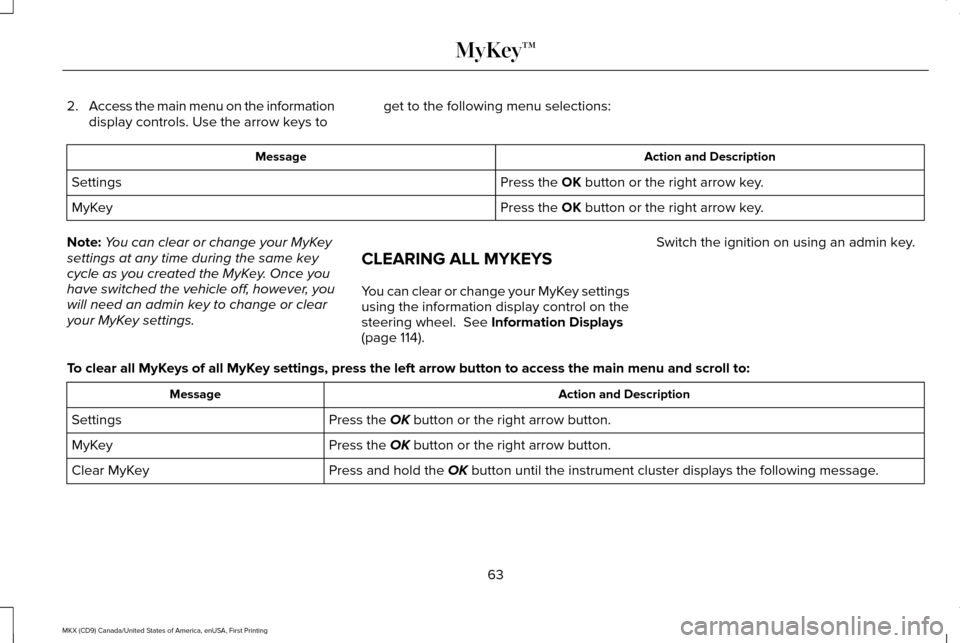
2.
Access the main menu on the information
display controls. Use the arrow keys to get to the following menu selections: Action and Description
Message
Press the OK button or the right arrow key.
Settings
Press the
OK button or the right arrow key.
MyKey
Note: You can clear or change your MyKey
settings at any time during the same key
cycle as you created the MyKey. Once you
have switched the vehicle off, however, you
will need an admin key to change or clear
your MyKey settings. CLEARING ALL MYKEYS
You can clear or change your MyKey settings
using the information display control on the
steering wheel.
See Information Displays
(page 114). Switch the ignition on using an admin key.
To clear all MyKeys of all MyKey settings, press the left arrow button to access the main menu and scr\
oll to: Action and Description
Message
Press the
OK button or the right arrow button.
Settings
Press the
OK button or the right arrow button.
MyKey
Press and hold the
OK button until the instrument cluster displays the following message.
Clear MyKey
63
MKX (CD9) Canada/United States of America, enUSA, First Printing MyKey™
Page 68 of 587
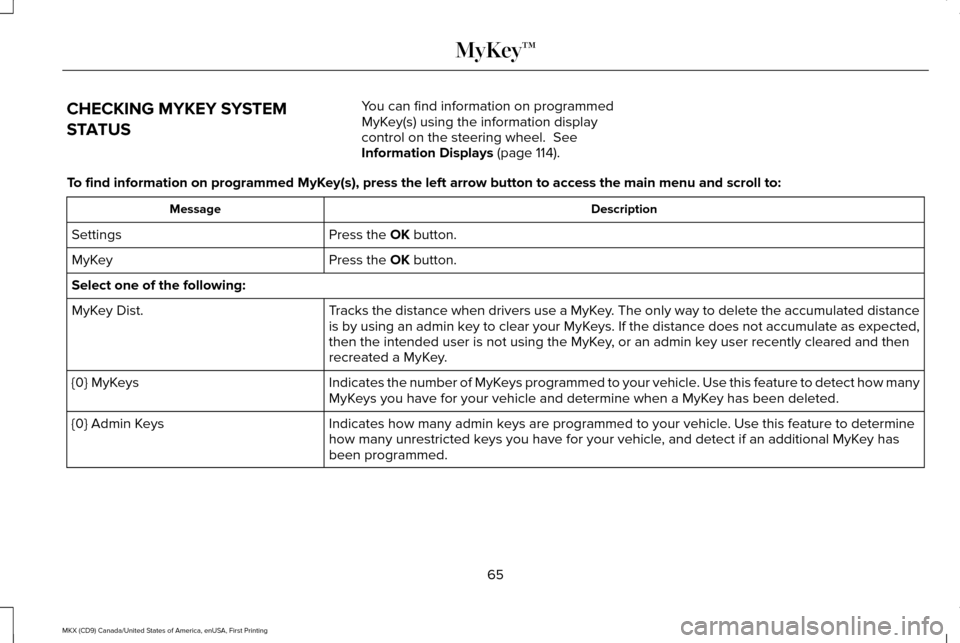
CHECKING MYKEY SYSTEM
STATUS
You can find information on programmed
MyKey(s) using the information display
control on the steering wheel. See
Information Displays (page 114).
To find information on programmed MyKey(s), press the left arrow button to access the main menu and scroll \
to: Description
Message
Press the
OK button.
Settings
Press the
OK button.
MyKey
Select one of the following:
Tracks the distance when drivers use a MyKey. The only way to delete the accumulated distance
is by using an admin key to clear your MyKeys. If the distance does not accumulate as expected,
then the intended user is not using the MyKey, or an admin key user recently cleared and then
recreated a MyKey.
MyKey Dist.
Indicates the number of MyKeys programmed to your vehicle. Use this feature to detect how many
MyKeys you have for your vehicle and determine when a MyKey has been deleted.
{0} MyKeys
Indicates how many admin keys are programmed to your vehicle. Use this feature to determine
how many unrestricted keys you have for your vehicle, and detect if an additional MyKey has
been programmed.
{0} Admin Keys
65
MKX (CD9) Canada/United States of America, enUSA, First Printing MyKey™