page 91 LINCOLN MKX 2017 Workshop Manual
[x] Cancel search | Manufacturer: LINCOLN, Model Year: 2017, Model line: MKX, Model: LINCOLN MKX 2017Pages: 587, PDF Size: 5.4 MB
Page 132 of 587
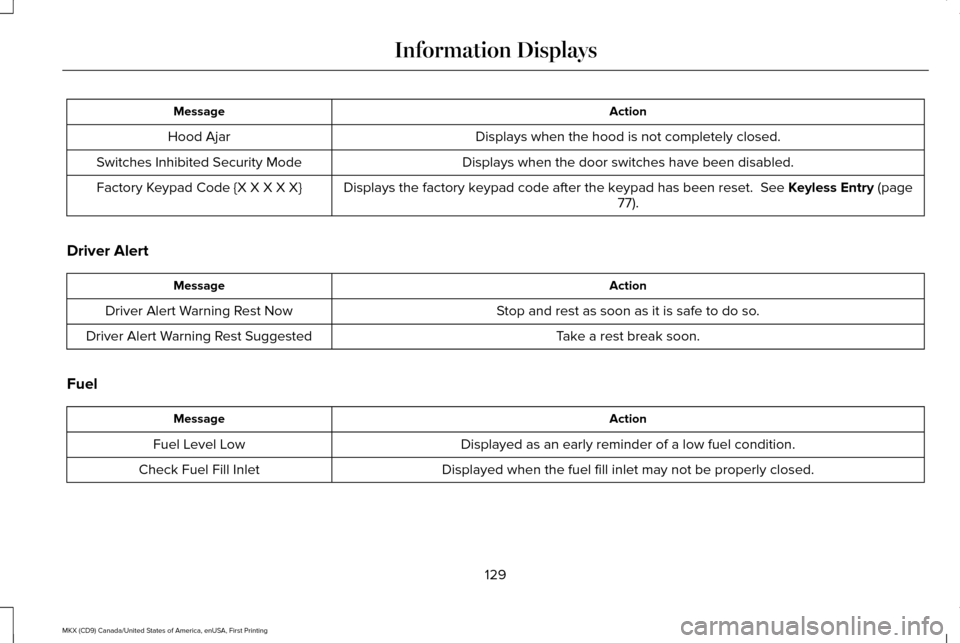
Action
Message
Displays when the hood is not completely closed.
Hood Ajar
Displays when the door switches have been disabled.
Switches Inhibited Security Mode
Displays the factory keypad code after the keypad has been reset. See Keyless Entry (page
77).
Factory Keypad Code {X X X X X}
Driver Alert Action
Message
Stop and rest as soon as it is safe to do so.
Driver Alert Warning Rest Now
Take a rest break soon.
Driver Alert Warning Rest Suggested
Fuel Action
Message
Displayed as an early reminder of a low fuel condition.
Fuel Level Low
Displayed when the fuel fill inlet may not be properly closed.
Check Fuel Fill Inlet
129
MKX (CD9) Canada/United States of America, enUSA, First Printing Information Displays
Page 133 of 587
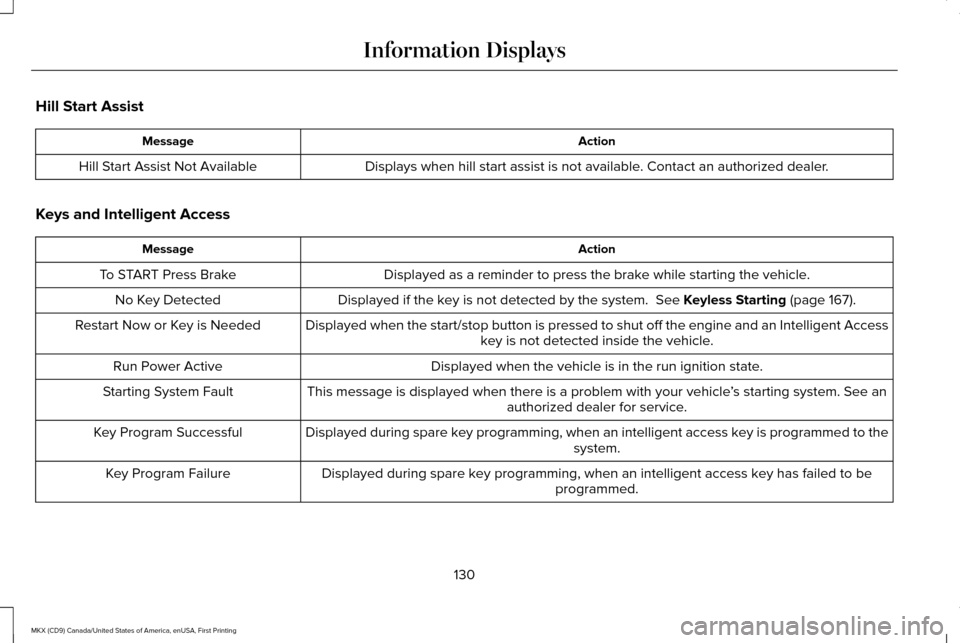
Hill Start Assist
Action
Message
Displays when hill start assist is not available. Contact an authorized dealer.
Hill Start Assist Not Available
Keys and Intelligent Access Action
Message
Displayed as a reminder to press the brake while starting the vehicle.
To START Press Brake
Displayed if the key is not detected by the system. See Keyless Starting (page 167).
No Key Detected
Displayed when the start/stop button is pressed to shut off the engine a\
nd an Intelligent Accesskey is not detected inside the vehicle.
Restart Now or Key is Needed
Displayed when the vehicle is in the run ignition state.
Run Power Active
This message is displayed when there is a problem with your vehicle ’s starting system. See an
authorized dealer for service.
Starting System Fault
Displayed during spare key programming, when an intelligent access key is programmed to the system.
Key Program Successful
Displayed during spare key programming, when an intelligent access key has failed to be programmed.
Key Program Failure
130
MKX (CD9) Canada/United States of America, enUSA, First Printing Information Displays
Page 135 of 587
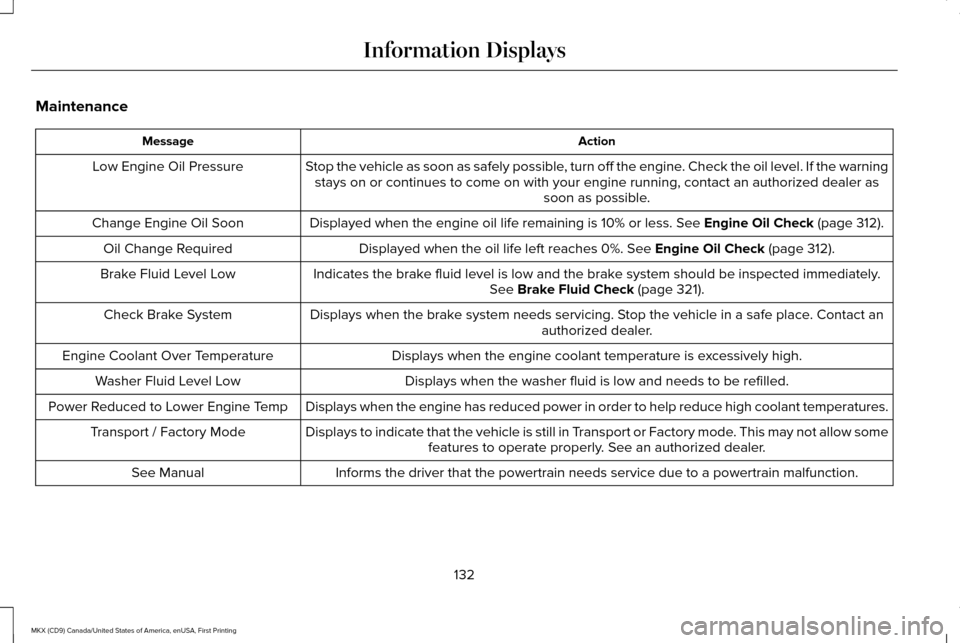
Maintenance
Action
Message
Stop the vehicle as soon as safely possible, turn off the engine. Check the oil level. If the warningstays on or continues to come on with your engine running, contact an au\
thorized dealer as soon as possible.
Low Engine Oil Pressure
Displayed when the engine oil life remaining is 10% or less. See Engine Oil Check (page 312).
Change Engine Oil Soon
Displayed when the oil life left reaches 0%.
See Engine Oil Check (page 312).
Oil Change Required
Indicates the brake fluid level is low and the brake system should be inspected immediately.See
Brake Fluid Check (page 321).
Brake Fluid Level Low
Displays when the brake system needs servicing. Stop the vehicle in a safe place. Contact an authorized dealer.
Check Brake System
Displays when the engine coolant temperature is excessively high.
Engine Coolant Over Temperature
Displays when the washer fluid is low and needs to be refilled.
Washer Fluid Level Low
Displays when the engine has reduced power in order to help reduce high \
coolant temperatures.
Power Reduced to Lower Engine Temp
Displays to indicate that the vehicle is still in Transport or Factory mode. This may not allow somefeatures to operate properly. See an authorized dealer.
Transport / Factory Mode
Informs the driver that the powertrain needs service due to a powertrain\
malfunction.
See Manual
132
MKX (CD9) Canada/United States of America, enUSA, First Printing Information Displays
Page 137 of 587
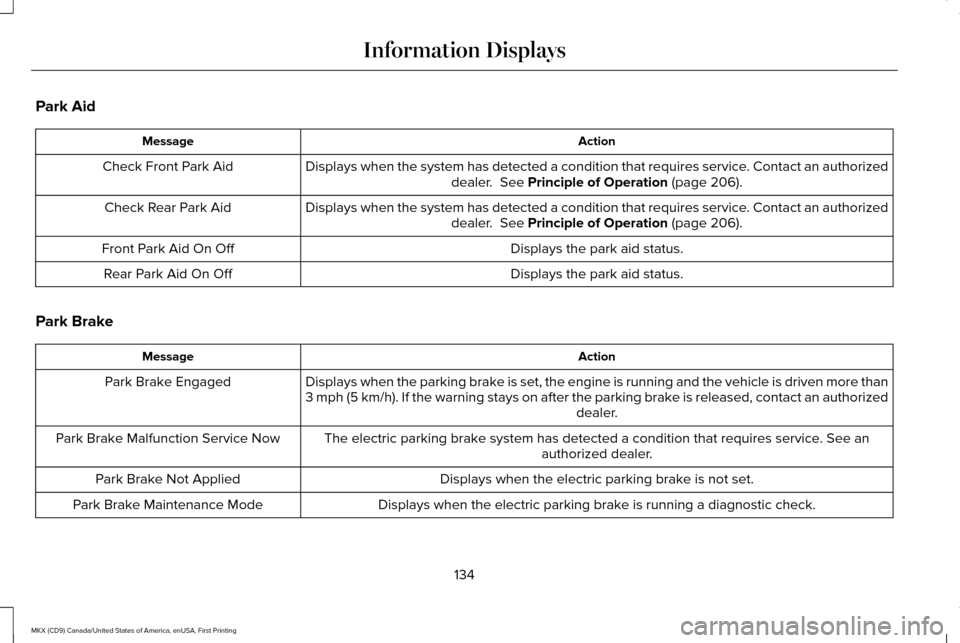
Park Aid
Action
Message
Displays when the system has detected a condition that requires service. Contact an authorizeddealer. See Principle of Operation (page 206).
Check Front Park Aid
Displays when the system has detected a condition that requires service. Contact an authorizeddealer.
See Principle of Operation (page 206).
Check Rear Park Aid
Displays the park aid status.
Front Park Aid On Off
Displays the park aid status.
Rear Park Aid On Off
Park Brake Action
Message
Displays when the parking brake is set, the engine is running and the vehicle is driven more than
3 mph (5 km/h). If the warning stays on after the parking brake is released, contact an authorized dealer.
Park Brake Engaged
The electric parking brake system has detected a condition that requires service. See anauthorized dealer.
Park Brake Malfunction Service Now
Displays when the electric parking brake is not set.
Park Brake Not Applied
Displays when the electric parking brake is running a diagnostic check.
Park Brake Maintenance Mode
134
MKX (CD9) Canada/United States of America, enUSA, First Printing Information Displays
Page 140 of 587
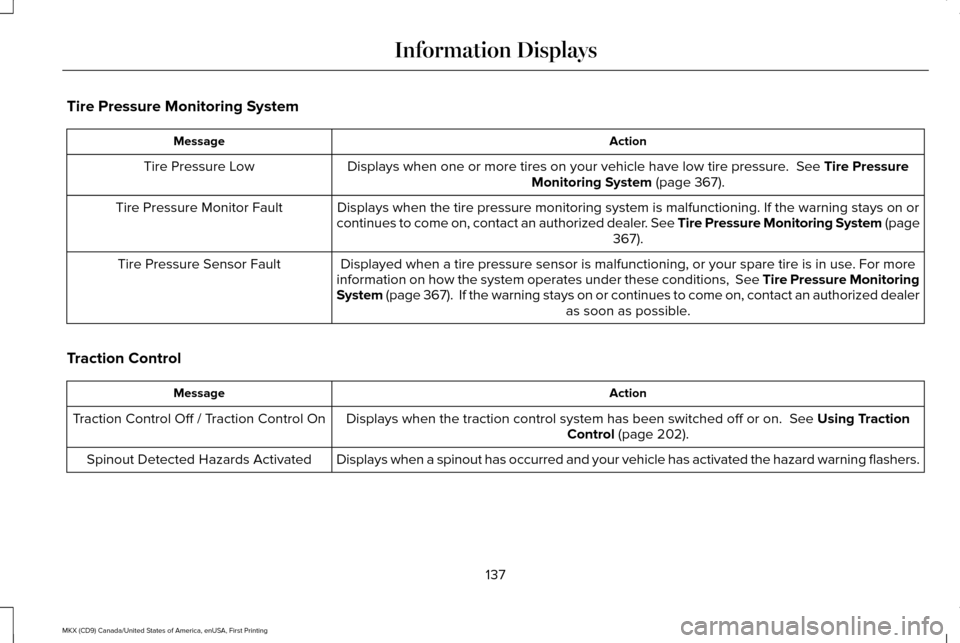
Tire Pressure Monitoring System
Action
Message
Displays when one or more tires on your vehicle have low tire pressure. See Tire Pressure
Monitoring System (page 367).
Tire Pressure Low
Displays when the tire pressure monitoring system is malfunctioning. If \
the warning stays on or
continues to come on, contact an authorized dealer. See Tire Pressure Monitoring System (page 367
).
Tire Pressure Monitor Fault
Displayed when a tire pressure sensor is malfunctioning, or your spare t\
ire is in use. For more
information on how the system operates under these conditions, See Tire Pressure Monitoring
System (page 367). If the warning stays on or continues to come on, contact\
an authorized dealer as soon as possible.
Tire Pressure Sensor Fault
Traction Control Action
Message
Displays when the traction control system has been switched off or on.
See Using Traction
Control (page 202).
Traction Control Off / Traction Control On
Displays when a spinout has occurred and your vehicle has activated the \
hazard warning flashers.
Spinout Detected Hazards Activated
137
MKX (CD9) Canada/United States of America, enUSA, First Printing Information Displays
Page 141 of 587
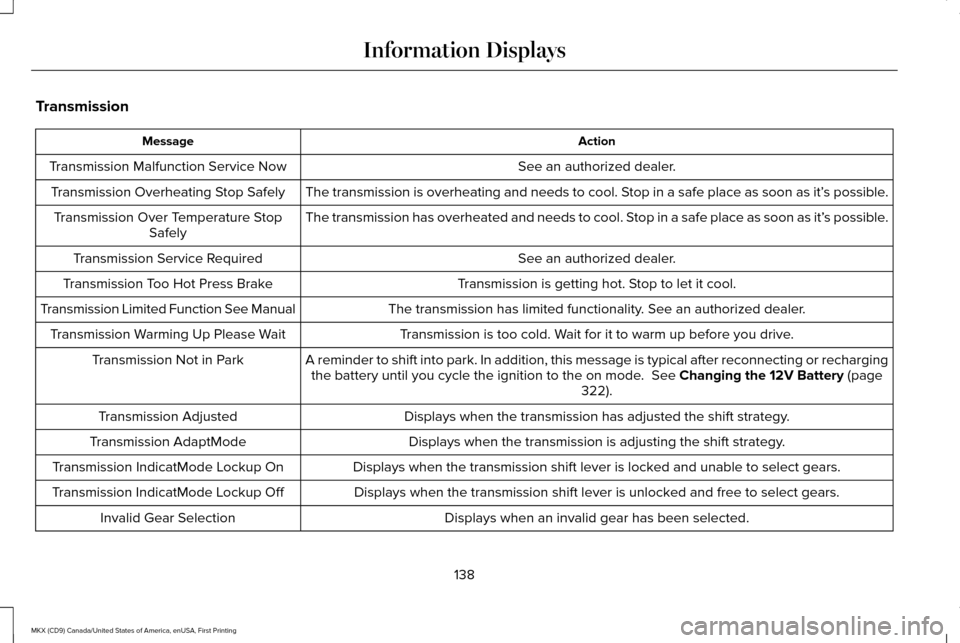
Transmission
Action
Message
See an authorized dealer.
Transmission Malfunction Service Now
The transmission is overheating and needs to cool. Stop in a safe place as soon as it’ s possible.
Transmission Overheating Stop Safely
The transmission has overheated and needs to cool. Stop in a safe place as soon as it’ s possible.
Transmission Over Temperature Stop
Safely
See an authorized dealer.
Transmission Service Required
Transmission is getting hot. Stop to let it cool.
Transmission Too Hot Press Brake
The transmission has limited functionality. See an authorized dealer.
Transmission Limited Function See Manual
Transmission is too cold. Wait for it to warm up before you drive.
Transmission Warming Up Please Wait
A reminder to shift into park. In addition, this message is typical afte\
r reconnecting or rechargingthe battery until you cycle the ignition to the on mode. See Changing the 12V Battery (page
322).
Transmission Not in Park
Displays when the transmission has adjusted the shift strategy.
Transmission Adjusted
Displays when the transmission is adjusting the shift strategy.
Transmission AdaptMode
Displays when the transmission shift lever is locked and unable to select gears.
Transmission IndicatMode Lockup On
Displays when the transmission shift lever is unlocked and free to select gears.
Transmission IndicatMode Lockup Off
Displays when an invalid gear has been selected.
Invalid Gear Selection
138
MKX (CD9) Canada/United States of America, enUSA, First Printing Information Displays
Page 142 of 587
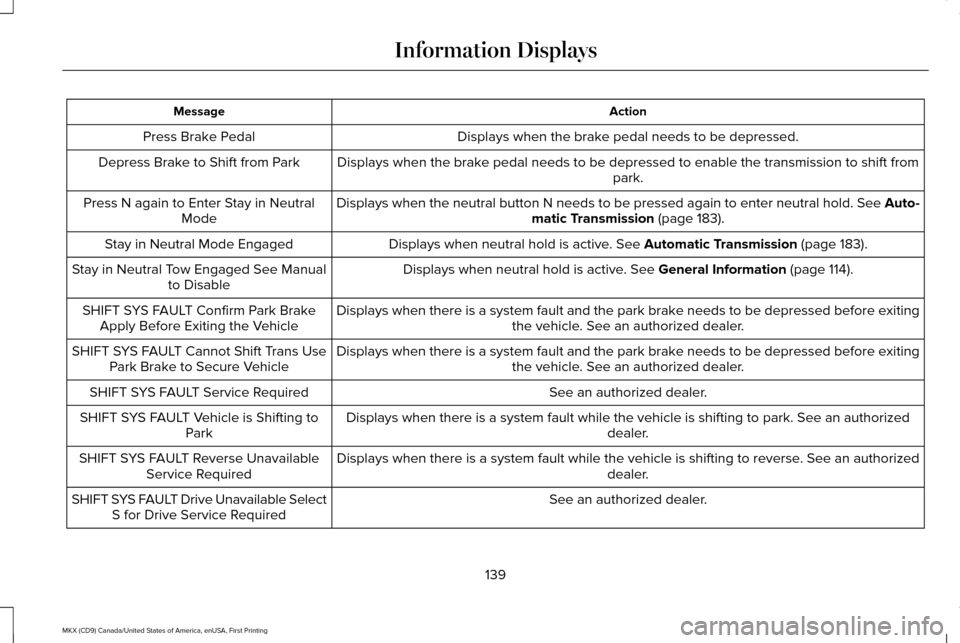
Action
Message
Displays when the brake pedal needs to be depressed.
Press Brake Pedal
Displays when the brake pedal needs to be depressed to enable the transmission to shift from park.
Depress Brake to Shift from Park
Displays when the neutral button N needs to be pressed again to enter ne\
utral hold. See Auto-matic Transmission (page 183).
Press N again to Enter Stay in Neutral
Mode
Displays when neutral hold is active.
See Automatic Transmission (page 183).
Stay in Neutral Mode Engaged
Displays when neutral hold is active.
See General Information (page 114).
Stay in Neutral Tow Engaged See Manual
to Disable
Displays when there is a system fault and the park brake needs to be depressed before exiting the vehicle. See an authorized dealer.
SHIFT SYS FAULT Confirm Park Brake
Apply Before Exiting the Vehicle
Displays when there is a system fault and the park brake needs to be depressed before exitingthe vehicle. See an authorized dealer.
SHIFT SYS FAULT Cannot Shift Trans Use
Park Brake to Secure Vehicle
See an authorized dealer.
SHIFT SYS FAULT Service Required
Displays when there is a system fault while the vehicle is shifting to p\
ark. See an authorized dealer.
SHIFT SYS FAULT Vehicle is Shifting to
Park
Displays when there is a system fault while the vehicle is shifting to r\
everse. See an authorized dealer.
SHIFT SYS FAULT Reverse Unavailable
Service Required
See an authorized dealer.
SHIFT SYS FAULT Drive Unavailable Select
S for Drive Service Required
139
MKX (CD9) Canada/United States of America, enUSA, First Printing Information Displays
Page 143 of 587
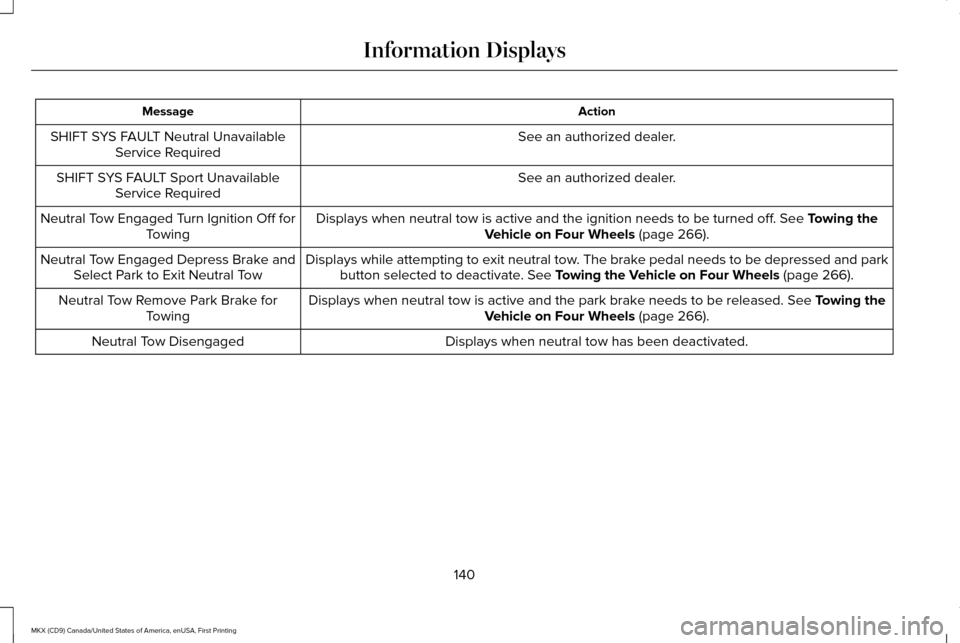
Action
Message
See an authorized dealer.
SHIFT SYS FAULT Neutral Unavailable
Service Required
See an authorized dealer.
SHIFT SYS FAULT Sport Unavailable
Service Required
Displays when neutral tow is active and the ignition needs to be turned \
off. See Towing the
Vehicle on Four Wheels (page 266).
Neutral Tow Engaged Turn Ignition Off for
Towing
Displays while attempting to exit neutral tow. The brake pedal needs to be depressed and parkbutton selected to deactivate.
See Towing the Vehicle on Four Wheels (page 266).
Neutral Tow Engaged Depress Brake and
Select Park to Exit Neutral Tow
Displays when neutral tow is active and the park brake needs to be released.
See Towing the
Vehicle on Four Wheels (page 266).
Neutral Tow Remove Park Brake for
Towing
Displays when neutral tow has been deactivated.
Neutral Tow Disengaged
140
MKX (CD9) Canada/United States of America, enUSA, First Printing Information Displays
Page 145 of 587
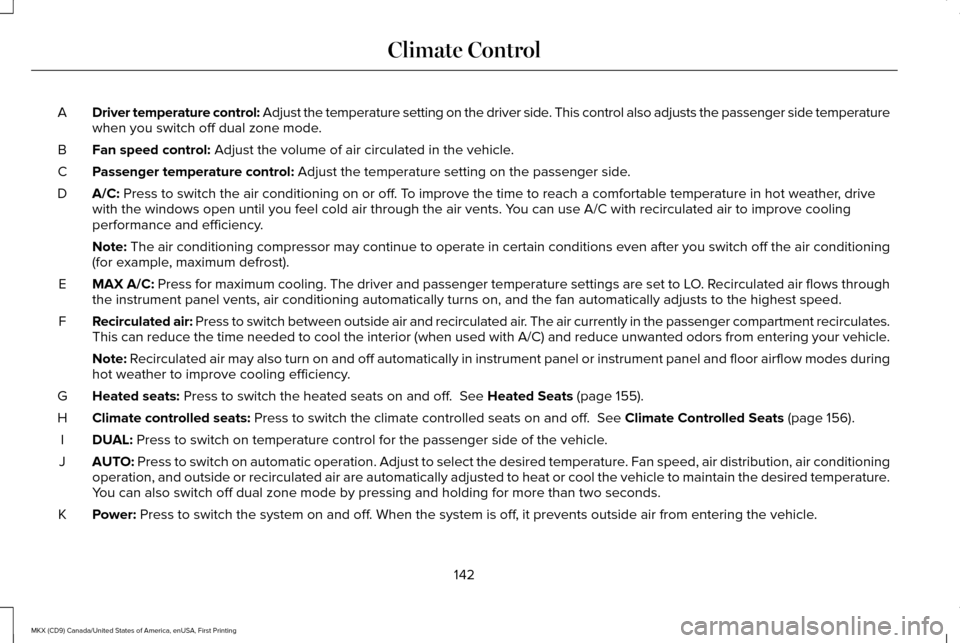
Driver temperature control: Adjust the temperature setting on the driver side. This control also adjusts the passenger side temperature
when you switch off dual zone mode.
A
Fan speed control: Adjust the volume of air circulated in the vehicle.
B
Passenger temperature control:
Adjust the temperature setting on the passenger side.
C
A/C:
Press to switch the air conditioning on or off. To improve the time to reach a comfortable temperature in hot weather, drive
with the windows open until you feel cold air through the air vents. You can use A/C with recirculated air to improve cooling
performance and efficiency.
D
Note:
The air conditioning compressor may continue to operate in certain cond\
itions even after you switch off the air conditioning
(for example, maximum defrost).
MAX A/C:
Press for maximum cooling. The driver and passenger temperature setting\
s are set to LO. Recirculated air flows through
the instrument panel vents, air conditioning automatically turns on, and\
the fan automatically adjusts to the highest speed.
E
Recirculated air: Press to switch between outside air and recirculated air. The air currently in the passenger compartment recirculates.
This can reduce the time needed to cool the interior (when used with A/\
C) and reduce unwanted odors from entering your vehicle.
F
Note:
Recirculated air may also turn on and off automatically in instrument pan\
el or instrument panel and floor airflow modes during
hot weather to improve cooling efficiency.
Heated seats:
Press to switch the heated seats on and off. See Heated Seats (page 155).
G
Climate controlled seats:
Press to switch the climate controlled seats on and off. See Climate Controlled Seats (page 156).
H
DUAL:
Press to switch on temperature control for the passenger side of the ve\
hicle.
I
AUTO:
Press to switch on automatic operation. Adjust to select the desired te\
mperature. Fan speed, air distribution, air conditioning
operation, and outside or recirculated air are automatically adjusted to\
heat or cool the vehicle to maintain the desired temperature .
You can also switch off dual zone mode by pressing and holding for more t\
han two seconds.
J
Power:
Press to switch the system on and off. When the system is off, it prevents outside air from entering the vehicle.
K
142
MKX (CD9) Canada/United States of America, enUSA, First Printing Climate Control
Page 146 of 587

Defrost: Select to distribute air through the windshield air vents. Air distribu\
tion to the instrument panel and footwell vents turns
off. You can also use this setting to defrost and clear the windshield of a th\
in covering of ice.
L
Heated rear window:
Press to switch the heated rear window on and off. See Heated Windows and Mirrors (page 144).
M
HINTS ON CONTROLLING THE
INTERIOR CLIMATE
General Hints
Note: Prolonged use of recirculated air may
cause the windows to fog up.
Note: You may feel a small amount of air
from the footwell air vents regardless of the
air distribution setting.
Note: To reduce humidity build-up inside
your vehicle, do not drive with the system
switched off or with recirculated air always
switched on.
Note: Do not place objects under the front
seats as this may interfere with the airflow
to the rear seats.
Note: Remove any snow, ice or leaves from
the air intake area at the base of the
windshield. Note:
To improve the time to reach a
comfortable temperature in hot weather,
drive with the windows open until you feel
cold air through the air vents.
Automatic Climate Control
Note: Adjusting the settings when your
vehicle interior is extremely hot or cold is not
necessary. The system automatically adjusts
to heat or cool the cabin to your selected
temperature as quickly as possible. For the
system to function efficiently, the instrument
panel and side air vents should be fully
open.
Note: If you select
AUTO during cold outside
temperatures, the system directs airflow to
the windshield and side window vents. In
addition, the fan may run at a slower speed
until the engine warms up. Note:
If you select AUTO during hot outside
temperatures and when the inside of the
vehicle is hot, the system automatically uses
recirculated air to maximize interior cooling.
When the interior reaches the selected
temperature, the system automatically
switches to using outside air.
Heating the Interior Quickly
1. Select the
AUTO function.
2. Adjust the temperature function to the desired setting.
Recommended Settings for Heating
1. Select the
AUTO function.
2. Adjust the temperature function to the desired setting. Use 72°F (22°C) as a
starting point, then adjust the setting as
necessary.
143
MKX (CD9) Canada/United States of America, enUSA, First Printing Climate Control