park assist LINCOLN MKX 2017 User Guide
[x] Cancel search | Manufacturer: LINCOLN, Model Year: 2017, Model line: MKX, Model: LINCOLN MKX 2017Pages: 587, PDF Size: 5.4 MB
Page 214 of 587
WARNINGS
The sensors may not detect objects in
heavy rain or other conditions that
cause interference. Active park assist does not apply the
brakes under any circumstances.
The system is designed to aid the
driver. It is not intended to replace your
attention and judgment. You are still
responsible to drive with due care and
attention. Note:
The Blind Spot Information System
does not detect traffic alongside or behind
your vehicle during an active park assist
maneuver.
The system detects an available parallel or
perpendicular parking space and
automatically steers your vehicle into the
space (hands-free) while you control the
accelerator, gearshift and brakes. The system
visually and audibly guides you to park your
vehicle. If you are uncomfortable with the proximity
to any vehicle or object, you may choose to
override the system by grabbing the steering
wheel or pushing the active park assist
button.
Parallel Park Out Assist automatically steers
your vehicle out of a parallel parking space
(hands-free) while you control the
accelerator, gearshift and brakes. The system
visually and audibly guides you to enter
traffic.
The system may not correctly operate in any
of the following conditions:
•
You use a spare tire or a tire significantly
worn more than the other tires.
• One or more tires are improperly inflated.
• You try to park on a tight curve.
• Something passes between the front
bumper and the parking space (a
pedestrian or cyclist). •
The edge of the neighboring parked
vehicle is high off the ground (for
example, a bus, tow truck or flatbed
truck).
• The weather conditions are poor (heavy
rain, snow, fog, etc).
Note: Keep the sensors, located on the
bumper or fascia, free from snow, ice and
large accumulations of dirt. Covered sensors
can affect the system's accuracy. Do not
clean the sensors with sharp objects.
Note: The sensors may not detect objects
with surfaces that absorb ultrasonic waves
or cause ultrasonic interference (motorcycle
exhaust, truck air brakes or horns).
Do not use the system if:
• You have attached a foreign object (for
example, a bike rack or trailer) close to
the sensors on the front or rear of your
vehicle.
• You have attached an overhanging
object (for example, a surfboard) to the
roof.
211
MKX (CD9) Canada/United States of America, enUSA, First Printing Parking Aids
Page 215 of 587
•
A foreign object damages or obstructs
the front or rear bumper or side sensors.
• The correct tire size is not in use on your
vehicle (for example, a mini-spare tire).
Using Active Park Assist - Parallel Parking Press the active park assist button
to search for a parallel parking
space.
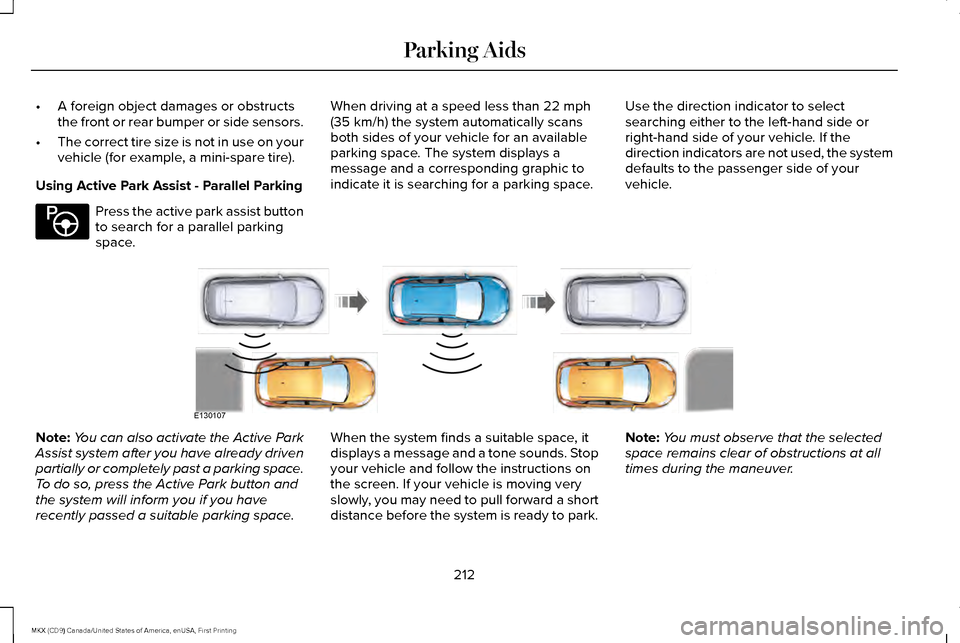
When driving at a speed less than 22 mph
(35 km/h) the system automatically scans
both sides of your vehicle for an available
parking space. The system displays a
message and a corresponding graphic to
indicate it is searching for a parking space. Use the direction indicator to select
searching either to the left-hand side or
right-hand side of your vehicle. If the
direction indicators are not used, the system
defaults to the passenger side of your
vehicle.Note:
You can also activate the Active Park
Assist system after you have already driven
partially or completely past a parking space.
To do so, press the Active Park button and
the system will inform you if you have
recently passed a suitable parking space. When the system finds a suitable space, it
displays a message and a tone sounds. Stop
your vehicle and follow the instructions on
the screen. If your vehicle is moving very
slowly, you may need to pull forward a short
distance before the system is ready to park.Note:
You must observe that the selected
space remains clear of obstructions at all
times during the maneuver.
212
MKX (CD9) Canada/United States of America, enUSA, First Printing Parking AidsE146186 E130107
Page 216 of 587
Note:
You should drive your vehicle within
5 ft (1.5 m) and as parallel as possible to the
other vehicles while passing a parking
space.
Note: The system always offers the last
detected parking space (for example, if your
vehicle detects multiple spaces while you
are driving, it offers the last one). Note:
If driven above approximately 22 mph
(35 km/h), the system shows a message to
alert you to reduce your vehicle speed.
Automatic Steering into Parking Space
Note: If your vehicle speed exceeds
approximately
6 mph (10 km/h) or the
maneuver is interrupted (driver input), the
system switches off and you need to take
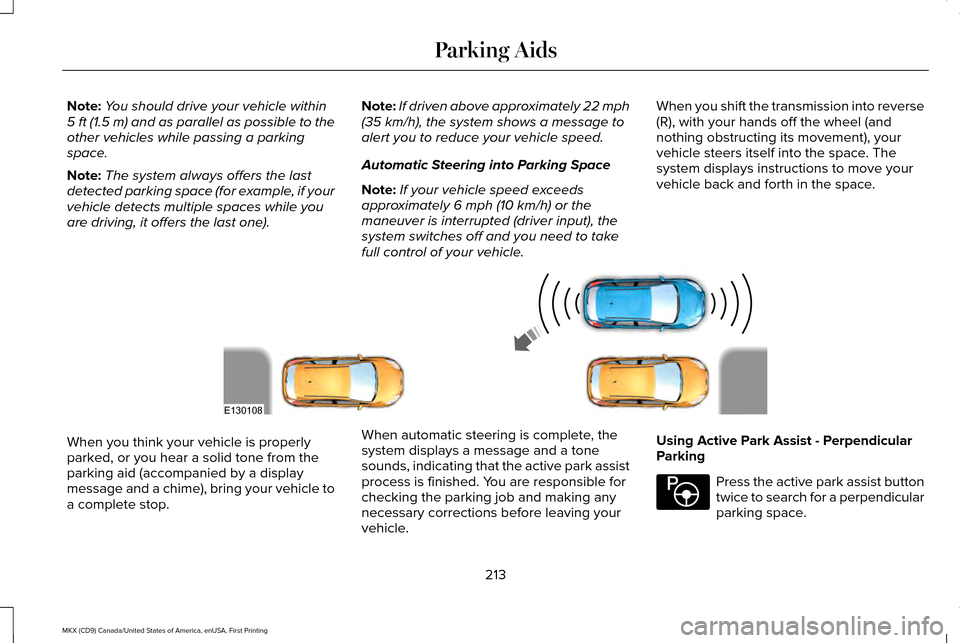
full control of your vehicle. When you shift the transmission into reverse
(R), with your hands off the wheel (and
nothing obstructing its movement), your
vehicle steers itself into the space. The
system displays instructions to move your
vehicle back and forth in the space.When you think your vehicle is properly
parked, or you hear a solid tone from the
parking aid (accompanied by a display
message and a chime), bring your vehicle to
a complete stop.
When automatic steering is complete, the
system displays a message and a tone
sounds, indicating that the active park assist
process is finished. You are responsible for
checking the parking job and making any
necessary corrections before leaving your
vehicle.Using Active Park Assist - Perpendicular
Parking Press the active park assist button
twice to search for a perpendicular
parking space.
213
MKX (CD9) Canada/United States of America, enUSA, First Printing Parking AidsE130108 E146186
Page 218 of 587
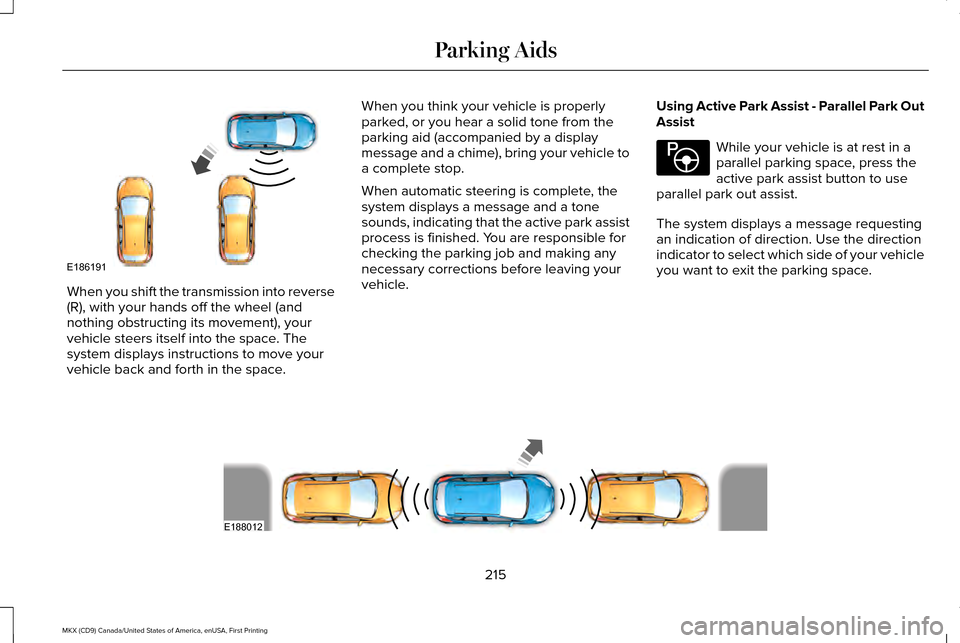
When you shift the transmission into reverse
(R), with your hands off the wheel (and
nothing obstructing its movement), your
vehicle steers itself into the space. The
system displays instructions to move your
vehicle back and forth in the space.
When you think your vehicle is properly
parked, or you hear a solid tone from the
parking aid (accompanied by a display
message and a chime), bring your vehicle to
a complete stop.
When automatic steering is complete, the
system displays a message and a tone
sounds, indicating that the active park assist
process is finished. You are responsible for
checking the parking job and making any
necessary corrections before leaving your
vehicle.
Using Active Park Assist - Parallel Park Out
Assist While your vehicle is at rest in a
parallel parking space, press the
active park assist button to use
parallel park out assist.
The system displays a message requesting
an indication of direction. Use the direction
indicator to select which side of your vehicle
you want to exit the parking space. 215
MKX (CD9) Canada/United States of America, enUSA, First Printing Parking AidsE186191 E146186 E188012
Page 219 of 587
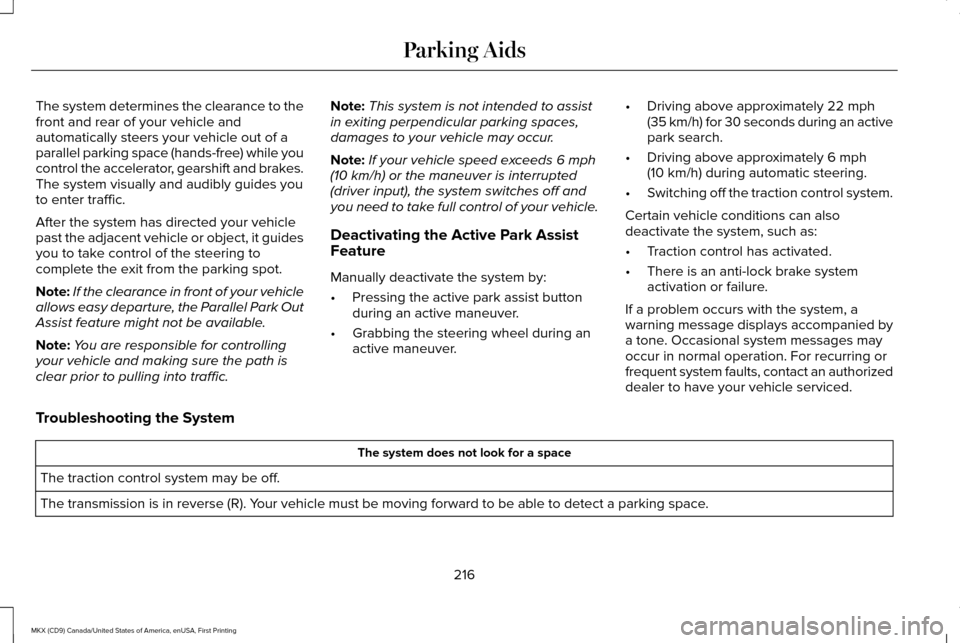
The system determines the clearance to the
front and rear of your vehicle and
automatically steers your vehicle out of a
parallel parking space (hands-free) while you
control the accelerator, gearshift and brakes.
The system visually and audibly guides you
to enter traffic.
After the system has directed your vehicle
past the adjacent vehicle or object, it guides
you to take control of the steering to
complete the exit from the parking spot.
Note:
If the clearance in front of your vehicle
allows easy departure, the Parallel Park Out
Assist feature might not be available.
Note: You are responsible for controlling
your vehicle and making sure the path is
clear prior to pulling into traffic. Note:
This system is not intended to assist
in exiting perpendicular parking spaces,
damages to your vehicle may occur.
Note: If your vehicle speed exceeds 6 mph
(10 km/h) or the maneuver is interrupted
(driver input), the system switches off and
you need to take full control of your vehicle.
Deactivating the Active Park Assist
Feature
Manually deactivate the system by:
• Pressing the active park assist button
during an active maneuver.
• Grabbing the steering wheel during an
active maneuver. •
Driving above approximately
22 mph
(35 km/h) for 30 seconds during an active
park search.
• Driving above approximately
6 mph
(10 km/h) during automatic steering.
• Switching off the traction control system.
Certain vehicle conditions can also
deactivate the system, such as:
• Traction control has activated.
• There is an anti-lock brake system
activation or failure.
If a problem occurs with the system, a
warning message displays accompanied by
a tone. Occasional system messages may
occur in normal operation. For recurring or
frequent system faults, contact an authorized
dealer to have your vehicle serviced.
Troubleshooting the System The system does not look for a space
The traction control system may be off.
The transmission is in reverse (R). Your vehicle must be moving forward to be able to detect a parking space.
216
MKX (CD9) Canada/United States of America, enUSA, First Printing Parking Aids
Page 226 of 587
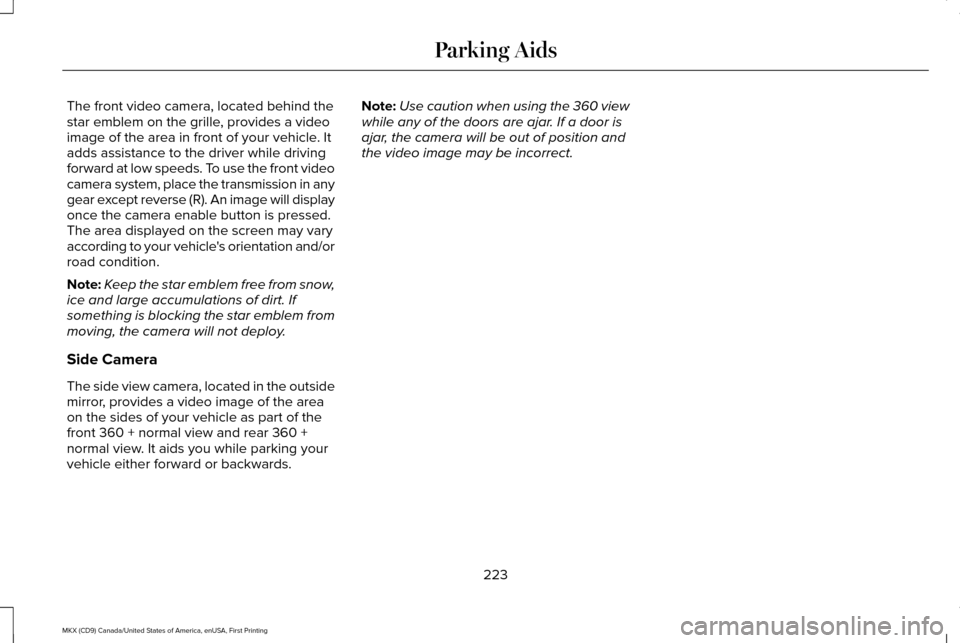
The front video camera, located behind the
star emblem on the grille, provides a video
image of the area in front of your vehicle. It
adds assistance to the driver while driving
forward at low speeds. To use the front video
camera system, place the transmission in any
gear except reverse (R). An image will display
once the camera enable button is pressed.
The area displayed on the screen may vary
according to your vehicle's orientation and/or
road condition.
Note:
Keep the star emblem free from snow,
ice and large accumulations of dirt. If
something is blocking the star emblem from
moving, the camera will not deploy.
Side Camera
The side view camera, located in the outside
mirror, provides a video image of the area
on the sides of your vehicle as part of the
front 360 + normal view and rear 360 +
normal view. It aids you while parking your
vehicle either forward or backwards. Note:
Use caution when using the 360 view
while any of the doors are ajar. If a door is
ajar, the camera will be out of position and
the video image may be incorrect.
223
MKX (CD9) Canada/United States of America, enUSA, First Printing Parking Aids
Page 268 of 587
Trailer lamps are required on most towed
vehicles. Make sure all running lights, brake
lights, turn signals and hazard lights are
working.
Before Towing a Trailer
Practice turning, stopping and backing up to
get the feel of your vehicle-trailer
combination before starting on a trip. When
turning, make wider turns so the trailer
wheels clear curbs and other obstacles.
When Towing a Trailer
•
Do not drive faster than 70 mph (113
km/h) during the first 500 miles (800
kilometers).
• Do not make full-throttle starts.
• Check your hitch, electrical connections
and trailer wheel lug nuts thoroughly after
you have traveled 50 miles (80
kilometers).
• When stopped in congested or heavy
traffic during hot weather, place the
gearshift in position P to aid engine and
transmission cooling and to help A/C
performance. •
Turn off the speed control with heavy
loads or in hilly terrain. The speed control
may turn off automatically when you are
towing on long, steep grades.
• Shift to a lower gear when driving down
a long or steep hill. Do not apply the
brakes continuously, as they may
overheat and become less effective.
• If your transmission is equipped with a
Grade Assist or Tow/Haul feature, use
this feature when towing. This provides
engine braking and helps eliminate
excessive transmission shifting for
optimum fuel economy and transmission
cooling.
• Allow more distance for stopping with a
trailer attached. Anticipate stops and
brake gradually.
• Avoid parking on a grade. However, if
you must park on a grade:
1. Turn the steering wheel to point your vehicle tires away from traffic flow.
2. Set your vehicle parking brake.
3. Place the automatic transmission in position
P. 4. Place wheel chocks in front and back of
the trailer wheels. (Chocks not included
with vehicle.)
Launching or Retrieving a Boat or
Personal Watercraft (PWC)
Note: Disconnect the wiring to the trailer
before
backing the trailer into the water.
Note: Reconnect the wiring to the trailer
after
removing the trailer from the water.
When backing down a ramp during boat
launching or retrieval:
• Do not allow the static water level to rise
above the bottom edge of the rear
bumper.
• Do not allow waves to break higher than
6 inches (15 centimeters) above the
bottom edge of the rear bumper.
Exceeding these limits may allow water to
enter vehicle components:
• Causing internal damage to the
components.
• Affecting driveability, emissions, and
reliability.
265
MKX (CD9) Canada/United States of America, enUSA, First Printing Towing
Page 321 of 587
1. Pull off the road as soon as safely
possible and switch the engine off.
2. If you are a member of a roadside assistance program, we recommend that
you contact your roadside assistance
service provider.
3. If this is not possible, wait a short period
for the engine to cool.
4. Check the coolant level. If the coolant level is at or below the minimum mark,
add prediluted coolant immediately.
5. When the engine temperature cools, you
can re-start the engine. Have your vehicle
checked as soon as possible to minimize
engine damage.
Note: Driving your vehicle without repair
increases the chance of engine damage. Engine Coolant Temperature
Management (If Equipped) WARNING
To reduce the risk of crash and injury,
be prepared that the vehicle speed
may reduce and the vehicle may not be able
to accelerate with full power until the coolant
temperature reduces. If you tow a trailer with your vehicle, the
engine may temporarily reach a higher
temperature during severe operating
conditions, for example ascending a long or
steep grade in high ambient temperatures.
At this time, you may notice the coolant
temperature gauge moves toward the red
zone and a message may appear in the
information display.
You may notice a reduction in vehicle speed
caused by reduced engine power. In order
to manage the engine coolant temperature.
Your vehicle may enter this mode if certain
high-temperature and high-load conditions
take place. The amount of speed reduction
depends on vehicle loading, grade and
ambient temperature. If this occurs, there is
no need to pull off the road. You can
continue to drive your vehicle.
The air conditioning may automatically turn
on and off during severe operating
conditions to protect the engine from
overheating. When the coolant temperature
decreases to the normal operating
temperature, the air conditioning turns on.
If the coolant temperature gauge moves fully
into the red zone, or if the coolant
temperature warning or service engine soon
messages appear in your information display,
do the following:
1. Pull off the road as soon as safely
possible and shift the transmission into
park
(P).
318
MKX (CD9) Canada/United States of America, enUSA, First Printing Maintenance
Page 348 of 587
•
Always set the parking brake to ensure
the vehicle does not move unexpectedly.
• Do not remove any foreign objects, such
as nails or screws, from the tire.
• When using the kit, leave the engine
running (only if the vehicle is outdoors or
in a well-ventilated area) so the
compressor does not drain the vehicle's
battery.
• Do not allow the compressor to operate
continuously for more than 15 minutes.
This will help prevent the compressor
from overheating.
• Never leave the kit unattended during
operation.
• Sealant compound contains latex. Those
with latex sensitivities should use
appropriate precautions to avoid an
allergic reaction.
• Keep the kit away from children.
• Only use the kit when the ambient
temperature is between -22°F (-30°C) and
158°F (70°C). •
Only use the sealing compound before
the use-by date. The use-by date is on a
label on the sealant canister, which you
can see through the rectangular viewing
window on the bottom of the compressor.
Check the use-by date regularly and
replace the canister after four years of
non-use.
• Do not store the kit unsecured inside the
passenger compartment of the vehicle
as it may cause injury during a sudden
stop or crash. Always store the kit in its
original location.
• After sealant use, an authorized Ford
dealer must replace the tire pressure
monitoring system sensor and valve stem
on the wheel.
• Operating the kit could cause an
electrical disturbance in radio, CD and
DVD player operation. * When inflation only is required for
a tire or other objects, the selector
must be in the Air position.What to do When a Tire Is Punctured
You can repair a tire puncture within the tire's
tread area in two stages with the kit.
•
In the first stage, inflate the tire with a
sealing compound and air. After you
inflate the tire, you will need to drive the
vehicle a short distance (about 4 miles [6
kilometers]) to distribute the sealant in
the tire.
• In the second stage, check the tire
pressure and adjust, if necessary, to the
vehicle's specified tire inflation pressure.
First Stage: Inflating the Tire with
Sealing Compound and Air WARNINGS
Do not stand directly over the kit while
inflating the tire. If you notice any
unusual bulges or deformations in the tire's
sidewall during inflation, stop and call
roadside assistance. If the tire does not inflate to the
recommended tire pressure within 15
minutes, stop and call roadside assistance.
345
MKX (CD9) Canada/United States of America, enUSA, First Printing Wheels and TiresE175978
Page 349 of 587
WARNINGS
Do not run the engine during kit
operation unless the vehicle is
outdoors or in a well-ventilated area. Preparation: Park the vehicle in a safe, level
and secure area, away from moving traffic.
Switch the hazard lights on. Apply the
parking brake and switch the engine off.
Inspect the flat tire for visible damage.
Sealant compound contains latex. Use
appropriate precautions to avoid any allergic
reactions.
Do not remove any foreign object that has
pierced the tire. If a puncture is located in
the tire sidewall, stop and call roadside
assistance.
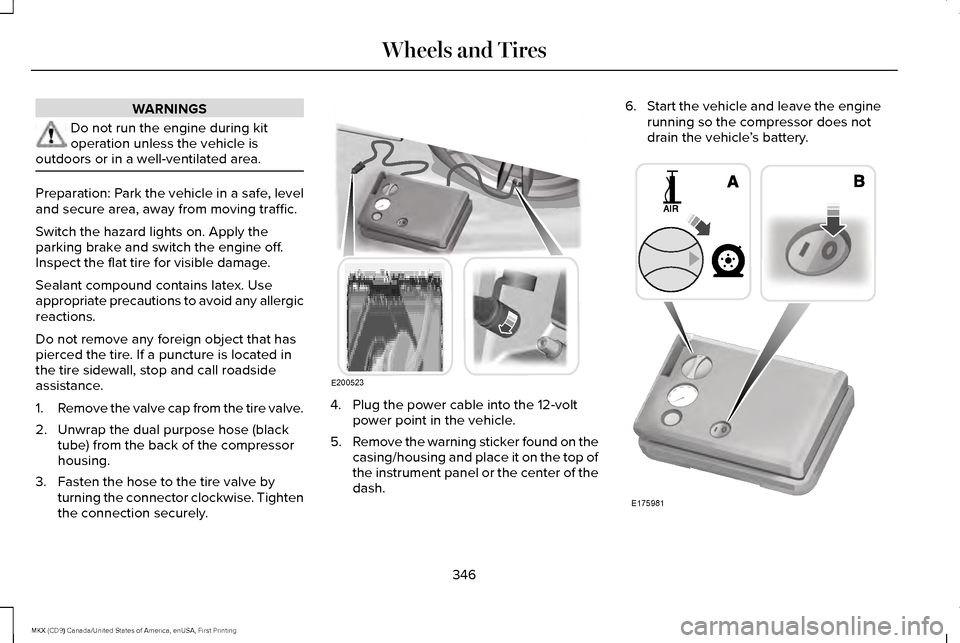
1.
Remove the valve cap from the tire valve.
2. Unwrap the dual purpose hose (black tube) from the back of the compressor
housing.
3. Fasten the hose to the tire valve by turning the connector clockwise. Tighten
the connection securely. 4. Plug the power cable into the 12-volt
power point in the vehicle.
5. Remove the warning sticker found on the
casing/housing and place it on the top of
the instrument panel or the center of the
dash. 6. Start the vehicle and leave the engine
running so the compressor does not
drain the vehicle ’s battery. 346
MKX (CD9) Canada/United States of America, enUSA, First Printing Wheels and TiresE200523 E175981