page 91 LINCOLN MKX 2017 Repair Manual
[x] Cancel search | Manufacturer: LINCOLN, Model Year: 2017, Model line: MKX, Model: LINCOLN MKX 2017Pages: 587, PDF Size: 5.4 MB
Page 148 of 587
Replace the filter at regular intervals. See
Scheduled Maintenance (page 510).
For additional cabin air filter information, or
to replace the filter, see an authorized dealer.
REMOTE START
The system adjusts the interior temperature
depending on your chosen settings during
remote start.
You cannot adjust the climate control setting
during remote start operation. When you
switch the ignition on, the climate control
system will return to the previous settings.
You can now make adjustments.
You need to switch on certain
vehicle-dependent features, such as:
• Heated seats.
• Cooled seats.
• Heated steering wheel.
• Heated mirrors.
• Heated rear window. You can adjust the default remote start
settings using the information display
controls. See Information Displays (page
114).
Automatic Settings
In hot weather, the system is set to 72°F
(22°C). The cooled seats are set to high (if
available, and selected to AUTO in the
information display).
In moderate weather, the system either heats
or cools (based on pre-selected settings).
The rear defroster, heated mirrors and
heated or cooled seats do not automatically
switch on.
In cold weather, the system is set to 72°F
(22°C). The heated seats and heated steering
wheel are set to high (if available, and
selected to AUTO in the information display).
The rear defroster and heated mirrors
automatically switch on.
145
MKX (CD9) Canada/United States of America, enUSA, First Printing Climate Control
Page 156 of 587
WARNINGS
Do not use the memory function when
your vehicle is moving.
This feature automatically recalls the position
of the following:
•
Driver seat.
• Power mirrors.
• Optional power adjustable foot pedals.
• Optional power steering column.
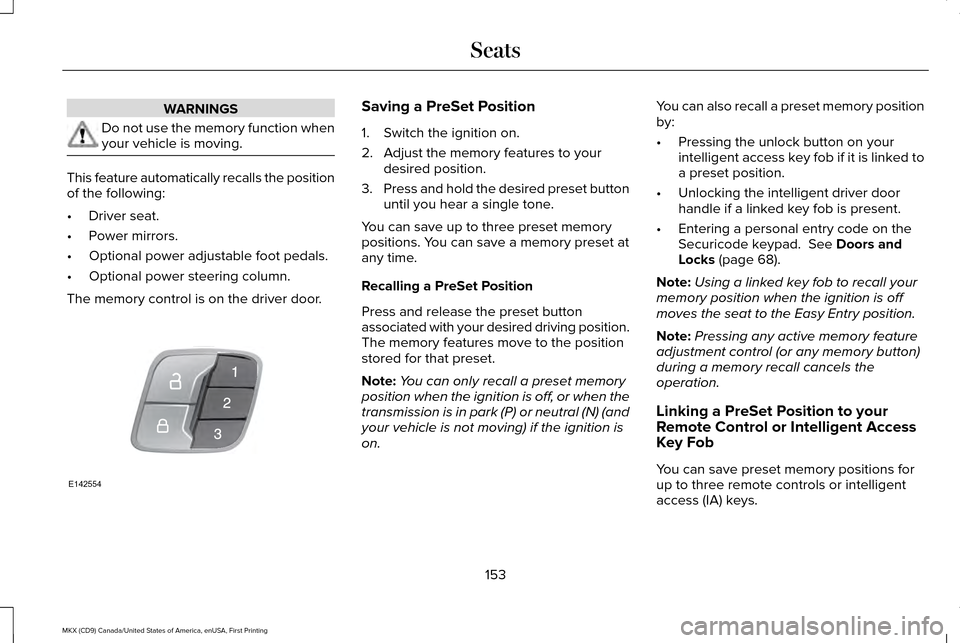
The memory control is on the driver door. Saving a PreSet Position
1. Switch the ignition on.
2. Adjust the memory features to your
desired position.
3. Press and hold the desired preset button
until you hear a single tone.
You can save up to three preset memory
positions. You can save a memory preset at
any time.
Recalling a PreSet Position
Press and release the preset button
associated with your desired driving position.
The memory features move to the position
stored for that preset.
Note: You can only recall a preset memory
position when the ignition is off, or when the
transmission is in park (P) or neutral (N) (and
your vehicle is not moving) if the ignition is
on. You can also recall a preset memory position
by:
•
Pressing the unlock button on your
intelligent access key fob if it is linked to
a preset position.
• Unlocking the intelligent driver door
handle if a linked key fob is present.
• Entering a personal entry code on the
Securicode keypad. See Doors and
Locks (page 68).
Note: Using a linked key fob to recall your
memory position when the ignition is off
moves the seat to the Easy Entry position.
Note: Pressing any active memory feature
adjustment control (or any memory button)
during a memory recall cancels the
operation.
Linking a PreSet Position to your
Remote Control or Intelligent Access
Key Fob
You can save preset memory positions for
up to three remote controls or intelligent
access (IA) keys.
153
MKX (CD9) Canada/United States of America, enUSA, First Printing SeatsE142554
Page 157 of 587
1. With the ignition on, move the memory
positions to the desired positions.
2. Press and hold the desired preset button
for about five seconds. A tone sounds
after about two seconds. Continue
holding until you hear a second tone.
3. Within three seconds, press the lock button on the remote control you are
linking.
To unlink a remote control, follow the same
procedure – except in step 3, press the
unlock button on the remote control.
Note: If more than one linked remote control
or intelligent access key is in range, the
memory function moves to the settings of
the first key to initiate a memory recall.
Easy Entry and Exit Feature
If you enable the easy entry and exit feature,
it automatically moves the driver seat
position rearward up to 2 in (5 cm) when you
switch the ignition off.
The driver seat will return to its previous
position when you switch the ignition on. You can enable or disable this feature in the
information display.
See Information
Displays (page 114).
REAR SEATS
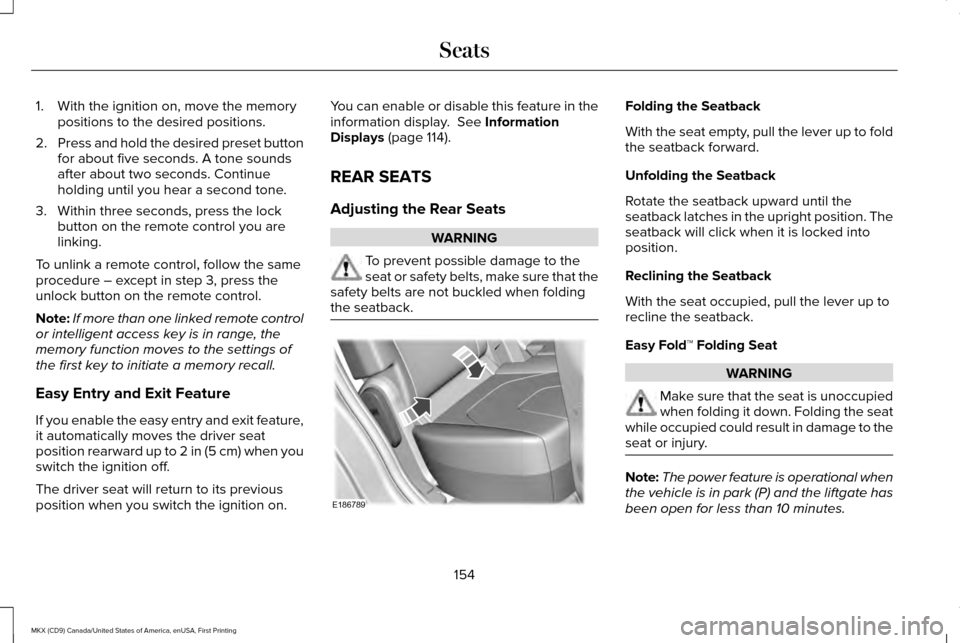
Adjusting the Rear Seats WARNING
To prevent possible damage to the
seat or safety belts, make sure that the
safety belts are not buckled when folding
the seatback. Folding the Seatback
With the seat empty, pull the lever up to fold
the seatback forward.
Unfolding the Seatback
Rotate the seatback upward until the
seatback latches in the upright position. The
seatback will click when it is locked into
position.
Reclining the Seatback
With the seat occupied, pull the lever up to
recline the seatback.
Easy Fold™ Folding Seat
WARNING
Make sure that the seat is unoccupied
when folding it down. Folding the seat
while occupied could result in damage to the
seat or injury. Note:
The power feature is operational when
the vehicle is in park (P) and the liftgate has
been open for less than 10 minutes.
154
MKX (CD9) Canada/United States of America, enUSA, First Printing SeatsE186789
Page 173 of 587
4. Keep the accelerator pedal fully
depressed and press the push button
ignition switch until the engine starts.
Automatic Engine Shutdown
This feature automatically shuts down the
engine if it has been idling for an extended
period. The ignition also turns off to save
battery power. Before your vehicle shuts
down, a message appears in the information
display showing a timer counting down. If
you do not intervene within 30 seconds, your
vehicle shuts down. Another message
appears in the information display to inform
you that your vehicle has shut down to save
fuel. Start your vehicle as normal.
Automatic Engine Shutdown Override
Note: You cannot permanently switch off
the automatic shutdown. When you switch
it off temporarily, it turns on at the next
ignition cycle. You can stop the shutdown, or reset the
timer, at any point before the 30-second
countdown has expired by doing any of the
following:
•
Reset the timer by pressing the brake or
accelerator pedal.
• Temporarily switch off the shutdown
feature during the current ignition cycle
using the information display. See
General Information (page 114).
• Press OK or RESET to temporarily switch
the feature off during the current ignition
cycle.
Stopping the Engine When Your
Vehicle is Stationary
1. Shift into park (P).
2. Press the push button ignition switch.
3. Apply the parking brake.
Note: The ignition, all electrical circuits and
all warning lamps and indicators will be
turned off.
Note: If the engine is idling for 30 minutes,
the ignition and engine automatically shut
down. Stopping the Engine When Your
Vehicle is Moving WARNING
Switching off the engine when the
vehicle is still moving will result in a
loss of brake and steering assistance. The
steering will not lock, but higher effort will
be required. When the ignition is switched
off, some electrical circuits, including air
bags, warning lamps and indicators may also
be off. If the ignition was turned off
accidentally, you can shift into neutral (N) and
re-start the engine. 1.
Put the transmission into neutral (N) and
use the brakes to bring your vehicle to a
safe stop.
2. When your vehicle has stopped, shift into
park (P).
3. Press and hold the push button ignition switch until the engine stops, or press it
three times within two seconds.
4. Apply the parking brake.
170
MKX (CD9) Canada/United States of America, enUSA, First Printing Starting and Stopping the Engine
Page 177 of 587
•
Fuels can also be harmful if absorbed
through the skin. If fuel is splashed on
the skin, clothing or both, promptly
remove contaminated clothing and wash
skin thoroughly with soap and water.
Repeated or prolonged skin contact with
fuel liquid or vapor causes skin irritation.
• Be particularly careful if you are taking
Antabuse or other forms of Disulfiram for
the treatment of alcoholism. Breathing
gasoline vapors could cause an adverse
reaction, serious personal injury or
sickness. If fuel is splashed on the skin,
wash the affected areas immediately with
plenty of soap and water. Consult a
physician immediately if you experience
any adverse reactions. FUEL QUALITY
Choosing the Right Fuel Your vehicle is designed to operate on
regular unleaded gasoline with a minimum
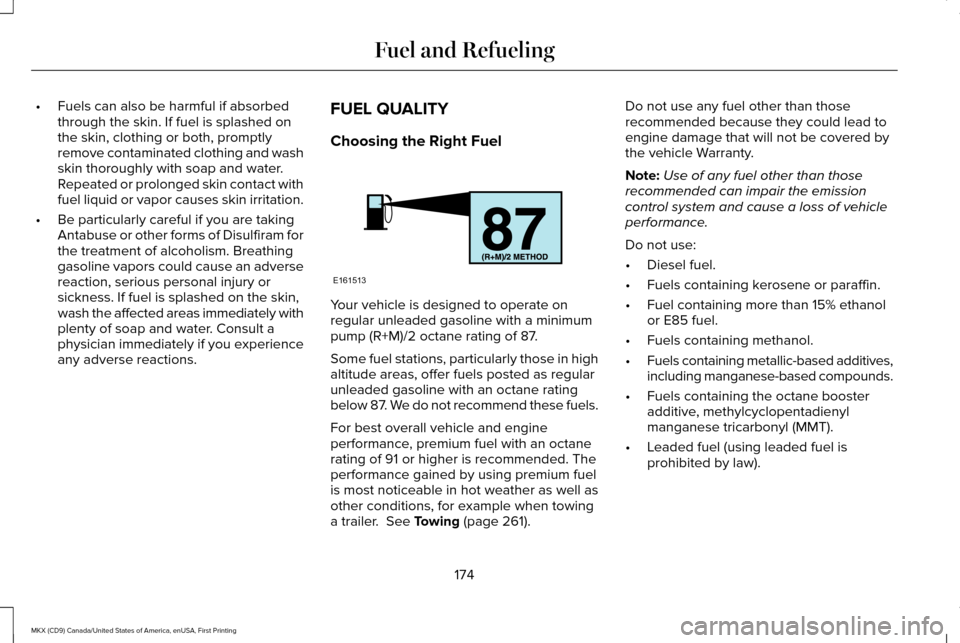
pump (R+M)/2 octane rating of 87.
Some fuel stations, particularly those in high
altitude areas, offer fuels posted as regular
unleaded gasoline with an octane rating
below 87. We do not recommend these fuels.
For best overall vehicle and engine
performance, premium fuel with an octane
rating of 91 or higher is recommended. The
performance gained by using premium fuel
is most noticeable in hot weather as well as
other conditions, for example when towing
a trailer. See Towing (page 261).Do not use any fuel other than those
recommended because they could lead to
engine damage that will not be covered by
the vehicle Warranty.
Note:
Use of any fuel other than those
recommended can impair the emission
control system and cause a loss of vehicle
performance.
Do not use:
• Diesel fuel.
• Fuels containing kerosene or paraffin.
• Fuel containing more than 15% ethanol
or E85 fuel.
• Fuels containing methanol.
• Fuels containing metallic-based additives,
including manganese-based compounds.
• Fuels containing the octane booster
additive, methylcyclopentadienyl
manganese tricarbonyl (MMT).
• Leaded fuel (using leaded fuel is
prohibited by law).
174
MKX (CD9) Canada/United States of America, enUSA, First Printing Fuel and RefuelingE161513
Page 178 of 587
The use of fuels with metallic compounds
such as methylcyclopentadienyl manganese
tricarbonyl (commonly known as MMT), which
is a manganese-based fuel additive, will
impair engine performance and affect the
emission control system.
Do not be concerned if the engine
sometimes knocks lightly. However, if the
engine knocks heavily while using fuel with
the recommended octane rating, contact an
authorized dealer to prevent any engine
damage.
FUEL FILLER FUNNEL LOCATION
The fuel filler funnel is located in the spare
wheel storage tray.
RUNNING OUT OF FUEL
Running out of fuel can cause damage not
covered by the vehicle Warranty.
If your vehicle runs out of fuel:
•
Add a minimum of 1.3 gal (5 L) of fuel to
restart the engine. If your vehicle is out
of fuel and on a steep slope, more fuel
may be required.
• You may need to switch the ignition from
off to on several times after refueling to
allow the fuel system to pump the fuel
from the tank to the engine. When
restarting, cranking time takes a few
seconds longer than normal.
Filling a Portable Fuel Container
Use the following guidelines to avoid
electrostatic charge build-up, which can
produce a spark, when filling an ungrounded
fuel container:
• Only use an approved fuel container to
transfer fuel to your vehicle. Place the
container on the ground when filling it.
• Do not fill a fuel container when it is
inside your vehicle (including the cargo
area). •
Keep the fuel pump nozzle in contact
with the fuel container when filling it.
• Do not use a device that holds the fuel
pump nozzle lever in the fill position.
Adding Fuel From a Portable Fuel
Container WARNINGS
Do not insert the nozzle of a fuel
container or an aftermarket funnel into
the fuel system filler neck. This may damage
the fuel system filler neck or its seal and
cause fuel to run onto the ground. Do not try to pry open or push open
the capless fuel system with foreign
objects. This could damage the fuel system
and its seal and cause injury to you or others. Do not dispose of fuel in the household
refuse or the public sewage system.
Use an authorized waste disposal facility. When refueling the vehicle fuel tank from a
fuel container, use the fuel filler funnel
included with your vehicle.
See Fuel Filler
Funnel Location (page 175).
175
MKX (CD9) Canada/United States of America, enUSA, First Printing Fuel and Refueling
Page 184 of 587
An improperly operating or damaged exhaust
system may allow exhaust to enter the
vehicle. Have a damaged or improperly
operating exhaust system inspected and
repaired immediately.
Do not make any unauthorized changes to
your vehicle or engine. By law, vehicle
owners and anyone who manufactures,
repairs, services, sells, leases, trades
vehicles, or supervises a fleet of vehicles are
not permitted to intentionally remove an
emission control device or prevent it from
working. Information about your vehicle
’s
emission system is on the Vehicle Emission
Control Information Decal located on or near
the engine. This decal also lists engine
displacement.
Please consult your warranty information for
complete details. On-Board Diagnostics (OBD-II)
Your vehicle has a computer known as the
on-board diagnostics system (OBD-II) that
monitors the engine
’s emission control
system. The system protects the environment
by making sure that your vehicle continues
to meet government emission standards. The
OBD-II system also assists a service
technician in properly servicing your vehicle. When the service engine soon
indicator illuminates, the OBD-II
system has detected a malfunction.
Temporary malfunctions may cause the
service engine soon indicator to illuminate.
Examples are:
1. Your vehicle has run out of fuel—the engine may misfire or run poorly.
2. Poor fuel quality or water in the fuel—the
engine may misfire or run poorly.
3. The fuel fill inlet may not have closed properly. See Refueling (page 176).
4. Driving through deep water—the electrical system may be wet. You can correct these temporary
malfunctions by filling the fuel tank with good
quality fuel, properly closing the fuel fill inlet
or letting the electrical system dry out. After
three driving cycles without these or any
other temporary malfunctions present, the
service engine soon indicator should stay off
the next time you start the engine. A driving
cycle consists of a cold engine startup
followed by mixed city and highway driving.
No additional vehicle service is required.
If the service engine soon indicator remains
on, have your vehicle serviced at the first
available opportunity. Although some
malfunctions detected by the OBD-II may not
have symptoms that are apparent, continued
driving with the service engine soon indicator
on can result in increased emissions, lower
fuel economy, reduced engine and
transmission smoothness and lead to more
costly repairs.
181
MKX (CD9) Canada/United States of America, enUSA, First Printing Fuel and Refueling
Page 192 of 587
USING ALL-WHEEL DRIVE
All-wheel drive uses all four wheels to power
the vehicle. This increases traction, enabling
you to drive over terrain and road conditions
that a conventional two-wheel drive vehicle
cannot. The AWD system is active all the time
and requires no input from the operator.
Note:
Your AWD vehicle is not intended for
off-road use. The AWD feature gives your
vehicle some limited off-road capabilities in
which driving surfaces are relatively level,
obstruction-free and otherwise similar to
normal on-road driving conditions. Operating
your vehicle under other than those
conditions could subject the vehicle to
excessive stress which might result in
damage which is not covered under your
warranty.
Note: A warning message will be displayed
in the information display when an AWD
system fault is present See Information
Messages (page 121). An AWD system fault
will cause the AWD system to default to
front-wheel drive only mode. When this
warning message is displayed, have your
vehicle serviced at an authorized dealer Note:
A warning message will be displayed
in the information display if the AWD system
has overheated See Information Messages
(page
121). This condition may occur if the
vehicle was operated in extreme conditions
with excessive wheel slip, such as deep
sand. To resume normal AWD function as
soon as possible, stop the vehicle in a safe
location and stop the engine for at least 10
minutes. After the engine has been restarted
and the AWD system has adequately cooled,
the warning message will turn off and normal
AWD function will return.
Do not use a spare tire of a different size
other than the tire provided. If the mini-spare
tire is installed, the AWD system may disable
automatically and enter front-wheel drive
only mode to protect driveline components.
This condition will be indicated by a warning
in the information display
See Information
Messages (page 121). If there is a warning
message in the information display from
using the spare tire, this indicator should turn
off after reinstalling the repaired or replaced
normal road tire and cycling the ignition off
and on. It is recommended to reinstall the repaired or replaced road tire as soon as
possible. Major dissimilar tire sizes between
the front and rear axles could cause the AWD
system to stop functioning and default to
front-wheel drive or damage the AWD
system.
Driving In Special Conditions With All-
Wheel Drive (AWD)
AWD vehicles are equipped for driving on
sand, snow, mud and rough roads and have
operating characteristics that are somewhat
different from conventional vehicles, both on
and off the highway.
Under severe operating conditions, the A/C
may cycle on and off to protect overheating
of the engine.
Basic operating principles in special
conditions
•
Drive slower in strong crosswinds which
can affect the normal steering
characteristics of your vehicle.
• Be extremely careful when driving on
pavement made slippery by loose sand,
water, gravel, snow or ice.
189
MKX (CD9) Canada/United States of America, enUSA, First Printing All-Wheel Drive
(If Equipped)
Page 196 of 587
Your vehicle has anti-lock brakes, therefore
apply the brakes steadily. Do not “pump
” the
brakes.
Driving on Snow and Ice WARNING
If you are driving in slippery conditions
that require tire chains or cables, then
it is critical that you drive cautiously. Keep
speeds down, allow for longer stopping
distances and avoid aggressive steering to
reduce the chances of a loss of vehicle
control which can lead to serious injury or
death. If the rear end of the vehicle slides
while cornering, steer in the direction of the
slide until you regain control of the vehicle. Note:
Excessive tire slippage can cause
driveline damage.
AWD vehicles have advantages over 2WD
vehicles in snow and ice but can skid like
any other vehicle.
Should you start to slide while driving on
snowy or icy roads, turn the steering wheel
in the direction of the slide until you regain
control. Avoid sudden applications of power and
quick changes of direction on snow and ice.
Apply the accelerator slowly and steadily
when starting from a full stop.
Avoid sudden braking as well. Although an
AWD vehicle may accelerate better than a
two-wheel drive vehicle in snow and ice, it
won
’t stop any faster, because as in other
vehicles, braking occurs at all four wheels.
Do not become overconfident as to road
conditions.
Make sure you allow sufficient distance
between you and other vehicles for stopping.
Drive slower than usual and consider using
one of the lower gears. In emergency
stopping situations, apply the brake steadily.
Since your vehicle is equipped with a four
wheel (ABS), do not “pump ” the brakes. See
Hints on Driving With Anti-Lock Brakes
(page 195). Maintenance and Modifications
The suspension and steering systems on
your vehicle have been designed and tested
to provide predictable performance whether
loaded or empty and durable load carrying
capability. For this reason, Ford Motor
Company strongly recommends that you do
not make modifications such as adding or
removing parts (such as lowering kits or
stabilizer bars) or by using replacement parts
not equivalent to the original factory
equipment.
Any modifications to a vehicle that raise the
center of gravity can make it more likely the
vehicle will rollover as a result of a loss of
control. Ford Motor Company recommends
that caution be used with any vehicle
equipped with a high load or device (such
as ladder or luggage racks).
193
MKX (CD9) Canada/United States of America, enUSA, First Printing All-Wheel Drive
(If Equipped)
Page 198 of 587
GENERAL INFORMATION
Note:
Occasional brake noise is normal. If a
metal-to-metal, continuous grinding or
continuous squeal sound is present, the
brake linings may be worn-out. Have the
system checked by an authorized dealer. If
your vehicle has continuous vibration or
shudder in the steering wheel while braking,
have it checked by an authorized dealer.
Note: Brake dust may accumulate on the
wheels, even under normal driving
conditions. Some dust is inevitable as the
brakes wear and does not contribute to
brake noise. See Cleaning the Wheels
(page 337).
Note: Depending on applicable laws and
regulations in the country for which your
vehicle was originally built, your brake lamps
may flash during heavy braking. Following
this, your hazard lights may also flash when
your vehicle comes to a stop. See
Warning Lamps and
Indicators (page 109). Wet brakes result in reduced braking
efficiency. Gently press the brake pedal a
few times when driving from a car wash or
standing water to dry the brakes.
Brake Over Accelerator
In the event the accelerator pedal becomes
stuck or entrapped, apply steady and firm
pressure to the brake pedal to slow the
vehicle and reduce engine power. If you
experience this condition, apply the brakes
and bring your vehicle to a safe stop. Move
the transmission to park (P), switch the
engine off and apply the parking brake.
Inspect the accelerator pedal for any
interference. If none are found and the
condition persists, have your vehicle towed
to the nearest authorized dealer.
Brake Assist
Brake assist detects when you brake rapidly
by measuring the rate at which you press the
brake pedal. It provides maximum braking
efficiency as long as you press the pedal,
and can reduce stopping distances in critical
situations. Anti-lock Brake System
This system helps you maintain steering
control during emergency stops by keeping
the brakes from locking. This lamp momentarily illuminates
when you turn the ignition on. If
the light does not illuminate during
start up, remains on or flashes, the system
may be disabled. Have the system checked
by an authorized dealer. If the anti-lock brake
system is disabled, normal braking is still
effective. If the brake warning lamp
illuminates when you release the
parking brake, have the system
checked by an authorized dealer.
HINTS ON DRIVING WITH ANTI-
LOCK BRAKES
Note: When the system is operating, the
brake pedal may pulse and may travel
further. Maintain pressure on the brake
pedal. You may also hear a noise from the
system. This is normal.
195
MKX (CD9) Canada/United States of America, enUSA, First Printing BrakesE144522 E144522