ECU LINCOLN MKX 2018 User Guide
[x] Cancel search | Manufacturer: LINCOLN, Model Year: 2018, Model line: MKX, Model: LINCOLN MKX 2018Pages: 603, PDF Size: 4.94 MB
Page 40 of 603
•Height adjuster at the front outboardseating positions.
•Safety belt pretensioner at the frontoutboard seating positions.
•Belt tension sensor at the front outboardpassenger seating position.
•Safety belt warning light and chime.
•Crash sensors and monitoring systemwith readiness indicator.
The safety belt pretensioners at the frontseating positions are designed to tighten thesafety belts when activated. In frontal andnear-frontal crashes, the safety beltpretensioners may be activated alone or, ifthe crash is of sufficient severity, togetherwith the front airbags. The pretensioners mayalso activate when a Safety Canopy airbagis deployed.
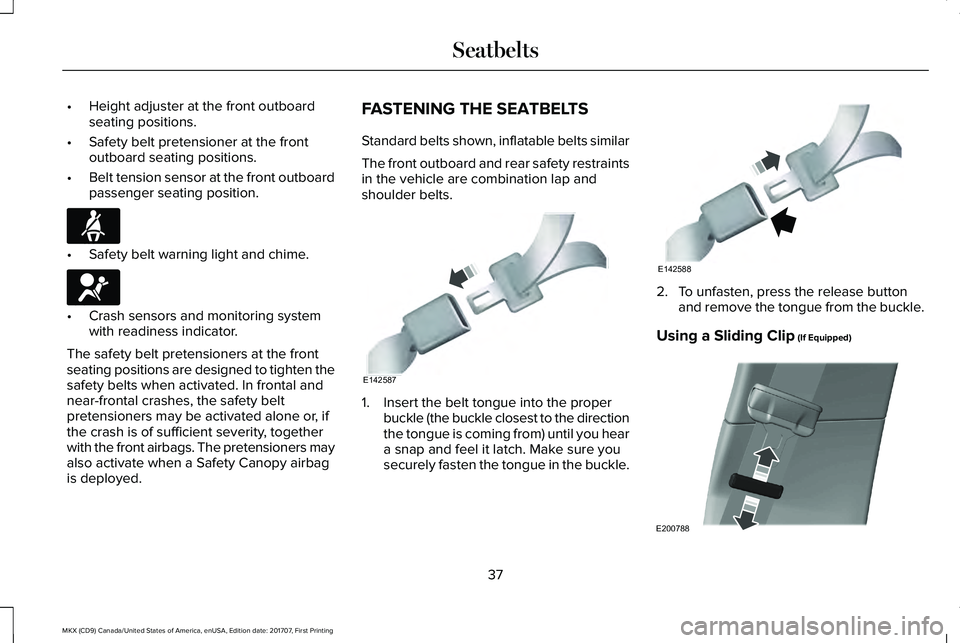
FASTENING THE SEATBELTS
Standard belts shown, inflatable belts similar
The front outboard and rear safety restraintsin the vehicle are combination lap andshoulder belts.
1. Insert the belt tongue into the properbuckle (the buckle closest to the directionthe tongue is coming from) until you heara snap and feel it latch. Make sure yousecurely fasten the tongue in the buckle.
2. To unfasten, press the release buttonand remove the tongue from the buckle.
Using a Sliding Clip (If Equipped)
37
MKX (CD9) Canada/United States of America, enUSA, Edition date: 201707, First Printing
SeatbeltsE71880 E67017 E142587 E142588 E200788
Page 57 of 603
The design and development of the sideairbag system included recommendedtesting procedures that were developed bya group of automotive safety experts knownas the Side Airbag Technical Working Group.These recommended testing procedureshelp reduce the risk of injuries related to thedeployment of side airbags.
DRIVER AND PASSENGER KNEE
AIRBAGS
Note:Keep the glove box door closed whiledriving for optimal performance of thepassenger knee airbag during a crash.
Note:To reduce risk of injury, do not obstructor place objects in the deployment path ofthe knee airbag.
A driver knee airbag is located under orwithin the instrument panel. A passengerknee airbag is located within or under theglove box door. During a crash, the restraintscontrol module may activate the driver andpassenger knee airbags based on crashseverity and occupant conditions. Undercertain crash and occupant conditions, the
driver and passenger knee airbag maydeploy but the driver front airbag may notactivate. As with front and side airbags, it isimportant to be properly seated andrestrained to reduce the risk of death orserious injury.
Make sure the knee airbags areoperating properly. See CrashSensors and Airbag Indicator(page 55).
SAFETY CANOPY™
WARNINGS
Do not place objects or mountequipment on or near the headliner atthe siderail that may come into contact witha deploying curtain airbag. Failure to followthese instructions may increase the risk ofpersonal injury in the event of a crash.
Do not lean your head on the door. Thecurtain airbag could injure you as itdeploys from the headliner.
WARNINGS
Do not attempt to service, repair, ormodify the curtain airbags, its fuses,the A, B, C or D pillar trim, or the headlineron a vehicle containing curtain airbags asyou could be seriously injured or killed.Contact your authorized dealer as soon aspossible.
All occupants of your vehicle includingthe driver should always wear theirsafety belts even when an airbagsupplemental restraint system and curtainairbag is provided. Failure to properly wearyour safety belt could seriously increase therisk of injury or death.
To reduce risk of injury, do not obstructor place objects in the deploymentpath of the curtain airbag.
If the curtain airbags have deployed,the curtain airbags will not functionagain. The curtain airbags (including the A,B, C and D pillar trim and headliner) must beinspected and serviced by an authorizeddealer. If the curtain airbag is not replaced,the unrepaired area will increase the risk ofinjury in a crash.
54
MKX (CD9) Canada/United States of America, enUSA, Edition date: 201707, First Printing
Supplementary Restraints SystemE67017
Page 63 of 603
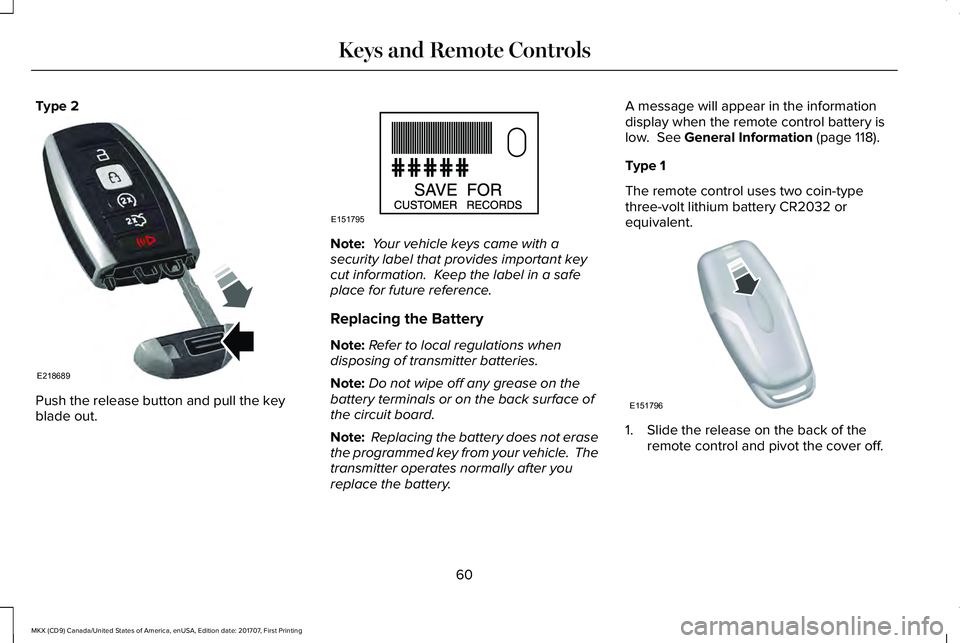
Type 2
Push the release button and pull the keyblade out.
Note: Your vehicle keys came with asecurity label that provides important keycut information. Keep the label in a safeplace for future reference.
Replacing the Battery
Note:Refer to local regulations whendisposing of transmitter batteries.
Note:Do not wipe off any grease on thebattery terminals or on the back surface ofthe circuit board.
Note: Replacing the battery does not erasethe programmed key from your vehicle. Thetransmitter operates normally after youreplace the battery.
A message will appear in the informationdisplay when the remote control battery islow. See General Information (page 118).
Type 1
The remote control uses two coin-typethree-volt lithium battery CR2032 orequivalent.
1. Slide the release on the back of theremote control and pivot the cover off.
60
MKX (CD9) Canada/United States of America, enUSA, Edition date: 201707, First Printing
Keys and Remote ControlsE218689 E151795 E151796
Page 73 of 603
USING MYKEY WITH REMOTE
START SYSTEMS
MyKey is not compatible with non
Ford-approved, aftermarket remote startsystems. If you choose to install a remotestart system, see an authorized dealer for aFord-approved remote start system.
MYKEY TROUBLESHOOTING
Potential CausesCondition
I cannot create a MyKey.•The key or transmitter used to start the vehicle does not have admin privileges.
•The key or transmitter used to start the vehicle is the only admin key (there always has to be atleast one admin key).
•Vehicles with keyless start: The keyless start transmitter is not placed in the backup position.See Starting a Gasoline Engine (page 172).
•SecuriLock passive anti-theft system is disabled or in unlimited mode.
•The key or transmitter used to start your vehicle does not have admin privileges.
•No MyKeys are created. See Creating a MyKey (page 66).
I cannot program the configurablesettings.
•The key or transmitter used to start your vehicle does not have admin privileges.
•No MyKeys are created. See Creating a MyKey (page 66).
I cannot clear the MyKeys.
Purchase a new key from an authorized dealer.I lost the only admin key.
70
MKX (CD9) Canada/United States of America, enUSA, Edition date: 201707, First Printing
MyKey™
Page 80 of 603
KEYLESS ENTRY
SECURICODE™ Keyless Entry Keypad
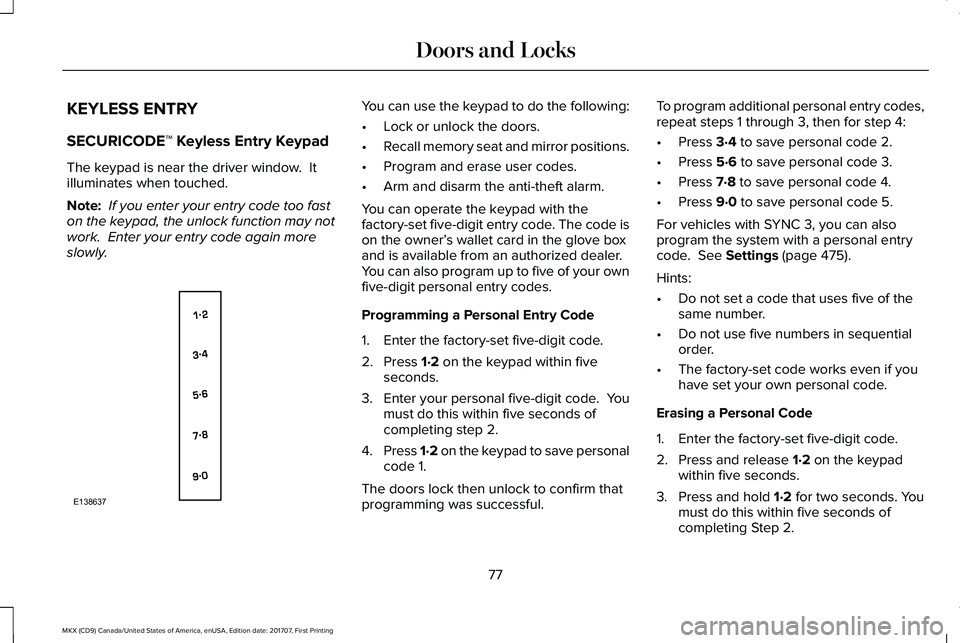
The keypad is near the driver window. Itilluminates when touched.
Note: If you enter your entry code too faston the keypad, the unlock function may notwork. Enter your entry code again moreslowly.
You can use the keypad to do the following:
•Lock or unlock the doors.
•Recall memory seat and mirror positions.
•Program and erase user codes.
•Arm and disarm the anti-theft alarm.
You can operate the keypad with thefactory-set five-digit entry code. The code ison the owner’s wallet card in the glove boxand is available from an authorized dealer.You can also program up to five of your ownfive-digit personal entry codes.
Programming a Personal Entry Code
1. Enter the factory-set five-digit code.
2. Press 1·2 on the keypad within fiveseconds.
3.Enter your personal five-digit code. Youmust do this within five seconds ofcompleting step 2.
4.Press 1·2 on the keypad to save personalcode 1.
The doors lock then unlock to confirm thatprogramming was successful.
To program additional personal entry codes,repeat steps 1 through 3, then for step 4:
•Press 3·4 to save personal code 2.
•Press 5·6 to save personal code 3.
•Press 7·8 to save personal code 4.
•Press 9·0 to save personal code 5.
For vehicles with SYNC 3, you can alsoprogram the system with a personal entrycode. See Settings (page 475).
Hints:
•Do not set a code that uses five of thesame number.
•Do not use five numbers in sequentialorder.
•The factory-set code works even if youhave set your own personal code.
Erasing a Personal Code
1. Enter the factory-set five-digit code.
2. Press and release 1·2 on the keypadwithin five seconds.
3. Press and hold 1·2 for two seconds. Youmust do this within five seconds ofcompleting Step 2.
77
MKX (CD9) Canada/United States of America, enUSA, Edition date: 201707, First Printing
Doors and LocksE138637
Page 89 of 603
PASSIVE ANTI-THEFT SYSTEM
Note: The system is not compatible withnon-Ford aftermarket remote start systems. Use of these systems may result in enginestarting problems and a loss of securityprotection.
Note: Metallic objects, electronic devicesor a second coded key on the same keychain may result in vehicle starting problems,especially if they are too close to the keywhen starting your vehicle. Prevent theseobjects from touching the coded key whenstarting your vehicle. Switch the ignition off,move all objects on the key chain away fromthe coded key and restart your vehicle if aproblem occurs.
Note: Do not leave a duplicate coded keyin your vehicle. Always take your keys andlock all doors when leaving your vehicle.
SecuriLock™
The system helps prevent the engine fromstarting unless you use a coded keyprogrammed to your vehicle. Using thewrong key may prevent your vehicle fromstarting. A message may appear in theinformation display.
If you are unable to start your vehicle with acoded key, it is not operating correctly. Amessage may appear in the informationdisplay.
Automatic Arming
The system arms when you switch theignition off.
Automatic Disarming
The system disarms when you switch theignition on with a coded key.
Replacement Keys
Note:Your vehicle comes with two keys.
The intelligent access key functions as aprogrammed key that operates the driverdoor lock and turns on the intelligent accesswith push button start system, as well as aremote control.
If your coded keys are lost or stolen and youdo not have an extra coded key, you needto erase the key codes from your vehicle andprogram new coded keys. Contact anauthorized dealer.
Store a spare intelligent access key awayfrom your vehicle in a safe place. You canpurchase replacement keys or remotecontrols from an authorized dealer.
Programming a Spare Intelligent AccessKey
Note:You can program a maximum of fourintelligent access keys to your vehicle.
You must have two previously programmedintelligent access keys inside your vehicleand the new unprogrammed intelligentaccess keys readily accessible. Contact anauthorized dealer to have the spare keyprogrammed if two previously programmedkeys are not available.
86
MKX (CD9) Canada/United States of America, enUSA, Edition date: 201707, First Printing
Security
Page 90 of 603
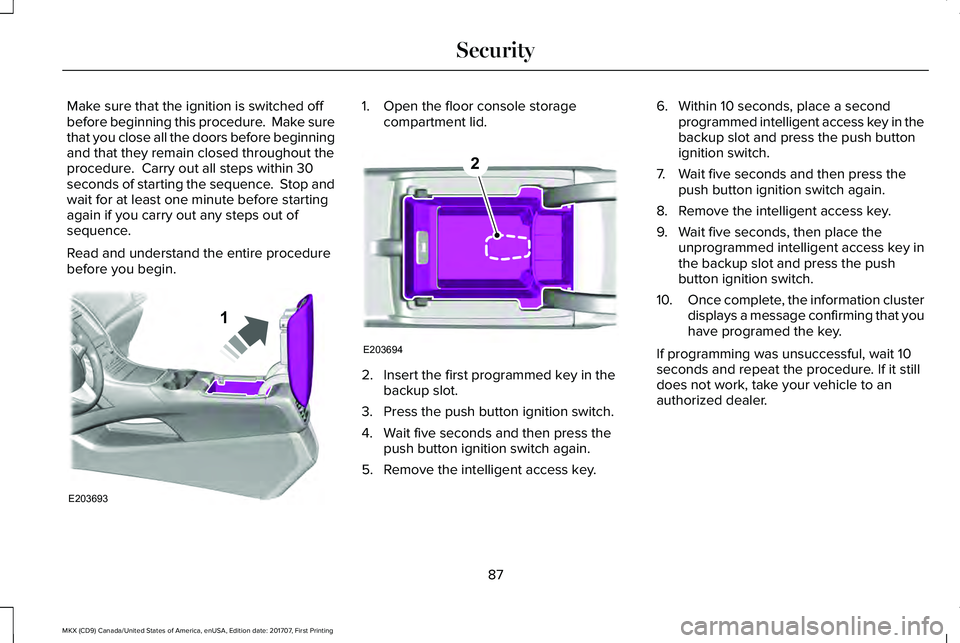
Make sure that the ignition is switched offbefore beginning this procedure. Make surethat you close all the doors before beginningand that they remain closed throughout theprocedure. Carry out all steps within 30seconds of starting the sequence. Stop andwait for at least one minute before startingagain if you carry out any steps out ofsequence.
Read and understand the entire procedurebefore you begin.
1. Open the floor console storagecompartment lid.
2. Insert the first programmed key in thebackup slot.
3. Press the push button ignition switch.
4. Wait five seconds and then press thepush button ignition switch again.
5. Remove the intelligent access key.
6. Within 10 seconds, place a secondprogrammed intelligent access key in thebackup slot and press the push buttonignition switch.
7. Wait five seconds and then press thepush button ignition switch again.
8. Remove the intelligent access key.
9. Wait five seconds, then place theunprogrammed intelligent access key inthe backup slot and press the pushbutton ignition switch.
10.Once complete, the information clusterdisplays a message confirming that youhave programed the key.
If programming was unsuccessful, wait 10seconds and repeat the procedure. If it stilldoes not work, take your vehicle to anauthorized dealer.
87
MKX (CD9) Canada/United States of America, enUSA, Edition date: 201707, First Printing
SecurityE203693
1 E203694
2
Page 91 of 603
ANTI-THEFT ALARM
The system will warn you of an unauthorizedentry to your vehicle. It will be triggered ifany door, the luggage compartment or thehood is opened without using the key,remote control or keyless entry keypad.
The direction indicators will flash and thehorn will sound if unauthorized entry isattempted while the alarm is armed.
Take all remote controls to an authorizeddealer if there is any potential alarm problemwith your vehicle.
Arming the Alarm
The alarm is ready to arm when there is nota key in your vehicle. Electronically lock yourvehicle to arm the alarm.
Disarming the Alarm
Disarm the alarm by any of the followingactions:
•Unlock the doors or luggagecompartment with the remote control orkeyless entry keypad.
•Switch your vehicle on or start yourvehicle.
•Use a key in the driver door to unlockyour vehicle, then switch your vehicle onwithin 12 seconds.
Note:Pressing the panic button on theremote control will stop the horn and signalindicators, but will not disarm the system.
88
MKX (CD9) Canada/United States of America, enUSA, Edition date: 201707, First Printing
Security
Page 136 of 603
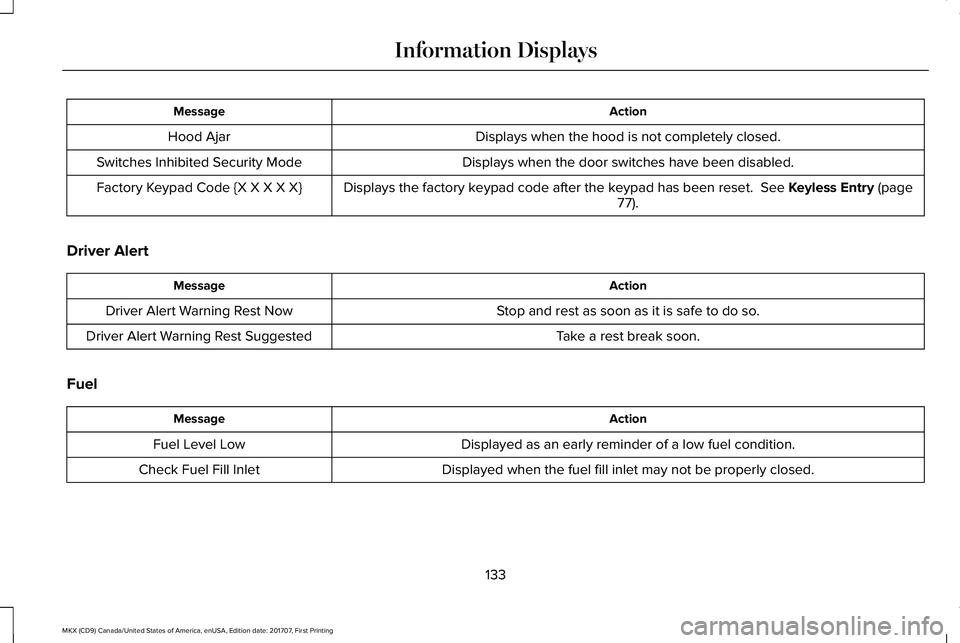
ActionMessage
Displays when the hood is not completely closed.Hood Ajar
Displays when the door switches have been disabled.Switches Inhibited Security Mode
Displays the factory keypad code after the keypad has been reset. See Keyless Entry (page77).Factory Keypad Code {X X X X X}
Driver Alert
ActionMessage
Stop and rest as soon as it is safe to do so.Driver Alert Warning Rest Now
Take a rest break soon.Driver Alert Warning Rest Suggested
Fuel
ActionMessage
Displayed as an early reminder of a low fuel condition.Fuel Level Low
Displayed when the fuel fill inlet may not be properly closed.Check Fuel Fill Inlet
133
MKX (CD9) Canada/United States of America, enUSA, Edition date: 201707, First Printing
Information Displays
Page 146 of 603
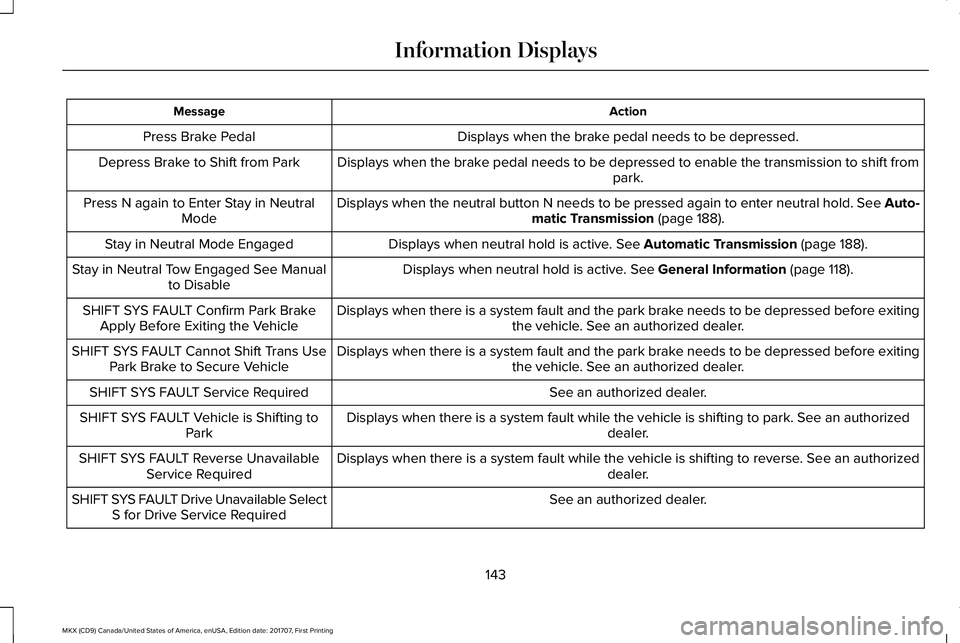
ActionMessage
Displays when the brake pedal needs to be depressed.Press Brake Pedal
Displays when the brake pedal needs to be depressed to enable the transmission to shift frompark.Depress Brake to Shift from Park
Displays when the neutral button N needs to be pressed again to enter neutral hold. See Auto-matic Transmission (page 188).Press N again to Enter Stay in NeutralMode
Displays when neutral hold is active. See Automatic Transmission (page 188).Stay in Neutral Mode Engaged
Displays when neutral hold is active. See General Information (page 118).Stay in Neutral Tow Engaged See Manualto Disable
Displays when there is a system fault and the park brake needs to be depressed before exitingthe vehicle. See an authorized dealer.SHIFT SYS FAULT Confirm Park BrakeApply Before Exiting the Vehicle
Displays when there is a system fault and the park brake needs to be depressed before exitingthe vehicle. See an authorized dealer.SHIFT SYS FAULT Cannot Shift Trans UsePark Brake to Secure Vehicle
See an authorized dealer.SHIFT SYS FAULT Service Required
Displays when there is a system fault while the vehicle is shifting to park. See an authorizeddealer.SHIFT SYS FAULT Vehicle is Shifting toPark
Displays when there is a system fault while the vehicle is shifting to reverse. See an authorizeddealer.SHIFT SYS FAULT Reverse UnavailableService Required
See an authorized dealer.SHIFT SYS FAULT Drive Unavailable SelectS for Drive Service Required
143
MKX (CD9) Canada/United States of America, enUSA, Edition date: 201707, First Printing
Information Displays