belt LINCOLN MKX 2018 Owner's Guide
[x] Cancel search | Manufacturer: LINCOLN, Model Year: 2018, Model line: MKX, Model: LINCOLN MKX 2018Pages: 603, PDF Size: 4.94 MB
Page 50 of 603
PRINCIPLE OF OPERATION
WARNINGS
Airbags do not inflate slowly or gently,and the risk of injury from a deployingairbag is the greatest close to the trimcovering the airbag module.
All occupants of your vehicle, includingthe driver, should always properly weartheir seatbelts, even when an airbagsupplemental restraint system is provided.Failure to properly wear your seatbelt couldseriously increase the risk of injury or death.
Even with advanced restraints systems,properly restrain children 12 and underin a rear seating position. Failure to followthis could seriously increase the risk of injuryor death.
Do not place your arms on the airbagcover or through the steering wheel.Failure to follow this instruction could resultin personal injury.
WARNINGS
Keep the areas in front of the airbagsfree from obstruction. Do not affixanything to or over the airbag covers.Objects could become projectiles duringairbag deployment or in a sudden stop.Failure to follow this instruction could resultin personal injury or death.
Airbags can kill or injure a child in achild restraint. Never place arear-facing child restraint in front of an activeairbag. If you must use a forward-facing childrestraint in the front seat, move the seat uponwhich the child restraint is installed all theway back.
Do not attempt to service, repair, ormodify the supplementary restraintsystem or associated components. Failureto follow this instruction could result inpersonal injury or death.
Several airbag system components gethot after inflation. To reduce the riskof injury, do not touch them after inflation.
WARNINGS
If a supplementary restraint systemcomponent has deployed, it will notfunction again. Have the system andassociated components inspected as soonas possible. Failure to follow this instructioncould result in personal injury or death.
The airbags are a supplemental restraintsystem and are designed to work with theseatbelts to help protect the driver and rightfront passenger from certain upper bodyinjuries. Airbags do not inflate slowly; thereis a risk of injury from a deploying airbag.
Note:You will hear a loud bang and see acloud of harmless powdery residue if anairbag deploys. This is normal.
47
MKX (CD9) Canada/United States of America, enUSA, Edition date: 201707, First Printing
Supplementary Restraints System
Page 52 of 603
Proper Driver and Front PassengerSeating Adjustment
WARNING
National Highway Traffic SafetyAdministration (NHTSA) recommendsa minimum distance of at least 10 in (25 cm)between an occupant's chest and the driverairbag module.
To properly position yourself away from theairbag:
•Move your seat to the rear as far as youcan while still reaching the pedalscomfortably.
•Recline the seat slightly (one or twodegrees) from the upright position.
After all occupants have adjusted their seatsand put on seatbelts, it is very important thatthey continue to sit properly. A properlyseated occupant sits upright, leaning againstthe seatback, and centered on the seatcushion, with their feet comfortably extendedon the floor. Sitting improperly can increase
the chance of injury in a crash event. Forexample, if an occupant slouches, lies down,turns sideways, sits forward, leans forwardor sideways, or puts one or both feet up, thechance of injury during a crash is greatlyincreased.
Children and Airbags
WARNING
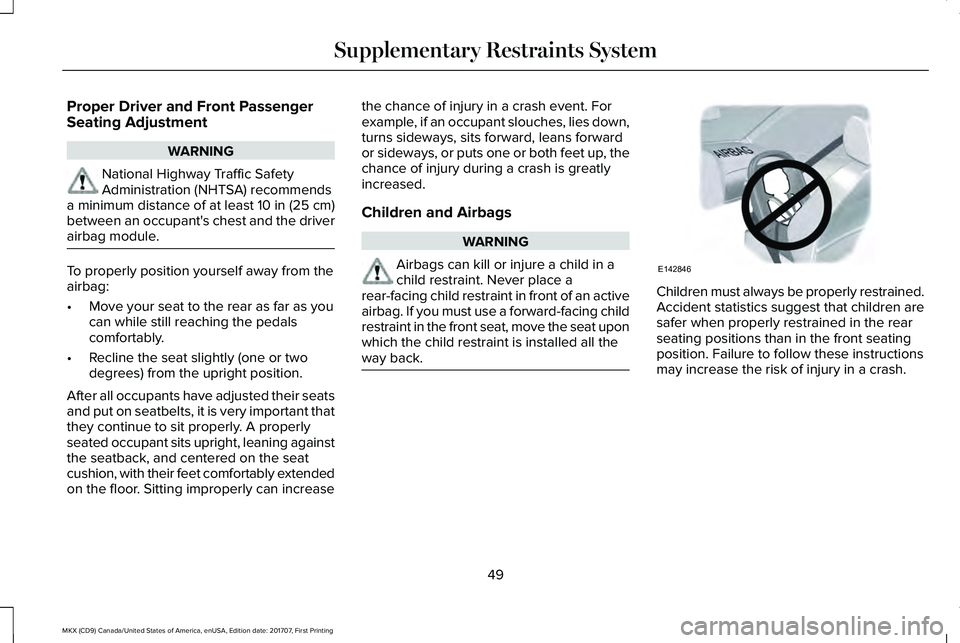
Airbags can kill or injure a child in achild restraint. Never place arear-facing child restraint in front of an activeairbag. If you must use a forward-facing childrestraint in the front seat, move the seat uponwhich the child restraint is installed all theway back.
Children must always be properly restrained.Accident statistics suggest that children aresafer when properly restrained in the rearseating positions than in the front seatingposition. Failure to follow these instructionsmay increase the risk of injury in a crash.
49
MKX (CD9) Canada/United States of America, enUSA, Edition date: 201707, First Printing
Supplementary Restraints SystemE142846
Page 53 of 603
FRONT PASSENGER SENSING
SYSTEM
WARNINGS
Even with advanced restraints systems,properly restrain children 12 and underin a rear seating position. Failure to followthis could seriously increase the risk of injuryor death.
Sitting improperly, out of position orwith the seatback reclined too far cantake weight off the seat cushion and affectthe decision of the passenger sensingsystem, resulting in serious injury or deathin the event of a crash. Always sit uprightagainst your seat back, with your feet on thefloor.
Any alteration or modification to thefront passenger seat may affect theperformance of the front passenger sensingsystem. This could seriously increase the riskof injury or death.
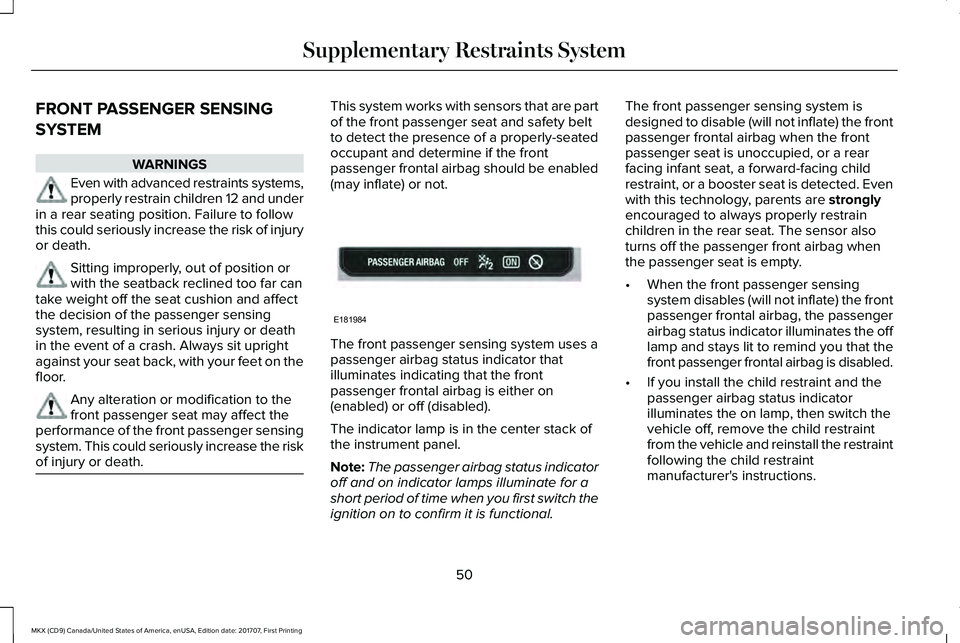
This system works with sensors that are partof the front passenger seat and safety beltto detect the presence of a properly-seatedoccupant and determine if the frontpassenger frontal airbag should be enabled(may inflate) or not.
The front passenger sensing system uses apassenger airbag status indicator thatilluminates indicating that the frontpassenger frontal airbag is either on(enabled) or off (disabled).
The indicator lamp is in the center stack ofthe instrument panel.
Note:The passenger airbag status indicatoroff and on indicator lamps illuminate for ashort period of time when you first switch theignition on to confirm it is functional.
The front passenger sensing system isdesigned to disable (will not inflate) the frontpassenger frontal airbag when the frontpassenger seat is unoccupied, or a rearfacing infant seat, a forward-facing childrestraint, or a booster seat is detected. Evenwith this technology, parents are stronglyencouraged to always properly restrainchildren in the rear seat. The sensor alsoturns off the passenger front airbag whenthe passenger seat is empty.
•When the front passenger sensingsystem disables (will not inflate) the frontpassenger frontal airbag, the passengerairbag status indicator illuminates the offlamp and stays lit to remind you that thefront passenger frontal airbag is disabled.
•If you install the child restraint and thepassenger airbag status indicatorilluminates the on lamp, then switch thevehicle off, remove the child restraintfrom the vehicle and reinstall the restraintfollowing the child restraintmanufacturer's instructions.
50
MKX (CD9) Canada/United States of America, enUSA, Edition date: 201707, First Printing
Supplementary Restraints SystemE181984
Page 55 of 603
Note:When the passenger airbag statusindicator off light is illuminated, thepassenger (seat mounted) side airbag maybe disabled to avoid the risk of airbagdeployment injuries.
After all occupants have adjusted their seatsand put on seatbelts, it is very important thatthey continue to sit properly. A properlyseated occupant sits upright, leaning againstthe seatback, and centered on the seatcushion, with their feet comfortably extendedon the floor. Sitting improperly can increasethe chance of injury in a crash event. Forexample, if an occupant slouches, lies down,turns sideways, sits forward, leans forwardor sideways, or puts one or both feet up, thechance of injury during a crash greatlyincreases.
If you think that the status of the passengerairbag off indicator lamp is incorrect, checkfor the following:
•Objects lodged underneath the seat.
•Objects between the seat cushion andthe center console.
•Objects hanging off the seatback.
•Objects stowed in the seatback mappocket.
•Objects placed on the occupant's lap.
•Cargo interference with the seat
•Other passengers pushing or pulling onthe seat.
•Rear passenger feet and knees restingor pushing on the seat.
The conditions listed above may cause theweight of a properly seated occupant to beincorrectly interpreted by the front passengersensing system. The person in the frontpassenger seat may appear heavier or lighterdue to the conditions described in the listabove.
Make sure the front passengersensing system is operatingproperly. See Crash Sensors andAirbag Indicator (page 55).
If the airbag readiness light is lit, do thefollowing:
The driver and adult passengers shouldcheck for objects lodged underneath thefront passenger seat, or cargo interferingwith the seat.
If there are lodged objects, or cargo isinterfering with the seat, take the followingsteps to remove the obstruction:
•Pull the vehicle over.
•Switch the vehicle off.
•Driver and adult passengers shouldcheck for any objects lodged underneaththe front passenger seat or cargointerfering with the seat.
•Remove the obstruction(s) (if found).
•Restart the vehicle.
•Wait at least two minutes and verify thatthe airbag readiness light is no longerilluminated.
•If the airbag readiness light remainsilluminated, this may or may not be aproblem due to the front passengersensing system.
Do not attempt to repair or service thesystem. Take your vehicle immediately to anauthorized dealer.
52
MKX (CD9) Canada/United States of America, enUSA, Edition date: 201707, First Printing
Supplementary Restraints SystemE67017
Page 57 of 603
The design and development of the sideairbag system included recommendedtesting procedures that were developed bya group of automotive safety experts knownas the Side Airbag Technical Working Group.These recommended testing procedureshelp reduce the risk of injuries related to thedeployment of side airbags.
DRIVER AND PASSENGER KNEE
AIRBAGS
Note:Keep the glove box door closed whiledriving for optimal performance of thepassenger knee airbag during a crash.
Note:To reduce risk of injury, do not obstructor place objects in the deployment path ofthe knee airbag.
A driver knee airbag is located under orwithin the instrument panel. A passengerknee airbag is located within or under theglove box door. During a crash, the restraintscontrol module may activate the driver andpassenger knee airbags based on crashseverity and occupant conditions. Undercertain crash and occupant conditions, the
driver and passenger knee airbag maydeploy but the driver front airbag may notactivate. As with front and side airbags, it isimportant to be properly seated andrestrained to reduce the risk of death orserious injury.
Make sure the knee airbags areoperating properly. See CrashSensors and Airbag Indicator(page 55).
SAFETY CANOPY™
WARNINGS
Do not place objects or mountequipment on or near the headliner atthe siderail that may come into contact witha deploying curtain airbag. Failure to followthese instructions may increase the risk ofpersonal injury in the event of a crash.
Do not lean your head on the door. Thecurtain airbag could injure you as itdeploys from the headliner.
WARNINGS
Do not attempt to service, repair, ormodify the curtain airbags, its fuses,the A, B, C or D pillar trim, or the headlineron a vehicle containing curtain airbags asyou could be seriously injured or killed.Contact your authorized dealer as soon aspossible.
All occupants of your vehicle includingthe driver should always wear theirsafety belts even when an airbagsupplemental restraint system and curtainairbag is provided. Failure to properly wearyour safety belt could seriously increase therisk of injury or death.
To reduce risk of injury, do not obstructor place objects in the deploymentpath of the curtain airbag.
If the curtain airbags have deployed,the curtain airbags will not functionagain. The curtain airbags (including the A,B, C and D pillar trim and headliner) must beinspected and serviced by an authorizeddealer. If the curtain airbag is not replaced,the unrepaired area will increase the risk ofinjury in a crash.
54
MKX (CD9) Canada/United States of America, enUSA, Edition date: 201707, First Printing
Supplementary Restraints SystemE67017
Page 59 of 603
Your vehicle has a collection of crash andoccupant sensors which provide informationto the restraints control module. Therestraints control module deploys (activates)the front seatbelt pretensioners, driverairbag, passenger airbag, knee airbag(s), seatmounted side airbags, the Safety Canopyand optional rear inflatable seatbelts. Basedon the type of crash, the restraints controlmodule deploys the appropriate safetydevices.
The restraints control module also monitorsthe readiness of the above safety devicesplus the crash and occupant sensors. Thereadiness of the safety system is indicatedby a warning indicator light in the instrumentcluster or by a backup tone if the warninglight is not working. Routine maintenance ofthe airbag is not required.
A difficulty with the system is indicated byone or more of the following:
•The readiness light will not illuminateimmediately after the ignition is switchedon.
•The readiness light either flashes or stayslit.
•A series of five beeps will be heard. Thetone pattern repeats periodically until theproblem, the light or both are repaired.
If any of these things happen, evenintermittently, have the supplementalrestraint system serviced at an authorizeddealer immediately. Unless serviced, thesystem may not function properly in theevent of a crash.
The seatbelt pretensioners and the frontairbag supplemental restraint system aredesigned to activate when the vehiclesustains frontal deceleration sufficient tocause the restraints control module to deploya safety device.
The fact that the seatbelt pretensioners orfront airbags did not activate for both frontseat occupants in a crash does not meanthat something is wrong with the system.Rather, it means the restraints control moduledetermined the accident conditions (crashseverity, belt usage) were not appropriate toactivate these safety devices.
•The design of the front airbags is toactivate only in frontal and near-frontalcrashes (not rollovers, side impacts orrear impacts) unless the crash causessufficient frontal deceleration.
•The design of the seatbelt pretensionersand optional rear inflatable seatbelts isto activate in frontal, near-frontal and sidecrashes, and in rollovers.
•The knee airbag(s) may deploy based oncrash severity and occupant conditions.
56
MKX (CD9) Canada/United States of America, enUSA, Edition date: 201707, First Printing
Supplementary Restraints SystemE67017
Page 68 of 603
PRINCIPLE OF OPERATION
MyKey allows you to program keys withrestricted driving modes to promote gooddriving habits. All but one of the keys can beactivated with these restricted modes.
Any keys that remain unprogrammed arereferred to as administrator keys or adminkeys. They can be used to:
•Create a MyKey.
•Program configurable MyKey settings.
•Clear all MyKey features.
When you have created a MyKey, you canaccess the following information by usingthe information display to determine:
•How many admin keys and MyKeys areprogrammed to your vehicle.
•The total distance your vehicle traveledwith a MyKey.
Note:Switch the vehicle on to use thesystem.
Note:All MyKeys are programmed to thesame settings. You cannot program themindividually.
Note:For vehicles equipped withpush-button start, when both a MyKey andan admin remote transmitter are present,the admin remote transmitter will berecognized by the vehicle while switchingthe vehicle on to start the vehicle.
Non-configurable Settings
The following settings cannot be changedby an admin key user:
•Safety belt reminder. You cannot disablethis feature. The audio system will mutewhen the driver and front seatpassengers’ safety belts are not fastened.
•Early low fuel or charge. The low-fuel orlow charge warning activates earlier,giving the MyKey user more time to refuelor recharge.
•Driver assist features, if equipped on yourvehicle, are forced on: parking aid, BlindSpot Information System (BLIS) with crosstraffic alert and forward collision warning.
•Satellite radio adult content restrictions,if equipped on your vehicle.
Configurable Settings
With an admin key, you can configure certainMyKey settings when you first create aMyKey and before you recycle the key orrestart the vehicle. You can also change thesettings afterward with an admin key.
•A vehicle speed limit can be set.Warnings will be shown in the displayfollowed by an audible tone when yourvehicle reaches the set speed. Youcannot override the set speed by fullydepressing the accelerator pedal or bysetting cruise control.
WARNING
Do not set MyKey maximum speed limitto a limit that will prevent the driverfrom maintaining a safe speed consideringposted speed limits and prevailing roadconditions. The driver is always responsibleto drive in accordance with local laws andprevailing conditions. Failure to do so couldresult in accident or injury.
65
MKX (CD9) Canada/United States of America, enUSA, Edition date: 201707, First Printing
MyKey™
Page 69 of 603
•Various vehicle speed minders can beset. Once you select a speed, it will beshown in the display, followed by anaudible tone when the preselectedvehicle speed is exceeded.
•Audio system maximum volume of 45%.A message will be shown in the displaywhen you attempt to exceed the limitedvolume. Also, the speed-sensitive orcompensated automatic volume controlwill be disabled.
•Always on setting. When this is selected,you will not be able to switch offAdvanceTrac™ or traction control, 911Assist or Emergency Assistance, or thedo not disturb feature (if your vehicle isequipped with these features).
CREATING A MYKEY
Use the information display to create aMyKey:
1. Insert the key you want to program intothe ignition. See Starting a GasolineEngine (page 172). If your vehicle isequipped with a push-button start, placethe remote control into the backupposition. See Passive Anti-Theft System(page 86).
2. Switch the ignition on.
3.Access the main menu on the informationdisplay controls. Use the arrow keys toget to the following menu selections:
Action and DescriptionMessage
Press the OK button or the right arrow key.Settings
Press the OK button or the right arrow key.MyKey
Press the OK button or the right arrow key.Create MyKey
When prompted, hold the OK button untilyou see a message informing you to labelthis key as a MyKey. The programmedrestrictions apply when you key off, openand close the driver door and restart yourvehicle with the programmed key ortransmitter.
MyKey is successfully created. Make sureyou label it so you can distinguish it from theadmin keys.
You can also program configurable settingsfor the key(s). See Programming/ChangingConfigurable Settings.
Programming/Changing ConfigurableSettings
Use the information display to access yourconfigurable MyKey settings.
1. Switch the ignition on using the key orthe transmitter you want to program.
66
MKX (CD9) Canada/United States of America, enUSA, Edition date: 201707, First Printing
MyKey™
Page 83 of 603
MANUAL LIFTGATE (If Equipped)
WARNINGS
It is extremely dangerous to ride in acargo area, inside or outside of avehicle. In a crash, people riding in theseareas are more likely to be seriously injuredor killed. Do not allow people to ride in anyarea of your vehicle that is not equipped withseats and seatbelts. Make sure everyone inyour vehicle is in a seat and properly usinga seatbelt. Failure to follow this warningcould result in serious personal injury ordeath..
Make sure to close and latch theliftgate to prevent drawing exhaustfumes into your vehicle. This will also preventpassengers and cargo from falling out. If youmust drive with the liftgate open, keep thevents or windows open so outside air comesinto your vehicle. Failure to follow thiswarning could result in serious personalinjury.
Note:Be careful when opening or closingthe liftgate in a garage or other enclosedarea to avoid damaging the liftgate.
Note: Do not hang anything, for example abike rack, from the glass or liftgate. Thiscould damage the liftgate and itscomponents.
Note: Do not leave the liftgate open whiledriving. This could damage the liftgate andits components.
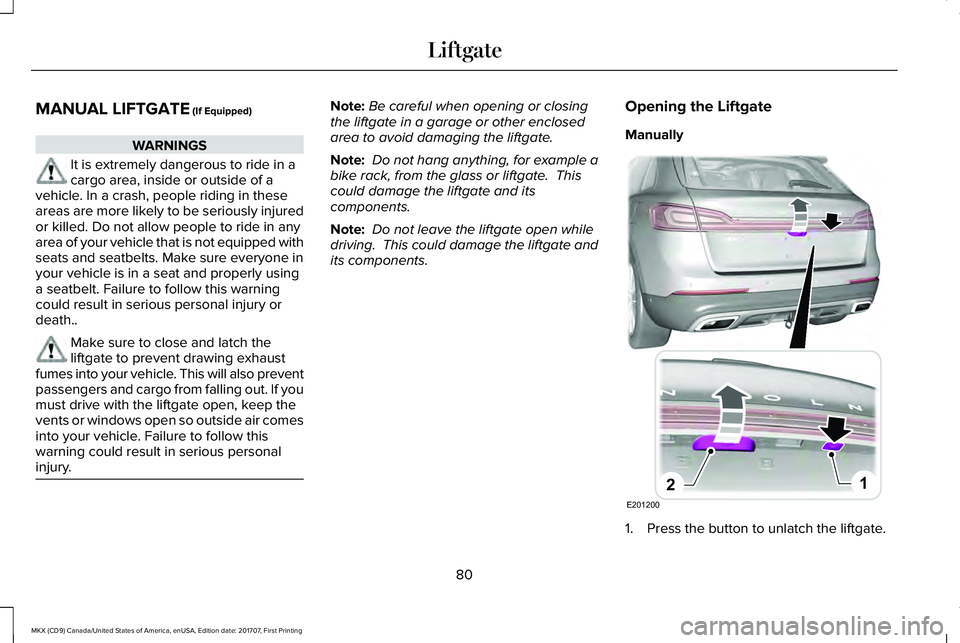
Opening the Liftgate
Manually
1. Press the button to unlatch the liftgate.
80
MKX (CD9) Canada/United States of America, enUSA, Edition date: 201707, First Printing
LiftgateE201200
12
Page 84 of 603
2. Pull the liftgate upward.
With the Remote Control
Press the button twice within threeseconds, and then pull on theoutside handle.
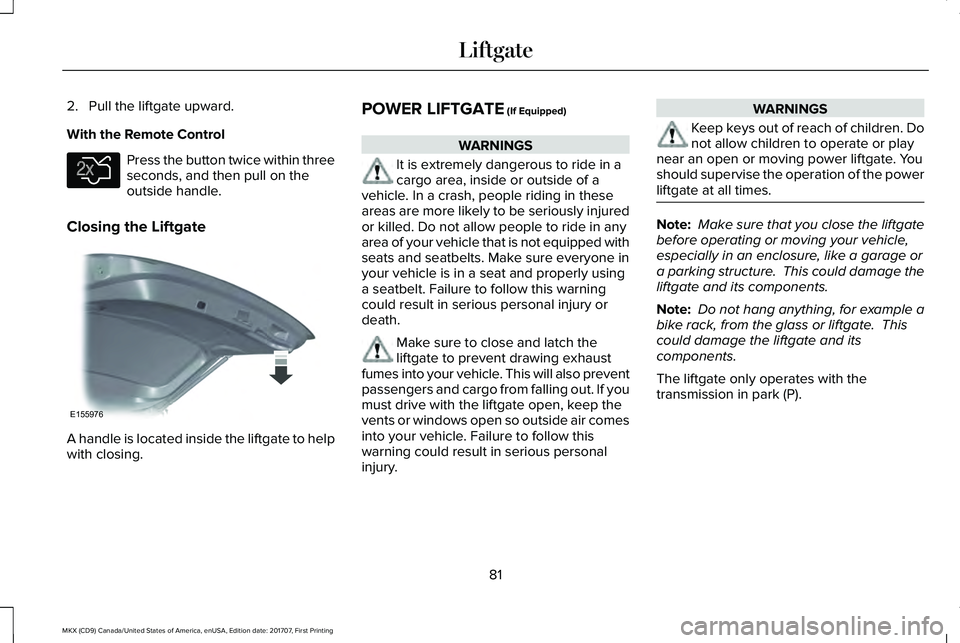
Closing the Liftgate
A handle is located inside the liftgate to helpwith closing.
POWER LIFTGATE (If Equipped)
WARNINGS
It is extremely dangerous to ride in acargo area, inside or outside of avehicle. In a crash, people riding in theseareas are more likely to be seriously injuredor killed. Do not allow people to ride in anyarea of your vehicle that is not equipped withseats and seatbelts. Make sure everyone inyour vehicle is in a seat and properly usinga seatbelt. Failure to follow this warningcould result in serious personal injury ordeath.
Make sure to close and latch theliftgate to prevent drawing exhaustfumes into your vehicle. This will also preventpassengers and cargo from falling out. If youmust drive with the liftgate open, keep thevents or windows open so outside air comesinto your vehicle. Failure to follow thiswarning could result in serious personalinjury.
WARNINGS
Keep keys out of reach of children. Donot allow children to operate or playnear an open or moving power liftgate. Youshould supervise the operation of the powerliftgate at all times.
Note: Make sure that you close the liftgatebefore operating or moving your vehicle,especially in an enclosure, like a garage ora parking structure. This could damage theliftgate and its components.
Note: Do not hang anything, for example abike rack, from the glass or liftgate. Thiscould damage the liftgate and itscomponents.
The liftgate only operates with thetransmission in park (P).
81
MKX (CD9) Canada/United States of America, enUSA, Edition date: 201707, First Printing
LiftgateE138630 E155976