belt LINCOLN MKX 2018 Service Manual
[x] Cancel search | Manufacturer: LINCOLN, Model Year: 2018, Model line: MKX, Model: LINCOLN MKX 2018Pages: 603, PDF Size: 4.94 MB
Page 118 of 603
See Using Cruise Control (page 229).
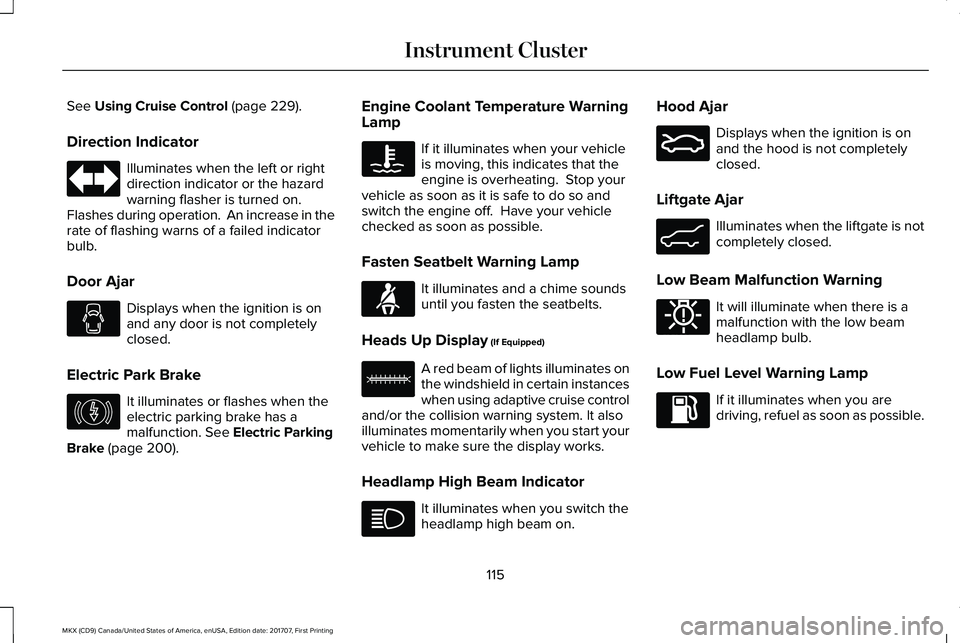
Direction Indicator
Illuminates when the left or rightdirection indicator or the hazardwarning flasher is turned on. Flashes during operation. An increase in therate of flashing warns of a failed indicatorbulb.
Door Ajar
Displays when the ignition is onand any door is not completelyclosed.
Electric Park Brake
It illuminates or flashes when theelectric parking brake has amalfunction. See Electric ParkingBrake (page 200).
Engine Coolant Temperature WarningLamp
If it illuminates when your vehicleis moving, this indicates that theengine is overheating. Stop yourvehicle as soon as it is safe to do so andswitch the engine off. Have your vehiclechecked as soon as possible.
Fasten Seatbelt Warning Lamp
It illuminates and a chime soundsuntil you fasten the seatbelts.
Heads Up Display (If Equipped)
A red beam of lights illuminates onthe windshield in certain instanceswhen using adaptive cruise controland/or the collision warning system. It alsoilluminates momentarily when you start yourvehicle to make sure the display works.
Headlamp High Beam Indicator
It illuminates when you switch theheadlamp high beam on.
Hood Ajar
Displays when the ignition is onand the hood is not completelyclosed.
Liftgate Ajar
Illuminates when the liftgate is notcompletely closed.
Low Beam Malfunction Warning
It will illuminate when there is amalfunction with the low beamheadlamp bulb.
Low Fuel Level Warning Lamp
If it illuminates when you aredriving, refuel as soon as possible.
115
MKX (CD9) Canada/United States of America, enUSA, Edition date: 201707, First Printing
Instrument Cluster E146190 E71880 E156133 E159324 E162453 E181350
Page 126 of 603
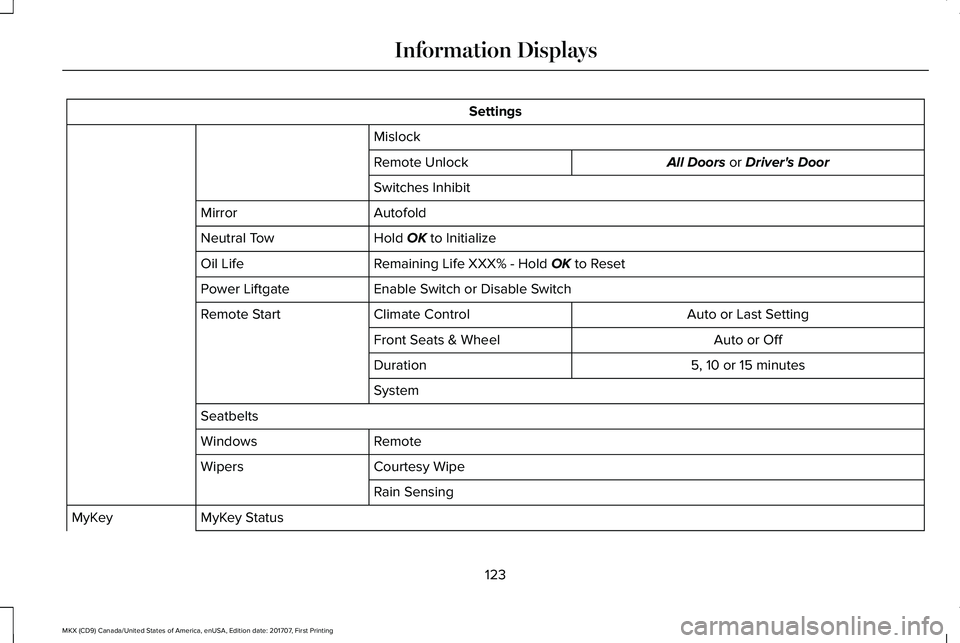
Settings
Mislock
All Doors or Driver's DoorRemote Unlock
Switches Inhibit
AutofoldMirror
Hold OK to InitializeNeutral Tow
Remaining Life XXX% - Hold OK to ResetOil Life
Enable Switch or Disable SwitchPower Liftgate
Auto or Last SettingClimate ControlRemote Start
Auto or OffFront Seats & Wheel
5, 10 or 15 minutesDuration
System
Seatbelts
RemoteWindows
Courtesy WipeWipers
Rain Sensing
MyKey StatusMyKey
123
MKX (CD9) Canada/United States of America, enUSA, Edition date: 201707, First Printing
Information Displays
Page 140 of 603
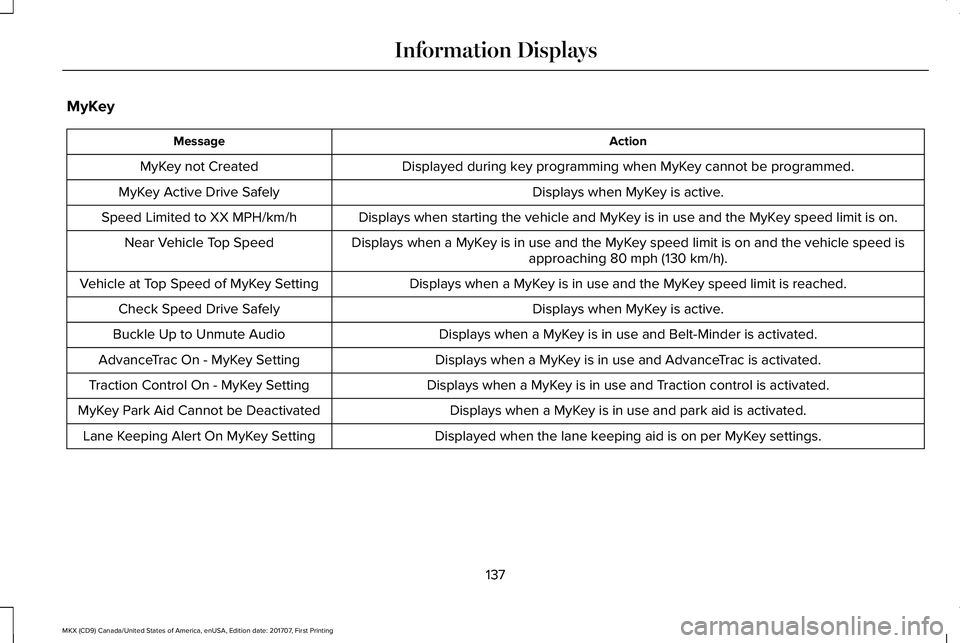
MyKey
ActionMessage
Displayed during key programming when MyKey cannot be programmed.MyKey not Created
Displays when MyKey is active.MyKey Active Drive Safely
Displays when starting the vehicle and MyKey is in use and the MyKey speed limit is on.Speed Limited to XX MPH/km/h
Displays when a MyKey is in use and the MyKey speed limit is on and the vehicle speed isapproaching 80 mph (130 km/h).Near Vehicle Top Speed
Displays when a MyKey is in use and the MyKey speed limit is reached.Vehicle at Top Speed of MyKey Setting
Displays when MyKey is active.Check Speed Drive Safely
Displays when a MyKey is in use and Belt-Minder is activated.Buckle Up to Unmute Audio
Displays when a MyKey is in use and AdvanceTrac is activated.AdvanceTrac On - MyKey Setting
Displays when a MyKey is in use and Traction control is activated.Traction Control On - MyKey Setting
Displays when a MyKey is in use and park aid is activated.MyKey Park Aid Cannot be Deactivated
Displayed when the lane keeping aid is on per MyKey settings.Lane Keeping Alert On MyKey Setting
137
MKX (CD9) Canada/United States of America, enUSA, Edition date: 201707, First Printing
Information Displays
Page 153 of 603
SITTING IN THE CORRECT
POSITION
WARNINGS
Sitting improperly, out of position orwith the seatback reclined too far cantake weight off the seat cushion and affectthe decision of the passenger sensingsystem, resulting in serious injury or deathin the event of a crash. Always sit uprightagainst your seat back, with your feet on thefloor.
Do not recline the seatback as this cancause the occupant to slide under thesafety belt, resulting in serious injury in theevent of a crash.
Do not place objects higher than theseatback to reduce the risk of seriousinjury in the event of a crash or during heavybraking.
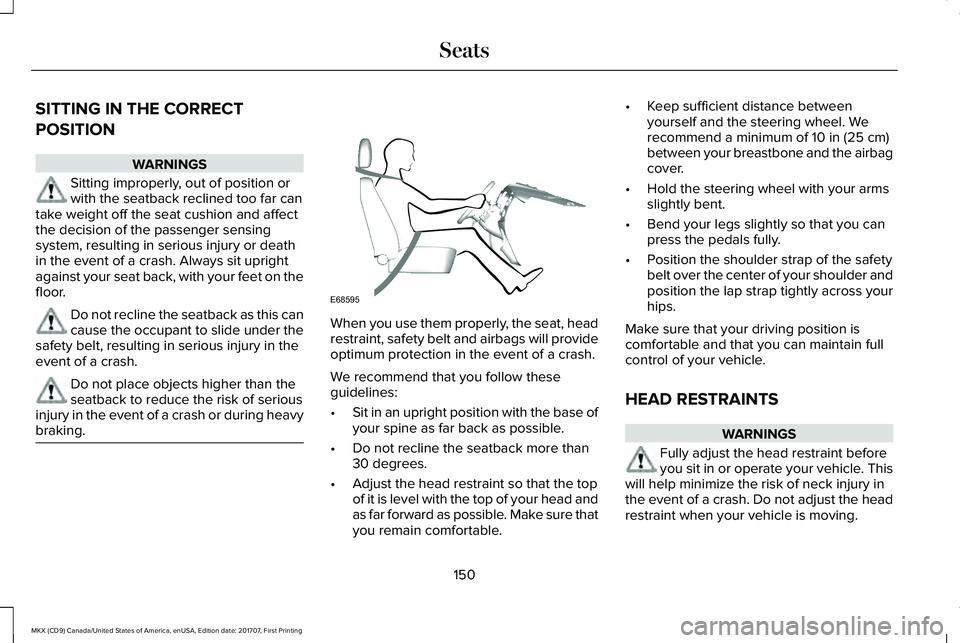
When you use them properly, the seat, headrestraint, safety belt and airbags will provideoptimum protection in the event of a crash.
We recommend that you follow theseguidelines:
•Sit in an upright position with the base ofyour spine as far back as possible.
•Do not recline the seatback more than30 degrees.
•Adjust the head restraint so that the topof it is level with the top of your head andas far forward as possible. Make sure thatyou remain comfortable.
•Keep sufficient distance betweenyourself and the steering wheel. Werecommend a minimum of 10 in (25 cm)between your breastbone and the airbagcover.
•Hold the steering wheel with your armsslightly bent.
•Bend your legs slightly so that you canpress the pedals fully.
•Position the shoulder strap of the safetybelt over the center of your shoulder andposition the lap strap tightly across yourhips.
Make sure that your driving position iscomfortable and that you can maintain fullcontrol of your vehicle.
HEAD RESTRAINTS
WARNINGS
Fully adjust the head restraint beforeyou sit in or operate your vehicle. Thiswill help minimize the risk of neck injury inthe event of a crash. Do not adjust the headrestraint when your vehicle is moving.
150
MKX (CD9) Canada/United States of America, enUSA, Edition date: 201707, First Printing
SeatsE68595
Page 162 of 603
2.Press and hold the desired preset buttonfor about five seconds. A tone soundsafter about two seconds. Continueholding until you hear a second tone.
3. Within three seconds, press the lockbutton on the remote control you arelinking.
To unlink a remote control, follow the sameprocedure – except in step 3, press theunlock button on the remote control.
Note:If more than one linked remote controlor intelligent access key is in range, thememory function moves to the settings ofthe first key to initiate a memory recall.
Easy Entry and Exit Feature
If you enable the easy entry and exit feature,it automatically moves the driver seatposition rearward up to 2 in (5 cm) when youswitch the ignition off.
The driver seat will return to its previousposition when you switch the ignition on.
You can enable or disable this feature in theinformation display. See InformationDisplays (page 118).
REAR SEATS
Adjusting the Rear Seats
WARNING
To prevent possible damage to theseat or safety belts, make sure that thesafety belts are not buckled when foldingthe seatback.
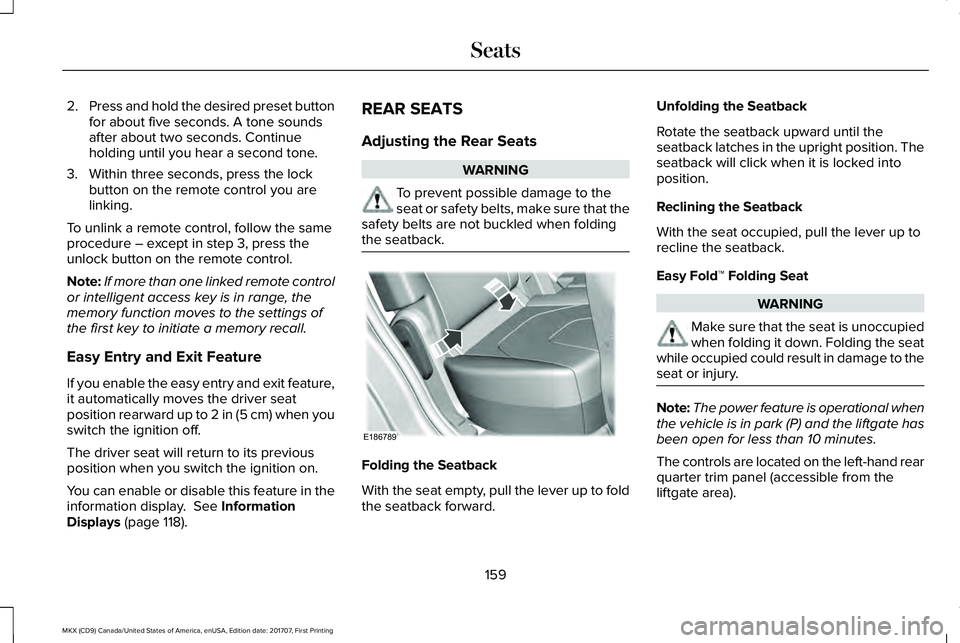
Folding the Seatback
With the seat empty, pull the lever up to foldthe seatback forward.
Unfolding the Seatback
Rotate the seatback upward until theseatback latches in the upright position. Theseatback will click when it is locked intoposition.
Reclining the Seatback
With the seat occupied, pull the lever up torecline the seatback.
Easy Fold™ Folding Seat
WARNING
Make sure that the seat is unoccupiedwhen folding it down. Folding the seatwhile occupied could result in damage to theseat or injury.
Note:The power feature is operational whenthe vehicle is in park (P) and the liftgate hasbeen open for less than 10 minutes.
The controls are located on the left-hand rearquarter trim panel (accessible from theliftgate area).
159
MKX (CD9) Canada/United States of America, enUSA, Edition date: 201707, First Printing
SeatsE186789
Page 175 of 603
Note:You may have to press the pushbutton ignition switch twice to switch theignition on.
Start: Starts the engine.
•Press the brake pedal, and then pressthe button for any length of time. Anindicator light on the button illuminateswhen then ignition is on and when theengine starts.
STARTING A GASOLINE ENGINE
When you start the engine, the idle speedincreases. This helps to warm up theengine. If the engine idle speed does notslow down automatically, have your vehiclechecked by an authorized dealer.
Note: You can crank the engine for a totalof 60 seconds without the engine startingbefore the starting system temporarilydisables. The 60 seconds does not have tobe all at once. For example, if you crank theengine three times for 20 seconds each time,without the engine starting, you reached the60-second time limit. A message appearsin the information display alerting you thatyou exceeded the cranking time. Youcannot attempt to start the engine for atleast 15 minutes. After 15 minutes, you arelimited to a 15-second engine cranking time. You need to wait 60 minutes before you cancrank the engine for 60 seconds again.
Before starting the engine check thefollowing:
•Make sure all occupants have fastenedtheir seatbelts.
•Make sure the headlamps and electricalaccessories are off.
•Make sure the parking brake is on.
•Make sure the transmission is in park (P)or neutral (N).
Keyless Starting
Note:Do not touch the accelerator pedal.
Note:A valid passive key must be locatedinside your vehicle to switch the power onand start your vehicle.
1. Fully depress the brake pedal.
2. Briefly press the push button ignitionswitch.
The system does not function if:
•The passive key frequencies are jammed.
•The key battery has no charge.
If you are unable to start the engine, do thefollowing:
172
MKX (CD9) Canada/United States of America, enUSA, Edition date: 201707, First Printing
Starting and Stopping the Engine
Page 192 of 603
3. The gearshift button you select willilluminate and the selected gear willappear in the instrument cluster.
4. Release the brake pedal and yourtransmission will remain in the selectedgear.
Note:If you attempt to leave your vehiclewhile it is in gear, your vehicle willautomatically shift into park (P). Safety beltand door monitors determine your intent andmake the shift for you. During this time, amessage will appear in the informationdisplay screen prompting you to make theshift to park (P).
Note:To put your vehicle in gear with thedoor open, perform steps 1-4. See theAutomatic Return to Park section in thischapter for more information on this feature.
Park (P)
With the transmission in park (P), your vehiclelocks the transmission and prevents thewheels from turning. Always come to acomplete stop before putting your vehicleinto and out of park (P). An audible tonesounds once you select park (P).
When the ignition is turned off, the vehiclewill automatically shift into park (P). If theignition is turned off while the vehicle ismoving, it will first shift into neutral (N) untila slow enough speed is reached. The vehiclewill then shift into park (P) automatically.
Automatic Return to Park
Note:This feature will not operate when yourvehicle is in Stay in Neutral mode or neutraltow.
Your vehicle has a safety feature that willautomatically shift your vehicle into park (P)when any of the following conditions occur:
•You turn the ignition off
•You open the driver's door with yoursafety belt unlatched
•Your safety belt is unlatched while thedriver's door is open
If you turn the ignition off while your vehicleis moving, your vehicle will first shift intoneutral (N) until it slows down enough to shiftinto park (P) automatically.
Note:If you have waited an extended periodof time (2-15 minutes) before starting yourvehicle, unlatching your safety belt will causethis feature to activate, even with the driver'sdoor closed.
Note:This feature may not work properly ifthe door ajar switch is malfunctioning. If yourdoor ajar indicator does not illuminate whenyou open the driver’s door or the indicatorilluminates with the driver’s door closed, seeyour authorized dealer.
Reverse (R)
With the transmission in reverse (R), yourvehicle will move backward. Always cometo a complete stop before shifting into andout of reverse (R).
Neutral (N)
With the transmission in neutral (N), you canstart your vehicle and it is free to roll. Holdthe brake pedal down while in this position.
189
MKX (CD9) Canada/United States of America, enUSA, Edition date: 201707, First Printing
Transmission
Page 208 of 603
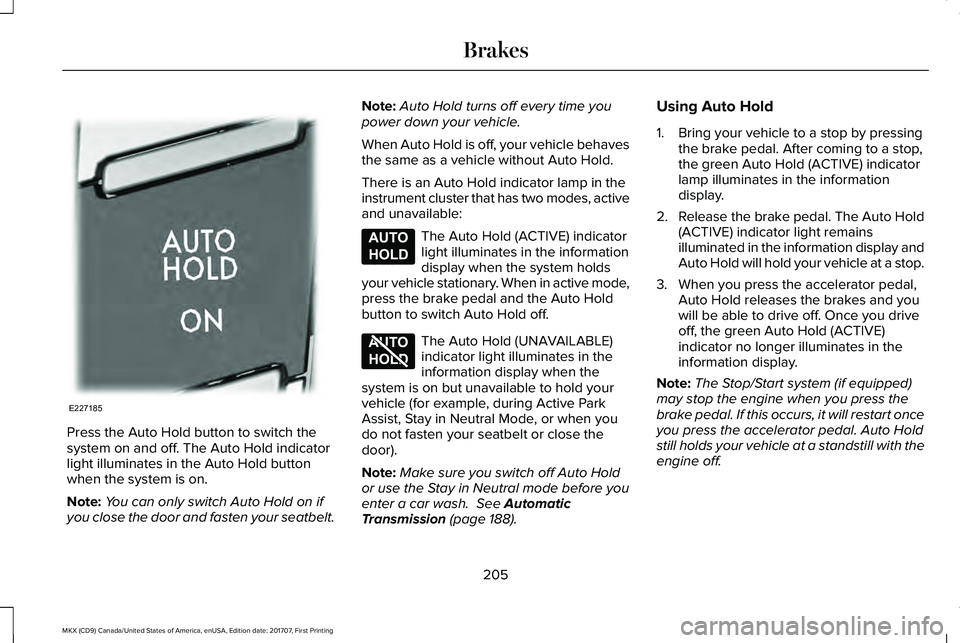
Press the Auto Hold button to switch thesystem on and off. The Auto Hold indicatorlight illuminates in the Auto Hold buttonwhen the system is on.
Note:You can only switch Auto Hold on ifyou close the door and fasten your seatbelt.
Note:Auto Hold turns off every time youpower down your vehicle.
When Auto Hold is off, your vehicle behavesthe same as a vehicle without Auto Hold.
There is an Auto Hold indicator lamp in theinstrument cluster that has two modes, activeand unavailable:
The Auto Hold (ACTIVE) indicatorlight illuminates in the informationdisplay when the system holdsyour vehicle stationary. When in active mode,press the brake pedal and the Auto Holdbutton to switch Auto Hold off.
The Auto Hold (UNAVAILABLE)indicator light illuminates in theinformation display when thesystem is on but unavailable to hold yourvehicle (for example, during Active ParkAssist, Stay in Neutral Mode, or when youdo not fasten your seatbelt or close thedoor).
Note:Make sure you switch off Auto Holdor use the Stay in Neutral mode before youenter a car wash. See AutomaticTransmission (page 188).
Using Auto Hold
1. Bring your vehicle to a stop by pressingthe brake pedal. After coming to a stop,the green Auto Hold (ACTIVE) indicatorlamp illuminates in the informationdisplay.
2.Release the brake pedal. The Auto Hold(ACTIVE) indicator light remainsilluminated in the information display andAuto Hold will hold your vehicle at a stop.
3. When you press the accelerator pedal,Auto Hold releases the brakes and youwill be able to drive off. Once you driveoff, the green Auto Hold (ACTIVE)indicator no longer illuminates in theinformation display.
Note:The Stop/Start system (if equipped)may stop the engine when you press thebrake pedal. If this occurs, it will restart onceyou press the accelerator pedal. Auto Holdstill holds your vehicle at a standstill with theengine off.
205
MKX (CD9) Canada/United States of America, enUSA, Edition date: 201707, First Printing
BrakesE227185 E197933 E197934
Page 281 of 603
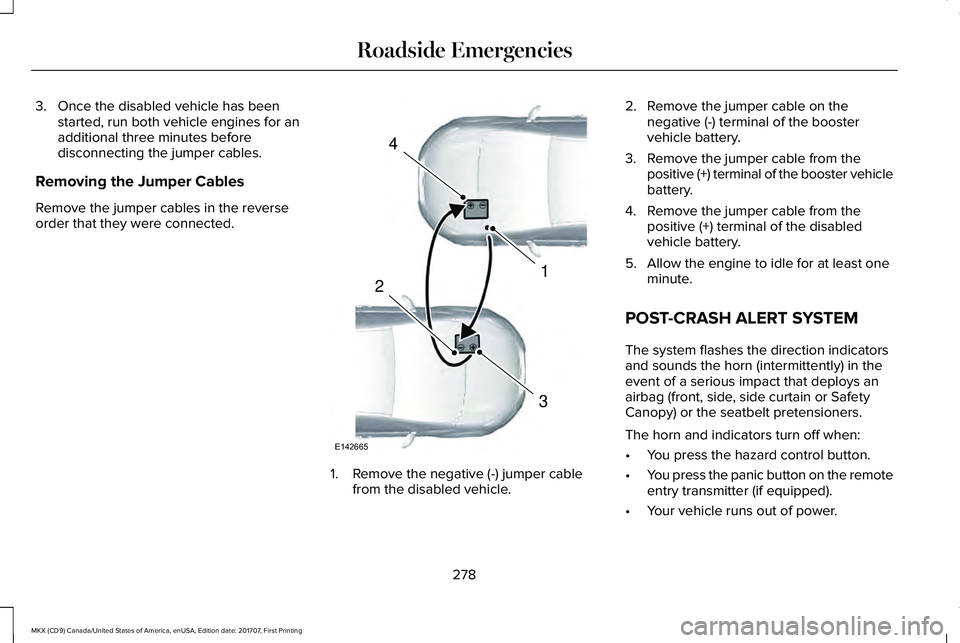
3. Once the disabled vehicle has beenstarted, run both vehicle engines for anadditional three minutes beforedisconnecting the jumper cables.
Removing the Jumper Cables
Remove the jumper cables in the reverseorder that they were connected.
1. Remove the negative (-) jumper cablefrom the disabled vehicle.
2. Remove the jumper cable on thenegative (-) terminal of the boostervehicle battery.
3. Remove the jumper cable from thepositive (+) terminal of the booster vehiclebattery.
4. Remove the jumper cable from thepositive (+) terminal of the disabledvehicle battery.
5. Allow the engine to idle for at least oneminute.
POST-CRASH ALERT SYSTEM
The system flashes the direction indicatorsand sounds the horn (intermittently) in theevent of a serious impact that deploys anairbag (front, side, side curtain or SafetyCanopy) or the seatbelt pretensioners.
The horn and indicators turn off when:
•You press the hazard control button.
•You press the panic button on the remoteentry transmitter (if equipped).
•Your vehicle runs out of power.
278
MKX (CD9) Canada/United States of America, enUSA, Edition date: 201707, First Printing
Roadside Emergencies4
1
3
2
E142665
Page 282 of 603
TRANSPORTING THE VEHICLEIf you need to tow your vehicle, contact aprofessional towing service or, if you are amember of a roadside assistance program,your roadside assistance service provider.
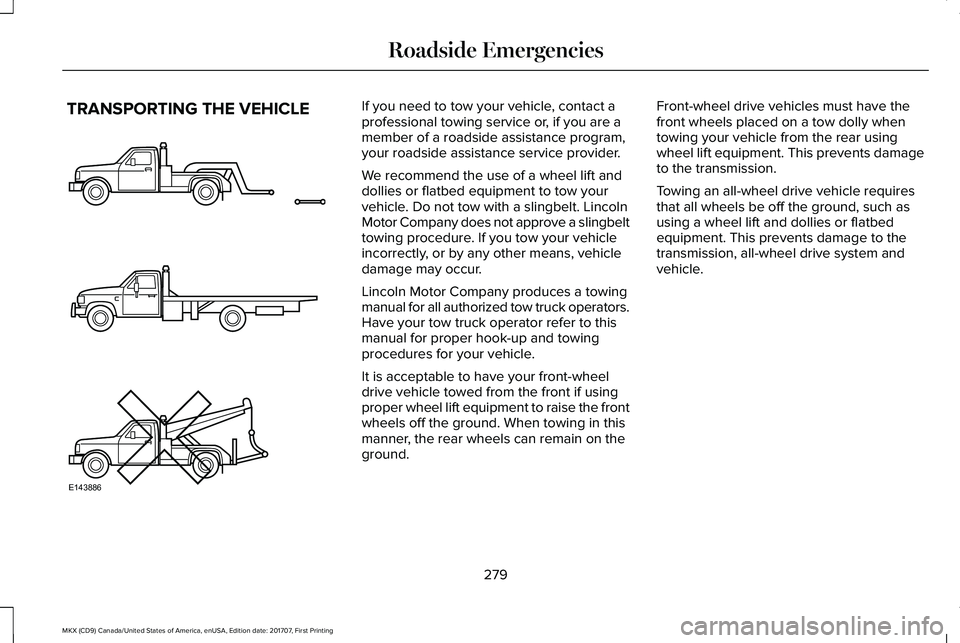
We recommend the use of a wheel lift anddollies or flatbed equipment to tow yourvehicle. Do not tow with a slingbelt. LincolnMotor Company does not approve a slingbelttowing procedure. If you tow your vehicleincorrectly, or by any other means, vehicledamage may occur.
Lincoln Motor Company produces a towingmanual for all authorized tow truck operators.Have your tow truck operator refer to thismanual for proper hook-up and towingprocedures for your vehicle.
It is acceptable to have your front-wheeldrive vehicle towed from the front if usingproper wheel lift equipment to raise the frontwheels off the ground. When towing in thismanner, the rear wheels can remain on theground.
Front-wheel drive vehicles must have thefront wheels placed on a tow dolly whentowing your vehicle from the rear usingwheel lift equipment. This prevents damageto the transmission.
Towing an all-wheel drive vehicle requiresthat all wheels be off the ground, such asusing a wheel lift and dollies or flatbedequipment. This prevents damage to thetransmission, all-wheel drive system andvehicle.
279
MKX (CD9) Canada/United States of America, enUSA, Edition date: 201707, First Printing
Roadside EmergenciesE143886