lock LINCOLN MKZ 2013 Owners Manual
[x] Cancel search | Manufacturer: LINCOLN, Model Year: 2013, Model line: MKZ, Model: LINCOLN MKZ 2013Pages: 474, PDF Size: 3.79 MB
Page 335 of 474
For a complete listing of the
accessories that are available for your
vehicle, please contact your dealer or
visit our online store at:
Accessories.Lincoln.com (U.S.
only).
Lincoln Custom Accessories are
available for your vehicle through your
local Lincoln or Lincoln of Canada
dealer. Ford Motor Company will
repair or replace any properly
dealer-installed Lincoln Custom
Accessories found to be defective in
factory-supplied materials or
workmanship during the warranty
period, as well as any component
damaged by the defective
accessories. The accessories will be
warranted for whichever provides you
the greatest benefit:
• 12 months or 12,000 miles (20,000
kilometers) (whichever occurs
first), or
• the remainder of your new vehicle
limited warranty.
Contact your dealer for details and a
copy of the warranty.
Exterior style
• Hood deflectors
• Side-window deflectors
• Wheels
• Bumper protectors
Interior style
• All-weather floor mats
• Rear seat entertainment*
• Premium carpeted floor mats Lifestyle
•
Ash cup (smoker's packages)
• Cargo area protector
• Cargo net
• Cargo organizer
• Roof racks and carriers*
Peace of mind
• Car cover*
• Wheel locks
• Bumper mounted parking sensor*
• Locking fuel plug for capless fuel
system
*Lincoln Licensed Accessories are
warranted by the accessory
manufacturer's warranty. Lincoln
Licensed Accessories are fully
designed and developed by the
accessory manufacturer and have not
been designed or tested to Ford Motor
Company engineering requirements.
Contact your Lincoln dealer for details
regarding the manufacturer's limited
warranty and a copy of the Lincoln
Licensed Accessories product limited
warranty offered by the accessory
manufacturer.
For maximum vehicle performance,
keep the following information in mind
when adding accessories or
equipment to your vehicle:
332
Accessories
Page 336 of 474
•
When adding accessories,
equipment, passengers and
luggage to your vehicle, do not
exceed the total weight capacity
of the vehicle or of the front or rear
axle (GVWR or GAWR as indicated
on the Safety Compliance
Certification label). Consult your
authorized dealer for specific
weight information.
• The Federal Communications
Commission (FCC) and Canadian
Radio Telecommunications
Commission (CRTC) regulate the
use of mobile communications
systems — such as two-way
radios, telephones and theft
alarms - that are equipped with
radio transmitters. Any such
equipment installed in your vehicle
should comply with FCC or CRTC
regulations and should be installed
only by a qualified service
technician.
• Mobile communications systems
may harm the operation of your
vehicle, particularly if they are not
properly designed for automotive
use. •
To avoid interference with other
vehicle functions, such as anti-lock
braking systems, amateur radio
users who install radios and
antennas onto their vehicle should
not locate the amateur radio
antennas in the area of the driver's
side hood.
• Any non-Lincoln custom electrical
or electronic accessories or
components that are added to the
vehicle by the authorized dealer or
the owner, may adversely affect
battery performance and
durability, and may also adversely
affect the performance of other
electrical systems in the vehicle.
333
Accessories
Page 337 of 474
SERVICE PLANS (U.S. only)
More than 32 million Ford and Lincoln
owners have discovered the powerful
protection of Ford Extended Service
Plan. It is the only extended service
plan backed by Ford Motor Company,
and provides peace of mind
protection beyond the New Vehicle
Limited Warranty coverage.
Up to 500+ Covered Vehicle
Components
There are four, new-vehicle Extended
Service Plans with different levels of
coverage. Ask your dealer for details.
1. PremiumCare - Our most
comprehensive coverage. With
over 500 covered components,
this plan is so complete that we
generally only discuss what’ s not
covered!
2. ExtraCare - Covers 113 components, and includes many
high-tech items.
3. BaseCare - Covers 84 components.
4. PowertrainCare - Covers 29 critical
components.
Ford Extended Service Plan is honored
by all Ford and Lincoln Dealers in the
U.S. and Canada. It is the only
extended service plan authorized and
backed by Ford Motor Company. That
means you get: •
Reliable, quality service anywhere
you go.
• Factory-trained technicians.
• Ford Authorized Parts used with
every covered repair.
Rental Car Reimbursement
If your vehicle is kept overnight for
covered repairs, you are eligible for
rental car coverage, including
Bumper-to-Bumper warranty repairs,
or manufacturer ’s recalls.
Transferable Coverage
If you sell your vehicle before your
Ford Extended Service Plan coverage
expires, you can transfer any
remaining coverage to the new owner.
Whenever you’re ready to sell your car,
prospective buyers may feel better
about taking a risk on your used
vehicle. Ford Extended Service Plan
may add resale value!
Plus, exclusive 24/7 roadside
assistance, including:
• Towing, flat-tire change and
battery jump starts.
• Out-of-fuel and lock-out
assistance.
• Travel expense reimbursement for
lodging, meals and rental car.
• Destination assistance for taxi,
shuttle, rental car coverage and
emergency transportation.
334
Ford Extended Service Plan (ESP)
Page 340 of 474
GENERAL INFORMATION
WARNING
Driving while distracted can
result in loss of vehicle control,
accident and injury. Ford strongly
recommends that drivers use extreme
caution when using any device or
feature that may take their focus off
the road. Your primary responsibility
is the safe operation of the vehicle.
We recommend against the use of any
handheld device while driving,
encourage the use of voice-operated
systems when possible and that you
become aware of applicable state
and local laws that may affect use of
electronic devices while driving. Note:
Some features are not available
while the vehicle is moving.
Note: Your system is equipped with a
feature that allows you to access and
control audio features for 30 minutes
after the ignition has been turned off
(as long as no doors are opened).
This system uses a four-corner
strategy to provide quick access to
vehicle features and settings. The
comprehensive touchscreen provides
easy interaction with your cellular
phone, multimedia, climate control
and navigation system. The corners
display any active modes within those
menus, such as your phone being
connected or the climate
temperature. SETTINGS Press to select any of the following:
•
Clock
• Display
• Sound
• Vehicle
• Settings
• Help INFORMATION
Press to select any of the following:
• Services
• Travel Link
• Alerts
• Calendar
• Apps
PHONE
Press to select any of the following:
• Phone
• Quick Dial
• Phonebook
• History
• Messaging
• Settings
NAVIGATION
Press to select any of the following:
• My Home
• Favorites
• Previous Destinations
• Point of Interest
• Emergency
• Previous Starting Point
• Latitude/Longitude
337
MyLincoln Touch
™E142607 E142608
Page 354 of 474
The dual mode feature is also
available when the voice system
displays a list of items to pick from
during a voice session, where you
would be able to touch the line item
or say "Line 2". If a command is not
understood or there are multiple
options, the system returns a list for
you to choose from.
SETTINGS
Under the menu setting, you can set
your clock, access and make
adjustments to the display, sound and
vehicle settings as well as access
settings for specific modes or the help
feature.
Clock
Note:
The date is set by your vehicle's
GPS; you cannot manually set the date.
Note: If the battery has been
disconnected, the vehicle needs to
acquire a GPS signal to update the
clock. Once your vehicle acquires the
signal, it may take a few minutes for
the update to display the correct time.
1. Press the Settings icon > Clock.
2. Press + and - to adjust the time.
From this screen, you can also make
other adjustments such as 12-hour or
24-hour mode, activate GPS time
synchronization and have the system
automatically update new time zones. You can also turn the outside air
temperature display on and off. When
the outside air temperature is
displayed, it appears at the top center
of the touchscreen next to the time
and date.
Once you update any settings, they
are automatically saved.
Display
You can make adjustments to the
touchscreen display through the
touchscreen or by pressing the voice
button on your steering wheel controls
and when prompted, say "Display
settings".
To access and make adjustments
using the touchscreen, press the
Settings icon > Display.
•
Brightness allows you to make
the screen display brighter or
dimmer.
• Mode
allows you to set the screen
to a certain brightness or have the
system automatically change
based on the outside light level.
• If you select AUTO or NIGHT,
you have the options of turning
the display's Auto Dim feature
on or off and changing the Auto
Dim Manual Offset feature.
• Edit Wallpaper
•You can have your touchscreen
display the default photo or
upload your own.
351
MyLincoln Touch
™
Page 356 of 474
1. Press the Settings icon > Vehicle
> Ambient Lighting.
2. Touch the desired color.
3. Use the scroll bar to increase or decrease the intensity.
To turn the feature on or off, press the
power button.
Vehicle Health Report (If
Equipped)
Turn Automatic Reminders on and off
and set the mileage interval at which
you would like to receive the reports.
Press the ? for more information on
these selections.
When done making your selections,
press Run Vehicle Health Report Now
if you want your report.
Door Keypad Code (If Equipped)
To change the keypad code for your
keyless entry keypad system:
1. Press the Settings icon > Vehicle > Door Keypad Code.
2. Enter your current factory code, then, when prompted, enter your
new code.
Rear View Camera (If Equipped)
This menu allows you to access
settings for your rear view camera. Press the Settings icon > Vehicle >
Rear View Camera, then select from
the following settings:
•
Rear Camera Delay
• Visual Park Aid Alert
• Guidelines.
Enable Valet Mode
Note: If you are locked out and need
to reset the PIN, you can enter 3681
and the system unlocks.
Valet mode allows you to lock the
system so that none of your
information on the system can be
accessed until it is unlocked with the
correct PIN.
1. Press the Settings icon > Vehicle > Enable Valet Mode.
2. When prompted, enter a four-digit
PIN.
After you press Continue the system
is locked until the correct PIN is
entered again.
Settings
Access and adjust system settings,
voice features, as well as phone,
navigation and wireless settings.
Some of these settings can also be
accessed with regard to their specific
modes (i.e., phone and media).
System
Press the Settings icon > Settings >
System, then select from the
following:
353
MyLincoln Touch
™
Page 373 of 474
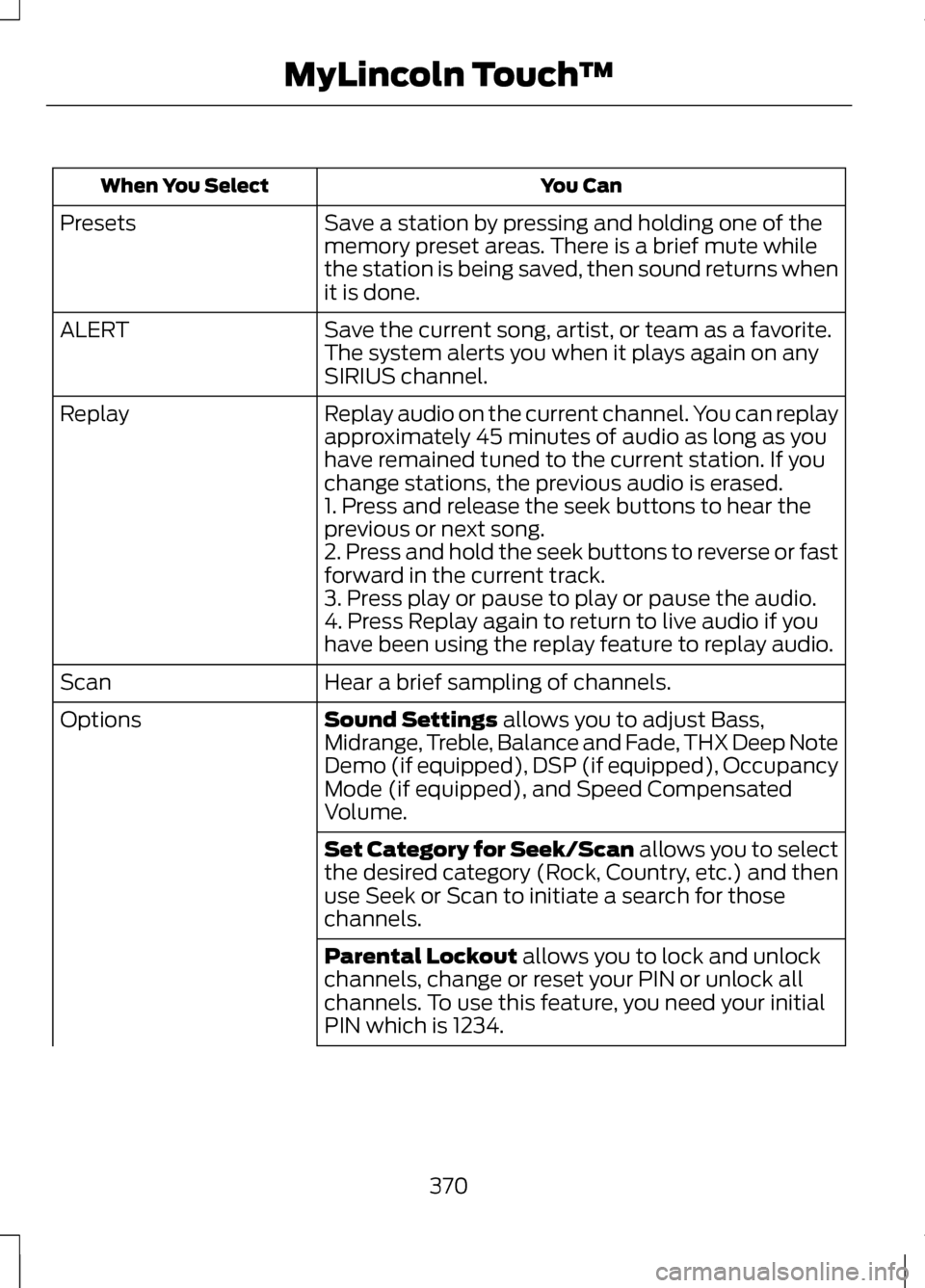
You Can
When You Select
Save a station by pressing and holding one of the
memory preset areas. There is a brief mute while
the station is being saved, then sound returns when
it is done.
Presets
Save the current song, artist, or team as a favorite.
The system alerts you when it plays again on any
SIRIUS channel.
ALERT
Replay audio on the current channel. You can replay
approximately 45 minutes of audio as long as you
have remained tuned to the current station. If you
change stations, the previous audio is erased.
Replay
1. Press and release the seek buttons to hear the
previous or next song.
2. Press and hold the seek buttons to reverse or fast
forward in the current track.
3. Press play or pause to play or pause the audio.
4. Press Replay again to return to live audio if you
have been using the replay feature to replay audio.
Hear a brief sampling of channels.
Scan
Sound Settings allows you to adjust Bass,
Midrange, Treble, Balance and Fade, THX Deep Note
Demo (if equipped), DSP (if equipped), Occupancy
Mode (if equipped), and Speed Compensated
Volume.
Options
Set Category for Seek/Scan
allows you to select
the desired category (Rock, Country, etc.) and then
use Seek or Scan to initiate a search for those
channels.
Parental Lockout
allows you to lock and unlock
channels, change or reset your PIN or unlock all
channels. To use this feature, you need your initial
PIN which is 1234.
370
MyLincoln Touch
™
Page 374 of 474
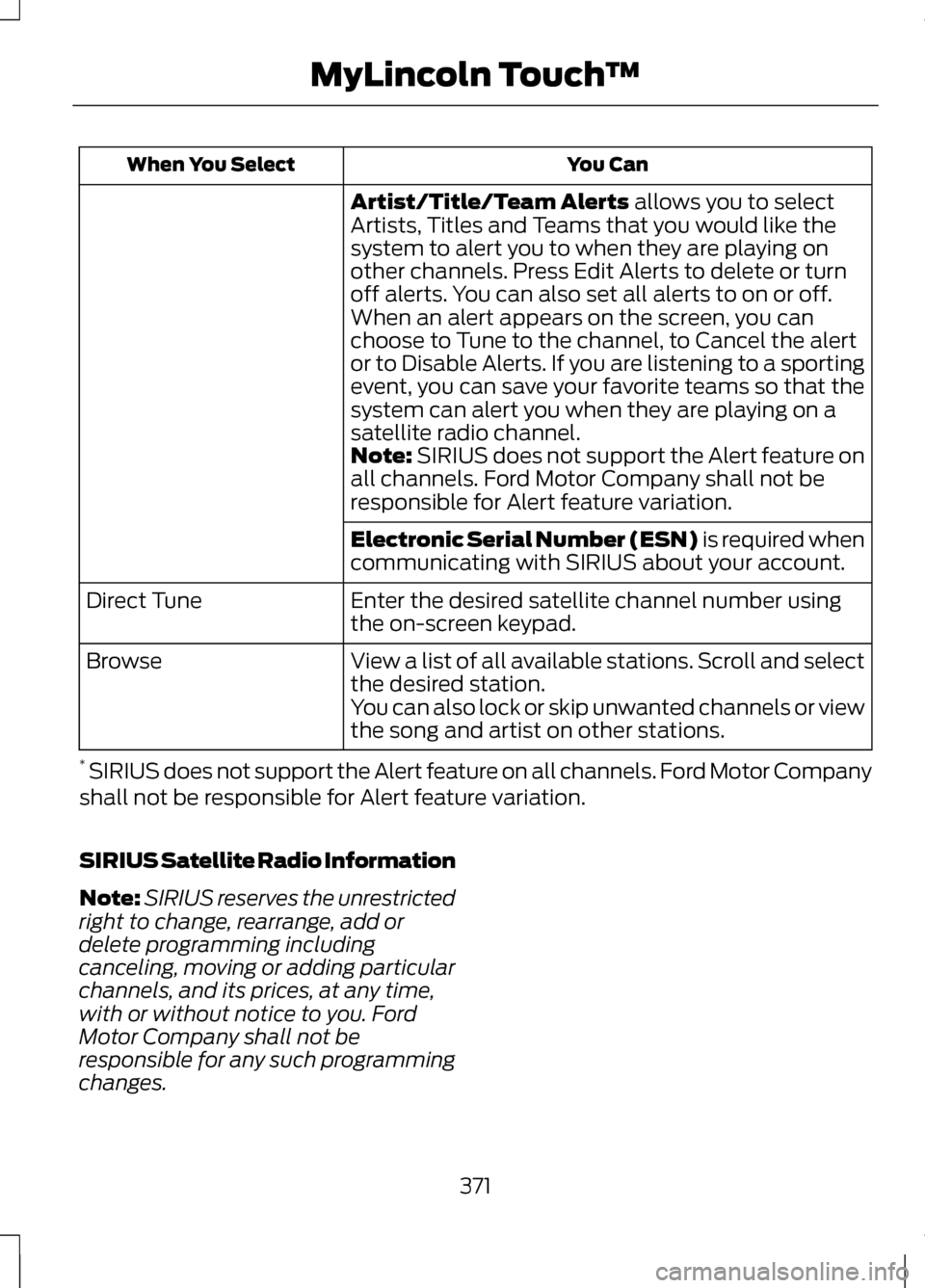
You Can
When You Select
Artist/Title/Team Alerts allows you to select
Artists, Titles and Teams that you would like the
system to alert you to when they are playing on
other channels. Press Edit Alerts to delete or turn
off alerts. You can also set all alerts to on or off.
When an alert appears on the screen, you can
choose to Tune to the channel, to Cancel the alert
or to Disable Alerts. If you are listening to a sporting
event, you can save your favorite teams so that the
system can alert you when they are playing on a
satellite radio channel.
Note:
SIRIUS does not support the Alert feature on
all channels. Ford Motor Company shall not be
responsible for Alert feature variation.
Electronic Serial Number (ESN) is required when
communicating with SIRIUS about your account.
Enter the desired satellite channel number using
the on-screen keypad.
Direct Tune
View a list of all available stations. Scroll and select
the desired station.
Browse
You can also lock or skip unwanted channels or view
the song and artist on other stations.
* SIRIUS does not support the Alert feature on all channels. Ford Motor Company
shall not be responsible for Alert feature variation.
SIRIUS Satellite Radio Information
Note: SIRIUS reserves the unrestricted
right to change, rearrange, add or
delete programming including
canceling, moving or adding particular
channels, and its prices, at any time,
with or without notice to you. Ford
Motor Company shall not be
responsible for any such programming
changes.
371
MyLincoln Touch
™
Page 376 of 474
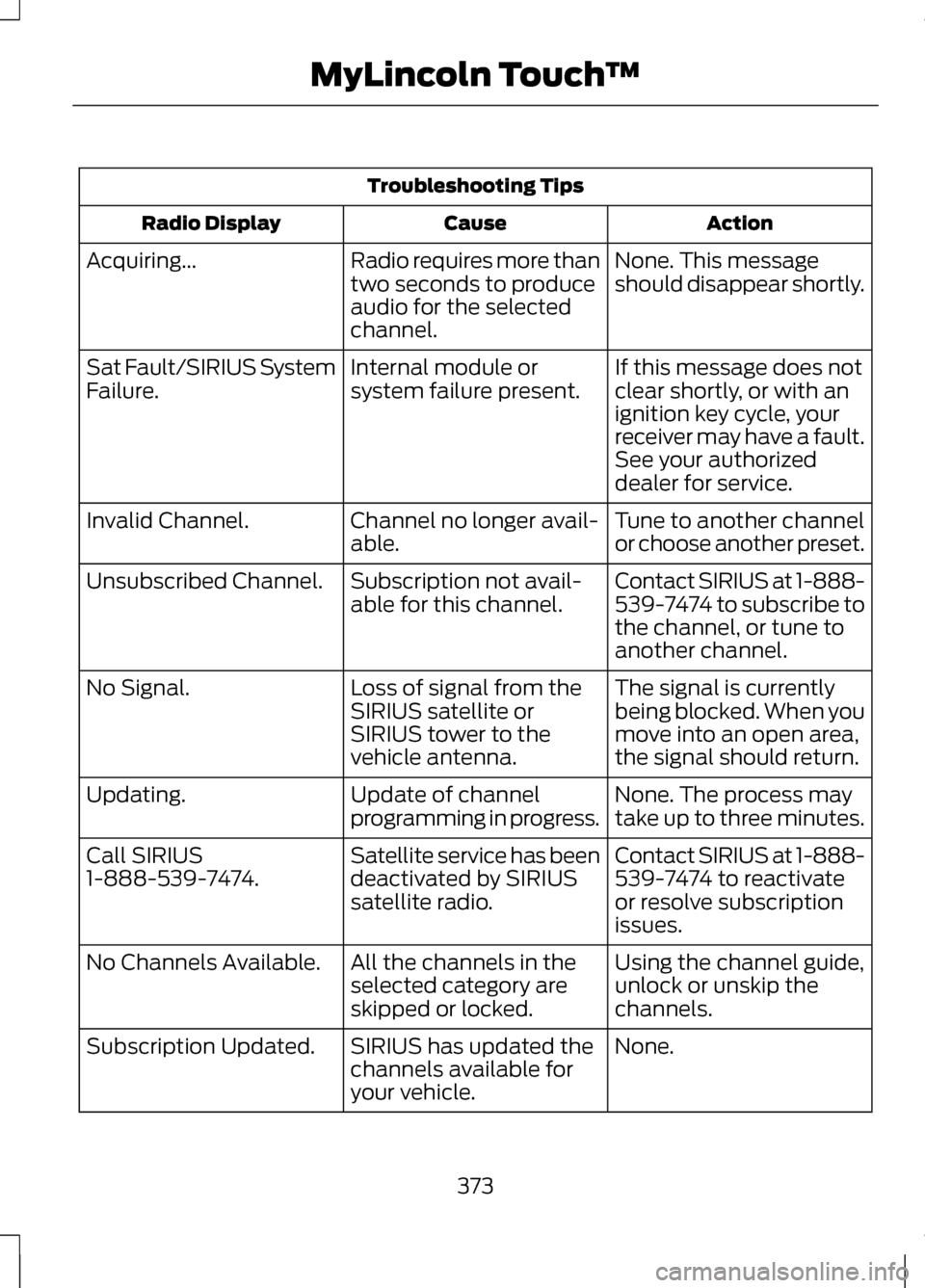
Troubleshooting Tips
Action
Cause
Radio Display
None. This message
should disappear shortly.
Radio requires more than
two seconds to produce
audio for the selected
channel.
Acquiring...
If this message does not
clear shortly, or with an
ignition key cycle, your
receiver may have a fault.
See your authorized
dealer for service.
Internal module or
system failure present.
Sat Fault/SIRIUS System
Failure.
Tune to another channel
or choose another preset.
Channel no longer avail-
able.
Invalid Channel.
Contact SIRIUS at 1-888-
539-7474 to subscribe to
the channel, or tune to
another channel.
Subscription not avail-
able for this channel.
Unsubscribed Channel.
The signal is currently
being blocked. When you
move into an open area,
the signal should return.
Loss of signal from the
SIRIUS satellite or
SIRIUS tower to the
vehicle antenna.
No Signal.
None. The process may
take up to three minutes.
Update of channel
programming in progress.
Updating.
Contact SIRIUS at 1-888-
539-7474 to reactivate
or resolve subscription
issues.
Satellite service has been
deactivated by SIRIUS
satellite radio.
Call SIRIUS
1-888-539-7474.
Using the channel guide,
unlock or unskip the
channels.
All the channels in the
selected category are
skipped or locked.
No Channels Available.
None.
SIRIUS has updated the
channels available for
your vehicle.
Subscription Updated.
373
MyLincoln Touch
™
Page 395 of 474
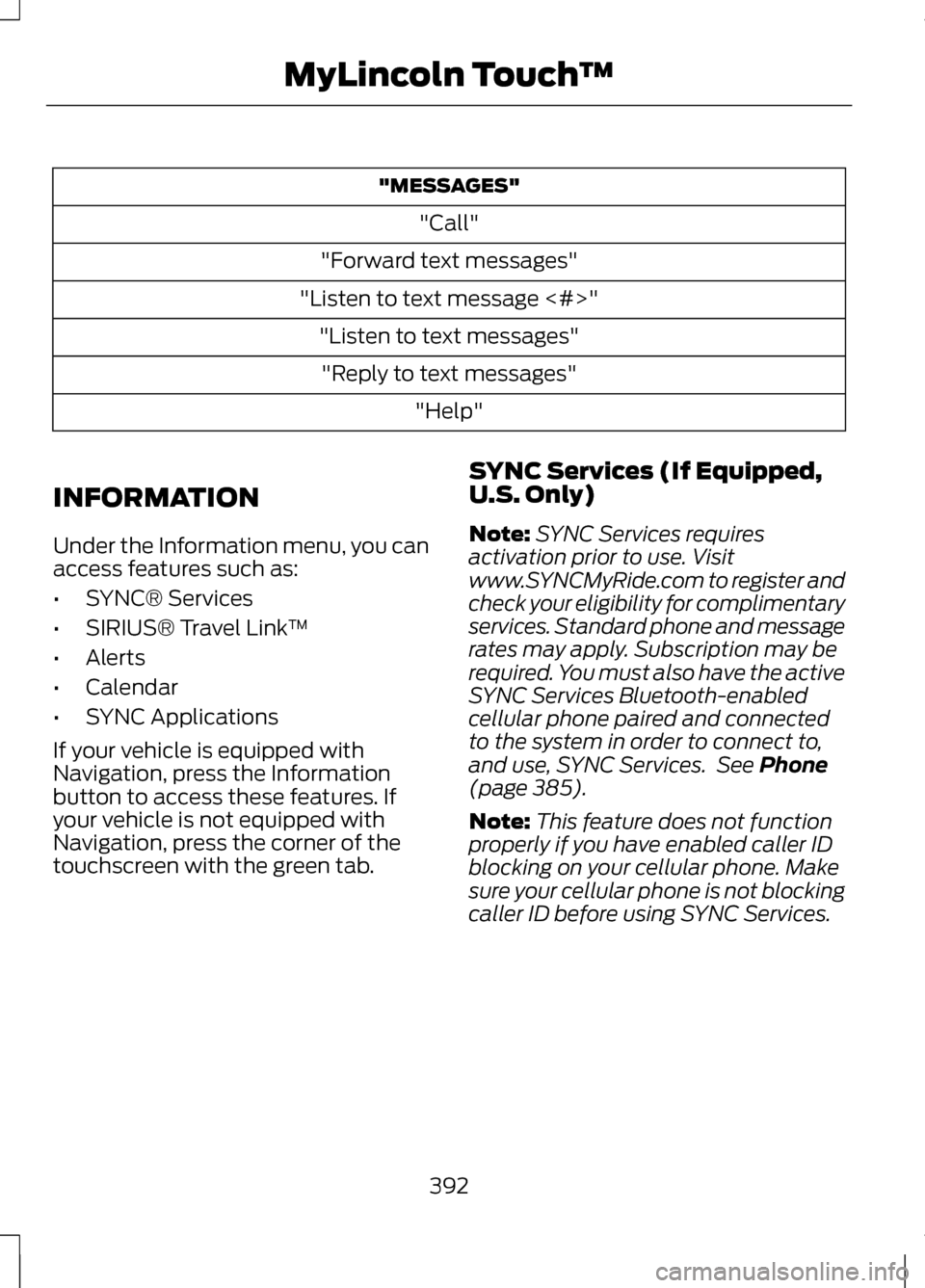
"MESSAGES"
"Call"
"Forward text messages"
"Listen to text message <#>" "Listen to text messages""Reply to text messages" "Help"
INFORMATION
Under the Information menu, you can
access features such as:
• SYNC® Services
• SIRIUS® Travel Link ™
• Alerts
• Calendar
• SYNC Applications
If your vehicle is equipped with
Navigation, press the Information
button to access these features. If
your vehicle is not equipped with
Navigation, press the corner of the
touchscreen with the green tab. SYNC Services (If Equipped,
U.S. Only)
Note:
SYNC Services requires
activation prior to use. Visit
www.SYNCMyRide.com to register and
check your eligibility for complimentary
services. Standard phone and message
rates may apply. Subscription may be
required. You must also have the active
SYNC Services Bluetooth-enabled
cellular phone paired and connected
to the system in order to connect to,
and use, SYNC Services. See Phone
(page 385).
Note: This feature does not function
properly if you have enabled caller ID
blocking on your cellular phone. Make
sure your cellular phone is not blocking
caller ID before using SYNC Services.
392
MyLincoln Touch
™