Driver door lock LINCOLN MKZ 2013 User Guide
[x] Cancel search | Manufacturer: LINCOLN, Model Year: 2013, Model line: MKZ, Model: LINCOLN MKZ 2013Pages: 474, PDF Size: 3.79 MB
Page 77 of 474
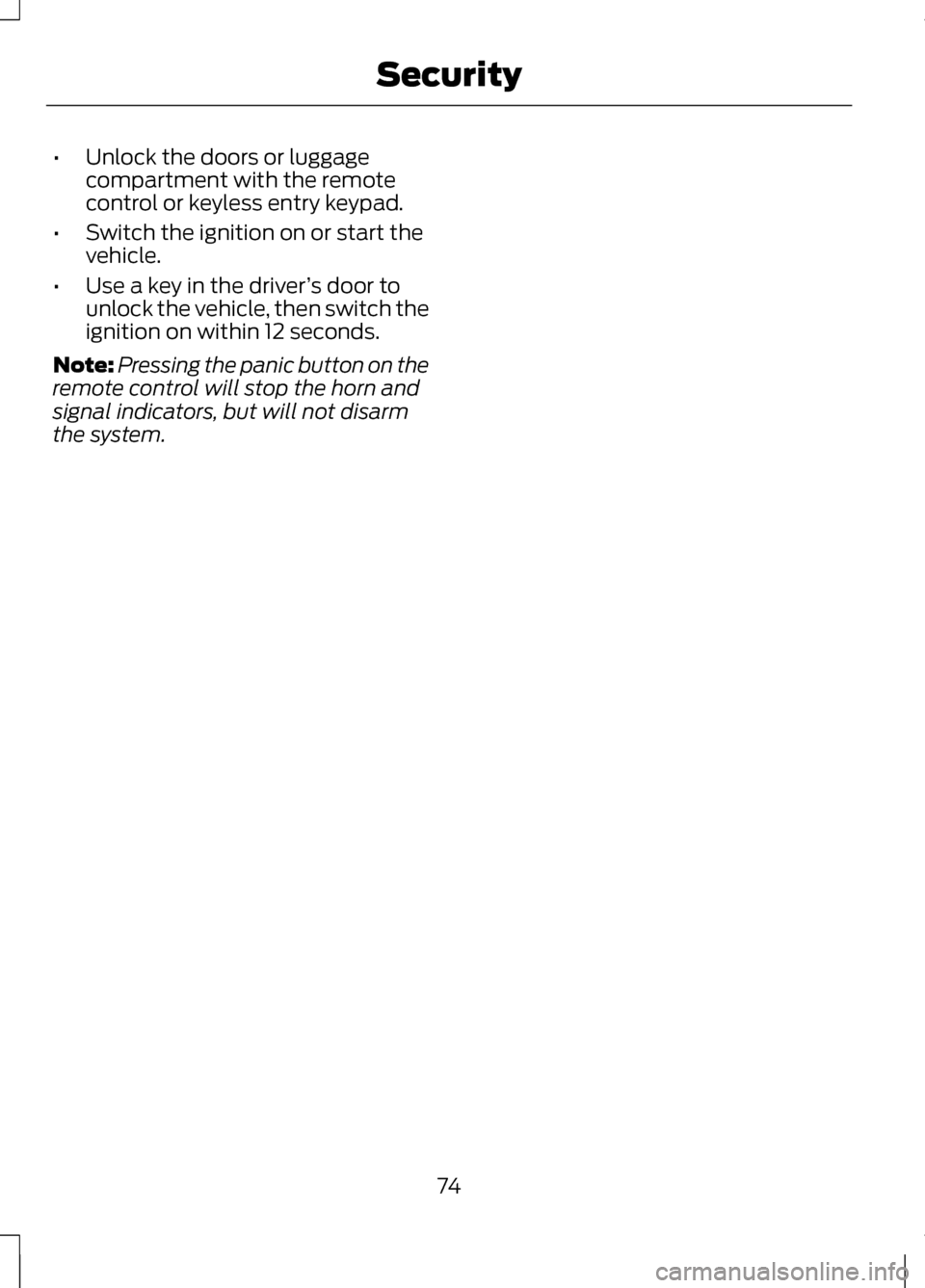
•
Unlock the doors or luggage
compartment with the remote
control or keyless entry keypad.
• Switch the ignition on or start the
vehicle.
• Use a key in the driver ’s door to
unlock the vehicle, then switch the
ignition on within 12 seconds.
Note: Pressing the panic button on the
remote control will stop the horn and
signal indicators, but will not disarm
the system.
74
Security
Page 106 of 474
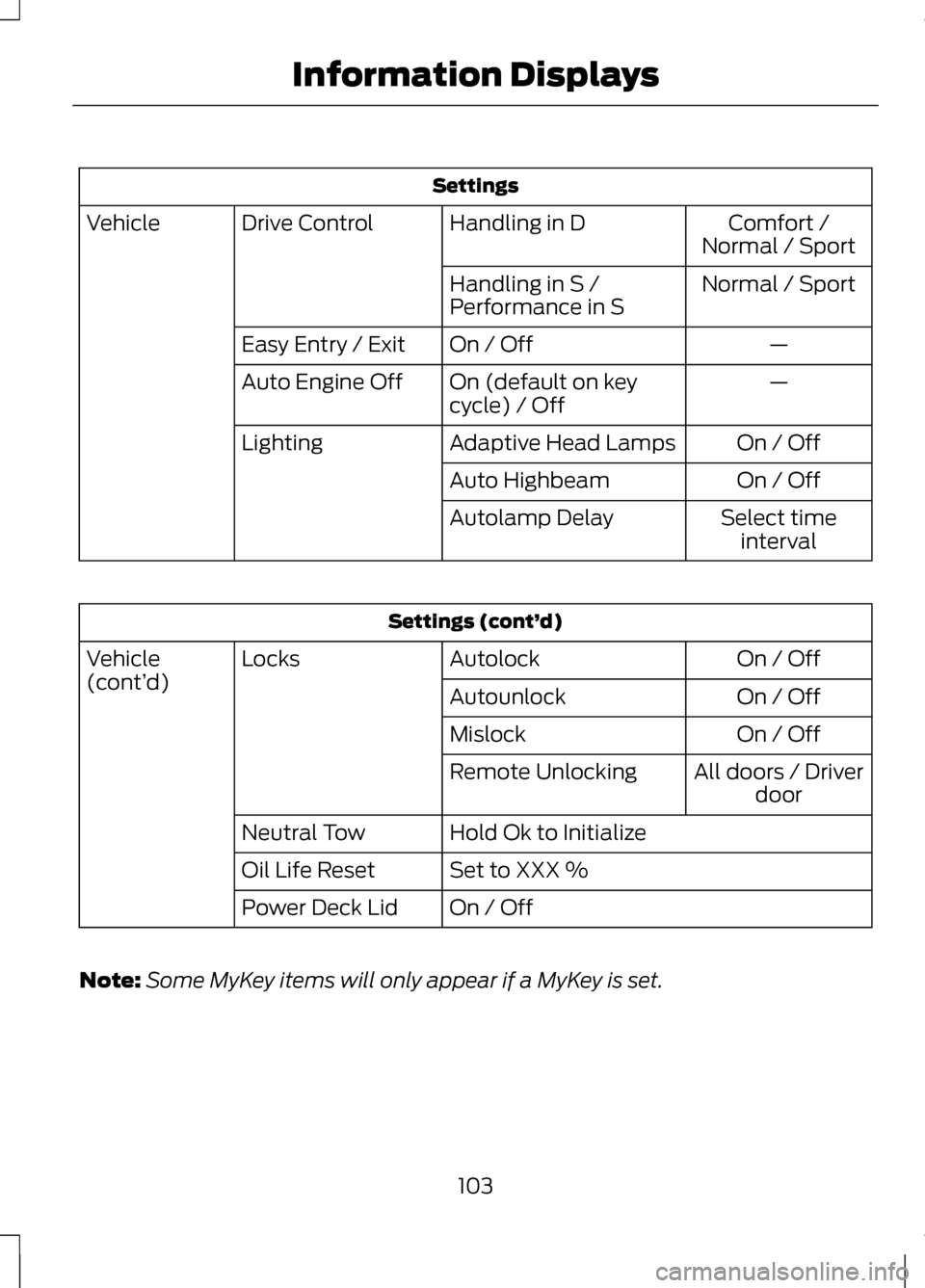
Settings
Comfort /
Normal / Sport
Handling in D
Drive Control
Vehicle
Normal / Sport
Handling in S /
Performance in S
—
On / Off
Easy Entry / Exit
—
On (default on key
cycle) / Off
Auto Engine Off
On / Off
Adaptive Head Lamps
Lighting
On / Off
Auto Highbeam
Select timeinterval
Autolamp Delay Settings (cont’
d)
On / Off
Autolock
Locks
Vehicle
(cont’ d)
On / Off
Autounlock
On / Off
Mislock
All doors / Driverdoor
Remote Unlocking
Hold Ok to Initialize
Neutral Tow
Set to XXX %
Oil Life Reset
On / Off
Power Deck Lid
Note: Some MyKey items will only appear if a MyKey is set.
103
Information Displays
Page 114 of 474
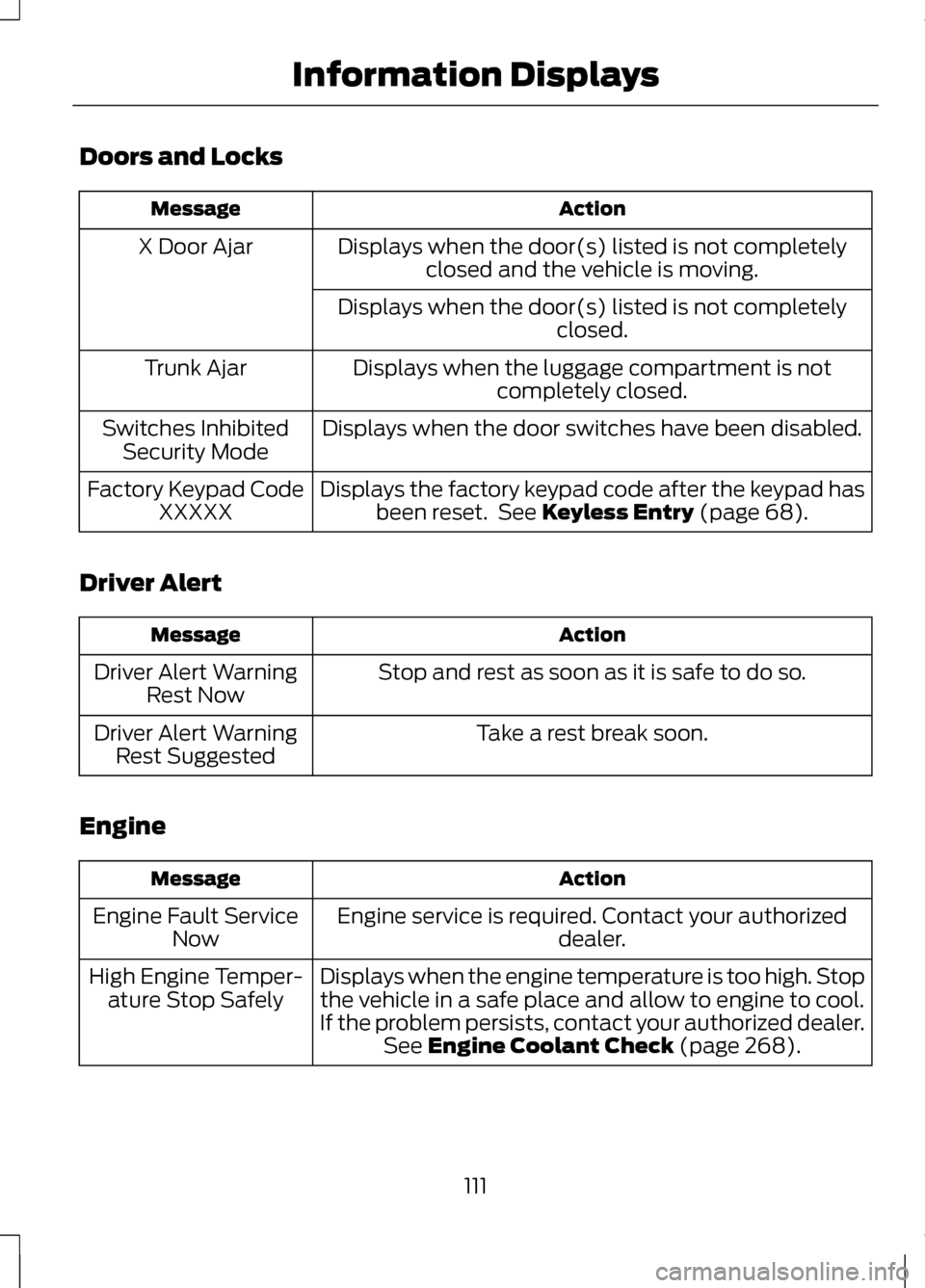
Doors and Locks
Action
Message
Displays when the door(s) listed is not completelyclosed and the vehicle is moving.
X Door Ajar
Displays when the door(s) listed is not completely closed.
Displays when the luggage compartment is not completely closed.
Trunk Ajar
Displays when the door switches have been disabled.
Switches Inhibited
Security Mode
Displays the factory keypad code after the keypad hasbeen reset. See Keyless Entry (page 68).
Factory Keypad Code
XXXXX
Driver Alert Action
Message
Stop and rest as soon as it is safe to do so.
Driver Alert Warning
Rest Now
Take a rest break soon.
Driver Alert Warning
Rest Suggested
Engine Action
Message
Engine service is required. Contact your authorized dealer.
Engine Fault Service
Now
Displays when the engine temperature is too high. Stopthe vehicle in a safe place and allow to engine to cool.
If the problem persists, contact your authorized dealer. See
Engine Coolant Check (page 268).
High Engine Temper-
ature Stop Safely
111
Information Displays
Page 139 of 474
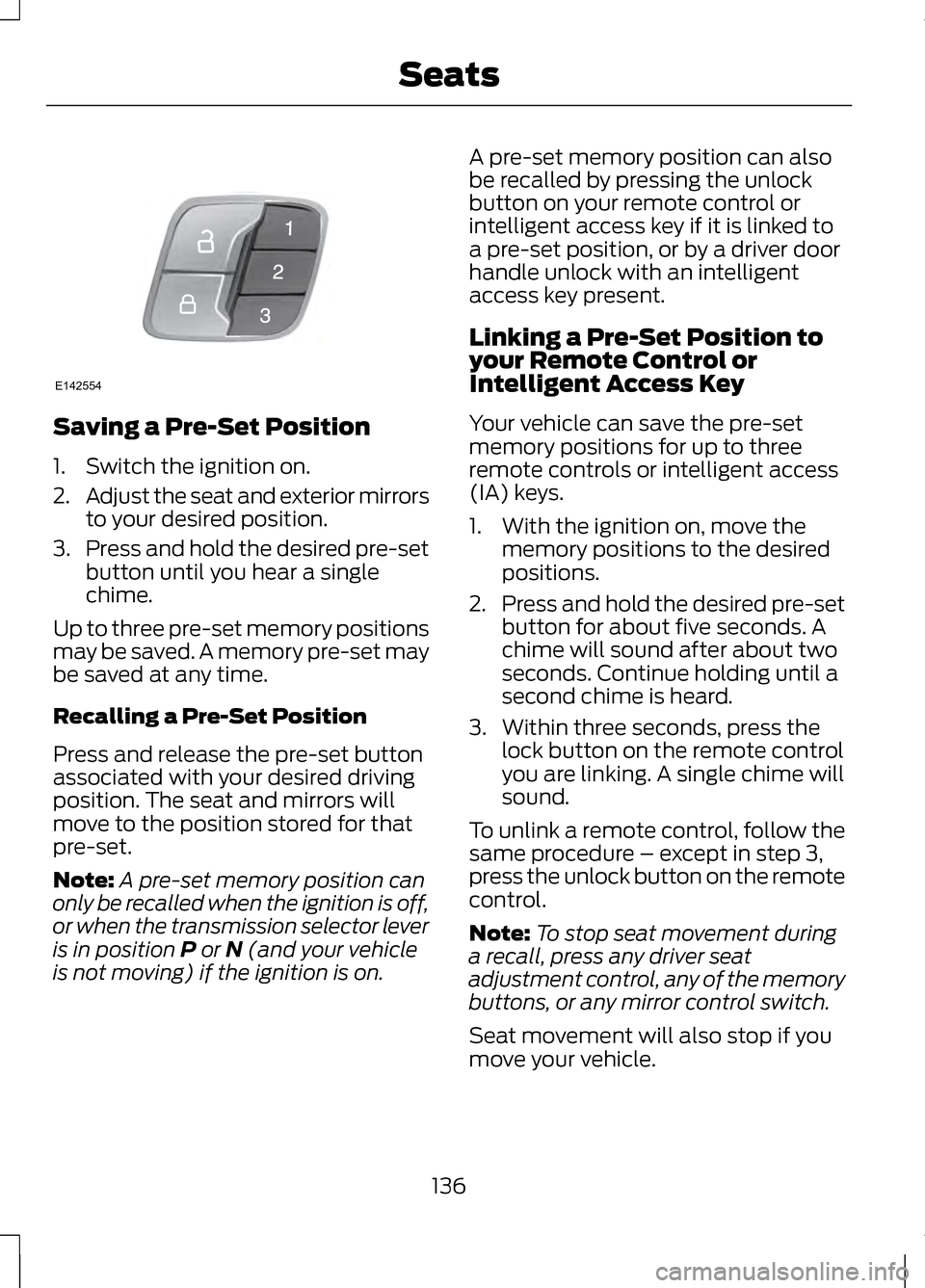
Saving a Pre-Set Position
1. Switch the ignition on.
2.
Adjust the seat and exterior mirrors
to your desired position.
3. Press and hold the desired pre-set
button until you hear a single
chime.
Up to three pre-set memory positions
may be saved. A memory pre-set may
be saved at any time.
Recalling a Pre-Set Position
Press and release the pre-set button
associated with your desired driving
position. The seat and mirrors will
move to the position stored for that
pre-set.
Note: A pre-set memory position can
only be recalled when the ignition is off,
or when the transmission selector lever
is in position P or N (and your vehicle
is not moving) if the ignition is on. A pre-set memory position can also
be recalled by pressing the unlock
button on your remote control or
intelligent access key if it is linked to
a pre-set position, or by a driver door
handle unlock with an intelligent
access key present.
Linking a Pre-Set Position to
your Remote Control or
Intelligent Access Key
Your vehicle can save the pre-set
memory positions for up to three
remote controls or intelligent access
(IA) keys.
1. With the ignition on, move the
memory positions to the desired
positions.
2. Press and hold the desired pre-set
button for about five seconds. A
chime will sound after about two
seconds. Continue holding until a
second chime is heard.
3. Within three seconds, press the lock button on the remote control
you are linking. A single chime will
sound.
To unlink a remote control, follow the
same procedure – except in step 3,
press the unlock button on the remote
control.
Note: To stop seat movement during
a recall, press any driver seat
adjustment control, any of the memory
buttons, or any mirror control switch.
Seat movement will also stop if you
move your vehicle.
136
SeatsE142554
Page 145 of 474
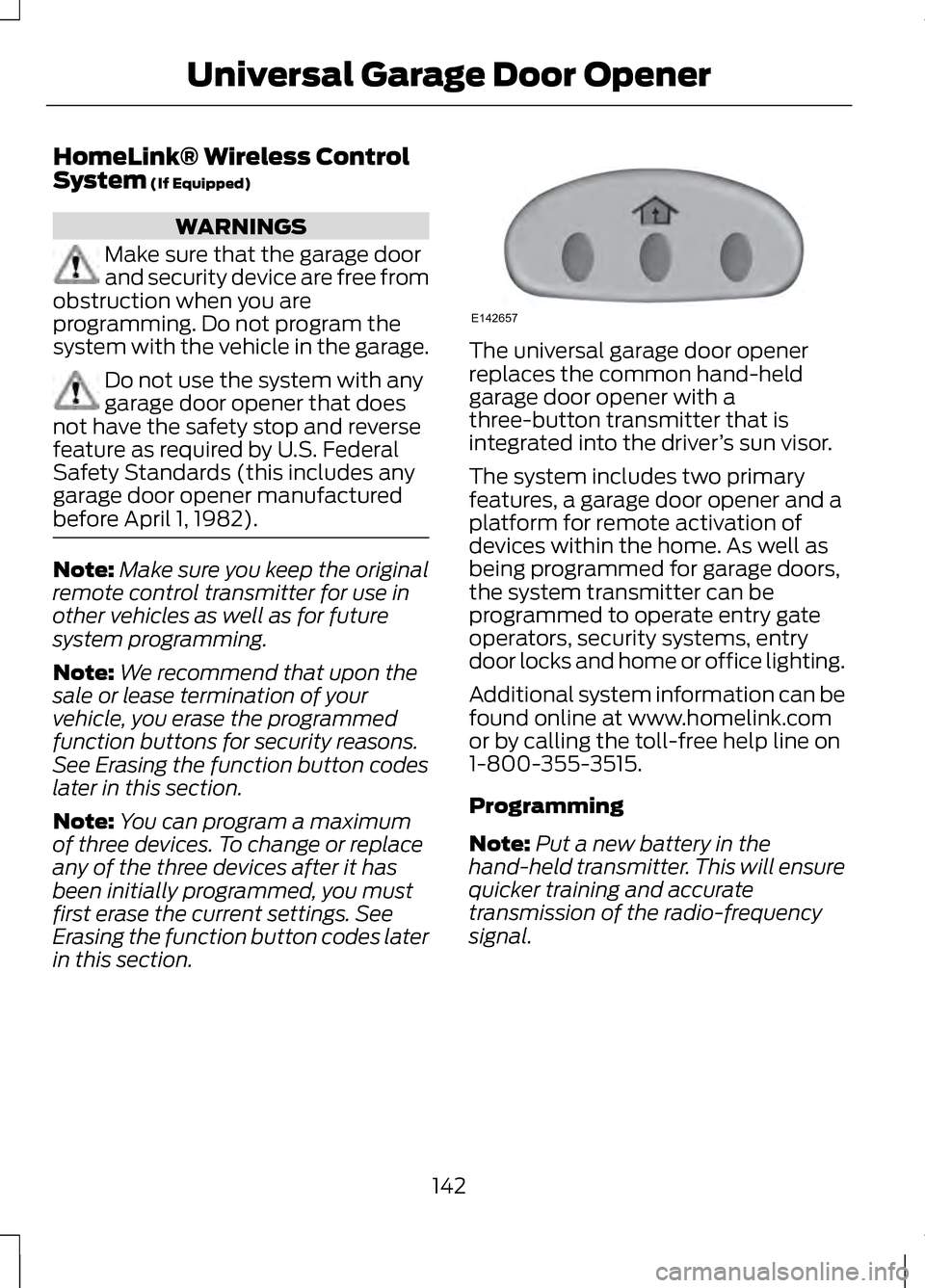
HomeLink® Wireless Control
System (If Equipped)
WARNINGS
Make sure that the garage door
and security device are free from
obstruction when you are
programming. Do not program the
system with the vehicle in the garage. Do not use the system with any
garage door opener that does
not have the safety stop and reverse
feature as required by U.S. Federal
Safety Standards (this includes any
garage door opener manufactured
before April 1, 1982). Note:
Make sure you keep the original
remote control transmitter for use in
other vehicles as well as for future
system programming.
Note: We recommend that upon the
sale or lease termination of your
vehicle, you erase the programmed
function buttons for security reasons.
See Erasing the function button codes
later in this section.
Note: You can program a maximum
of three devices. To change or replace
any of the three devices after it has
been initially programmed, you must
first erase the current settings. See
Erasing the function button codes later
in this section. The universal garage door opener
replaces the common hand-held
garage door opener with a
three-button transmitter that is
integrated into the driver
’s sun visor.
The system includes two primary
features, a garage door opener and a
platform for remote activation of
devices within the home. As well as
being programmed for garage doors,
the system transmitter can be
programmed to operate entry gate
operators, security systems, entry
door locks and home or office lighting.
Additional system information can be
found online at www.homelink.com
or by calling the toll-free help line on
1-800-355-3515.
Programming
Note: Put a new battery in the
hand-held transmitter. This will ensure
quicker training and accurate
transmission of the radio-frequency
signal.
142
Universal Garage Door OpenerE142657
Page 169 of 474
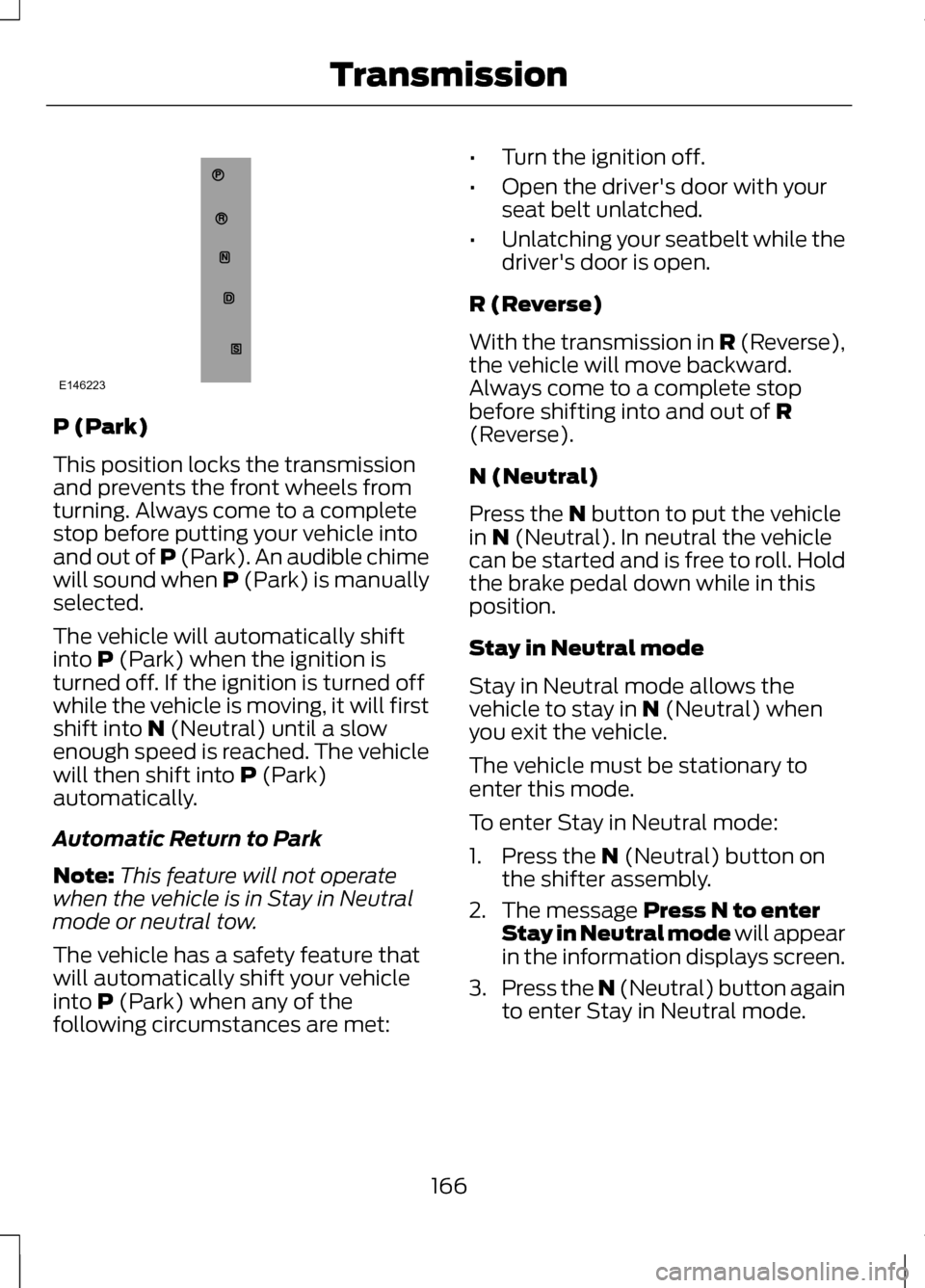
P (Park)
This position locks the transmission
and prevents the front wheels from
turning. Always come to a complete
stop before putting your vehicle into
and out of P (Park). An audible chime
will sound when P (Park) is manually
selected.
The vehicle will automatically shift
into P (Park) when the ignition is
turned off. If the ignition is turned off
while the vehicle is moving, it will first
shift into
N (Neutral) until a slow
enough speed is reached. The vehicle
will then shift into
P (Park)
automatically.
Automatic Return to Park
Note: This feature will not operate
when the vehicle is in Stay in Neutral
mode or neutral tow.
The vehicle has a safety feature that
will automatically shift your vehicle
into
P (Park) when any of the
following circumstances are met: •
Turn the ignition off.
• Open the driver's door with your
seat belt unlatched.
• Unlatching your seatbelt while the
driver's door is open.
R (Reverse)
With the transmission in
R (Reverse),
the vehicle will move backward.
Always come to a complete stop
before shifting into and out of
R
(Reverse).
N (Neutral)
Press the
N button to put the vehicle
in N (Neutral). In neutral the vehicle
can be started and is free to roll. Hold
the brake pedal down while in this
position.
Stay in Neutral mode
Stay in Neutral mode allows the
vehicle to stay in
N (Neutral) when
you exit the vehicle.
The vehicle must be stationary to
enter this mode.
To enter Stay in Neutral mode:
1. Press the
N (Neutral) button on
the shifter assembly.
2. The message
Press N to enter
Stay in Neutral mode will appear
in the information displays screen.
3. Press the N (Neutral) button again
to enter Stay in Neutral mode.
166
TransmissionE146223
Page 263 of 474
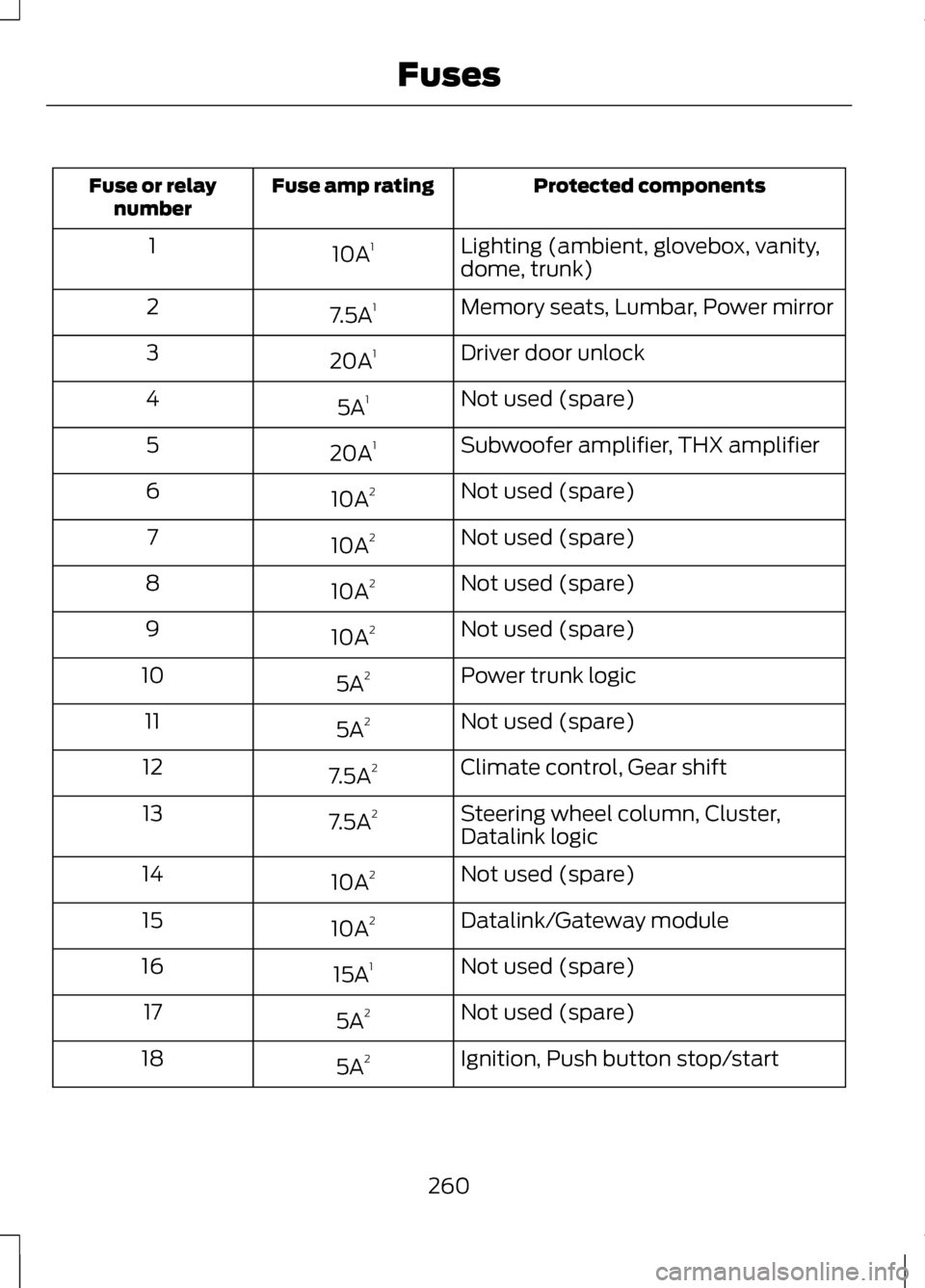
Protected components
Fuse amp rating
Fuse or relay
number
Lighting (ambient, glovebox, vanity,
dome, trunk)
10A
1
1
Memory seats, Lumbar, Power mirror
7.5A 1
2
Driver door unlock
20A 1
3
Not used (spare)
5A 1
4
Subwoofer amplifier, THX amplifier
20A 1
5
Not used (spare)
10A 2
6
Not used (spare)
10A 2
7
Not used (spare)
10A 2
8
Not used (spare)
10A 2
9
Power trunk logic
5A 2
10
Not used (spare)
5A 2
11
Climate control, Gear shift
7.5A 2
12
Steering wheel column, Cluster,
Datalink logic
7.5A
2
13
Not used (spare)
10A 2
14
Datalink/Gateway module
10A 2
15
Not used (spare)
15A 1
16
Not used (spare)
5A 2
17
Ignition, Push button stop/start
5A 2
18
260
Fuses
Page 264 of 474
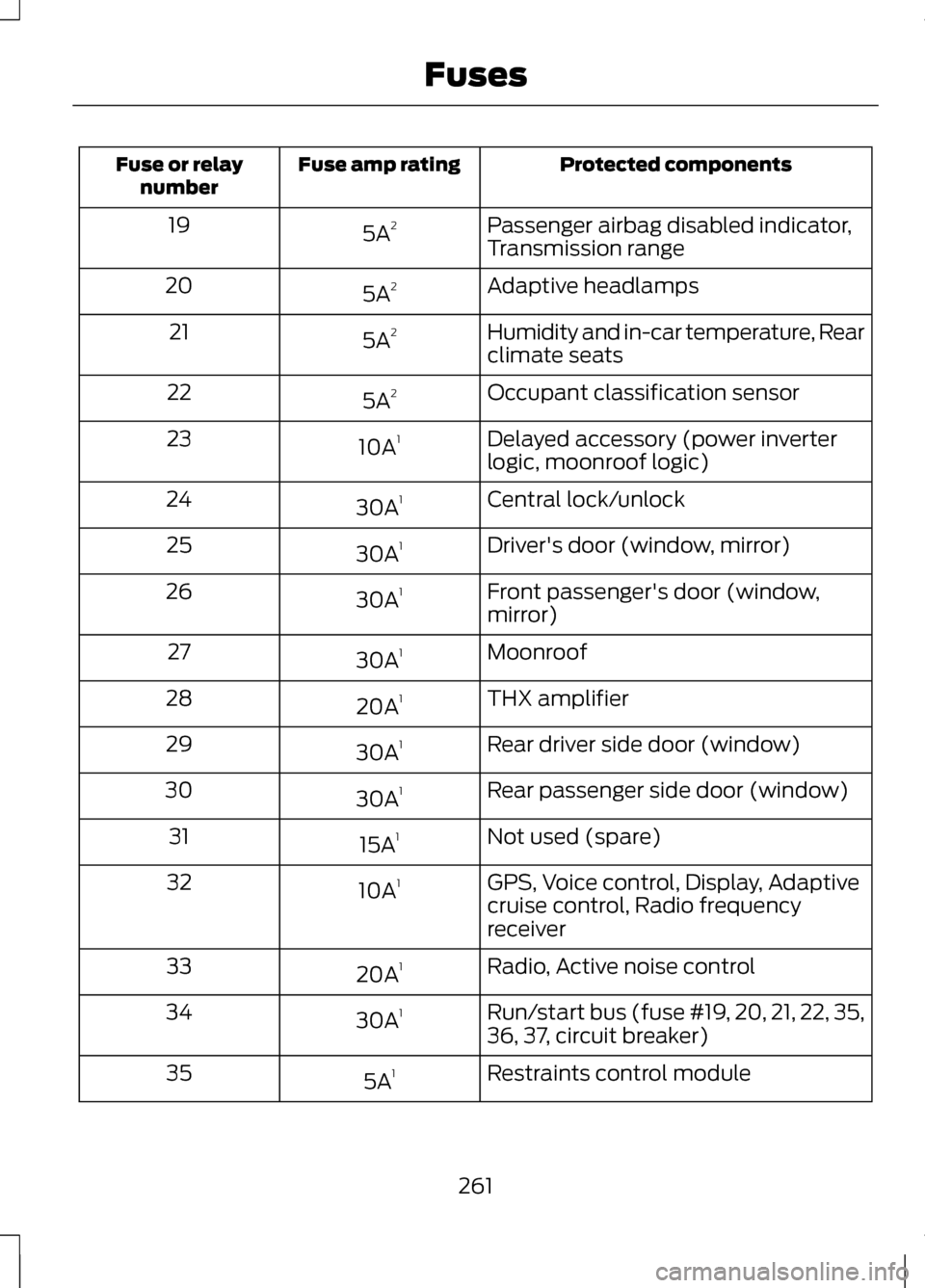
Protected components
Fuse amp rating
Fuse or relay
number
Passenger airbag disabled indicator,
Transmission range
5A
2
19
Adaptive headlamps
5A 2
20
Humidity and in-car temperature, Rear
climate seats
5A
2
21
Occupant classification sensor
5A 2
22
Delayed accessory (power inverter
logic, moonroof logic)
10A
1
23
Central lock/unlock
30A 1
24
Driver's door (window, mirror)
30A 1
25
Front passenger's door (window,
mirror)
30A
1
26
Moonroof
30A 1
27
THX amplifier
20A 1
28
Rear driver side door (window)
30A 1
29
Rear passenger side door (window)
30A 1
30
Not used (spare)
15A 1
31
GPS, Voice control, Display, Adaptive
cruise control, Radio frequency
receiver
10A
1
32
Radio, Active noise control
20A 1
33
Run/start bus (fuse #19, 20, 21, 22, 35,
36, 37, circuit breaker)
30A
1
34
Restraints control module
5A 1
35
261
Fuses
Page 298 of 474
Do not remove any foreign object that
has pierced the tire. If a puncture is
located in the tire sidewall, stop and
call roadside assistance.
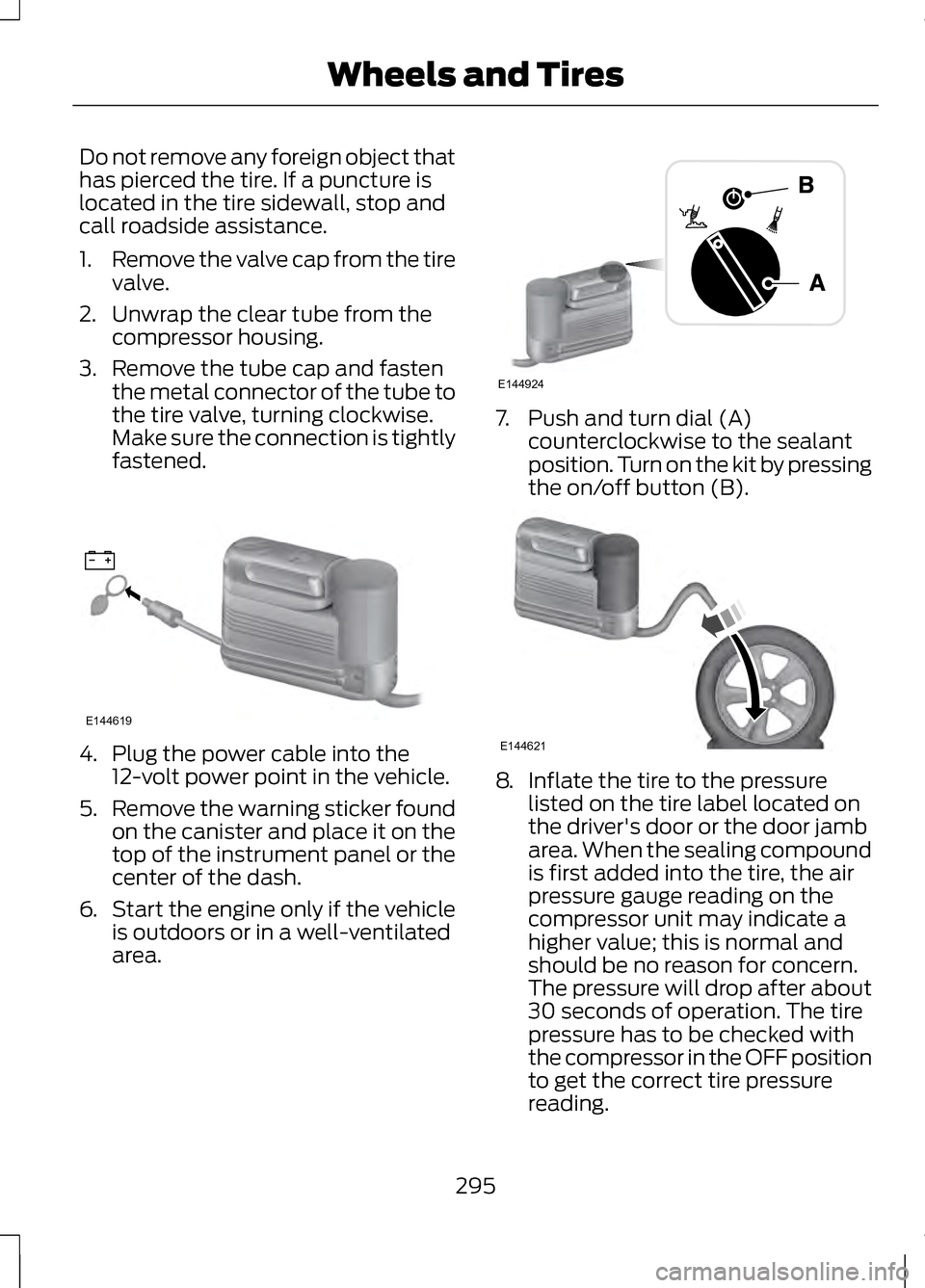
1.
Remove the valve cap from the tire
valve.
2. Unwrap the clear tube from the compressor housing.
3. Remove the tube cap and fasten the metal connector of the tube to
the tire valve, turning clockwise.
Make sure the connection is tightly
fastened. 4. Plug the power cable into the
12-volt power point in the vehicle.
5. Remove the warning sticker found
on the canister and place it on the
top of the instrument panel or the
center of the dash.
6. Start the engine only if the vehicle
is outdoors or in a well-ventilated
area. 7. Push and turn dial (A)
counterclockwise to the sealant
position. Turn on the kit by pressing
the on/off button (B). 8.
Inflate the tire to the pressure
listed on the tire label located on
the driver's door or the door jamb
area. When the sealing compound
is first added into the tire, the air
pressure gauge reading on the
compressor unit may indicate a
higher value; this is normal and
should be no reason for concern.
The pressure will drop after about
30 seconds of operation. The tire
pressure has to be checked with
the compressor in the OFF position
to get the correct tire pressure
reading.
295
Wheels and TiresE144619 E144924 E144621
Page 299 of 474
9. When the recommended tire
pressure is reached, turn off the kit
by pressing the on button;
disconnect the kit from the tire
valve and the power point.
Re-install the valve cap on the tire
valve, place the tube cap on the
metal connector, and return the kit
to the stowage area
10. Immediately and cautiously, drive
the vehicle 4 miles (6 km) to
distribute the sealant evenly
inside the tire. Do not exceed 50
mph (80 km/h).
11. After 4 miles (6 km), stop and check the tire pressure. See
Second stage: Checking tire
pressure.
Note: If you experience any unusual
vibration, ride disturbance or noise
while driving, reduce your speed until
you can safely pull off to the side of the
road to call for roadside assistance.
Note: Do not proceed to the second
stage of this operation.
Second Stage: Checking Tire
Pressure WARNINGS
If you are proceeding from the
First stage: Re–inflating the tire
with sealing compound and air section
and have injected sealant in the tire
and the pressure is below 20 psi (1.4
bar), stop and call roadside
assistance. If tire pressure is above 20
psi (1.4 bar), continue to the next step. The power plug may get hot
after use and should be handled
carefully while unplugging. Check the air pressure of your tires as
follows:
1.
Remove the valve cap from the tire
valve.
2. Unhook the black hose from the side of the compressor and fasten
firmly on the valve stem by turning
clockwise.
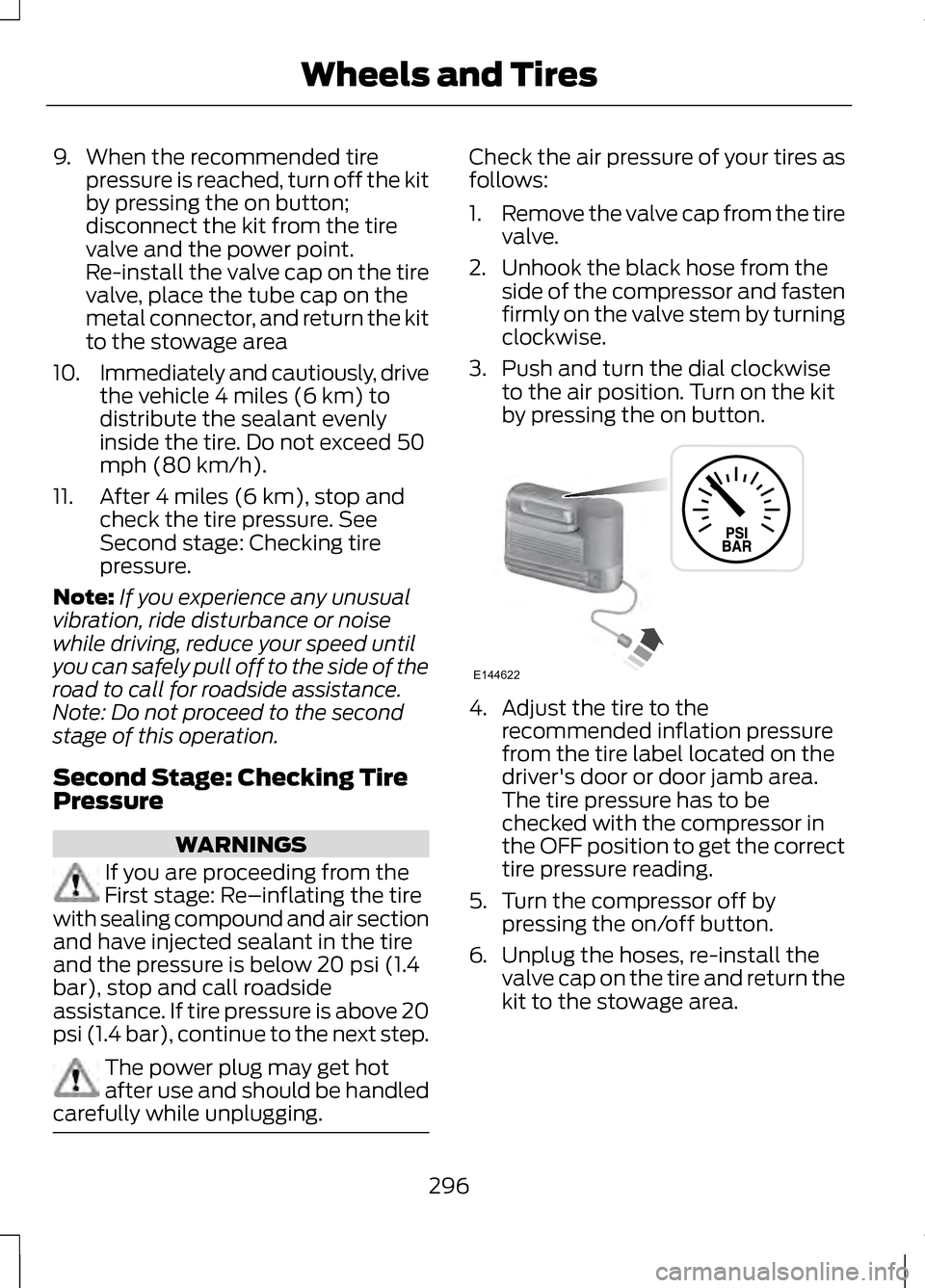
3. Push and turn the dial clockwise to the air position. Turn on the kit
by pressing the on button. 4. Adjust the tire to the
recommended inflation pressure
from the tire label located on the
driver's door or door jamb area.
The tire pressure has to be
checked with the compressor in
the OFF position to get the correct
tire pressure reading.
5. Turn the compressor off by pressing the on/off button.
6. Unplug the hoses, re-install the
valve cap on the tire and return the
kit to the stowage area.
296
Wheels and TiresE144622