brake LINCOLN MKZ 2013 User Guide
[x] Cancel search | Manufacturer: LINCOLN, Model Year: 2013, Model line: MKZ, Model: LINCOLN MKZ 2013Pages: 474, PDF Size: 3.79 MB
Page 115 of 474
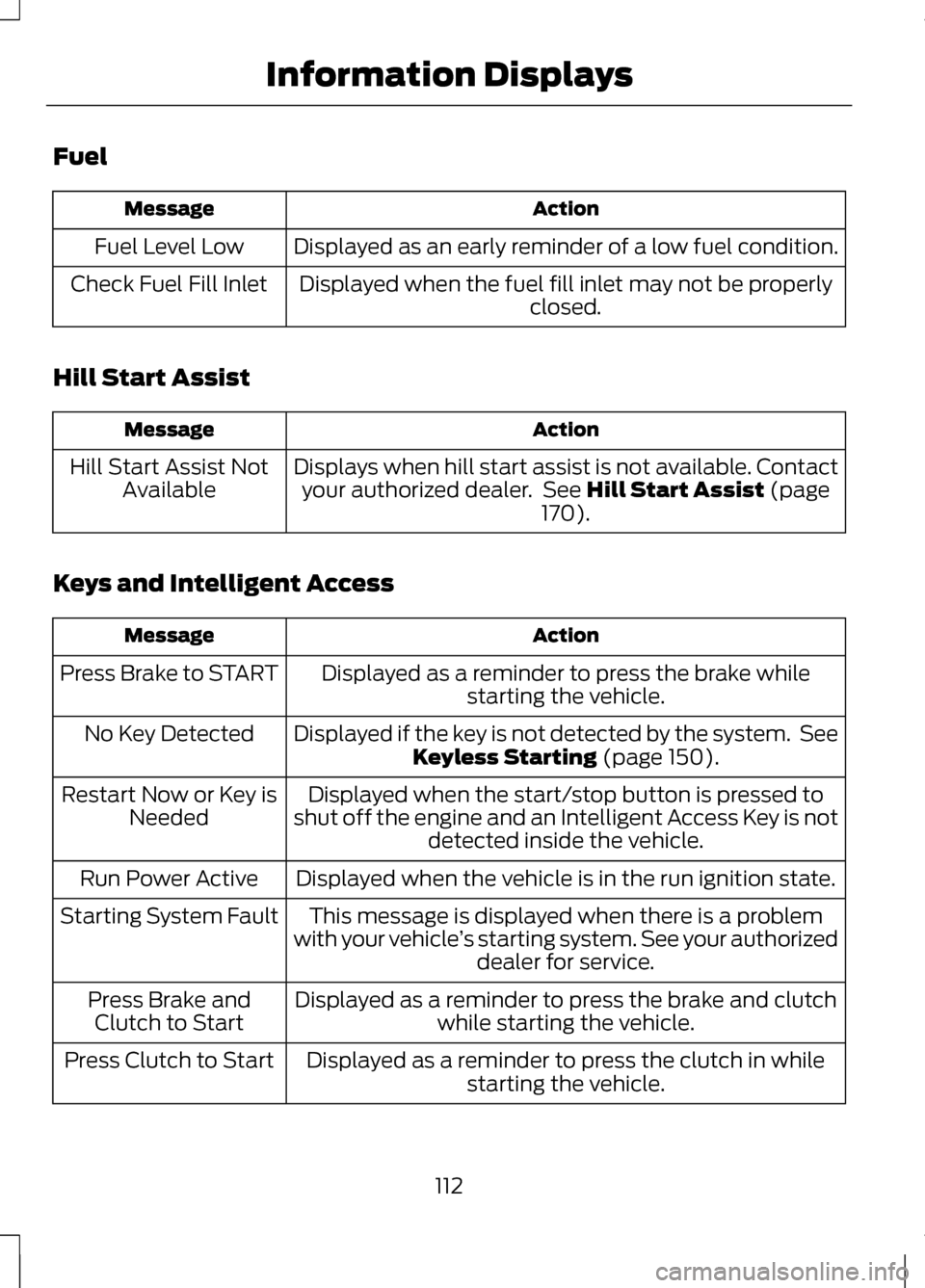
Fuel
Action
Message
Displayed as an early reminder of a low fuel condition.
Fuel Level Low
Displayed when the fuel fill inlet may not be properly closed.
Check Fuel Fill Inlet
Hill Start Assist Action
Message
Displays when hill start assist is not available. Contactyour authorized dealer. See Hill Start Assist (page
170).
Hill Start Assist Not
Available
Keys and Intelligent Access Action
Message
Displayed as a reminder to press the brake whilestarting the vehicle.
Press Brake to START
Displayed if the key is not detected by the system. SeeKeyless Starting
(page 150).
No Key Detected
Displayed when the start/stop button is pressed to
shut off the engine and an Intelligent Access Key is not detected inside the vehicle.
Restart Now or Key is
Needed
Displayed when the vehicle is in the run ignition state.
Run Power Active
This message is displayed when there is a problem
with your vehicle ’s starting system. See your authorized
dealer for service.
Starting System Fault
Displayed as a reminder to press the brake and clutchwhile starting the vehicle.
Press Brake and
Clutch to Start
Displayed as a reminder to press the clutch in whilestarting the vehicle.
Press Clutch to Start
112
Information Displays
Page 117 of 474
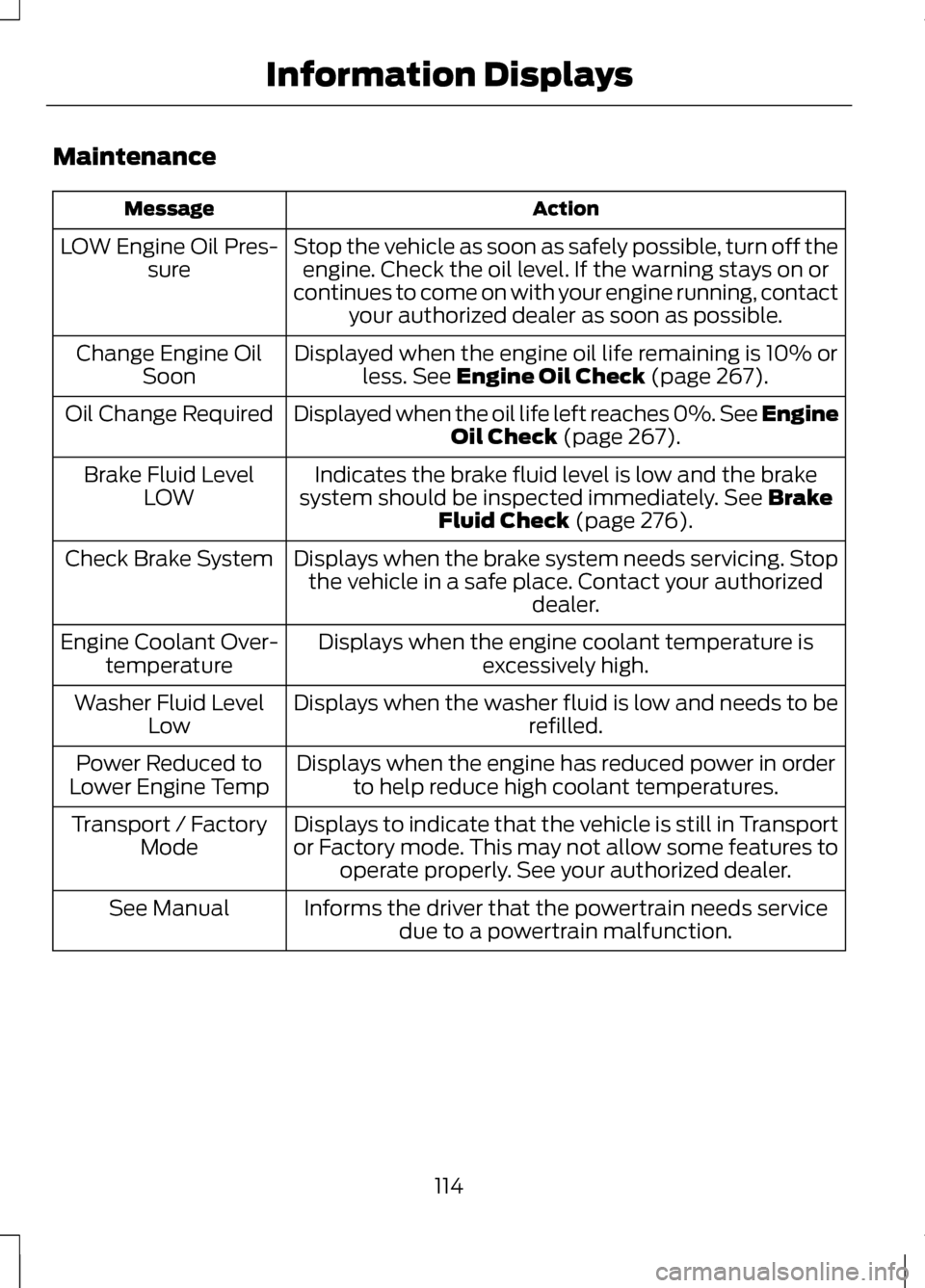
Maintenance
Action
Message
Stop the vehicle as soon as safely possible, turn off theengine. Check the oil level. If the warning stays on or
continues to come on with your engine running, contact your authorized dealer as soon as possible.
LOW Engine Oil Pres-
sure
Displayed when the engine oil life remaining is 10% orless. See Engine Oil Check (page 267).
Change Engine Oil
Soon
Displayed when the oil life left reaches 0%. See Engine Oil Check
(page 267).
Oil Change Required
Indicates the brake fluid level is low and the brake
system should be inspected immediately.
See Brake
Fluid Check (page 276).
Brake Fluid Level
LOW
Displays when the brake system needs servicing. Stopthe vehicle in a safe place. Contact your authorized dealer.
Check Brake System
Displays when the engine coolant temperature isexcessively high.
Engine Coolant Over-
temperature
Displays when the washer fluid is low and needs to be refilled.
Washer Fluid Level
Low
Displays when the engine has reduced power in orderto help reduce high coolant temperatures.
Power Reduced to
Lower Engine Temp
Displays to indicate that the vehicle is still in Transport
or Factory mode. This may not allow some features tooperate properly. See your authorized dealer.
Transport / Factory
Mode
Informs the driver that the powertrain needs servicedue to a powertrain malfunction.
See Manual
114
Information Displays
Page 119 of 474
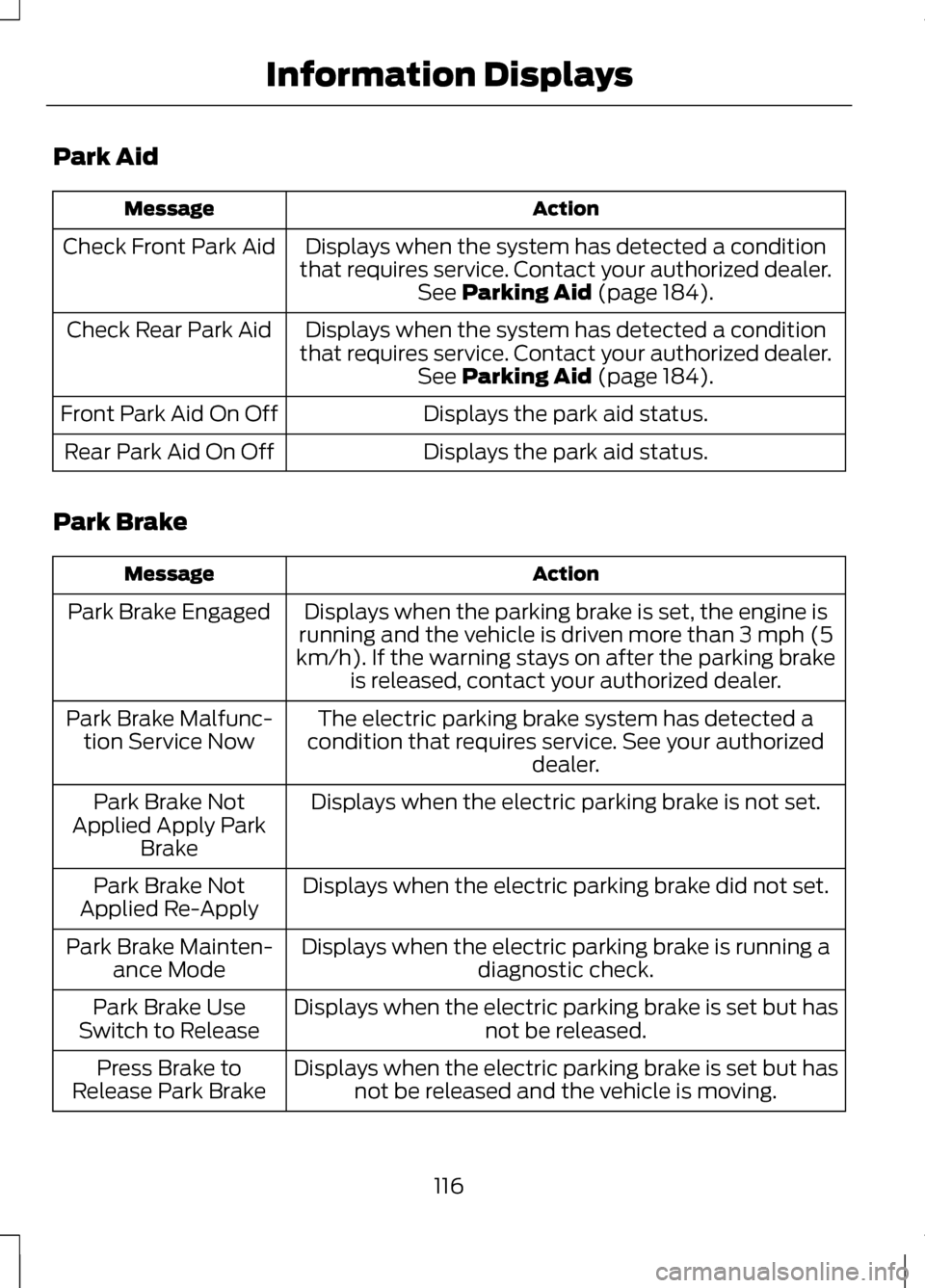
Park Aid
Action
Message
Displays when the system has detected a condition
that requires service. Contact your authorized dealer. See Parking Aid (page 184).
Check Front Park Aid
Displays when the system has detected a condition
that requires service. Contact your authorized dealer. See
Parking Aid (page 184).
Check Rear Park Aid
Displays the park aid status.
Front Park Aid On Off
Displays the park aid status.
Rear Park Aid On Off
Park Brake Action
Message
Displays when the parking brake is set, the engine is
running and the vehicle is driven more than 3 mph (5
km/h). If the warning stays on after the parking brake is released, contact your authorized dealer.
Park Brake Engaged
The electric parking brake system has detected a
condition that requires service. See your authorized dealer.
Park Brake Malfunc-
tion Service Now
Displays when the electric parking brake is not set.
Park Brake Not
Applied Apply Park Brake
Displays when the electric parking brake did not set.
Park Brake Not
Applied Re-Apply
Displays when the electric parking brake is running adiagnostic check.
Park Brake Mainten-
ance Mode
Displays when the electric parking brake is set but has not be released.
Park Brake Use
Switch to Release
Displays when the electric parking brake is set but hasnot be released and the vehicle is moving.
Press Brake to
Release Park Brake
116
Information Displays
Page 120 of 474
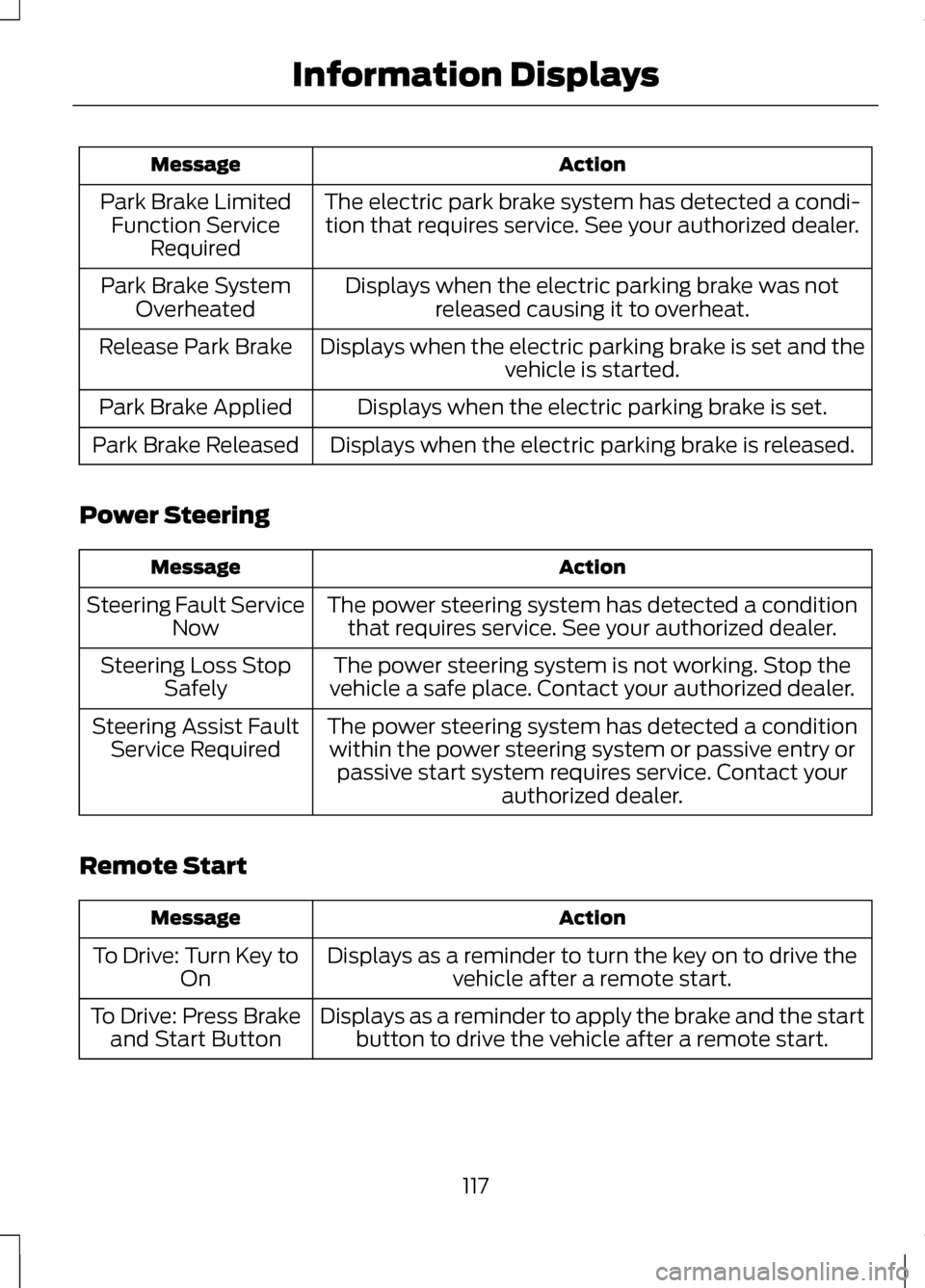
Action
Message
The electric park brake system has detected a condi-tion that requires service. See your authorized dealer.
Park Brake Limited
Function Service Required
Displays when the electric parking brake was notreleased causing it to overheat.
Park Brake System
Overheated
Displays when the electric parking brake is set and the vehicle is started.
Release Park Brake
Displays when the electric parking brake is set.
Park Brake Applied
Displays when the electric parking brake is released.
Park Brake Released
Power Steering Action
Message
The power steering system has detected a conditionthat requires service. See your authorized dealer.
Steering Fault Service
Now
The power steering system is not working. Stop the
vehicle a safe place. Contact your authorized dealer.
Steering Loss Stop
Safely
The power steering system has detected a conditionwithin the power steering system or passive entry or passive start system requires service. Contact your authorized dealer.
Steering Assist Fault
Service Required
Remote Start Action
Message
Displays as a reminder to turn the key on to drive thevehicle after a remote start.
To Drive: Turn Key to
On
Displays as a reminder to apply the brake and the startbutton to drive the vehicle after a remote start.
To Drive: Press Brake
and Start Button
117
Information Displays
Page 121 of 474
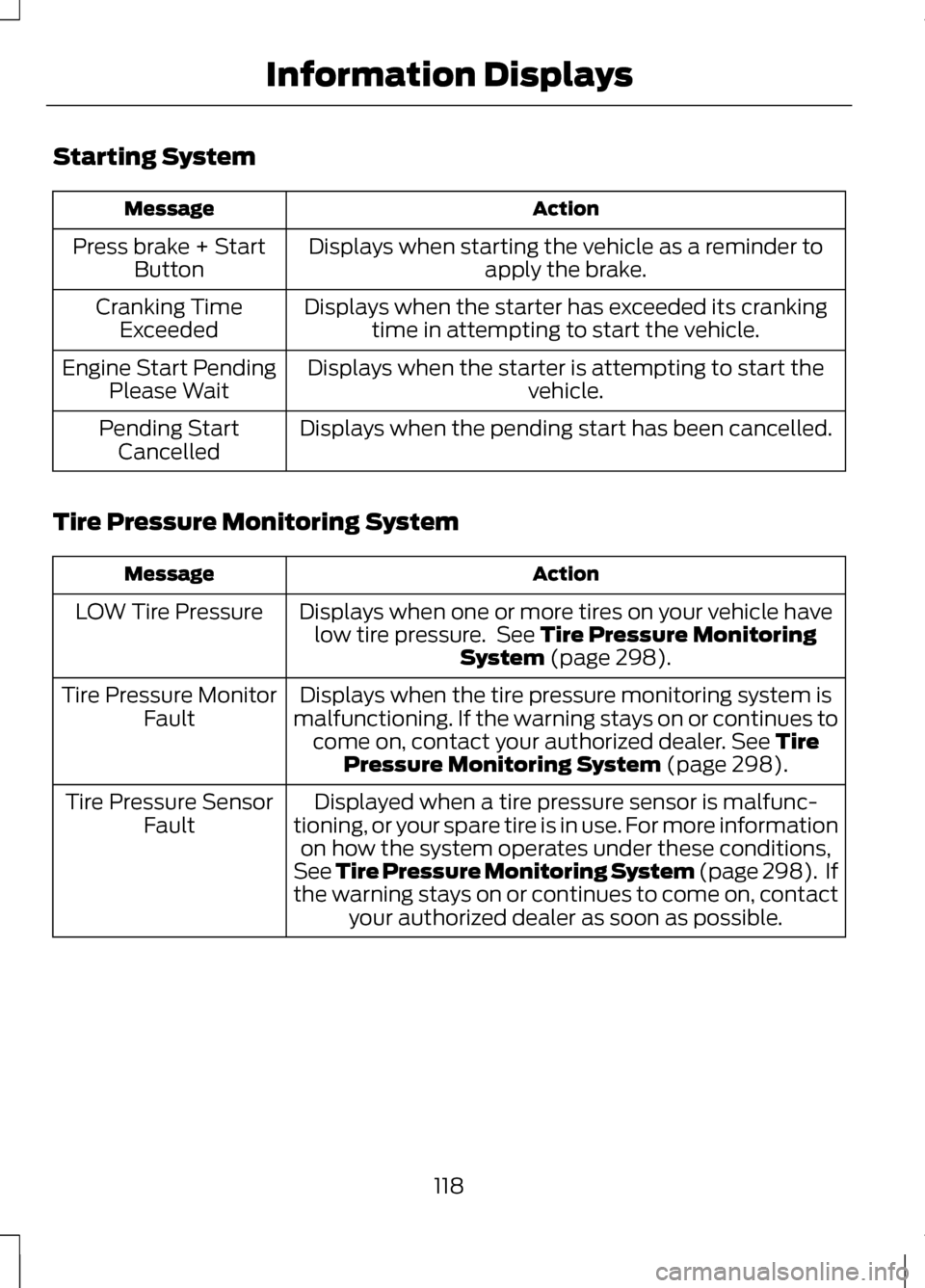
Starting System
Action
Message
Displays when starting the vehicle as a reminder toapply the brake.
Press brake + Start
Button
Displays when the starter has exceeded its crankingtime in attempting to start the vehicle.
Cranking Time
Exceeded
Displays when the starter is attempting to start the vehicle.
Engine Start Pending
Please Wait
Displays when the pending start has been cancelled.
Pending Start
Cancelled
Tire Pressure Monitoring System Action
Message
Displays when one or more tires on your vehicle havelow tire pressure. See Tire Pressure Monitoring
System (page 298).
LOW Tire Pressure
Displays when the tire pressure monitoring system is
malfunctioning. If the warning stays on or continues to come on, contact your authorized dealer.
See Tire
Pressure Monitoring System (page 298).
Tire Pressure Monitor
Fault
Displayed when a tire pressure sensor is malfunc-
tioning, or your spare tire is in use. For more information on how the system operates under these conditions,
See Tire Pressure Monitoring System (page 298). If
the warning stays on or continues to come on, contact your authorized dealer as soon as possible.
Tire Pressure Sensor
Fault
118
Information Displays
Page 122 of 474
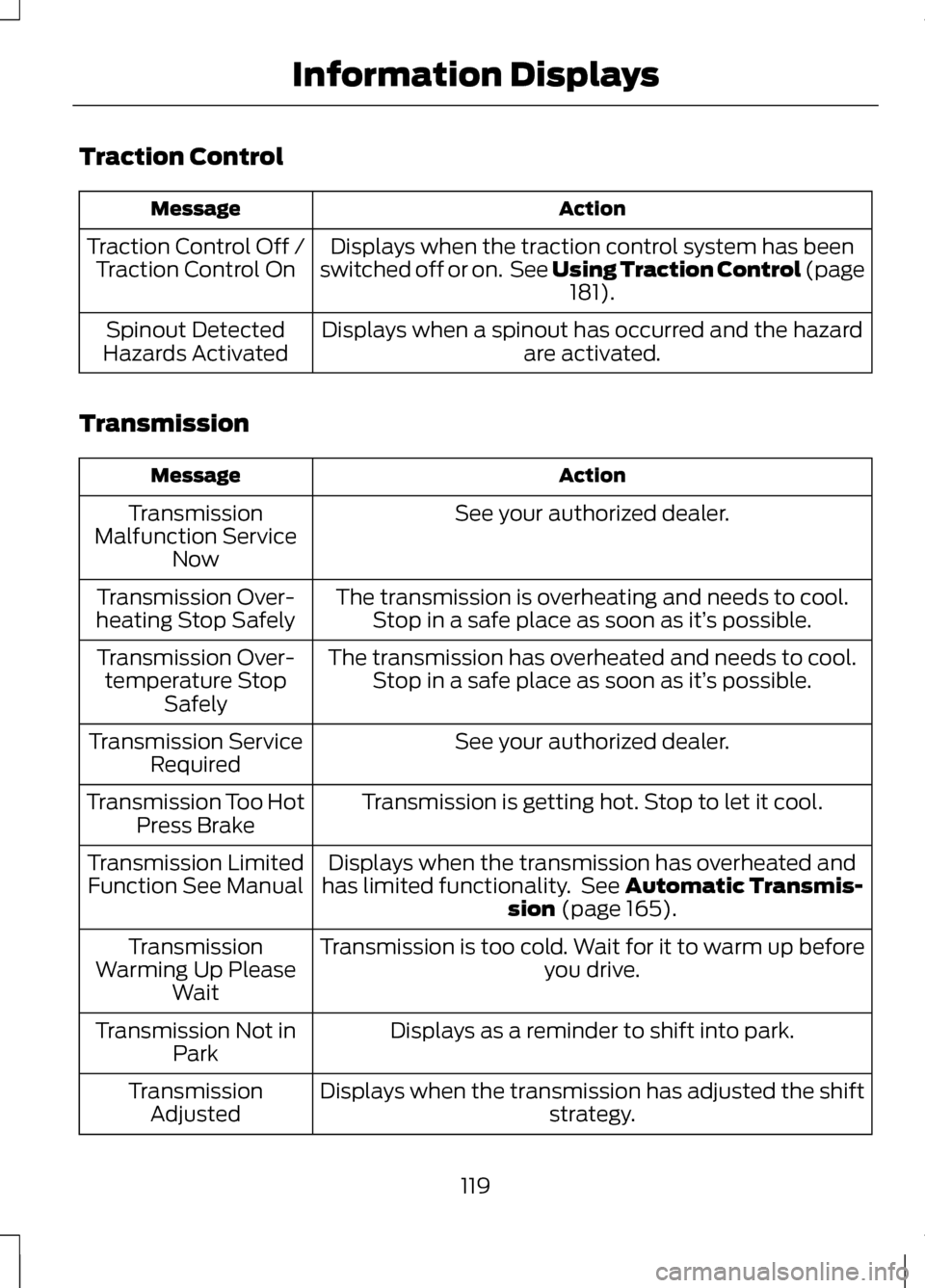
Traction Control
Action
Message
Displays when the traction control system has been
switched off or on. See Using Traction Control (page 181).
Traction Control Off /
Traction Control On
Displays when a spinout has occurred and the hazardare activated.
Spinout Detected
Hazards Activated
Transmission Action
Message
See your authorized dealer.
Transmission
Malfunction Service Now
The transmission is overheating and needs to cool.Stop in a safe place as soon as it’ s possible.
Transmission Over-
heating Stop Safely
The transmission has overheated and needs to cool.Stop in a safe place as soon as it’ s possible.
Transmission Over-
temperature Stop Safely
See your authorized dealer.
Transmission Service
Required
Transmission is getting hot. Stop to let it cool.
Transmission Too Hot
Press Brake
Displays when the transmission has overheated and
has limited functionality. See
Automatic Transmis-
sion (page 165).
Transmission Limited
Function See Manual
Transmission is too cold. Wait for it to warm up beforeyou drive.
Transmission
Warming Up Please Wait
Displays as a reminder to shift into park.
Transmission Not in
Park
Displays when the transmission has adjusted the shift strategy.
Transmission
Adjusted
119
Information Displays
Page 123 of 474
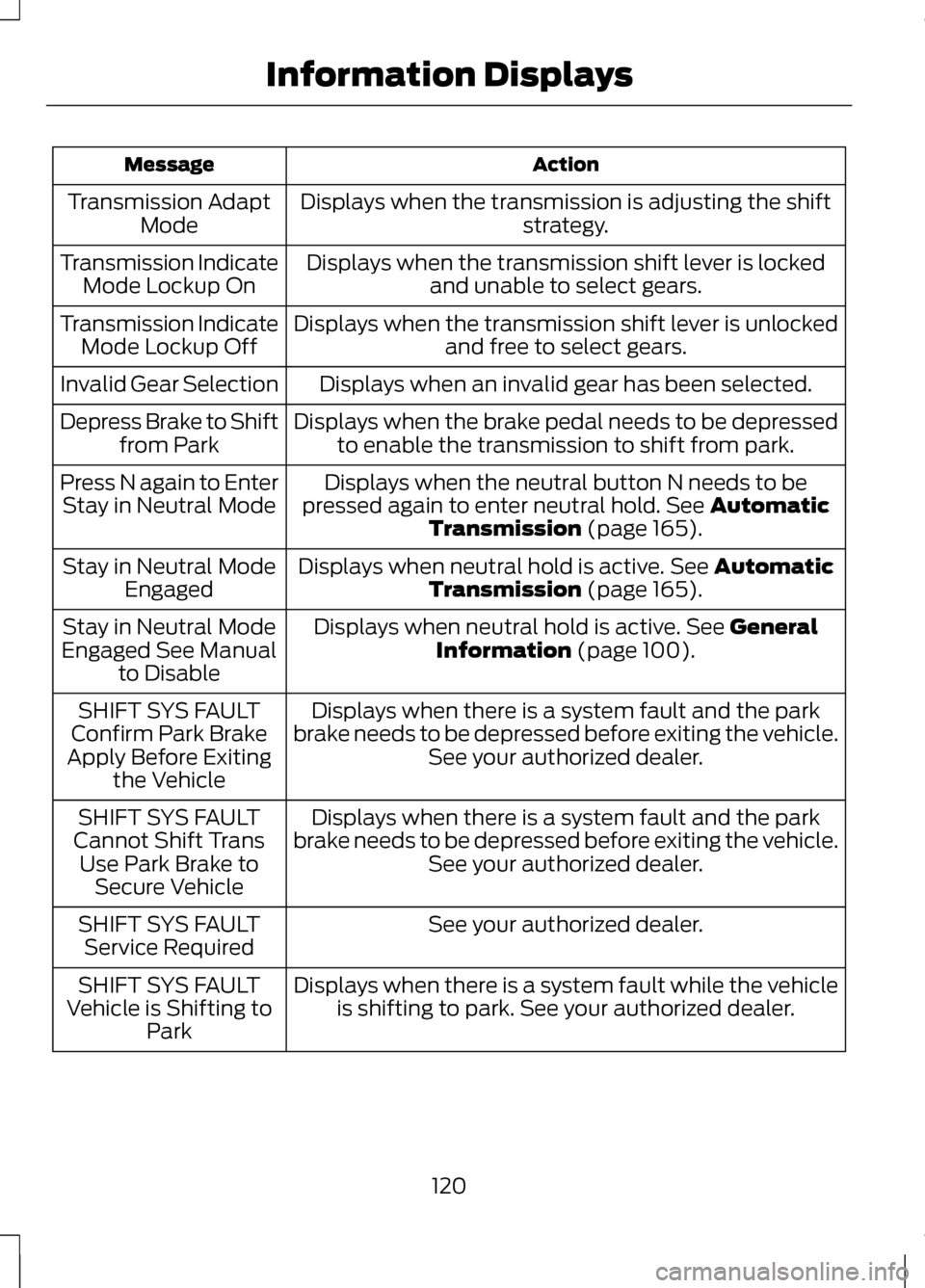
Action
Message
Displays when the transmission is adjusting the shift strategy.
Transmission Adapt
Mode
Displays when the transmission shift lever is lockedand unable to select gears.
Transmission Indicate
Mode Lockup On
Displays when the transmission shift lever is unlockedand free to select gears.
Transmission Indicate
Mode Lockup Off
Displays when an invalid gear has been selected.
Invalid Gear Selection
Displays when the brake pedal needs to be depressedto enable the transmission to shift from park.
Depress Brake to Shift
from Park
Displays when the neutral button N needs to be
pressed again to enter neutral hold. See Automatic
Transmission (page 165).
Press N again to Enter
Stay in Neutral Mode
Displays when neutral hold is active.
See Automatic
Transmission (page 165).
Stay in Neutral Mode
Engaged
Displays when neutral hold is active.
See General
Information (page 100).
Stay in Neutral Mode
Engaged See Manual to Disable
Displays when there is a system fault and the park
brake needs to be depressed before exiting the vehicle. See your authorized dealer.
SHIFT SYS FAULT
Confirm Park Brake
Apply Before Exiting the Vehicle
Displays when there is a system fault and the park
brake needs to be depressed before exiting the vehicle. See your authorized dealer.
SHIFT SYS FAULT
Cannot Shift Trans Use Park Brake to Secure Vehicle
See your authorized dealer.
SHIFT SYS FAULT
Service Required
Displays when there is a system fault while the vehicleis shifting to park. See your authorized dealer.
SHIFT SYS FAULT
Vehicle is Shifting to Park
120
Information Displays
Page 124 of 474
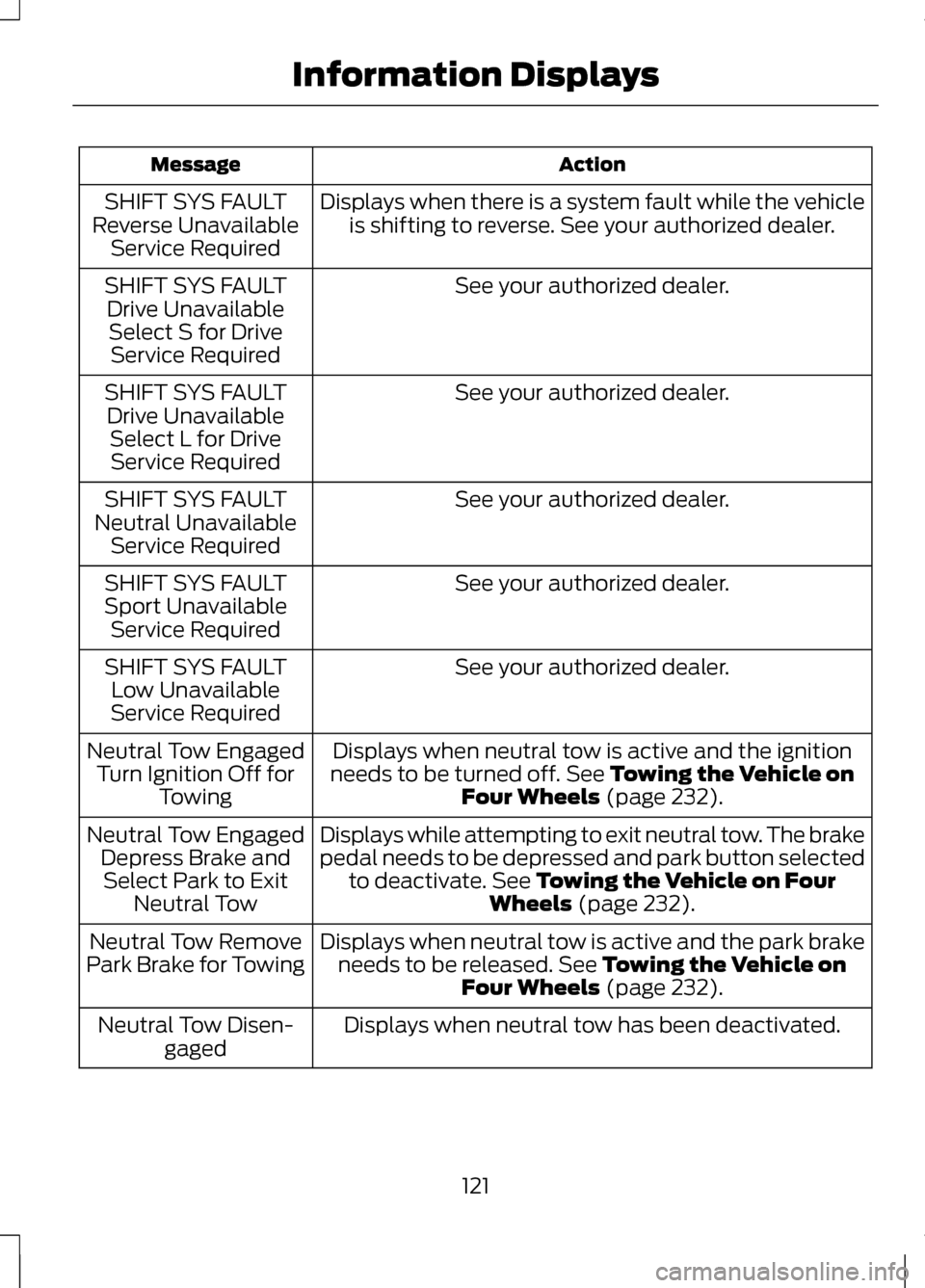
Action
Message
Displays when there is a system fault while the vehicleis shifting to reverse. See your authorized dealer.
SHIFT SYS FAULT
Reverse Unavailable Service Required
See your authorized dealer.
SHIFT SYS FAULT
Drive UnavailableSelect S for Drive Service Required
See your authorized dealer.
SHIFT SYS FAULT
Drive Unavailable Select L for DriveService Required
See your authorized dealer.
SHIFT SYS FAULT
Neutral Unavailable Service Required
See your authorized dealer.
SHIFT SYS FAULT
Sport Unavailable Service Required
See your authorized dealer.
SHIFT SYS FAULT
Low Unavailable
Service Required
Displays when neutral tow is active and the ignition
needs to be turned off. See Towing the Vehicle on
Four Wheels (page 232).
Neutral Tow Engaged
Turn Ignition Off for Towing
Displays while attempting to exit neutral tow. The brake
pedal needs to be depressed and park button selectedto deactivate.
See Towing the Vehicle on Four
Wheels (page 232).
Neutral Tow Engaged
Depress Brake andSelect Park to Exit Neutral Tow
Displays when neutral tow is active and the park brakeneeds to be released.
See Towing the Vehicle on
Four Wheels (page 232).
Neutral Tow Remove
Park Brake for Towing
Displays when neutral tow has been deactivated.
Neutral Tow Disen-
gaged
121
Information Displays
Page 153 of 474
GENERAL INFORMATION
If you disconnect the battery, your
vehicle may exhibit some unusual
driving characteristics for
approximately 5 miles (8 kilometers)
after you reconnect it. This is because
the engine management system must
realign itself with the engine. You can
disregard any unusual driving
characteristics during this period.
WARNINGS
Extended idling at high engine
speeds can produce very high
temperatures in the engine and
exhaust system, creating the risk of
fire or other damage. Do not park, idle or drive your
vehicle on dry grass or other dry
ground cover. The emission system
heats up the engine compartment and
exhaust system, creating the risk of
fire. Do not start the engine in a
closed garage or in other
enclosed areas. Exhaust fumes can
be toxic. Always open the garage door
before you start the engine. If you smell exhaust fumes inside
your vehicle, have your vehicle
checked by your authorized dealer
immediately. Do not drive your vehicle
if you smell exhaust fumes. The powertrain control system meets
all Canadian interference-causing
equipment standard requirements
regulating the impulse electrical field
or radio noise. When you start the engine, avoid
pressing the accelerator pedal before
and during operation. Only use the
accelerator pedal when you have
difficulty starting the engine.
KEYLESS STARTING
WARNING
The keyless starting system may
not function if the key is close to
metal objects or electronic devices
such as mobile phones. Note:
A valid key must be located
inside your vehicle to switch the ignition
on and start the engine.
Switching the Ignition On
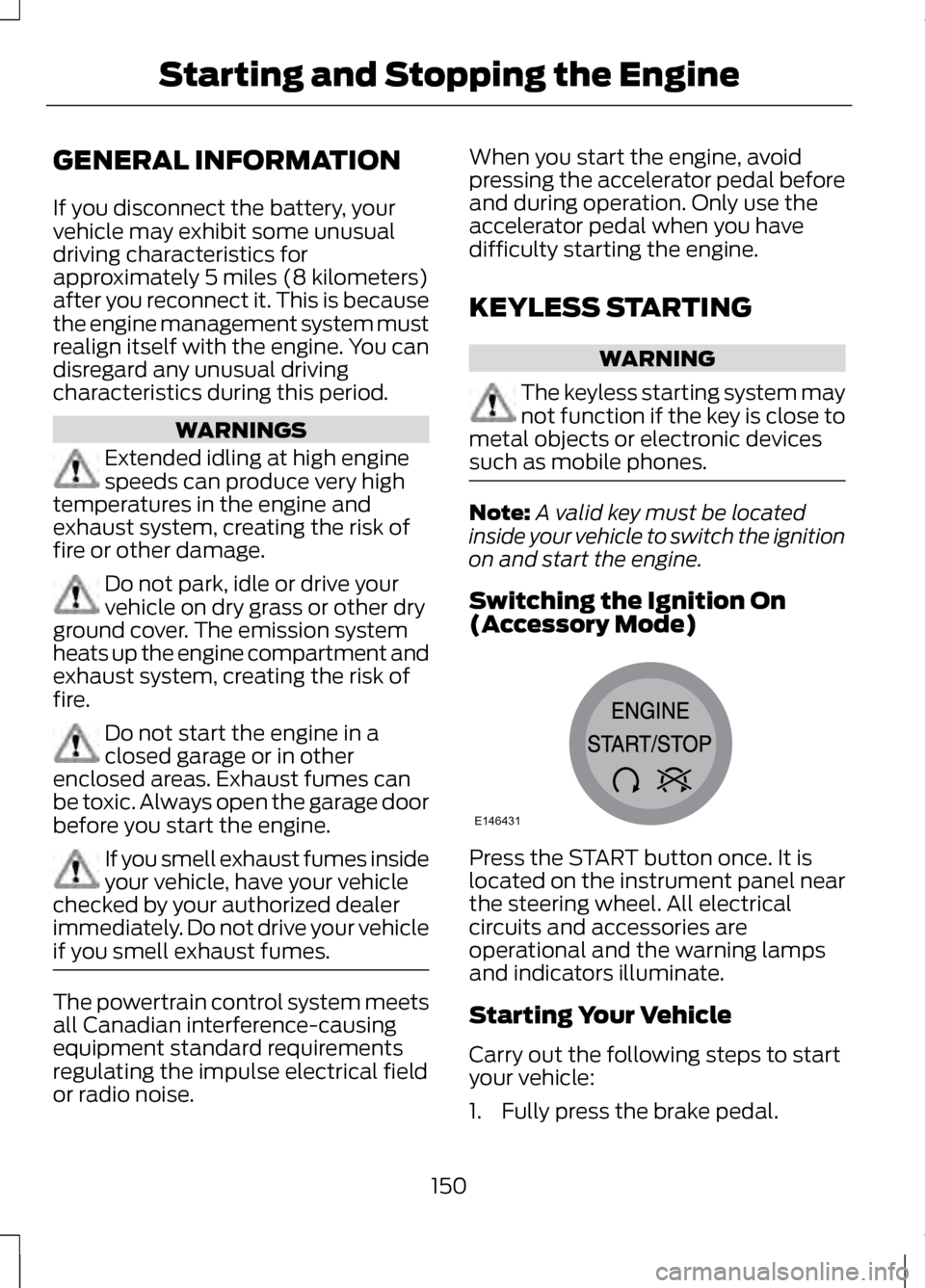
(Accessory Mode) Press the START button once. It is
located on the instrument panel near
the steering wheel. All electrical
circuits and accessories are
operational and the warning lamps
and indicators illuminate.
Starting Your Vehicle
Carry out the following steps to start
your vehicle:
1. Fully press the brake pedal.
150
Starting and Stopping the EngineE146431
Page 154 of 474
2.
Put the transmission in position P.
3. Press the START button.
The system does not function if:
• The key frequencies are jammed.
• The key battery has no charge.
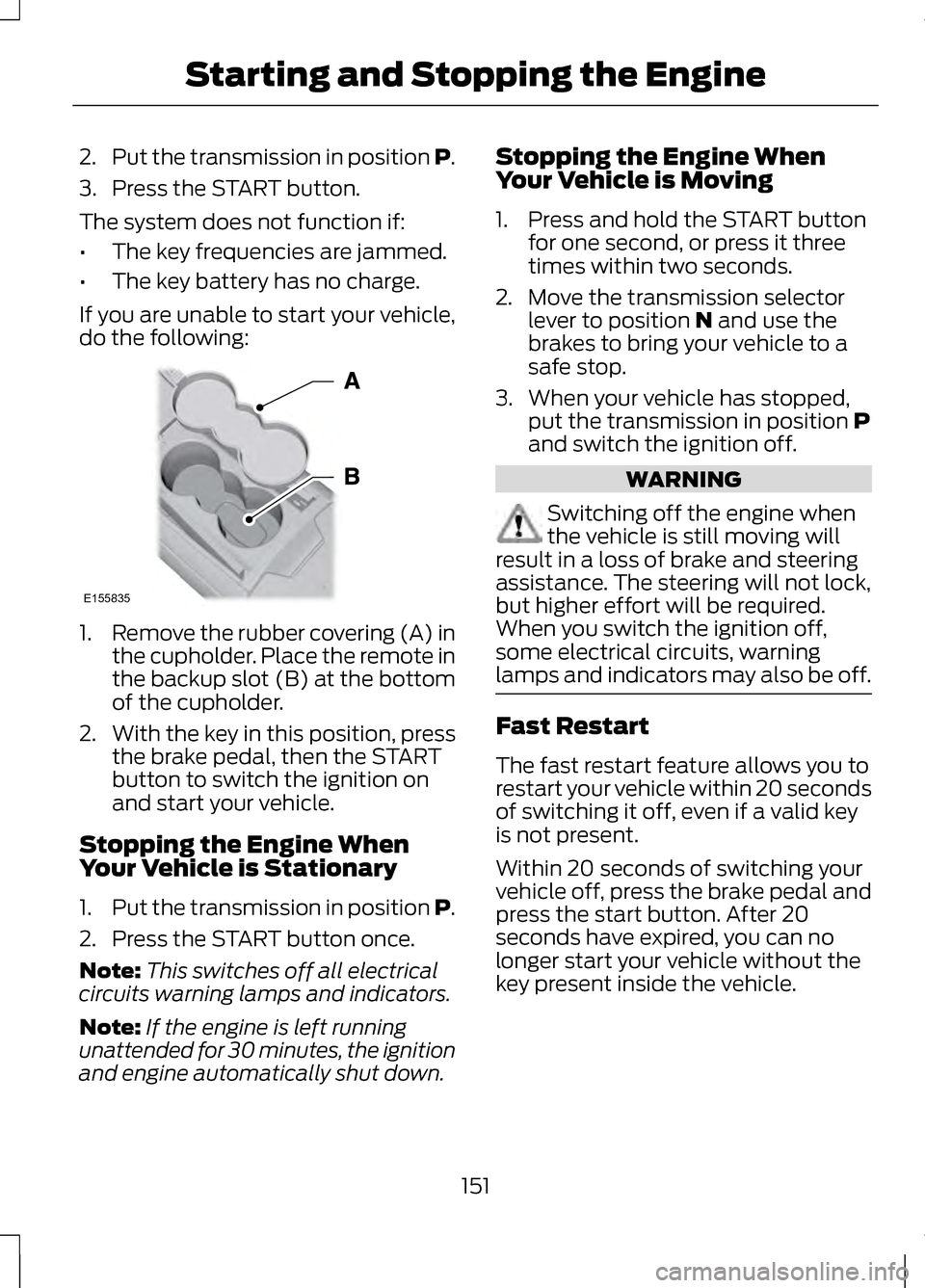
If you are unable to start your vehicle,
do the following: 1.
Remove the rubber covering (A) in
the cupholder. Place the remote in
the backup slot (B) at the bottom
of the cupholder.
2. With the key in this position, press
the brake pedal, then the START
button to switch the ignition on
and start your vehicle.
Stopping the Engine When
Your Vehicle is Stationary
1. Put the transmission in position P.
2. Press the START button once.
Note: This switches off all electrical
circuits warning lamps and indicators.
Note: If the engine is left running
unattended for 30 minutes, the ignition
and engine automatically shut down. Stopping the Engine When
Your Vehicle is Moving
1. Press and hold the START button
for one second, or press it three
times within two seconds.
2. Move the transmission selector lever to position N and use the
brakes to bring your vehicle to a
safe stop.
3. When your vehicle has stopped, put the transmission in position
P
and switch the ignition off. WARNING
Switching off the engine when
the vehicle is still moving will
result in a loss of brake and steering
assistance. The steering will not lock,
but higher effort will be required.
When you switch the ignition off,
some electrical circuits, warning
lamps and indicators may also be off. Fast Restart
The fast restart feature allows you to
restart your vehicle within 20 seconds
of switching it off, even if a valid key
is not present.
Within 20 seconds of switching your
vehicle off, press the brake pedal and
press the start button. After 20
seconds have expired, you can no
longer start your vehicle without the
key present inside the vehicle.
151
Starting and Stopping the EngineE155835