brake light LINCOLN MKZ 2013 User Guide
[x] Cancel search | Manufacturer: LINCOLN, Model Year: 2013, Model line: MKZ, Model: LINCOLN MKZ 2013Pages: 474, PDF Size: 3.79 MB
Page 183 of 474
You can manually release the electric
parking brake by turning the ignition
on, pressing the brake pedal and then
pressing the electric parking brake
switch.
When the electric parking brake is
released, the brake system warning
lamp will turn off.
Driving with a Trailer
Depending on the grade and the
weight of the trailer, your vehicle and
trailer may roll backwards slightly
when you start on a slope. To prevent
this from happening, do the following:
1. Pull the switch up and hold it in
this position.
2. Drive your vehicle, then release the
switch when you notice that the
engine has developed sufficient
driving force.
Automatic release - drive away
release
Note: The driver's door must be closed
and the driver's safety belt must be
fastened before this feature will
operate.
Note: If the electric parking brake
warning lamp stays illuminated, the
electric parking brake will not
automatically release. You must
release the electric parking brake using
the electric parking brake switch.
Note: The engine must be running and
the accelerator pedal must be pressed
before the drive away release feature
will operate. The brake system warning lamp will
go off to confirm that the electric
parking brake has been released.
Note:
The electric parking brake drive
away release makes starting on a hill
easier. This feature will release the
parking brake automatically when the
vehicle has sufficient drive force to
move up the hill. To assure drive away
release when starting uphill, press the
accelerator pedal quickly.
Battery With No Charge WARNING
You will not be able to apply or
release the electric parking brake
if the battery is low or has no charge. If the battery is low or has no charge,
use jumper cables and a booster
battery.
180
Brakes
Page 184 of 474
PRINCIPLE OF OPERATION
The traction control system helps
avoid drive wheel spin and loss of
traction.
If your vehicle begins to slide, the
system applies the brakes to
individual wheels and, when needed,
reduces engine power at the same
time. If the wheels spin when
accelerating on slippery or loose
surfaces, the system reduces engine
power in order to increase traction.
USING TRACTION
CONTROL
In certain situations (e.g. stuck in snow
or mud), turning the traction control
off may be beneficial as this allows
the wheels to spin with full engine
power. Turn off the traction control
system through the information
display. See General Information
(page 100). System Indicator Lights and
Messages WARNING
If a failure has been detected
within the AdvanceTrac system,
the stability control light will
illuminate steadily. Verify that the
AdvanceTrac system was not
manually disabled through the
information display. If the stability
control light still illuminates steadily,
have the system serviced by an
authorized dealer immediately.
Operating your vehicle with
AdvanceTrac disabled could lead to
an increased risk of loss of vehicle
control, vehicle rollover, personal
injury and death. The stability control light
temporarily illuminates on
engine start-up and flashes
when a driving condition activates the
stability system. The stability control off light
temporarily illuminates on
engine start-up and stays on
when the traction control system is
turned off.
When the traction control system is
turned off or on, a message appears
in the information display showing
system status.
181
Traction ControlE138639
Page 200 of 474
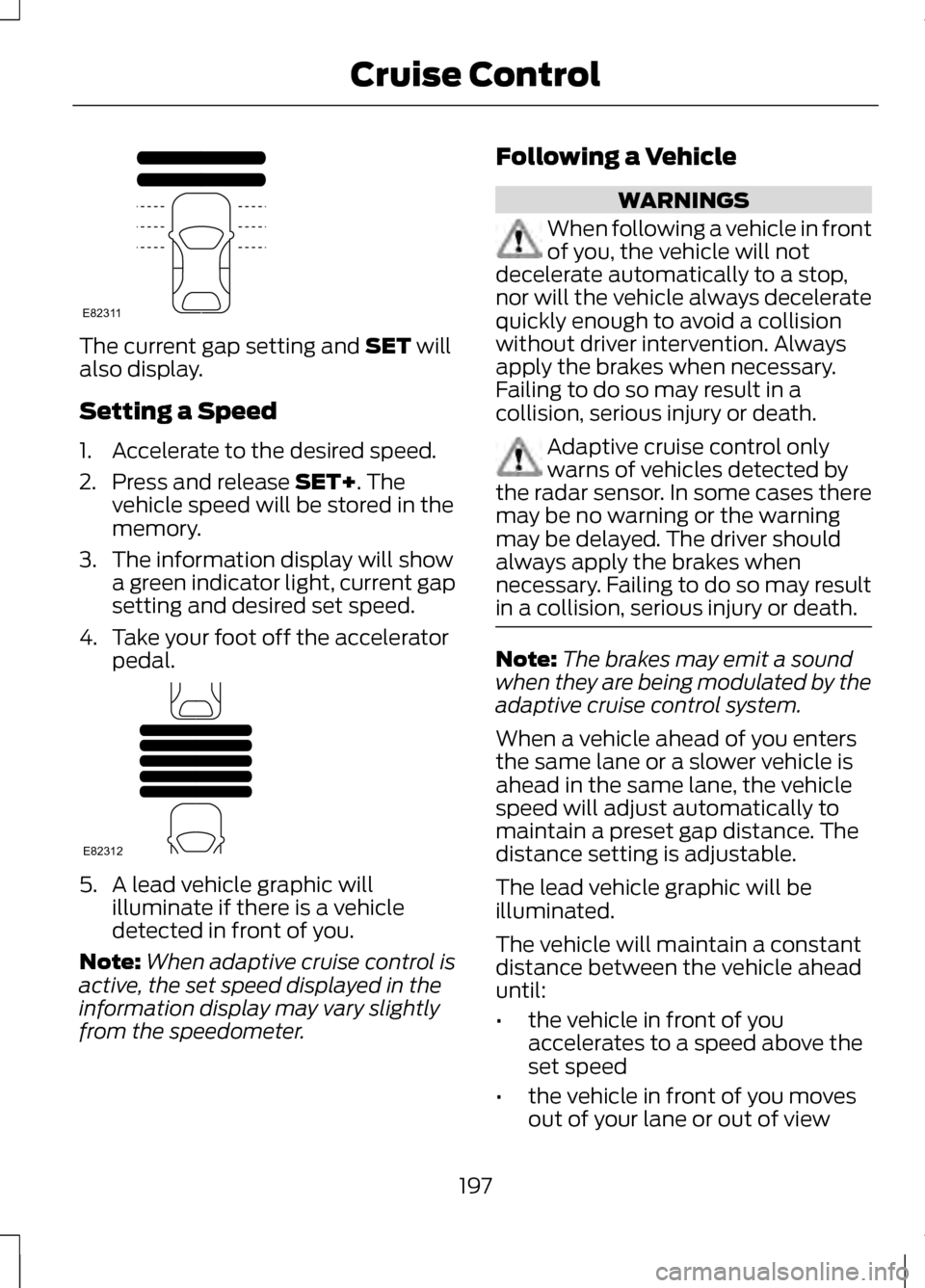
The current gap setting and SET will
also display.
Setting a Speed
1. Accelerate to the desired speed.
2. Press and release
SET+. The
vehicle speed will be stored in the
memory.
3. The information display will show a green indicator light, current gap
setting and desired set speed.
4. Take your foot off the accelerator pedal. 5. A lead vehicle graphic will
illuminate if there is a vehicle
detected in front of you.
Note: When adaptive cruise control is
active, the set speed displayed in the
information display may vary slightly
from the speedometer. Following a Vehicle WARNINGS
When following a vehicle in front
of you, the vehicle will not
decelerate automatically to a stop,
nor will the vehicle always decelerate
quickly enough to avoid a collision
without driver intervention. Always
apply the brakes when necessary.
Failing to do so may result in a
collision, serious injury or death. Adaptive cruise control only
warns of vehicles detected by
the radar sensor. In some cases there
may be no warning or the warning
may be delayed. The driver should
always apply the brakes when
necessary. Failing to do so may result
in a collision, serious injury or death. Note:
The brakes may emit a sound
when they are being modulated by the
adaptive cruise control system.
When a vehicle ahead of you enters
the same lane or a slower vehicle is
ahead in the same lane, the vehicle
speed will adjust automatically to
maintain a preset gap distance. The
distance setting is adjustable.
The lead vehicle graphic will be
illuminated.
The vehicle will maintain a constant
distance between the vehicle ahead
until:
• the vehicle in front of you
accelerates to a speed above the
set speed
• the vehicle in front of you moves
out of your lane or out of view
197
Cruise ControlE82311 E82312
Page 202 of 474
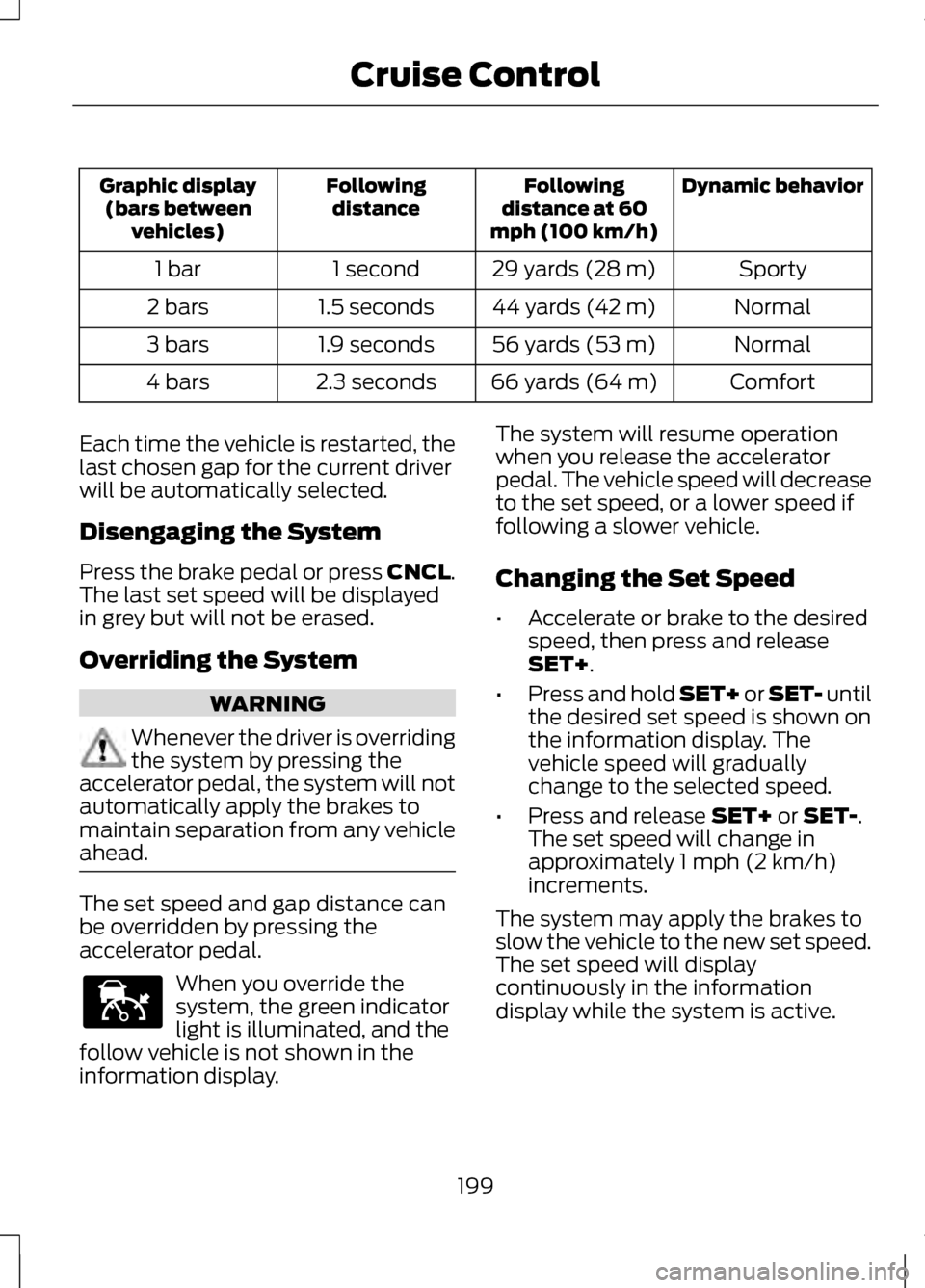
Dynamic behavior
Following
distance at 60
mph (100 km/h)
Following
distance
Graphic display
(bars between vehicles)
Sporty
29 yards (28 m)
1 second
1 bar
Normal
44 yards (42 m)
1.5 seconds
2 bars
Normal
56 yards (53 m)
1.9 seconds
3 bars
Comfort
66 yards (64 m)
2.3 seconds
4 bars
Each time the vehicle is restarted, the
last chosen gap for the current driver
will be automatically selected.
Disengaging the System
Press the brake pedal or press CNCL.
The last set speed will be displayed
in grey but will not be erased.
Overriding the System WARNING
Whenever the driver is overriding
the system by pressing the
accelerator pedal, the system will not
automatically apply the brakes to
maintain separation from any vehicle
ahead. The set speed and gap distance can
be overridden by pressing the
accelerator pedal.
When you override the
system, the green indicator
light is illuminated, and the
follow vehicle is not shown in the
information display. The system will resume operation
when you release the accelerator
pedal. The vehicle speed will decrease
to the set speed, or a lower speed if
following a slower vehicle.
Changing the Set Speed
•
Accelerate or brake to the desired
speed, then press and release
SET+.
• Press and hold SET+ or SET- until
the desired set speed is shown on
the information display. The
vehicle speed will gradually
change to the selected speed.
• Press and release
SET+ or SET-.
The set speed will change in
approximately 1 mph (2 km/h)
increments.
The system may apply the brakes to
slow the vehicle to the new set speed.
The set speed will display
continuously in the information
display while the system is active.
199
Cruise ControlE144529
Page 205 of 474
Action
Cause
Clean the grille surface in front of the
radar or remove the object causing the obstruction.
The surface of the radar in the grille is
dirty or obstructed in some way.
Wait a short time. It may take several
minutes for the radar to detect that it is no longer obstructed
The surface of the radar in the grille is
clean but the message remains in the display.
Do not use the system in these condi-tion because it may not detect, warn, or respond to potential collisions.
Heavy rain or snow is interfering with
the radar signals.
Do not use the system in these condi-tion because it may not detect, warn, or respond to potential collisions.
Swirling water, or snow or ice on the
surface of the road may interfere with the radar signals.
Wait a short time or switch to normalcruise control.
You are in a desert or remote area with
no other vehicles and no roadside objects.
Due to the nature of radar technology,
it is possible to get a blockage warning
and not be blocked. This can happen,
for example, when driving in sparse
rural or desert environments. A false
blocked condition will either self clear
or clear after a key cycle.
Switching to Normal Cruise
Control WARNING
Normal cruise control will not
brake due to slower vehicles.
Always be aware of which mode is
selected and apply the brakes when
necessary. You can manually change from
adaptive cruise control to normal
cruise control through the information
display.
The cruise control indicator
light will replace the adaptive
cruise control indicator light
if normal cruise control is selected.
The gap setting will not be displayed,
the system will not automatically
respond to lead vehicles and
automatic braking will not be
activated. The system will default to
adaptive cruise control when the
engine is started.
202
Cruise ControlE71340
Page 208 of 474
This system is designed to alert the
driver of certain collision risks. A radar
detects if your vehicle is rapidly
approaching another vehicle traveling
in the same direction as yours.
If it is, a red warning light illuminates
and an audible warning chime sounds.
The brake support system assists the
driver in reducing the collision speed
by charging the brakes. If the risk of
collision further increases after the
warning light illuminates, the brake
support prepares the brake system
for rapid braking. This may be
apparent to the driver. The system
does not automatically activate the
brakes but, if the brake pedal is
pressed, full force braking is applied
even if the brake pedal is lightly
pressed.
Using the Collision Warning
System
WARNING
The collision warning system
’s
brake support can only help
reduce the speed at which a collision
occurs if the driver applies the
vehicle ’s brakes. The brake pedal
must be pressed just like any typical
braking situation. The warning system and chime can
be turned on and off separately; the
warning system sensitivity can be
adjusted to one of three possible
settings by using the information
display control. See General
Information (page 100).
Note: If the system cannot be turned
off in a vehicle equipped with MyKey®,
See Principle of Operation (page 58).
Note: If collision warnings are
perceived as being too frequent or
disturbing then the warning sensitivity
can be reduced, though the
manufacturer recommends using the
highest sensitivity setting where
possible. Setting lower sensitivity
would lead to fewer and later system
warnings. See
General Information
(page 100).
Blocked Sensors 205
Driving AidsE156131 E145632
Page 230 of 474
TOWING A TRAILER
WARNINGS
Do not exceed the GVWR or the
GAWR specified on the
certification label. Towing trailers beyond the
maximum recommended gross
trailer weight exceeds the limit of the
vehicle and could result in engine
damage, transmission damage,
structural damage, loss of vehicle
control, vehicle rollover and personal
injury. Note:
There may be electrical items
such as fuses or relays that can affect
trailer towing operation. See Fuses
(page 251).
Weight, not volume designates your
vehicle's load capacity. You cannot
necessarily use all available space
when loading a vehicle.
Towing a trailer places an additional
load on your vehicle's engine,
transmission, axle, brakes, tires and
suspension. Inspect these
components periodically during, and
after, any towing operation.
Load Placement
To help minimize how trailer
movement affects the vehicle when
driving:
• Load the heaviest items closest to
the trailer floor.
• Load the heaviest items in the
center of the left and right side
trailer tires. •
Load the heaviest items above the
trailer axles or just slightly forward
toward the trailer tongue. Do not
allow the final trailer tongue
weight to go above or below
10-15% of the loaded trailer
weight.
• Select a tow bar with the correct
rise or drop. When both the loaded
vehicle and trailer are connected,
the trailer frame should be level,
or slightly angled down toward the
vehicle, when viewed from the
side.
When driving with a trailer or payload,
a slight takeoff vibration or shudder
may be present due to the increased
payload weight. Additional
information regarding proper trailer
loading and setting your vehicle up for
towing is located in another chapter
of this manual. See Load Limit (page
219). You can also find the information
in the
RV & Trailer Towing Guide,
available at your authorized dealer.
RECOMMENDED TOWING
WEIGHTS
Note: Do not exceed the trailer weight
for your vehicle configuration listed in
the chart below.
Note: Be sure to take into
consideration trailer frontal area. Do
not exceed 20 feet 2
(1.86 meters 2
).
Note: For high altitude operation,
reduce the gross combined weight by
2% per 1000 feet (300 meters)
starting at the 1000 foot (300 meter)
elevation point.
227
Towing
Page 233 of 474
The braking system of the tow
vehicle is rated for operation at the
GVWR not GCWR.
Separate functioning brake
systems are required for safe
control of towed vehicles and
trailers weighing more than 1500
pounds (680 kilograms) when
loaded.
Trailer Lamps
Trailer lamps are required on most
towed vehicles. Make sure all running
lights, brake lights, turn signals and
hazard lights are working. Contact
your authorized dealer or trailer rental
agency for proper instructions and
equipment for hooking up the lamps.
Before Towing a Trailer
Practice turning, stopping and
backing-up to get the feel of the
vehicle-trailer combination before
starting on a trip. When turning, make
wider turns so the trailer wheels clear
curbs and other obstacles.
When Towing a Trailer
•
Do not drive faster than 70 mph
(113 km/h) during the first 500
miles (800 kilometers).
• Do not make full-throttle starts.
• Check your hitch, electrical
connections and trailer wheel lug
nuts thoroughly after you have
traveled 50 miles (80 kilometers). •
When stopped in congested or
heavy traffic during hot weather,
place the gearshift in position P to
aid engine and transmission
cooling and to help A/C
performance.
• Turn off the speed control with
heavy loads or in hilly terrain. The
speed control may turn off
automatically when you are towing
on long, steep grades.
• Shift to a lower gear when driving
down a long or steep hill. Do not
apply the brakes continuously, as
they may overheat and become
less effective.
• If your transmission is equipped
with a grade assist or Tow/Haul
feature, use this feature when
towing. This provides engine
braking and helps eliminate
excessive transmission shifting for
optimum fuel economy and
transmission cooling.
• Allow more distance for stopping
with a trailer attached. Anticipate
stops and brake gradually.
230
Towing
Page 238 of 474
BREAKING-IN
You need to break in new tires for
approximately 300 miles (480
kilometers). During this time, your
vehicle may exhibit some unusual
driving characteristics.
Avoid driving too fast during the first
1000 miles (1600 kilometers). Vary
your speed frequently and change up
through the gears early. Do not labor
the engine.
Do not tow during the first 1000 miles
(1600 kilometers).
ECONOMICAL DRIVING
Fuel economy is affected by several
things such as how you drive, the
conditions you drive under and how
you maintain your vehicle.
There are some things to keep in mind
that may improve your fuel economy:
•
Accelerate and slow down in a
smooth, moderate fashion.
• Drive at steady speeds.
• Anticipate stops; slowing down
may eliminate the need to stop.
• Combine errands and minimize
stop-and-go driving.
•When running errands, go to
the furthest destination first
and then work your way back
home.
• Close the windows for high-speed
driving. •
Drive at reasonable speeds.
(Traveling at 65 mph/105 kph uses
about 15% less fuel than traveling
at 75 mph/121 kph).
• Keep the tires properly inflated and
use only the recommended size.
• Use the recommended engine oil.
• Perform all regularly scheduled
maintenance.
There are also some things you may
want to avoid doing because they
reduce your fuel economy:
• Avoid sudden or hard
accelerations.
• Avoid revving the engine before
turning off the car.
• Avoid long idle periods.
• Do not warm up your vehicle on
cold mornings.
• Reduce the use of air conditioning
and heat.
• Avoid using speed control in hilly
terrain.
• Do not rest your foot on the brake
pedal while driving.
• Avoid carrying unnecessary weight
(approximately 1 mpg [0.4
kilometers/liter] is lost for every
400 lbs [180 kilograms] of weight
carried).
• Avoid adding particular
accessories to your vehicle (e.g.
bug deflectors, rollbars/light bars,
running boards, ski racks).
• Avoid driving with the wheels out
of alignment.
235
Driving Hints
Page 239 of 474
DRIVING THROUGH WATER
Note:
Driving through deep water
above the recommended levels can
cause vehicle damage.
Note: Once through the water, always
dry the brakes by moving your vehicle
slowly while applying light pressure on
the brake pedal. Wet brakes do not
stop the vehicle as quickly as dry
brakes. If driving through deep or standing
water is unavoidable, proceed very
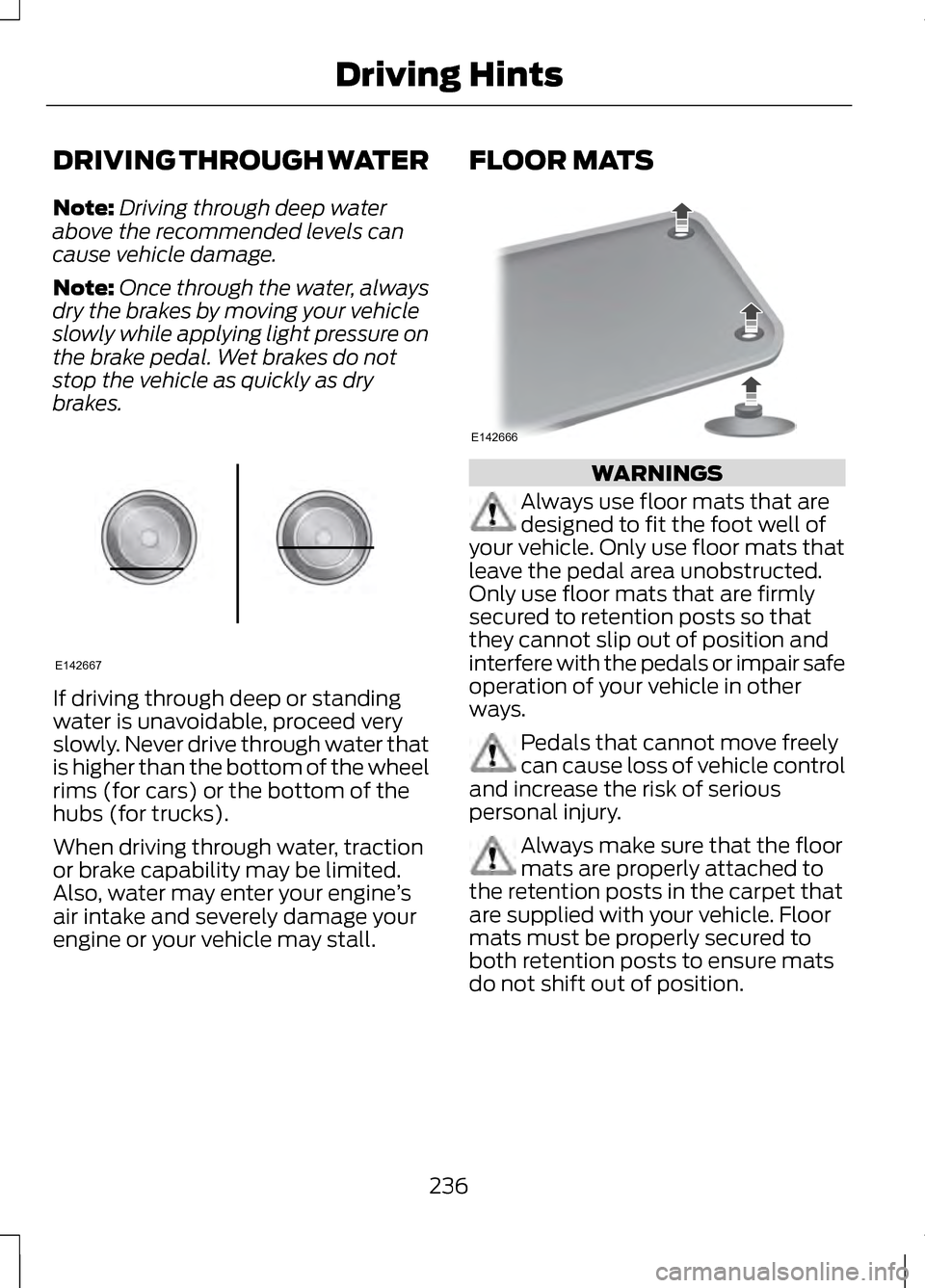
slowly. Never drive through water that
is higher than the bottom of the wheel
rims (for cars) or the bottom of the
hubs (for trucks).
When driving through water, traction
or brake capability may be limited.
Also, water may enter your engine
’s
air intake and severely damage your
engine or your vehicle may stall. FLOOR MATS
WARNINGS
Always use floor mats that are
designed to fit the foot well of
your vehicle. Only use floor mats that
leave the pedal area unobstructed.
Only use floor mats that are firmly
secured to retention posts so that
they cannot slip out of position and
interfere with the pedals or impair safe
operation of your vehicle in other
ways. Pedals that cannot move freely
can cause loss of vehicle control
and increase the risk of serious
personal injury. Always make sure that the floor
mats are properly attached to
the retention posts in the carpet that
are supplied with your vehicle. Floor
mats must be properly secured to
both retention posts to ensure mats
do not shift out of position.
236
Driving HintsE142667 E142666