cruise control LINCOLN MKZ 2013 User Guide
[x] Cancel search | Manufacturer: LINCOLN, Model Year: 2013, Model line: MKZ, Model: LINCOLN MKZ 2013Pages: 474, PDF Size: 3.79 MB
Page 199 of 474
Switching Cruise Control Off
Note:
You will erase the set speed if
you switch the system off.
Press and release OFF or switch the
ignition off.
USING ADAPTIVE CRUISE
CONTROL
(IF EQUIPPED) WARNINGS
Always pay close attention to
changing road conditions,
especially when using adaptive cruise
control. Adaptive cruise control
cannot replace attentive driving.
Failing to follow any of the warnings
below or failing to pay attention to the
road may result in a collision, serious
injury or death. Adaptive cruise control is not a
collision warning or avoidance
system. Adaptive cruise control will not
detect stationary or slow moving
vehicles below 6 mph (10 km/h). Adaptive cruise control will not
detect pedestrians or objects in
the roadway. Adaptive cruise control will not
detect oncoming vehicles in the
same lane. Do not use the adaptive cruise
control when entering or leaving
a highway, in heavy traffic or on roads
that are winding, slippery or unpaved. WARNINGS
Do not use in poor visibility,
specifically fog, rain, spray or
snow. Note:
It is your responsibility to stay
alert, drive safely and be in control of
the vehicle at all times.
The system is designed to
automatically adjust your speed to
maintain a proper distance between
you and the vehicle in front of you in
the same lane. You can select from
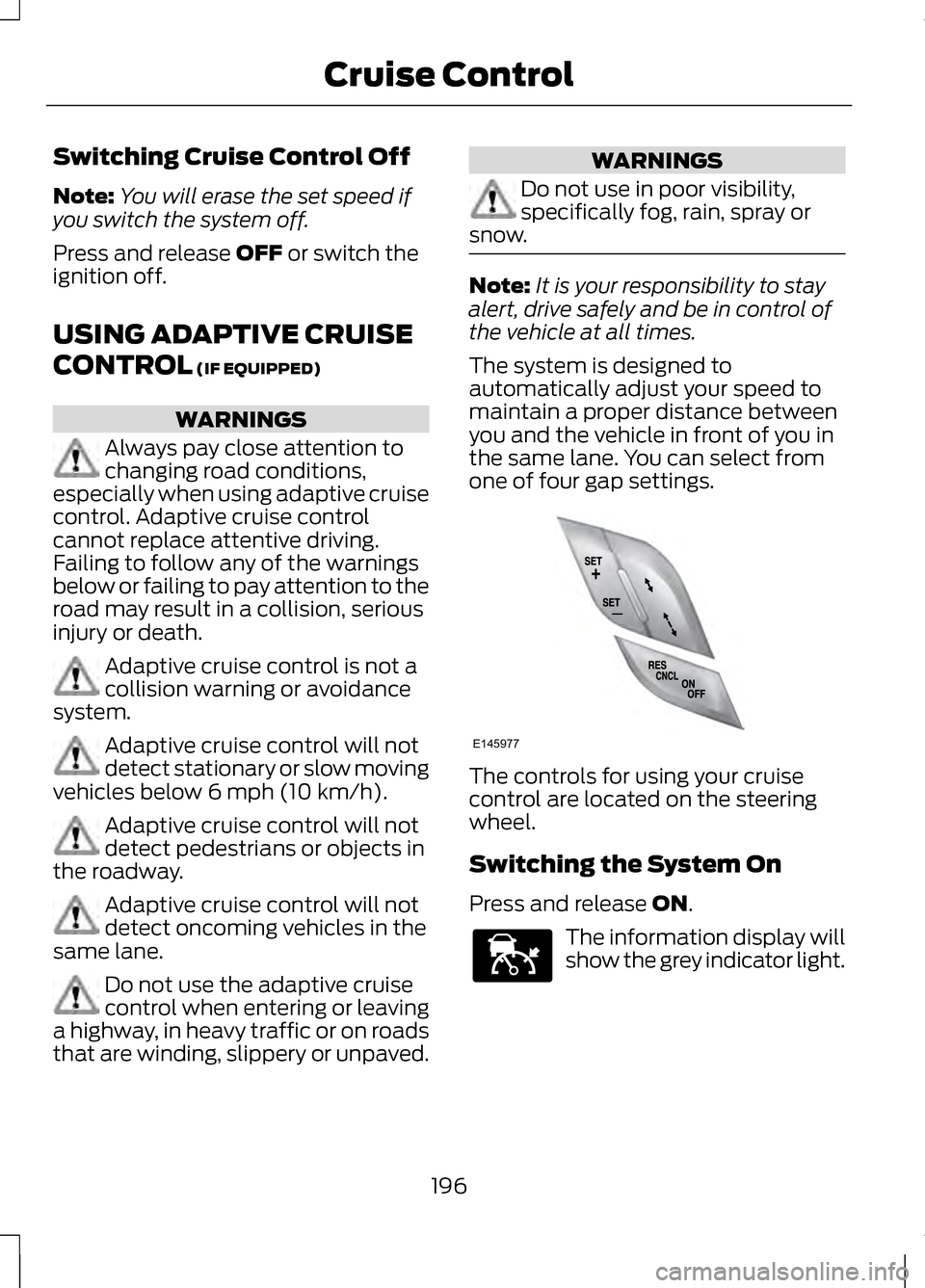
one of four gap settings. The controls for using your cruise
control are located on the steering
wheel.
Switching the System On
Press and release
ON.
The information display will
show the grey indicator light.
196
Cruise ControlE145977 E144529
Page 200 of 474
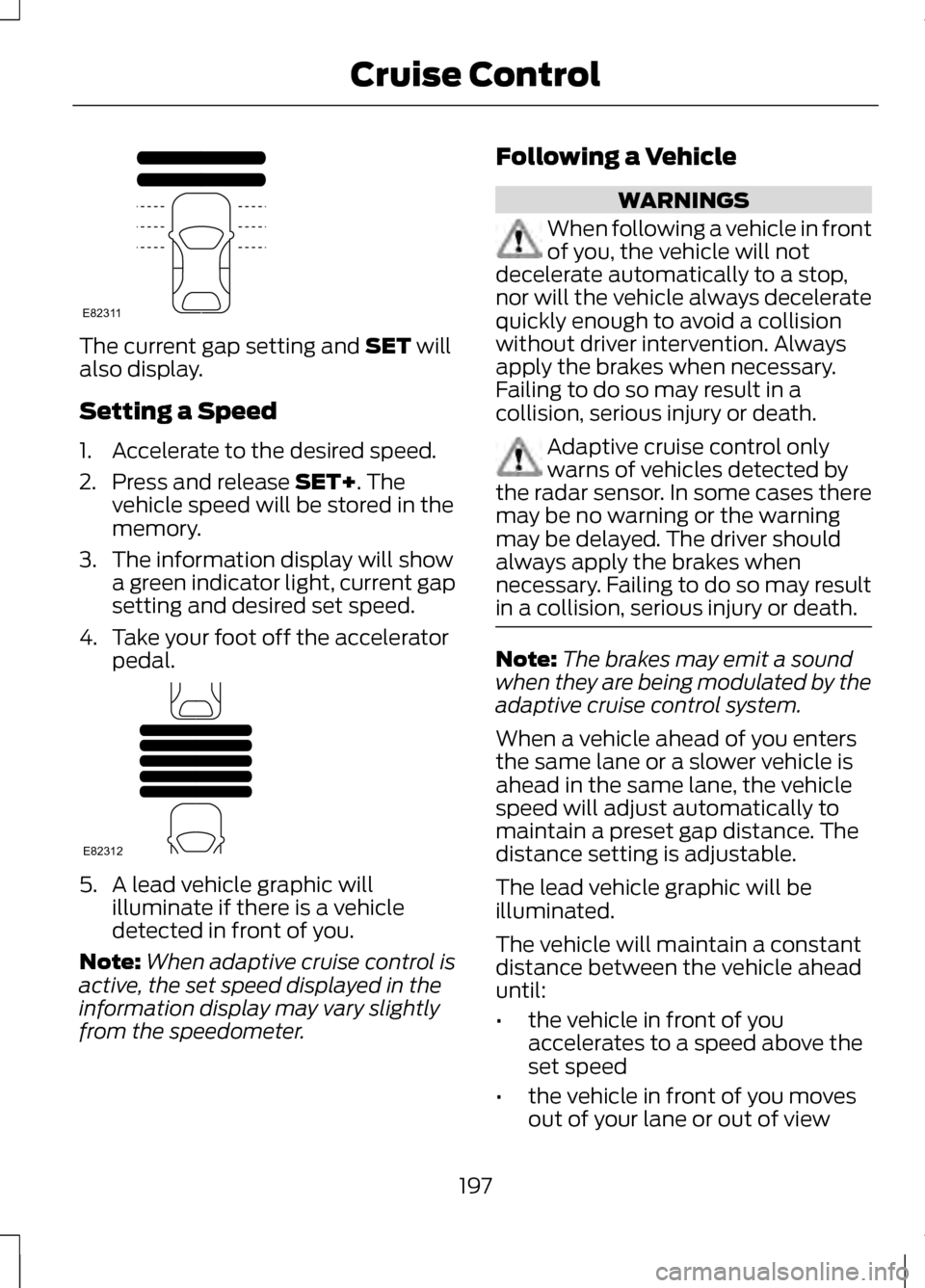
The current gap setting and SET will
also display.
Setting a Speed
1. Accelerate to the desired speed.
2. Press and release
SET+. The
vehicle speed will be stored in the
memory.
3. The information display will show a green indicator light, current gap
setting and desired set speed.
4. Take your foot off the accelerator pedal. 5. A lead vehicle graphic will
illuminate if there is a vehicle
detected in front of you.
Note: When adaptive cruise control is
active, the set speed displayed in the
information display may vary slightly
from the speedometer. Following a Vehicle WARNINGS
When following a vehicle in front
of you, the vehicle will not
decelerate automatically to a stop,
nor will the vehicle always decelerate
quickly enough to avoid a collision
without driver intervention. Always
apply the brakes when necessary.
Failing to do so may result in a
collision, serious injury or death. Adaptive cruise control only
warns of vehicles detected by
the radar sensor. In some cases there
may be no warning or the warning
may be delayed. The driver should
always apply the brakes when
necessary. Failing to do so may result
in a collision, serious injury or death. Note:
The brakes may emit a sound
when they are being modulated by the
adaptive cruise control system.
When a vehicle ahead of you enters
the same lane or a slower vehicle is
ahead in the same lane, the vehicle
speed will adjust automatically to
maintain a preset gap distance. The
distance setting is adjustable.
The lead vehicle graphic will be
illuminated.
The vehicle will maintain a constant
distance between the vehicle ahead
until:
• the vehicle in front of you
accelerates to a speed above the
set speed
• the vehicle in front of you moves
out of your lane or out of view
197
Cruise ControlE82311 E82312
Page 201 of 474
•
the vehicle speed falls below 12
mph (20 km/h)
• a new gap distance is set.
The vehicle brakes will be
automatically applied to slow the
vehicle to maintain a safe distance
from the vehicle in front. The
maximum braking which is applied by
the system is limited and can be
overridden by applying the brakes.
If the system predicts that its
maximum braking level will not be
sufficient, an audible warning will
sound while the system continues to
brake. This is accompanied by a
heads-up display; a red warning bar
illuminating on the windshield. You
should take immediate action.
Setting the Gap Distance
Note: It is your responsibility to select
a gap appropriate to the driving
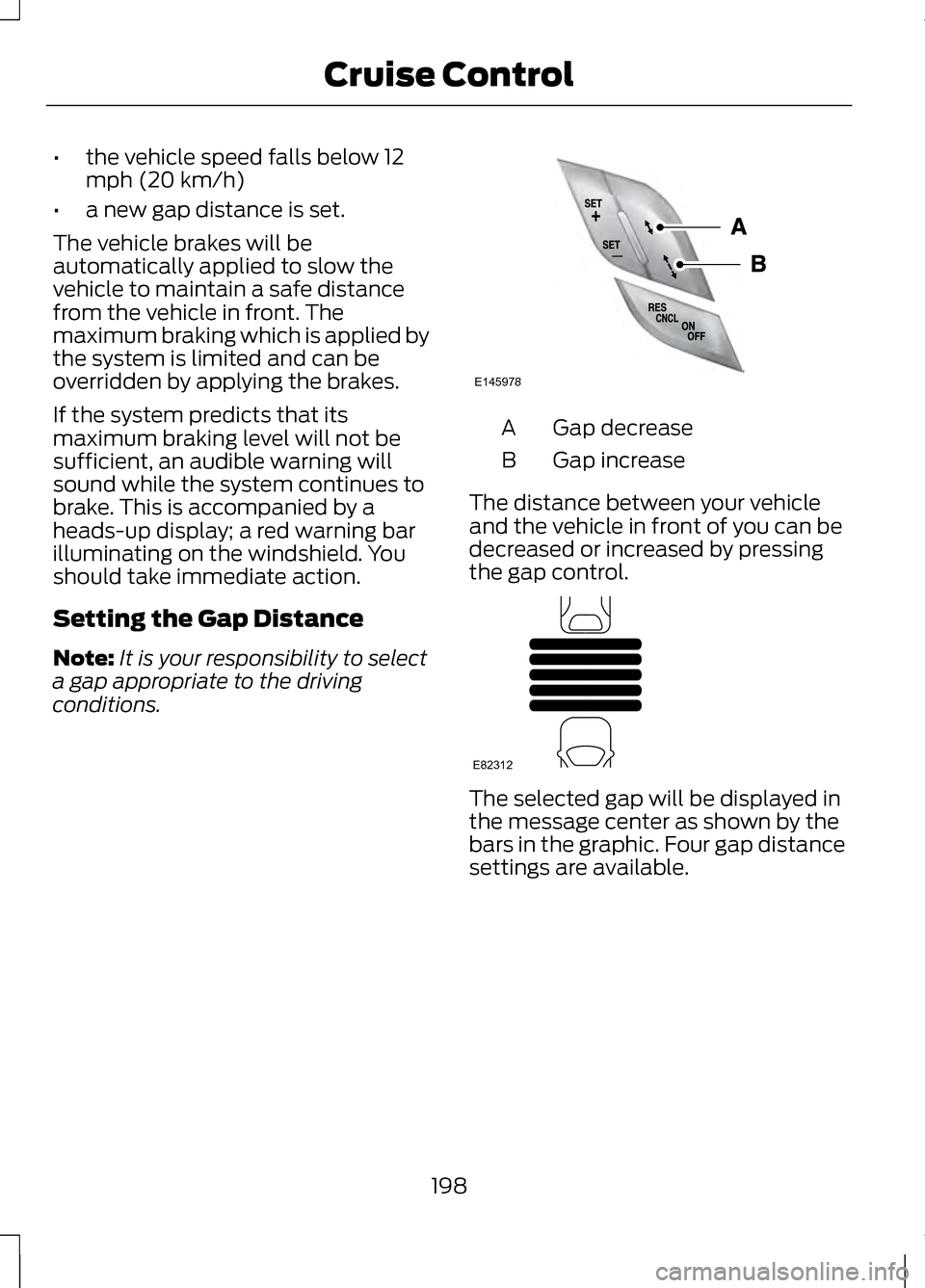
conditions. Gap decrease
A
Gap increase
B
The distance between your vehicle
and the vehicle in front of you can be
decreased or increased by pressing
the gap control. The selected gap will be displayed in
the message center as shown by the
bars in the graphic. Four gap distance
settings are available.
198
Cruise ControlE145978 E82312
Page 202 of 474
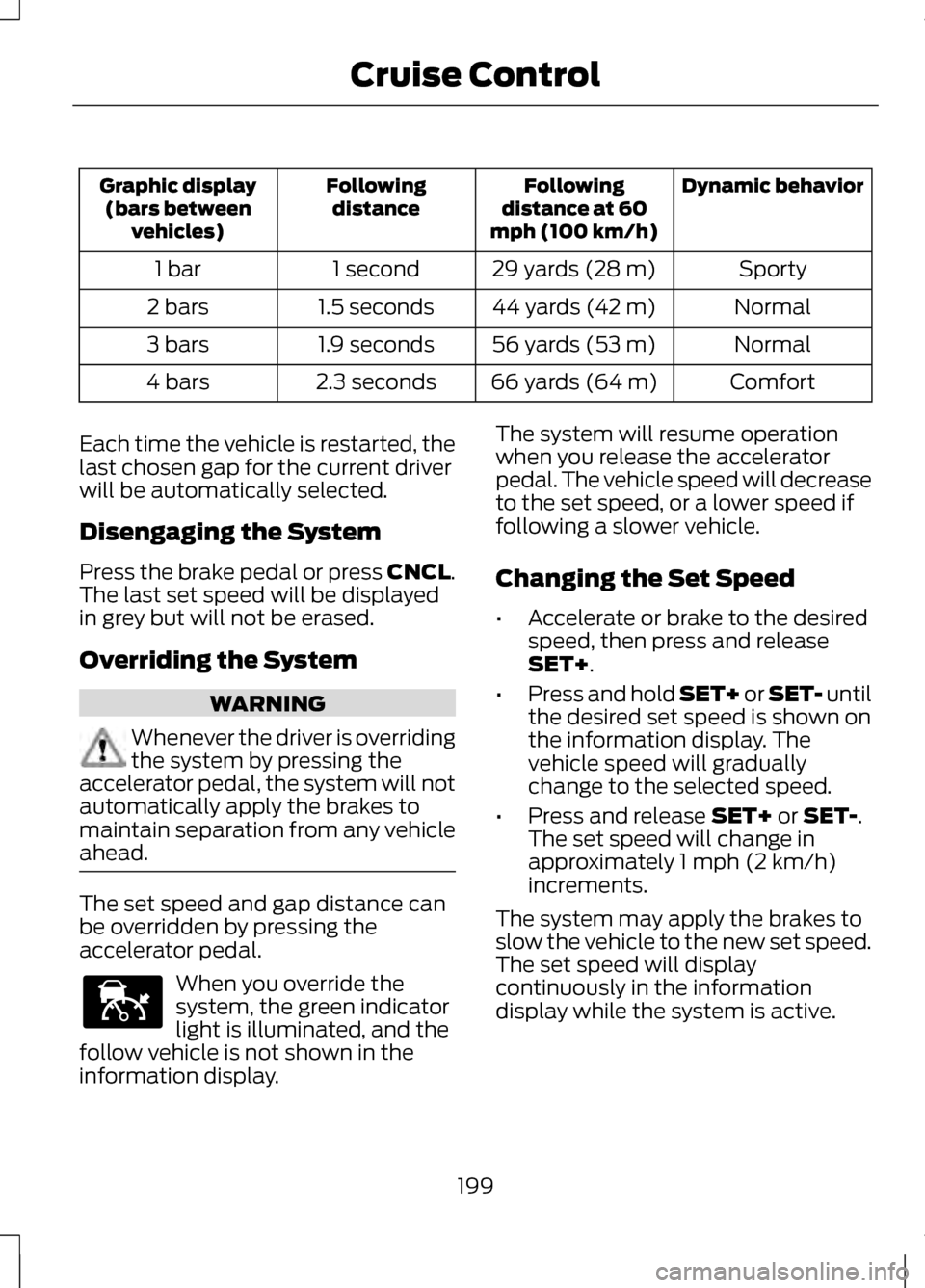
Dynamic behavior
Following
distance at 60
mph (100 km/h)
Following
distance
Graphic display
(bars between vehicles)
Sporty
29 yards (28 m)
1 second
1 bar
Normal
44 yards (42 m)
1.5 seconds
2 bars
Normal
56 yards (53 m)
1.9 seconds
3 bars
Comfort
66 yards (64 m)
2.3 seconds
4 bars
Each time the vehicle is restarted, the
last chosen gap for the current driver
will be automatically selected.
Disengaging the System
Press the brake pedal or press CNCL.
The last set speed will be displayed
in grey but will not be erased.
Overriding the System WARNING
Whenever the driver is overriding
the system by pressing the
accelerator pedal, the system will not
automatically apply the brakes to
maintain separation from any vehicle
ahead. The set speed and gap distance can
be overridden by pressing the
accelerator pedal.
When you override the
system, the green indicator
light is illuminated, and the
follow vehicle is not shown in the
information display. The system will resume operation
when you release the accelerator
pedal. The vehicle speed will decrease
to the set speed, or a lower speed if
following a slower vehicle.
Changing the Set Speed
•
Accelerate or brake to the desired
speed, then press and release
SET+.
• Press and hold SET+ or SET- until
the desired set speed is shown on
the information display. The
vehicle speed will gradually
change to the selected speed.
• Press and release
SET+ or SET-.
The set speed will change in
approximately 1 mph (2 km/h)
increments.
The system may apply the brakes to
slow the vehicle to the new set speed.
The set speed will display
continuously in the information
display while the system is active.
199
Cruise ControlE144529
Page 203 of 474
Resuming the Set Speed
Note:
Resume should only be used if
you are aware of the set speed and
intend to return to it.
Press and release RES. The vehicle
will return to the previously set speed.
The set speed will display
continuously in the information
display while the system is active.
Low Speed Automatic
Cancellation
The system is not functional at vehicle
speeds below 12 mph (20 km/h). An
audible alarm will sound and the
automatic braking will be released if
the vehicle drops below this speed.
Hilly Condition Usage
Note: An audible alarm will sound and
the system will shut down if it is
applying brakes for an extended period
of time. This allows the brakes to cool
down. The system will function
normally again when the brakes have
cooled down.
You should select a lower gear
position when the system is active in
situations such as prolonged downhill
driving on steep grades (i.e., driving in
mountainous areas). Additional
engine braking is needed in these
situations to reduce the load on the
vehicle ’s regular brake system to
prevent them from overheating.
Switching the System Off
Note: The set speed memory is erased
when you switch off the system. Press and release
OFF or turn off the
ignition.
Detection Issues
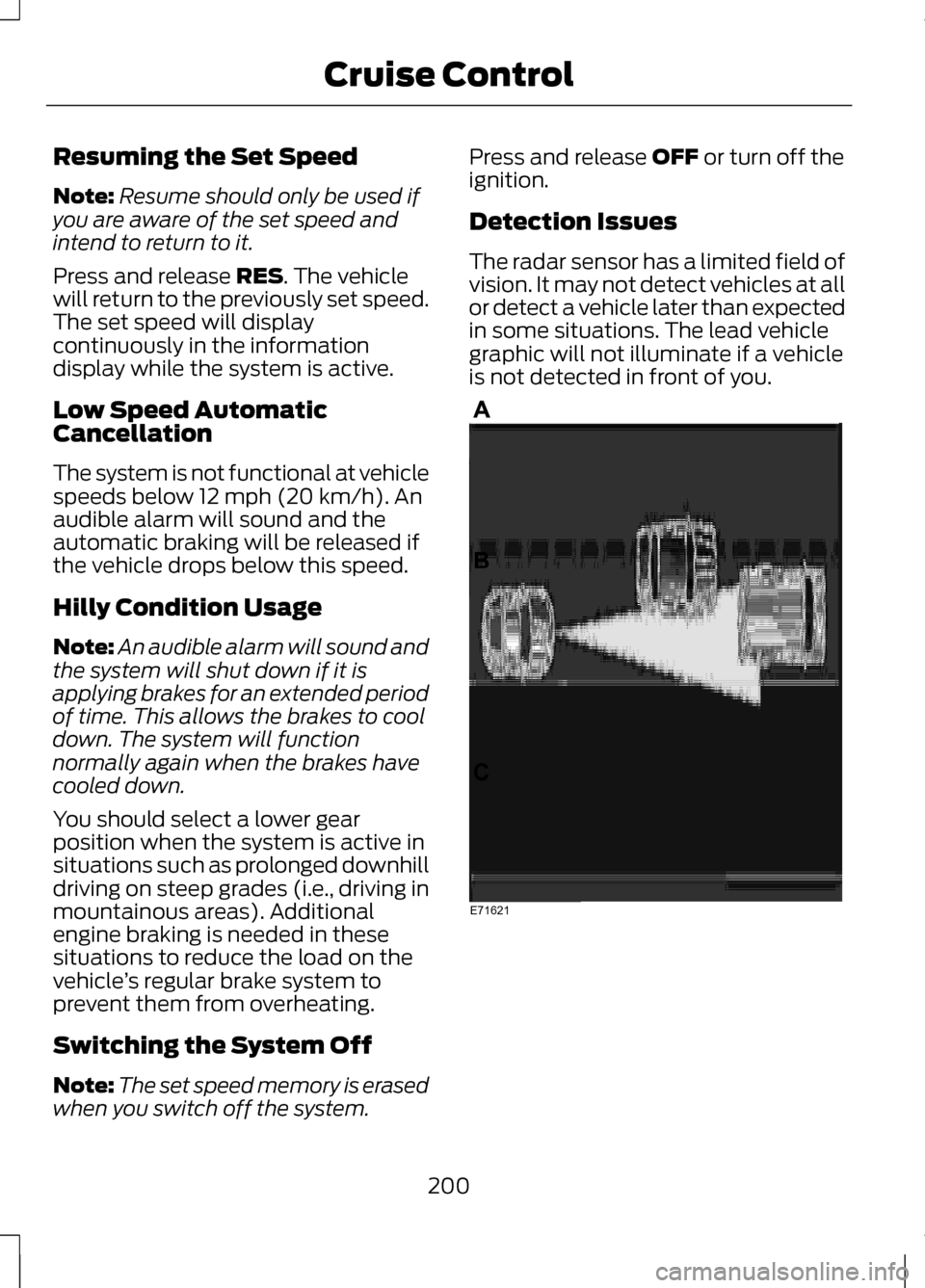
The radar sensor has a limited field of
vision. It may not detect vehicles at all
or detect a vehicle later than expected
in some situations. The lead vehicle
graphic will not illuminate if a vehicle
is not detected in front of you. 200
Cruise ControlE71621
Page 204 of 474
Detection issues can occur:
When driving on a different
line than the vehicle in front.
A
With vehicles that edge into
your lane. These vehicles can
only be detected once they
have moved fully into your
lane.
B
There may be issues with the
detection of vehicles in front
when driving into and coming
out of a bend or curve in the
road.
C
In these cases the system may brake
late or unexpectedly. The driver
should stay alert and intervene when
necessary.
If the front end of the vehicle is hit or
damaged, the radar sensing zone may
be altered causing missed or false
vehicle detections. See your
authorized dealer to have the radar
checked for proper coverage and
operation.
System Not Available
Conditions which can cause the
system to deactivate or prevent the
system from activating when
requested include:
• a blocked sensor
• high brake temperature
• a failure in the system or a related
system. Blocked Sensor WARNINGS
Do not use the system when
towing a trailer with brake
controls. Aftermarket trailer brakes
will not function properly when the
system is activated because the
brakes are electronically controlled.
Failing to do so may result in loss of
vehicle control, which could result in
serious injury. Do not use tires sizes other than
those recommended because
this can affect the normal operation
of the system. Failing to do so may
result in a loss of vehicle control,
which could result in serious injury. A message will display if the radar
signals from the sensor have been
obstructed. The sensor is located
behind a fascia cover near the driver
side of the lower grille. A vehicle
ahead cannot be detected and the
system will not function when the
radar signals are obstructed. The
following table lists possible causes
and actions for this message being
displayed.
201
Cruise ControlE145632
Page 205 of 474
Action
Cause
Clean the grille surface in front of the
radar or remove the object causing the obstruction.
The surface of the radar in the grille is
dirty or obstructed in some way.
Wait a short time. It may take several
minutes for the radar to detect that it is no longer obstructed
The surface of the radar in the grille is
clean but the message remains in the display.
Do not use the system in these condi-tion because it may not detect, warn, or respond to potential collisions.
Heavy rain or snow is interfering with
the radar signals.
Do not use the system in these condi-tion because it may not detect, warn, or respond to potential collisions.
Swirling water, or snow or ice on the
surface of the road may interfere with the radar signals.
Wait a short time or switch to normalcruise control.
You are in a desert or remote area with
no other vehicles and no roadside objects.
Due to the nature of radar technology,
it is possible to get a blockage warning
and not be blocked. This can happen,
for example, when driving in sparse
rural or desert environments. A false
blocked condition will either self clear
or clear after a key cycle.
Switching to Normal Cruise
Control WARNING
Normal cruise control will not
brake due to slower vehicles.
Always be aware of which mode is
selected and apply the brakes when
necessary. You can manually change from
adaptive cruise control to normal
cruise control through the information
display.
The cruise control indicator
light will replace the adaptive
cruise control indicator light
if normal cruise control is selected.
The gap setting will not be displayed,
the system will not automatically
respond to lead vehicles and
automatic braking will not be
activated. The system will default to
adaptive cruise control when the
engine is started.
202
Cruise ControlE71340
Page 213 of 474
When the system is turned off, the
lane marking graphics will not be
displayed.
Note:
The overhead vehicle graphic
may still be displayed if adaptive cruise
control is enabled.
While the system is on, the color of
the lane markings will change to
indicate the system status.
Gray: Indicates that the system is
temporarily unable to provide a
warning or intervention on the
indicated side(s). This may be
because:
• the vehicle is under the activation
speed
• the turn indicator is active
• the vehicle is in a dynamic
maneuver
• the road has no or poor lane
markings in the camera
field-of-view
• the camera is obscured or unable
to detect the lane markings due to
environmental conditions (e.g.
significant sun angles or shadows,
snow, heavy rain, fog), traffic
conditions (e.g. following a large
vehicle that is blocking or
shadowing the lane), or vehicle
conditions (e.g. poor headlamp
illumination). See Troubleshooting for additional
information.
Green: Indicates that the system is
available or ready to provide a
warning or intervention, on the
indicated side(s).
Yellow: Indicates that the system is
providing or has just provided a lane
keeping aid intervention.
Red: Indicates that the system is
providing or has just provided a lane
keeping alert warning.
The system can be temporarily
suppressed at any time by the
following:
• Quick braking
• Fast acceleration
• Using the turn signal indicator
• Evasive steering maneuver
210
Driving Aids
Page 257 of 474
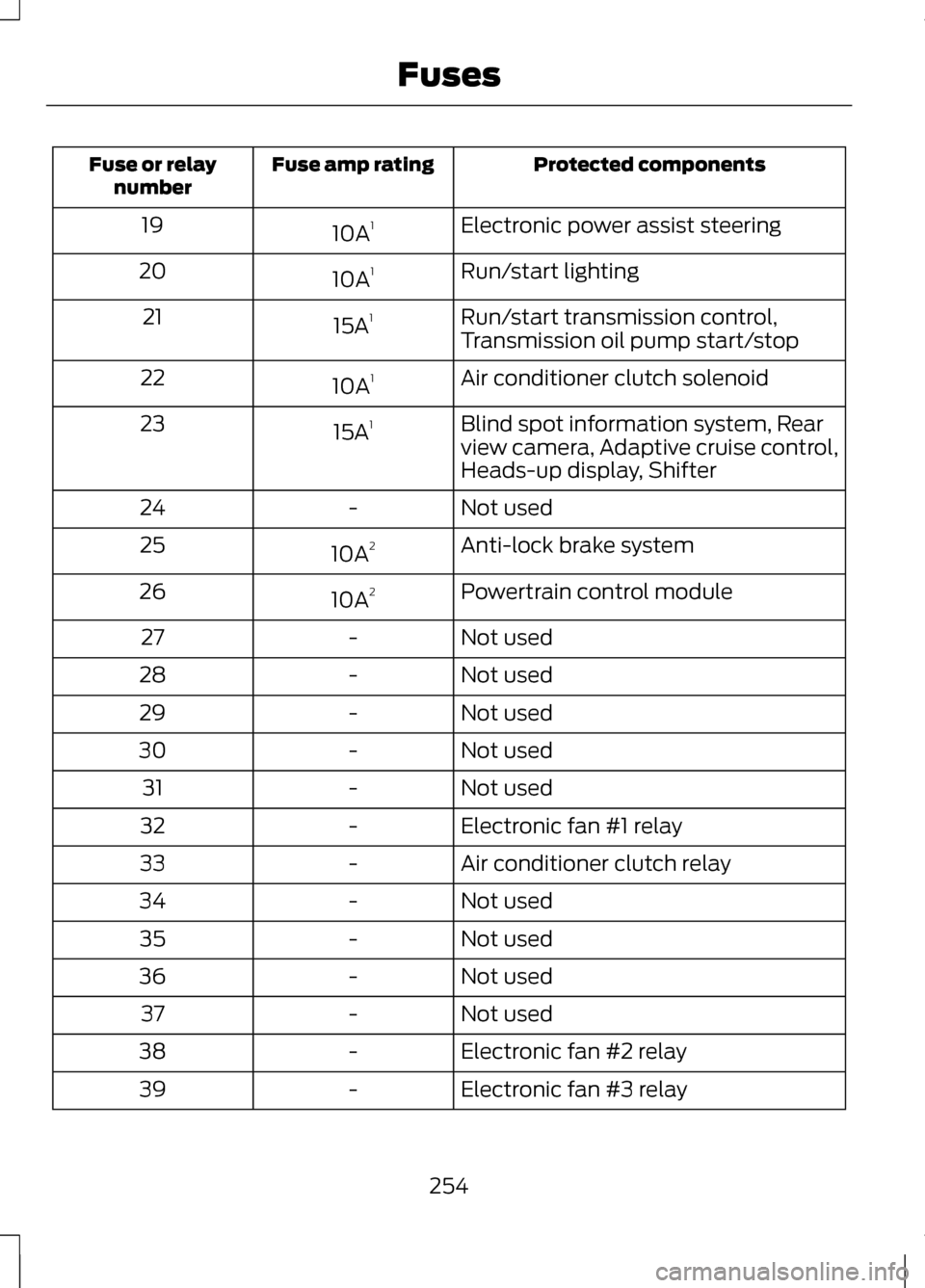
Protected components
Fuse amp rating
Fuse or relay
number
Electronic power assist steering
10A 1
19
Run/start lighting
10A 1
20
Run/start transmission control,
Transmission oil pump start/stop
15A
1
21
Air conditioner clutch solenoid
10A 1
22
Blind spot information system, Rear
view camera, Adaptive cruise control,
Heads-up display, Shifter
15A
1
23
Not used
-
24
Anti-lock brake system
10A 2
25
Powertrain control module
10A 2
26
Not used
-
27
Not used
-
28
Not used
-
29
Not used
-
30
Not used
-
31
Electronic fan #1 relay
-
32
Air conditioner clutch relay
-
33
Not used
-
34
Not used
-
35
Not used
-
36
Not used
-
37
Electronic fan #2 relay
-
38
Electronic fan #3 relay
-
39
254
Fuses
Page 264 of 474
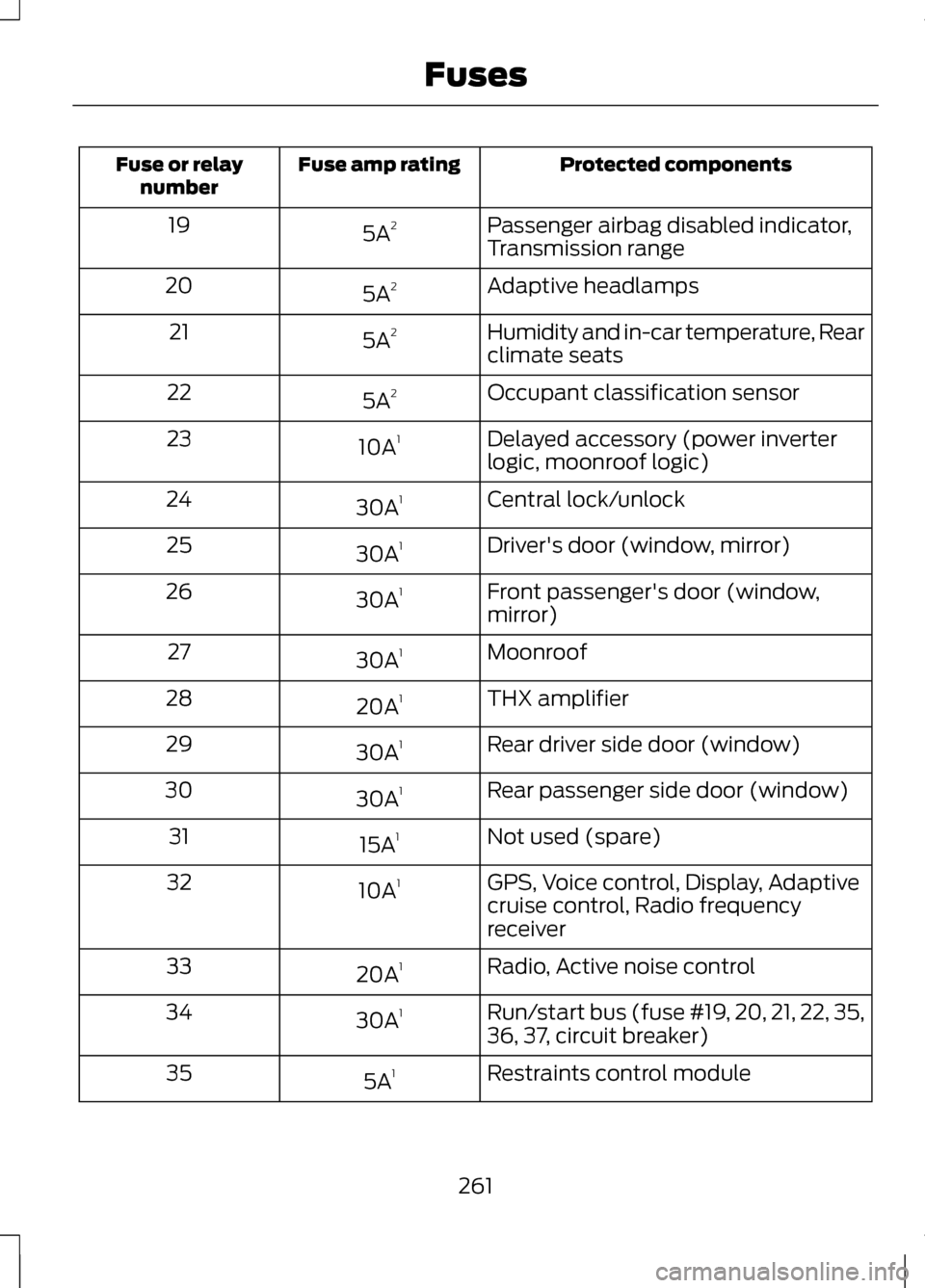
Protected components
Fuse amp rating
Fuse or relay
number
Passenger airbag disabled indicator,
Transmission range
5A
2
19
Adaptive headlamps
5A 2
20
Humidity and in-car temperature, Rear
climate seats
5A
2
21
Occupant classification sensor
5A 2
22
Delayed accessory (power inverter
logic, moonroof logic)
10A
1
23
Central lock/unlock
30A 1
24
Driver's door (window, mirror)
30A 1
25
Front passenger's door (window,
mirror)
30A
1
26
Moonroof
30A 1
27
THX amplifier
20A 1
28
Rear driver side door (window)
30A 1
29
Rear passenger side door (window)
30A 1
30
Not used (spare)
15A 1
31
GPS, Voice control, Display, Adaptive
cruise control, Radio frequency
receiver
10A
1
32
Radio, Active noise control
20A 1
33
Run/start bus (fuse #19, 20, 21, 22, 35,
36, 37, circuit breaker)
30A
1
34
Restraints control module
5A 1
35
261
Fuses