navigation LINCOLN MKZ 2013 Owners Manual
[x] Cancel search | Manufacturer: LINCOLN, Model Year: 2013, Model line: MKZ, Model: LINCOLN MKZ 2013Pages: 474, PDF Size: 3.79 MB
Page 8 of 474
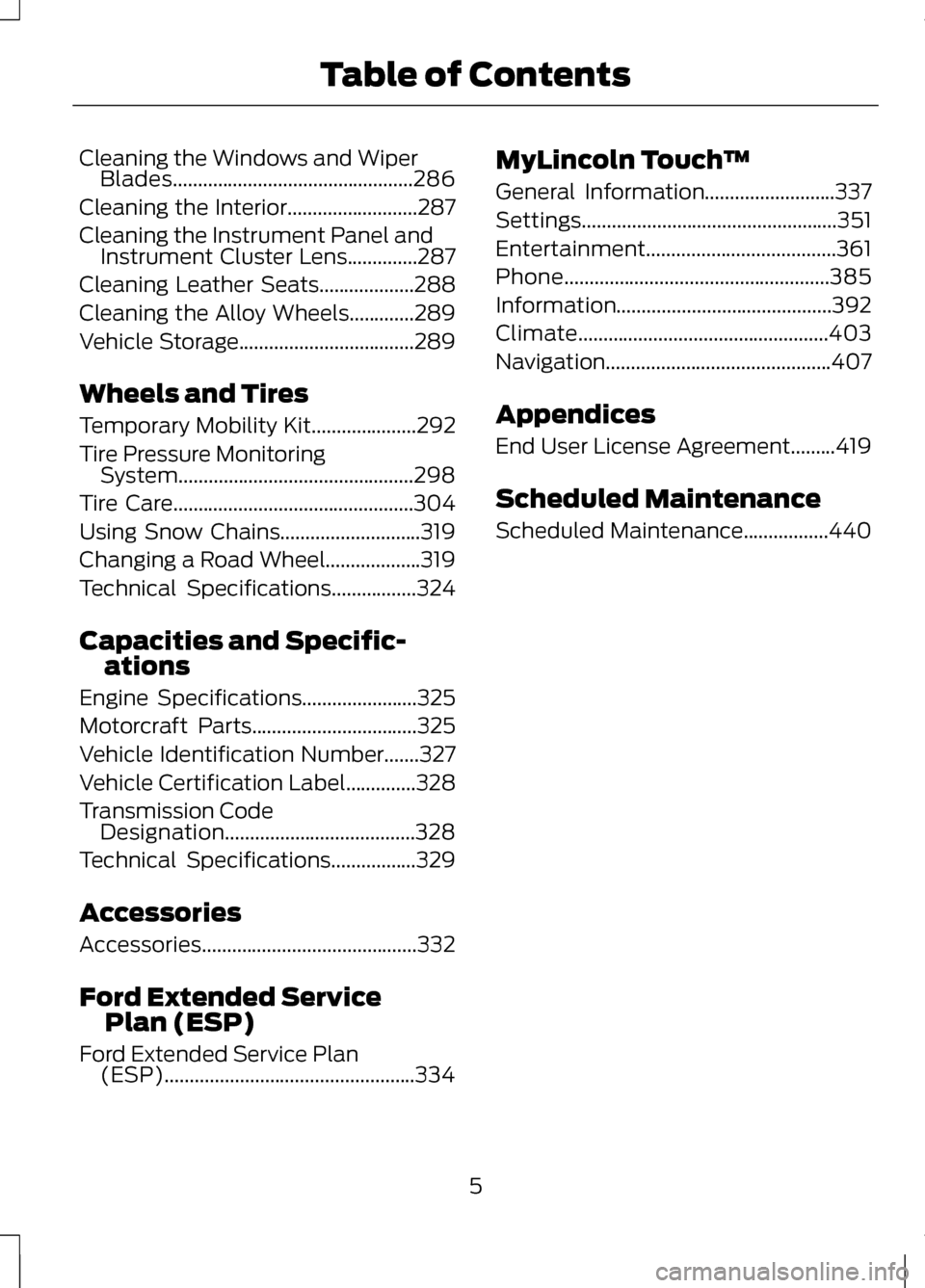
Cleaning the Windows and Wiper
Blades................................................286
Cleaning the Interior
..........................287
Cleaning the Instrument Panel and Instrument Cluster Lens..............287
Cleaning Leather Seats...................288
Cleaning the Alloy Wheels.............289
Vehicle Storage
...................................289
Wheels and Tires
Temporary Mobility Kit.....................292
Tire Pressure Monitoring System...............................................298
Tire Care
................................................304
Using Snow Chains............................319
Changing a Road Wheel
...................319
Technical Specifications
.................324
Capacities and Specific- ations
Engine Specifications
.......................325
Motorcraft Parts.................................325
Vehicle Identification Number
.......327
Vehicle Certification Label..............328
Transmission Code Designation......................................328
Technical Specifications
.................329
Accessories
Accessories...........................................332
Ford Extended Service Plan (ESP)
Ford Extended Service Plan (ESP)..................................................334 MyLincoln Touch
™
General Information
..........................337
Settings...................................................351
Entertainment......................................361
Phone.....................................................385
Information...........................................392
Climate..................................................403
Navigation.............................................407
Appendices
End User License Agreement.........419
Scheduled Maintenance
Scheduled Maintenance
.................440
5
Table of Contents
Page 126 of 474
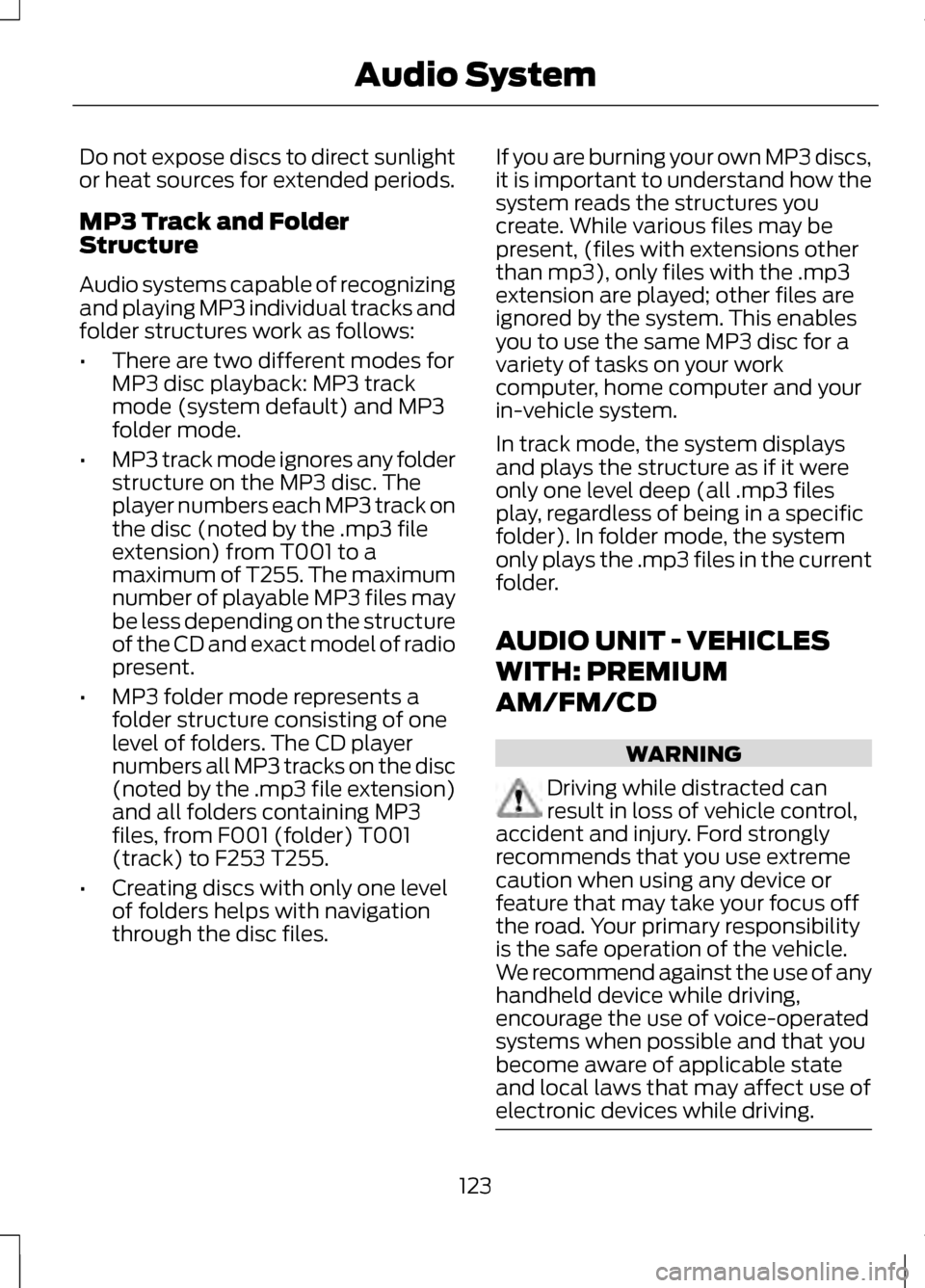
Do not expose discs to direct sunlight
or heat sources for extended periods.
MP3 Track and Folder
Structure
Audio systems capable of recognizing
and playing MP3 individual tracks and
folder structures work as follows:
•
There are two different modes for
MP3 disc playback: MP3 track
mode (system default) and MP3
folder mode.
• MP3 track mode ignores any folder
structure on the MP3 disc. The
player numbers each MP3 track on
the disc (noted by the .mp3 file
extension) from T001 to a
maximum of T255. The maximum
number of playable MP3 files may
be less depending on the structure
of the CD and exact model of radio
present.
• MP3 folder mode represents a
folder structure consisting of one
level of folders. The CD player
numbers all MP3 tracks on the disc
(noted by the .mp3 file extension)
and all folders containing MP3
files, from F001 (folder) T001
(track) to F253 T255.
• Creating discs with only one level
of folders helps with navigation
through the disc files. If you are burning your own MP3 discs,
it is important to understand how the
system reads the structures you
create. While various files may be
present, (files with extensions other
than mp3), only files with the .mp3
extension are played; other files are
ignored by the system. This enables
you to use the same MP3 disc for a
variety of tasks on your work
computer, home computer and your
in-vehicle system.
In track mode, the system displays
and plays the structure as if it were
only one level deep (all .mp3 files
play, regardless of being in a specific
folder). In folder mode, the system
only plays the .mp3 files in the current
folder.
AUDIO UNIT - VEHICLES
WITH: PREMIUM
AM/FM/CD
WARNING
Driving while distracted can
result in loss of vehicle control,
accident and injury. Ford strongly
recommends that you use extreme
caution when using any device or
feature that may take your focus off
the road. Your primary responsibility
is the safe operation of the vehicle.
We recommend against the use of any
handheld device while driving,
encourage the use of voice-operated
systems when possible and that you
become aware of applicable state
and local laws that may affect use of
electronic devices while driving. 123
Audio System
Page 340 of 474
GENERAL INFORMATION
WARNING
Driving while distracted can
result in loss of vehicle control,
accident and injury. Ford strongly
recommends that drivers use extreme
caution when using any device or
feature that may take their focus off
the road. Your primary responsibility
is the safe operation of the vehicle.
We recommend against the use of any
handheld device while driving,
encourage the use of voice-operated
systems when possible and that you
become aware of applicable state
and local laws that may affect use of
electronic devices while driving. Note:
Some features are not available
while the vehicle is moving.
Note: Your system is equipped with a
feature that allows you to access and
control audio features for 30 minutes
after the ignition has been turned off
(as long as no doors are opened).
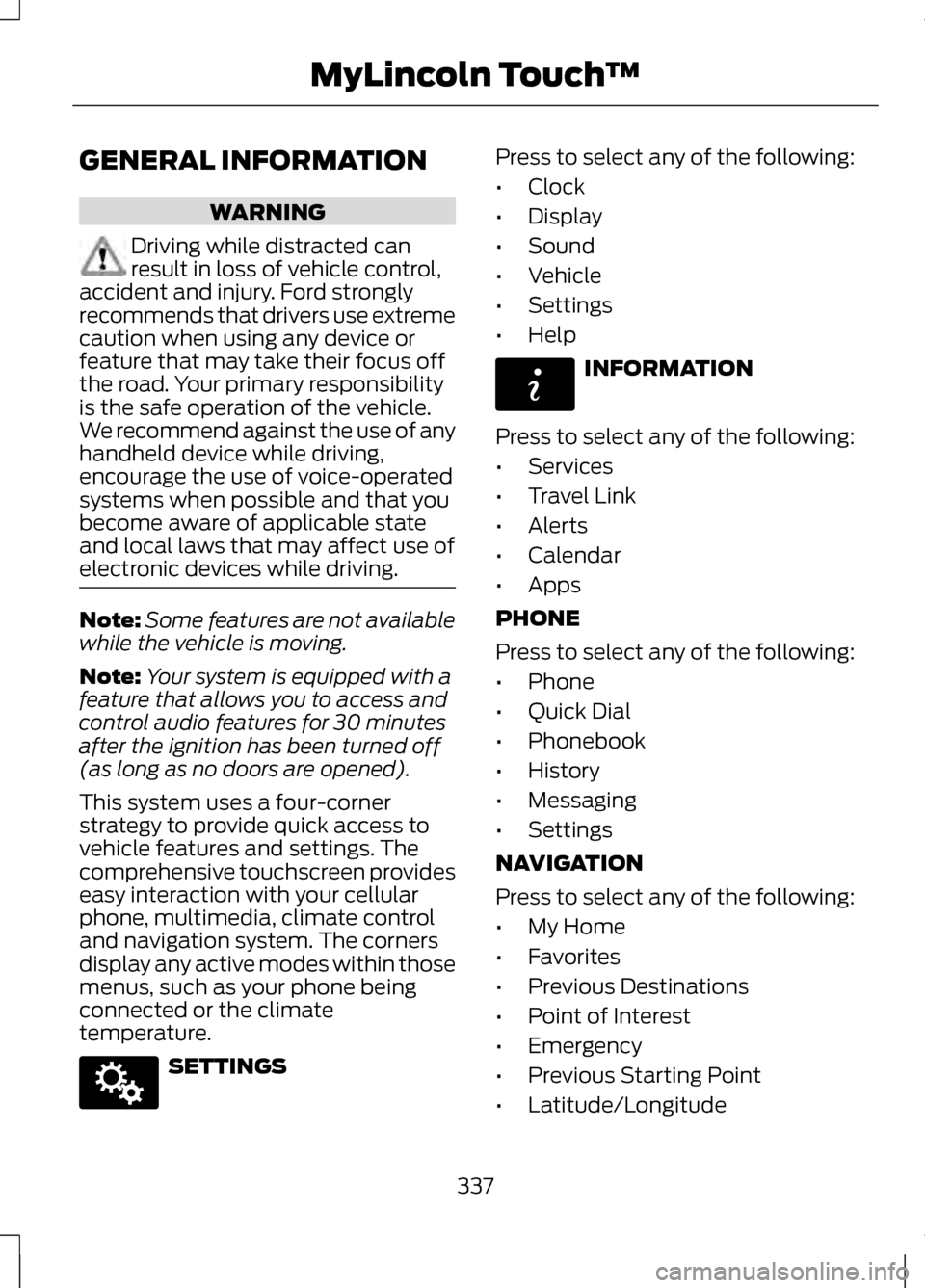
This system uses a four-corner
strategy to provide quick access to
vehicle features and settings. The
comprehensive touchscreen provides
easy interaction with your cellular
phone, multimedia, climate control
and navigation system. The corners
display any active modes within those
menus, such as your phone being
connected or the climate
temperature. SETTINGS Press to select any of the following:
•
Clock
• Display
• Sound
• Vehicle
• Settings
• Help INFORMATION
Press to select any of the following:
• Services
• Travel Link
• Alerts
• Calendar
• Apps
PHONE
Press to select any of the following:
• Phone
• Quick Dial
• Phonebook
• History
• Messaging
• Settings
NAVIGATION
Press to select any of the following:
• My Home
• Favorites
• Previous Destinations
• Point of Interest
• Emergency
• Previous Starting Point
• Latitude/Longitude
337
MyLincoln Touch
™E142607 E142608
Page 343 of 474
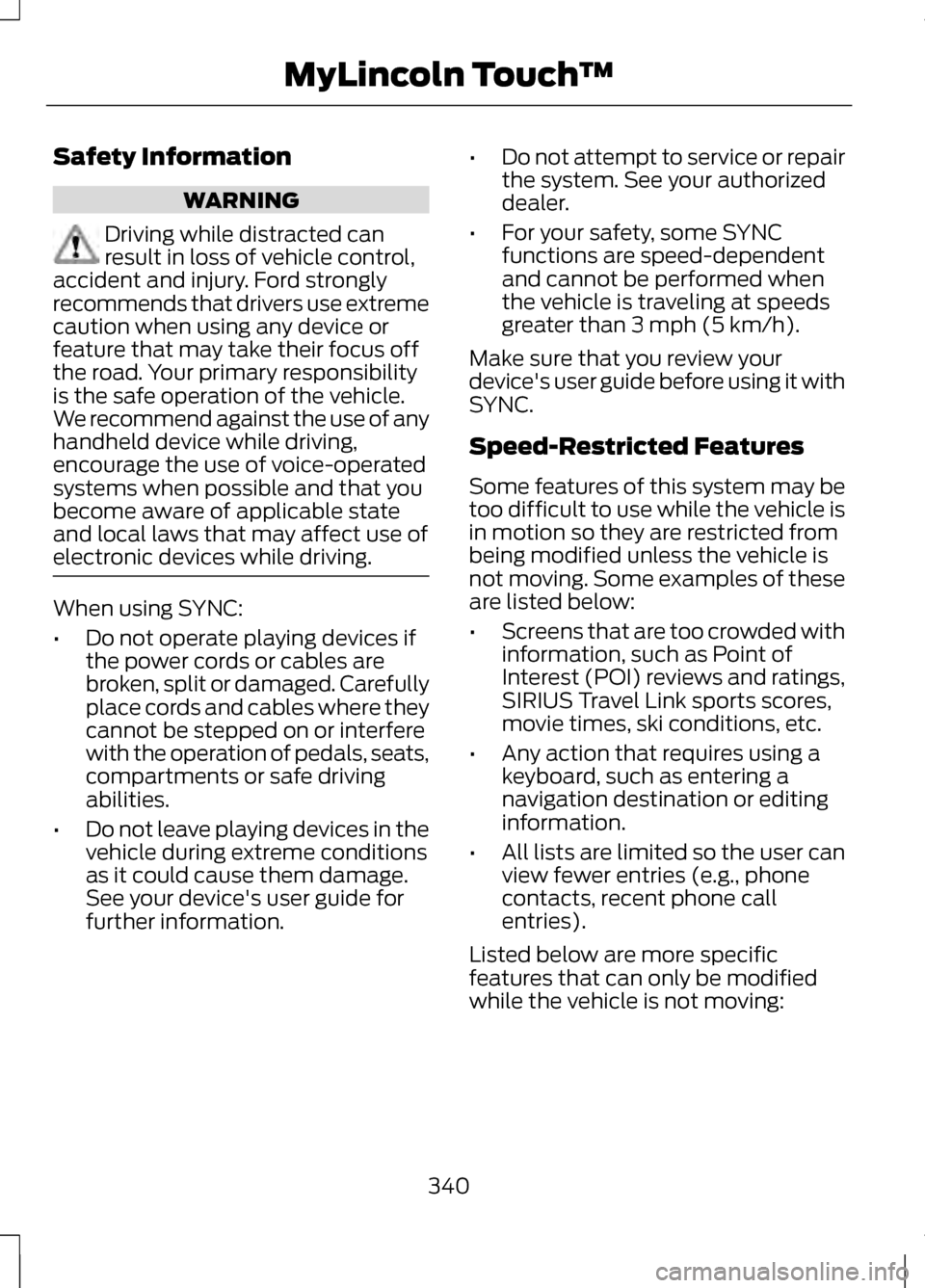
Safety Information
WARNING
Driving while distracted can
result in loss of vehicle control,
accident and injury. Ford strongly
recommends that drivers use extreme
caution when using any device or
feature that may take their focus off
the road. Your primary responsibility
is the safe operation of the vehicle.
We recommend against the use of any
handheld device while driving,
encourage the use of voice-operated
systems when possible and that you
become aware of applicable state
and local laws that may affect use of
electronic devices while driving. When using SYNC:
•
Do not operate playing devices if
the power cords or cables are
broken, split or damaged. Carefully
place cords and cables where they
cannot be stepped on or interfere
with the operation of pedals, seats,
compartments or safe driving
abilities.
• Do not leave playing devices in the
vehicle during extreme conditions
as it could cause them damage.
See your device's user guide for
further information. •
Do not attempt to service or repair
the system. See your authorized
dealer.
• For your safety, some SYNC
functions are speed-dependent
and cannot be performed when
the vehicle is traveling at speeds
greater than 3 mph (5 km/h).
Make sure that you review your
device's user guide before using it with
SYNC.
Speed-Restricted Features
Some features of this system may be
too difficult to use while the vehicle is
in motion so they are restricted from
being modified unless the vehicle is
not moving. Some examples of these
are listed below:
• Screens that are too crowded with
information, such as Point of
Interest (POI) reviews and ratings,
SIRIUS Travel Link sports scores,
movie times, ski conditions, etc.
• Any action that requires using a
keyboard, such as entering a
navigation destination or editing
information.
• All lists are limited so the user can
view fewer entries (e.g., phone
contacts, recent phone call
entries).
Listed below are more specific
features that can only be modified
while the vehicle is not moving:
340
MyLincoln Touch
™
Page 344 of 474
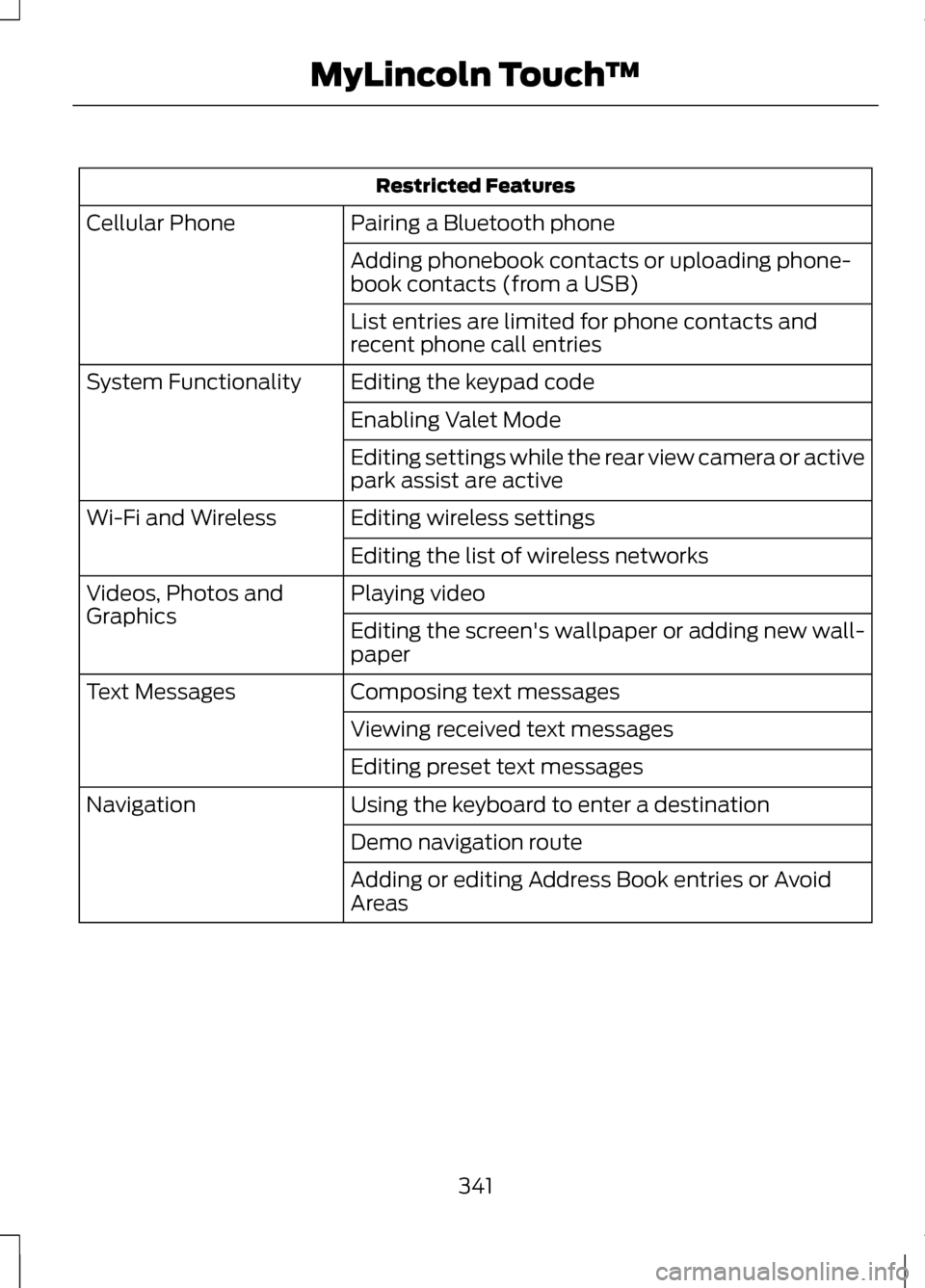
Restricted Features
Pairing a Bluetooth phone
Cellular Phone
Adding phonebook contacts or uploading phone-
book contacts (from a USB)
List entries are limited for phone contacts and
recent phone call entries
Editing the keypad code
System Functionality
Enabling Valet Mode
Editing settings while the rear view camera or active
park assist are active
Editing wireless settings
Wi-Fi and Wireless
Editing the list of wireless networks
Playing video
Videos, Photos and
Graphics
Editing the screen's wallpaper or adding new wall-
paper
Composing text messages
Text Messages
Viewing received text messages
Editing preset text messages
Using the keyboard to enter a destination
Navigation
Demo navigation route
Adding or editing Address Book entries or Avoid
Areas
341
MyLincoln Touch
™
Page 346 of 474
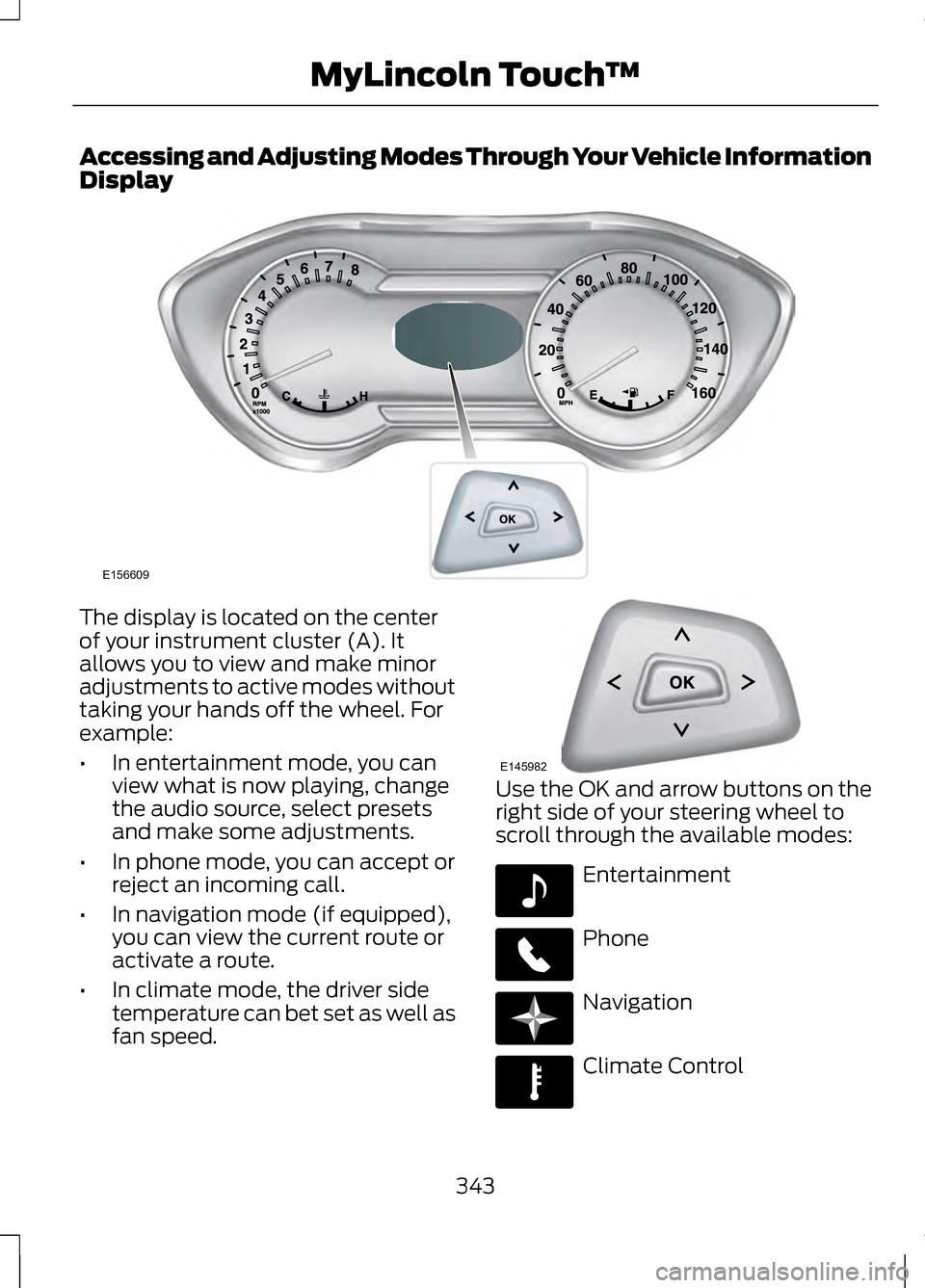
Accessing and Adjusting Modes Through Your Vehicle Information
Display
The display is located on the center
of your instrument cluster (A). It
allows you to view and make minor
adjustments to active modes without
taking your hands off the wheel. For
example:
•
In entertainment mode, you can
view what is now playing, change
the audio source, select presets
and make some adjustments.
• In phone mode, you can accept or
reject an incoming call.
• In navigation mode (if equipped),
you can view the current route or
activate a route.
• In climate mode, the driver side
temperature can bet set as well as
fan speed. Use the OK and arrow buttons on the
right side of your steering wheel to
scroll through the available modes:
Entertainment
Phone
Navigation
Climate Control
343
MyLincoln Touch
™E156609 E145982 E142611 E142609 E142610 E142612
Page 347 of 474
You can make selections from the
menu by using the OK button. The
selection menu expands and you are
allowed different options.
•
Press the up and down arrows to
scroll through the modes.
• Press the right arrow to enter the
mode.
• Press the left or right arrows to
make adjustments within the
chosen mode.
• Press OK to confirm your selection.
Note: If your vehicle is not equipped
with Navigation, Compass appears in
the display instead of Navigation. If you
press the right arrow to go into the
Compass menu, you can see the
compass graphic. The compass
displays the direction in which the
vehicle is traveling, not true direction
(i.e., if the vehicle is traveling west, the
middle of the compass graphic displays
west; north displays to the left of west
though its true direction is to the right
of west).
Using Voice Recognition
This system helps you control many
features using voice commands. This
allows you to keep your hands on the
wheel and focus on what is in front of
you. The system provides feedback
through audible tones, prompts,
questions and spoken confirmations
depending on the situation and the
chosen level of interaction (voice
settings). The system also asks short questions
(confirmation prompts) when it is not
sure of your request or when there are
multiple possible responses to your
request.
When using voice commands, words
and icons may also appear in the
lower left status bar indicating the
status of the voice session (i.e.,
listening, success, failed, paused or
try again).
How to Use Voice Commands with
Your System
Press the voice icon; after the
tone, speak your command
clearly.
What Can I Say?
To access the available voice
commands for the current session, do
one of the following:
• During a voice session, press the
help icon (?) in the lower left
status bar of the screen.
• Say "What can I say?" for an
on-screen listing of the possible
voice commands associated with
your current voice session.
• Press the voice icon. After the tone,
say "Help" for an audible list of
possible voice commands.
344
MyLincoln Touch
™E142599
Page 349 of 474
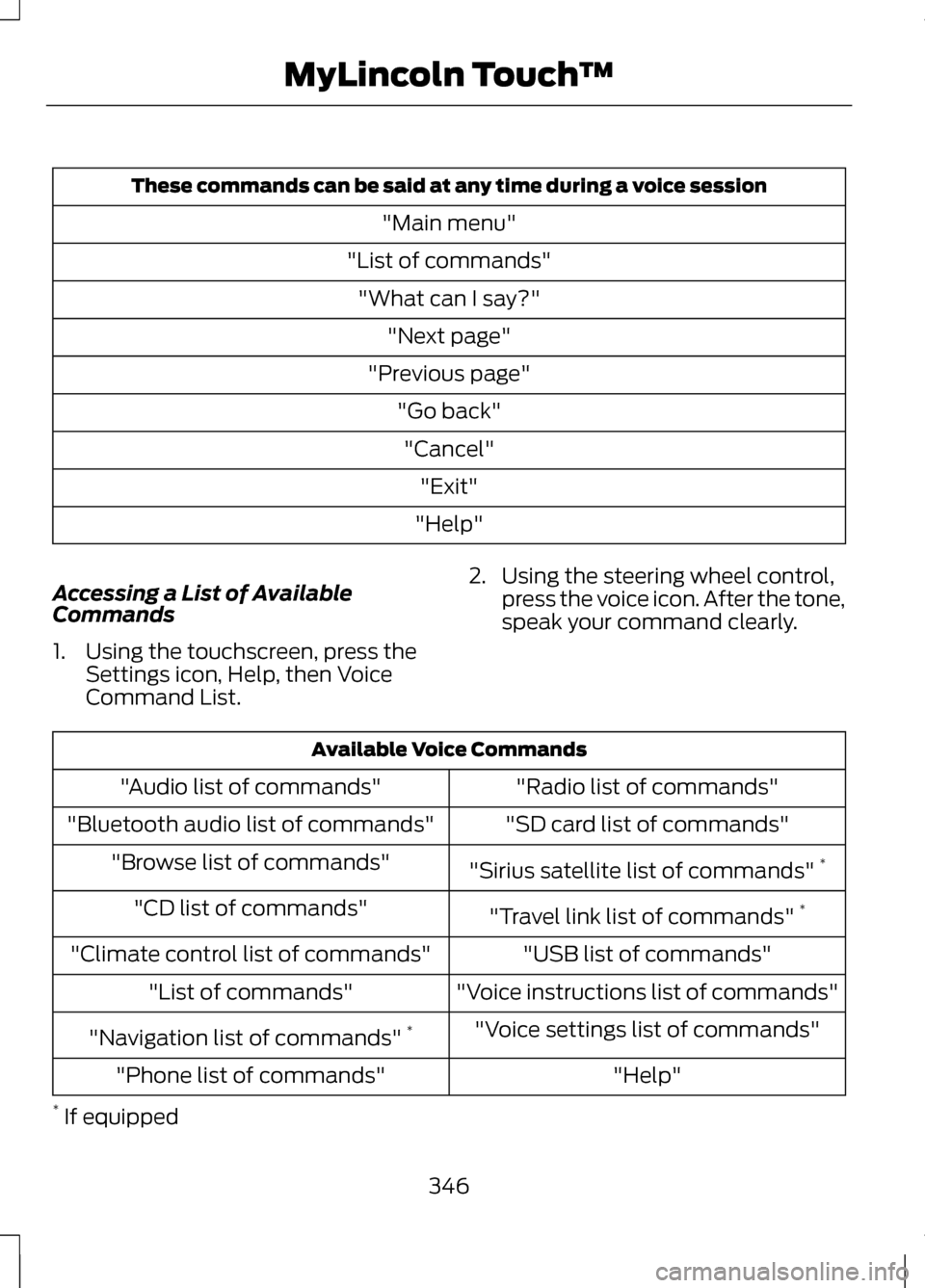
These commands can be said at any time during a voice session
"Main menu"
"List of commands" "What can I say?" "Next page"
"Previous page" "Go back""Cancel" "Exit"
"Help"
Accessing a List of Available
Commands
1. Using the touchscreen, press the Settings icon, Help, then Voice
Command List. 2. Using the steering wheel control,
press the voice icon. After the tone,
speak your command clearly. Available Voice Commands
"Radio list of commands"
"Audio list of commands"
"SD card list of commands"
"Bluetooth audio list of commands"
"Sirius satellite list of commands" *
"Browse list of commands"
"Travel link list of commands" *
"CD list of commands"
"USB list of commands"
"Climate control list of commands"
"Voice instructions list of commands"
"List of commands"
"Voice settings list of commands"
"Navigation list of commands" *
"Help"
"Phone list of commands"
* If equipped
346
MyLincoln Touch
™
Page 351 of 474
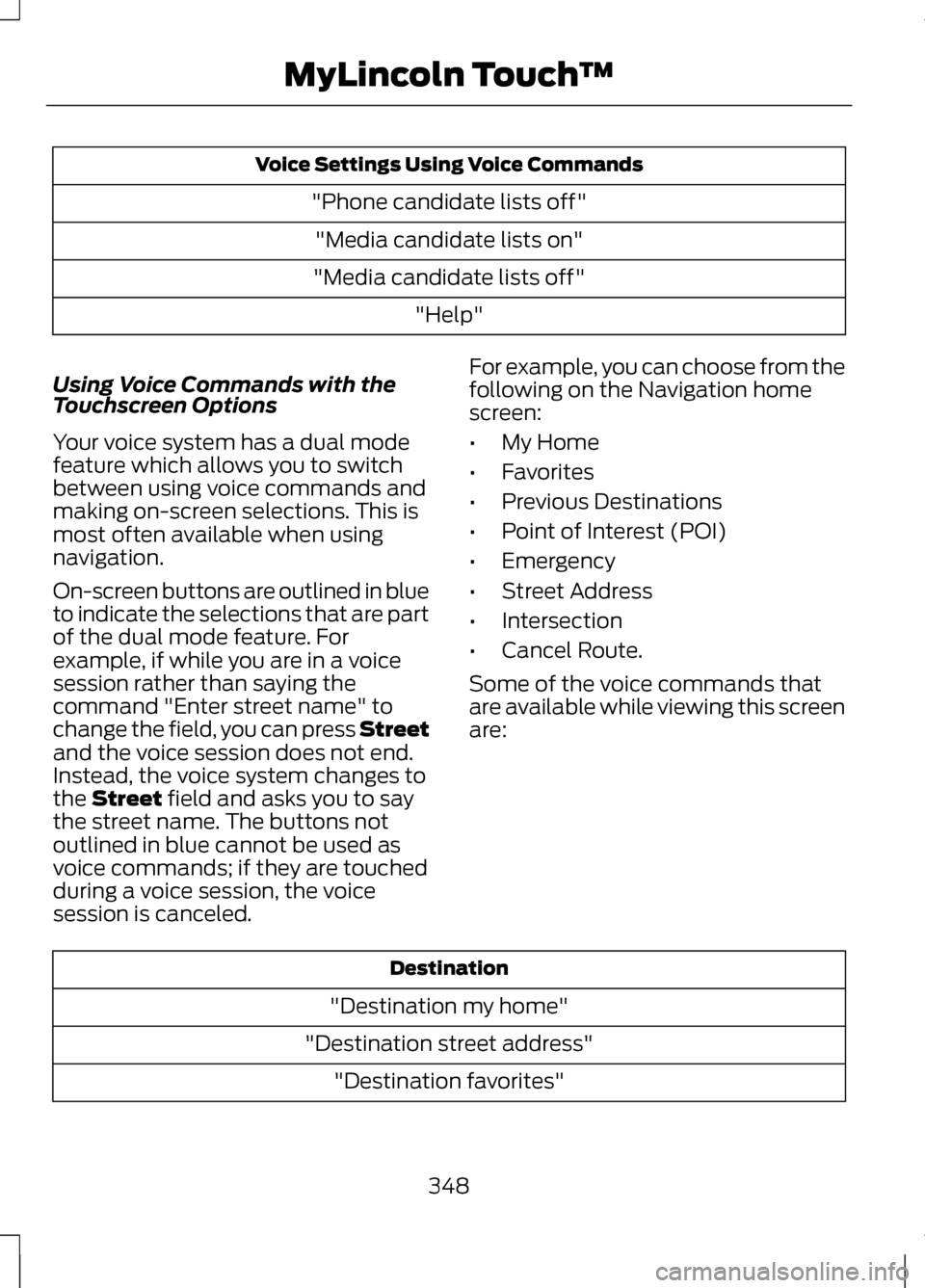
Voice Settings Using Voice Commands
"Phone candidate lists off""Media candidate lists on"
"Media candidate lists off" "Help"
Using Voice Commands with the
Touchscreen Options
Your voice system has a dual mode
feature which allows you to switch
between using voice commands and
making on-screen selections. This is
most often available when using
navigation.
On-screen buttons are outlined in blue
to indicate the selections that are part
of the dual mode feature. For
example, if while you are in a voice
session rather than saying the
command "Enter street name" to
change the field, you can press Street
and the voice session does not end.
Instead, the voice system changes to
the Street field and asks you to say
the street name. The buttons not
outlined in blue cannot be used as
voice commands; if they are touched
during a voice session, the voice
session is canceled. For example, you can choose from the
following on the Navigation home
screen:
•
My Home
• Favorites
• Previous Destinations
• Point of Interest (POI)
• Emergency
• Street Address
• Intersection
• Cancel Route.
Some of the voice commands that
are available while viewing this screen
are: Destination
"Destination my home"
"Destination street address" "Destination favorites"
348
MyLincoln Touch
™
Page 352 of 474
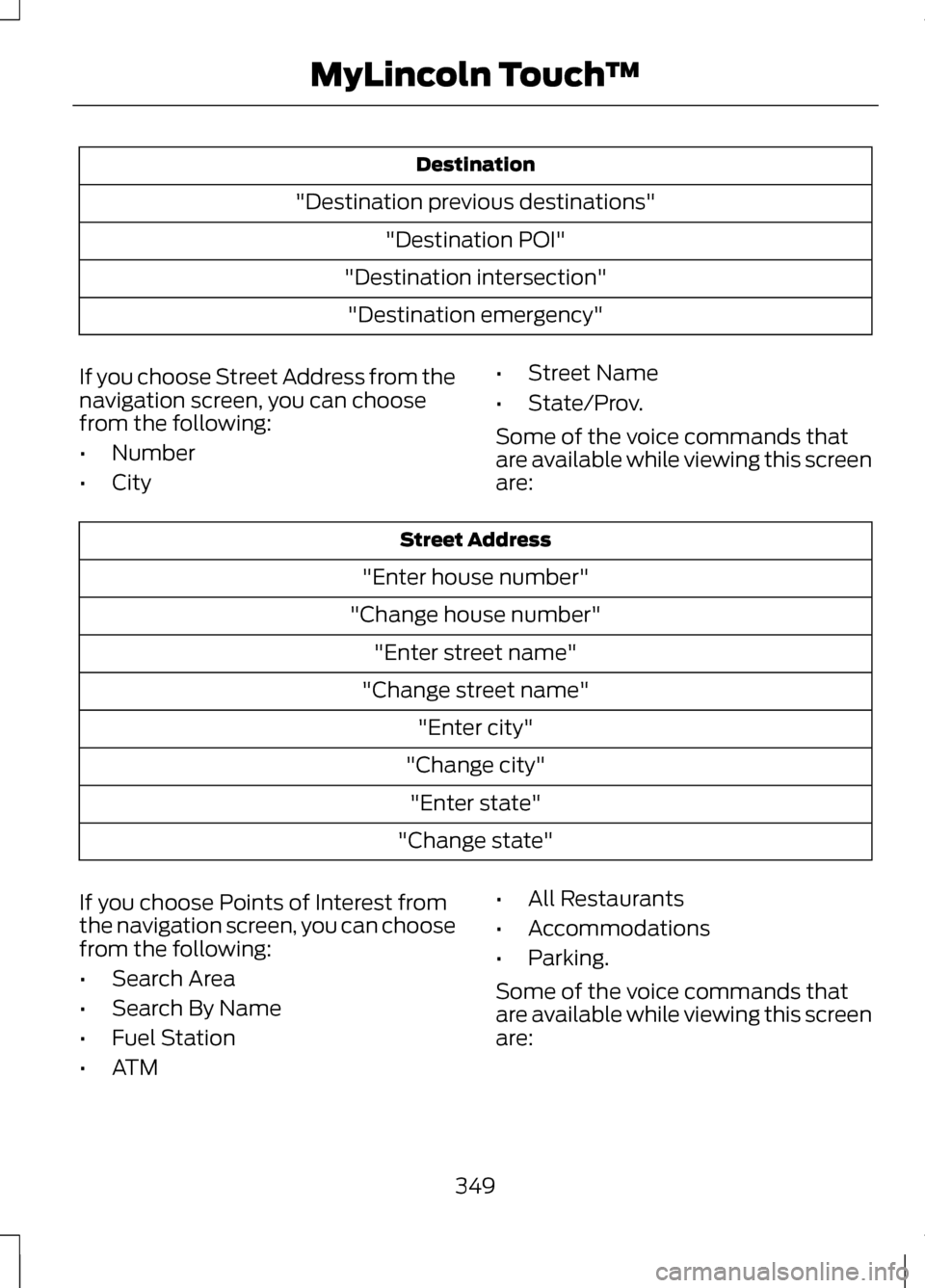
Destination
"Destination previous destinations" "Destination POI"
"Destination intersection" "Destination emergency"
If you choose Street Address from the
navigation screen, you can choose
from the following:
• Number
• City •
Street Name
• State/Prov.
Some of the voice commands that
are available while viewing this screen
are: Street Address
"Enter house number"
"Change house number" "Enter street name"
"Change street name" "Enter city"
"Change city" "Enter state"
"Change state"
If you choose Points of Interest from
the navigation screen, you can choose
from the following:
• Search Area
• Search By Name
• Fuel Station
• ATM •
All Restaurants
• Accommodations
• Parking.
Some of the voice commands that
are available while viewing this screen
are:
349
MyLincoln Touch
™