navigation LINCOLN MKZ 2013 User Guide
[x] Cancel search | Manufacturer: LINCOLN, Model Year: 2013, Model line: MKZ, Model: LINCOLN MKZ 2013Pages: 474, PDF Size: 3.79 MB
Page 353 of 474
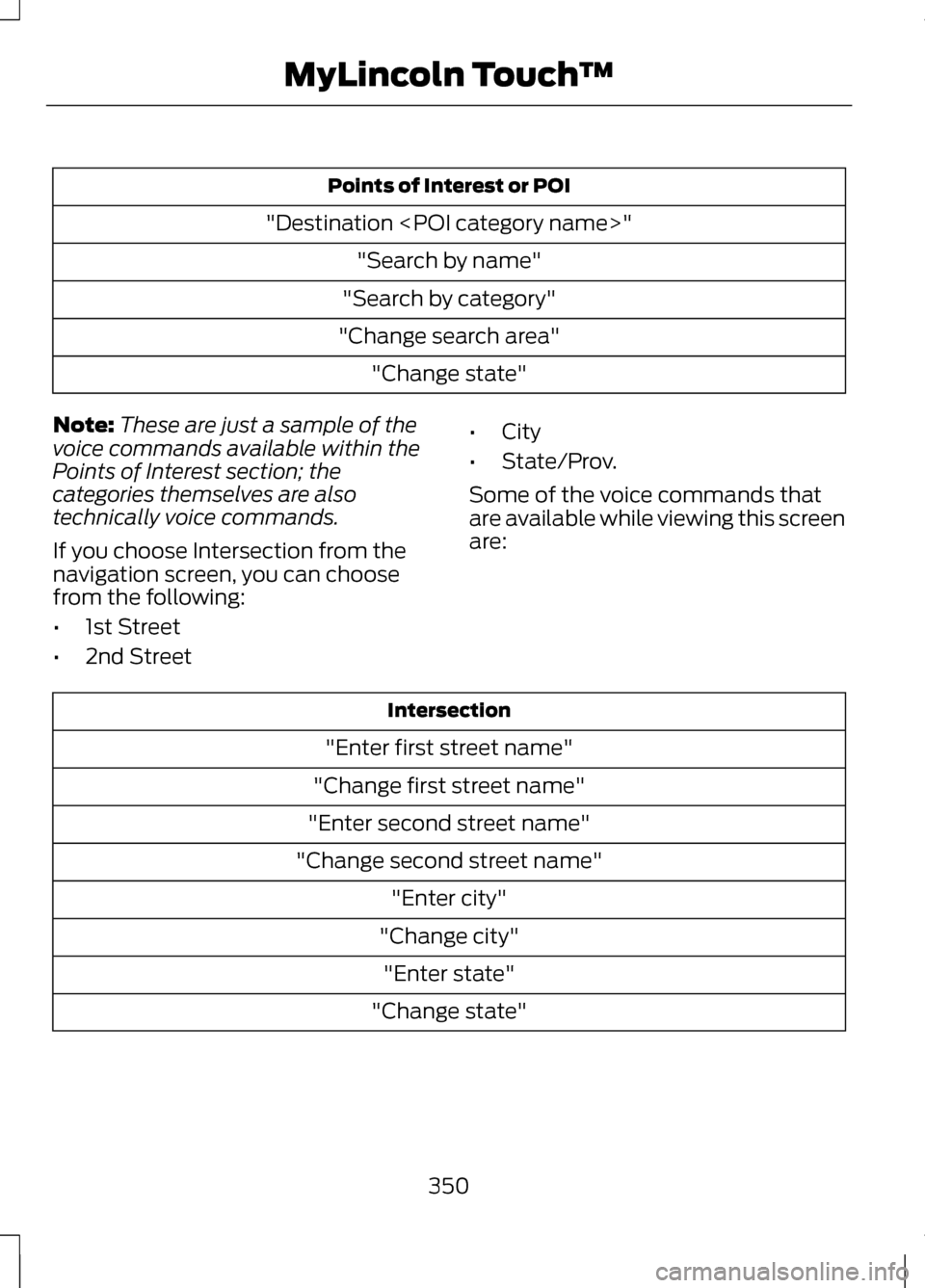
Points of Interest or POI
"Destination
"Search by category"
"Change search area" "Change state"
Note: These are just a sample of the
voice commands available within the
Points of Interest section; the
categories themselves are also
technically voice commands.
If you choose Intersection from the
navigation screen, you can choose
from the following:
• 1st Street
• 2nd Street •
City
• State/Prov.
Some of the voice commands that
are available while viewing this screen
are: Intersection
"Enter first street name"
"Change first street name"
"Enter second street name"
"Change second street name" "Enter city"
"Change city" "Enter state"
"Change state"
350
MyLincoln Touch
™
Page 356 of 474
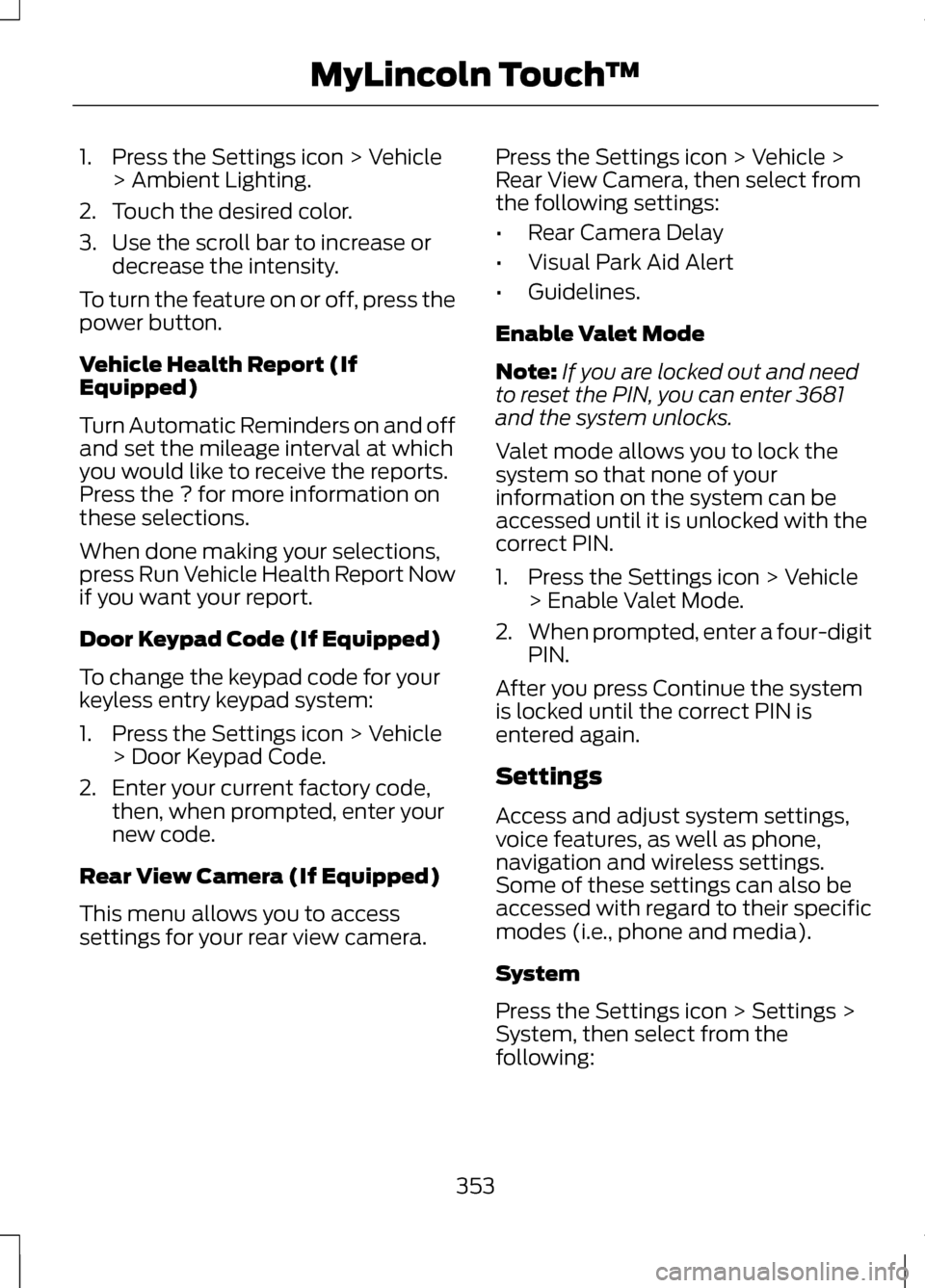
1. Press the Settings icon > Vehicle
> Ambient Lighting.
2. Touch the desired color.
3. Use the scroll bar to increase or decrease the intensity.
To turn the feature on or off, press the
power button.
Vehicle Health Report (If
Equipped)
Turn Automatic Reminders on and off
and set the mileage interval at which
you would like to receive the reports.
Press the ? for more information on
these selections.
When done making your selections,
press Run Vehicle Health Report Now
if you want your report.
Door Keypad Code (If Equipped)
To change the keypad code for your
keyless entry keypad system:
1. Press the Settings icon > Vehicle > Door Keypad Code.
2. Enter your current factory code, then, when prompted, enter your
new code.
Rear View Camera (If Equipped)
This menu allows you to access
settings for your rear view camera. Press the Settings icon > Vehicle >
Rear View Camera, then select from
the following settings:
•
Rear Camera Delay
• Visual Park Aid Alert
• Guidelines.
Enable Valet Mode
Note: If you are locked out and need
to reset the PIN, you can enter 3681
and the system unlocks.
Valet mode allows you to lock the
system so that none of your
information on the system can be
accessed until it is unlocked with the
correct PIN.
1. Press the Settings icon > Vehicle > Enable Valet Mode.
2. When prompted, enter a four-digit
PIN.
After you press Continue the system
is locked until the correct PIN is
entered again.
Settings
Access and adjust system settings,
voice features, as well as phone,
navigation and wireless settings.
Some of these settings can also be
accessed with regard to their specific
modes (i.e., phone and media).
System
Press the Settings icon > Settings >
System, then select from the
following:
353
MyLincoln Touch
™
Page 359 of 474
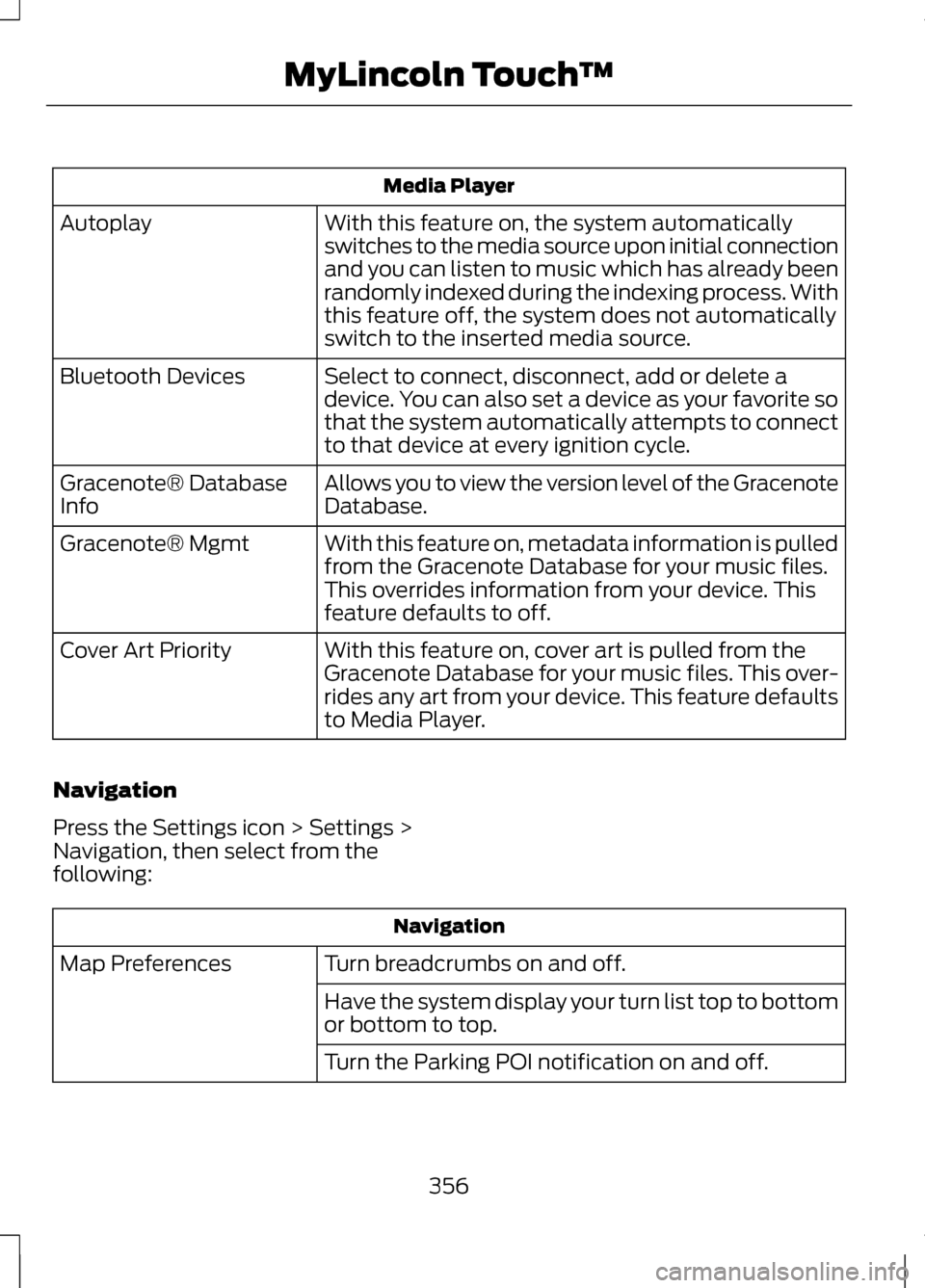
Media Player
With this feature on, the system automatically
switches to the media source upon initial connection
and you can listen to music which has already been
randomly indexed during the indexing process. With
this feature off, the system does not automatically
switch to the inserted media source.
Autoplay
Select to connect, disconnect, add or delete a
device. You can also set a device as your favorite so
that the system automatically attempts to connect
to that device at every ignition cycle.
Bluetooth Devices
Allows you to view the version level of the Gracenote
Database.
Gracenote® Database
Info
With this feature on, metadata information is pulled
from the Gracenote Database for your music files.
This overrides information from your device. This
feature defaults to off.
Gracenote® Mgmt
With this feature on, cover art is pulled from the
Gracenote Database for your music files. This over-
rides any art from your device. This feature defaults
to Media Player.
Cover Art Priority
Navigation
Press the Settings icon > Settings >
Navigation, then select from the
following: Navigation
Turn breadcrumbs on and off.
Map Preferences
Have the system display your turn list top to bottom
or bottom to top.
Turn the Parking POI notification on and off.
356
MyLincoln Touch
™
Page 360 of 474
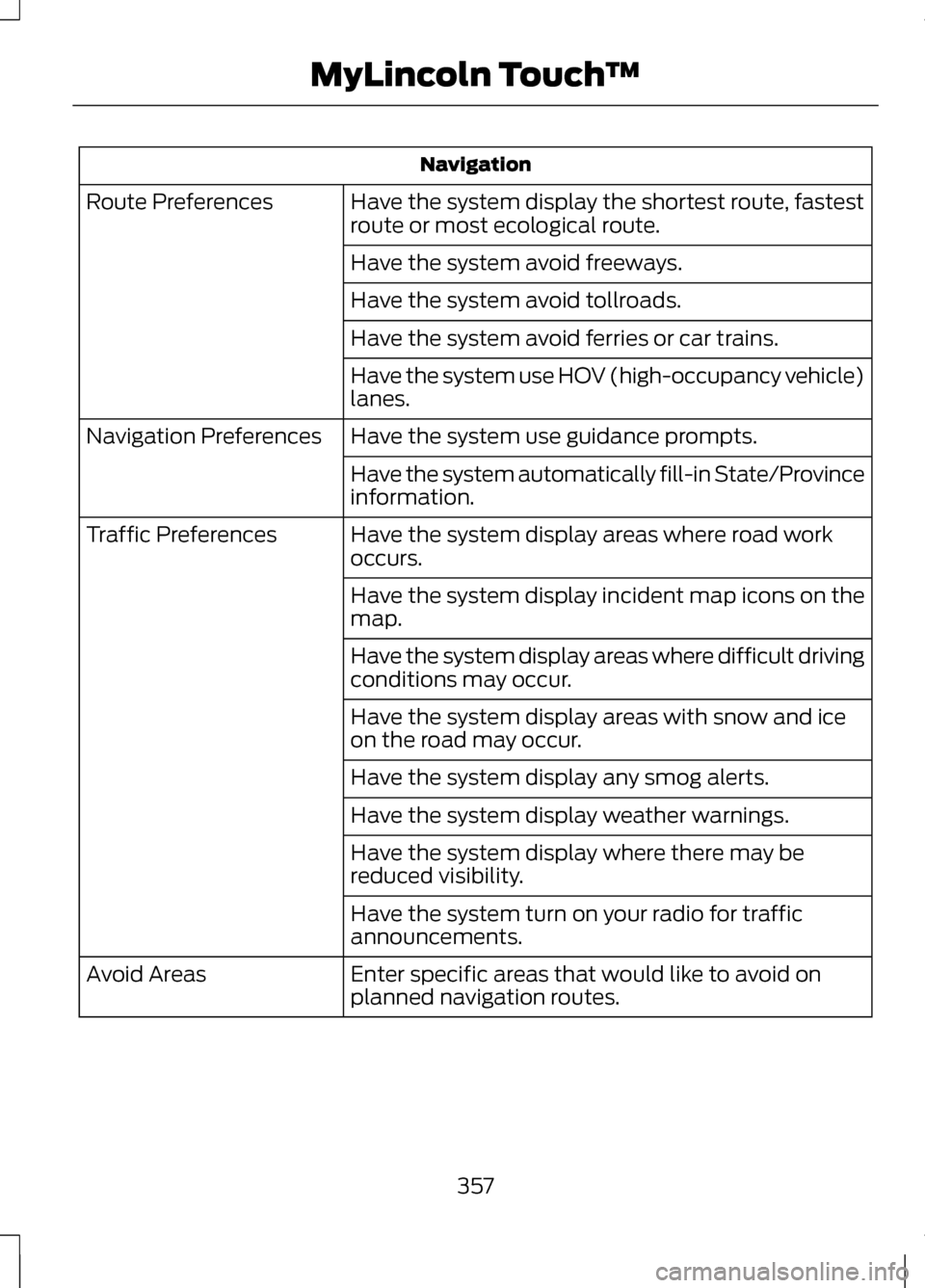
Navigation
Have the system display the shortest route, fastest
route or most ecological route.
Route Preferences
Have the system avoid freeways.
Have the system avoid tollroads.
Have the system avoid ferries or car trains.
Have the system use HOV (high-occupancy vehicle)
lanes.
Have the system use guidance prompts.
Navigation Preferences
Have the system automatically fill-in State/Province
information.
Have the system display areas where road work
occurs.
Traffic Preferences
Have the system display incident map icons on the
map.
Have the system display areas where difficult driving
conditions may occur.
Have the system display areas with snow and ice
on the road may occur.
Have the system display any smog alerts.
Have the system display weather warnings.
Have the system display where there may be
reduced visibility.
Have the system turn on your radio for traffic
announcements.
Enter specific areas that would like to avoid on
planned navigation routes.
Avoid Areas
357
MyLincoln Touch
™
Page 363 of 474
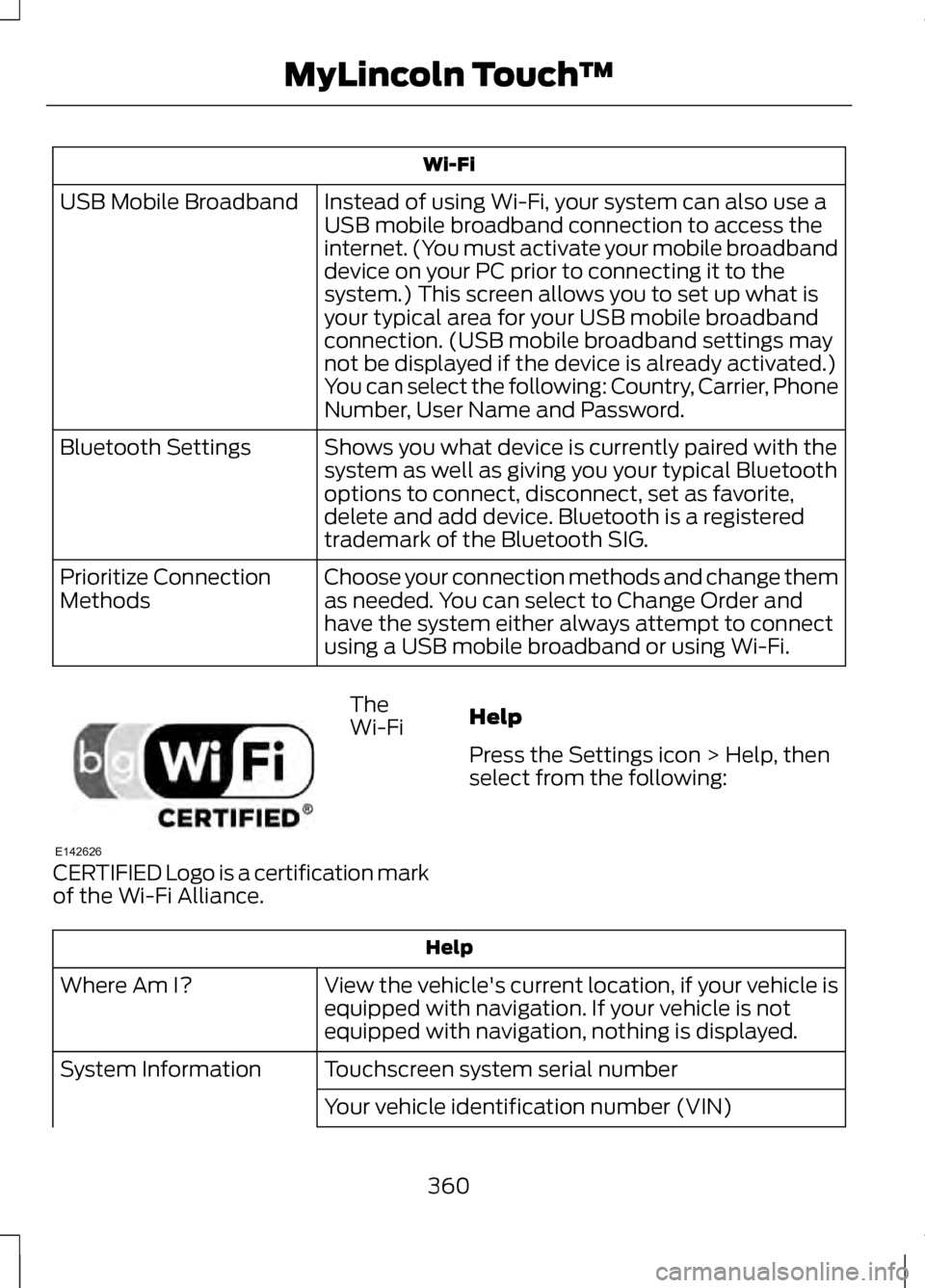
Wi-Fi
Instead of using Wi-Fi, your system can also use a
USB mobile broadband connection to access the
internet. (You must activate your mobile broadband
device on your PC prior to connecting it to the
system.) This screen allows you to set up what is
your typical area for your USB mobile broadband
connection. (USB mobile broadband settings may
not be displayed if the device is already activated.)
You can select the following: Country, Carrier, Phone
Number, User Name and Password.
USB Mobile Broadband
Shows you what device is currently paired with the
system as well as giving you your typical Bluetooth
options to connect, disconnect, set as favorite,
delete and add device. Bluetooth is a registered
trademark of the Bluetooth SIG.
Bluetooth Settings
Choose your connection methods and change them
as needed. You can select to Change Order and
have the system either always attempt to connect
using a USB mobile broadband or using Wi-Fi.
Prioritize Connection
Methods The
Wi-Fi
CERTIFIED Logo is a certification mark
of the Wi-Fi Alliance. Help
Press the Settings icon > Help, then
select from the following:Help
View the vehicle's current location, if your vehicle is
equipped with navigation. If your vehicle is not
equipped with navigation, nothing is displayed.
Where Am I?
Touchscreen system serial number
System Information
Your vehicle identification number (VIN)
360
MyLincoln Touch
™E142626
Page 364 of 474
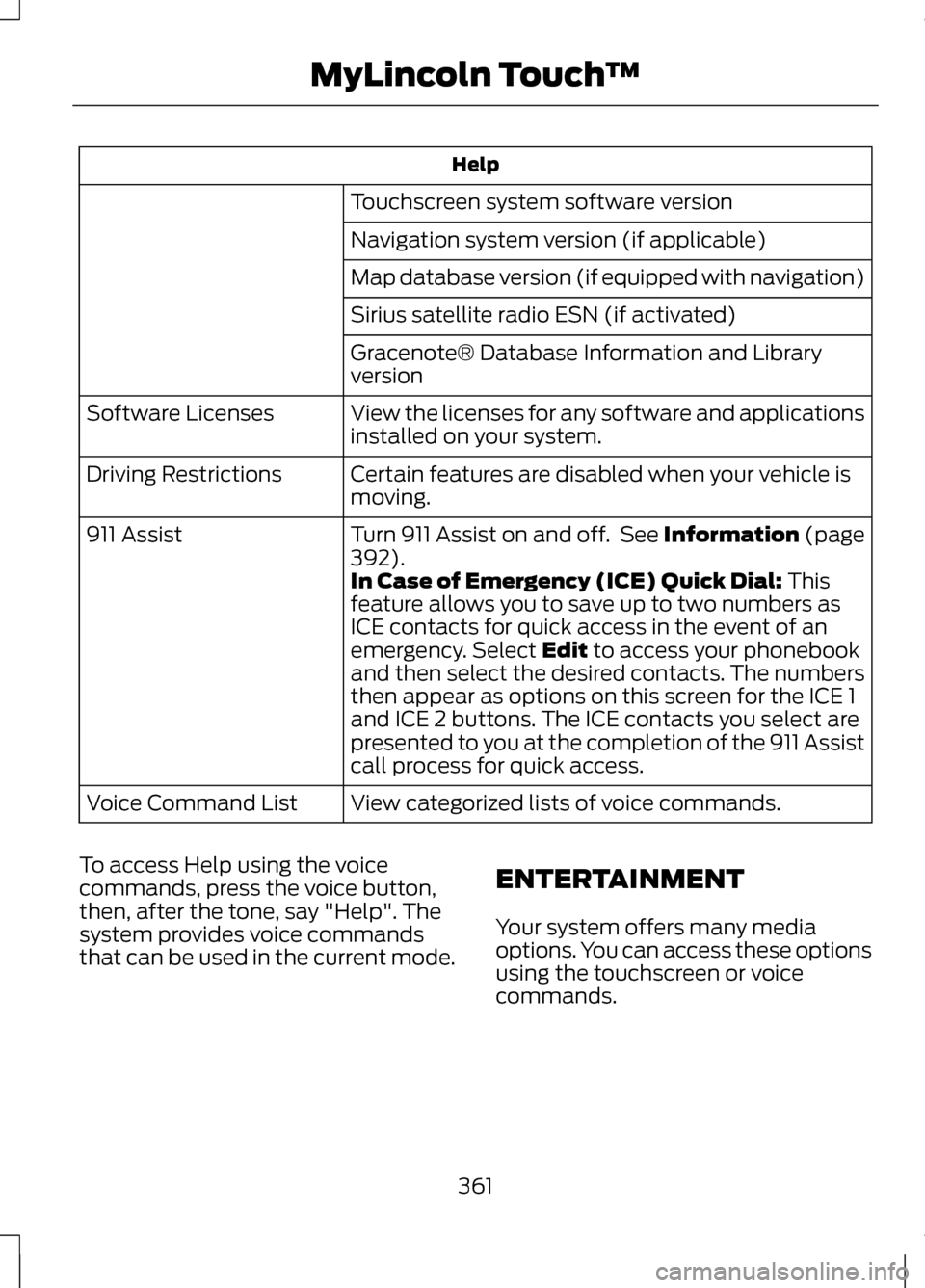
Help
Touchscreen system software version
Navigation system version (if applicable)
Map database version (if equipped with navigation)
Sirius satellite radio ESN (if activated)
Gracenote® Database Information and Library
version
View the licenses for any software and applications
installed on your system.
Software Licenses
Certain features are disabled when your vehicle is
moving.
Driving Restrictions
Turn 911 Assist on and off. See Information (page
392).
911 Assist
In Case of Emergency (ICE) Quick Dial: This
feature allows you to save up to two numbers as
ICE contacts for quick access in the event of an
emergency. Select
Edit to access your phonebook
and then select the desired contacts. The numbers
then appear as options on this screen for the ICE 1
and ICE 2 buttons. The ICE contacts you select are
presented to you at the completion of the 911 Assist
call process for quick access.
View categorized lists of voice commands.
Voice Command List
To access Help using the voice
commands, press the voice button,
then, after the tone, say "Help". The
system provides voice commands
that can be used in the current mode. ENTERTAINMENT
Your system offers many media
options. You can access these options
using the touchscreen or voice
commands.
361
MyLincoln Touch
™
Page 380 of 474
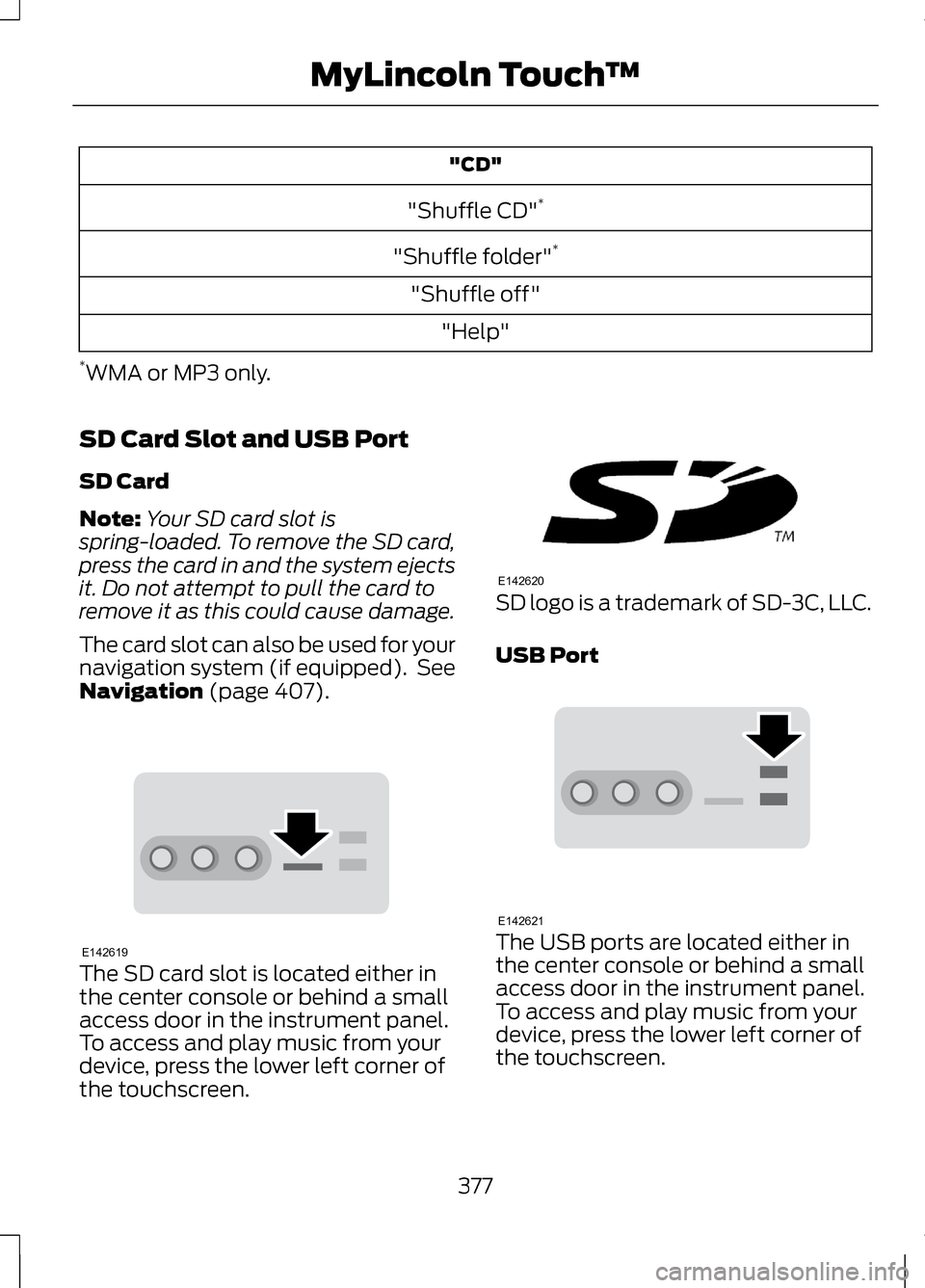
"CD"
"Shuffle CD" *
"Shuffle folder" *
"Shuffle off" "Help"
* WMA or MP3 only.
SD Card Slot and USB Port
SD Card
Note: Your SD card slot is
spring-loaded. To remove the SD card,
press the card in and the system ejects
it. Do not attempt to pull the card to
remove it as this could cause damage.
The card slot can also be used for your
navigation system (if equipped). See
Navigation (page 407). The SD card slot is located either in
the center console or behind a small
access door in the instrument panel.
To access and play music from your
device, press the lower left corner of
the touchscreen. SD logo is a trademark of SD-3C, LLC.
USB Port
The USB ports are located either in
the center console or behind a small
access door in the instrument panel.
To access and play music from your
device, press the lower left corner of
the touchscreen.
377
MyLincoln Touch
™E142619 E142620 E142621
Page 395 of 474
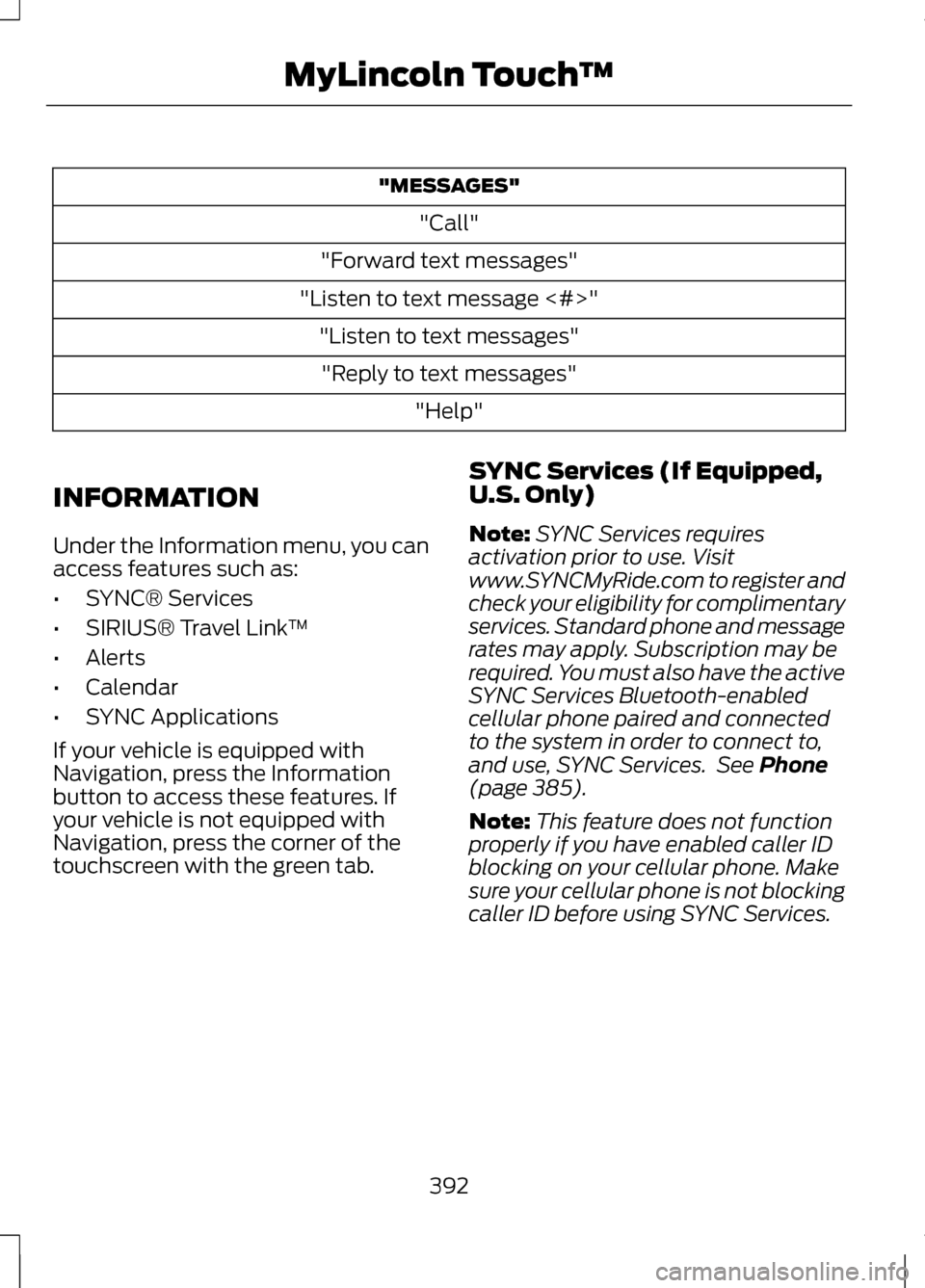
"MESSAGES"
"Call"
"Forward text messages"
"Listen to text message <#>" "Listen to text messages""Reply to text messages" "Help"
INFORMATION
Under the Information menu, you can
access features such as:
• SYNC® Services
• SIRIUS® Travel Link ™
• Alerts
• Calendar
• SYNC Applications
If your vehicle is equipped with
Navigation, press the Information
button to access these features. If
your vehicle is not equipped with
Navigation, press the corner of the
touchscreen with the green tab. SYNC Services (If Equipped,
U.S. Only)
Note:
SYNC Services requires
activation prior to use. Visit
www.SYNCMyRide.com to register and
check your eligibility for complimentary
services. Standard phone and message
rates may apply. Subscription may be
required. You must also have the active
SYNC Services Bluetooth-enabled
cellular phone paired and connected
to the system in order to connect to,
and use, SYNC Services. See Phone
(page 385).
Note: This feature does not function
properly if you have enabled caller ID
blocking on your cellular phone. Make
sure your cellular phone is not blocking
caller ID before using SYNC Services.
392
MyLincoln Touch
™
Page 396 of 474
Note:
The driver is ultimately
responsible for the safe operation of
the vehicle, and therefore, must
evaluate whether it is safe to follow
the suggested directions. Any
navigation features are provided only
as an aid. Make your driving decisions
based on your observations of local
conditions and existing traffic
regulations. Do not follow the route
suggestions if doing so would result in
an unsafe or illegal maneuver, if you
would be placed in an unsafe situation,
or if you would be directed into an area
that you consider unsafe. Maps used
by this system may be inaccurate
because of errors, changes in roads,
traffic conditions or driving conditions.
Note: When you connect, the service
uses GPS technology and advanced
vehicle sensors to collect the vehicle's
current location, travel direction and
speed to help provide you with the
directions, traffic reports, or business
searches you request. Further, to
provide the services you request and
for continuous improvement, the
service may collect and record call
details and voice communications. For
more information, see SYNC Services
Terms and Conditions at
www.SYNCMyRide.com. If you do not
want Ford or its service providers to
collect the vehicle travel information
or other information identified in the
Terms and Conditions, do not activate
or use the service. SYNC Services uses advanced vehicle
sensors, integrated GPS technology
and comprehensive map and traffic
data, to give you personalized traffic
reports, precise turn-by-turn
directions, business search, news,
sports, weather and more. For a
complete list of services, or to learn
more, please visit
www.SYNCMyRide.com.
Connecting to SYNC Services
Using Voice Commands
1. Press the voice button.
2. When prompted, say "Services".
This initiates an outgoing call to
SYNC Services using your paired
and connected Bluetooth-enabled
cellular phone.
3. Once you are connected to the service, follow the voice prompts
to request the desired service, such
as "Traffic" or "Directions". You
can also say "What are my
choices?" to receive a complete
list of available services from
which to choose.
4. Say "Services" to return to the Services main menu or for help,
say "Help".
Connecting to SYNC Services
Using the Touchscreen
If your vehicle is equipped with
Navigation, press the Information
button.
If your vehicle is not equipped with
Navigation, press the green tab on
your touchscreen.
393
MyLincoln Touch
™
Page 397 of 474
1. Select Connect to Services to
initiate an outgoing call to SYNC
Services using your phone.
2. Once connected, follow the voice prompts to request your desired
Service, such as "Traffic" or
"Directions". You can also say
"What are my choices?" to receive
a complete list of available
services from which to choose.
3. To return to the Services menu, say
"Services" or for help, say "Help".
Receiving Turn-by-Turn Directions
1. When connected to SYNC Services, say "Directions" or
"Business search". To find the
closest business or type of
business to your current location,
just say "Business search" and
then "Search near me". If you need
further assistance in finding a
location you can say "Operator" at
any time within a Directions or
Business search to speak with a
live operator. You may also be
prompted to speak with an
operator when the automatic
system has difficulty matching
your voice request. The live
operator can assist you by
searching for businesses by name
or by category, residential
addresses by street address or by
name or specific street
intersections. Operator Assist is a
feature of your SYNC Services
subscription. For more information
on Operator Assist, visit
www.SYNCMyRide.com/support. 2.
Follow the voice prompts to select
your Destination. After the route
download is complete, the phone
call is automatically ended.
If your vehicle is not equipped with
Navigation:
• Turn-by-turn directions appear in
the right vehicle information
display, in the status bar of your
touchscreen system and also on
the SYNC Services screen. You
also receive driving instructions
from audible prompts.
• When on an active route, you can
select Route Summary or Route
Status
using the touchscreen
controls or voice commands to
view the
Route Summary Turn
List or the Route Status ETA.
You can also turn voice guidance
on or off, cancel the route or
update the route.
If you miss a turn, SYNC automatically
asks if you want the route updated.
Just say, "Yes" when prompted and a
new route is delivered to your vehicle.
If your vehicle is equipped with
Navigation, SYNC Services downloads
your requested destination to the
navigation system. The navigation
system then calculates the route and
provides driving instructions. See
Navigation
(page 407).
Disconnecting from SYNC Services
1. Press and hold the hang-up phone
button on the steering wheel.
2. Say "Good-bye" from the SYNC Services main menu.
394
MyLincoln Touch
™