roof LINCOLN MKZ 2013 User Guide
[x] Cancel search | Manufacturer: LINCOLN, Model Year: 2013, Model line: MKZ, Model: LINCOLN MKZ 2013Pages: 474, PDF Size: 3.79 MB
Page 249 of 474
The BBB AUTO LINE program consists
of two parts – mediation and
arbitration. During mediation, a
representative of the BBB will contact
both you and Ford Motor Company to
explore options for settlement of the
claim. If an agreement is not reached
during mediation or you do not want
to participate in mediation, and if your
claim is eligible, you may participate
in the arbitration process. An
arbitration hearing will be scheduled
so that you can present your case in
an informal setting before an impartial
person. The arbitrator will consider
the testimony provided and make a
decision after the hearing.
Disputes submitted to the BBB AUTO
LINE program are usually decided
within forty days after you file your
claim with the BBB. You are not bound
by the decision, and may reject the
decision and proceed to court where
all findings of the BBB Auto Line
dispute, and decision, are admissible
in the court action. Should you choose
to accept the BBB AUTO LINE
decision, Ford is then bound by the
decision, and must comply with the
decision within 30 days of receipt of
your acceptance letter.
BBB AUTO LINE Application: Using
the information provided below,
please call or write to request a
program application. You will be
asked for your name and address,
general information about your new
vehicle, information about your
warranty concerns, and any steps you
have already taken to try to resolve
them. A Customer Claim Form will be
mailed that will need to be
completed, signed and returned to the
BBB along with proof of ownership.
Upon receipt, the BBB will review the
claim for eligibility under the Program
Summary Guidelines.
You can get more information by
calling BBB AUTO LINE at
1-800-955-5100, or writing to:
BBB AUTO LINE
4200 Wilson Boulevard, Suite 800
Arlington, Virginia 22203-1833
BBB AUTO LINE applications can also
be requested by calling the Ford Motor
Company Customer Relationship
Center at 1-800-392-3673.
Note:
Ford Motor Company reserves
the right to change eligibility
limitations, modify procedures, or to
discontinue this process at any time
without notice and without obligation.
246
Customer Assistance
Page 261 of 474
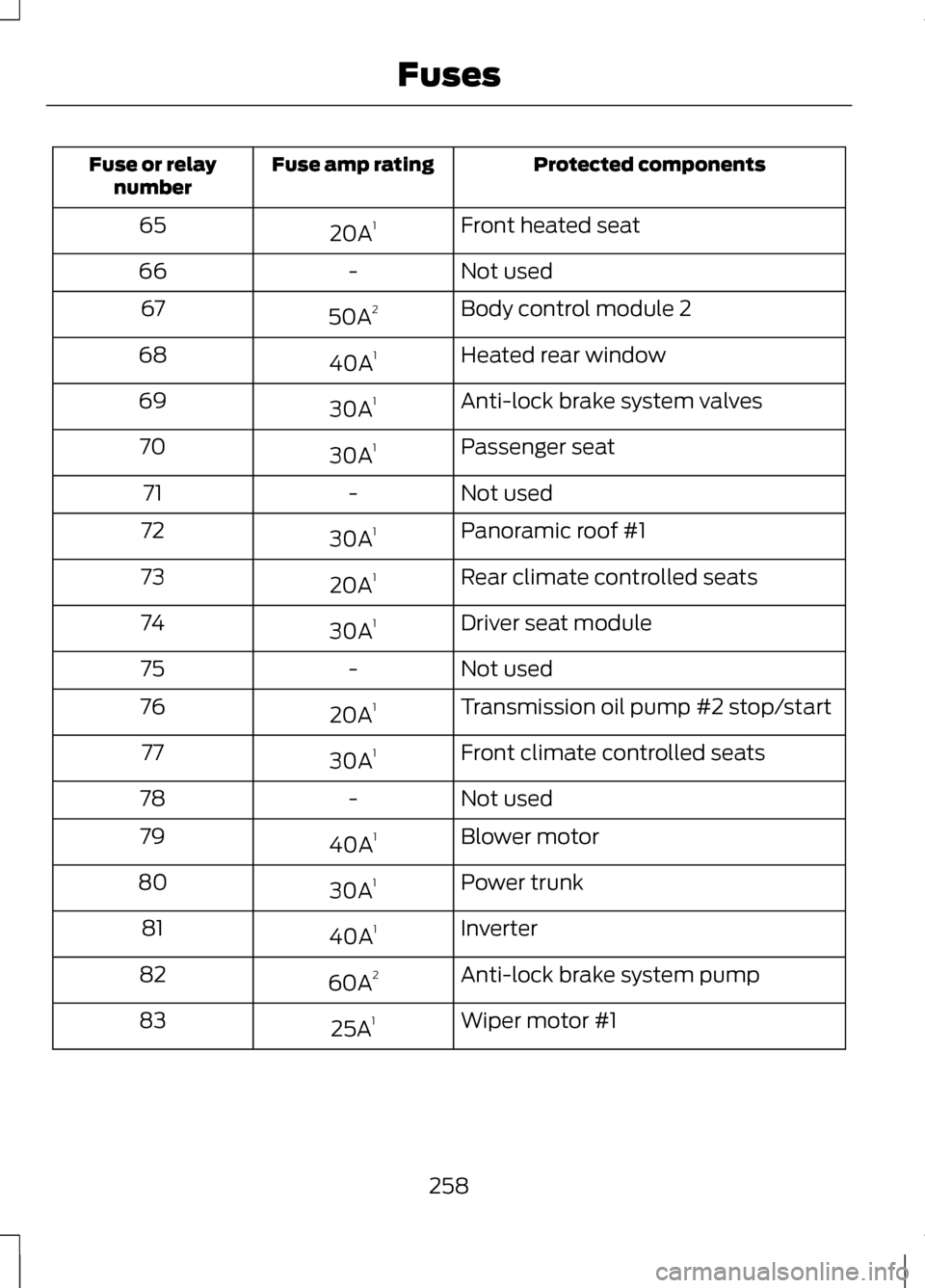
Protected components
Fuse amp rating
Fuse or relay
number
Front heated seat
20A 1
65
Not used
-
66
Body control module 2
50A 2
67
Heated rear window
40A 1
68
Anti-lock brake system valves
30A 1
69
Passenger seat
30A 1
70
Not used
-
71
Panoramic roof #1
30A 1
72
Rear climate controlled seats
20A 1
73
Driver seat module
30A 1
74
Not used
-
75
Transmission oil pump #2 stop/start
20A 1
76
Front climate controlled seats
30A 1
77
Not used
-
78
Blower motor
40A 1
79
Power trunk
30A 1
80
Inverter
40A 1
81
Anti-lock brake system pump
60A 2
82
Wiper motor #1
25A 1
83
258
Fuses
Page 262 of 474
Protected components
Fuse amp rating
Fuse or relay
number
Starter solenoid
30A 1
84
Panoramic roof #2
30A 1
85
1 M-type fuse
2 J-type fuse
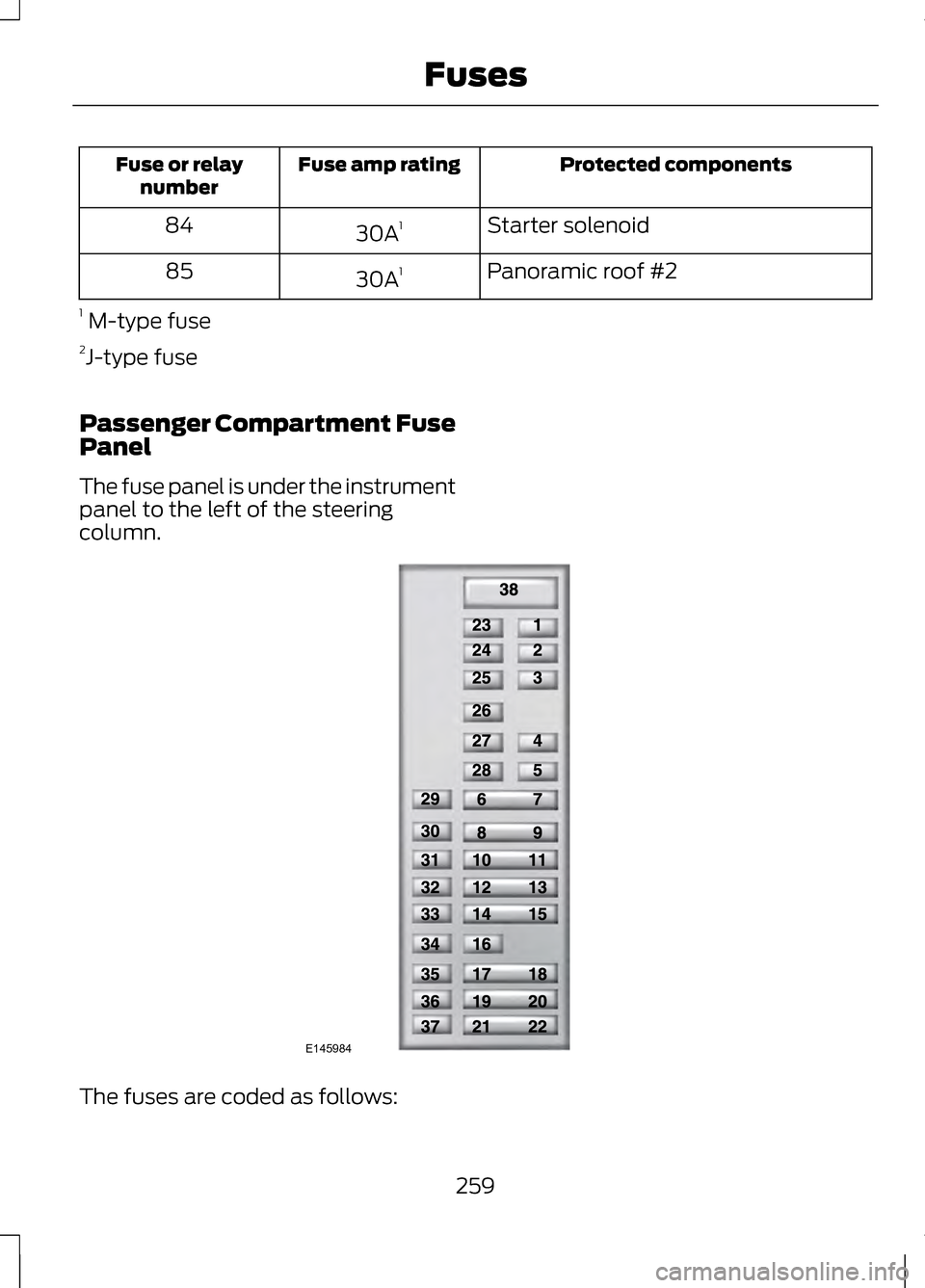
Passenger Compartment Fuse
Panel
The fuse panel is under the instrument
panel to the left of the steering
column. The fuses are coded as follows:
259
FusesE145984
Page 264 of 474
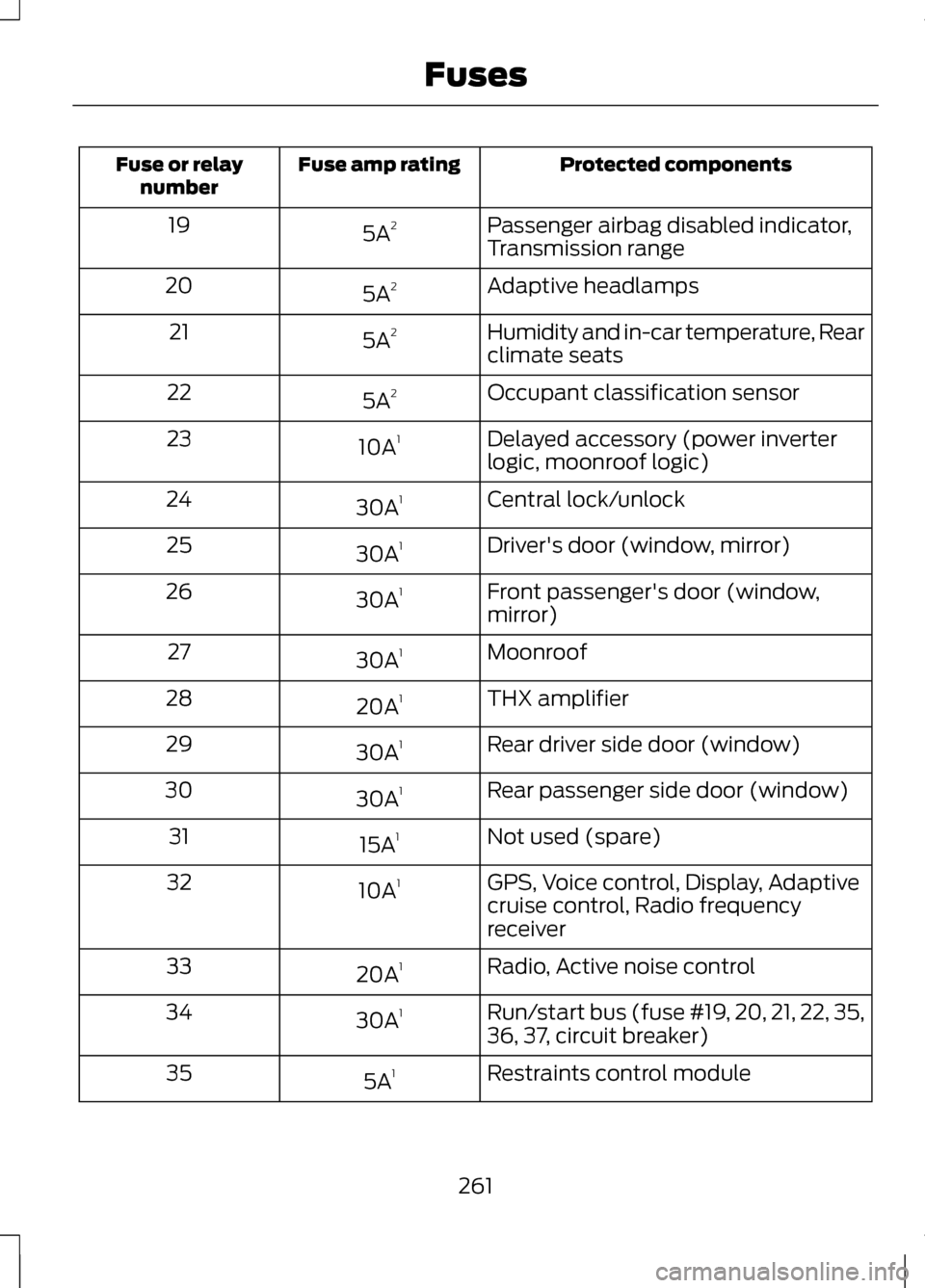
Protected components
Fuse amp rating
Fuse or relay
number
Passenger airbag disabled indicator,
Transmission range
5A
2
19
Adaptive headlamps
5A 2
20
Humidity and in-car temperature, Rear
climate seats
5A
2
21
Occupant classification sensor
5A 2
22
Delayed accessory (power inverter
logic, moonroof logic)
10A
1
23
Central lock/unlock
30A 1
24
Driver's door (window, mirror)
30A 1
25
Front passenger's door (window,
mirror)
30A
1
26
Moonroof
30A 1
27
THX amplifier
20A 1
28
Rear driver side door (window)
30A 1
29
Rear passenger side door (window)
30A 1
30
Not used (spare)
15A 1
31
GPS, Voice control, Display, Adaptive
cruise control, Radio frequency
receiver
10A
1
32
Radio, Active noise control
20A 1
33
Run/start bus (fuse #19, 20, 21, 22, 35,
36, 37, circuit breaker)
30A
1
34
Restraints control module
5A 1
35
261
Fuses
Page 288 of 474
Exterior Chrome
Note:
Never use abrasive materials
such as steel wool or plastic pads as
they can scratch the chrome surface.
Note: Do not use chrome cleaner,
metal cleaner or polish on wheels and
wheel covers
• Wash the vehicle first, using cool
or lukewarm water and a neutral
pH shampoo, such as Motorcraft®
Detail Wash.
• Use Motorcraft® Custom Bright
Metal Cleaner. Apply the product
as you would a wax to clean
bumpers and other chrome parts;
allow the cleaner to dry for a few
minutes, then wipe off the haze
with a clean, dry rag.
• Do not apply cleaning product to
hot surfaces and do not leave
cleaning product on chrome
surfaces for a period of time
exceeding that which is
recommended.
• Using other non-recommended
cleaners can result in severe and
permanent cosmetic damage.
Underbody
Flush the complete underside of your
vehicle frequently. Keep body and
door drain holes free from packed dirt.
Cleaning Plastic Exterior Parts
Use only approved products to clean
plastic parts •
For routine cleaning, use
Motorcraft® Detail Wash.
• If tar or grease spots are present,
use Motorcraft® Bug and Tar
Remover.
REPAIRING MINOR PAINT
DAMAGE
Your authorized dealer has touch-up
paint to match your vehicle ’s color.
Take your color code (printed on a
sticker in the driver ’s door jamb) to
your authorized dealer to ensure you
get the correct color.
• Remove particles such as bird
droppings, tree sap, insect
deposits, tar spots, road salt and
industrial fallout before repairing
paint chips.
• Always read the instructions
before using the products.
WAXING
• Wash the vehicle first.
• Use a quality wax that does not
contain abrasives.
• Do not allow paint sealant to come
in contact with any non-body
(low-gloss black) colored trim,
such as grained door handles, roof
racks, bumpers, side moldings,
mirror housings or the windshield
cowl area. The paint sealant will
“gray ” or stain the parts over time.
285
Vehicle Care
Page 335 of 474
For a complete listing of the
accessories that are available for your
vehicle, please contact your dealer or
visit our online store at:
Accessories.Lincoln.com (U.S.
only).
Lincoln Custom Accessories are
available for your vehicle through your
local Lincoln or Lincoln of Canada
dealer. Ford Motor Company will
repair or replace any properly
dealer-installed Lincoln Custom
Accessories found to be defective in
factory-supplied materials or
workmanship during the warranty
period, as well as any component
damaged by the defective
accessories. The accessories will be
warranted for whichever provides you
the greatest benefit:
• 12 months or 12,000 miles (20,000
kilometers) (whichever occurs
first), or
• the remainder of your new vehicle
limited warranty.
Contact your dealer for details and a
copy of the warranty.
Exterior style
• Hood deflectors
• Side-window deflectors
• Wheels
• Bumper protectors
Interior style
• All-weather floor mats
• Rear seat entertainment*
• Premium carpeted floor mats Lifestyle
•
Ash cup (smoker's packages)
• Cargo area protector
• Cargo net
• Cargo organizer
• Roof racks and carriers*
Peace of mind
• Car cover*
• Wheel locks
• Bumper mounted parking sensor*
• Locking fuel plug for capless fuel
system
*Lincoln Licensed Accessories are
warranted by the accessory
manufacturer's warranty. Lincoln
Licensed Accessories are fully
designed and developed by the
accessory manufacturer and have not
been designed or tested to Ford Motor
Company engineering requirements.
Contact your Lincoln dealer for details
regarding the manufacturer's limited
warranty and a copy of the Lincoln
Licensed Accessories product limited
warranty offered by the accessory
manufacturer.
For maximum vehicle performance,
keep the following information in mind
when adding accessories or
equipment to your vehicle:
332
Accessories
Page 467 of 474
Interior Mirror.........................................90
Auto-Dimming Mirror...............................90
Introduction...............................................7
J
Jump-Starting the Vehicle
.............240
Connecting the Jumper Cables..........240
Jump Starting............................................. 241
Preparing Your Vehicle..........................240
Removing the Jumper Cables..............241
K
Keyless Entry..........................................68 SECURICODE™ KEYLESS ENTRY
KEYPAD..................................................... 68
Keyless Starting...................................150 Automatic Engine Shutdown...............152
Fast Restart.................................................. 151
Starting Your Vehicle..............................150
Stopping the Engine When Your Vehicle is Moving...................................151
Stopping the Engine When Your Vehicle is Stationary.............................151
Switching the Ignition On (Accessory Mode)....................................................... 150
Keys and Remote Controls................53
Knee Airbag
.............................................45
L
Lane Keeping System......................208 Switching the System On and
Off............................................................. 209
Lighting Control
.....................................82
Headlamp Flasher.....................................82
High Beams.................................................. 82
Lighting.....................................................82
Lincoln Credit
...........................................12
Load Carrying........................................219 Load Limit
..............................................219
Vehicle loading - with and without a
trailer......................................................... 219
Locking and Unlocking.......................62 Activating Intelligent Access .................63
Autolock Feature........................................64
Auto Relock.................................................. 64
Battery Saver............................................... 65
Illuminated Entry........................................65
Illuminated Exit........................................... 65
Luggage Compartment...........................66
Power Decklid (If Equipped).................66
Power Door Locks......................................62
Remote Control.......................................... 62
Smart Unlocks ........................................... 64
Locks..........................................................62
M
Maintenance........................................263 General Information...............................263
Media Hub
..............................................125
Memory Function................................135 Easy Entry and Exit Function................137
Linking a Pre-Set Position to your
Remote Control or Intelligent Access
Key............................................................. 136
Saving a Pre-Set Position.....................136
Message Center See: Information Displays.....................100
Mirrors See: Heated Windows and Mirrors.....128
See: Windows and Mirrors......................87
Mobile Communications Equipment.............................................13
Moonroof..................................................91 Bounce-Back............................................... 92
Opening and Closing the Moonroof.................................................. 92
Retractable Panoramic Roof.................92
Venting the Moonroof..............................92
Motorcraft Parts.................................325
464
Index