ECO mode LINCOLN MKZ 2013 Owner's Manual
[x] Cancel search | Manufacturer: LINCOLN, Model Year: 2013, Model line: MKZ, Model: LINCOLN MKZ 2013Pages: 474, PDF Size: 3.79 MB
Page 170 of 474
The message Stay in Neutral mode
engaged will appear in the
information display screen when the
vehicle has entered Stay in Neutral
mode.
Note: During this mode the
N button
will flash continuously and the
instrument cluster will display N as the
selected gear.
Exiting Stay in Neutral mode
To disable Stay in Neutral mode put
the vehicle in another gear. See the
Putting the Vehicle in Gear
for
instructions on how to do this.
Entering a Carwash
Note: Always put the vehicle in Stay
in Neutral mode when entering an
automatic car wash. Failure to do this
could result in vehicle damage that
may not be covered by warranty.
D (Drive)
The normal driving position for the
best fuel economy.
S (Sport)
Putting the vehicle in
S (Sport): •
Provides additional engine braking
and extends lower gear operation
to enhance performance for uphill
climbs, hilly terrain or mountainous
areas. This will increase engine
RPM during engine braking.
• Provides additional lower gear
operation through the automatic
transmission shift strategy.
• Gears are selected more quickly
and at higher engine speeds.
SelectShift Automatic®
Transmission
Your SelectShift automatic
transmission gives you the ability to
manually change gears if you'd like.
Paddle Shifters
The paddle shifters allow you to shift
gears quickly, without taking your
hands off the steering wheel.
Temporary manual control is provided
when pulling the paddles with the
vehicle in the
D (Drive). The system
will determine when temporary
manual control is no longer desired
and reverts back to automatic control.
Extensive manual control can be
achieved by pressing the
S (Sport)
button. The system will stay in manual
control until the vehicle is put in
another gear.
• Pull the right paddle (+) to upshift.
• Pull the left paddle (
–) to
downshift.
167
Transmission
Page 174 of 474
USING ALL-WHEEL DRIVE
All-wheel drive uses all four wheels
to power the vehicle. This increases
traction, enabling you to drive over
terrain and road conditions that a
conventional two-wheel drive vehicle
cannot. The AWD system is active all
the time and requires no input from
the operator.
Note:
Your AWD vehicle is not
intended for off-road use. The AWD
feature gives your vehicle some limited
off-road capabilities in which driving
surfaces are relatively level,
obstruction-free and otherwise similar
to normal on-road driving conditions.
Operating your vehicle under other than
those conditions could subject the
vehicle to excessive stress which might
result in damage which is not covered
under your warranty.
Note: A warning message will be
displayed in the information display
when an AWD system fault is present
See Information Messages (page 105).
An AWD system fault will cause the
AWD system to default to front-wheel
drive only mode. When this warning
message is displayed, have your vehicle
serviced at an authorized dealer Note:
A warning message will be
displayed in the information display if
the AWD system has overheated See
Information Messages (page 105).
This condition may occur if the vehicle
was operated in extreme conditions
with excessive wheel slip, such as deep
sand. To resume normal AWD function
as soon as possible, stop the vehicle in
a safe location and stop the engine for
at least 10 minutes. After the engine
has been restarted and the AWD
system has adequately cooled, the
warning message will turn off and
normal AWD function will return.
Do not use a spare tire of a different
size other than the tire provided. If the
mini-spare tire is installed, the AWD
system may disable automatically
and enter front-wheel drive only mode
to protect driveline components. This
condition will be indicated by a
warning in the information display
See
Information Messages (page
105). If there is a warning message in
the information display from using the
spare tire, this indicator should turn
off after reinstalling the repaired or
replaced normal road tire and cycling
the ignition off and on. It is
recommended to reinstall the repaired
or replaced road tire as soon as
possible. Major dissimilar tire sizes
between the front and rear axles
could cause the AWD system to stop
functioning and default to front-wheel
drive or damage the AWD system.
171
All-Wheel Drive
(If Equipped)
Page 215 of 474
Why does the vehicle not come back into the middle of the lane always, as
expected, in the Aid or Aid + Alert mode?
High cross winds
Large road crown
Rough roads, grooves, shoulder drop-offs
Heavy uneven loading of the vehicle or improper tire inflation pressure
If the tires have been exchanged (including snow tires), or the suspension has
been modified
BLIND SPOT MONITOR
Blind Spot Information System
(BLIS®) with Cross Traffic
Alert (If Equipped) WARNING
To help avoid injuries, NEVER use
the BLIS as a replacement for
using the interior and exterior mirrors
and looking over your shoulder before
changing lanes. BLIS is not a
replacement for careful driving and
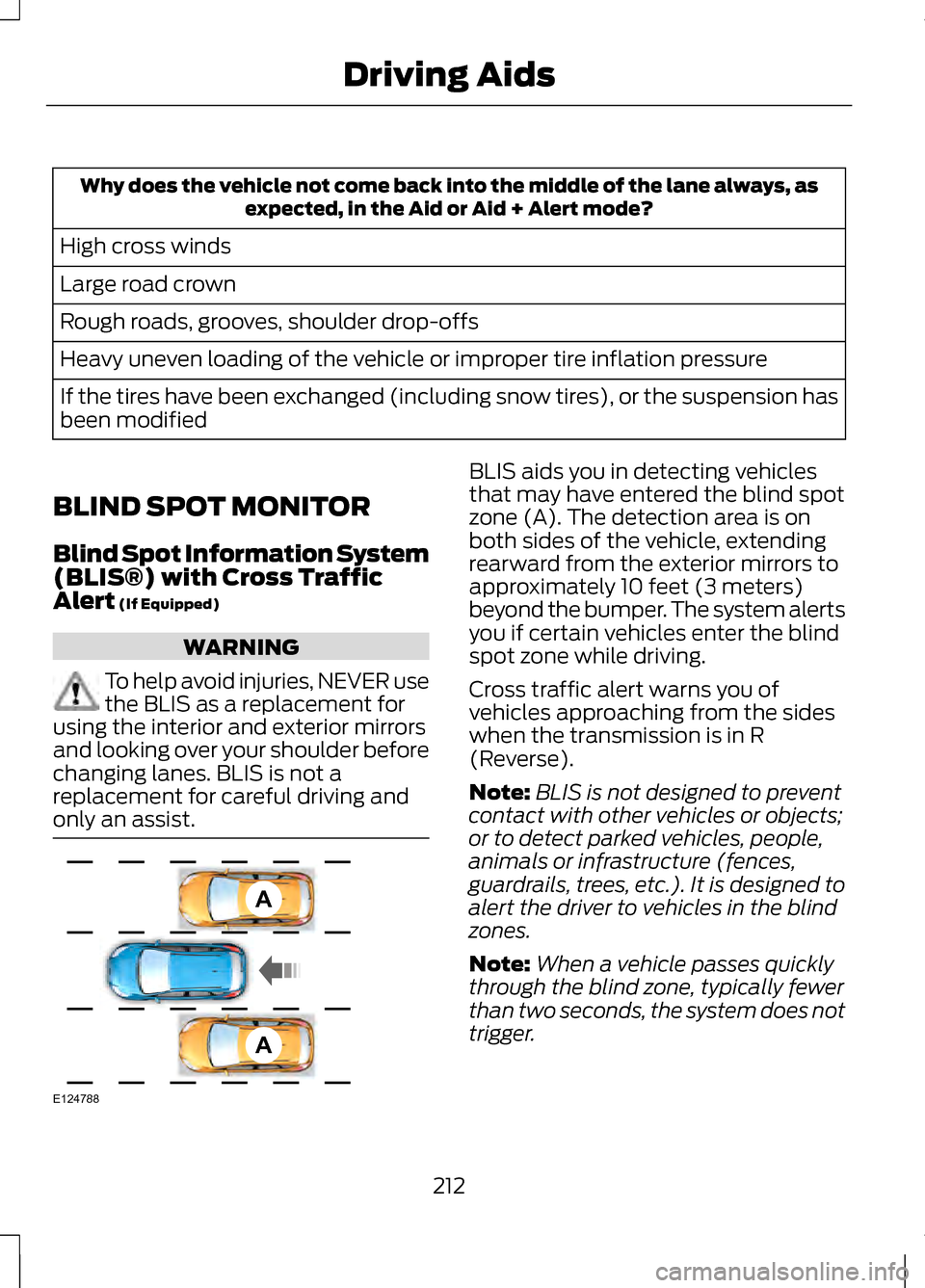
only an assist. BLIS aids you in detecting vehicles
that may have entered the blind spot
zone (A). The detection area is on
both sides of the vehicle, extending
rearward from the exterior mirrors to
approximately 10 feet (3 meters)
beyond the bumper. The system alerts
you if certain vehicles enter the blind
spot zone while driving.
Cross traffic alert warns you of
vehicles approaching from the sides
when the transmission is in R
(Reverse).
Note:
BLIS is not designed to prevent
contact with other vehicles or objects;
or to detect parked vehicles, people,
animals or infrastructure (fences,
guardrails, trees, etc.). It is designed to
alert the driver to vehicles in the blind
zones.
Note: When a vehicle passes quickly
through the blind zone, typically fewer
than two seconds, the system does not
trigger.
212
Driving AidsA
A
E124788
Page 235 of 474
We recommend using a wheel lift and
dollies or flatbed equipment. Do not
tow with a slingbelt. Ford Motor
Company has not approved a
slingbelt towing procedure. If towed
incorrectly, or by any other means,
vehicle damage may occur.
Ford Motor Company produces a
towing manual for all authorized tow
truck operators. Have your tow truck
operator refer to this manual for
proper hook-up and towing
procedures for your vehicle.
It is acceptable to tow a front-wheel
drive (FWD) vehicle from the front if
using proper wheel lift equipment to
raise the front wheels off the ground.
The rear wheels can remain on the
ground when towed in this fashion.
FWD vehicles can also be towed from
the rear using wheel lift equipment;
however, the front wheels must be
placed on a dolly to prevent damage
to the transmission.
It is required to tow an all-wheel drive
(AWD) vehicle with a wheel lift and
dollies or flatbed equipment, with all
the wheels off the ground, to prevent
damage to the transmission, AWD
system or vehicle.
TOWING THE VEHICLE ON
FOUR WHEELS
Emergency Towing
You can flat-tow (all wheels on the
ground, regardless of the
powertrain/transmission
configuration) your disabled vehicle
(without access to wheel dollies,
car-hauling trailer, or flatbed transport
vehicle) under the following
conditions:
•
Your vehicle is facing forward so
you tow it in a forward direction.
• You place the transmission in
position N. If you cannot place the
transmission in position N, you
may need to override it. See
Transmission
(page 165).
• Maximum speed is 35 mph (56
km/h).
• Maximum distance is 50 miles (80
kilometers).
Recreational Towing
Note: Put your climate control system
in recirculated air mode to prevent
exhaust fumes from entering the
vehicle. See
Climate Control (page
126).
Follow these guidelines if you have a
need for recreational (RV) towing. An
example of recreational towing would
be towing your vehicle behind a
motorhome. These guidelines are to
make sure you do not damage the
transmission during towing.
232
Towing
Page 236 of 474
Vehicles Equipped with a 2.0L
Engine
Front-wheel drive (FWD) vehicles
CANNOT be flat-towed (all wheels
on the ground) as vehicle or
transmission damage may occur. You
must place the front wheels on a
two-wheel tow dolly. If you are using
a tow dolly, follow the instructions
specified by the equipment provider.
All-wheel drive (AWD) vehicles
CANNOT
be flat-towed (all wheels
on the ground), as vehicle or
transmission damage may occur. It is
recommended to tow your vehicle
with all four (4) wheels off the ground
such as when using a car-hauling
trailer. Otherwise, you cannot tow your
vehicle.
Vehicles Equipped with a 3.7L
Engine
You can tow your vehicle with all four
wheels on the ground using the
Neutral Tow feature, or with all four
wheels off the ground using a vehicle
transport trailer. If you are using a
vehicle transport trailer, follow the
instruction specified by the equipment
provider.
If you tow your vehicle with all four
wheels on the ground:
• Tow only in the forward direction.
• Release the parking brake.
Neutral Tow
Enter Neutral Tow mode by doing the
following: 1.
Put the ignition in accessory mode
by pressing the engine START
button without pressing the brake
pedal.
2. Select
Neutral Tow under the
Vehicle Settings menu in the
information display. See General
Information (page 100).
3. Press and hold the OK button to start the neutral tow process.
4. Press the brake pedal and select N
on the push-button
transmission.
5. Turn the ignition off by pressing the
engine START button without
pressing the brake pedal.
If the process is completes
successfully:
• the
N on the push-button
transmission blinks slowly
• Neutral Tow Engaged turn
ignition off for towing
appears
in the information display.
Note: If the parking brake is applied,
Neutral Tow remove park brake for
towing
appears in the information
display.
Note: Do not exceed 65 mph (105
km/h).
Note: Start the engine and allow it to
run for five minutes at the beginning of
each day and every six hours (or fewer).
Shut the engine off and verify that
Neutral tow engaged
appears in the
display before continuing to tow.
233
Towing
Page 238 of 474
BREAKING-IN
You need to break in new tires for
approximately 300 miles (480
kilometers). During this time, your
vehicle may exhibit some unusual
driving characteristics.
Avoid driving too fast during the first
1000 miles (1600 kilometers). Vary
your speed frequently and change up
through the gears early. Do not labor
the engine.
Do not tow during the first 1000 miles
(1600 kilometers).
ECONOMICAL DRIVING
Fuel economy is affected by several
things such as how you drive, the
conditions you drive under and how
you maintain your vehicle.
There are some things to keep in mind
that may improve your fuel economy:
•
Accelerate and slow down in a
smooth, moderate fashion.
• Drive at steady speeds.
• Anticipate stops; slowing down
may eliminate the need to stop.
• Combine errands and minimize
stop-and-go driving.
•When running errands, go to
the furthest destination first
and then work your way back
home.
• Close the windows for high-speed
driving. •
Drive at reasonable speeds.
(Traveling at 65 mph/105 kph uses
about 15% less fuel than traveling
at 75 mph/121 kph).
• Keep the tires properly inflated and
use only the recommended size.
• Use the recommended engine oil.
• Perform all regularly scheduled
maintenance.
There are also some things you may
want to avoid doing because they
reduce your fuel economy:
• Avoid sudden or hard
accelerations.
• Avoid revving the engine before
turning off the car.
• Avoid long idle periods.
• Do not warm up your vehicle on
cold mornings.
• Reduce the use of air conditioning
and heat.
• Avoid using speed control in hilly
terrain.
• Do not rest your foot on the brake
pedal while driving.
• Avoid carrying unnecessary weight
(approximately 1 mpg [0.4
kilometers/liter] is lost for every
400 lbs [180 kilograms] of weight
carried).
• Avoid adding particular
accessories to your vehicle (e.g.
bug deflectors, rollbars/light bars,
running boards, ski racks).
• Avoid driving with the wheels out
of alignment.
235
Driving Hints
Page 242 of 474
If you need to arrange roadside
assistance for yourself, Ford Motor
Company will reimburse a reasonable
amount for towing to the nearest
dealership within 35 miles (56 km).
To obtain reimbursement information,
U.S. Lincoln vehicle customers call
1-800-521-4140. Customers will be
asked to submit their original receipts.
Vehicles Sold In Canada :
Getting Roadside Assistance
Canadian customers who require
roadside assistance, call
1-800-665-2006.
Vehicles Sold In Canada : Using
Roadside Assistance
Complete the roadside assistance
identification card and place it in your
wallet for quick reference. In Canada,
the card is found in the Warranty
Guide in the glove box.
Canadian Roadside coverage and
benefits may differ from the U.S.
coverage. Please refer to your
Warranty Guide or visit our website at
www.ford.ca for information on
Canadian services and benefits.
Canadian customers who need to
obtain roadside information, call
1-800-665-2006 or visit our website
at www.ford.ca.
HAZARD WARNING
FLASHERS
Note:
If used when the engine is not
running, the battery will lose charge.
There may be insufficient power to
restart your engine. The hazard warning button
is located on the instrument
panel. Use it when your
vehicle is creating a safety hazard for
other motorists.
• Press the button to turn on the
hazard warning function, and the
front and rear direction indicators
will flash.
• Press the button again to turn
them off.
FUEL CUT-OFF SWITCH WARNING
Failure to inspect and if
necessary repair fuel leaks after
a collision may increase the risk of fire
and serious injury. Ford Motor
Company recommends that the fuel
system be inspected by an authorized
dealer after any collision. In the event of a moderate to severe
collision, this vehicle is equipped with
a fuel pump shut-off feature that
stops the flow of fuel to the engine.
Not every impact will cause a shut-off.
Should your vehicle shut off after a
collision, you may restart your vehicle
by doing the following:
239
Roadside Emergencies
Page 244 of 474
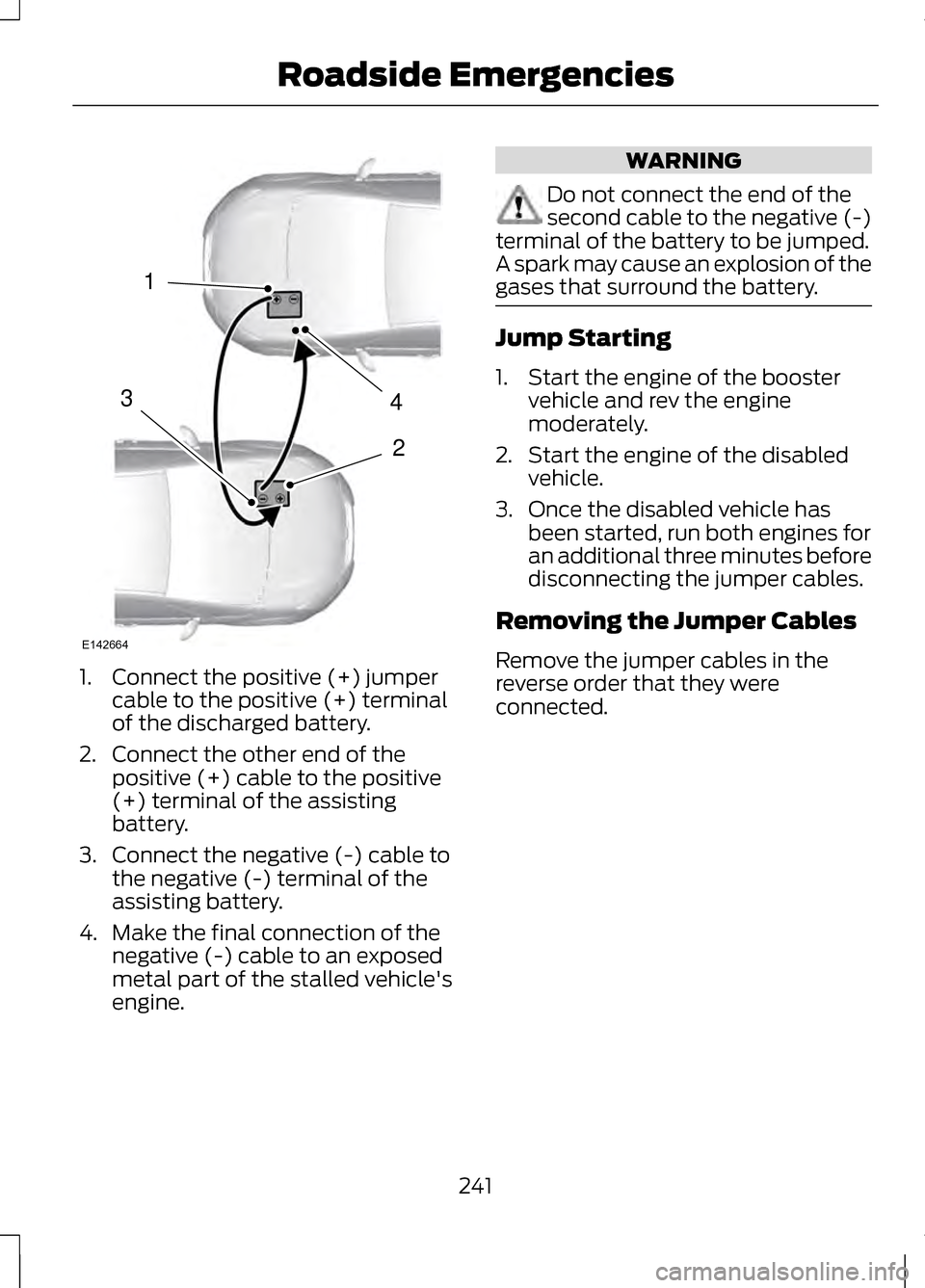
1. Connect the positive (+) jumper
cable to the positive (+) terminal
of the discharged battery.
2. Connect the other end of the positive (+) cable to the positive
(+) terminal of the assisting
battery.
3. Connect the negative (-) cable to the negative (-) terminal of the
assisting battery.
4. Make the final connection of the negative (-) cable to an exposed
metal part of the stalled vehicle's
engine. WARNING
Do not connect the end of the
second cable to the negative (-)
terminal of the battery to be jumped.
A spark may cause an explosion of the
gases that surround the battery. Jump Starting
1. Start the engine of the booster
vehicle and rev the engine
moderately.
2. Start the engine of the disabled vehicle.
3. Once the disabled vehicle has been started, run both engines for
an additional three minutes before
disconnecting the jumper cables.
Removing the Jumper Cables
Remove the jumper cables in the
reverse order that they were
connected.
241
Roadside Emergencies4
2
1
3
E142664
Page 340 of 474
GENERAL INFORMATION
WARNING
Driving while distracted can
result in loss of vehicle control,
accident and injury. Ford strongly
recommends that drivers use extreme
caution when using any device or
feature that may take their focus off
the road. Your primary responsibility
is the safe operation of the vehicle.
We recommend against the use of any
handheld device while driving,
encourage the use of voice-operated
systems when possible and that you
become aware of applicable state
and local laws that may affect use of
electronic devices while driving. Note:
Some features are not available
while the vehicle is moving.
Note: Your system is equipped with a
feature that allows you to access and
control audio features for 30 minutes
after the ignition has been turned off
(as long as no doors are opened).
This system uses a four-corner
strategy to provide quick access to
vehicle features and settings. The
comprehensive touchscreen provides
easy interaction with your cellular
phone, multimedia, climate control
and navigation system. The corners
display any active modes within those
menus, such as your phone being
connected or the climate
temperature. SETTINGS Press to select any of the following:
•
Clock
• Display
• Sound
• Vehicle
• Settings
• Help INFORMATION
Press to select any of the following:
• Services
• Travel Link
• Alerts
• Calendar
• Apps
PHONE
Press to select any of the following:
• Phone
• Quick Dial
• Phonebook
• History
• Messaging
• Settings
NAVIGATION
Press to select any of the following:
• My Home
• Favorites
• Previous Destinations
• Point of Interest
• Emergency
• Previous Starting Point
• Latitude/Longitude
337
MyLincoln Touch
™E142607 E142608
Page 347 of 474
You can make selections from the
menu by using the OK button. The
selection menu expands and you are
allowed different options.
•
Press the up and down arrows to
scroll through the modes.
• Press the right arrow to enter the
mode.
• Press the left or right arrows to
make adjustments within the
chosen mode.
• Press OK to confirm your selection.
Note: If your vehicle is not equipped
with Navigation, Compass appears in
the display instead of Navigation. If you
press the right arrow to go into the
Compass menu, you can see the
compass graphic. The compass
displays the direction in which the
vehicle is traveling, not true direction
(i.e., if the vehicle is traveling west, the
middle of the compass graphic displays
west; north displays to the left of west
though its true direction is to the right
of west).
Using Voice Recognition
This system helps you control many
features using voice commands. This
allows you to keep your hands on the
wheel and focus on what is in front of
you. The system provides feedback
through audible tones, prompts,
questions and spoken confirmations
depending on the situation and the
chosen level of interaction (voice
settings). The system also asks short questions
(confirmation prompts) when it is not
sure of your request or when there are
multiple possible responses to your
request.
When using voice commands, words
and icons may also appear in the
lower left status bar indicating the
status of the voice session (i.e.,
listening, success, failed, paused or
try again).
How to Use Voice Commands with
Your System
Press the voice icon; after the
tone, speak your command
clearly.
What Can I Say?
To access the available voice
commands for the current session, do
one of the following:
• During a voice session, press the
help icon (?) in the lower left
status bar of the screen.
• Say "What can I say?" for an
on-screen listing of the possible
voice commands associated with
your current voice session.
• Press the voice icon. After the tone,
say "Help" for an audible list of
possible voice commands.
344
MyLincoln Touch
™E142599