ECO mode LINCOLN MKZ 2013 Owner's Guide
[x] Cancel search | Manufacturer: LINCOLN, Model Year: 2013, Model line: MKZ, Model: LINCOLN MKZ 2013Pages: 474, PDF Size: 3.79 MB
Page 348 of 474
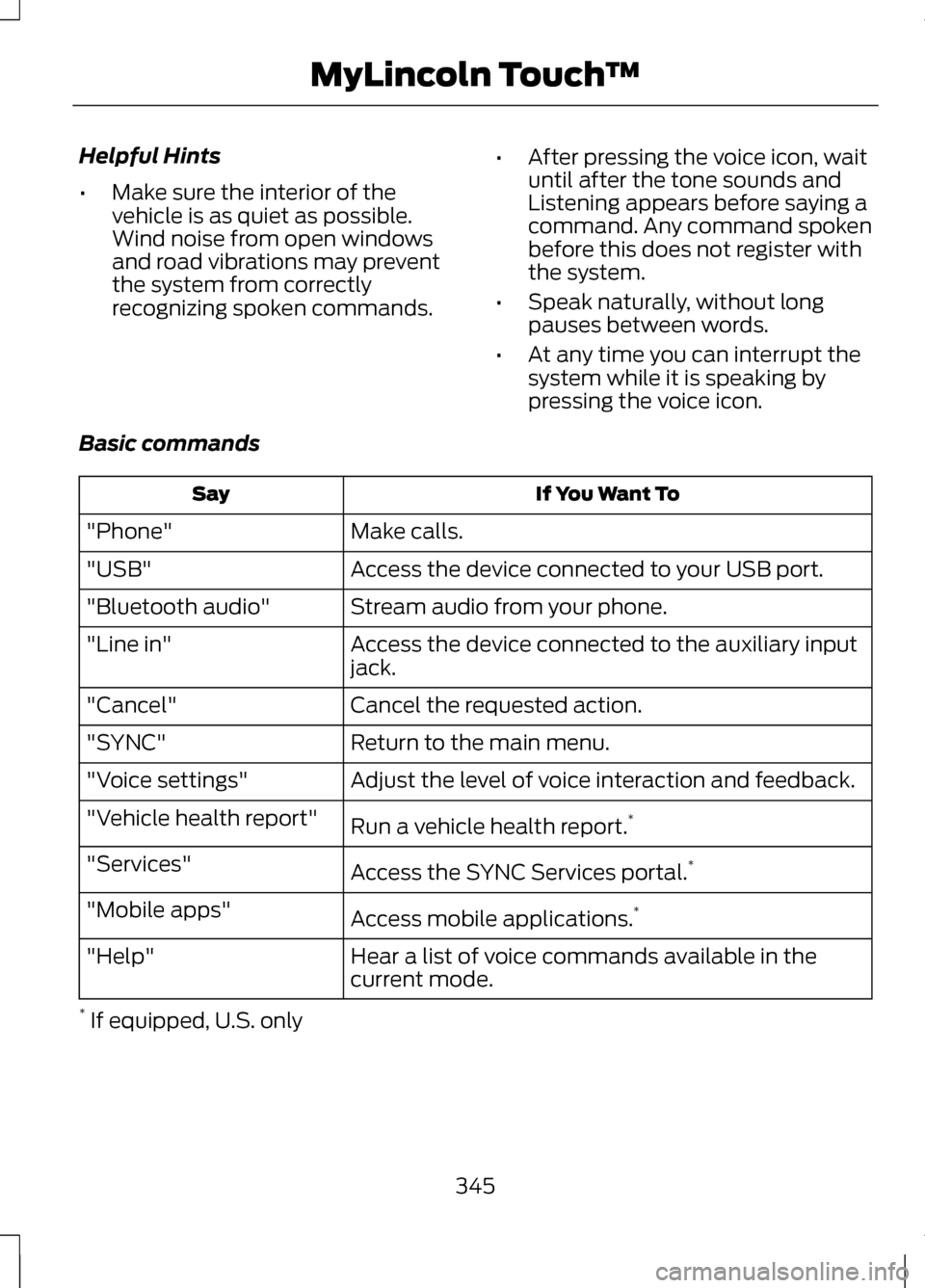
Helpful Hints
•
Make sure the interior of the
vehicle is as quiet as possible.
Wind noise from open windows
and road vibrations may prevent
the system from correctly
recognizing spoken commands. •
After pressing the voice icon, wait
until after the tone sounds and
Listening appears before saying a
command. Any command spoken
before this does not register with
the system.
• Speak naturally, without long
pauses between words.
• At any time you can interrupt the
system while it is speaking by
pressing the voice icon.
Basic commands If You Want To
Say
Make calls.
"Phone"
Access the device connected to your USB port.
"USB"
Stream audio from your phone.
"Bluetooth audio"
Access the device connected to the auxiliary input
jack.
"Line in"
Cancel the requested action.
"Cancel"
Return to the main menu.
"SYNC"
Adjust the level of voice interaction and feedback.
"Voice settings"
Run a vehicle health report. *
"Vehicle health report"
Access the SYNC Services portal. *
"Services"
Access mobile applications. *
"Mobile apps"
Hear a list of voice commands available in the
current mode.
"Help"
* If equipped, U.S. only
345
MyLincoln Touch
™
Page 355 of 474
Uploading Photos for Your Home
Screen Wallpaper
Note:
You cannot load photos directly
from your camera. You must access
the photos from either your USB mass
storage device or from an SD card.
Note: Photographs with extremely
large dimensions (i.e., 2048 x 1536)
may not be compatible and appear as
a blank (black) image on the display.
Your system allows you to upload and
view up to 32 photos. To access, press the Settings icon >
Display > Edit Wallpaper, then follow
the system prompts to upload your
photographs.
Only the photograph(s) which meets
the following conditions display:
•
Compatible file formats are as
follows: .jpg, .gif, .png, .bmp
• Each file must be 1.5 MB or less.
• Recommended dimensions: 800
x 384
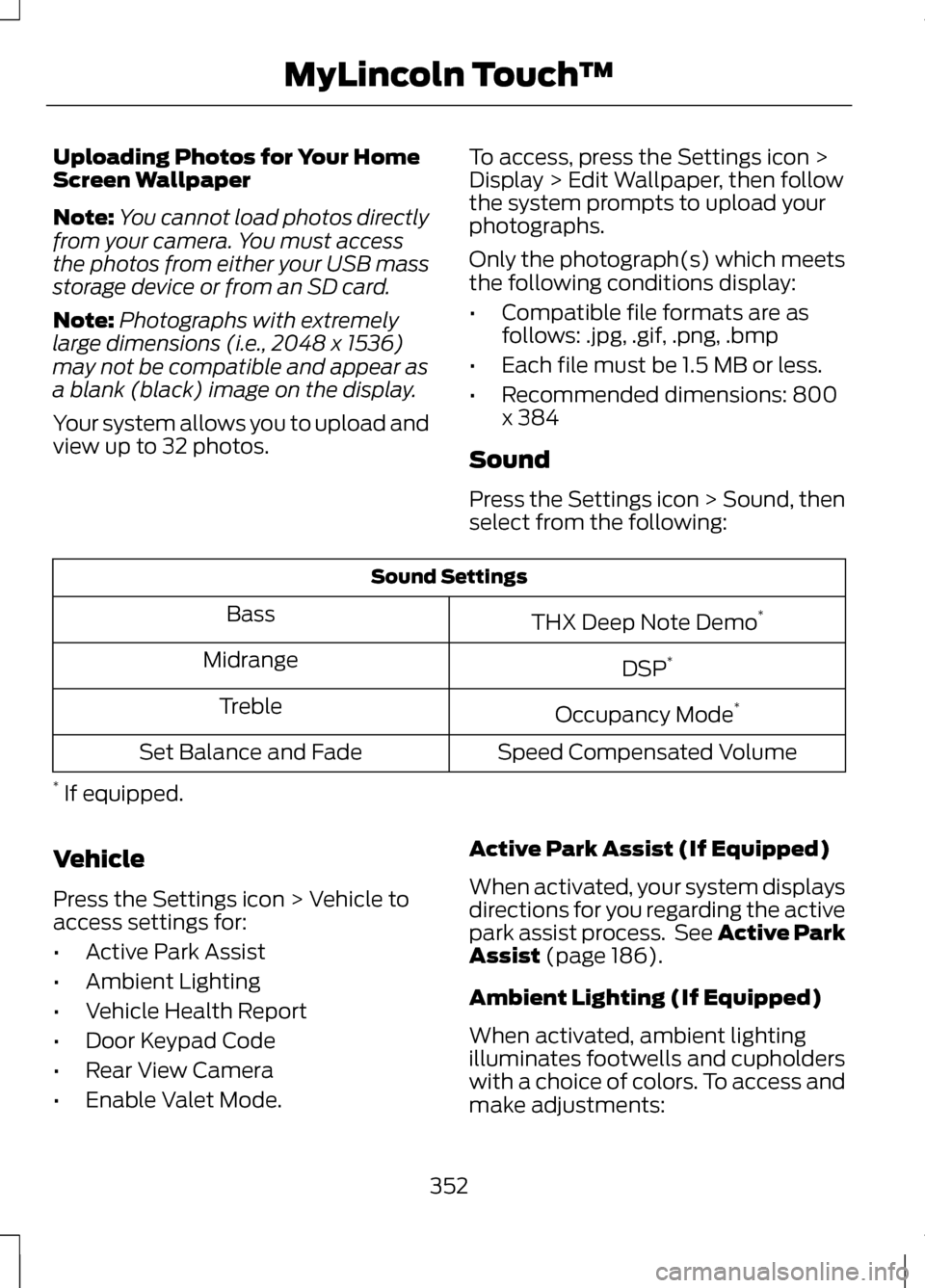
Sound
Press the Settings icon > Sound, then
select from the following: Sound Settings
THX Deep Note Demo *
Bass
DSP*
Midrange
Occupancy Mode*
Treble
Speed Compensated Volume
Set Balance and Fade
* If equipped.
Vehicle
Press the Settings icon > Vehicle to
access settings for:
• Active Park Assist
• Ambient Lighting
• Vehicle Health Report
• Door Keypad Code
• Rear View Camera
• Enable Valet Mode. Active Park Assist (If Equipped)
When activated, your system displays
directions for you regarding the active
park assist process. See Active Park
Assist (page 186).
Ambient Lighting (If Equipped)
When activated, ambient lighting
illuminates footwells and cupholders
with a choice of colors. To access and
make adjustments:
352
MyLincoln Touch
™
Page 381 of 474
This feature allows you to plug in
media playing devices, memory sticks,
flash drives or thumb drives, and also
charge devices if they support this
feature.
In order to playback video from your
iPod® or iPhone® (if compatible), you
MUST have a special combination
USB/RCA composite video cable
(available for purchase from Apple®).
When the cable is connected to your
iPod® or iPhone®, plug the other end
into both the RCA jacks and the USB
port.
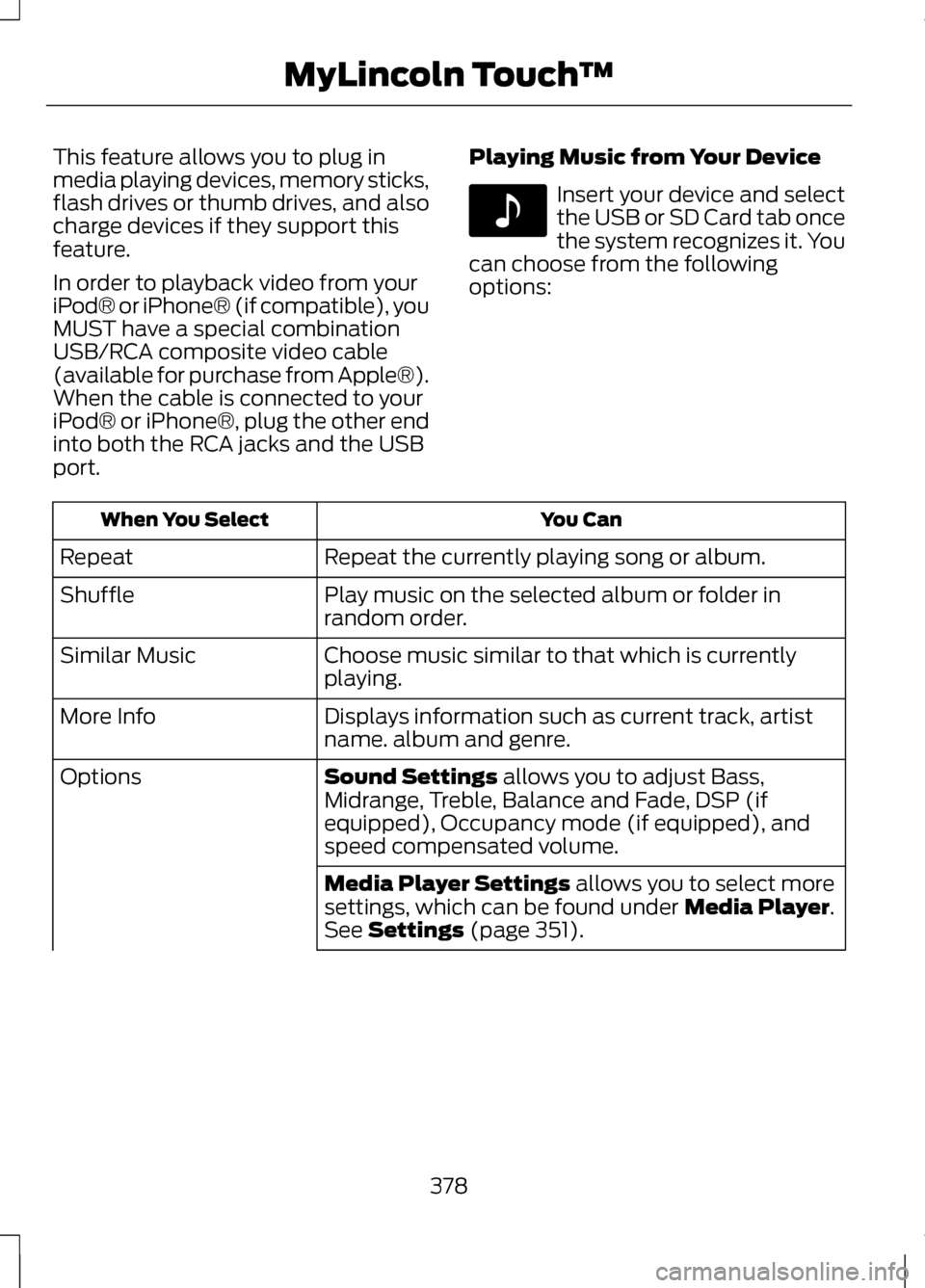
Playing Music from Your Device Insert your device and select
the USB or SD Card tab once
the system recognizes it. You
can choose from the following
options: You Can
When You Select
Repeat the currently playing song or album.
Repeat
Play music on the selected album or folder in
random order.
Shuffle
Choose music similar to that which is currently
playing.
Similar Music
Displays information such as current track, artist
name. album and genre.
More Info
Sound Settings allows you to adjust Bass,
Midrange, Treble, Balance and Fade, DSP (if
equipped), Occupancy mode (if equipped), and
speed compensated volume.
Options
Media Player Settings
allows you to select more
settings, which can be found under Media Player.
See Settings (page 351).
378
MyLincoln Touch
™E142611
Page 388 of 474
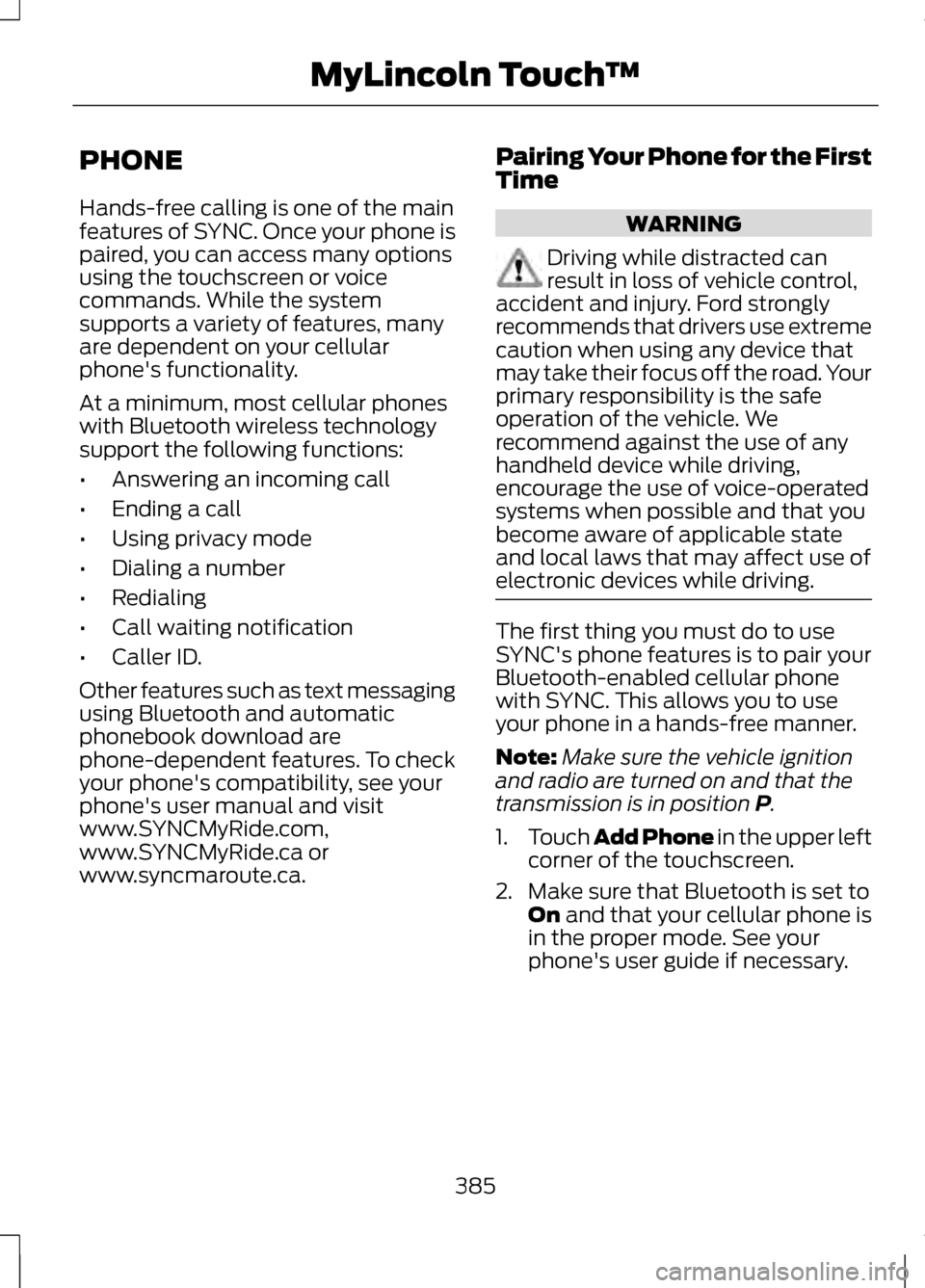
PHONE
Hands-free calling is one of the main
features of SYNC. Once your phone is
paired, you can access many options
using the touchscreen or voice
commands. While the system
supports a variety of features, many
are dependent on your cellular
phone's functionality.
At a minimum, most cellular phones
with Bluetooth wireless technology
support the following functions:
•
Answering an incoming call
• Ending a call
• Using privacy mode
• Dialing a number
• Redialing
• Call waiting notification
• Caller ID.
Other features such as text messaging
using Bluetooth and automatic
phonebook download are
phone-dependent features. To check
your phone's compatibility, see your
phone's user manual and visit
www.SYNCMyRide.com,
www.SYNCMyRide.ca or
www.syncmaroute.ca. Pairing Your Phone for the First
Time WARNING
Driving while distracted can
result in loss of vehicle control,
accident and injury. Ford strongly
recommends that drivers use extreme
caution when using any device that
may take their focus off the road. Your
primary responsibility is the safe
operation of the vehicle. We
recommend against the use of any
handheld device while driving,
encourage the use of voice-operated
systems when possible and that you
become aware of applicable state
and local laws that may affect use of
electronic devices while driving. The first thing you must do to use
SYNC's phone features is to pair your
Bluetooth-enabled cellular phone
with SYNC. This allows you to use
your phone in a hands-free manner.
Note:
Make sure the vehicle ignition
and radio are turned on and that the
transmission is in position P.
1. Touch Add Phone in the upper left
corner of the touchscreen.
2. Make sure that Bluetooth is set to On
and that your cellular phone is
in the proper mode. See your
phone's user guide if necessary.
385
MyLincoln Touch
™
Page 407 of 474
Power: Touch to turn the climate control system on and off. When
the system is off, outside air is prevented from entering the vehicle.
A
Passenger settings:
Touch DUAL to switch passenger side
temperature controls on and off. Touch the + and - to adjust the
temperature. Touch the heated seat icon to control the heated seat
(if equipped). Touch the cooled seat icon to control the cooled seat
(if equipped).
B
Fan speed:
Touch + or - to increase or decrease the volume of air
circulated in your vehicle.
C
Recirculated air: Touch the button to switch between outside air and
recirculated air. When recirculated air is selected, the button illuminates
and the air currently in the passenger compartment recirculates. This
may reduce the time needed to cool the interior (when used with A/C)
and may also reduce unwanted odors from entering your vehicle.
Recirculated air may turn off automatically in all airflow modes except
MAX A/C to reduce the possibility of fogging.
D
MAX A/C:
Touch to switch on. Recirculated air is distributed through
the instrument panel air vents, air conditioning is automatically adjusted
to the highest speed and the temperature dial returns to the full cool
position. This re-cooling of the interior is more economical and efficient.
E
A/C:
Touch to turn air conditioning on or off. To improve air
conditioning when starting your vehicle, drive with the windows slightly
open for two to three minutes. Use A/C with recirculated air to improve
cooling performance and efficiency.
F
AUTO:
Touch to turn on fully automatic operation. Select the desired
temperature using the temperature control. The system automatically
adjusts fan speed, air distribution, A/C operation, and outside or
recirculated air, to heat or cool the vehicle to maintain the selected
temperature.
G
Rear defroster:
Touch to turn the rear window defroster and heated
mirrors (if equipped).
H
404
MyLincoln Touch
™
Page 415 of 474
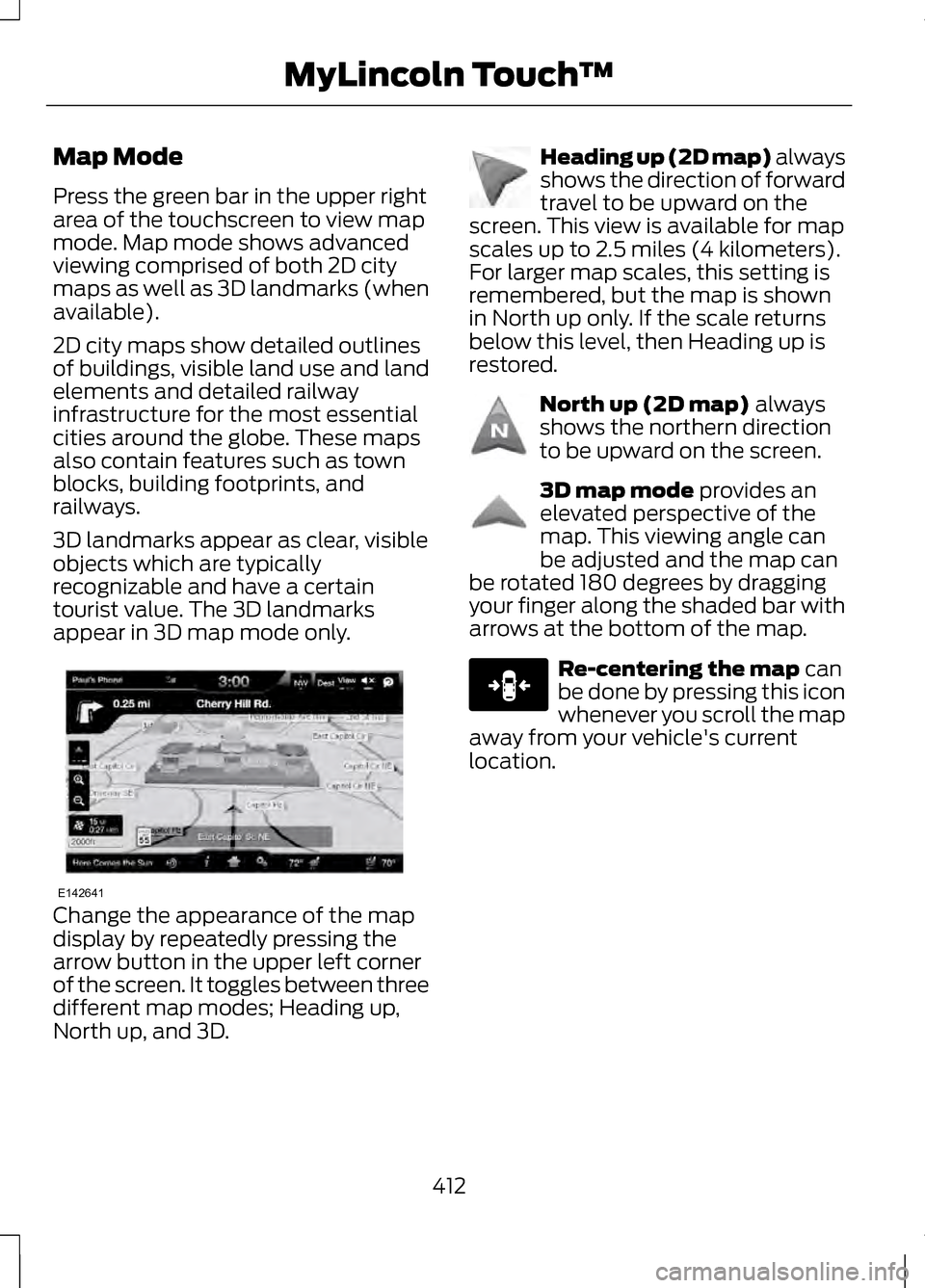
Map Mode
Press the green bar in the upper right
area of the touchscreen to view map
mode. Map mode shows advanced
viewing comprised of both 2D city
maps as well as 3D landmarks (when
available).
2D city maps show detailed outlines
of buildings, visible land use and land
elements and detailed railway
infrastructure for the most essential
cities around the globe. These maps
also contain features such as town
blocks, building footprints, and
railways.
3D landmarks appear as clear, visible
objects which are typically
recognizable and have a certain
tourist value. The 3D landmarks
appear in 3D map mode only.
Change the appearance of the map
display by repeatedly pressing the
arrow button in the upper left corner
of the screen. It toggles between three
different map modes; Heading up,
North up, and 3D. Heading up (2D map) always
shows the direction of forward
travel to be upward on the
screen. This view is available for map
scales up to 2.5 miles (4 kilometers).
For larger map scales, this setting is
remembered, but the map is shown
in North up only. If the scale returns
below this level, then Heading up is
restored. North up (2D map) always
shows the northern direction
to be upward on the screen. 3D map mode
provides an
elevated perspective of the
map. This viewing angle can
be adjusted and the map can
be rotated 180 degrees by dragging
your finger along the shaded bar with
arrows at the bottom of the map. Re-centering the map
can
be done by pressing this icon
whenever you scroll the map
away from your vehicle's current
location.
412
MyLincoln Touch
™E142641 E142642 E142643 E142644 E146188
Page 465 of 474
Event Data Recording
See: Data Recording....................................9
Export Unique Options........................14
Exterior Mirrors......................................88 Auto-Dimming Feature...........................89
Blind Spot Monitor....................................90
Fold-Away Exterior Mirrors.....................89
Heated Exterior Mirrors............................89
Integrated Blind Spot Mirrors................89
Memory Mirrors.......................................... 89
Power Exterior Mirrors..............................88
Signal Indicator Mirrors...........................89
F
Fastening the Safety Belts................32 Rear Inflatable Safety Belt......................35
Restraint of Pregnant Women..............33
Safety Belt Extension Assembly..........36
Safety Belt Locking Modes.....................33
Floor Mats.............................................236
Ford Extended Service Plan (ESP)....................................................334
SERVICE PLANS (CANADA
ONLY)...................................................... 336
SERVICE PLANS (U.S. only)................334
Front Passenger Sensing System...................................................45
Fuel and Refueling..............................155
Fuel Consumption
..............................160
Calculating Fuel Economy....................160
Filling the Tank.......................................... 160
Fuel Cut-Off Switch
..........................239
Fuel Filter...............................................276
Fuel Quality...........................................156
Choosing the Right Fuel........................156
Octane Recommendations..................156
Fuses........................................................251
Fuse Specification Chart
.................252
Passenger Compartment Fuse
Panel........................................................ 259
Power Distribution Box..........................252 G
Garage Door Opener
See: Universal Garage Door
Opener...................................................... 142
Gauges......................................................94 Engine Coolant Temperature
Gauge......................................................... 95
Fuel Gauge................................................... 95
Information Display...................................94
Gearbox See: Transmission....................................165
General Information on Radio Frequencies..........................................53
Intelligent Access.......................................53
Getting Assistance Outside the U.S. and Canada
........................................247
Getting the Services You Need
.....................................................243
Away From Home....................................243
Global Opening and Closing............88 Closing the Windows...............................88
Opening the Windows.............................88
H
Hazard Warning Flashers
................239
Headlamp Exit Delay...........................83
Head Restraints
....................................131
Adjusting the Head Restraint...............132
Tilting Head Restraints (If
Equipped)............................................... 133
Heated Seats.........................................137 Rear Heated Seats...................................138
Heated Steering Wheel......................78
Heated Windows and Mirrors.........128 Heated Exterior Mirror.............................128
Heated Rear Window..............................128
Heating See: Climate Control...............................126
Hill Start Assist.....................................170 Using Hill Start Assist..............................170
462
Index
Page 468 of 474
MyKey®....................................................58
Principle of Operation..............................58
MyKey Troubleshooting.......................61
MyLincoln Touch ™.............................337
General Information................................337
N
Navigation.............................................407 cityseekr..................................................... 409
Map Mode................................................... 412
Navigation Map Updates.......................415
Navigation Voice Commands..............415
Point of Interest (POI) Categories............................................. 408
Quick-touch Buttons..............................414
Setting a Destination.............................407
Setting Your Navigation Preferences............................................ 410
O
Oil Check See: Engine Oil Check - 2.0L
EcoBoost™/3.7L..................................267
Opening and Closing the Hood.....................................................264
Ordering Additional Owner's Literature............................................248
Obtaining a French Owner ’s
Manual.................................................... 249
Overhead Console..............................149
P
Parking Aid
............................................184
Front Sensing System............................185
Rear Sensing System..............................185
Parking Aids
..........................................184
Passive Anti-Theft System................72
SecuriLock®.................................................. 72PATS
See: Passive Anti-Theft System...........72
Perchlorate...............................................12
Personal Safety System ™
.................41
How Does the Personal Safety System
Work?.......................................................... 41
Phone.....................................................385 Making Calls.............................................. 386
Pairing Subsequent Phones...............386
Pairing Your Phone for the First Time......................................................... 385
Phone Menu Options.............................386
Phone Settings.........................................389
Receiving Calls.........................................386
Text Messaging........................................388
Power Door Locks See: Locking and Unlocking...................62
Power Seats
..........................................133
Multi-Contour Front Seats with Active
Motion (If Equipped)..........................134
Power Lumbar........................................... 134
Power Steering Fluid Check............276
Power Windows
....................................87
Accessory Delay.........................................88
Bounce-Back............................................... 87
One-Touch Down.......................................87
One-Touch Up............................................. 87
Window Lock............................................... 87
R
Rear Seat Armrest
..............................140
Armrest pass-through............................140
Rear Seats..............................................137
Rear View Camera...............................191 Using the Rear View Camera
System...................................................... 191
Rear View Camera See: Rear View Camera...........................191
Recommended Towing Weights................................................227
465
Index