buttons LINCOLN MKZ 2013 Owner's Manual
[x] Cancel search | Manufacturer: LINCOLN, Model Year: 2013, Model line: MKZ, Model: LINCOLN MKZ 2013Pages: 474, PDF Size: 3.79 MB
Page 373 of 474
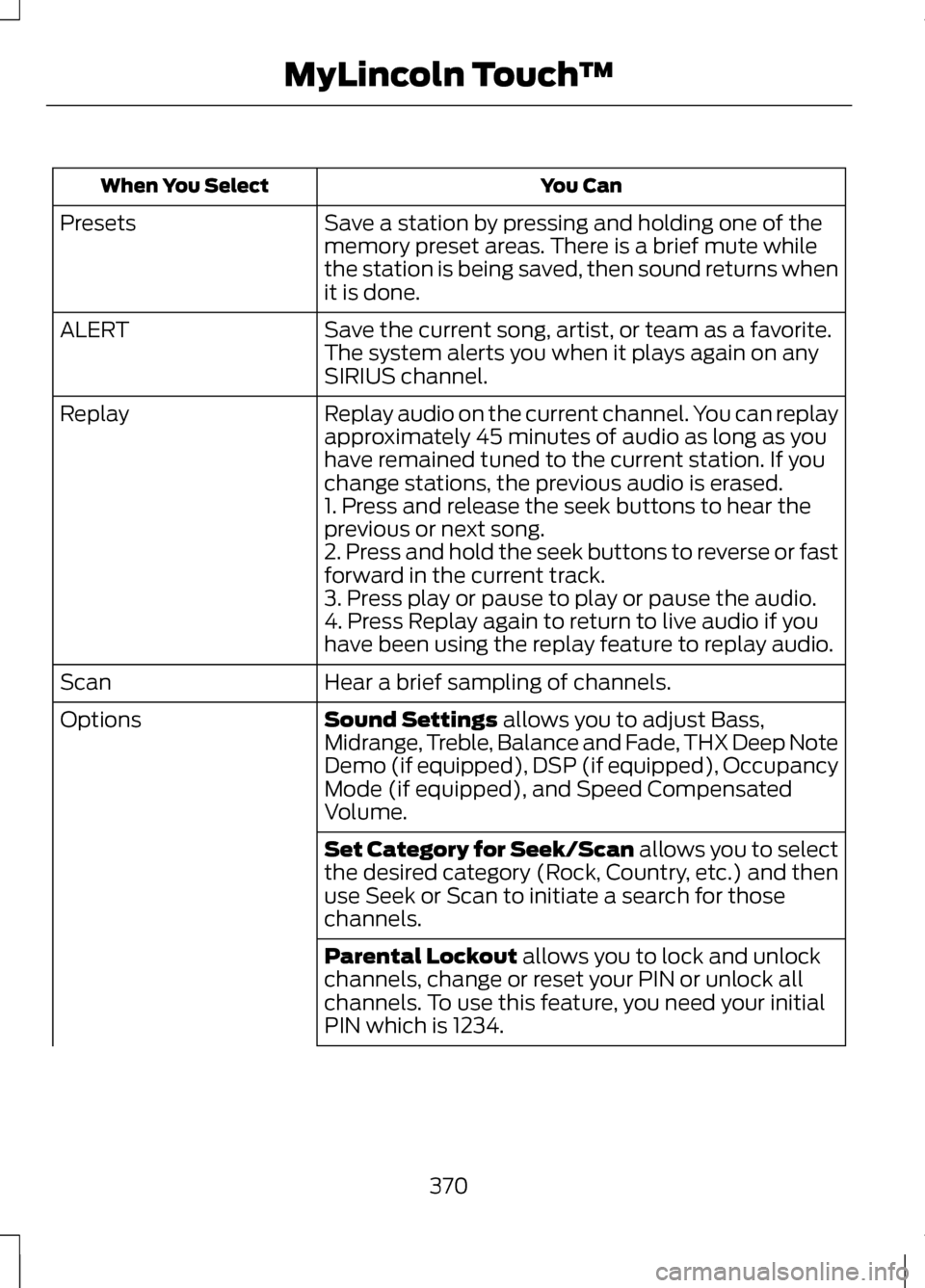
You Can
When You Select
Save a station by pressing and holding one of the
memory preset areas. There is a brief mute while
the station is being saved, then sound returns when
it is done.
Presets
Save the current song, artist, or team as a favorite.
The system alerts you when it plays again on any
SIRIUS channel.
ALERT
Replay audio on the current channel. You can replay
approximately 45 minutes of audio as long as you
have remained tuned to the current station. If you
change stations, the previous audio is erased.
Replay
1. Press and release the seek buttons to hear the
previous or next song.
2. Press and hold the seek buttons to reverse or fast
forward in the current track.
3. Press play or pause to play or pause the audio.
4. Press Replay again to return to live audio if you
have been using the replay feature to replay audio.
Hear a brief sampling of channels.
Scan
Sound Settings allows you to adjust Bass,
Midrange, Treble, Balance and Fade, THX Deep Note
Demo (if equipped), DSP (if equipped), Occupancy
Mode (if equipped), and Speed Compensated
Volume.
Options
Set Category for Seek/Scan
allows you to select
the desired category (Rock, Country, etc.) and then
use Seek or Scan to initiate a search for those
channels.
Parental Lockout
allows you to lock and unlock
channels, change or reset your PIN or unlock all
channels. To use this feature, you need your initial
PIN which is 1234.
370
MyLincoln Touch
™
Page 416 of 474
Auto Zoom
Press the green bar to access map
mode, then select the + or - zoom
button to bring up the zoom level and
Auto buttons on the touchscreen.
When the Auto button is pressed,
Auto Zoom is turned on and Auto is
displayed in the bottom left corner of
the screen. The map zoom level then
synchronizes with vehicle speed. The
slower the vehicle is traveling, the
farther in the map is zoomed in; the
faster the vehicle is traveling, the
farther the map is zoomed out. To turn
the feature off, just press the + or -
button again.
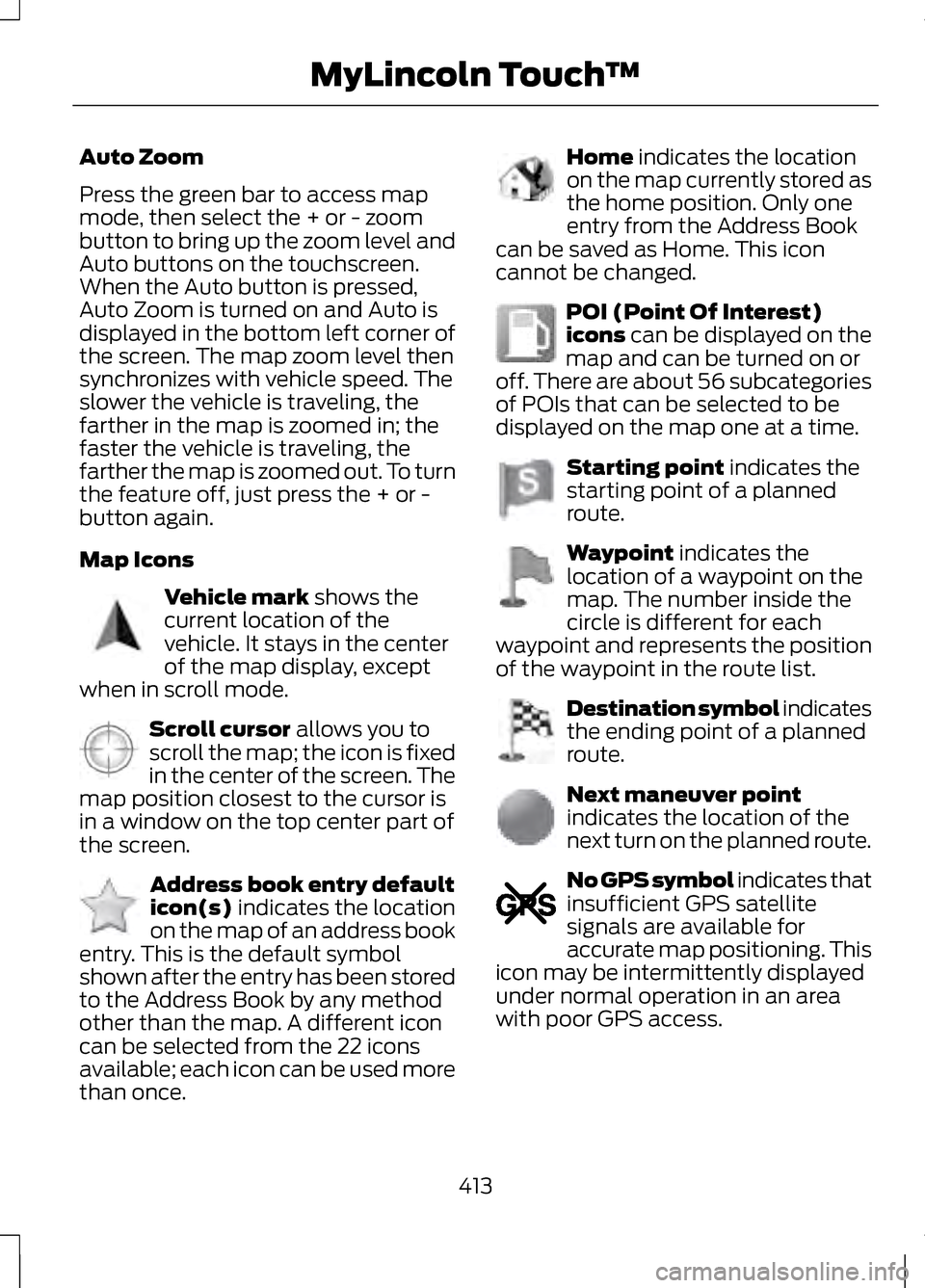
Map Icons
Vehicle mark shows the
current location of the
vehicle. It stays in the center
of the map display, except
when in scroll mode. Scroll cursor
allows you to
scroll the map; the icon is fixed
in the center of the screen. The
map position closest to the cursor is
in a window on the top center part of
the screen. Address book entry default
icon(s)
indicates the location
on the map of an address book
entry. This is the default symbol
shown after the entry has been stored
to the Address Book by any method
other than the map. A different icon
can be selected from the 22 icons
available; each icon can be used more
than once. Home
indicates the location
on the map currently stored as
the home position. Only one
entry from the Address Book
can be saved as Home. This icon
cannot be changed. POI (Point Of Interest)
icons
can be displayed on the
map and can be turned on or
off. There are about 56 subcategories
of POIs that can be selected to be
displayed on the map one at a time. Starting point
indicates the
starting point of a planned
route. Waypoint
indicates the
location of a waypoint on the
map. The number inside the
circle is different for each
waypoint and represents the position
of the waypoint in the route list. Destination symbol indicates
the ending point of a planned
route.
Next maneuver point
indicates the location of the
next turn on the planned route.
No GPS symbol indicates that
insufficient GPS satellite
signals are available for
accurate map positioning. This
icon may be intermittently displayed
under normal operation in an area
with poor GPS access.
413
MyLincoln Touch
™E142646 E142647 E142648 E142649 E142650 E142651 E142652 E142653 E142654 E142655
Page 417 of 474
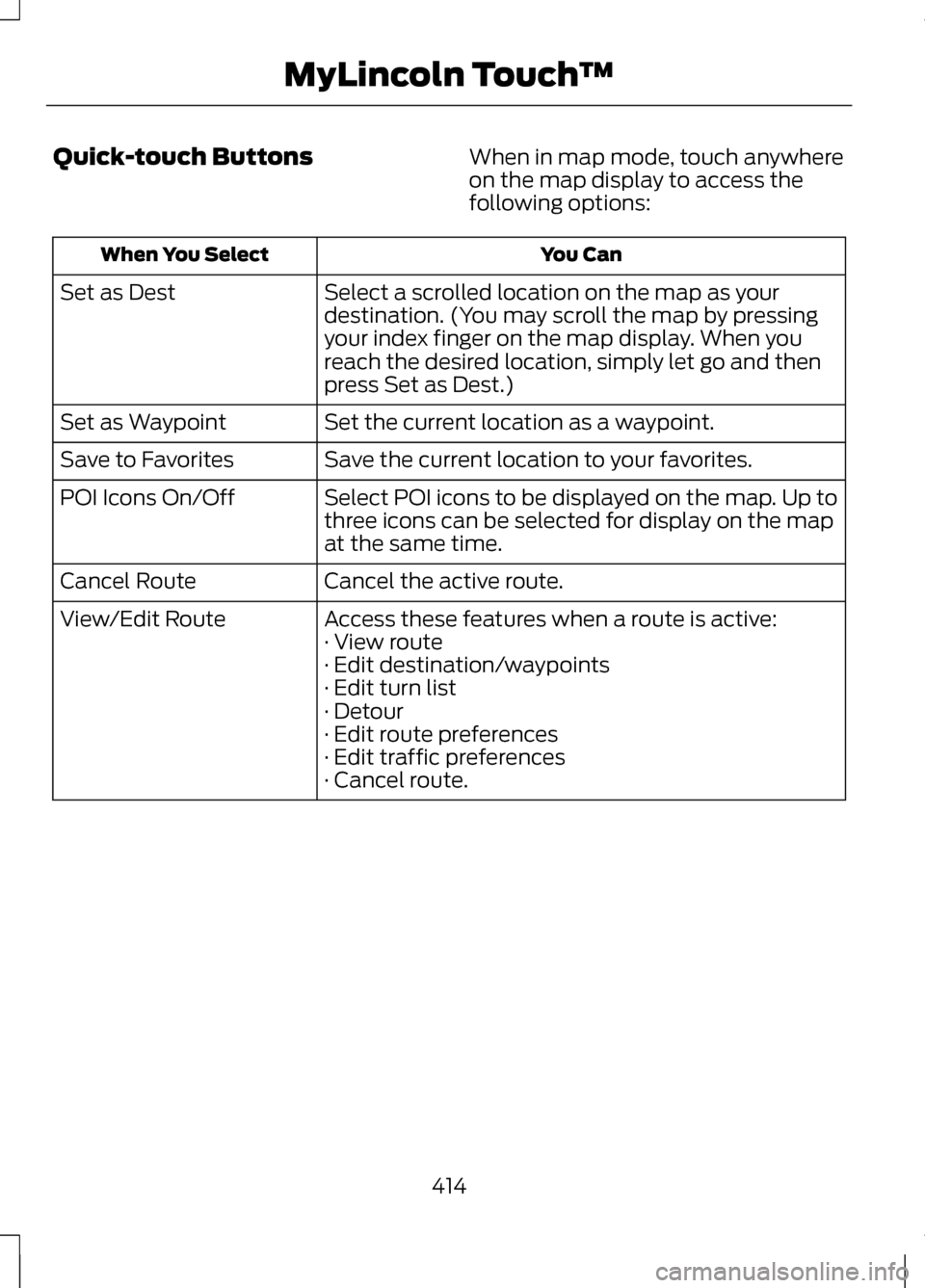
Quick-touch Buttons
When in map mode, touch anywhere
on the map display to access the
following options: You Can
When You Select
Select a scrolled location on the map as your
destination. (You may scroll the map by pressing
your index finger on the map display. When you
reach the desired location, simply let go and then
press Set as Dest.)
Set as Dest
Set the current location as a waypoint.
Set as Waypoint
Save the current location to your favorites.
Save to Favorites
Select POI icons to be displayed on the map. Up to
three icons can be selected for display on the map
at the same time.
POI Icons On/Off
Cancel the active route.
Cancel Route
Access these features when a route is active:
View/Edit Route
· View route
· Edit destination/waypoints
· Edit turn list
· Detour
· Edit route preferences
· Edit traffic preferences
· Cancel route.
414
MyLincoln Touch
™
Page 468 of 474
MyKey®....................................................58
Principle of Operation..............................58
MyKey Troubleshooting.......................61
MyLincoln Touch ™.............................337
General Information................................337
N
Navigation.............................................407 cityseekr..................................................... 409
Map Mode................................................... 412
Navigation Map Updates.......................415
Navigation Voice Commands..............415
Point of Interest (POI) Categories............................................. 408
Quick-touch Buttons..............................414
Setting a Destination.............................407
Setting Your Navigation Preferences............................................ 410
O
Oil Check See: Engine Oil Check - 2.0L
EcoBoost™/3.7L..................................267
Opening and Closing the Hood.....................................................264
Ordering Additional Owner's Literature............................................248
Obtaining a French Owner ’s
Manual.................................................... 249
Overhead Console..............................149
P
Parking Aid
............................................184
Front Sensing System............................185
Rear Sensing System..............................185
Parking Aids
..........................................184
Passive Anti-Theft System................72
SecuriLock®.................................................. 72PATS
See: Passive Anti-Theft System...........72
Perchlorate...............................................12
Personal Safety System ™
.................41
How Does the Personal Safety System
Work?.......................................................... 41
Phone.....................................................385 Making Calls.............................................. 386
Pairing Subsequent Phones...............386
Pairing Your Phone for the First Time......................................................... 385
Phone Menu Options.............................386
Phone Settings.........................................389
Receiving Calls.........................................386
Text Messaging........................................388
Power Door Locks See: Locking and Unlocking...................62
Power Seats
..........................................133
Multi-Contour Front Seats with Active
Motion (If Equipped)..........................134
Power Lumbar........................................... 134
Power Steering Fluid Check............276
Power Windows
....................................87
Accessory Delay.........................................88
Bounce-Back............................................... 87
One-Touch Down.......................................87
One-Touch Up............................................. 87
Window Lock............................................... 87
R
Rear Seat Armrest
..............................140
Armrest pass-through............................140
Rear Seats..............................................137
Rear View Camera...............................191 Using the Rear View Camera
System...................................................... 191
Rear View Camera See: Rear View Camera...........................191
Recommended Towing Weights................................................227
465
Index