door lock LINCOLN MKZ 2013 Owner's Manual
[x] Cancel search | Manufacturer: LINCOLN, Model Year: 2013, Model line: MKZ, Model: LINCOLN MKZ 2013Pages: 474, PDF Size: 3.79 MB
Page 99 of 474
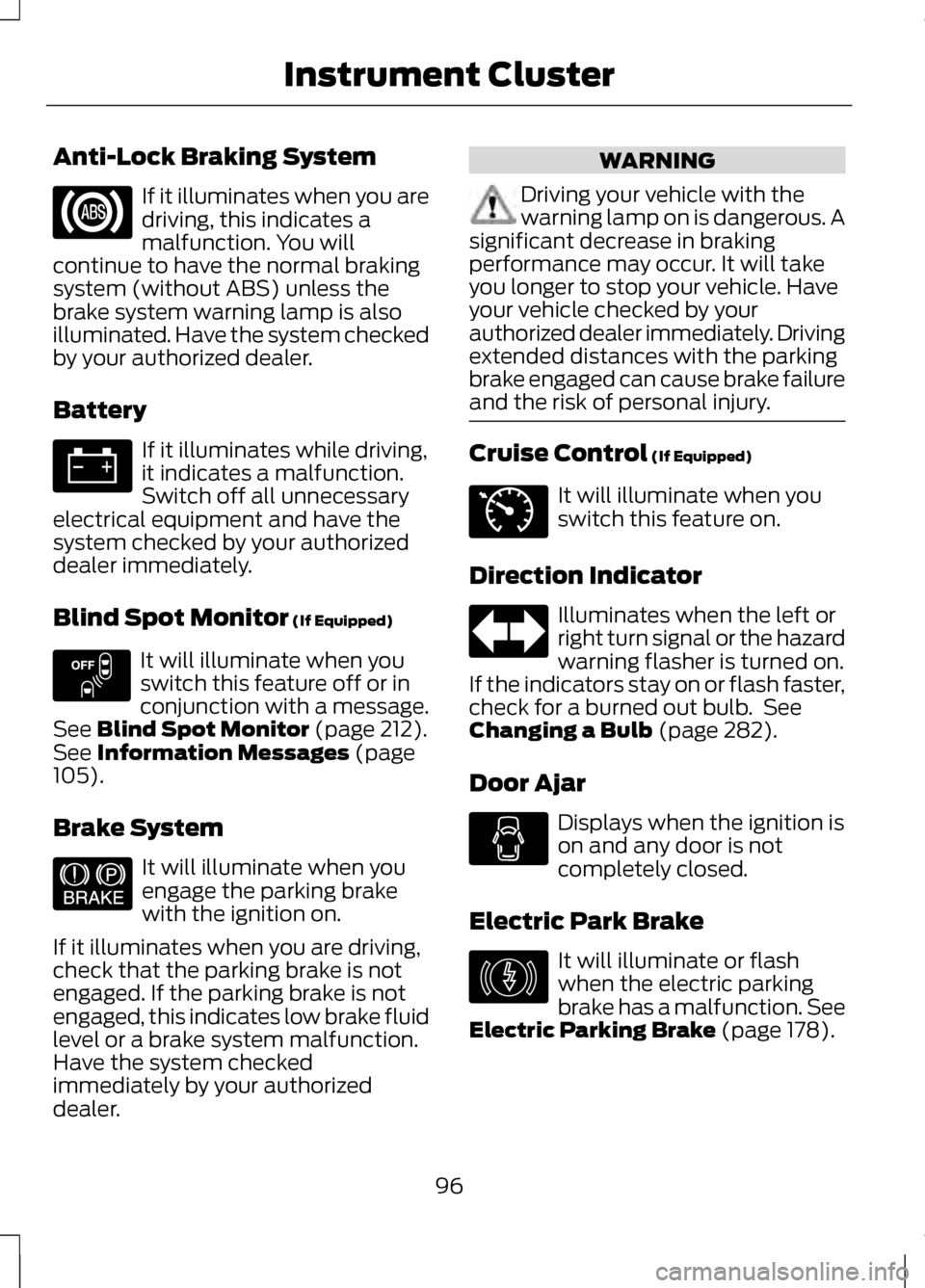
Anti-Lock Braking System
If it illuminates when you are
driving, this indicates a
malfunction. You will
continue to have the normal braking
system (without ABS) unless the
brake system warning lamp is also
illuminated. Have the system checked
by your authorized dealer.
Battery If it illuminates while driving,
it indicates a malfunction.
Switch off all unnecessary
electrical equipment and have the
system checked by your authorized
dealer immediately.
Blind Spot Monitor (If Equipped) It will illuminate when you
switch this feature off or in
conjunction with a message.
See
Blind Spot Monitor (page 212).
See Information Messages (page
105).
Brake System It will illuminate when you
engage the parking brake
with the ignition on.
If it illuminates when you are driving,
check that the parking brake is not
engaged. If the parking brake is not
engaged, this indicates low brake fluid
level or a brake system malfunction.
Have the system checked
immediately by your authorized
dealer. WARNING
Driving your vehicle with the
warning lamp on is dangerous. A
significant decrease in braking
performance may occur. It will take
you longer to stop your vehicle. Have
your vehicle checked by your
authorized dealer immediately. Driving
extended distances with the parking
brake engaged can cause brake failure
and the risk of personal injury. Cruise Control
(If Equipped)
It will illuminate when you
switch this feature on.
Direction Indicator Illuminates when the left or
right turn signal or the hazard
warning flasher is turned on.
If the indicators stay on or flash faster,
check for a burned out bulb. See
Changing a Bulb
(page 282).
Door Ajar Displays when the ignition is
on and any door is not
completely closed.
Electric Park Brake It will illuminate or flash
when the electric parking
brake has a malfunction. See
Electric Parking Brake
(page 178).
96
Instrument Cluster E151262 E144522 E71340 E146190
Page 106 of 474
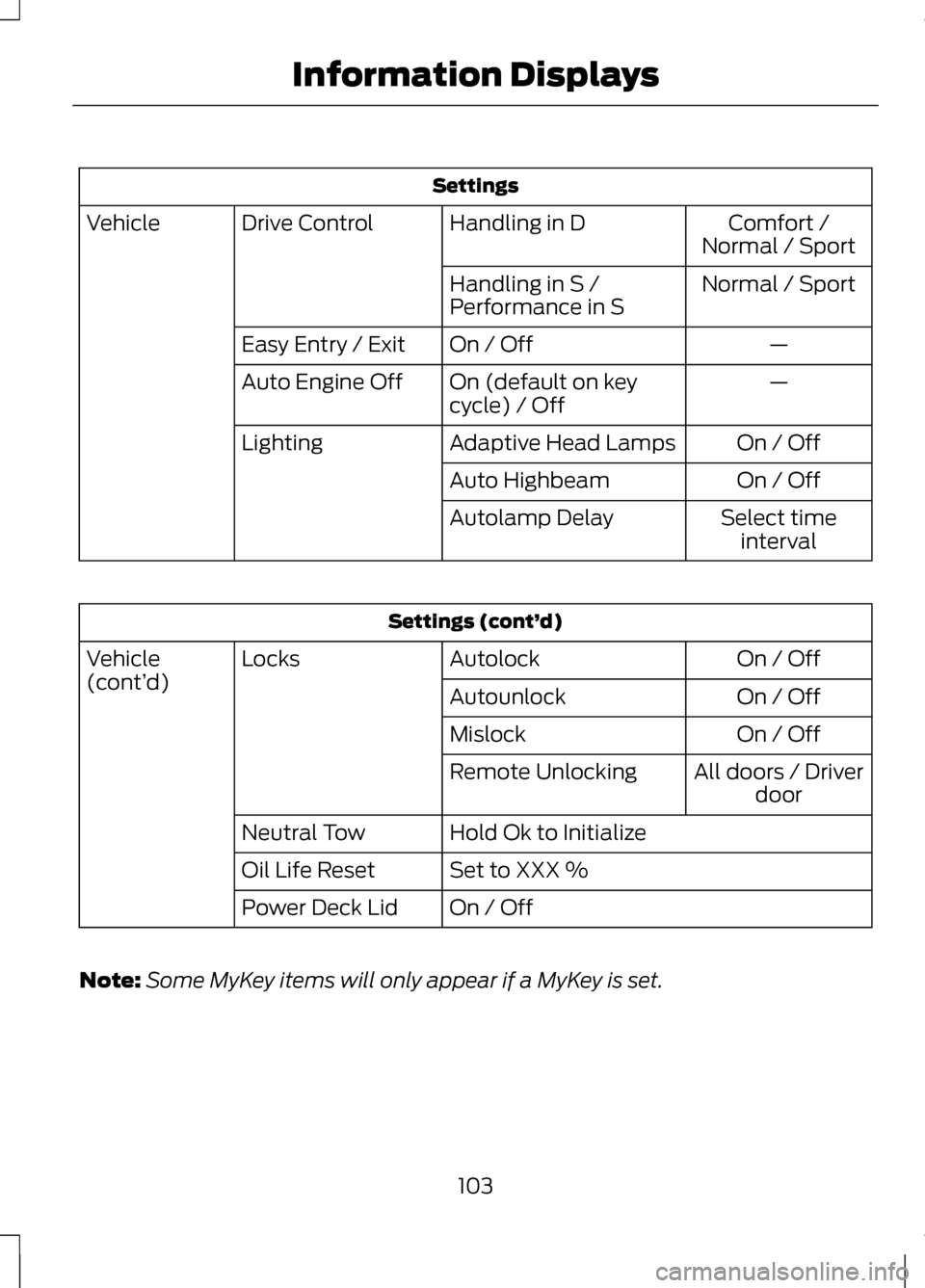
Settings
Comfort /
Normal / Sport
Handling in D
Drive Control
Vehicle
Normal / Sport
Handling in S /
Performance in S
—
On / Off
Easy Entry / Exit
—
On (default on key
cycle) / Off
Auto Engine Off
On / Off
Adaptive Head Lamps
Lighting
On / Off
Auto Highbeam
Select timeinterval
Autolamp Delay Settings (cont’
d)
On / Off
Autolock
Locks
Vehicle
(cont’ d)
On / Off
Autounlock
On / Off
Mislock
All doors / Driverdoor
Remote Unlocking
Hold Ok to Initialize
Neutral Tow
Set to XXX %
Oil Life Reset
On / Off
Power Deck Lid
Note: Some MyKey items will only appear if a MyKey is set.
103
Information Displays
Page 114 of 474
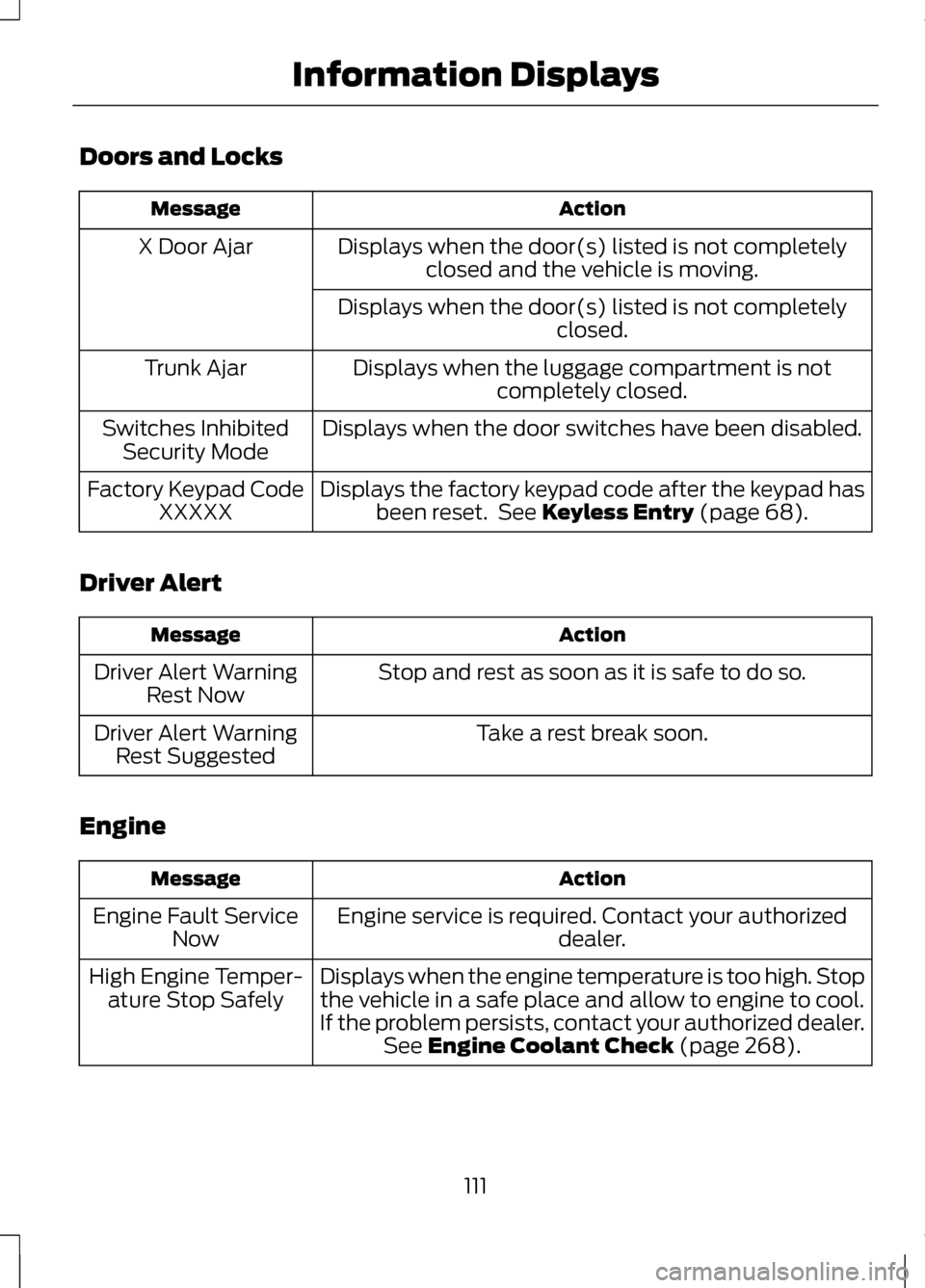
Doors and Locks
Action
Message
Displays when the door(s) listed is not completelyclosed and the vehicle is moving.
X Door Ajar
Displays when the door(s) listed is not completely closed.
Displays when the luggage compartment is not completely closed.
Trunk Ajar
Displays when the door switches have been disabled.
Switches Inhibited
Security Mode
Displays the factory keypad code after the keypad hasbeen reset. See Keyless Entry (page 68).
Factory Keypad Code
XXXXX
Driver Alert Action
Message
Stop and rest as soon as it is safe to do so.
Driver Alert Warning
Rest Now
Take a rest break soon.
Driver Alert Warning
Rest Suggested
Engine Action
Message
Engine service is required. Contact your authorized dealer.
Engine Fault Service
Now
Displays when the engine temperature is too high. Stopthe vehicle in a safe place and allow to engine to cool.
If the problem persists, contact your authorized dealer. See
Engine Coolant Check (page 268).
High Engine Temper-
ature Stop Safely
111
Information Displays
Page 139 of 474
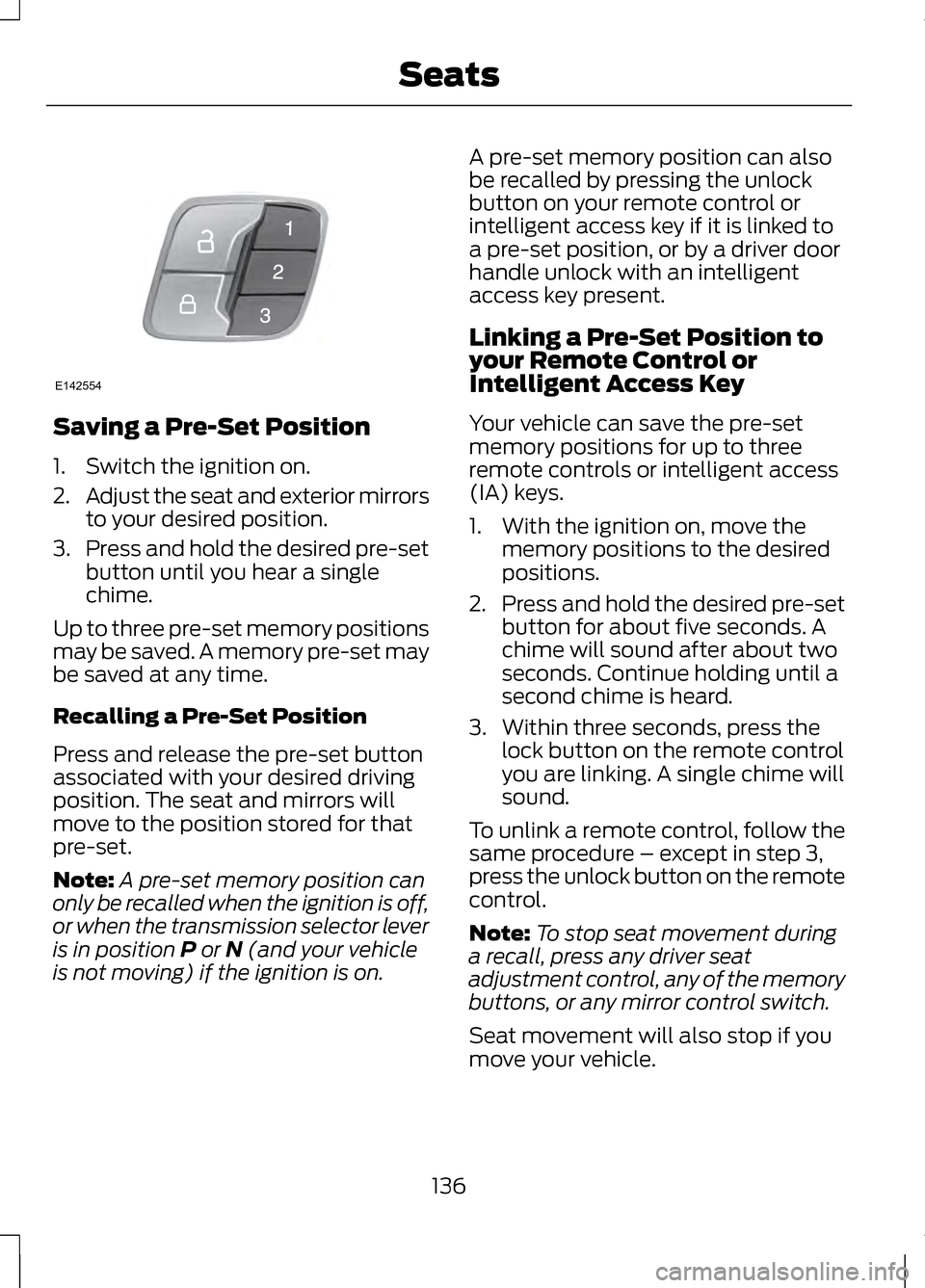
Saving a Pre-Set Position
1. Switch the ignition on.
2.
Adjust the seat and exterior mirrors
to your desired position.
3. Press and hold the desired pre-set
button until you hear a single
chime.
Up to three pre-set memory positions
may be saved. A memory pre-set may
be saved at any time.
Recalling a Pre-Set Position
Press and release the pre-set button
associated with your desired driving
position. The seat and mirrors will
move to the position stored for that
pre-set.
Note: A pre-set memory position can
only be recalled when the ignition is off,
or when the transmission selector lever
is in position P or N (and your vehicle
is not moving) if the ignition is on. A pre-set memory position can also
be recalled by pressing the unlock
button on your remote control or
intelligent access key if it is linked to
a pre-set position, or by a driver door
handle unlock with an intelligent
access key present.
Linking a Pre-Set Position to
your Remote Control or
Intelligent Access Key
Your vehicle can save the pre-set
memory positions for up to three
remote controls or intelligent access
(IA) keys.
1. With the ignition on, move the
memory positions to the desired
positions.
2. Press and hold the desired pre-set
button for about five seconds. A
chime will sound after about two
seconds. Continue holding until a
second chime is heard.
3. Within three seconds, press the lock button on the remote control
you are linking. A single chime will
sound.
To unlink a remote control, follow the
same procedure – except in step 3,
press the unlock button on the remote
control.
Note: To stop seat movement during
a recall, press any driver seat
adjustment control, any of the memory
buttons, or any mirror control switch.
Seat movement will also stop if you
move your vehicle.
136
SeatsE142554
Page 143 of 474
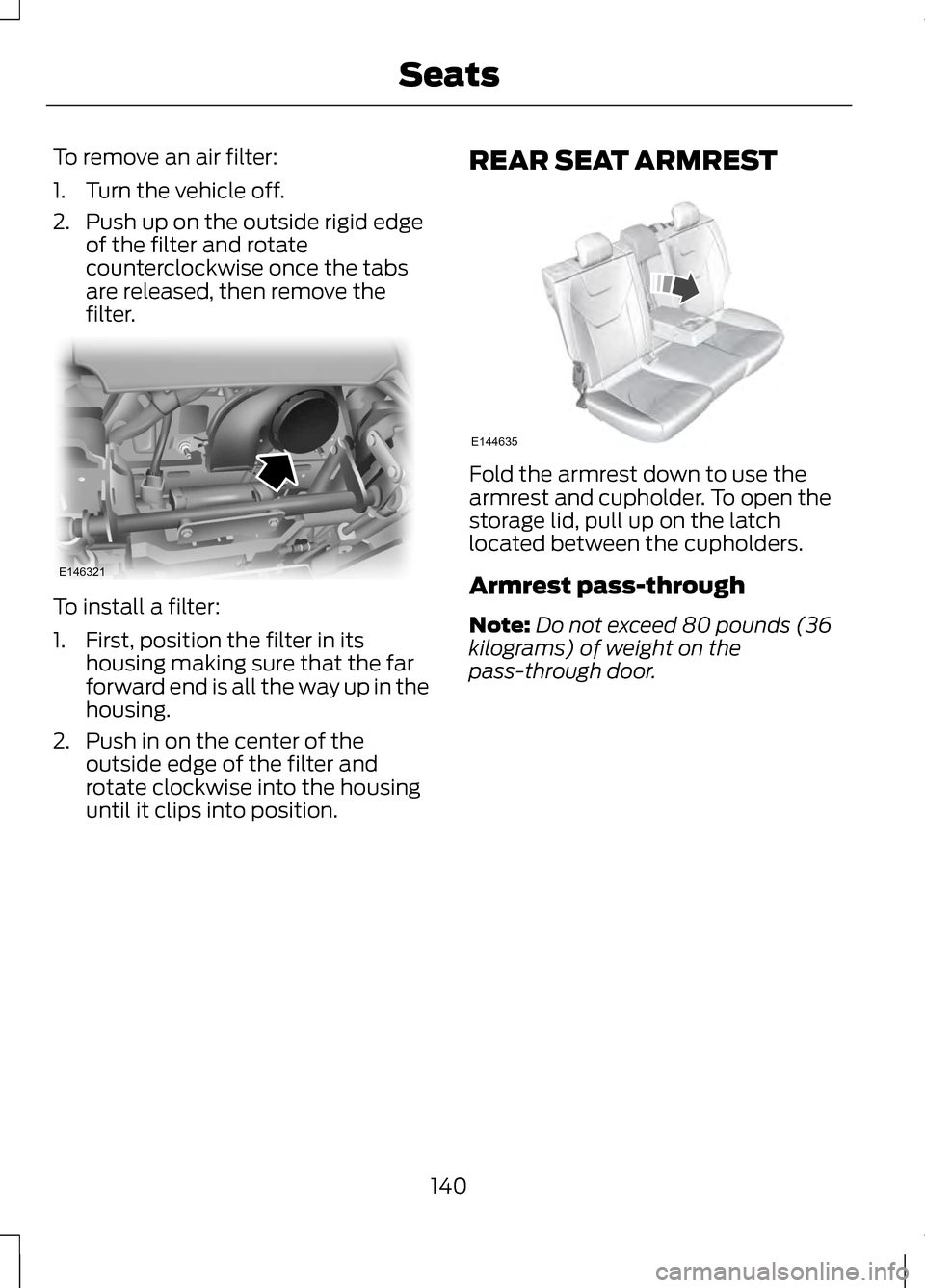
To remove an air filter:
1. Turn the vehicle off.
2. Push up on the outside rigid edge
of the filter and rotate
counterclockwise once the tabs
are released, then remove the
filter. To install a filter:
1. First, position the filter in its
housing making sure that the far
forward end is all the way up in the
housing.
2. Push in on the center of the outside edge of the filter and
rotate clockwise into the housing
until it clips into position. REAR SEAT ARMREST Fold the armrest down to use the
armrest and cupholder. To open the
storage lid, pull up on the latch
located between the cupholders.
Armrest pass-through
Note:
Do not exceed 80 pounds (36
kilograms) of weight on the
pass-through door.
140
SeatsE146321 E144635
Page 145 of 474
HomeLink® Wireless Control
System (If Equipped)
WARNINGS
Make sure that the garage door
and security device are free from
obstruction when you are
programming. Do not program the
system with the vehicle in the garage. Do not use the system with any
garage door opener that does
not have the safety stop and reverse
feature as required by U.S. Federal
Safety Standards (this includes any
garage door opener manufactured
before April 1, 1982). Note:
Make sure you keep the original
remote control transmitter for use in
other vehicles as well as for future
system programming.
Note: We recommend that upon the
sale or lease termination of your
vehicle, you erase the programmed
function buttons for security reasons.
See Erasing the function button codes
later in this section.
Note: You can program a maximum
of three devices. To change or replace
any of the three devices after it has
been initially programmed, you must
first erase the current settings. See
Erasing the function button codes later
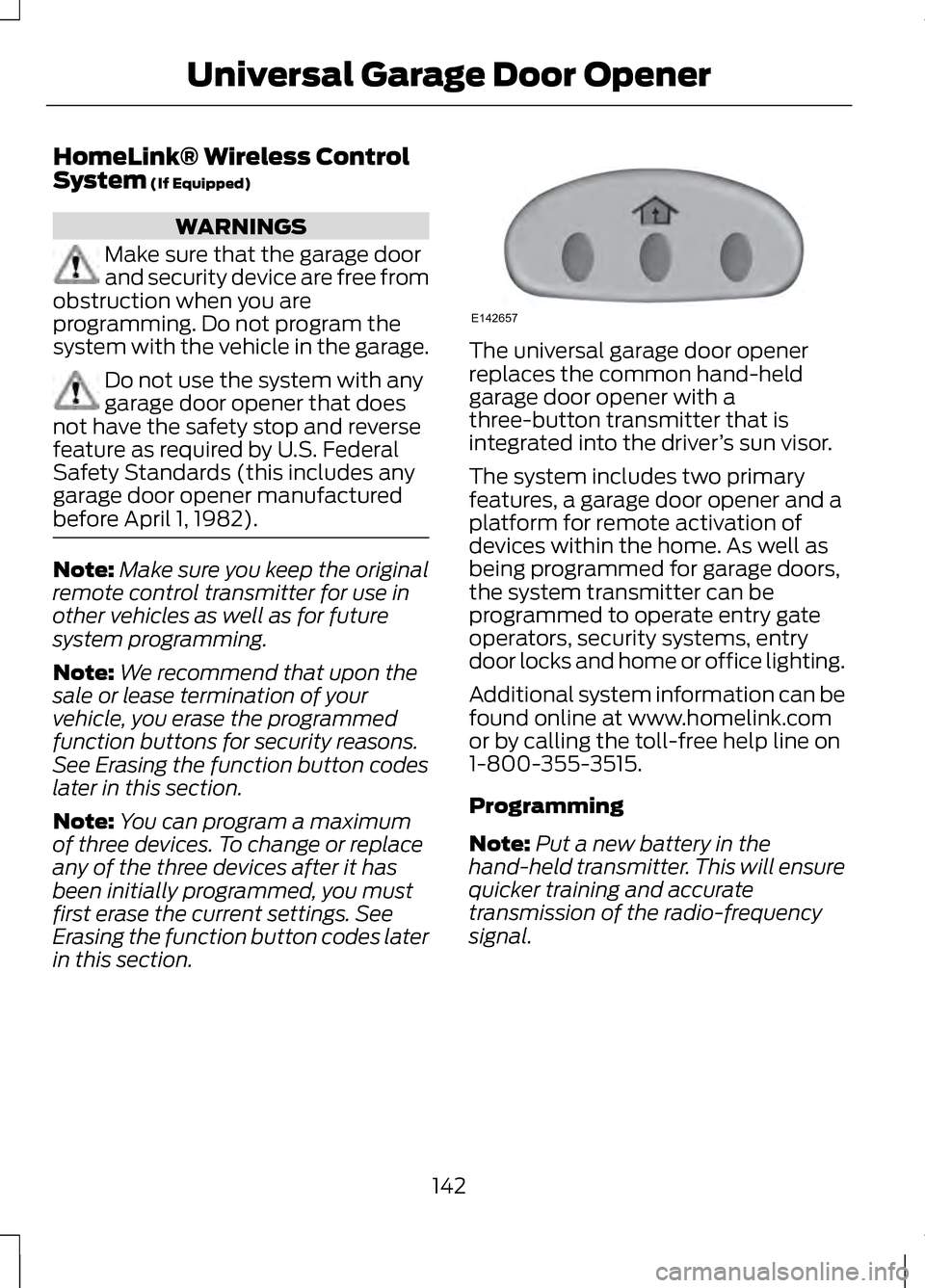
in this section. The universal garage door opener
replaces the common hand-held
garage door opener with a
three-button transmitter that is
integrated into the driver
’s sun visor.
The system includes two primary
features, a garage door opener and a
platform for remote activation of
devices within the home. As well as
being programmed for garage doors,
the system transmitter can be
programmed to operate entry gate
operators, security systems, entry
door locks and home or office lighting.
Additional system information can be
found online at www.homelink.com
or by calling the toll-free help line on
1-800-355-3515.
Programming
Note: Put a new battery in the
hand-held transmitter. This will ensure
quicker training and accurate
transmission of the radio-frequency
signal.
142
Universal Garage Door OpenerE142657
Page 156 of 474
2. Put the transmission in position P
or N.
3. Press the START button. The engine may continue cranking for
up to 15 seconds or until it starts.
Note: If you cannot start the engine on
the first try, wait for a short period and
try again.
If you have difficulty starting the
engine when the temperature is below
-13°F (-25°C), press the accelerator
pedal slightly and try again.
If you cannot start the engine after
three attempts, wait 10 seconds and
follow this procedure:
1. Fully press the brake pedal.
2. Fully press the accelerator pedal and hold it there.
3. Put the transmission in position P.
4. Press the START button.
Guarding Against Exhaust
Fumes WARNING
If you smell exhaust fumes inside
your vehicle, have your vehicle
checked by your authorized dealer
immediately. Do not drive your vehicle
if you smell exhaust fumes. Carbon
monoxide is present in exhaust fumes.
Take precautions to avoid its
dangerous effects. Important Ventilating
Information
If you stop your vehicle and the leave
the engine idling for long periods, we
recommend that you do one of the
following:
•
Open the windows at least 1 inch
(2.5 centimeters)
• Set your climate control to outside
air.
ENGINE BLOCK HEATER
(IF
EQUIPPED) WARNINGS
Failure to follow engine block
heater instructions could result
in property damage or serious
personal injury. Do not use your heater with
ungrounded electrical systems
or two-pronged adapters. There is a
risk of electrical shock. Note:
The heater is most effective
when outdoor temperatures are below
0°F (-18°C).
The heater acts as a starting aid by
warming the engine coolant. This
allows the climate control system to
respond quickly. The equipment
includes a heater element (installed
in the engine block) and a wire
harness. You can connect the system
to a grounded 120 volt AC electrical
source.
153
Starting and Stopping the Engine
Page 157 of 474
We recommend that you do the
following for a safe and correct
operation:
•
Use a 16-gauge outdoor extension
cord that is product certified by
Underwriter ’s Laboratory (UL) or
Canadian Standards Association
(CSA). This extension cord must
be suitable for use outdoors, in
cold temperatures, and be clearly
marked Suitable for Use with
Outdoor Appliances. Do not use an
indoor extension cord outdoors.
This could result in an electric
shock or become a fire hazard.
• Use as short an extension cord as
possible.
• Do not use multiple extension
cords.
• Make sure that when in operation,
the extension cord plug and heater
cord plug connections are free and
clear of water. This could cause an
electric shock or fire.
• Make sure your vehicle is parked in
a clean area, clear of
combustibles.
• Make sure the heater, heater cord
and extension cord are firmly
connected.
• Check for heat anywhere in the
electrical hookup once the system
has been operating for
approximately 30 minutes. •
Make sure the system is unplugged
and properly stowed before driving
your vehicle. Make sure the
protective cover seals the prongs
of the block heater cord plug when
not in use.
• Make sure the heater system is
checked for proper operation
before winter.
Using the Engine Block Heater
Make sure the receptacle terminals
are clean and dry prior to use. Clean
them with a dry cloth if necessary.
The heater uses 0.4 to 1.0
kilowatt-hours of energy per hour of
use. The system does not have a
thermostat. It achieves maximum
temperature after approximately
three hours of operation. Using the
heater longer than three hours does
not improve system performance and
unnecessarily uses electricity.
154
Starting and Stopping the Engine
Page 169 of 474
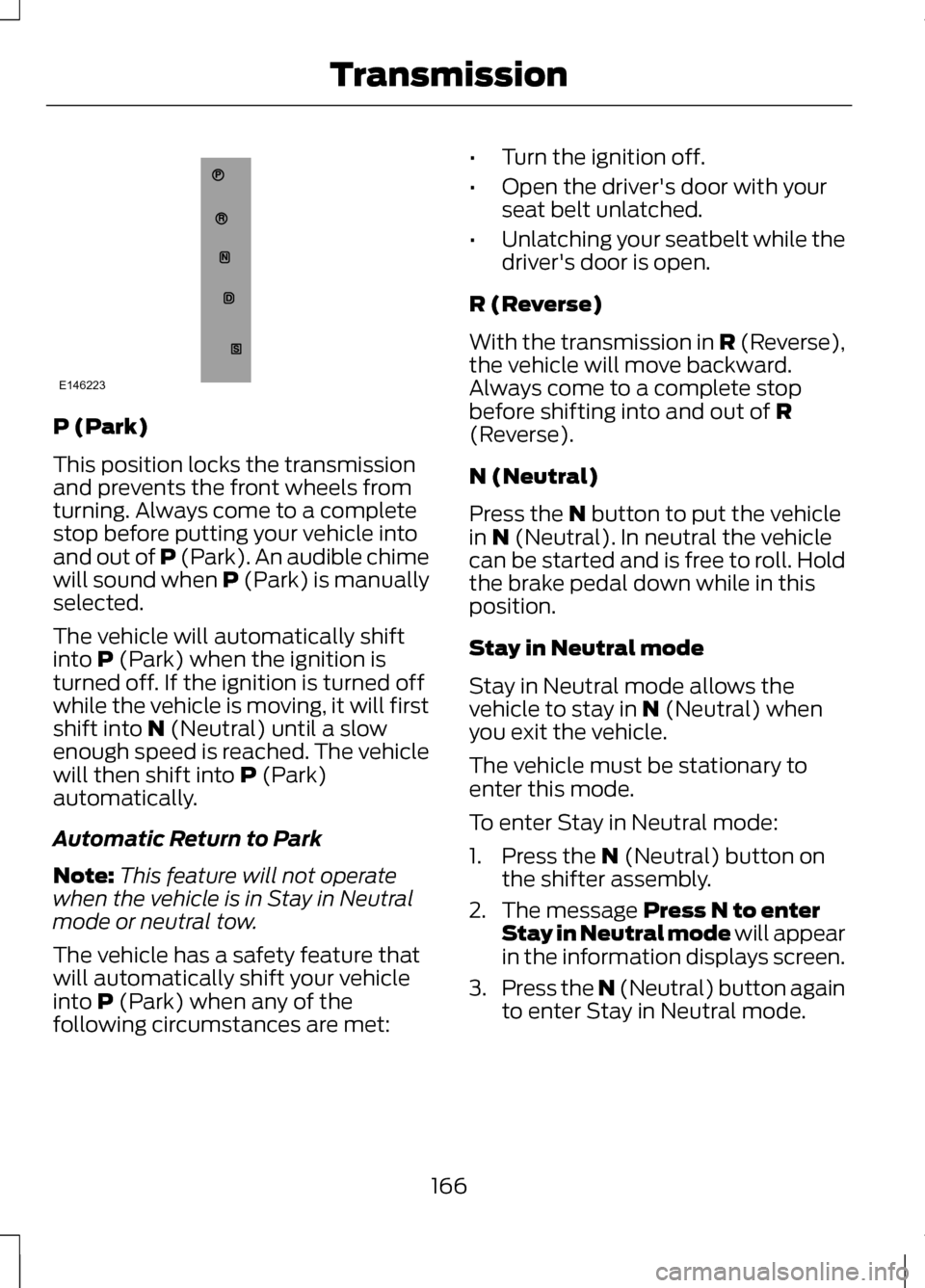
P (Park)
This position locks the transmission
and prevents the front wheels from
turning. Always come to a complete
stop before putting your vehicle into
and out of P (Park). An audible chime
will sound when P (Park) is manually
selected.
The vehicle will automatically shift
into P (Park) when the ignition is
turned off. If the ignition is turned off
while the vehicle is moving, it will first
shift into
N (Neutral) until a slow
enough speed is reached. The vehicle
will then shift into
P (Park)
automatically.
Automatic Return to Park
Note: This feature will not operate
when the vehicle is in Stay in Neutral
mode or neutral tow.
The vehicle has a safety feature that
will automatically shift your vehicle
into
P (Park) when any of the
following circumstances are met: •
Turn the ignition off.
• Open the driver's door with your
seat belt unlatched.
• Unlatching your seatbelt while the
driver's door is open.
R (Reverse)
With the transmission in
R (Reverse),
the vehicle will move backward.
Always come to a complete stop
before shifting into and out of
R
(Reverse).
N (Neutral)
Press the
N button to put the vehicle
in N (Neutral). In neutral the vehicle
can be started and is free to roll. Hold
the brake pedal down while in this
position.
Stay in Neutral mode
Stay in Neutral mode allows the
vehicle to stay in
N (Neutral) when
you exit the vehicle.
The vehicle must be stationary to
enter this mode.
To enter Stay in Neutral mode:
1. Press the
N (Neutral) button on
the shifter assembly.
2. The message
Press N to enter
Stay in Neutral mode will appear
in the information displays screen.
3. Press the N (Neutral) button again
to enter Stay in Neutral mode.
166
TransmissionE146223
Page 263 of 474
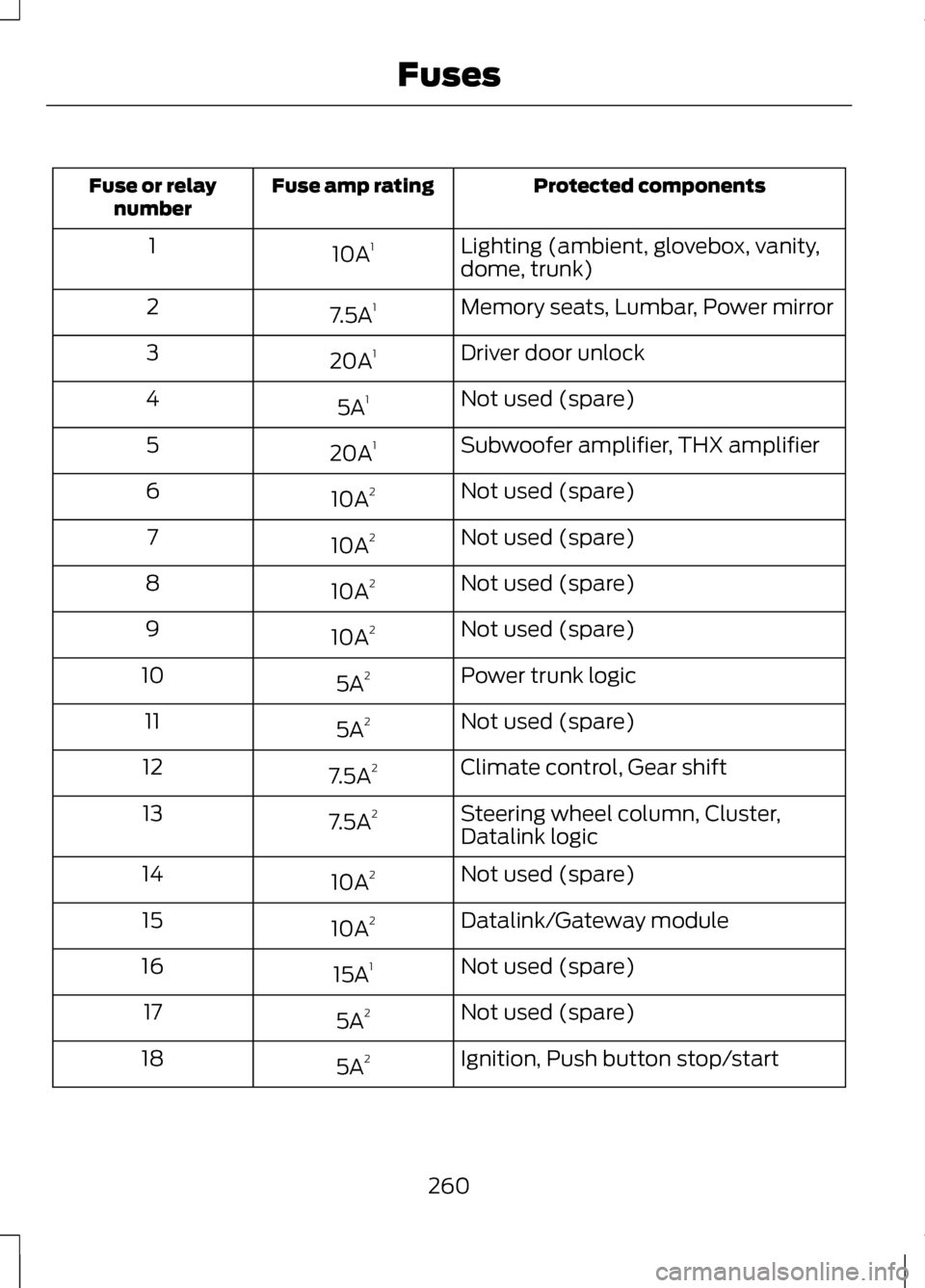
Protected components
Fuse amp rating
Fuse or relay
number
Lighting (ambient, glovebox, vanity,
dome, trunk)
10A
1
1
Memory seats, Lumbar, Power mirror
7.5A 1
2
Driver door unlock
20A 1
3
Not used (spare)
5A 1
4
Subwoofer amplifier, THX amplifier
20A 1
5
Not used (spare)
10A 2
6
Not used (spare)
10A 2
7
Not used (spare)
10A 2
8
Not used (spare)
10A 2
9
Power trunk logic
5A 2
10
Not used (spare)
5A 2
11
Climate control, Gear shift
7.5A 2
12
Steering wheel column, Cluster,
Datalink logic
7.5A
2
13
Not used (spare)
10A 2
14
Datalink/Gateway module
10A 2
15
Not used (spare)
15A 1
16
Not used (spare)
5A 2
17
Ignition, Push button stop/start
5A 2
18
260
Fuses