mirror LINCOLN MKZ 2013 Owner's Manual
[x] Cancel search | Manufacturer: LINCOLN, Model Year: 2013, Model line: MKZ, Model: LINCOLN MKZ 2013Pages: 474, PDF Size: 3.79 MB
Page 216 of 474
Using the Systems
BLIS turns on when the engine is
started and the vehicle is driven
forward above 5 mph (8 km/h); it
remains on while the transmission is
in D (Drive) and N (Neutral). If shifted
out of D (Drive) or N (Neutral), the
system enters cross traffic alert mode.
Once shifted back into D (Drive), BLIS
turns back on when the vehicle is
driven above 5 mph (8 km/h).
Note:
BLIS does not function in R
(Reverse) or P (Park) or provide any
additional warning when a turn signal
is on. Note:
Cross traffic alert detects
approaching vehicles from up to 45
feet (14 meters) away though coverage
decreases when the sensors are
blocked. Reversing slowly helps
increase the coverage area and
effectiveness. WARNING
To help avoid personal injury,
NEVER use the cross traffic alert
system as a replacement for using the
interior and exterior mirrors and
looking over your shoulder before
backing out of a parking space. Cross
traffic alert is not a replacement for
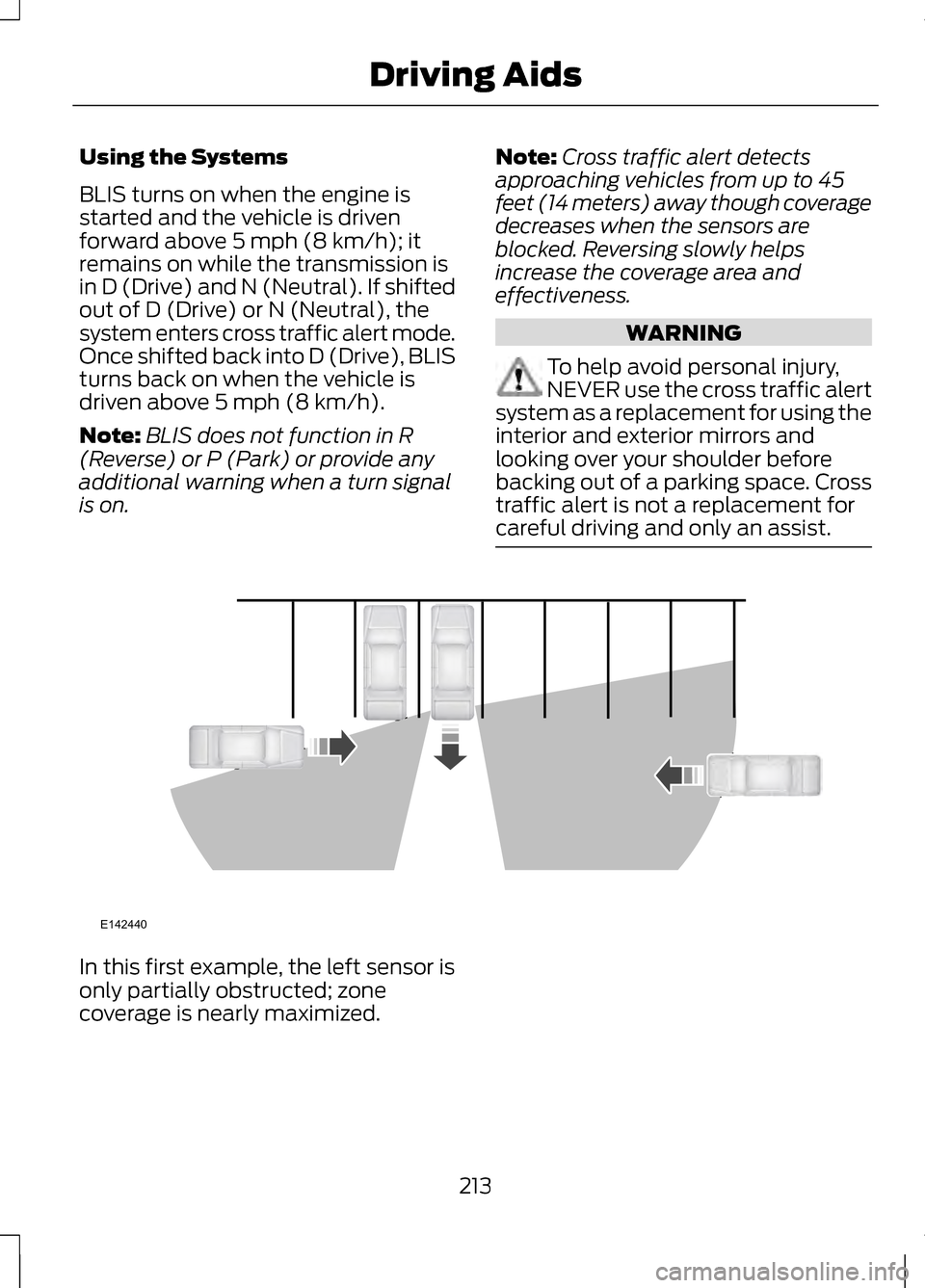
careful driving and only an assist. In this first example, the left sensor is
only partially obstructed; zone
coverage is nearly maximized.
213
Driving AidsE142440
Page 217 of 474
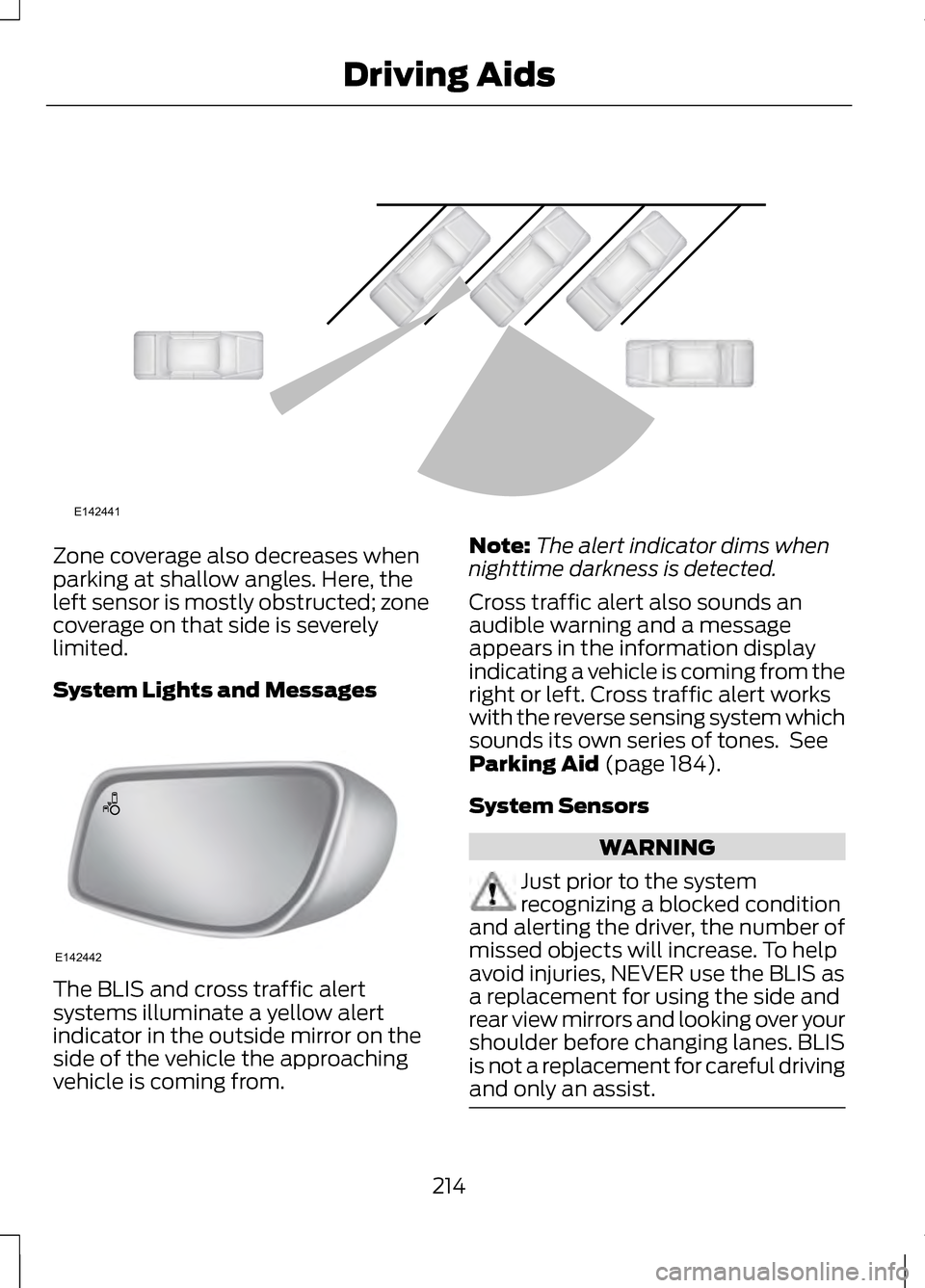
Zone coverage also decreases when
parking at shallow angles. Here, the
left sensor is mostly obstructed; zone
coverage on that side is severely
limited.
System Lights and Messages
The BLIS and cross traffic alert
systems illuminate a yellow alert
indicator in the outside mirror on the
side of the vehicle the approaching
vehicle is coming from. Note:
The alert indicator dims when
nighttime darkness is detected.
Cross traffic alert also sounds an
audible warning and a message
appears in the information display
indicating a vehicle is coming from the
right or left. Cross traffic alert works
with the reverse sensing system which
sounds its own series of tones. See
Parking Aid (page 184).
System Sensors WARNING
Just prior to the system
recognizing a blocked condition
and alerting the driver, the number of
missed objects will increase. To help
avoid injuries, NEVER use the BLIS as
a replacement for using the side and
rear view mirrors and looking over your
shoulder before changing lanes. BLIS
is not a replacement for careful driving
and only an assist. 214
Driving AidsE142441 E142442
Page 218 of 474
Note:
It is possible to get a blockage
warning with no blockage present; this
is rare and known as a false blockage
warning. A false blocked condition
either self-corrects or clears after a key
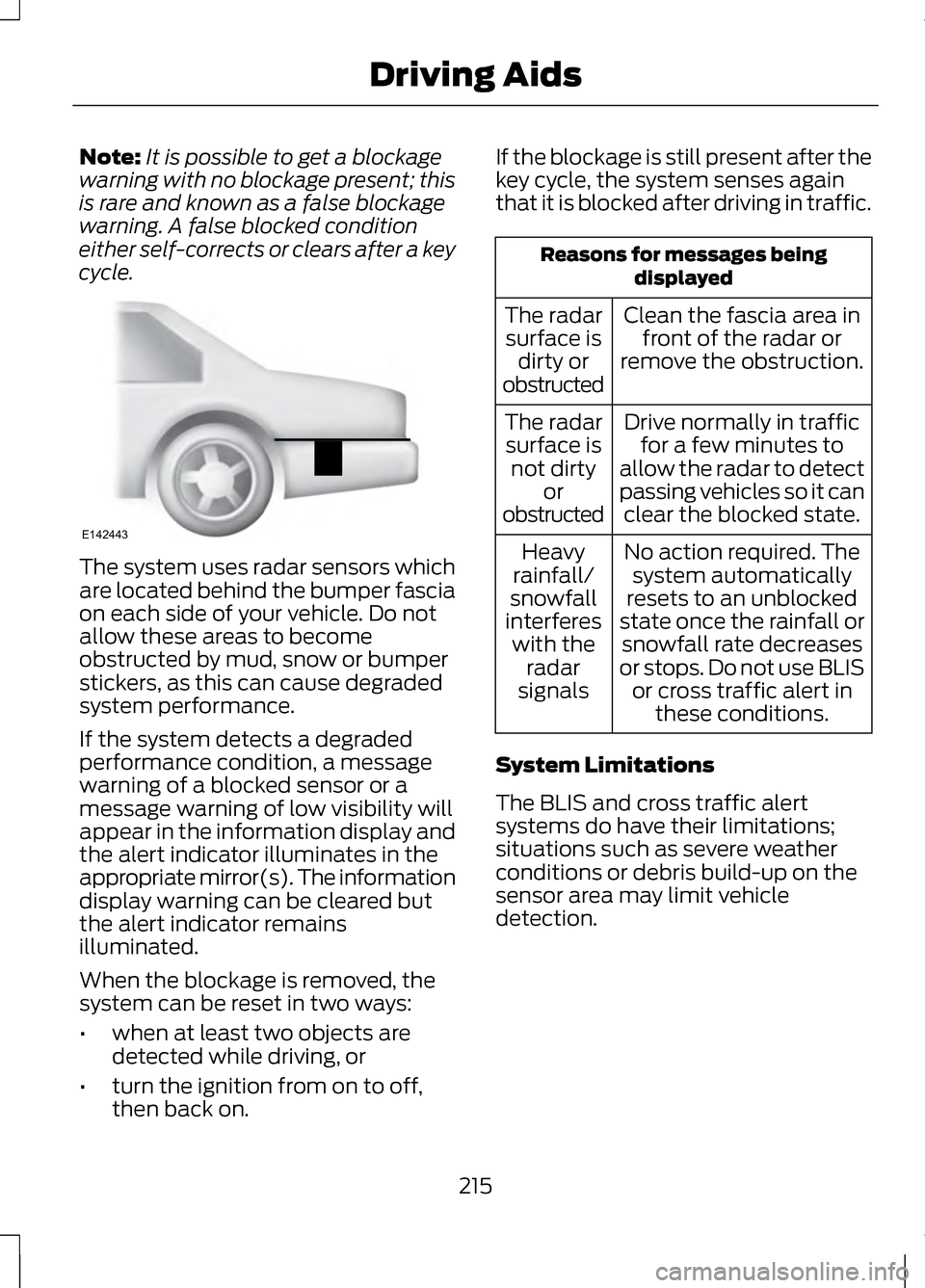
cycle. The system uses radar sensors which
are located behind the bumper fascia
on each side of your vehicle. Do not
allow these areas to become
obstructed by mud, snow or bumper
stickers, as this can cause degraded
system performance.
If the system detects a degraded
performance condition, a message
warning of a blocked sensor or a
message warning of low visibility will
appear in the information display and
the alert indicator illuminates in the
appropriate mirror(s). The information
display warning can be cleared but
the alert indicator remains
illuminated.
When the blockage is removed, the
system can be reset in two ways:
•
when at least two objects are
detected while driving, or
• turn the ignition from on to off,
then back on. If the blockage is still present after the
key cycle, the system senses again
that it is blocked after driving in traffic. Reasons for messages being
displayed
Clean the fascia area in front of the radar or
remove the obstruction.
The radar
surface is dirty or
obstructed
Drive normally in trafficfor a few minutes to
allow the radar to detect
passing vehicles so it can clear the blocked state.
The radar
surface is not dirty or
obstructed
No action required. Thesystem automatically
resets to an unblocked
state once the rainfall or snowfall rate decreases
or stops. Do not use BLIS or cross traffic alert in these conditions.
Heavy
rainfall/
snowfall
interferes with the radar
signals
System Limitations
The BLIS and cross traffic alert
systems do have their limitations;
situations such as severe weather
conditions or debris build-up on the
sensor area may limit vehicle
detection.
215
Driving AidsE142443
Page 263 of 474
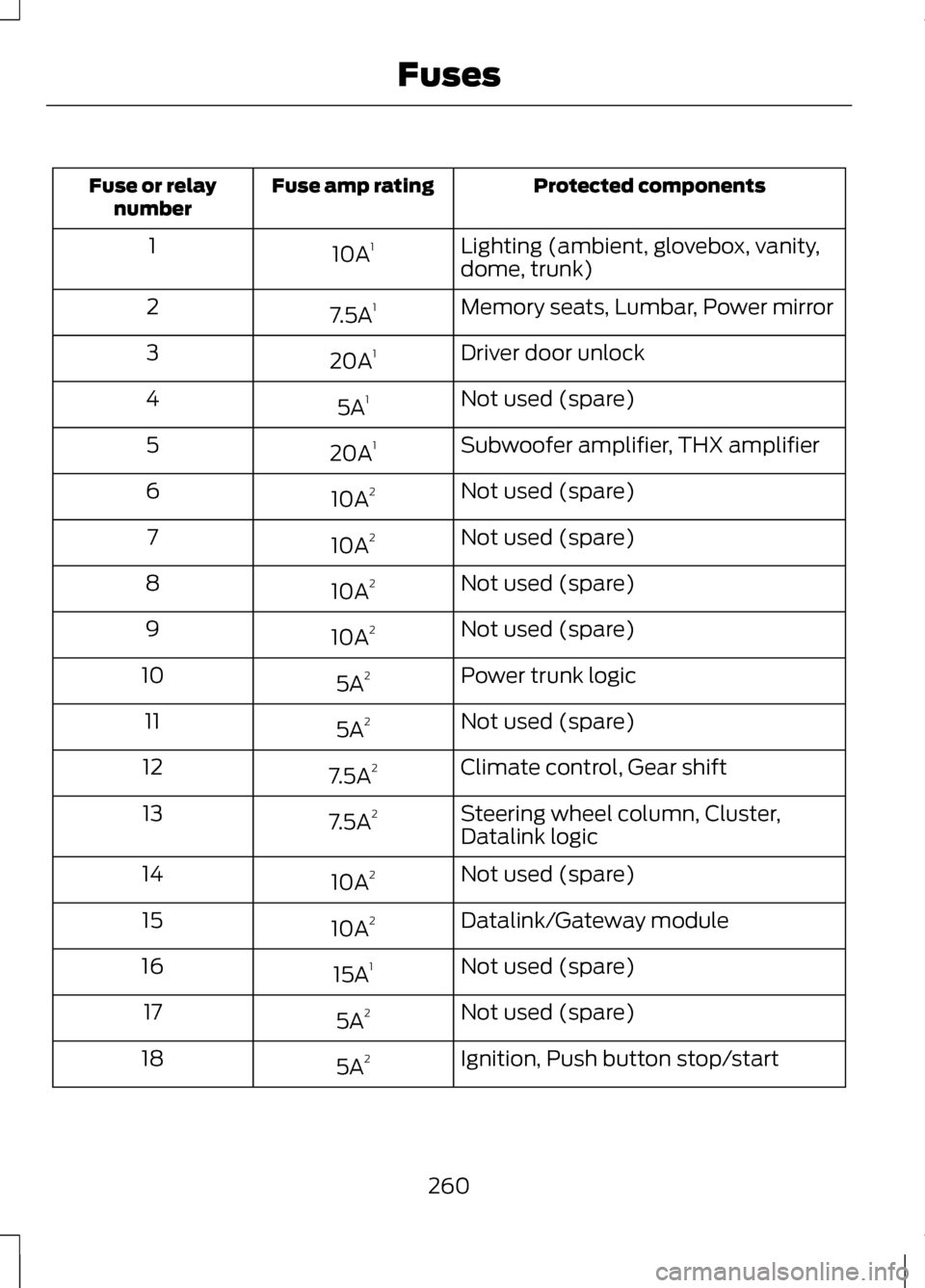
Protected components
Fuse amp rating
Fuse or relay
number
Lighting (ambient, glovebox, vanity,
dome, trunk)
10A
1
1
Memory seats, Lumbar, Power mirror
7.5A 1
2
Driver door unlock
20A 1
3
Not used (spare)
5A 1
4
Subwoofer amplifier, THX amplifier
20A 1
5
Not used (spare)
10A 2
6
Not used (spare)
10A 2
7
Not used (spare)
10A 2
8
Not used (spare)
10A 2
9
Power trunk logic
5A 2
10
Not used (spare)
5A 2
11
Climate control, Gear shift
7.5A 2
12
Steering wheel column, Cluster,
Datalink logic
7.5A
2
13
Not used (spare)
10A 2
14
Datalink/Gateway module
10A 2
15
Not used (spare)
15A 1
16
Not used (spare)
5A 2
17
Ignition, Push button stop/start
5A 2
18
260
Fuses
Page 264 of 474
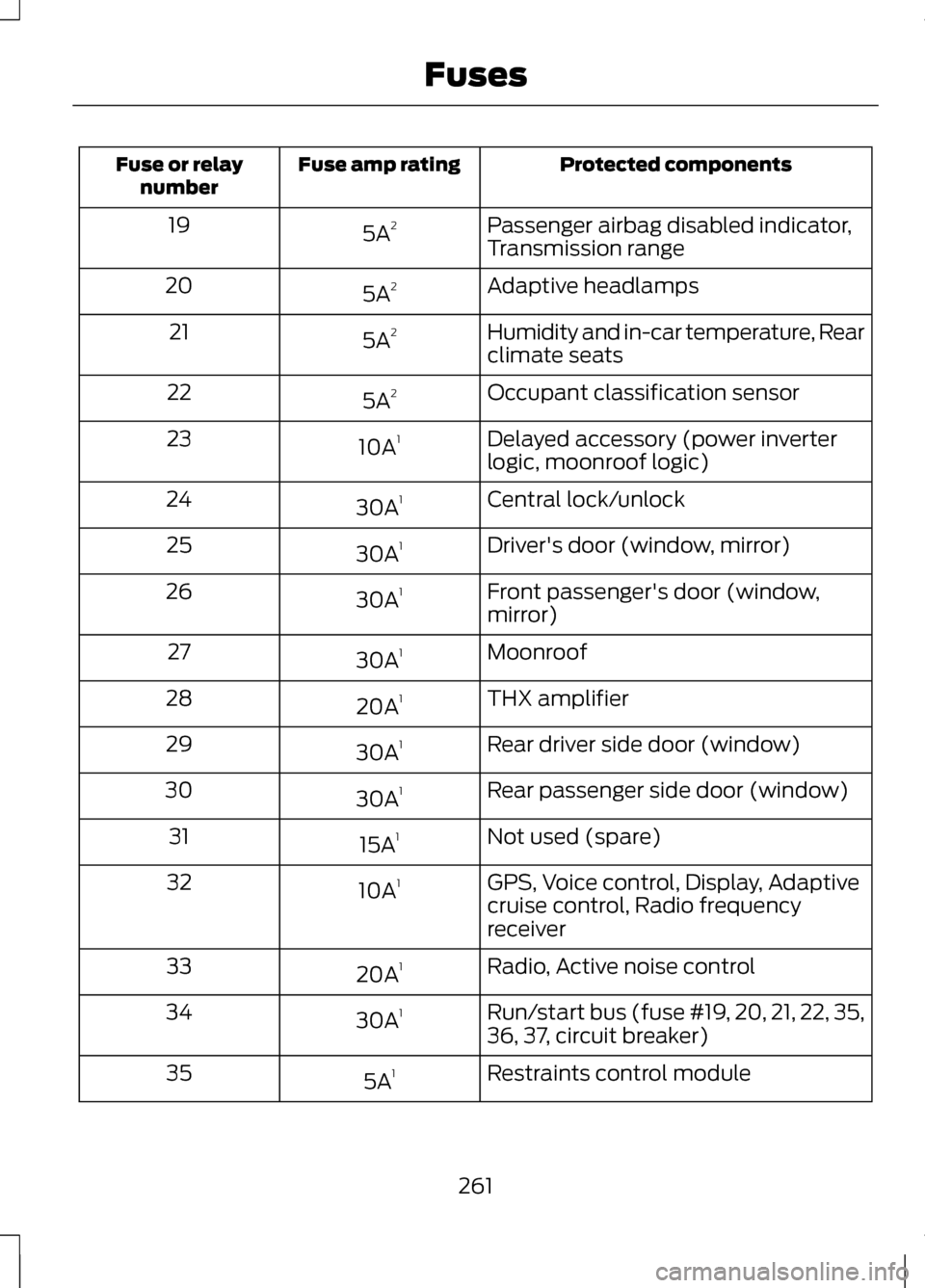
Protected components
Fuse amp rating
Fuse or relay
number
Passenger airbag disabled indicator,
Transmission range
5A
2
19
Adaptive headlamps
5A 2
20
Humidity and in-car temperature, Rear
climate seats
5A
2
21
Occupant classification sensor
5A 2
22
Delayed accessory (power inverter
logic, moonroof logic)
10A
1
23
Central lock/unlock
30A 1
24
Driver's door (window, mirror)
30A 1
25
Front passenger's door (window,
mirror)
30A
1
26
Moonroof
30A 1
27
THX amplifier
20A 1
28
Rear driver side door (window)
30A 1
29
Rear passenger side door (window)
30A 1
30
Not used (spare)
15A 1
31
GPS, Voice control, Display, Adaptive
cruise control, Radio frequency
receiver
10A
1
32
Radio, Active noise control
20A 1
33
Run/start bus (fuse #19, 20, 21, 22, 35,
36, 37, circuit breaker)
30A
1
34
Restraints control module
5A 1
35
261
Fuses
Page 265 of 474
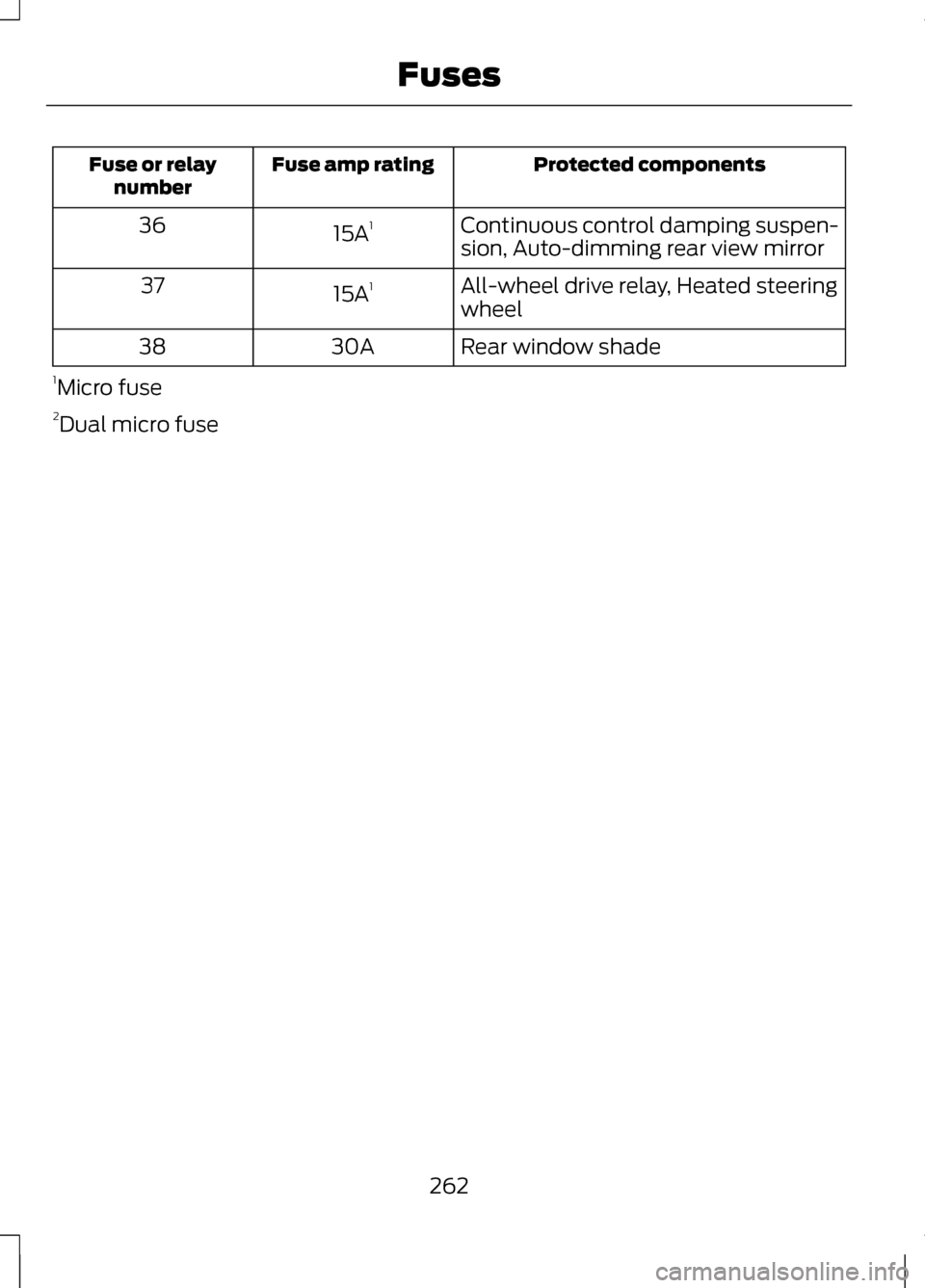
Protected components
Fuse amp rating
Fuse or relay
number
Continuous control damping suspen-
sion, Auto-dimming rear view mirror
15A
1
36
All-wheel drive relay, Heated steering
wheel
15A
1
37
Rear window shade
30A
38
1 Micro fuse
2 Dual micro fuse
262
Fuses
Page 288 of 474
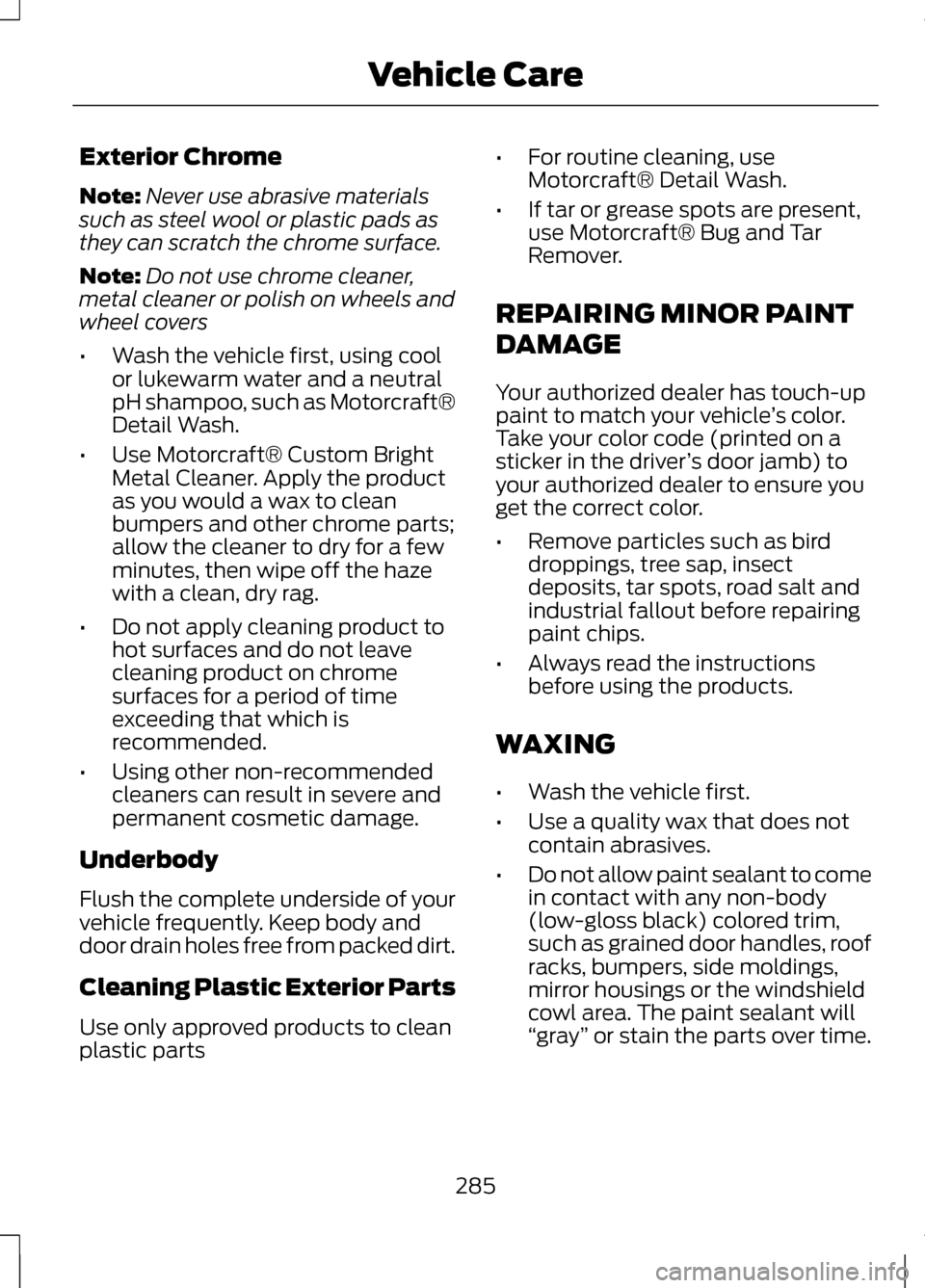
Exterior Chrome
Note:
Never use abrasive materials
such as steel wool or plastic pads as
they can scratch the chrome surface.
Note: Do not use chrome cleaner,
metal cleaner or polish on wheels and
wheel covers
• Wash the vehicle first, using cool
or lukewarm water and a neutral
pH shampoo, such as Motorcraft®
Detail Wash.
• Use Motorcraft® Custom Bright
Metal Cleaner. Apply the product
as you would a wax to clean
bumpers and other chrome parts;
allow the cleaner to dry for a few
minutes, then wipe off the haze
with a clean, dry rag.
• Do not apply cleaning product to
hot surfaces and do not leave
cleaning product on chrome
surfaces for a period of time
exceeding that which is
recommended.
• Using other non-recommended
cleaners can result in severe and
permanent cosmetic damage.
Underbody
Flush the complete underside of your
vehicle frequently. Keep body and
door drain holes free from packed dirt.
Cleaning Plastic Exterior Parts
Use only approved products to clean
plastic parts •
For routine cleaning, use
Motorcraft® Detail Wash.
• If tar or grease spots are present,
use Motorcraft® Bug and Tar
Remover.
REPAIRING MINOR PAINT
DAMAGE
Your authorized dealer has touch-up
paint to match your vehicle ’s color.
Take your color code (printed on a
sticker in the driver ’s door jamb) to
your authorized dealer to ensure you
get the correct color.
• Remove particles such as bird
droppings, tree sap, insect
deposits, tar spots, road salt and
industrial fallout before repairing
paint chips.
• Always read the instructions
before using the products.
WAXING
• Wash the vehicle first.
• Use a quality wax that does not
contain abrasives.
• Do not allow paint sealant to come
in contact with any non-body
(low-gloss black) colored trim,
such as grained door handles, roof
racks, bumpers, side moldings,
mirror housings or the windshield
cowl area. The paint sealant will
“gray ” or stain the parts over time.
285
Vehicle Care
Page 407 of 474
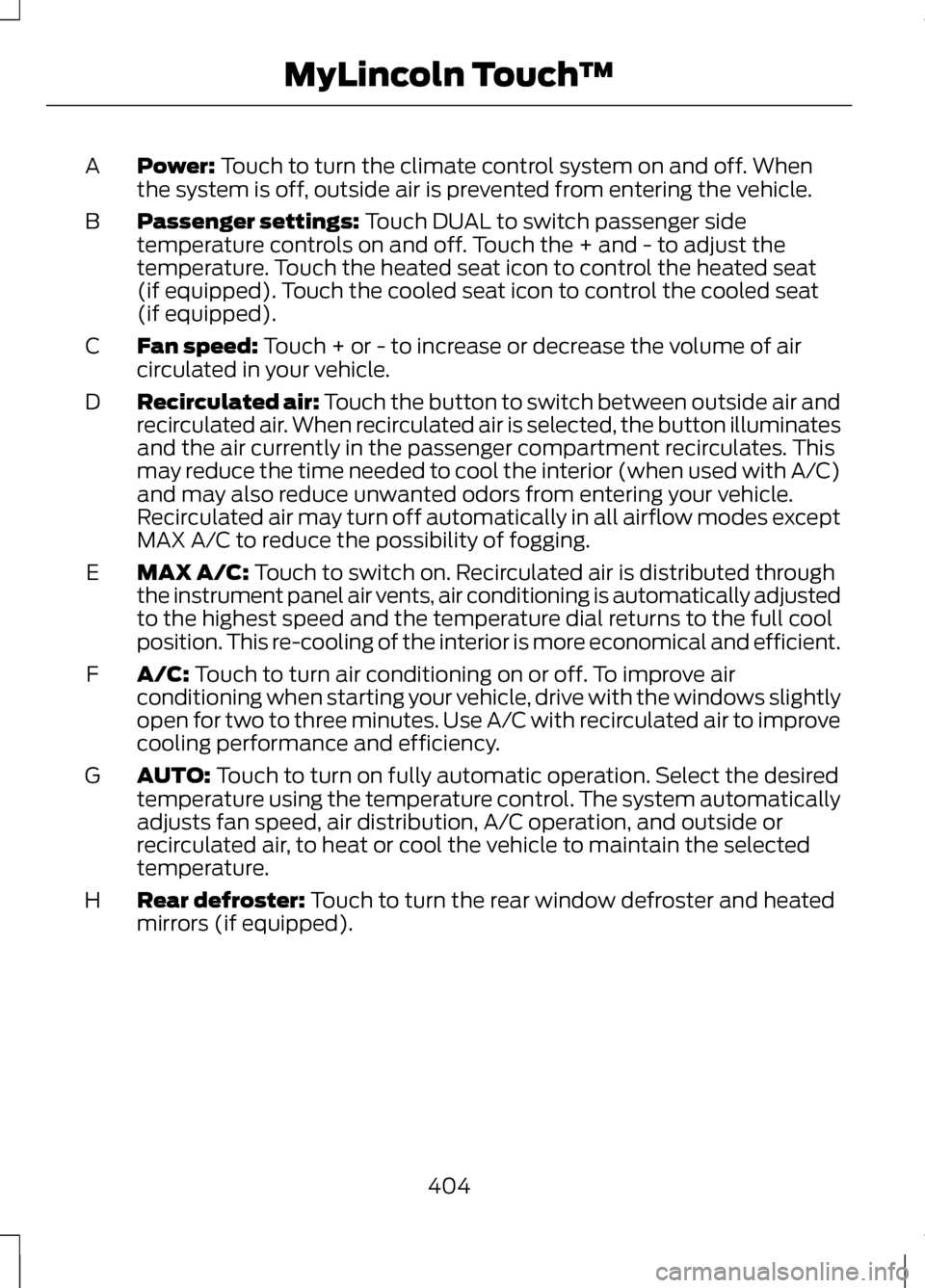
Power: Touch to turn the climate control system on and off. When
the system is off, outside air is prevented from entering the vehicle.
A
Passenger settings:
Touch DUAL to switch passenger side
temperature controls on and off. Touch the + and - to adjust the
temperature. Touch the heated seat icon to control the heated seat
(if equipped). Touch the cooled seat icon to control the cooled seat
(if equipped).
B
Fan speed:
Touch + or - to increase or decrease the volume of air
circulated in your vehicle.
C
Recirculated air: Touch the button to switch between outside air and
recirculated air. When recirculated air is selected, the button illuminates
and the air currently in the passenger compartment recirculates. This
may reduce the time needed to cool the interior (when used with A/C)
and may also reduce unwanted odors from entering your vehicle.
Recirculated air may turn off automatically in all airflow modes except
MAX A/C to reduce the possibility of fogging.
D
MAX A/C:
Touch to switch on. Recirculated air is distributed through
the instrument panel air vents, air conditioning is automatically adjusted
to the highest speed and the temperature dial returns to the full cool
position. This re-cooling of the interior is more economical and efficient.
E
A/C:
Touch to turn air conditioning on or off. To improve air
conditioning when starting your vehicle, drive with the windows slightly
open for two to three minutes. Use A/C with recirculated air to improve
cooling performance and efficiency.
F
AUTO:
Touch to turn on fully automatic operation. Select the desired
temperature using the temperature control. The system automatically
adjusts fan speed, air distribution, A/C operation, and outside or
recirculated air, to heat or cool the vehicle to maintain the selected
temperature.
G
Rear defroster:
Touch to turn the rear window defroster and heated
mirrors (if equipped).
H
404
MyLincoln Touch
™
Page 465 of 474
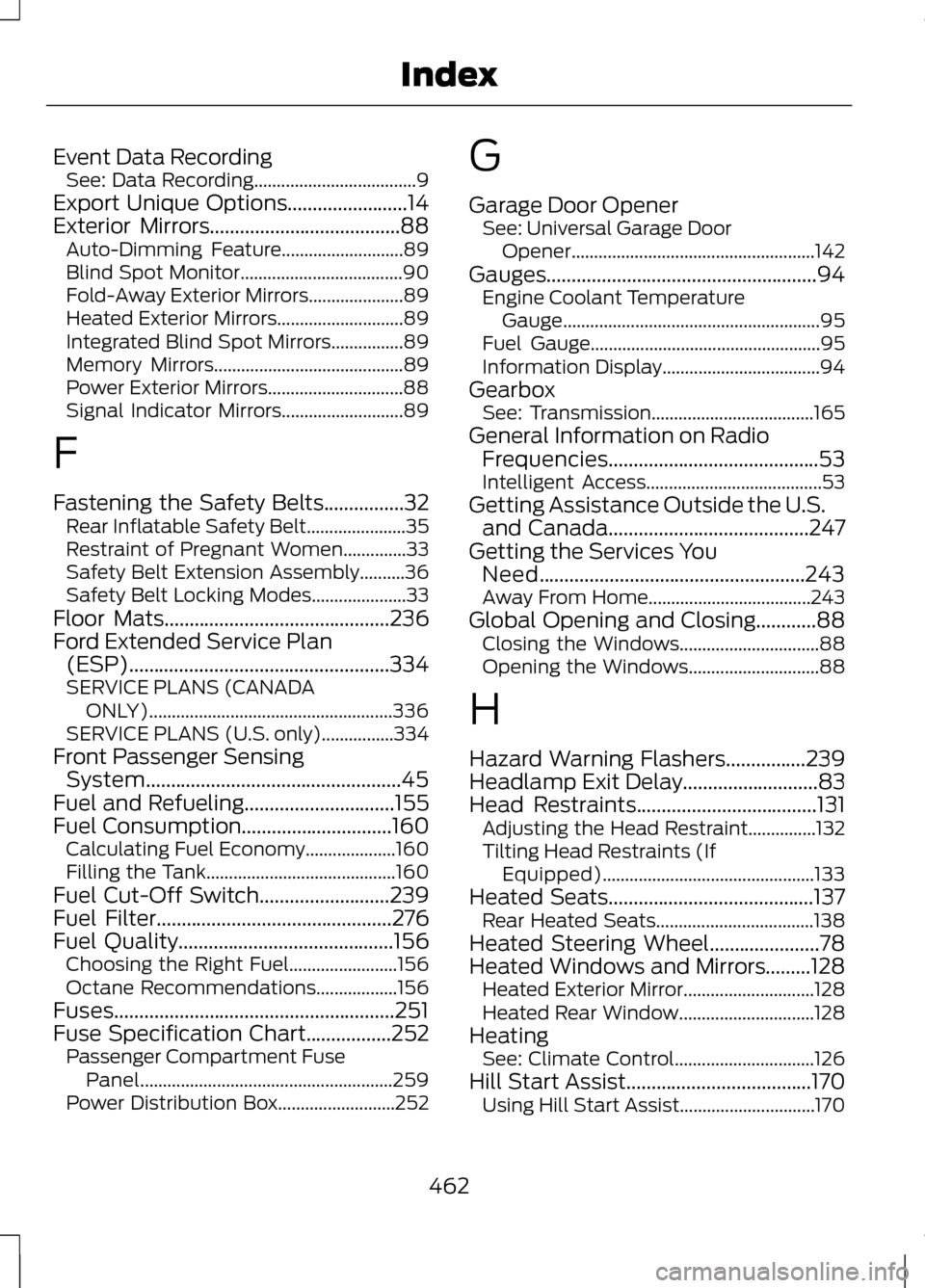
Event Data Recording
See: Data Recording....................................9
Export Unique Options........................14
Exterior Mirrors......................................88 Auto-Dimming Feature...........................89
Blind Spot Monitor....................................90
Fold-Away Exterior Mirrors.....................89
Heated Exterior Mirrors............................89
Integrated Blind Spot Mirrors................89
Memory Mirrors.......................................... 89
Power Exterior Mirrors..............................88
Signal Indicator Mirrors...........................89
F
Fastening the Safety Belts................32 Rear Inflatable Safety Belt......................35
Restraint of Pregnant Women..............33
Safety Belt Extension Assembly..........36
Safety Belt Locking Modes.....................33
Floor Mats.............................................236
Ford Extended Service Plan (ESP)....................................................334
SERVICE PLANS (CANADA
ONLY)...................................................... 336
SERVICE PLANS (U.S. only)................334
Front Passenger Sensing System...................................................45
Fuel and Refueling..............................155
Fuel Consumption
..............................160
Calculating Fuel Economy....................160
Filling the Tank.......................................... 160
Fuel Cut-Off Switch
..........................239
Fuel Filter...............................................276
Fuel Quality...........................................156
Choosing the Right Fuel........................156
Octane Recommendations..................156
Fuses........................................................251
Fuse Specification Chart
.................252
Passenger Compartment Fuse
Panel........................................................ 259
Power Distribution Box..........................252 G
Garage Door Opener
See: Universal Garage Door
Opener...................................................... 142
Gauges......................................................94 Engine Coolant Temperature
Gauge......................................................... 95
Fuel Gauge................................................... 95
Information Display...................................94
Gearbox See: Transmission....................................165
General Information on Radio Frequencies..........................................53
Intelligent Access.......................................53
Getting Assistance Outside the U.S. and Canada
........................................247
Getting the Services You Need
.....................................................243
Away From Home....................................243
Global Opening and Closing............88 Closing the Windows...............................88
Opening the Windows.............................88
H
Hazard Warning Flashers
................239
Headlamp Exit Delay...........................83
Head Restraints
....................................131
Adjusting the Head Restraint...............132
Tilting Head Restraints (If
Equipped)............................................... 133
Heated Seats.........................................137 Rear Heated Seats...................................138
Heated Steering Wheel......................78
Heated Windows and Mirrors.........128 Heated Exterior Mirror.............................128
Heated Rear Window..............................128
Heating See: Climate Control...............................126
Hill Start Assist.....................................170 Using Hill Start Assist..............................170
462
Index
Page 467 of 474
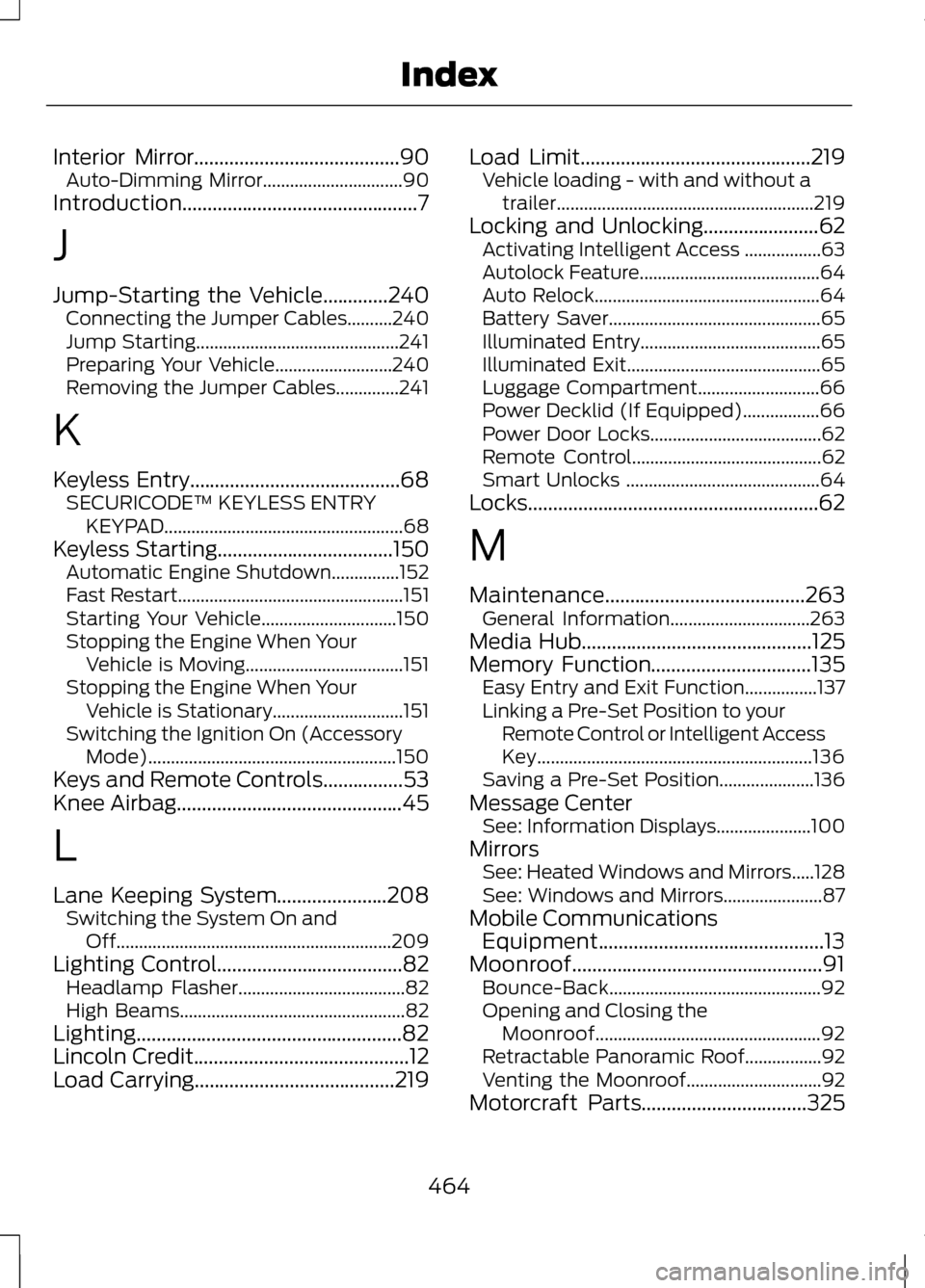
Interior Mirror.........................................90
Auto-Dimming Mirror...............................90
Introduction...............................................7
J
Jump-Starting the Vehicle
.............240
Connecting the Jumper Cables..........240
Jump Starting............................................. 241
Preparing Your Vehicle..........................240
Removing the Jumper Cables..............241
K
Keyless Entry..........................................68 SECURICODE™ KEYLESS ENTRY
KEYPAD..................................................... 68
Keyless Starting...................................150 Automatic Engine Shutdown...............152
Fast Restart.................................................. 151
Starting Your Vehicle..............................150
Stopping the Engine When Your Vehicle is Moving...................................151
Stopping the Engine When Your Vehicle is Stationary.............................151
Switching the Ignition On (Accessory Mode)....................................................... 150
Keys and Remote Controls................53
Knee Airbag
.............................................45
L
Lane Keeping System......................208 Switching the System On and
Off............................................................. 209
Lighting Control
.....................................82
Headlamp Flasher.....................................82
High Beams.................................................. 82
Lighting.....................................................82
Lincoln Credit
...........................................12
Load Carrying........................................219 Load Limit
..............................................219
Vehicle loading - with and without a
trailer......................................................... 219
Locking and Unlocking.......................62 Activating Intelligent Access .................63
Autolock Feature........................................64
Auto Relock.................................................. 64
Battery Saver............................................... 65
Illuminated Entry........................................65
Illuminated Exit........................................... 65
Luggage Compartment...........................66
Power Decklid (If Equipped).................66
Power Door Locks......................................62
Remote Control.......................................... 62
Smart Unlocks ........................................... 64
Locks..........................................................62
M
Maintenance........................................263 General Information...............................263
Media Hub
..............................................125
Memory Function................................135 Easy Entry and Exit Function................137
Linking a Pre-Set Position to your
Remote Control or Intelligent Access
Key............................................................. 136
Saving a Pre-Set Position.....................136
Message Center See: Information Displays.....................100
Mirrors See: Heated Windows and Mirrors.....128
See: Windows and Mirrors......................87
Mobile Communications Equipment.............................................13
Moonroof..................................................91 Bounce-Back............................................... 92
Opening and Closing the Moonroof.................................................. 92
Retractable Panoramic Roof.................92
Venting the Moonroof..............................92
Motorcraft Parts.................................325
464
Index